

 Published on: December 29, 2025
Disclosure:
This post contains affiliate links. If you click through and make a purchase, we may earn a small commission at no additional cost to you. Thank you for supporting AIDigitalSpace — we only recommend tools and services we genuinely trust and believe bring real value to our readers.
1. Safest AI Browser in 2025: What This Guide Helps You Decide
AI browsers are not just faster browsers — they think, read, and sometimes act on your behalf. That’s powerful, but it also raises a simple question many people are asking right now:
Which is the safest AI browser to actually use in daily life?
In 2025, tools like Atlas, Comet, and Opera Neon promise smarter browsing, built-in AI assistants, and automated actions. What’s often unclear is what happens to your data while they do that.
This guide is built for people who want:
Clear answers, not hype
Practical safety advice, not fear
A real comparison based on privacy, control, and daily use
We’ll help you understand:
What “safe” really means when a browser uses AI
How Atlas, Comet, and Opera Neon differ in data handling
Which AI browser fits your risk tolerance and workflow
How to use these tools without exposing sensitive data
Recent discussions from security researchers and browser vendors have shown that AI-powered browsing introduces new attack surfaces, especially when tools can read tabs, summarize content, or execute actions automatically — a topic also explored by organizations like the Electronic Frontier Foundation when discussing browser privacy risks.
At AIDigitalSpace, we don’t treat “safest AI browser” as a marketing label. We look at how much control you keep, what data is processed locally versus remotely, and how transparent each tool is. You’ll see that perspective reflected throughout this comparison — without overcomplicating things.
If you’re using an AI browser for work, research, or everyday browsing, this guide helps you make a confident decision today, not “someday.”
Recommended Read
If you’re choosing the safest AI browser and want to truly understand what happens to your data when technology becomes more intelligent, “On Privacy and Technology” by Daniel J. Solove is a highly relevant read. It explains — in plain language — how modern digital tools collect, process, and influence personal information, giving you the right mindset to evaluate AI browsers beyond features and speed.
2. Are AI Browsers Safe? Real Privacy Risks You Should Know
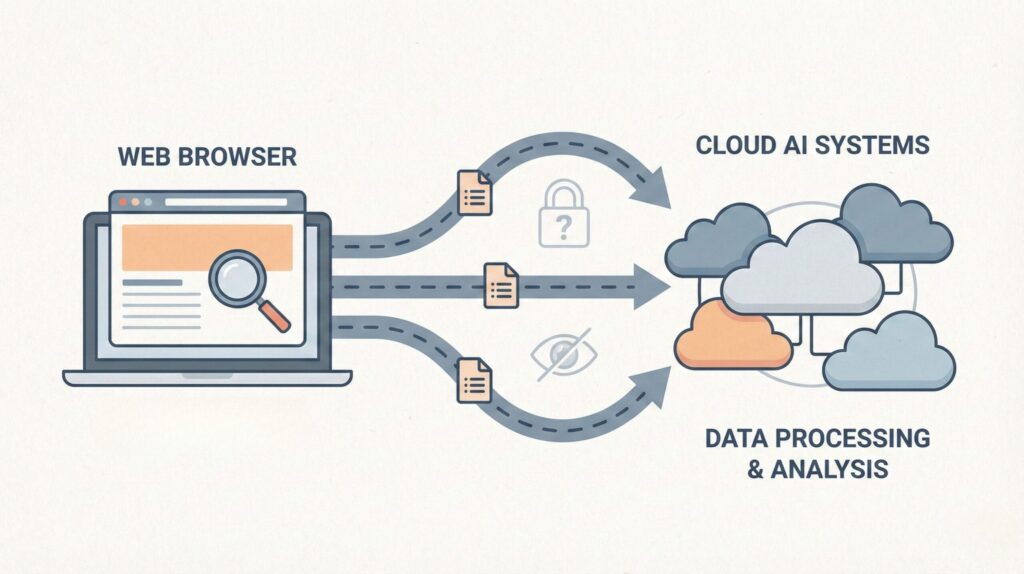
Before comparing Atlas, Comet, and Opera Neon, we need to answer a question people are actively searching for:
Are AI browsers actually safe to use?
The short answer is: they can be — but only if you understand the risks.
AI browsers introduce capabilities that traditional browsers never had, and with them, new privacy trade-offs.
What Makes AI Browsers Riskier Than Normal Browsers
AI browsers don’t just load pages. Many of them can:
Read and summarize open tabs
Analyze forms, emails, and documents
Act on your behalf (search, reply, book, extract data)
This means more data visibility by design.
Security researchers have already warned that browser-level AI agents increase exposure to:
Prompt-injection attacks
Accidental data leakage across tabs
Over-permissioned AI assistants
Organizations like the Electronic Frontier Foundation have repeatedly highlighted that browser tools with deep page access require much stronger transparency and user control than classic extensions.
The 4 Most Common Privacy Risks People Overlook
Here’s what users usually don’t realize when enabling AI features:
| Risk | Why It Matters | Real Impact |
|---|---|---|
| Cross-tab data access | AI may “see” more than one page at a time | Sensitive info mixed unintentionally |
| Cloud processing | Content sent to external servers | Data retention outside your control |
| Action automation | AI can click, submit, or respond | Mistakes happen faster |
| Opaque permissions | Hard to see what AI can access | False sense of safety |
Local AI vs Cloud AI: The Key Safety Difference
One of the biggest safety factors is where the AI runs:
Local or on-device processing
→ More private, less data exposure, limited capabilityCloud-based AI processing
→ More powerful, but data leaves your device
Privacy regulators in the EU have repeatedly emphasized that data minimization and purpose limitation are critical when AI tools process personal information — a principle also reinforced by GDPR enforcement actions discussed by European data protection authorities.
This is why “AI browser safety” isn’t about branding — it’s about architecture.
At AIDigitalSpace, we consider this the most important factor: how much data must leave your device for the AI to work.
What “Safe” Actually Means for an AI Browser
A truly safer AI browser should offer:
Clear visibility into what data the AI can access
Manual confirmation before actions are executed
The ability to disable or limit AI scope
Transparent documentation on data handling
If a browser doesn’t clearly explain these points, that’s already a warning sign — regardless of how impressive the demo looks.
3. Atlas vs Comet vs Opera Neon: Privacy & Data Handling Compared
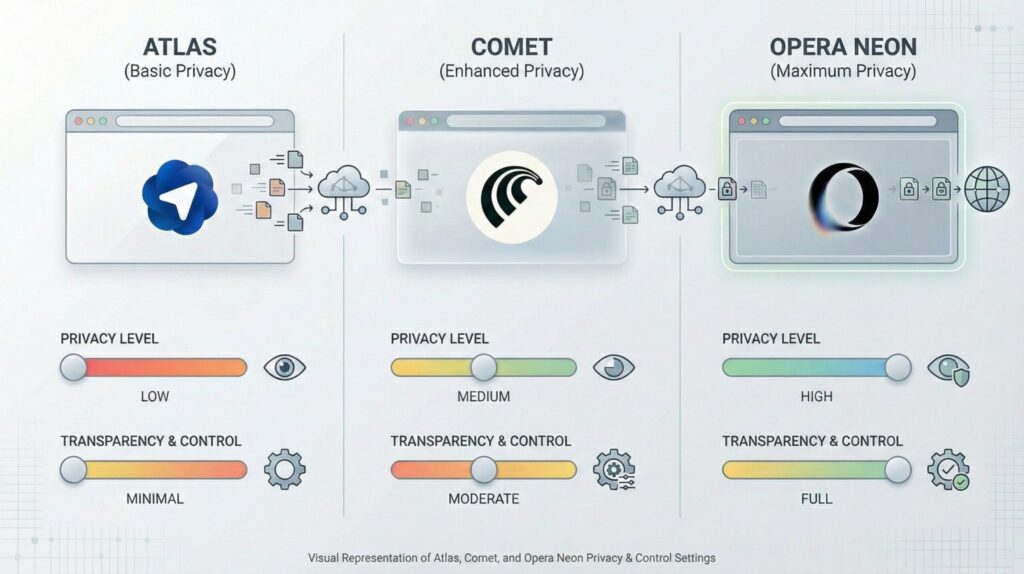
Now that we’ve covered the risks, let’s look at how each AI browser actually handles your data.
This is where marketing claims fade and architecture matters.
Below is a practical, privacy-first comparison focused on what people care about most: visibility, control, and where data goes.
| Feature | Atlas | Comet | Opera Neon |
|---|---|---|---|
| AI processing location | Primarily cloud-based | Cloud-first with search focus | Hybrid (local + cloud) |
| Tab & page visibility | Broad access for agent tasks | Scoped to active context | User-triggered access |
| Action automation | Advanced (agent-style) | Limited, research-oriented | Optional, confirmation-based |
| User control & toggles | Moderate | High for search tasks | High and visible |
| Transparency on data use | Improving, still evolving | Clear for queries & sources | Clear and documented |
Atlas: Powerful, But Requires Trust
Atlas is designed around AI agents that can act for you.
That’s useful — and also where the risk increases.
Strong automation means broader page access
More cloud processing means data leaves your device
Best suited for users who want speed and are comfortable managing permissions
At AIDigitalSpace, we see Atlas as the most capable — but also the one that requires the most awareness and discipline.
Comet: Search-Centric and More Contained
Comet’s AI focuses on answering questions and researching, not acting across your browser.
Narrower scope reduces accidental exposure
Data use is more predictable
Fewer automation features = fewer surprises
If your main use case is research and fact-finding, Comet feels simpler and safer by default.
Opera Neon: Control-First Design
Opera Neon takes a more conservative route:
Clear prompts before AI actions
Hybrid processing where possible
Familiar browser-style permission controls
This makes it appealing to users who want AI help without handing over full control.
From a privacy perspective, Neon currently offers the clearest balance between assistance and restraint.
What This Comparison Tells Us
There’s no universally “perfect” option — but there is a safest AI browser for your use case.
More automation = more risk
More transparency = more trust
More control = fewer mistakes
In the next section, we’ll move from theory to practice and show how to use an AI browser safely, regardless of which one you choose.
4. How to Use an AI Browser Safely Step by Step
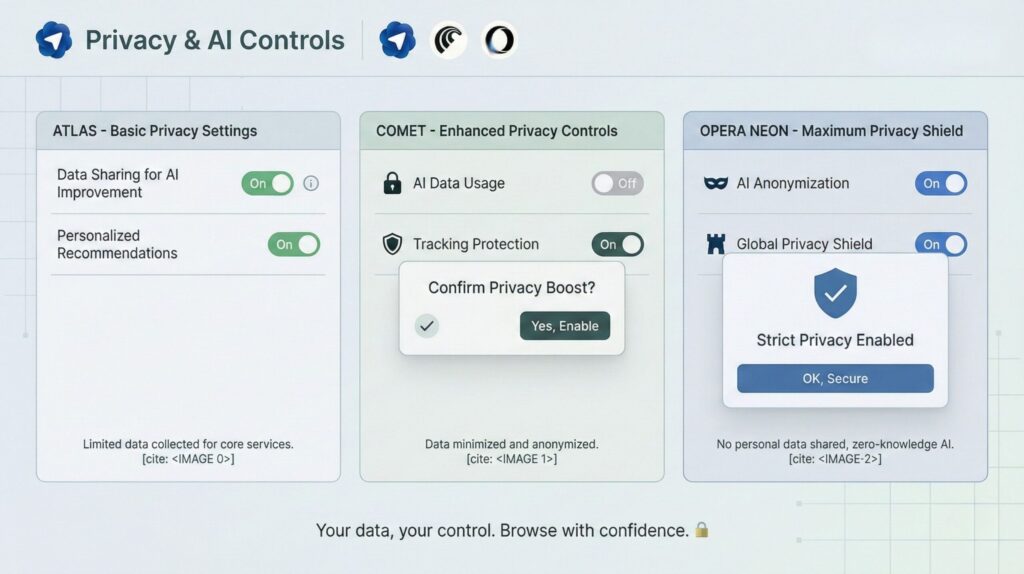
Using an AI browser safely isn’t about avoiding features — it’s about using them with intention. Most privacy problems happen because users leave defaults unchanged or trust automation too early.
Below is a practical setup flow you can apply to Atlas, Comet, or Opera Neon.
Step 1: Limit What the AI Can See
Before using any AI feature:
Disable global “read all tabs” access
Allow AI access only to the active tab
Avoid granting access to logged-in dashboards (email, banking, admin panels)
Security researchers have shown that broad tab visibility increases the risk of prompt-injection attacks, where malicious pages manipulate AI behavior — a risk discussed in multiple browser security analyses by academic and independent researchers.
Rule of thumb: if the AI doesn’t need it, don’t let it see it.
Step 2: Separate Work, AI, and Personal Browsing
One simple habit reduces risk dramatically:
Use one profile or window for AI-assisted browsing
Use another for personal accounts and sensitive logins
This mirrors guidance often recommended by privacy-focused browser communities and reduces accidental data crossover.
At AIDigitalSpace, we treat this as a baseline safety practice, not an advanced trick.
Step 3: Disable Auto-Actions Until You Trust the Tool
Many AI browsers offer:
Auto-clicking
Auto-filling
Auto-submitting forms
These should be off by default.
Turn them on only when:
You understand the scope of the action
The browser asks for confirmation
The task is low-risk (research, summaries, drafts)
Automation saves time — but mistakes happen faster when humans are removed from the loop.
Step 4: Check Where Your Data Is Processed
Always look for:
“Processed locally” vs “processed in the cloud”
Whether conversations or page content are stored
Options to disable training on your data
European data protection authorities consistently stress data minimization as a core safety principle: the less data processed, the lower the risk.
If a browser is unclear here, that’s not neutral — it’s a signal.
Quick Safety Checklist (Use This Every Time)
| Check | Why It Matters |
|---|---|
| AI access limited to active tab | Prevents accidental data exposure |
| Automation disabled by default | Keeps you in control |
| Separate browsing profiles | Avoids cross-account leakage |
| Clear data-processing policy | Reduces long-term privacy risk |
What This Means in Practice
You don’t need to avoid AI browsers to stay safe.
You just need to treat them like powerful assistants, not invisible helpers.
Used intentionally, an AI browser can save time without costing you control.
Used blindly, it can expose more than you expect.
Next, we’ll look at common AI browser mistakes that even experienced users make — and how to avoid them easily.
5. Common AI Browser Privacy Mistakes to Avoid
Most people don’t misuse AI browsers on purpose.
They fall into patterns that feel normal — until privacy quietly slips away.
Instead of listing mistakes, let’s look at the signals that something isn’t safe.
Signal 1: The AI “knows too much” too quickly
If the browser starts giving answers that clearly reference:
Other tabs you didn’t mention
Past sessions you forgot about
Content from logged-in accounts
…it means the AI has broader visibility than you expect.
What to do instead:
Limit AI access to the active tab only and disable cross-tab awareness. If that option isn’t clearly visible, treat the feature as high risk.
Signal 2: Automation feels convenient — until it isn’t
AI browsers are increasingly good at:
Clicking through flows
Filling forms
Executing multi-step actions
The problem is not errors.
The problem is speed without context.
What to do instead:
Use AI for drafting and analysis, not execution. Keep manual confirmation enabled for anything that sends, submits, or changes data.
Signal 3: You stop thinking about where your data goes
This is the most common issue.
People ask:
“Just summarize this page”
“Just explain this document”
“Just help me reply”
And forget that “just” often means cloud processing.
What to do instead:
Before using an AI feature, ask one question:
Does this content need to leave my device?
If the answer isn’t clear, don’t proceed.
Signal 4: You mix AI browsing with sensitive life tasks
AI browsers are often open when users:
Check finances
Access admin panels
Review contracts
Manage client data
Not because it’s smart — but because it’s already open.
What to do instead:
Separate tools by intent. AI browsers are excellent for research and drafting. Sensitive operations deserve a clean, non-AI session.
A Simple Self-Check (30 Seconds)
| If this feels true… | You should probably… |
|---|---|
| AI responses feel too contextual | Reduce tab and history access |
| AI acts faster than you expect | Disable automation features |
| You forgot what permissions you gave | Review settings immediately |
| AI is open during sensitive tasks | Switch to a non-AI browser |
The Bigger Picture
AI browsers don’t fail loudly.
They fail quietly, through convenience.
At AIDigitalSpace, we see the safest users not as the most technical ones — but the ones who pause before automating.
6. Ethical AI Reflection: Convenience vs Control in AI Browsing
AI browsers aren’t just tools—they’re a shift in how we interact with the web. With powerful AI assisting every step of the way, the question becomes: how much control are we willing to give up for convenience?
The Ethical Dilemma
When an AI browser reads your data, interprets your intent, and acts on your behalf, it’s easy to forget who’s really in control. At its core, AI-assisted browsing challenges our traditional notions of privacy and consent.
The real ethical issue isn’t just about protecting personal data; it’s about how much we are willing to let AI make decisions for us. Automation feels great when it speeds things up, but we must remain aware of when we’re handing over control without thinking.
Where Should We Draw the Line?
Ethical AI design requires clear transparency. We should always know:
What the AI can access
When it’s acting on our behalf
How we can stop it or limit its capabilities
Without these controls, it’s easy to feel like we’re in the driver’s seat when, in reality, we’ve delegated too much. Privacy isn’t just about data security; it’s about autonomy and the ability to make informed choices about what happens to our information.
A Human-Centered Approach
The ethical use of AI browsers lies in balancing convenience with control. At AIDigitalSpace, we advocate for design that:
Prioritizes user consent
Offers visible choices at every turn
Gives users real-time control over what AI can do
While AI browsing can be incredibly efficient, it should never cross the line into invisibility. We want browsers that empower users, not browsers that do everything for them without full awareness.
For further reading on how privacy, transparency, and ethical oversight shape responsible AI use in real-world systems, check out this analysis from HumanMade on AI ethics and privacy challenges.
7. Final Verdict: Which Is the Safest AI Browser for You
Now that we’ve explored the privacy risks, tools, and ethical implications of AI browsers, it’s time to answer the big question:
Which AI browser is the safest to use?
The answer depends on what matters most to you.
Atlas: Best for Power Users Who Need Automation
If you’re comfortable with broad AI access and are prioritizing efficiency, Atlas is your go-to.
Pro: Fast, smart automation that can act for you.
Con: Requires the most user awareness to avoid accidental privacy risks.
Comet: Best for Research-Centric Users
Comet is ideal for those who mainly need research-focused AI without the risk of over-automation.
Pro: Clear data use and limited scope.
Con: Fewer features for users who need full AI-powered browsing.
Opera Neon: Best for Users Who Want Full Control
For those who want complete transparency and visible boundaries for their AI, Opera Neon stands out.
Pro: Highly customizable, with strong control over what AI can access.
Con: Less powerful in automation compared to Atlas.
The Right Choice for You
Ultimately, your decision should be based on your comfort level with AI access and how much control you want over the browser’s actions. Whether you value speed, simplicity, or control, there’s an AI browser for every need.
8. FAQ: AI Browser Privacy, Tracking & Safety Explained
Q: Are AI browsers safe to use for everyday browsing?
A: Yes, AI browsers can be safe if used intentionally. Limit AI access to the active tab, disable automation by default, and avoid using AI features during sensitive tasks like banking or admin work.
Q: Which is the safest AI browser for privacy-focused users?
A: For users who prioritize control and transparency, browsers that require manual confirmation for AI actions and clearly explain data handling tend to be the safest choice.
Q: Do AI browsers track everything I do online?
A: Not everything—but they may process page content you explicitly allow. The key is understanding permissions and whether data is processed locally or sent to the cloud.
Q: Is private or incognito mode enough to protect my data with AI browsers?
A: No. Private mode hides activity from your device, not necessarily from AI features. Always check whether AI tools are disabled or restricted in private sessions.
Q: Can I use AI browsers for work without risking confidential data?
A: Yes, but only if you separate AI-assisted browsing from sensitive workflows. Use dedicated profiles or windows and keep automation turned off for confidential tasks.
If you want to go deeper and build a safer, more intentional relationship with AI tools, these guides connect perfectly with what we’ve explored here:
→ Turn Off AI Features Everywhere (2025): WhatsApp, Instagram, Google, Windows, iPhone
→ How to Stop AI From Collecting Your Data — 2025 Privacy Guide
→ What’s the Safest Way to Use AI Tools Without Getting Tracked?