
 Published on: August 26, 2025
- 1. Introduction: Back to School 2025 with AI
- 2. Quick Picks: Best AI Tools for Students 2025
- 3. Deep Dive – The Core AI Tools Students Actually Use
- 4. Student Discounts & Free Perks in 2025
- 5. How to Stay Ethical with AI in School
- 6. Comparison Table: Free vs Paid Perks
- 7. FAQ – Quick Answers for Students
- 8. Conclusion: Smarter Schooling With AI
Disclosure:
Some links in this post are affiliate links. If you click and purchase, we may earn a small commission at no extra cost to you. Thank you for supporting AIDigitalSpace.com and helping us keep this content free and useful.
1. Introduction: Back to School 2025 with AI
Heading back to school in 2025 feels very different compared to just a few years ago. AI is no longer a niche topic—it’s something almost every student touches daily, whether for research, notes, or even creating a last-minute presentation. The challenge is that with so many new apps flooding the market, it’s hard to know which ones are actually worth using and which are just hype.
That’s why we decided to put together this updated list of the best AI tools for students—not the endless catalogs you’ll find elsewhere, but a clear selection of tools that genuinely help with studying, writing, math, and creativity. We’ve tried to balance what’s useful for high school and college students alike, focusing on apps that are either free, offer student discounts, or deliver more value than the usual “AI homework helper” trend.
From our perspective, AI should never replace learning—it should support it. The best students are the ones who use AI smartly, not to copy answers, but to organize ideas, clarify complex topics, and save time for deeper thinking. For example, tools like Notion AI or Grammarly don’t do the work for you, but they make the process smoother and less stressful. On the other hand, more specialized platforms such as Wolfram|Alpha (often underrated) can turn a confusing math problem into something you finally understand, step by step.
Education in 2025 is about balance. We believe that if you’re strategic in picking the best AI tools for students, you’ll not only study faster—you’ll also keep more energy for the things that matter outside the classroom.
2. Quick Picks: Best AI Tools for Students 2025
When school gets busy, the last thing you want is to waste hours testing random apps. That’s why we’ve narrowed it down to just a handful of the best AI tools for students—apps that are reliable, easy to use, and actually save you time. The key is knowing why they matter (not just what they do) and how to use them smartly.
Here’s a quick overview:
| Tool | What It Does | Why It’s Useful |
|---|---|---|
| NotebookLM (Google) | Summarizes PDFs, notes, and research sources | Perfect for quickly turning study material into clear explanations |
| Notion AI | Organizes notes, tasks, and group projects | Free for students with .edu emails, makes collaboration stress-free |
| Grammarly AI | Polishes essays and fixes grammar mistakes | Helps you sound professional and avoid citation errors |
| Canva Pro for Education | Creates slides, posters, and visuals | Makes your projects look professional with minimal effort |
| Wolfram|Alpha Pro | Solves math and STEM problems step by step | Turns tough equations into easy-to-follow solutions |
Pro tip: Don’t just collect tools—learn to integrate them into your routine. For example, use NotebookLM to condense your reading, then drop the key points into Notion AI for project planning. This way, you’re not juggling apps—you’re creating a simple, AI-powered study system.
3. Deep Dive – The Core AI Tools Students Actually Use
Not all apps are made equal. Some AI tools look exciting at first, but when it comes to everyday schoolwork, they add more noise than value. That’s why we’re focusing only on the best AI tools for students that have proven useful for note-taking, writing, projects, and problem-solving. Let’s break them down.
3.1 NotebookLM (Google) – Your research assistant
NotebookLM is one of the most underrated AI study tools. Instead of juggling dozens of open tabs, you can upload your class notes, articles, or PDFs, and the tool generates summaries, key takeaways, and even quiz questions.
Why it helps: Saves hours of re-reading, especially before exams.
How to use it smartly: Add your lecture slides + textbook chapters into NotebookLM, then use the summaries as a personal “study sheet.”
3.2 Notion AI – Free student plan for notes & projects
Notion AI is one of the best AI tools for students because it combines note-taking, task management, and AI writing in one space. Students get Notion’s Education Plus plan for free with their school email, and AI features can be added at a discount.
Why it helps: Keeps assignments, deadlines, and group projects organized in one place.
How to use it smartly: Write your notes normally, then ask Notion AI to generate summaries or turn them into a to-do list for revision.

3.3 Grammarly AI – Writing and citation support
Grammarly has grown far beyond grammar checks. In 2025, it offers AI-powered writing assistants that suggest citations, proofread drafts, and even check academic tone.
Why it helps: Makes essays clear, professional, and less stressful to proofread.
How to use it smartly: Draft your essay, then let Grammarly AI refine it. Always check suggestions—don’t accept everything blindly.

3.4 Canva Pro for Education – Presentations made simple
Canva’s student program gives access to premium templates, AI design tools, and team collaboration. Instead of starting from scratch, you can create polished slides, infographics, or posters in minutes.
Why it helps: Perfect for group presentations, visual projects, or even resumes.
How to use it smartly: Use AI to generate a first draft of your slide deck, then customize it so it matches your class style.
3.5 Wolfram|Alpha Pro – Math & STEM powerhouse
Wolfram|Alpha has long been known as a “computational search engine,” but the Pro version adds step-by-step explanations for equations, graphs, and STEM problems.
Why it helps: Great for students who want to understand how a problem is solved, not just the final answer.
How to use it smartly: Type in complex math problems or physics equations and use the breakdown to guide your own practice.
Key takeaway: Each of these tools fills a different need—NotebookLM for research, Notion AI for organization, Grammarly for writing, Canva for visuals, and Wolfram|Alpha for STEM. Together, they form a balanced toolkit for smarter studying.
4. Student Discounts & Free Perks in 2025
One of the best parts of being a student in 2025 is that many of the best AI tools for students come with huge discounts—or even free plans. The trick is knowing where to find them and how to activate them before you pay full price.
Notion AI – Free with a student email
Why: Notion gives students the Education Plus plan for free, which already includes collaboration features. You only need to pay if you want to unlock the advanced AI add-ons.
How: Sign up with your .edu or school email, and Notion automatically applies the education plan.
Microsoft Copilot & 365 – 3 months free, then 50% off
Why: If your school uses Microsoft tools, you can get Copilot integrated into Word, Excel, and PowerPoint.
How: Check the official Microsoft Education site and log in with your school account to claim your free trial and discount.
Grammarly AI – Free basics, premium student deals
Why: Grammarly’s free plan covers basic checks, but the AI writing assistant is in the premium tiers—often discounted for students.
How: Start with the free plan, then look for student pricing when upgrading. Always sign up with your school email to unlock offers.
Canva for Education – Premium features for free
Why: Canva’s education program gives you premium templates, AI design tools, and team features—all for free.
How: Apply with your school email through the Canva Education page. Teachers can also invite students to a shared space.
Wolfram|Alpha Pro – Student pricing on Pro
Why: The free version only gives answers; the Pro plan explains step by step. With the student discount, it’s very affordable.
How: Sign up through the Wolfram Student Pricing page, then log in with your school details to activate.
Tip: Always try your school email first. Many platforms automatically detect student status and apply discounts instantly—no paperwork, no delays.
5. How to Stay Ethical with AI in School
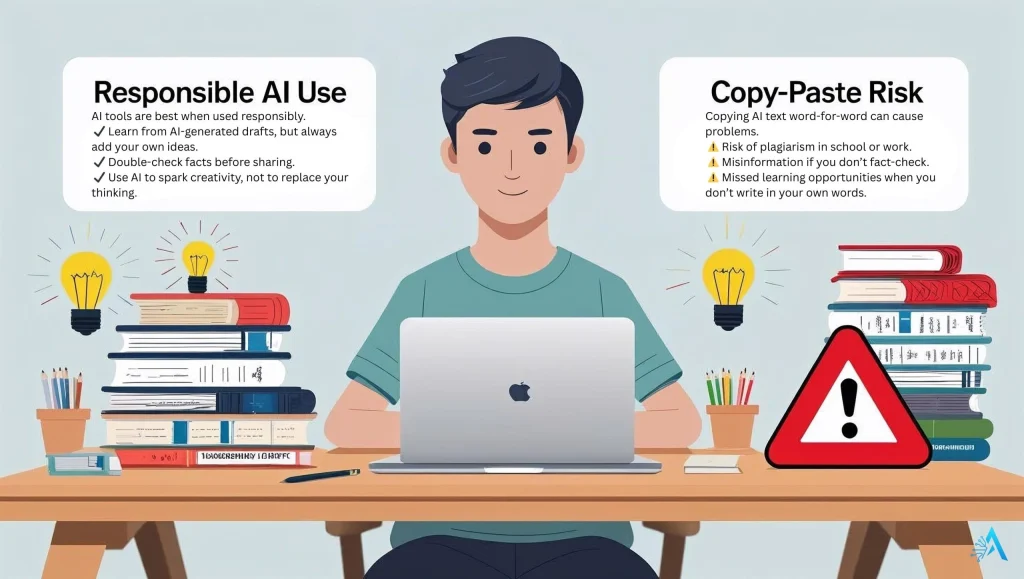
AI can be a powerful study partner, but it’s also an area where schools are setting new rules. Using the best AI tools for students means learning how to apply them responsibly—so you get the benefits without crossing academic lines.
Why it matters
Most schools and universities now use AI-detection tools like Turnitin to check assignments. If you copy-paste AI-generated text without citing it, you risk plagiarism charges. On the other hand, using AI to brainstorm, summarize, or proofread is usually encouraged—as long as the final work is your own thinking.
How to use AI responsibly
Summarize, don’t copy → Use tools like NotebookLM to simplify reading, but always rephrase in your own words.
Polish, don’t outsource → Grammarly AI can fix your essay, but the ideas should still be yours.
Cite when needed → If an AI tool suggests a reference, make sure it’s a real source and include it in your bibliography.
Ask your teacher → Some schools publish AI usage policies—if unsure, ask before submitting.
Our take
The smartest students in 2025 aren’t the ones who let AI do everything. They’re the ones who combine human effort with AI support. Think of AI as a study buddy, not a shortcut—it makes learning faster, but the knowledge still has to be yours.
6. Comparison Table: Free vs Paid Perks
Choosing the best AI tools for students often comes down to whether the free plan is enough or if the paid version adds real value. Here’s a quick side-by-side overview:
| Tool | Free Plan | Paid / Student Perks |
|---|---|---|
| NotebookLM | Limited free access, basic summarization | Full uploads, advanced querying (free for students in some schools) |
| Notion AI | Education Plus plan free with student email | Discounted AI credits for advanced writing & summarization |
| Grammarly AI | Basic grammar and spell check | AI writing assistant, citation finder, tone suggestions (student discounts available) |
| Canva for Education | Free premium templates for students & teachers | Team collaboration upgrades, extra storage (still free in education program) |
| Wolfram|Alpha | Basic answers only | Pro plan with step-by-step solutions, discounted for students |
Tip: Always start with the free plan. Most students realize within a week if they actually need the paid upgrade—this way you avoid paying for features you won’t use.
7. FAQ – Quick Answers for Students
Q: Can AI do my homework?
A: No, AI should not be used to do your homework for you. Tools like NotebookLM or Grammarly are meant to support your learning—summarizing sources, fixing grammar, or explaining a math problem. Submitting AI-written work can be flagged by school systems like Turnitin and may be considered plagiarism.
Q: What are the best free AI tools for students in 2025?
A: The best free AI tools for students are NotebookLM (basic), Notion AI’s education plan, Grammarly Free, Canva for Education, and Wolfram|Alpha basic. They cover research, organization, writing, visuals, and STEM without costing anything upfront.
Q: Is it safe to use AI for essays?
A: Yes, if you use AI responsibly to improve your own work. Grammarly AI, for example, can check clarity, grammar, and references, but the content must still be your original writing. Always check your school’s rules.
Q: How can I get student discounts on AI tools?
A: Most AI platforms unlock discounts automatically when you sign up with a school email. Examples include Notion (free education plan), Canva (free premium access for students), and Grammarly (discounted premium tiers). Microsoft Copilot also offers free trials plus 50% off for students.
Q: Which AI tool is best for math and STEM?
A: Wolfram|Alpha Pro is the top pick for math and STEM students. It doesn’t just give answers—it shows step-by-step solutions, which is essential for actually understanding problems.
Q: Will AI replace studying?
A: No—AI is a support tool, not a replacement for learning. The best students use AI to save time on busy work and focus more energy on critical thinking and deeper understanding.
8. Conclusion: Smarter Schooling With AI
School in 2025 is not just about books, lectures, and late-night cramming. AI is becoming a real study partner—helping students take notes faster, polish essays, and even understand tough math problems step by step. The best AI tools for students aren’t shortcuts; they’re multipliers. They take the time you already put in and make it more efficient.
Looking ahead, AI in schools is likely to grow even deeper. We’ll see more integration inside platforms you already use every day—like Microsoft Copilot inside Word, Google’s Gemini AI inside Docs and Slides, and smarter research tools that can analyze entire textbooks in minutes. Some universities are even testing AI tutors that adapt to your learning style in real time.
But with all this innovation comes responsibility. Teachers and institutions are still shaping the rules, and students need to stay aware of what’s allowed. Used wisely, AI can free you from repetitive tasks and give you more space for creativity, problem-solving, and personal growth.
Our advice? Don’t chase every new app—focus on a few reliable tools like NotebookLM, Notion AI, Grammarly, Canva, and Wolfram|Alpha. Together, they cover the essentials: research, writing, organization, visuals, and STEM. Start small, build a routine, and you’ll notice how much lighter studying feels.
At the end of the day, AI won’t replace your curiosity, effort, or creativity. But if you let it, it will become the sidekick that makes school not just manageable, but more rewarding. And that’s the real future of learning.