
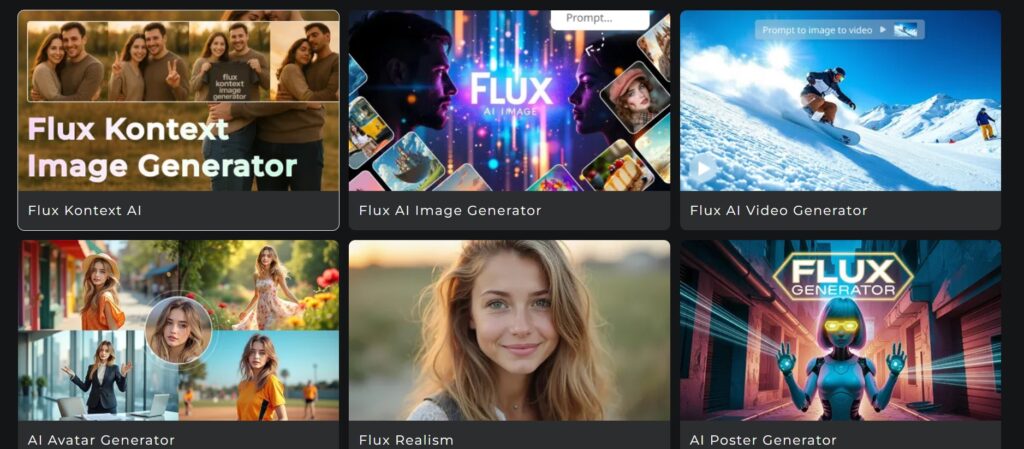
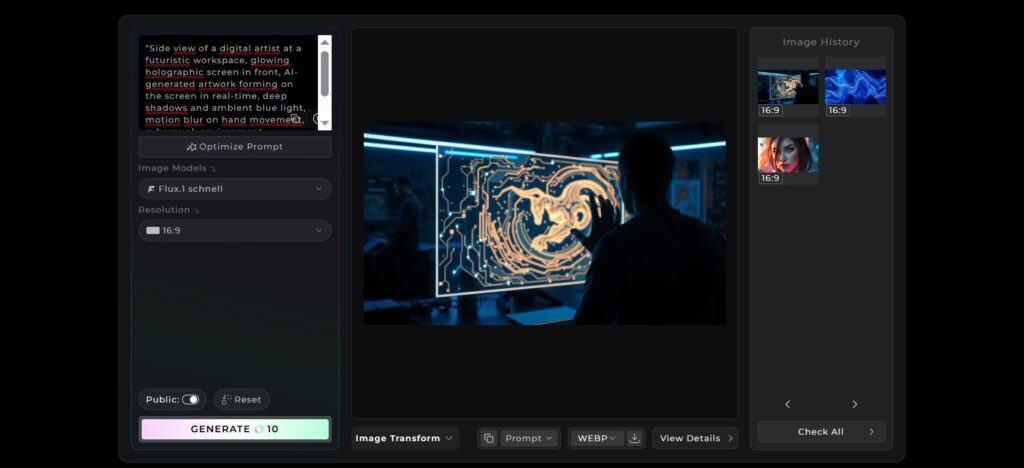
Flux AI interface generating images with in-context editing tool in 2025

Flux AI Review – Brilliant Tool That Transforms Sketches into Masterpieces (2025)

📅 Published on: June 30, 2025

Flux AI – From Sketch to Masterpiece in Seconds

Can a single AI tool truly turn raw ideas into studio-quality visuals? Flux AI is making waves for doing exactly that—fast.

In a space crowded with generative tools, Flux AI stands out for one reason: it bridges the gap between human imagination and professional design. Artists, content creators, and digital entrepreneurs are all taking notice—and for good reason. Whether you start from a rough sketch or a simple concept, Flux AI can transform it into visually stunning results with remarkable consistency.

This review dives deep into how Flux AI works, what makes it different, and whether it lives up to the hype. We explored its features, real-world applications, and where it fits in the growing ecosystem of creative AI tools.

If you’re looking to speed up your workflow without losing artistic integrity, Flux AI might just be the upgrade you’re looking for in 2025.

Let’s explore why.

1. What Is Flux AI?

Flux AI is an advanced text-to-image generator developed by a team of former Stability AI researchers. Positioned as a serious contender in the generative art landscape, it directly competes with popular tools like Midjourney and DALL·E, offering a powerful combination of speed, realism, and flexibility.

Unlike simpler AI image tools, Flux AI stands out for its ability to preserve the emotional tone and stylistic intent of a prompt—whether you’re starting with pure text or layering in a rough sketch. This makes it incredibly appealing for illustrators, designers, and creators who need more than just random visuals. You can go from concept to polished artwork in seconds, with impressive control over mood, composition, and detail.

From a technical standpoint, Flux AI leverages a hybrid rendering pipeline that combines diffusion models with an intelligent refinement layer—allowing for both fast previews and high-resolution outputs. It’s also one of the few platforms that supports image conditioning, meaning you can upload a sketch or photo and have the AI develop it intelligently, rather than replacing it altogether.

Personally, what struck me most about Flux AI is the balance between creative freedom and structure. Many tools either give you total chaos or predictable templates—but this one manages to feel collaborative. It “understands” where you want to go with an idea, which makes the process not only faster, but surprisingly enjoyable.

Whether you’re a freelancer, a content marketer, or someone experimenting with AI art for the first time, Flux AI offers one of the most accessible yet advanced platforms currently available in 2025.

2. How Flux AI Works

Creating high-quality visuals with Flux AI is surprisingly simple—even if you’re not a designer. The platform was built to give anyone the power to generate professional artwork in just a few clicks.

Here’s a step-by-step overview of how it works:

Step 1: Choose Your Model

Flux AI offers three rendering models:

  • Schnell – Lightning-fast preview generation. Great for quick drafts.

  • Dev – Balanced speed and detail. Ideal for general use.

  • Pro – Highest fidelity with longer processing times. Best for polished final results.

Depending on your needs, you can switch between them to optimize generation time and visual quality.

Step 2: Write Your Prompt

In the text box, describe what you want the image to look like. Flux AI responds well to clear, detailed prompts—the more context you provide (lighting, emotion, perspective), the better the results.

You can also add reference tags or style modifiers like “digital painting”, “pencil sketch”, or “cinematic lighting” to guide the AI.

Step 3: Generate

Click the Generate button and wait a few seconds.
Schnell takes 2–3 seconds. Dev and Pro may take 10–30 seconds depending on server load and complexity.

Flux AI shows you a live preview as the image is being formed, which is both exciting and useful for spotting early errors.

Step 4: Optional Editing with Kontext

After generation, you can enhance or correct details using Kontext, an integrated edit panel. This feature lets you adjust:

  • Composition

  • Lighting

  • Background clarity

  • Object details

  • Face correction (if applicable)

It’s like having a mini Photoshop built into the generator—without needing the skills.

Step 5: Export or Download

Once satisfied, click Download to save the image. High-res exports are available even for free users, although watermark-free versions are part of the premium plan.

A quick note: Flux AI’s responsiveness varies between models. Schnell is incredibly fast, but don’t expect perfection. If you need professional-level output, the Pro model is absolutely worth the wait.

This workflow makes Flux AI one of the most intuitive tools on the market. No bloated menus, no hidden settings—just results.

3. Kontext – The Game-Changer for Creators

One of the standout features of Flux AI is its Kontext tool—a built-in editing assistant that allows you to refine specific parts of your image without starting from scratch. It’s what turns Flux AI from a simple generator into a true creative companion.

What Is Kontext?

Kontext is an in-context editing tool. Instead of opening another software or retyping your prompt, you can select a part of the generated image—like a hand, face, or background—and adjust it directly. You describe what you want, and Flux AI regenerates just that portion.

This gives creators far more control than most image AIs. It’s a bit like what Adobe is doing with Photoshop AI, but here it’s fully integrated into the generation process, making it smoother and faster for creative workflows.

Why It Matters

Most AI tools still struggle with details like hands, faces, or symmetry. With Kontext, you don’t have to abandon an otherwise great image just because one element went wrong.

For example:

  • Is a hand looking awkward? Select it, describe the fix (e.g., “open relaxed hand with five fingers”), and Flux AI adjusts just that part.

  • Is the face expression too intense? Type “softer smile with calm eyes” and Kontext will revise it—without altering the whole image.

This feature saves time, reduces frustration, and lets you achieve more precision without learning complex tools.

If you’re used to bouncing between AI image generators and Photoshop for post-edits, you’ll really appreciate how seamless Kontext feels. It’s rare to find this level of control and fluidity in a tool that’s still so easy to use.

Kontext turns Flux AI from a one-shot generator into a collaborative art platform, making it ideal for creators who want more than one-click results.

4. Flux AI vs Midjourney vs DALL·E 3

Choosing the right AI image generator depends on your workflow, style preferences, and how much control you want over the final output. While Midjourney is known for its artistic flair, and DALL·E 3 for integration with ChatGPT, Flux AI brings something unique to the table: refinement, speed, and built-in editing.

Here’s a clear comparison to help you understand how they stack up in 2025:

Feature Flux AI Midjourney DALL·E 3
Text-to-Image Quality Realistic + adjustable Highly stylized and artistic Balanced, descriptive output
Editing Tools Built-in (Kontext) None (manual re-prompts) Inpainting (basic)
Ease of Use Very intuitive Requires Discord + prompt learning Simple via ChatGPT interface
Best For Creators who want fast edits and control Artists and visual storytellers Quick illustrations and idea generation
Price Free + paid tiers Paid only Free via ChatGPT Plus

5. Real Use Cases – Who Can Benefit?

Flux AI isn’t just a tool for digital artists—it’s a practical solution for a wide range of professionals who want to accelerate their creative process without sacrificing quality.

🎨 Graphic Designers

Need quick visual drafts or alternate layouts for a campaign? Flux AI is ideal for rapid prototyping, especially when timelines are tight but inspiration is lagging.

📱 Content Creators

If you’re posting daily on Instagram, TikTok, or YouTube, Flux AI helps you generate eye-catching visuals to accompany your posts, stories, and thumbnails—without needing a full design team.

✍️ Writers & Bloggers

Bringing an article to life with illustrations is often time-consuming. With Flux AI, you can create prompt-based visuals that match your themes and tone, adding style and engagement to your content.

📢 Marketers

Running A/B tests or launching a new product? Flux AI can produce scroll-stopping creatives for ads, landing pages, and campaign graphics in just minutes.

🛒 E-commerce Sellers

Whether you’re validating product ideas or creating mockups for a listing, Flux AI helps visualize products quickly—perfect for dropshippers, Amazon sellers, and early-stage entrepreneurs.

In a world where visuals speak louder than text, tools like Flux AI give solo creators and small teams an edge that used to require expensive design resources.

6. Pricing & Licensing – What’s Free, What’s Not

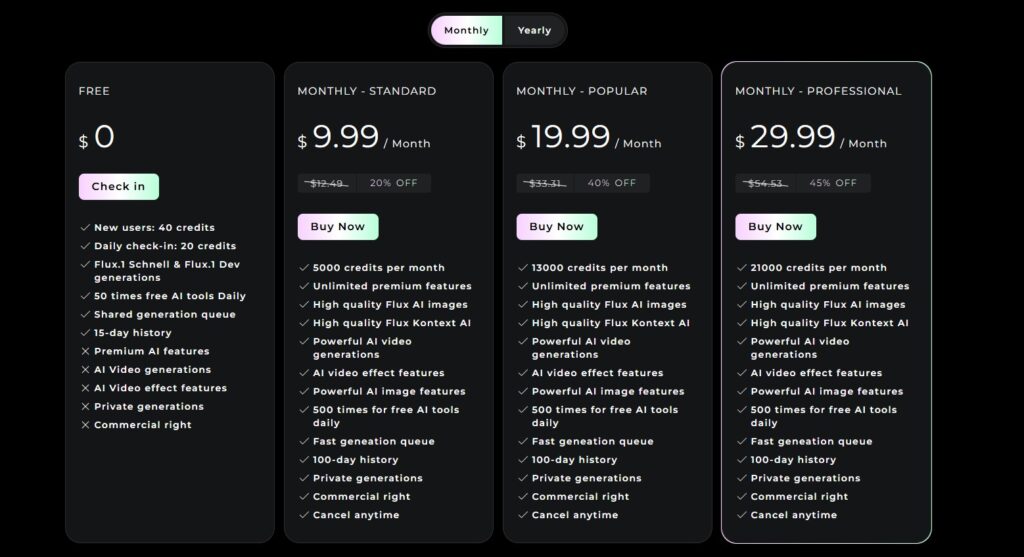
One of the most interesting things about Flux AI is how it’s structured across different tiers—not just in terms of performance, but also licensing and usage rights. Whether you’re a casual user or building visuals for commercial use, it’s important to know where the limits are.

🚀 Schnell – Open-Source & Free

The Schnell model is open-source and completely free to use. It’s perfect for experimenting, learning, and non-commercial projects like personal art, schoolwork, or concept drafts. You can try it directly on Flux AI’s platform or integrate it locally if you’re more tech-savvy.You can explore the repository on GitHub for technical details.

🧪 Dev – Free for Research

The Dev model offers better quality and more nuance than Schnell. It’s also free to use, but only for research and non-commercial purposes. So if you’re a blogger, content creator, or freelancer, be careful—using Dev outputs in paid projects or monetized content could violate licensing terms.

💼 Pro – Paid API with Commercial License

For business use, client work, or monetized content (like e-commerce or social media promotions), the Pro version is the way to go. It’s available through a paid API with clear commercial licensing, giving you full rights to use, modify, and publish the generated content without restrictions.

For creators and businesses, this means the Pro tier is the only safe choice for commercial use. It’s flexible, fast, and legally protected—which is not always the case in the AI image space.

⚠️ A Note on Monetization

At the time of writing, Flux AI does not yet have an affiliate program—but it’s definitely one to watch. If you’re building content around AI tools, keeping an eye on Flux AI’s monetization options is a smart move.
7. Ethical Considerations & Open Source Status

As with any powerful AI tool, Flux AI raises important questions about transparency, licensing, and responsible usage—especially as its image quality gets increasingly close to photorealism.

🧠 Hyper-Realism and Misuse Risks

One of the biggest concerns around Flux AI is the realism of its generated content. In some cases, the images are so lifelike that they could be confused with real photographs, especially when used out of context. This opens the door to potential misuse—whether accidental or intentional.

Creators, marketers, and bloggers should be mindful of how these visuals are presented, particularly in sensitive or commercial settings. Always disclose when an image is AI-generated to maintain audience trust.

📦 Training Data Transparency

While Flux AI is partially open-source, the full details of its training data are not publicly disclosed. This makes it difficult to assess potential copyright overlap or understand which datasets are influencing the output. For comparison, see Midjourney’s policy overview.

This isn’t uncommon in the AI space, but it’s worth mentioning—especially for creators who are cautious about using AI visuals in brand work or public-facing campaigns.

✅ The Open Source Advantage

That said, one of Flux AI’s strongest ethical points is its open development model. Tools like the Schnell version being freely available on GitHub promote collaboration and scrutiny, which is crucial for building trust in AI ecosystems.

The open components allow developers, artists, and researchers to test, adapt, and critique the technology—something more closed platforms like Midjourney still don’t allow.

⚖️ The Licensing Gray Area

However, the licensing system could use more clarity for mass adoption. While commercial use is technically permitted under the Pro tier, there’s still confusion around redistribution, brand work, and attribution—especially when using Dev outputs.

I always believe AI tools should empower, not mislead. Flux’s open components are a step in the right direction, but creators should still use them responsibly—both in what they generate and how they use it.

8. Final Verdict – Is Flux AI Worth It?

If you’re looking for a future-ready image generator with more control than the average tool, Flux AI is absolutely worth trying in 2025. It strikes a rare balance: open enough to experiment with, powerful enough for real creative work, and smart enough to evolve with the needs of creators.

Whether you’re designing ad creatives, sketching product concepts, or building content for your audience, Flux AI gives you the tools to work faster, smarter, and with a greater sense of creative ownership.

It’s not just another trend—it’s a serious contender for anyone building visual content in the AI era.

✅ Try Flux AI here
✅ Or explore Leonardo vs Midjourney – Which AI is Best for Creators?
✅ Want more tools and tips like this? Subscribe to our newsletter and get our free guide:
“Top 10 AI Tools That Save You 10+ Hours a Week – Free Download”

9. FAQ – What People Ask About Flux AI

Q: Is Flux AI free?
A: The Schnell version is open-source and 100% free. The Dev version is also free, but limited to non-commercial use. If you need to use Flux AI for business or monetized content, the Pro version requires a paid license.

Q: Can Flux AI replace Midjourney or DALL·E?
A: It depends on your goals. For editing control, open access, and professional refinement, Flux AI is a strong alternative. But if you’re looking for highly stylized art, Midjourney still leads in that niche.

Q: What’s Kontext exactly?
A: Kontext is Flux AI’s built-in smart editing tool. It lets you select specific image areas—like a hand or face—and regenerate just that part without redoing the entire image. It’s especially useful for quick corrections or creative tweaks.

Q: Is there a web app for Flux AI?
A: Yes. Flux AI provides a web interface for generating and editing images. Access depends on which version you’re using—Schnell and Dev are typically open, while Pro may require account access or API integration.