

 Published on: February 2, 2026
Disclosure:
This post contains affiliate links. If you click through and make a purchase, we may earn a small commission at no additional cost to you. Thank you for supporting AIDigitalSpace — we only recommend tools and services we genuinely trust and believe bring real value to our readers.
1. Why Lindy AI vs Bardeen AI Is a Hot Decision in 2026
Your day is packed, notifications keep piling up, and every productivity tool promises to save time — yet somehow, you’re still doing too much manually. Many of us feel this daily tension, especially as workflow automation tools become more common but not always more helpful.
Over the past year, we’ve started noticing a real shift. It’s no longer just about automating a single task. More AI productivity software now claims it can think, decide, and act for us. That’s exactly why the Lindy AI vs Bardeen AI discussion keeps resurfacing in conversations about AI agents comparison and smarter work automation.
On the surface, these tools can seem similar. They promise fewer clicks, less repetition, and smoother workflows across browsers and apps. But underneath, they represent two very different approaches to automation — and choosing the wrong one can quietly slow us down instead of saving time.
This article exists for one clear reason:
to help us understand why this choice matters now, what actually separates Lindy AI from Bardeen AI, and how to tell which type of AI agent or browser automation AI fits our daily work — without hype, jargon, or guesswork.
If you’ve ever wondered whether AI agents are genuinely useful or just another layer of complexity added to your workflow, you’re exactly in the right place.
2. AI Agent or Automation Tool? The Decision Most Users Get Wrong
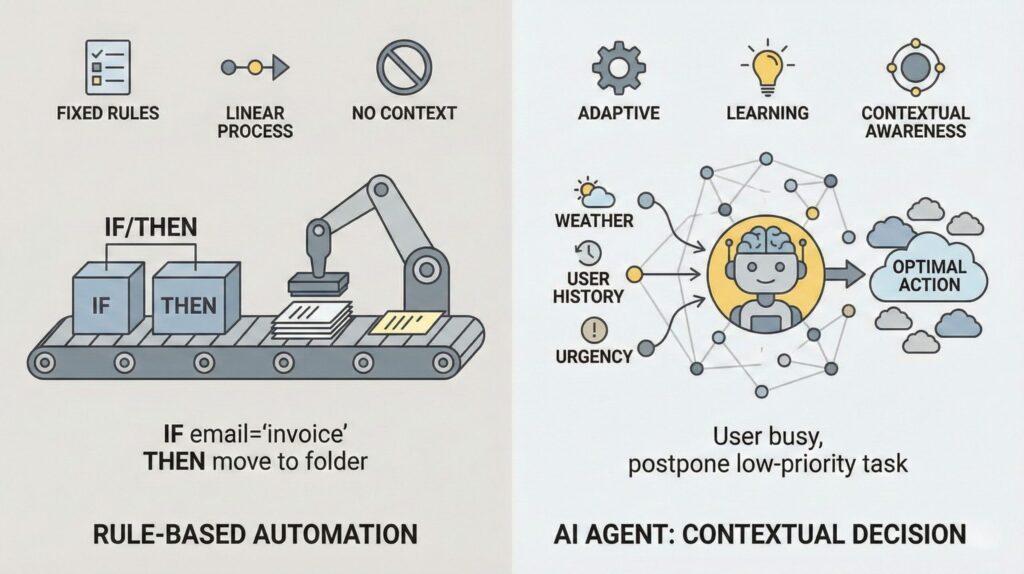
Have you ever tried setting up a tool that promised to “handle tasks for you,” only to end up with something that feels like another thing to manage?
That’s exactly the confusion many of us bump into when we start looking at modern productivity tools. On one hand, we’ve used automation tools for years — things that trigger actions when specific conditions are met. On the other hand, AI agents like Lindy AI and Bardeen AI claim they can think for you, make decisions, and take action across apps without as much setup.
So what’s the real difference?
At their core:
Traditional automation tools (like Zapier) wait for precise instructions.
AI agents aim to interpret intent, make decisions, and act more independently.
It sounds ideal, but that independence also brings questions: How much can they really decide? Do they understand context accurately? Are they making choices you’re comfortable delegating?
A recent piece from Harvard Business Review on AI decision-making highlights an important point:
A similar concern is highlighted by the U.S. National Institute of Standards and Technology (NIST) in its AI Risk Management Framework, which explains that AI systems capable of taking action must be designed with human oversight, clear limits, and accountability mechanisms to prevent unexpected or harmful behavior when operating autonomously (source).
This matters because tools like Lindy and Bardeen don’t just trigger actions — they interpret context and act across platforms. That’s powerful, but it also means our expectations must align with what they can reliably do today.
In this section, we’re not just defining terms. We’re grounding the comparison in what real people experience when they ask:
“Do I need an AI agent that decides and acts,
or is a smart automation tool enough for my workflow?”
And the answer isn’t always obvious — but it is important.
3. Lindy AI vs Bardeen AI: What Each One Is Actually Good At
This is where things usually click — because once we stop looking at features and start looking at real situations, the difference becomes much clearer in any serious AI agents comparison.
Both tools aim to save time, but they approach productivity from very different angles within the broader world of workflow automation tools.
Lindy AI is designed to act like a digital teammate. It’s most useful when work involves decisions, context, and follow-ups that change from day to day. Think of tasks where we’d normally say “I’ll handle this later” — and then forget. In that sense, Lindy AI behaves more like adaptive AI productivity software than a rigid automation script.
Bardeen AI, instead, shines when actions are repeatable and browser-based. It’s closer to a power tool: fast, precise, and extremely effective when the steps are clear and don’t change much. For many teams, this makes Bardeen AI a strong example of browser automation AI done right.
To make this practical, here’s how Lindy AI vs Bardeen AI typically shows up in real workflows:

| If this sounds like you… | You’ll likely prefer… | Why it works |
|---|---|---|
| You often need to follow up on emails, leads, or tasks without fixed rules | Lindy AI | Handles context, timing, and intent instead of rigid triggers |
| You regularly extract, move, or organize data directly from websites | Bardeen AI | Fast, browser-native automations for structured, repeatable actions |
| Your work involves reminders, priorities, and tasks that change day to day | Lindy AI | Adapts better to shifting goals and human-style workflows |
| You want to eliminate repetitive clicks, copy-paste work, and form filling | Bardeen AI | Executes precise actions quickly with minimal setup |
What we usually notice is this:
if our work is predictable, Bardeen feels incredibly efficient.
If our work is messy, contextual, or people-driven, Lindy feels more natural.
Neither approach is universally better — they simply solve different kinds of time loss. Understanding which kind shows up more often in our day is the real key to choosing correctly.
In the next section, we’ll make this even clearer by mapping these tools to real user profiles — so it’s easier to see where you fit.
4. How to Choose Between Lindy and Bardeen (Setup, Skills, Limits)
After seeing what each tool does well, the real question becomes simpler — which one fits how we actually work day to day?
This isn’t about features on a pricing page. It’s about setup effort, tolerance for uncertainty, and how much control we want to keep.
A useful way to think about it comes from human-centered automation research: tools work best when they reduce cognitive load without taking control away at the wrong moment. The U.S. National Institute of Standards and Technology (NIST) highlights that systems acting on our behalf need clear boundaries and human oversight to avoid unintended outcomes (Source).
With that in mind, here’s a practical way to decide.
| Decision signal | Choose Lindy if… | Choose Bardeen if… |
|---|---|---|
| Your tasks change often | You rely on context, follow-ups, and priorities that shift daily | Your steps are stable and repeatable in the browser |
| Setup tolerance | You’re okay spending time defining goals and guardrails | You want fast, visible automations with minimal configuration |
| Where mistakes matter | You prefer reviewing or approving actions before they happen | You want deterministic actions that run exactly as defined |
| Best first test | Start with an email or meeting follow-up assistant | Start with website data capture into a sheet or CRM |
| Try Lindy AI | Try Bardeen AI |
What we usually discover after trying both is this:
Lindy works best when we want help deciding what to do next.
Bardeen works best when we already know exactly what should happen.
If we choose with that distinction in mind, frustration drops quickly — and the tool actually sticks.
In the next section, we’ll address the part many people hesitate about before committing: data access, privacy, and how much control these tools really have once they’re connected.
5. Ethical, Privacy, and Reliability Concerns with AI Agents

This is usually the moment where we pause — and it’s a healthy pause.
When a tool can read emails, trigger actions, or move data between apps, the question isn’t just “Does it save time?” It’s also “What am I giving it access to?” and “Who stays in control?” These concerns come up often when comparing AI agents and advanced workflow automation tools.
Many of us have already felt this tension. We want support from AI productivity software, not a black box making decisions silently in the background.
That concern isn’t theoretical. The U.S. National Institute of Standards and Technology (NIST) explicitly warns that AI systems acting on a user’s behalf must include clear boundaries, human oversight, and accountability, especially when they can affect real workflows or sensitive data.
Applied to tools like Lindy AI and Bardeen AI, this translates into a few practical checks we should always make before relying on any AI agent or browser automation AI:
Data access scope
What emails, tabs, documents, or connected accounts does the tool actually see — and can we limit that access to only what’s necessary?Human-in-the-loop controls
Are actions reviewed, approved, or logged, or does the system act automatically once it’s enabled?Predictability vs adaptability
Flexible AI agents can be helpful in changing situations, but they also introduce uncertainty. Deterministic automation often feels safer, even if it’s less adaptive.Transparency
Can we understand why an action happened, or does the behavior feel opaque?
Thinking through these points helps us use Lindy AI vs Bardeen AI more intentionally — and reduces the risk of letting automation work against us instead of for us.
In real use, trust builds when a tool is explicit about its limits. The more autonomy we give it, the more important those limits become. This is why some users feel more comfortable starting with narrow, low-risk workflows before expanding access.
The goal isn’t to avoid AI agents altogether. It’s to use them in a way that supports our judgment instead of replacing it.
In the final section, we’ll bring everything together and answer the only question that really matters now: which tool saves you more time — and why?
6. Final Verdict: Which AI Agent Saves You More Time? + FAQ
After looking at real workflows, setup effort, and the trust side of things, the decision becomes clearer than it first appears.
If our day is shaped by people, context, and follow-ups that change, an AI agent approach makes sense. That’s where Lindy AI tends to shine — helping decide what to do next and keeping momentum without constant manual nudging.
If our work is structured, browser-based, and repetitive, classic automation wins. Bardeen AI saves time by executing exactly what we define, quickly and predictably.
There’s no universal “best” here. The real time savings come from matching the tool to the shape of our work, not from choosing the most advanced option on paper.
Quick takeaway
Choose an AI agent if you want help deciding and following up.
Choose automation if you want tasks executed the same way every time.
FAQ
Q: Is Lindy AI better than Bardeen AI for beginners?
A: It depends on how you think about work. Lindy AI feels more natural if you think in goals and outcomes, while Bardeen AI suits users who already know the exact steps they want automated.
Q: Can Lindy AI or Bardeen AI act without my approval?
A: Both tools can operate with different levels of autonomy. We recommend starting with review or logging enabled until you’re comfortable with how actions are triggered.
Q: Which tool is safer when handling sensitive data?
A: Neither tool should be given full access by default. The safest approach is to limit permissions and begin with low-risk workflows before expanding access.
Q: Can Lindy AI and Bardeen AI be used together?
A: Yes. Many people combine an AI agent for decision-making with automation for execution, allowing each tool to focus on what it does best.
Q: Will an AI agent replace my existing productivity tools?
A: In most cases, no. AI agents work best as a support layer on top of email, calendars, and browsers rather than as full replacements.
If you want to go a step further and use AI tools with more clarity, confidence, and control — especially when automation, trust, and daily workflows are involved — these guides connect naturally with what we’ve explored here:
→ Why AI Answers Change Every Time (And How to Get Stable Results)
→ Avoid These 5 Dark UI Tricks Used by Popular AI Apps
→ How to Use AI to Turn Notes Into Tasks (Without Losing Context)