

 Published on: December 3, 2025
Disclosure:
This post may contain affiliate links. If you purchase through them, we may earn a small commission — at no extra cost to you. This helps support our research and keeps AI Digital Space running. Thank you!
1. Why MindStudio Is Becoming the Go-To Tool for No-Code AI Agents
Most people want to build an AI agent, but the process normally requires coding and APIs that overwhelm beginners. This MindStudio review matters because MindStudio acts as a no-code AI agent builder, removing the technical barriers behind how to build AI agents. It replaces complex setups with a simple drag-and-drop workflow, letting anyone use no-code AI tools to create effective AI automation tools in minutes.
Today, creators, freelancers, and small businesses all want AI agents that can:
answer questions
automate repetitive tasks
handle customer support
process documents
generate personalized outputs
But they also want a solution that doesn’t require Python, hosting, or expensive developers. That’s where MindStudio is gaining attention.
What people search for right now
Across Google Trends and AI newsletters (Ben’s Bites, TLDR), searches are exploding around:
“how to build an AI agent”
“best AI agent builder”
“no-code AI agents”
“MindStudio tutorial”
“AI automation tools”
MindStudio sits exactly at the center of these trends, which is why this MindStudio review is highly relevant for 2025.
Why users choose MindStudio over traditional tools
MindStudio works more like a visual AI workflow builder, allowing us to create an agent by connecting:
inputs
logic blocks
LLM actions
memory
integrations
…without touching a single line of code.
That makes it far more accessible than building an agent with custom scripts or pure ChatGPT workflows.t
If you’re exploring AI agents to automate everyday tasks, our guide to AI workflow bots shows how these tools are reshaping productivity in 2025.
Recommended Read:
If you want a deeper understanding of how AI agents should be designed to truly help people, “Agentive Technology: Artificial Intelligence That Works” by Christopher Noessel is one of the most practical books available. It explains how well-designed AI assistants think, decide, and interact — perfect context for anyone creating AI agents with MindStudio.
2. The Real Problem: AI Agents Are Powerful but Hard to Build Without Coding
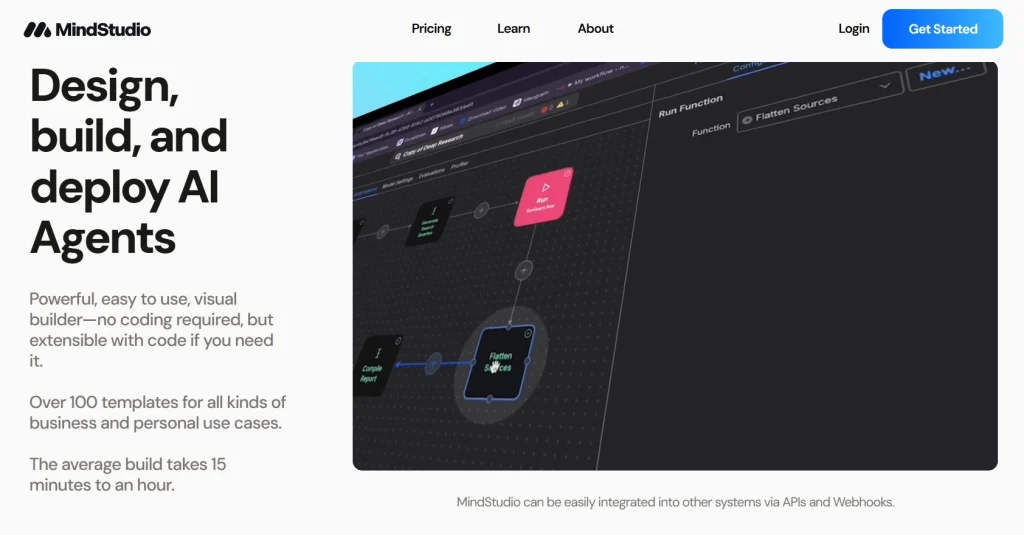
Before we dive deeper into this MindStudio review, it’s important to understand the real reason tools like this exist: building an AI agent is still too technical for most people. Even though AI agents can automate support, analyze documents, handle workflows, and assist in daily tasks, the setup normally requires coding, APIs, and infrastructure that beginners simply don’t have.
Most users who search for how to build an AI agent quickly discover the same roadblocks:
The biggest obstacles people face
You need to understand prompts, memory, and logic flow
Many AI agent builder platforms require API keys and backend knowledge
Setting up integrations (email, Notion, Slack, CRMs) is confusing
Debugging outputs requires technical intuition
Traditional automation tools become expensive or complicated as workflows grow
This gap is why search volume for no-code AI tools continues to rise across Google, YouTube, and TikTok. People want the outcome—a functional AI agent—but not the complexity.
Why this matters today
AI newsletters like The Rundown and Ben’s Bites show a surge in tutorials on agent creation, yet most still rely on Python, LangChain, or advanced logic. Users are frustrated because they see what AI agents can do, but they have no realistic path to building one themselves without a no-code AI agent builder. This is why a MindStudio review matters: it gives beginners a practical way to learn how to build AI agents using accessible no-code AI tools instead of complex coding.
That’s the core frustration this MindStudio review addresses: powerful AI, but inaccessible setup.
Where traditional tools fall short
Even ChatGPT workflows require a mix of:
careful prompt engineering
system instructions
memory management
optional API extensions
All of which still feel technical to everyday creators and business owners.
A good overview of the typical complexity can be seen in OpenAI’s agent documentation.
Why users seek a simpler alternative
People want something visual, something guided, something they can understand in minutes—not days. That’s why interest in no-code AI agent platforms is rising, and why MindStudio is becoming a highly searched tool among beginners and professionals.
This sets the stage for what we now explore in the next section: whether MindStudio actually delivers on this promise.
3. Key Features, Strengths, and Best Use Cases
When people search for a MindStudio review, they want one thing above all: does this tool actually make how to build AI agents easier?
MindStudio stands out because it works as a powerful AI agent builder, combining a clean no-code interface with features normally found only in advanced AI automation tools. For anyone comparing no-code AI tools, the breakdown below shows the capabilities users rely on the most.
Visual Workflow Builder (The Core Feature Everyone Talks About)
MindStudio’s drag-and-drop builder lets us create an AI agent using simple blocks.
We can connect inputs, logic, memory, and tools visually — no coding required.
Why users love it:
Easy to understand
Real-time preview of agent behavior
Great for beginners and fast prototyping
This is the feature most users mention when leaving positive feedback online because it turns complex logic into something intuitive.
Multi-Model Support (Not Locked to One Provider)
A strong point in any MindStudio review is its ability to switch between different LLMs depending on performance, cost, or tone.
Supported model types typically include:
ChatGPT-style models
Claude-style models
Specialized task-oriented models
This gives us flexibility and lets us optimize tasks without rebuilding the entire agent.
For a broader look at LLM choices, OpenAI offers a good comparison.
Built-In Memory and Context Handling
MindStudio automates one of the hardest parts of agent design:
keeping track of conversation history and knowledge.
Benefits:
More accurate responses
Personalized interactions
Better workflow reliability
This is especially useful for customer support, onboarding, or knowledge retrieval agents.
Integrations and Automation Blocks
This section is where MindStudio begins to compete with tools like Zapier and Make.
Users can connect agents to:
databases
spreadsheets
email
CRMs
webhooks
internal tools
For creators and small businesses, this turns an AI agent into a real automation engine — something that saves hours of repetitive work.
Some more related internal resources are available in our section of productivity tools.
Pre-Built Templates (Huge Time Saver)
MindStudio includes ready-made templates for:
customer support agents
onboarding flows
data extraction
document Q&A
content generation assistants
For beginners, this reduces the learning curve dramatically.
Instead of building from scratch, we can open a template and customize it.
Best Use Cases for MindStudio
From all the features above, the strongest use cases include:
entrepreneurs wanting automated client replies
creators building interactive tools or chat assistants
customer support teams needing AI support agents
freelancers offering AI workflows to clients
small businesses automating repetitive steps
educators creating guided learning assistants
This variety is a major reason this MindStudio review shows such strong adoption across different industries.
4. MindStudio Pricing and Free Plan: What You Actually Get in 2025
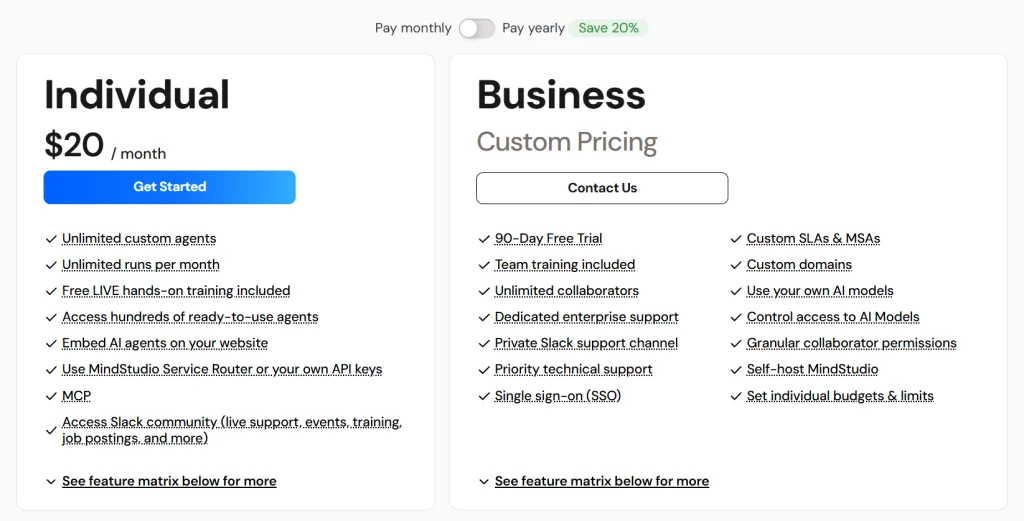
A good MindStudio review has to answer one simple question clearly: how much does it cost, and what do we get for that price?
MindStudio uses a familiar SaaS model: a free tier to learn how to build AI agents, then paid plans that unlock more power for anyone using it as an AI agent builder. Prices can change over time, but the structure below shows how this no-code AI tool positions itself in 2025 for creators and teams using AI automation tools.
We can think of the plans in three main layers:
- a Free tier to experiment
- an Individual / Starter tier for serious solo builders
- a Business / Custom tier for teams and enterprise work
To make this easier to scan, here’s a clear overview.
| Plan | Best For | What You Get | Starting Price* |
|---|---|---|---|
| Free / Community | Testing the platform and basic agents | Unlimited drafts, limited monthly runs, access to core AI models, good for learning and simple workflows. | $0 / month |
| Individual / Starter | Solo creators and small teams | Publish multiple agents, higher run limits, access to more models, better control over costs and performance. | From around $20 / month |
| Business / Custom | Companies, agencies, and enterprises | Custom limits, advanced security and governance, team training, dedicated support, options to use your own models. | Custom pricing |
*Always check the official MindStudio pricing page for the latest details.
In practice, this means we can start experimenting with agents on the Free plan, then move to the Individual / Starter plan once we know MindStudio fits our workflow. For many readers of this MindStudio review, that second tier is where the real value begins: enough runs, more powerful models, and the ability to publish agents that people actually use.
For teams and agencies, the Business / Custom tier makes more sense, especially if we need single sign-on, governance, or self-hosting. The official pricing page is the best place to confirm current limits and offers.
Next, we’ll see how to move from pricing theory to practice: building a real AI agent in MindStudio step by step.
5. Tips, Comparisons, and Common Mistakes to Avoid
A strong MindStudio review must go beyond features. What readers actually want is:
How do I get better results, faster?
Below are the practical insights that separate a struggling beginner from someone who builds solid AI agents with confidence.
Tip 1: Start With a Single Clear Goal
The biggest mistake new users make is trying to build an “everything” agent.
MindStudio works best when we define one purpose first, such as:
answering customer questions
summarizing PDFs
onboarding new clients
generating personalized content
Once the core flow works, we add complexity. This is the setup that performs best across all no-code AI tools, not just in a MindStudio review context.
Tip 2: Use Multi-Step Logic Instead of One Giant Prompt
Beginners often write one long prompt inside a single block.
This leads to:
inconsistent outputs
higher model costs
harder debugging
Instead, break your logic into smaller steps:
Input → Process → Format → Output
This is easier to optimize and improves agent reliability immediately.
Tip 3: Add Memory Only When It Improves the Experience
Memory is powerful, but it can confuse an agent when overused.
A simple rule:
Short, task-based agents → no memory
Conversational or personalized agents → light memory
Most high-performing agents in MindStudio templates follow this pattern.
Tip 4: Test With Extreme Inputs (Beginners Skip This)
A professional MindStudio review must highlight this:
The best agents are tested with bad inputs, not just perfect ones.
Try submitting:
incomplete sentences
contradictory instructions
long documents
unusual edge cases
This exposes gaps early and saves hours of revisions later.
Tip 5: Compare Model Performance Instead of Sticking to the Default
MindStudio lets us switch between LLMs.
Different models excel at different tasks:
ChatGPT-style models → creative and conversational
Claude-style models → longer reasoning and documents
Task-optimized models → faster, cheaper execution
Small swaps can cut costs or improve accuracy dramatically.
This is something many users only discover after reading a thorough MindStudio review.
Tip 6: Use Templates as Accelerators, Not Final Products
MindStudio templates are excellent starting points, but we should always:
rewrite instructions
adjust data sources
customize outputs
This avoids generic behavior and makes your agent feel truly unique.
Common Mistakes to Avoid
Mistake 1: Building Without Testing Each Block
If one step breaks, the entire agent breaks.
Test block-by-block for clarity.
Mistake 2: Not Setting Output Formatting
Agents without formatting can become unpredictable.
Always specify:
bullet points
tone
structure
length
Mistake 3: Ignoring Token Limits
Long inputs + long memory = model confusion.
Keep instructions concise.
Mistake 4: Overcomplicating the First Version
Start simple → iterate fast → scale later.
This is the strategy used by almost all successful MindStudio creators.
Check out this video below to understand better How To Set UP your first AI Agent:
6. Ethical Considerations When Building AI Agents With MindStudio
Even in a practical MindStudio review, we need to consider how AI agents behave once deployed. Clear guidelines help us build tools that are helpful, transparent, and safe for users. The table below summarizes the core principles every AI builder should keep in mind.
| Ethical Area | Best Practice |
|---|---|
| Transparency | Tell users they are interacting with an AI agent built using MindStudio. |
| Capabilities | Set clear boundaries. Prevent the agent from acting outside its purpose. |
| Data Use | Avoid storing sensitive or personal information unless absolutely required. |
| Identity | Never imitate real people or replicate voices without explicit permission. |
| Bias & Reliability | Test agents with diverse inputs to reduce bias and unexpected behavior. |
Building AI agents has never been easier, but ease shouldn’t replace responsibility. MindStudio gives us powerful no-code AI tools, and any good MindStudio review should remind us that creating agents requires clear boundaries and safe design. When we use an AI agent builder thoughtfully and follow best practices for how to build AI agents, we end up with AI automation tools that are not only effective but genuinely trustworthy.
f privacy is your main concern, we also reviewed several offline AI tools that help reduce data exposure.
7. Final Insights and Recommended Tools to Pair With MindStudio
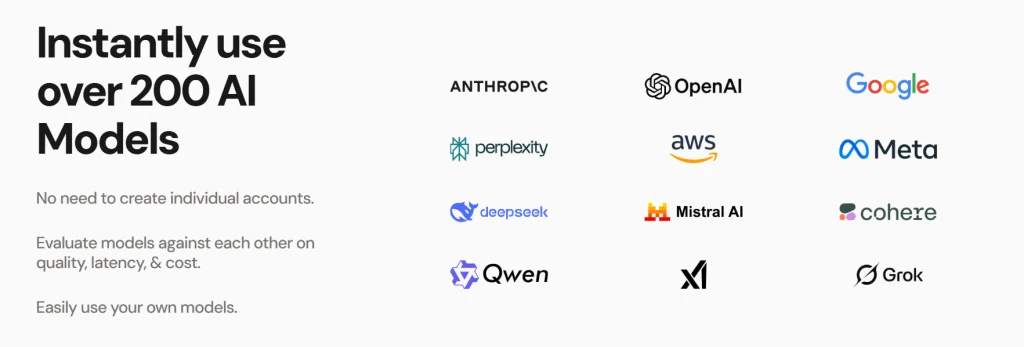
After exploring all the features in this MindStudio review, the conclusion is clear: MindStudio gives us one of the simplest and most accessible ways to build an AI agent without touching code. As a no-code AI agent builder, it removes unnecessary complexity, offers a clean workflow editor, and supports multiple models so we can adapt each project to our real needs. Whether we’re automating client support, processing documents, or creating custom assistants, this no-code AI tool makes how to build AI agents feel manageable and fast, even for beginners using modern AI automation tools.
For most readers, the best starting point is the Free plan, which is enough to test ideas and build a simple agent. Once the workflow proves valuable, upgrading unlocks the performance and run limits needed for real-world usage. That’s the moment where MindStudio becomes more than a tool — it becomes part of a productive AI setup.
To get even more out of MindStudio, many users combine it with complementary tools such as document analyzers, vector databases, or productivity-focused AI platforms. If you often use AI for content or workflow automation, our Top Productivity Tools category can help you discover additional apps that integrate well with agent-based workflows.
8. FAQ About MindStudio and AI Agent Creation
Q: Is MindStudio good for beginners who have never built an AI agent?
A: Yes. One key point in this MindStudio review is that the platform is genuinely beginner-friendly. The visual workflow builder replaces coding with drag-and-drop logic, so even users with zero technical background can build functional agents quickly.
Q: Does MindStudio support different AI models, or only one provider?
A: MindStudio supports multiple LLM providers, allowing you to switch models based on accuracy, tone, or cost. This flexibility is one of the strongest advantages highlighted in any serious MindStudio review.
Q: Can I use MindStudio for real customer workflows or business automation?
A: Absolutely. Many users deploy MindStudio agents for onboarding flows, client support, internal knowledge bases, and document processing. Just make sure to follow the ethical and data-handling guidelines mentioned earlier in this post.
Q: Is the Free plan enough to build a fully working agent?
A: For simple projects, yes. The Free tier lets you test ideas and create a basic agent. If you need higher run limits or more advanced features, upgrading becomes necessary.
Q: How does MindStudio compare to traditional tools like LangChain?
A: LangChain is powerful but requires coding skills. MindStudio focuses on no-code simplicity, making it the better choice for creators, freelancers, and small teams who want working results without technical overhead.