

Published: August 20, 2025 • Last update: March 2026
This post contains affiliate links. If you buy through them, we may earn a small commission at no extra cost to you — thanks for supporting. Learn more.
This guide helps you pick the best open source AI models fast — by use case, license, and how to run locally in minutes. No fluff, just the shortest path to a working setup.
Quick Verdict
If you want the fastest setup that actually works, start with an Ollama-ready model and run it locally first.
If you want the best results for writing + reasoning, choose a top general-purpose LLM.
If you need AI mainly for coding, pick a code-tuned model (more reliable than a generic chat model).
If you need vision (images or image understanding), jump to the Vision models section.
If you plan to use it for client work or commercial projects, read the License Cheat-Sheet first — “open” doesn’t always mean “commercial-friendly.”
If you use private documents, go local-first by default, then use cloud only when needed.
1. Why Open Source AI Models Matter Right Now
AI is no longer something you only access through ChatGPT or Gemini. Today, you can run powerful open source AI models locally on your computer — with more control, lower cost, and (often) better privacy.
That’s the real advantage: freedom + transparency + ownership. You can choose a model for your exact use case, tweak it, and keep your workflow independent from closed platforms.
But here’s the catch: not every “open” model is truly open source, and licenses can limit commercial use. That’s why this guide is designed to help you pick the right model fast, avoid licensing traps, and get a working setup without wasting hours.
Quick Start (pick your path):
→ Want the fastest “just run it” setup? Jump to run locally (10 minutes)
→ Need the best model for your goal? Jump to quick picks by use case
→ Using AI for client work or a product? Read the license cheat-sheet first
If you’re also curious about how AI works behind the scenes, check our post on How Voice Assistants Actually Understand You, and our Behind the Algorithm deep dive: Inside the Black Box: How AI Understands Visual Data.
What you’ll get in this guide
Quick picks to choose the right model in seconds
A license cheat-sheet to avoid commercial-use mistakes
Simple steps to run models locally (Ollama + LM Studio)
A clear view of risks + ethics (privacy, bias, copyright)
This isn’t about overwhelming you with jargon. It’s a practical map you can follow today — so you can experiment, build, and ship with confidence.
2. Quick Picks by Use Case
If you want the fastest answer, use this table to pick a model in 30 seconds.
Rule of thumb: choose by use case first, then confirm the license if you’re going commercial, then run locally.
→ New here? Start with Mistral 7B (text) + Whisper (audio) for the easiest setup.
→ Building something commercial? Check the license first before you commit.
| Use Case | Model | License | Why Pick It | Best Next Step |
|---|---|---|---|---|
| Text & Chat | Mistral 7B |
Apache 2.0 Commercial-friendly |
Fast, balanced, easy to run | Run locally |
| Multilingual & Advanced Projects | Qwen2.5 (7B/14B) |
Apache 2.0 Commercial-friendly |
Strong reasoning, many languages | Best text LLMs |
| Lightweight Local Use | Phi-3.5 |
MIT Commercial-friendly |
Efficient, works well on laptops | Run locally |
| Research & Customization | GPT-J, Pythia |
Apache 2.0 Check terms |
Popular baselines for training/testing | Verify license |
| Speech-to-Text | Whisper |
MIT Commercial-friendly |
Accurate transcription in many languages | Audio picks |
| Vision & Segmentation | Segment Anything (SAM) |
Apache 2.0 Commercial-friendly |
Instant object masks with simple prompts | Vision models |
| Text ↔ Image Matching | CLIP / OpenCLIP |
MIT / Apache Commercial-friendly |
Zero-shot search, tagging, and retrieval | Use for vision |
| Creative Image Generation | Stable Diffusion (SDXL / 3.x) |
OpenRAIL / Community Restrictions possible |
Versatile, but check license terms | Check license |
💡 Our take: If you want the safest starting point, go with Mistral 7B (text) + Whisper (audio) — both are easy to run and have permissive licenses. For creative work, Stable Diffusion is powerful, but don’t assume it’s “commercial-safe”: always verify the license terms first.
3. License Cheat-Sheet (Read This First)
Before you pick open source AI models, check the license. Some projects look “open” but aren’t truly open source. This quick table shows what’s safe for commercial use, what has restrictions, and what’s not open source even if the weights are public. Use it to choose open source AI models confidently and avoid surprises later.
| License Type | Truly Open Source? | Commercial Use | Examples | Notes |
|---|---|---|---|---|
| MIT | Yes (OSI-approved) | Allowed | Whisper, Phi-3/3.5 | Very permissive; attribution recommended. |
| Apache 2.0 | Yes (OSI-approved) | Allowed | Mistral 7B, Qwen2.5, GPT-J, Pythia, SAM, OpenCLIP | Permissive with patent grant; keep license/notice. |
| OpenRAIL / Community | No (not OSI) | Allowed with restrictions | Stable Diffusion (SDXL / 3.x) | Use-based limits (e.g., misuse bans); read terms carefully. |
| Open-Weight (Custom Licenses) | No (not OSI) | Varies; often restricted | Llama 3.x, Falcon 180B, DeepSeek V2 | Weights available but redistribution/competitive use may be limited. |
Our take: When it comes to open source AI models, MIT and Apache licenses are the safest and most flexible options. They let you build products, share your work, and scale without legal headaches. Models under OpenRAIL or custom “open-weight” licenses can still be valuable, but they come with restrictions that might block certain use cases. We see them as useful for experimentation, but less ideal if your goal is building something commercial or long-term.
4. Best Open Source LLMs for Text
Text-based models (LLMs) are the backbone of most AI tools. The good news is that several strong options are available under true open source AI models. Here are the ones worth your attention.
Mistral 7B (Apache 2.0)
What it is: A 7B-parameter language model known for being efficient, fast, and surprisingly capable for its size. It’s one of the most popular community LLMs in 2025.
License: Apache 2.0 → free to use, modify, and commercialize.
Quick start: On a local machine with Ollama, run: ollama run mistral
Why it matters: It strikes the best balance of performance and efficiency, making it a reliable everyday model.
Our take: Mistral 7B is the best first stop for anyone exploring open source AI models. It’s stable, widely supported, and safe to use in real projects.
Qwen2.5 (7B / 14B, Apache 2.0)
What it is: A multilingual family of models from Alibaba’s Qwen project, optimized for reasoning and diverse languages.
License: Apache 2.0 for the widely used 7B and 14B versions.
Quick start: ollama run qwen2.5
Why it matters: Stronger reasoning and multilingual capabilities compared to many alternatives.
Our take: Qwen2.5 is ideal if your work requires multiple languages. It feels more “global” than most LLMs, which makes it a great pick for education, content, and research.
Phi-3.5 (MIT)
What it is: Microsoft’s lightweight model series designed to run on smaller devices while maintaining surprisingly strong reasoning.
License: MIT → among the most permissive open source licenses.
Quick start: Available on Hugging Face
Why it matters: Very efficient, making AI accessible on laptops and even some mobile devices.
Our take: Phi-3.5 shows that open source AI models don’t always need massive hardware. For light users or small businesses, it’s a cost-effective entry point.
GPT-J & Pythia (Apache 2.0)
What they are: Older but still valuable models from EleutherAI. GPT-J-6B and the Pythia suite are used widely in research and custom fine-tuning projects.
License: Apache 2.0 → fully open and commercial-friendly.
Quick start: Browse EleutherAI models on Hugging Face and load them with Transformers in Python.
Why they matter: They serve as solid baselines for training and experimenting with LLMs.
Our take: While not cutting-edge, GPT-J and Pythia remain important open source AI models for research and educational projects. They’re less about raw performance and more about openness and adaptability.
Tip for monetization: If you want to run these models in the cloud instead of locally, consider GPU rental services like RunPod. It’s an easy way to experiment without expensive hardware.
5. Best Open Source Models for Vision
Computer vision is another area where open source AI models are making a huge difference. From image segmentation to text–image matching, here are the models worth knowing.
Segment Anything (SAM – Apache 2.0)
What it is: Developed by Meta, SAM can create high-quality segmentation masks of objects in any image with just a click, box, or prompt.
License: Apache 2.0 → free for research and commercial projects.
Quick start: The official Segment Anything GitHub provides ready-to-use code and weights.
Why it matters: Makes object detection and image editing much faster and more accurate, even for non-experts.
Our take: SAM has become a go-to open source AI model for vision. It’s reliable, well-documented, and easy to integrate into real projects from research to creative tools.
CLIP / OpenCLIP (MIT / Apache)
What it is: Models that connect text and images — allowing you to search, classify, or tag images without training on your own dataset.
License: OpenAI’s CLIP uses MIT, while OpenCLIP variants from LAION are Apache 2.0.
Quick start: Try OpenCLIP models directly on Hugging Face or use them in Python for zero-shot classification.
Why it matters: CLIP is behind many creative tools and search engines, powering text-to-image alignment and “zero-shot” vision tasks.
Our take: CLIP and OpenCLIP are must-have tools in the open source AI models ecosystem. They’re flexible, lightweight, and extremely useful for projects like image search or content moderation.
Tip: If you’re working with images, you can combine SAM (for segmentation) with CLIP (for tagging and matching). This pairing is common in AI pipelines for search, recommendation engines, and creative workflows.
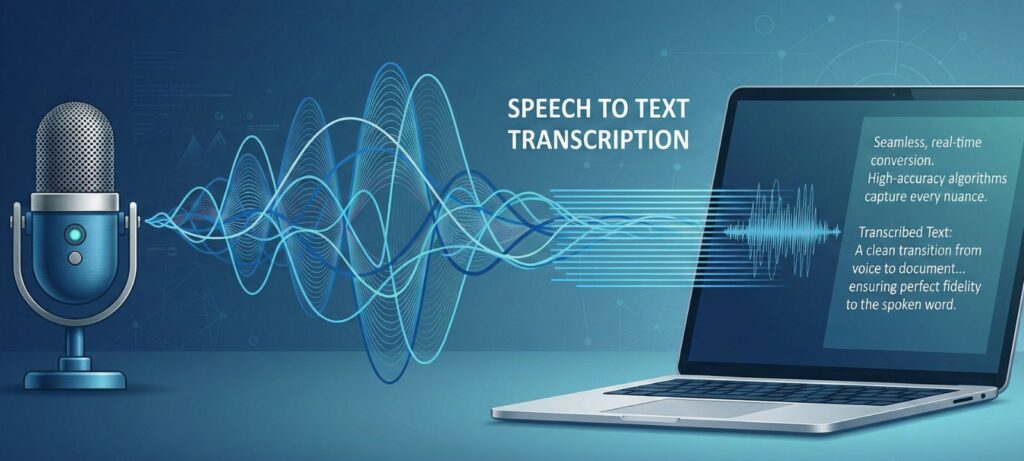
6. Best Open Source Models for Speech & Audio
Voice and audio are now as important as text and images — and this is the easiest open source win you can deploy today. If your goal is transcription, captions, podcasts, meetings, or accessibility, start here.
Whisper (MIT) — Best Open Source Speech-to-Text
Best for: fast transcription, subtitles, meeting notes, multilingual audio
Why it wins: high accuracy, strong noise handling, easy local setup
License: MIT (generally commercial-friendly) — still verify your specific use case
Choose the right model size
tiny / base → fastest (lower accuracy)
small → best balance for most users
medium / large → best accuracy (needs more power)
Our take: Whisper is still the most practical open source speech-to-text pick for real work. It’s accurate, fast, and easy to integrate into workflows for subtitles, content repurposing, or private transcription.
Pro tip (privacy-first): Combine Whisper + a lightweight local LLM to create an offline assistant that summarizes transcripts without uploading audio to the cloud.
7. Popular Open-Weight Models (Not True Open Source)
Not every model you see online is truly open source. Some are better described as “open-weight”: the weights are public, but the licenses come with limits. They are still powerful and widely used, but they are not considered open source AI models in the strict sense.
LLaMA 3.x (Meta License)
What it is: Meta’s large language model series, widely used across the AI community.
License: Community License → not OSI-approved.
Why it matters: LLaMA models power many popular apps and benchmarks, but they are not true open source AI models.
Our take: Excellent for research and tinkering, but be cautious if you plan to commercialize your work.
Falcon 180B (TII License)
What it is: A very large model released by the Technology Innovation Institute.
License: Custom TII terms → allows some use, but with restrictions.
Why it matters: Known for strong performance, especially in scaling benchmarks.
Our take: Impressive model, but less practical than smaller open source AI models due to its license and heavy hardware needs.
DeepSeek V2 (Custom License)
What it is: A Chinese-developed large language model gaining popularity for performance and innovation.
License: Custom terms with responsible-use clauses.
Why it matters: Shows the global spread of AI development.
Our take: Interesting to watch, but the license keeps it outside the category of open source AI models.
Stable Diffusion (OpenRAIL / Community License)
What it is: One of the most famous text-to-image models, used in creative industries.
License: OpenRAIL / Stability AI Community → allows commercial use with restrictions.
Why it matters: Still the most flexible image model available to the public, despite license conditions.
Our take: A must-know for creators, but always double-check the allowed uses if you’re building a business on top of it.
8. Comparison Table of Models
Here’s a quick overview of the most popular open source AI models and open-weight models, with license details and why they matter. Use this table as a reference before deciding which one fits your project best.
| Model | Type | License | Commercial Use | Why Pick It |
|---|---|---|---|---|
| Mistral 7B | Text LLM | Apache 2.0 | Yes | Balanced, efficient, easy to run with Ollama |
| Qwen2.5 | Text LLM | Apache 2.0 | Yes | Multilingual and reasoning strong, available on Hugging Face |
| Phi-3.5 | Small LLM | MIT | Yes | Runs on modest hardware, efficient for everyday tasks |
| Whisper | Speech-to-Text | MIT | Yes | Reliable transcription across many languages |
| Segment Anything | Vision | Apache 2.0 | Yes | Instant object masks, great for creative workflows |
| CLIP / OpenCLIP | Vision-Language | MIT / Apache | Yes | Text ↔ image matching, used in many AI tools |
| Stable Diffusion | Text-to-Image | OpenRAIL / Community | Yes* | Versatile creative model, check license terms before commercial use |
| LLaMA 3.x | Text LLM | Community License | Restricted | Powerful but not a true open source AI model |
Our take: Tables are great for fast comparisons, but they don’t tell the full story. The real decision comes down to your goal + your license risk tolerance. If you want maximum freedom (and fewer surprises), prioritize models under permissive licenses like MIT or Apache 2.0 (e.g., Mistral, Whisper, SAM).
If you want cutting-edge capabilities (e.g., Stable Diffusion or some “open-weight” models), treat them as “powerful but conditional”: use them, but verify the license terms before any commercial/client project. For a quick, reliable way to check what each license allows, see the official Hugging Face licenses guide (link here).
9. How to Run These Models Locally
One of the best things about open source AI models is that you can run them on your own computer without relying on cloud platforms. This gives you more privacy, control, and flexibility. The two simplest ways to get started are with Ollama and with Python using Hugging Face.
Running with Ollama
Ollama is a free tool that lets you pull and run models with one command. It’s the easiest way for beginners to try out LLMs.
Example commands:
Mistral →
ollama run mistralQwen2.5 →
ollama run qwen2.5Phi-3.5 →
ollama run phi3.5
You can explore more options on the official Ollama website.
Running with Python (Hugging Face Transformers)
For more flexibility, you can install Hugging Face Transformers and run models directly in Python.
Basic setup:
Install libraries →
pip install transformers accelerate torchLoad a model with just a few lines of code:
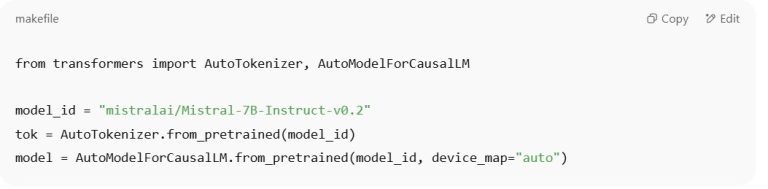
This works with most models, including Mistral, Phi-3.5, and Qwen2.5.
Our take: Running open source AI models locally has two big benefits: you avoid privacy risks from cloud services, and you learn more about how the models work. Ollama is great for quick tests, while Hugging Face gives you full control if you’re building apps or experiments.
No time to install? Start with free AI tools with no login required, then come back here when you’re ready to run models locally.
Tip: If your computer isn’t powerful enough, you can rent GPUs from providers like RunPod to test these models without big upfront costs.
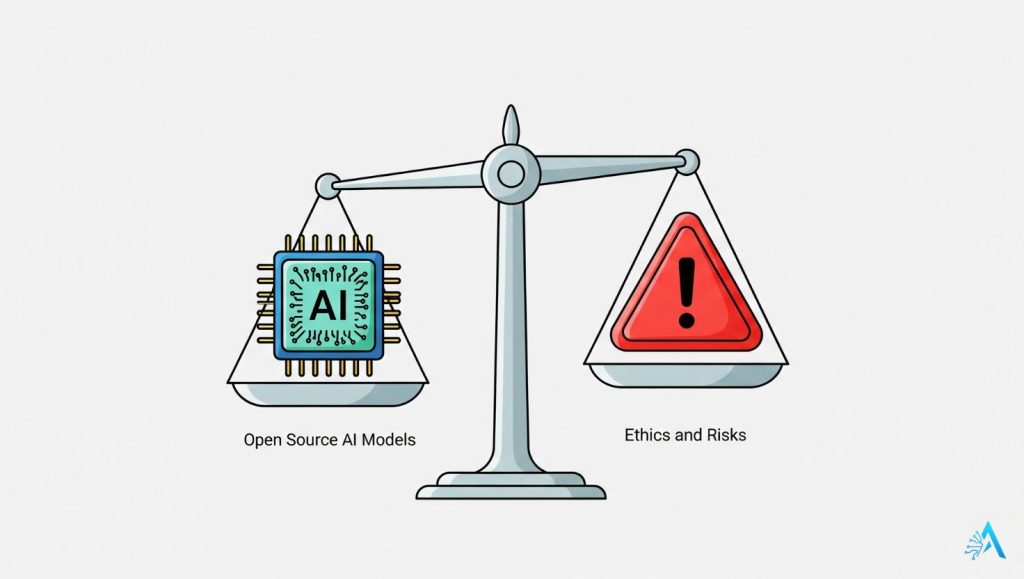
10. Ethical Notes & Risks
Using open source AI models brings freedom and flexibility, but it also comes with responsibilities. Unlike closed systems, you are fully in charge of how the models are used — and that can raise ethical questions.
Data and Bias
Most open source AI models are trained on large public datasets. That means they may reflect social biases, stereotypes, or even incorrect information. Be careful when using them in sensitive areas like hiring, healthcare, or education.
Copyright and Content
Since training data often includes internet content, outputs may unintentionally reproduce copyrighted or sensitive material. This is especially true with creative tools like Stable Diffusion. Always double-check before publishing or commercializing outputs.
Misuse Potential
Because these models are free to download, they can also be misused — for spreading misinformation, creating deepfakes, or bypassing filters. Some licenses (like OpenRAIL) explicitly include clauses to prevent harmful uses.
Our take: Open source AI models give us powerful opportunities, but they are not a free pass. It’s up to us as a community to use them responsibly, respect the license terms, and be mindful of bias and copyright risks. The freedom is valuable, but it should go hand in hand with accountability.
Tip: If you’re planning to use an open source AI model in a product or service, add safeguards like content filters and clear disclaimers. It helps protect both your users and your reputation.
11. FAQ – Quick Answers About Open Source AI Models
Q: Are all models with public weights considered open source AI models?
A: No. Many are open-weight (weights are public) but the license can still restrict commercial use or redistribution. If you’re building anything public or commercial, start with the License Cheat-Sheet.
Q: Can I use Stable Diffusion images commercially?
A: Sometimes — it depends on the specific license/version and your use case. In general, harmful/illegal uses are banned, and some setups may add restrictions. Before client work, double-check the terms in the License Cheat-Sheet.
Q: What’s the easiest way to try open source AI models on a laptop?
A: Use Ollama or LM Studio for the fastest “no friction” setup. If you want the shortest path, follow the steps in How to Run These Models Locally.
Q: Which open source AI models are best for creators?
A: A simple starter stack is: Stable Diffusion (images) + Whisper (captions) + a text LLM like Mistral/Qwen. If you want the fastest choice, go to Quick Picks by Use Case.
Q: Why should I care about licenses if the model is free to download?
A: Because “free” doesn’t mean “free to use however you want.” The license defines what you can do commercially, what you can redistribute, and whether you can use it in client work. If you’re unsure, don’t guess — check licenses first.
Q: Is running models locally actually better for privacy?
A: For sensitive files, local-first is usually the safest default because your data doesn’t need to leave your machine. If you handle private docs, also read Ethical Notes & Risks.
Final take: Open source AI models give you more control, privacy, and flexibility — but the best results come when you follow the right order: pick by use case → verify the license → run locally → scale only if needed.
If you’re building something commercial or handling private files, don’t rush: a clean setup today saves you headaches later.
Recommended next (to get better results fast):
Stop AI From Reading Your Private Data (privacy-first, essential before using models with real documents)
How Voice Assistants Actually Understand You (simple, clear explanation of how these systems work)
Inside the Black Box: How AI Understands Visual Data(deeper dive, perfect if you work with images/vision models)

