
 Last update: February 14, 2026
Some links may be affiliate links. We may earn a commission at no extra cost to you. Details.
1. Why the Rabbit R1 Became the Most Talked-About Pocket AI Assistant
The reason the Rabbit R1 became one of the most searched tech devices recently is simple: it challenges how we think about personal assistants. Instead of behaving like a smartphone or wearable, the Rabbit R1 introduces an action-based system designed to complete tasks for you — not just respond to prompts. That concept alone sparked massive curiosity across the tech world, especially after early hands-on coverage from outlets like Wired.
Compared to voice assistants like Siri or Alexa, Rabbit R1 focuses on completing tasks instead of just answering questions.
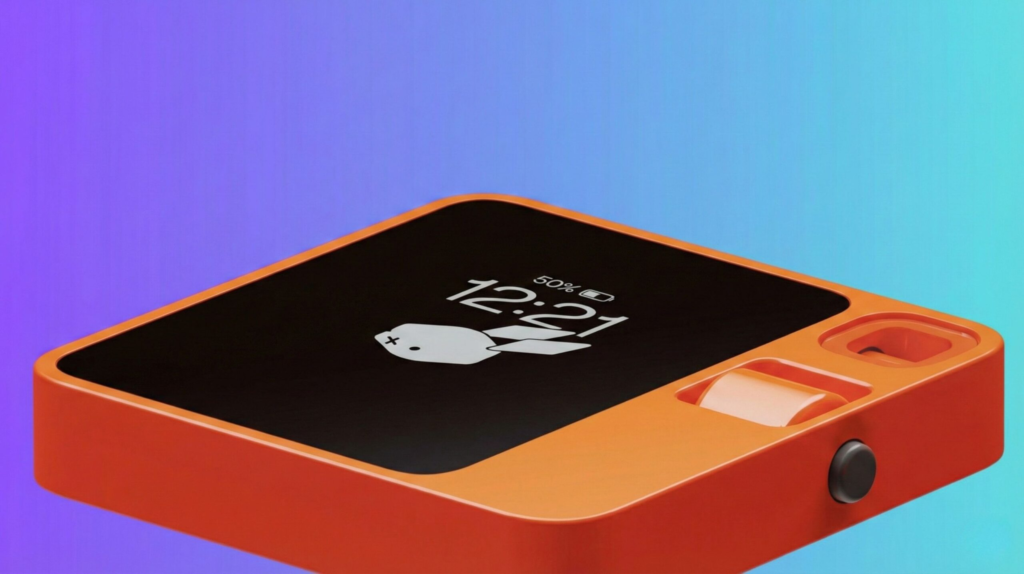
What quickly became clear is that interest in the Rabbit R1 isn’t just about its eye-catching design. The real appeal is its promise: a pocket AI assistant that can handle everyday actions — booking rides, ordering food, sending messages, managing playlists — without relying on traditional apps. In a world overloaded with software, many users are looking for something lighter, faster, and more intuitive, and the Rabbit R1 aims to deliver exactly that.
Another reason the device gained traction online is its shift from “AI that answers” to “AI that acts.” Rabbit OS is built to learn how you use services and then automate them step-by-step, turning the assistant into something closer to an extension of your habits than a standalone gadget.
If you’ve seen the Rabbit R1 trending across tech discussions, that momentum isn’t accidental. It represents one of the first mainstream attempts to replace app overload with a universal AI layer that lives in your pocket and works quietly in the background.
2. The Real Problem the Rabbit R1 Promises to Solve

When people search for a Rabbit R1 Review, they’re often trying to understand whether this device solves a real problem or is just another tech trend. The honest answer is that the Rabbit R1 targets one of the biggest frustrations of modern digital life: app overload. We constantly switch between apps just to complete simple actions — booking a taxi, checking an order, playing music, or replying to a message. Every task requires taps, screens, menus, and attention.
The Rabbit R1 Review trend grew because Rabbit OS takes a different approach. Instead of forcing us to jump between apps, it tries to handle tasks directly through an AI-driven “action engine.” That means the assistant learns how we perform a task and then repeats it autonomously, acting on services the same way a human would.
This idea resonated widely after early coverage from The Verge, which highlighted how the R1 could reduce friction in everyday interactions.
In simple terms, the problem the Rabbit R1 aims to solve is the growing complexity of using smartphones for basic tasks. Users want speed, clarity, and less cognitive load. As we confirmed during our Rabbit R1 Review, the R1 attempts to streamline all this into a single voice-first, action-focused experience — freeing us from constant multitasking and helping us reclaim time.
3. Rabbit R1 Review: What This Device Actually Does
In this Rabbit R1 Review, one of the first things we evaluated was what the device really does beyond the marketing hype. The R1 is built around Rabbit OS, an AI system designed to execute real actions on apps and services without needing the apps installed locally. Instead of opening a ride-hailing app, for example, you simply ask the R1 and the device performs the steps for you — just as you would on your phone.
During our Rabbit R1 Review, we looked closely at the core functions Rabbit OS currently supports: messaging shortcuts, simple booking tasks, media controls, web lookups, and personalized routines. The interaction happens entirely through voice or the small wheel/button interface, which keeps the experience minimal and distraction-free — similar to the evolution we explained in our guide on How Voice Assistants Actually Understand You, where we break down how AI systems interpret and execute real-world commands.
A big part of the excitement comes from the “Large Action Model,” the technology Rabbit claims allows the device to learn and replicate user actions. This was also highlighted in early coverage by The Crunch, which explored how the system differs from traditional assistants like Siri or Google Assistant.
While testing features for this Rabbit R1 Review, it became clear that the goal isn’t to replace your smartphone but to simplify the most repetitive tasks. It acts as a quick-access assistant for real-world actions — something that could evolve dramatically as more services become compatible with Rabbit OS.
4. How to Use the Rabbit R1 in Daily Routines for Maximum Value
One thing that became obvious during our Rabbit R1 Review is that the R1 works best when you use it for short, repetitive tasks — the kind of actions that normally force you to unlock your phone, open three apps, and waste minutes navigating menus. Rabbit OS tries to cut all that friction and turn everyday routines into quick voice-based interactions.
Below is a clear, structured view of how the device performs in real-life situations.
Rabbit R1 Real Use Cases (Practical Examples)
| Daily Task | How Rabbit R1 Handles It |
|---|---|
| Ordering a Ride | You ask verbally; Rabbit OS follows your usual ride-booking pattern and completes the steps. |
| Managing Playlists | Controls music apps through its action engine without opening interfaces. |
| Sending Quick Messages | Executes simple communication tasks for apps you already use. |
| Checking Deliveries or Orders | Fetches updates by repeating the process you normally follow on your phone. |
| Setting Reminders & Quick Notes | Captures instructions with a single command; ideal for hands-free use. |
The real benefit: fewer interruptions
During our Rabbit R1 Review, we realized that the device shines when you want to stay focused. Instead of grabbing your phone and getting distracted by notifications, the R1 lets you perform a single action and move on.
It’s not here to replace your phone — it’s here to reduce unnecessary phone time.
5. Key Advantages, Limitations, and How It Compares to Other AI Assistants
While doing our Rabbit R1 Review, it became clear that the R1 is innovative—but also early in its development. Below is a refined breakdown of what the device does well today, where it struggles, and how it compares to more mature assistants like Siri, Google Assistant, or ChatGPT-based apps.
Rabbit R1 Pros and Cons
| Pros | Cons |
|---|---|
| Unique action-based OS that performs tasks for you | Features still limited compared to a smartphone |
| Reduces screen time and app switching | Some services not yet supported by Rabbit OS |
| Simple, distraction-free interface | Occasional delays when executing actions |
| Affordable entry price compared to high-end AI devices | Battery life varies a lot depending on voice usage |
| Fun, portable form factor with a unique design | Early software bugs expected due to rapid updates |
Rabbit OS vs Traditional Assistants (Quick Comparison Table)
This part of the Rabbit R1 Review helps readers see how the R1 fits into the AI landscape.
| Feature | Rabbit OS | Siri / Google Assistant |
|---|---|---|
| Core Function | Executes actions on external services | Provides answers & simple commands |
| App Dependency | No apps installed; uses service access | Requires installed apps |
| Learning Ability | Learns your tasks via LAM | Limited task learning |
| Best For | Reducing app overload & routine tasks | Quick queries & basic controls |
| Limitations | Still early, fewer integrations | Not action-capable across all services |
What the comparison reveals
From this Rabbit R1 Review, the takeaway is clear:
Strength: Rabbit OS is more capable at doing things.
Weakness: It cannot yet replace traditional assistants for complex or unsupported services.
Ideal use: Quick, repetitive, app-based tasks you want to simplify.
The R1 introduces a new philosophy: an AI world where actions matter more than answers.
6. Ethical Reflection: What a Pocket AI Means for Data, Privacy, and Control

One important part of our Rabbit R1 Review is understanding what it means to carry an AI assistant that performs actions on your behalf. Rabbit OS is built to interact with external services the same way a user would, which naturally raises questions about how your data is handled, what gets stored, and how much control you maintain.
1. Data access vs data ownership
Because the R1 logs into your services to perform actions, it temporarily accesses parts of your accounts.
This isn’t unique—many AI platforms do the same—but it requires users to stay aware of:
which permissions they’re granting,
how often these permissions renew,
and whether they can revoke access at any time.
From our Rabbit R1 Review, we found that Rabbit provides basic controls, but transparency could still improve as the ecosystem grows.
2. The “action engine” introduces new responsibility
Traditional assistants generate answers.
Rabbit OS executes actions.
This means small misunderstandings can have bigger consequences, like:
booking a service incorrectly,
confirming the wrong option,
or triggering an action you didn’t fully intend.
It’s not dangerous, but it requires a new mindset: AI as an active agent, not just a passive assistant.
3. Privacy depends on integrations
As we noted during the Rabbit R1 Review, many features rely on third-party platforms. Each integration creates an additional layer to consider:
• What data does Rabbit see?
• What does the external service see?
• Which logs are stored, and for how long?
Understanding how AI tools handle permissions and data access is becoming essential as assistants move from answering questions to performing actions. If you want a deeper breakdown of how AI systems track behavior and what they actually collect, our guide on Ways AI Online Traking works.
For now, the R1 feels safe for everyday use, but it’s still early. Ethical AI means staying aware — not worried.
The takeaway
A pocket AI like the R1 is exciting, efficient, and genuinely useful—but it also shifts responsibility to the user to understand what the device can do, what access it requires, and how to manage that access over time. Ethical use means staying aware, not fearful.
7. Should You Buy the Rabbit R1? Final Insights + Recommended Alternatives
After completing this Rabbit R1 Review, our impression is that the R1 is not a replacement for your smartphone—but it is one of the most interesting pocket AI devices released so far. If you enjoy experimenting with new technology, want to reduce your daily screen time, and like the idea of an AI that performs real actions instead of giving simple answers, the Rabbit R1 is a fun and surprisingly practical choice.
However, if you expect flawless performance, full app integration, or advanced multimodal AI like ChatGPT or Gemini, the R1 may feel limited. It’s an early product with great potential but still building its ecosystem.
Who should consider buying it
The R1 is ideal if you:
want a lightweight AI companion for quick tasks,
dislike constant app switching on your phone,
enjoy voice-first interaction,
appreciate simple, distraction-free devices.
Who may want to wait
The R1 may not be the best fit if you:
need complex task handling,
rely heavily on unsupported services,
want deep conversational AI,
prefer polished, mature ecosystems.
Our Rabbit R1 Review shows that updates matter—its value will improve over time as Rabbit OS evolves.
Good alternatives to consider
If you like the idea behind Rabbit R1 but want stronger AI models or more features, these alternatives might suit you:
ChatGPT app (powerful multimodal AI, smartphone-based)
Humane AI Pin (more advanced but more expensive)
Google Assistant / Siri with automation shortcuts
Wearable AI with built-in LLMs (varies by brand)
You can link to your internal reviews, such as:
Final Verdict
In this Rabbit R1 review, the conclusion is clear: the device isn’t perfect yet, but it represents one of the first real shifts toward AI that does things for you instead of just talking to you. That distinction matters.
The Rabbit R1 isn’t trying to replace your phone — it’s trying to change how you interact with technology altogether. And while the ecosystem is still evolving, its action-based approach signals where personal AI is likely heading next.
If you value simplicity, automation, and early access to emerging tech trends, the Rabbit R1 is worth exploring — not as a finished product, but as a glimpse into the future of everyday AI.
FAQ
Q: Is the Rabbit R1 better than a smartphone assistant?
A: For traditional tasks, not yet. But the Rabbit R1 focuses on automation rather than app navigation, which makes it fundamentally different from phone-based assistants.
Q: Is Rabbit R1 worth buying right now?
A: It depends on expectations. Early adopters interested in emerging AI technology will likely enjoy it, while users wanting a polished all-in-one replacement device may prefer to wait.
Q: Can the Rabbit R1 actually perform tasks automatically?
A: Yes. Its system is designed to learn user behavior and complete multi-step actions, such as bookings or requests, without requiring manual navigation.
Q: Does Rabbit R1 replace apps completely?
A: Not entirely. Instead of replacing apps, it acts as a layer that interacts with services on your behalf, reducing the need to open individual apps.
Q: Is the Rabbit R1 safe to use with personal data?
A: Like any AI system connected to online services, privacy depends on permissions and usage habits. It’s best to avoid sharing highly sensitive data until platforms mature.
Q: Who should buy the Rabbit R1?
A: It’s best suited for tech enthusiasts, productivity experimenters, and users curious about the next generation of AI-driven devices.
Q: What makes Rabbit R1 different from other AI assistants?
A: Most assistants answer questions. Rabbit R1 is built to execute tasks. That shift from conversation to action is its defining innovation.
If you want to stay ahead in the fast-moving world of AI devices — not just read about them but actually understand how they fit into real life — these guides from AI Digital Space expand naturally on what we’ve covered:
→ ChatGPT vs Gemini: Which One Wins in Daily Use?
→ Best AI Gadgets on Amazon & TikTok – Smart Devices We’ll Actually Use
→ AI Note Taked Devices vs App: Why Hardwere Is Winning In 2026
Each explores a different angle of the same big question: how to choose AI tools that genuinely improve your daily workflow, instead of just adding another flashy gadget to your tech stack.