

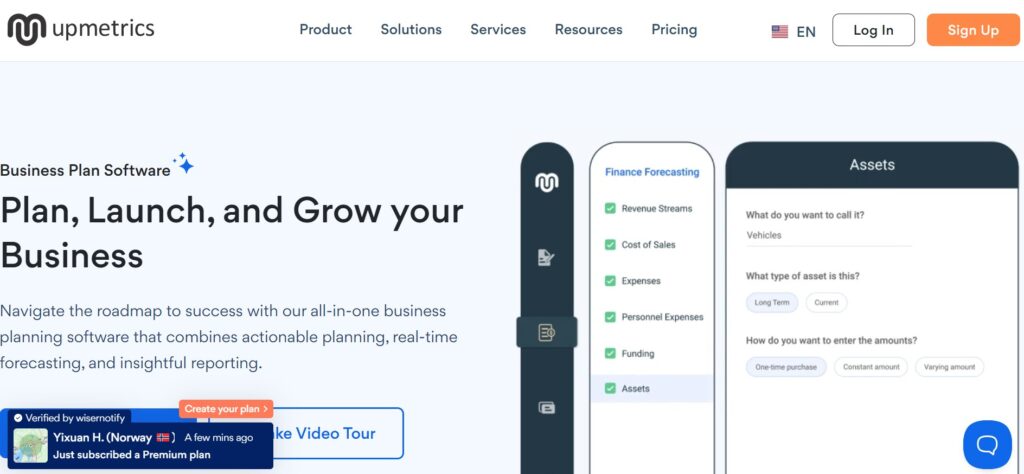
Here’s a refined and honest look at what real users on G2, Capterra, and other platforms are saying about Upmetrics AI:
 What They Love
1. Easy‑to‑use templates & clear structure
A founder on Capterra says, “it breaks the plan into manageable parts,” adding that “AI suggestions made it easier to get started and gave me confidence that I was on the right track.”
From G2: “The AI co‑pilot really works as a partner … helps with writing but with financial forecasting too.”
2. Clear instructions & guidance
A G2 reviewer praised the “step‑by‑step guidance and AI assistant helped me write the plan in just a day, saving me time to focus on other aspects.”
Another on Capterra raves: “Upmetrics made our business plan very easy and trackable … financial forecasting is great; additions to AI tools are a great plus for us.”
3. Major time savings
On G2: “Saves a lot of time in the business planning and forecasting activities … making us look well prepared.”
Another user: “Easy and quick to navigate and the end result is well formatted to share with others.”
 What Needs Improvement
1. AI outputs sometimes need polishing
A G2 user notes: “Sometimes the ideas from its AI engine could be too generic, but they offer a good starting point.”
Another says there are “still some glitches … needs a very good driver.”
2. Advanced features locked behind paid plans
Multiple reviewers on Capterra and G2 mention that certain formatting, exports, or integrations aren’t available on lower tiers — “Some features were not included in the plan I selected so do read carefully the differences between plans.”
 Reddit & Forum Insights
While explicit Reddit threads on Upmetrics are rare, broader discussions reflect similar observations about AI-powered business plan tools: users appreciate the time savings and structured formats but often report that manual refinement is needed to personalize the output.
 Takeaway
Real users consistently praise Upmetrics AI for its intuitive templates, easy-to-follow guidance, and time‑saving capabilities—especially useful for solo founders and small business owners. However, expect to tweak the AI‑generated text and upgrade to a paid plan for polished exports and full formatting control.
When it comes to business planning, too many tools throw around vague terms like “AI-powered” or “smart assistant” — but what actually matters is what the tool does for you. Thankfully, Upmetrics AI delivers real, practical features that make a difference for founders and freelancers alike.
 AI-Assisted Business Plan Writing
Forget staring at a blank screen. Upmetrics AI gives you dynamic suggestions and content generation that actually fits your business idea. It guides you through writing each section — from executive summaries to market analysis — with clarity and structure. This makes it especially helpful for first-time founders or side hustlers who aren’t sure where to start.
 Want a deeper look into tools that actually write for you? Check our TOP AI Tools here.
 400+ Templates Tailored to Your Industry
Instead of forcing everyone into a one-size-fits-all format, Upmetrics AI offers over 400 templates designed for different industries. Whether you’re launching a SaaS product, opening a coffee shop, or building a consulting agency, there’s a template that speaks your language — and your audience’s expectations.
 Visual Forecasting Tools (No Spreadsheet Headaches)
Numbers matter. But not everyone speaks Excel. That’s why Upmetrics AI includes built-in visual forecasting tools that help you map out your revenue, costs, and profit projections. You just input your data, and it does the hard work of turning it into clean, investor-ready charts.
This is a huge win for non-finance folks who want to build credible financials without hiring an analyst.
 Export to PDF or Shareable Pitch Deck
Once your plan is polished, you can export it directly to PDF or create a visually stunning pitch deck. This is perfect for sharing with investors, banks, or partners — no need to build a presentation from scratch.
And yes, the formatting actually looks professional (no broken layouts or weird spacing issues, like with some free tools).
Final Thought on Features
Each feature in Upmetrics AI is built with a single goal: making business planning easier, faster, and more effective — especially for people who don’t have a business degree or a team behind them. These aren’t just buzzwords; they’re actual tools that save time and reduce friction when you need to focus on launching, not formatting.
Curious how Upmetrics AI actually works once you’re inside the dashboard? While we haven’t tested it directly, we reviewed their official documentation, user feedback, and walkthroughs to break it down clearly.
Here’s what the typical flow looks like — and why it feels built for everyday users, not just MBAs.
 Step 1: Choose a Business Template
When you log in, Upmetrics AI invites you to pick from over 400+ pre-built templates tailored to different industries. Whether you’re planning a food truck, a tech startup, or a fitness studio, there’s a format ready to go — no formatting stress.
Templates are structured to match what investors, banks, or grant programs usually expect.
Step 2: Answer Guided Prompts
Once your template is selected, the platform walks you through each section of the business plan using simple prompts. No jargon. Just clear, fill-in-the-blank-style questions that help you articulate your business idea.
For example:
Who is your target audience?
What problem are you solving?
What’s your unique value proposition?
You can also bring in a team member to collaborate — great for small business co-founders or advisors.
Step 3: Let AI Draft the Content (Edit Tone, Length, Style)
Here’s where Upmetrics AI does the heavy lifting. Based on your answers, the AI auto-generates content for each section of the plan. You can adjust the tone (formal, persuasive, concise) and length to match your style.
The key here: it’s not generic fluff. It’s tailored to your business and industry, so you’re not starting from scratch — but you still stay in control of the message.
 Tip: Many users recommend reviewing the AI’s output and tweaking it to sound more personal or brand-aligned.
Step 4: Add Financial Projections (Manual or AI-Assisted)
Next up: numbers. You can input financial data manually or let the system guide you with AI-powered forecasting tools. Just add your estimated revenue, expenses, and pricing structure — and Upmetrics AI builds the visuals: profit/loss charts, breakeven analysis, and cash flow projections.
Step 5: Export or Share the Plan
Once your plan is polished, you can export it as a PDF, create a shareable web link, or generate a pitch deck directly within the platform.
This makes it incredibly easy to send to investors, loan officers, or collaborators — without the hassle of reformatting in PowerPoint or Word.
Quick Recap: Upmetrics AI Workflow
Select a business-specific template
Answer easy prompts to describe your idea
Use Upmetrics AI to draft your plan
Add your financials — or let the AI assist
Export as a PDF or deck and start pitching

You’ve got the tool — now here’s how to really make it work for you. Whether you’re using the free version or diving into the premium plan, these tips will help you squeeze every bit of value out of Upmetrics AI.
Use Prompt Formulas to Guide the AI
The AI is smart, but it’s only as good as the input it gets. Instead of writing vague answers like “we help people eat healthier,” try using a proven prompt formula:
[We help] + [who] + [do what] + [how it’s different or better]
Example: We help busy working parents eat healthier by delivering personalized, chef-prepared meals in under 30 minutes.
Feeding better prompts = getting better, more investor-ready output.
 Prep Key Numbers Before You Start Forecasting
To save time and get cleaner forecasts, prepare the following in advance:
Average product/service price
Estimated monthly sales
Fixed and variable costs
Salaries or team expenses (if any)
Customer acquisition costs
This makes the AI’s financial projections smarter — and ensures your plan reflects real, usable data.
Unlock Hidden Export Options
Most users know about the PDF export, but Upmetrics AI also lets you:
Export to PowerPoint (great for pitch meetings)
Create a live, shareable link for easy feedback
Use version history to duplicate plans and build variations
Even on the basic plan, these tools can help you make a professional impression.
 Make It Look Investor-Ready on Any Plan
On a budget? You can still polish your plan by:
Using Canva to reformat exported text into branded visuals
Editing tone/style in the AI settings before generating
Leveraging Upmetrics’ layout structure even if copy/pasting into Google Docs
 Pro tip: Combine Upmetrics AI with a free design tool like Canva to turn your export into a visually striking investor deck — no designer needed.
Not every tool fits every user — and Upmetrics AI is no exception. While it’s incredibly helpful for many founders and freelancers, it’s not the perfect match for everyone.
Here’s who gets the most value from it — and who might want to look elsewhere:
Great For
Startups with no prior business plan
If you’re just getting started and don’t know where to begin, Upmetrics AI gives you a clear roadmap. It’s structured, smart, and removes the intimidation of a blank page.
Freelancers pitching clients or services
Need a quick, well-presented plan to win over a new client or land funding? The platform’s AI writing and pitch-ready exports give freelancers a strong edge without hiring outside help.
Small businesses raising money
Whether you’re applying for a small business loan or pitching an investor, Upmetrics AI helps you present professional forecasts and a clear narrative — fast.
 Not Ideal For
Advanced accountants or CFOs
If you need granular control over financial formulas, tax modeling, or multiple entity planning, Upmetrics AI may feel too simplified. It’s great for fast modeling — but not full-blown financial engineering.
Those needing free-only tools
While it offers a free trial, most key features (like exporting and advanced forecasting) are behind a paywall. If you’re looking for a 100% free tool, this might not be the right fit.
Users who won’t double-check AI drafts
As smart as the tool is, AI-generated content still needs human review. If you plan to copy-paste without edits, your business plan could feel generic or incomplete. Reviewing and personalizing is key to making it investor-ready.
So, is Upmetrics AI worth trying in 2025?
If you’re someone who values speed, clarity, and just wants to get the business plan done, this tool checks a lot of boxes. Based on our research, user reviews, and platform features, it’s clear that Upmetrics AI isn’t just hype — it’s genuinely useful for early-stage entrepreneurs, freelancers, and small business owners who need something professional without overcomplicating things.
The strengths? Fast to set up Super easy to use Smart forecasting tools that take the edge off financial planning Polished outputs ready for investors, clients, or banks
But let’s keep it real.
Like most AI tools, Upmetrics AI still needs a human touch. You’ll get a strong first draft — but you’ll still need to review, edit, and personalize the content if you want it to stand out. Also, while there’s a free trial, the features that really matter (like exporting and collaboration) live behind a paywall.
Still, compared to the time (and money) you’d spend building a plan from scratch or hiring someone else to do it, the value is clear — especially if your goal is to move forward fast and professionally.
 Ready to see what it can do?
 Try Upmetrics AI here →
We’re all for tools that actually help — and Upmetrics AI feels like one worth having in your corner.
If you’re considering Upmetrics AI, chances are you’ve got a few lingering questions. Here are the most common ones people ask — answered in plain English.
 Is Upmetrics AI really free?
 There’s a free trial that lets you explore the platform, but to export your business plan or access advanced features (like pitch decks and financial tools), you’ll need a paid plan. It’s transparent, but not fully free forever.
Can I use Upmetrics AI without any business experience? Yes! That’s exactly who it’s built for. Whether you’re a first-time founder, freelancer, or side hustler, the guided prompts and templates make it easy to follow without needing a business degree.
What kind of businesses can use it? Pretty much anything — e-commerce, SaaS, service-based businesses, cafes, local shops, agencies. With over 400 industry-specific templates, you’ll likely find one that fits your niche.
Does the AI write the entire plan for me? It generates solid drafts for each section based on your inputs, but it’s still best to review and personalize the text. Think of it as a very smart co-writer, not a magic button.
Can I share the plan with others? Yes. You can export as PDF, generate a shareable link, or even create a pitch deck. Great for teams, investors, or advisors — even on the lower plans.
Will my financial projections be accurate? The AI helps you estimate, but it relies on the numbers you give it. If your inputs are solid, the forecasts will look great. But it won’t replace a full accountant if you need deep financial planning.
Do I need to download anything? Nope! Upmetrics AI is fully web-based. You can access your business plan from anywhere, anytime.
Can I collaborate with team members? Yes — collaboration is built in. Invite team members or partners to view or edit your plan directly in the platform.
 Still not sure? The best way to find out is to try it out for yourself.