

 Published on: January 8, 2026
Affiliate Disclaimer:
Some of the links in this post are affiliate links. This means we may earn a small commission if you click through and make a purchase, at no extra cost to you. We only recommend tools we truly believe offer value.
1. From Ideas to Visual Stories: Why This Is Hard for Most Creators
We’ve all been there.
You have a solid idea in your head — maybe for a video, a presentation, a tutorial, or a pitch — but when it’s time to turn that idea into something visual, everything suddenly feels messy.
The idea makes sense to us, yet explaining it visually feels harder than expected. Text feels flat. Slides look generic. Sketching or designing from scratch takes time we don’t really have.
Most of us aren’t struggling because we lack creativity. We’re struggling because turning ideas into clear visual stories requires structure, not just inspiration.
This is exactly where AI visual storytelling starts to matter — not as a replacement for creativity, but as a way to translate ideas into visuals that actually communicate what we mean.
In this guide, we’ll look at why this gap exists, what usually goes wrong, and how tools like Gamma help us move from scattered thoughts to visual stories that feel clear, human, and intentional — even if we don’t have design skills.
If you want to strengthen your visual storytelling skills beyond tools, Directing the Story is a classic reference. It explains how professionals think in scenes, shots, and visual flow — a mindset that pairs perfectly with modern AI storyboarding tools.
2. Why Text, Slides, and Templates Usually Fail
At some point, most of us try the “easy” route.
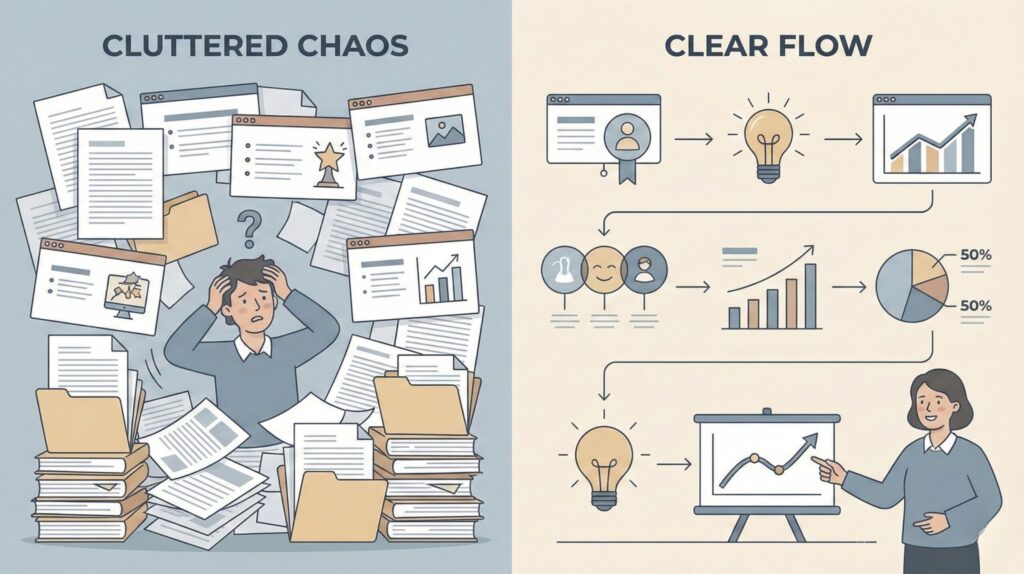
We open a document, write everything down, or drop our ideas into a slide template and hope it will come together.
The problem is that text explains, but it doesn’t show.
And classic slides are built to present information, not to guide a narrative — which is why they often fall short in AI visual storytelling workflows.
This is where ideas start to lose impact. We jump between bullet points, long paragraphs, and generic layouts, forcing the reader or viewer to do all the mental work. Instead of guiding them visually, we overwhelm them — the exact opposite of what effective AI visual storytelling is meant to do.
Research on how people process information confirms this gap. Studies on visual cognition show that humans understand and remember ideas better when text and visuals are intentionally combined, not stacked one after the other — something the Nielsen Norman Group has documented extensively in its work on visual hierarchy and cognitive load Nielsen Norman Group.
Templates don’t really solve this either. They give us a structure, but not meaning. We end up adapting our ideas to the template, instead of shaping visuals around the idea itself.
This is the moment where many creators feel stuck:
they know what they want to say, but they can’t find a simple way to guide someone through it visually — without becoming a designer.
3. How Gamma Approaches AI Visual Storytelling Differently

Instead of starting from layouts or slides, Gamma starts from meaning.
That’s the key difference — and it changes how AI visual storytelling actually comes together.
Most tools ask us to decide how things should look before we’re even clear on what we want to say. Gamma flips this logic. We begin with an idea, a short outline, or even rough notes, and the tool helps us organize that content into a visual flow that makes sense from start to finish.
This is where AI visual storytelling becomes practical. The AI isn’t guessing what story to tell; it’s helping us structure the story we already have, then pairing it with visuals that support each step of the narrative.
With Gamma, we’re not forced into rigid templates. Each section adapts to the content, creating natural breaks, visual rhythm, and hierarchy — the parts of AI visual storytelling that usually take the most time when working manually.
What matters is that we stay in control.
We can edit the structure, rewrite sections, adjust visuals, or simplify the flow at any point. The AI supports the process, but it doesn’t override our intent or voice.
This approach works especially well for creators, educators, and teams who want AI visual storytelling to feel clear, guided, and human — without spending hours tweaking design details.
In the next section, we’ll walk through how this looks in practice — step by step — starting from a simple idea and turning it into a complete visual story.
| Aspect | How Gamma Handles It | Why It Matters for Storytelling |
|---|---|---|
| Starting point | Ideas, notes, or short outlines | Reduces friction at the very beginning |
| Structure generation | AI organizes content into logical sections | Creates narrative flow automatically |
| Visual layout | Adaptive layouts instead of fixed templates | Visuals support meaning, not decoration |
| Editing control | Full manual editing of text and structure | Keeps humans in control of the story |
| Collaboration | Comments and shared editing | Useful for teams, clients, and feedback loops |
| What it’s not | Advanced design or video editing tool | Sets realistic expectations early |
Start from your idea, not a blank slide — no design skills needed.
4. Step-by-Step: Build a Visual Story with Gamma in Minutes
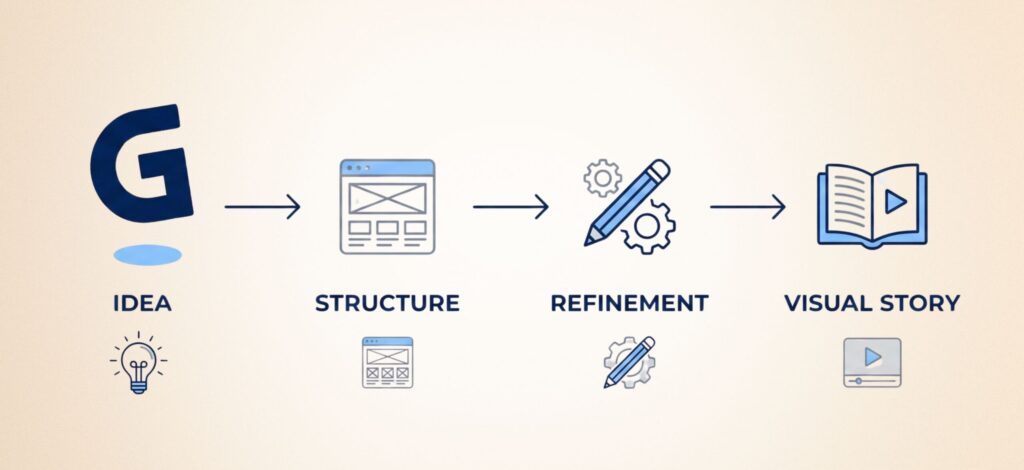
When we open Gamma for the first time, it helps to think less like a designer and more like a storyteller. The goal isn’t to “make slides” — it’s to guide someone from one idea to the next without friction, which is the core of effective AI visual storytelling.
Here’s a simple, practical way to approach it.
First, we start with a clear starting point.
In Gamma, this usually means choosing to create content from an idea or short outline. We don’t need a finished script — a few sentences that explain what this story is about are enough to kick off an AI visual storytelling workflow.
Next, we give the AI direction, not details.
Instead of writing long paragraphs, we describe the flow: what comes first, what needs explaining, and what should feel like a conclusion. Gamma uses this input to create a visual structure that already follows a narrative logic, which is exactly what AI visual storytelling is meant to support.
Then, we review the generated structure before touching visuals.
This step matters. We check the order of sections, rename titles so they sound natural, and remove anything that feels repetitive. If the story reads well in plain text, the visuals will work too — a good rule of thumb in AI visual storytelling.
Once the flow feels right, we refine one section at a time.
We shorten dense parts, split ideas that feel heavy, and let visuals support the message instead of competing with it. Gamma makes this easier because changes update the layout automatically, keeping the AI visual storytelling process fluid.
To make this easier to follow, here’s the workflow we usually stick to:
| Step | What to Do in Gamma | What to Focus On |
|---|---|---|
| 1. Start from an idea | Create content from a short description or outline | Clarity of intent, not polished wording |
| 2. Shape the flow | Let Gamma organize sections automatically | Does the order feel logical? |
| 3. Edit structure first | Rename sections and remove weak parts | Natural language and rhythm |
| 4. Refine visuals | Adjust visuals only after the story reads well | Support the idea, don’t decorate it |
By working in this order, we avoid the most common mistake: spending time on visuals before the story is clear. Gamma works best when we let it handle layout, while we focus on meaning.
5. Smart Tips to Make AI Visual Stories Feel Human
When people say “this feels too AI-made,” they’re usually not talking about the visuals.
They’re reacting to the lack of rhythm, intention, and voice.
Most AI tools do a good job at structure. What they can’t do on their own is decide what deserves attention and what can be simplified. That part is still on us — and it doesn’t take long.
Before looking at specific tips, it helps to reframe the goal. We’re not trying to make the story more complex or more polished. We’re trying to make it easier to follow, as if we were walking someone through the idea in person.
That’s why small, human decisions matter more than design tweaks. A clearer title, a shorter section, or one concrete example can change how the entire story is perceived.
Once we approach it this way, the rest becomes much simpler.
The table below breaks down a few practical adjustments that consistently make AI visual stories feel more natural, more readable, and more “ours” — without adding extra work.
| Tip | Do This | Avoid This | Why It Works |
|---|---|---|---|
| One idea per block | Split dense sections into smaller beats | Packing 3–4 points into one screen | Keeps rhythm and helps readers stay oriented |
| Rename headings | Use titles we’d actually say out loud | “Introduction”, “Key points”, “Conclusion” | Instantly makes the story feel more human |
| Add one real example | Include a short use case early (YouTube, pitch, tutorial) | Staying abstract for too long | Examples increase trust and shareability |
| Break perfect symmetry | Vary section length and layout slightly | Same layout and length for every section | Natural variation reduces the “AI feel” |
| Do a 30-second clarity check | Ask: “Would a friend get this in 30 seconds?” | Assuming visuals fix unclear thinking | Clarity is what makes a story memorable |
To finish this section, we can do one simple “human pass” that takes less than a minute:
read the story once from top to bottom
shorten anything that feels too polished or repetitive
rename one or two headings to sound like us
add one real example early
6. Ethical Use of AI in Visual Storytelling
Using AI to build visual stories is powerful — and that’s exactly why we need to slow down for a moment and use it responsibly.
The first thing to be aware of is authorship.
AI can help us structure, visualize, and speed up our work, but the ideas, opinions, and decisions should still come from us. If a visual story communicates a message, we’re accountable for it — not the tool.
The second point is accuracy and context.
AI-generated visuals can sometimes simplify complex topics too much or create connections that weren’t intentional. Before sharing or publishing, it’s worth checking that the story still reflects reality, nuance, and the audience’s expectations. Organizations like the Partnership on AI offer practical guidance on responsible AI use and how to avoid misleading outputs, especially when communicating publicly or professionally (a good starting point is their Responsible AI Framework).
There’s also the question of originality.
AI tools often rely on patterns learned from existing content. This means it’s our responsibility to avoid producing visuals that feel derivative or misleading.
In AI visual storytelling, adding personal examples, context, or real-world use cases helps keep the story grounded and respectful of original creators.
Finally, transparency matters.
When AI plays a significant role in how a story is built — especially in professional or educational contexts — being open about it builds trust. Most people aren’t opposed to AI; they simply want to understand how it’s being used.
Used thoughtfully, AI visual storytelling doesn’t replace creativity.
It supports it — as long as we stay intentional, honest, and aware of
7. AI Visual Storytelling FAQ
Q: What is AI visual storytelling?
A: It’s the use of AI tools to help turn ideas or text into structured visual narratives that are easier to understand and follow.
Q: Do I need design skills to use AI visual storytelling tools?
A: No, most tools are built for non-designers and focus on structure and clarity rather than manual design work.
Q: Is AI visual storytelling the same as making presentations?
A: Not exactly — presentations focus on slides, while AI visual storytelling focuses on guiding the viewer through a narrative.
Q: Can AI visual storytelling replace human creativity?
A: No, AI supports structure and speed, but the ideas, message, and judgment still come from us.
Q: Is AI visual storytelling safe to use for work or clients?
A: Yes, as long as we review accuracy, respect originality, and stay transparent about how AI is used.
If this guide helped you understand how AI visual storytelling fits into real creative workflows, you may want to explore a few related topics where creators often struggle with clarity, consistency, and visual quality. We’ve covered these in depth in the posts below:
→ AI Tools for Designers
→ Midjourney Prompt Hacks – Get Better Images with Smarter Prompts
→ How to Create AI Images That Don’t Look Fake (Simple Fixes)
Each of these goes deeper into practical techniques, common mistakes, and real use cases — helping us move from experimenting with AI visuals to using them confidently, intentionally, and with better results.