
 Published on: January 28, 2026
Affiliate Disclaimer:
Some of the links in this post are affiliate links. This means we may earn a small commission if you click through and make a purchase, at no extra cost to you. We only recommend tools we truly believe offer value.
1.Why AI Note-Takers Are Suddenly Everywhere in Work Meetings
It’s becoming a familiar moment.
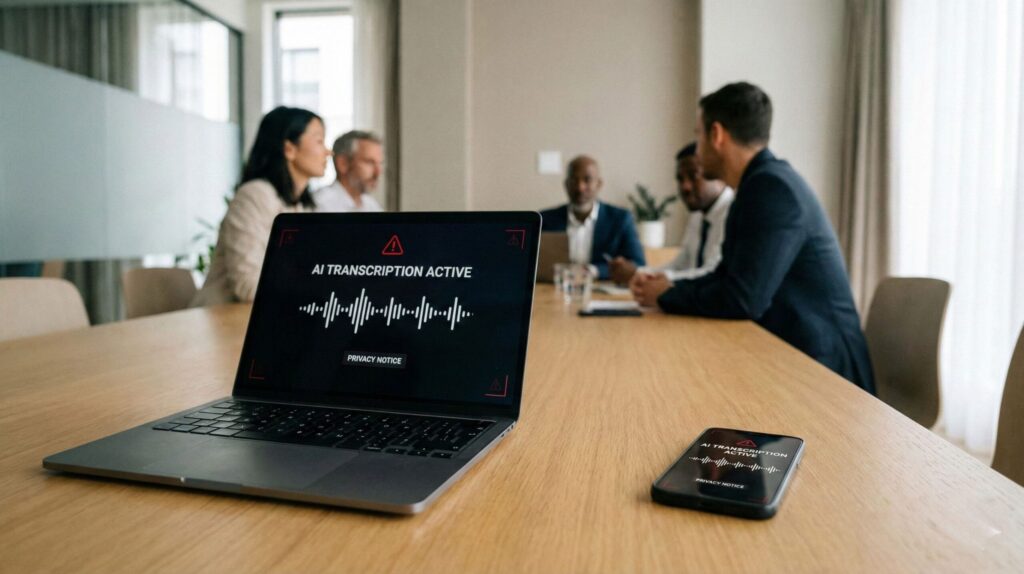
You join a work call, and before anyone says a word, a small notification appears: “This meeting is being recorded and transcribed.”
Sometimes no one explains it. Sometimes no one even asked.
Most of us have already experienced this — even if we didn’t stop to think about it.
AI note-takers at work didn’t spread because people love new tools. They spread because meetings are exhausting, notes get lost, and everyone is under pressure to remember everything without slowing down. From managers to freelancers, the promise sounds reasonable: fewer distractions, automatic summaries, and clearer follow-ups powered by AI meeting note takers.
What’s changed recently is how invisible these tools have become. AI meeting assistants now join calls automatically, capture conversations in the background, and generate transcripts without interrupting the flow. In many teams, this feels normal — even helpful. The convenience is real, and so is the time saved.
But that normalization is exactly why new questions are starting to surface.
We’re no longer talking only about productivity. We’re talking about meeting transcription privacy, about what is being recorded, where that data goes, and who actually controls it inside shared workspaces. Concerns around workplace AI privacy often appear only after transcripts show up in inboxes or collaboration tools people didn’t expect.
This guide is here to slow things down and explain what’s really happening behind AI note-takers at work — in simple terms. We’ll look at how these AI meeting assistants operate, what control workers and freelancers realistically have, and how to use them without giving up more data than intended or ignoring the growing AI meeting assistants risks.
Along the way, we’ll reference common AI note-taking tools — not to push them, but to help you recognize what’s already running in your meetings and which settings are actually worth checking.
If you’ve ever thought, “Wait, when did this start?” — you’re in the right place.
2. The Quiet Problem Nobody Explains: Who Is Actually Being Recorded?

At first, AI note-takers at work feel harmless. A tool joins the call, listens quietly, and sends a neat summary afterward. Most of us assume it’s only there for the organizer or the company, helping them keep track of decisions and action items.
But this is where things start to get blurry.
When AI note-takers at work are active, everyone in the meeting is being recorded — not just the person who turned the tool on. That includes colleagues, external partners, freelancers, and sometimes even clients who were never clearly informed in advance. This is a key part of the broader AI meeting assistants risks many teams overlook.
What many people don’t realize is that consent is often implicit, not explicit. Joining the call is treated as agreement, even when no one explains what the AI meeting note takers are capturing, how long meeting transcripts are stored, or who can access them later. This lack of clarity is at the core of growing concerns around meeting transcription privacy.
To make this clearer, here’s how recording usually works in practice:
| Situation | What’s recorded | What people assume |
|---|---|---|
| Internal team meeting | Voices, names, discussion context | “It stays inside the company” |
| Client or partner call | Full conversation + action items | “Only notes are saved” |
| Freelancer or interview call | Voice data + speaking patterns | “This is just for recap” |
The gap between what’s recorded and what people believe is where discomfort starts.
Most AI note-taking tools don’t just create a summary. They often store:
Full transcripts
Speaker labels
Timestamps and conversation context
Sometimes metadata about how the meeting unfolds
From a legal and ethical perspective, this is not a minor detail. In the US, voice recordings and meeting transcripts are considered personal data, and their use requires a clear legal basis and transparency. The FTC Board explains this clearly in its guidance on consent and recordings: check out their page for furthe discovery.
The key point isn’t to create fear — it’s to restore awareness.
Once we understand who is included in these recordings, the next question becomes unavoidable: what actually happens to that data after the meeting ends?
That’s exactly what we’ll unpack next, step by step, without technical overload.
3. How AI Note-Takers Really Work Behind the Scenes
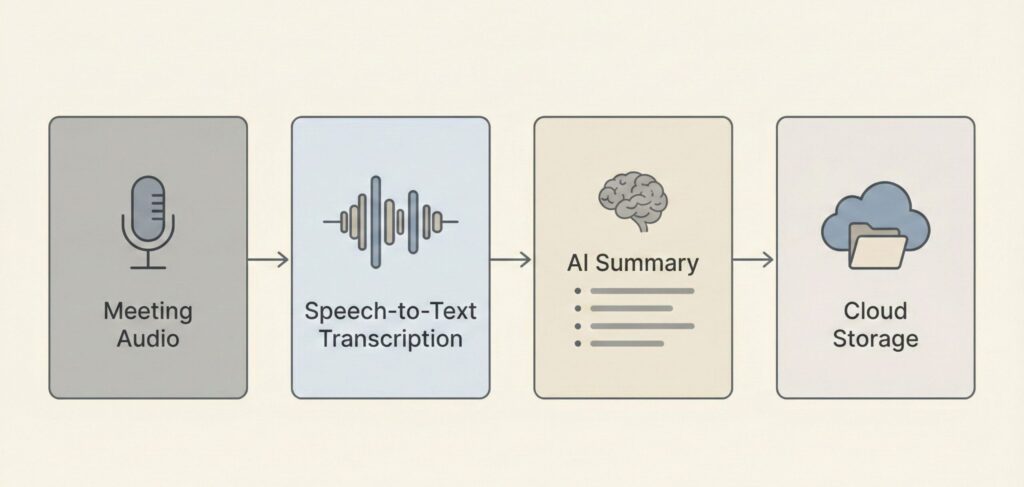
Most AI note-takers feel simple on the surface. They join a meeting, stay quiet, and send a summary afterward. What’s easy to miss is that several steps happen in sequence, often across different systems.
Understanding this flow helps explain why privacy questions matter — and where control can be lost.
Here’s what usually happens when an AI note-taker is active in a work meeting:
| Step | What happens | Why it matters |
|---|---|---|
| 1. Audio capture | The tool records every voice in the meeting | This is raw voice data, not just notes |
| 2. Transcription | Speech is converted into text in near real time | Errors and context still matter |
| 3. Speaker labeling | Voices are linked to names or roles | This creates personal data profiles |
| 4. AI summarization | Key points, tasks, and decisions are generated | AI decides what matters most |
| 5. Storage & sharing | Transcripts and summaries are saved or shared | Access rules vary widely |
What’s important to notice is that the summary is only the final output.
Behind it sits a full transcript, often stored longer than people expect.
Another detail many overlook: these systems don’t just listen — they analyze. Over time, AI note-takers can learn:
how often people speak
who interrupts
how decisions are framed
which topics trigger follow-ups
That doesn’t automatically mean misuse. But it does mean that meetings become data, not just conversations.
This explains why some teams feel comfortable using these tools — while others start asking questions only after something feels off.
In the next section, we’ll move from understanding to action and look at what you can actually control — whether you’re an employee, a freelancer, or someone invited into a recorded meeting without much warning.
4. What You Can (and Can’t) Control as an Employee or Freelancer
Once we understand how AI note-takers at work actually function, the next question is natural:
“What control do I really have?”
The honest answer is some — but not all. Control over AI meeting note takers depends on several factors: your role in the meeting, the specific tool being used, and who owns the account that enables recording and transcription. That’s why experiences with AI meeting assistants can feel inconsistent from one call to the next.
Still, there are practical steps we can take right now to protect ourselves, especially when it comes to meeting transcription privacy and reducing unexpected data sharing in professional settings.
What matters is understanding where workplace AI privacy boundaries realistically exist — and where they don’t.
Here’s a clear breakdown of what’s usually within reach when AI note-takers at work are active — and what typically isn’t.
| What you want to control | Usually possible? | What to do |
|---|---|---|
| Knowing you’re being recorded | Yes | Ask at the start or check the meeting invite details |
| Stopping the recording | Sometimes | Request a pause for sensitive topics |
| Access to the transcript | Depends | Ask who can view or export it |
| How long data is stored | Rarely | Check company or tool retention policies |
| Opting out entirely | Case by case | Raise it early, especially as a contractor |
For freelancers and consultants, one small habit can make a big difference when AI note-takers at work are involved: ask about recording before the meeting, not during. Framing it as a simple clarity question — “Will this call be recorded or summarized by an AI tool?” — keeps the conversation professional and non-confrontational, while setting expectations early.
If you regularly host meetings yourself, you usually have more leverage. Most AI meeting note takers and AI meeting assistants allow hosts to manage how recording and transcription are handled, including:
-
manual recording controls
-
restricted transcript sharing
-
transcript deletion options
-
limited retention windows
Taking a few minutes to review these settings once can prevent long-term issues later, especially around meeting transcription privacy and unintended data exposure.
This is also where tool choice matters. Some AI meeting assistants are designed with transparency and granular controls in mind, while others prioritize automation first and visibility second. Understanding these differences is an important part of managing workplace AI privacy.
In the next section, we’ll reference a few well-known AI note-taking tools — not to rank them, but to explain how their design choices affect control and privacy in real-world use, and where common AI meeting assistants risks tend to appear.
Understanding what we can’t control is just as important. And that’s where ethics and responsibility come in — especially for companies adopting these tools at scale.
That’s exactly what we’ll unpack next.
If meeting transcripts include sensitive information, using a secure password manager can help protect access to shared documents and AI-generated notes.
If meeting transcripts include sensitive information, using a stronger authentication method can help protect access to shared documents and AI-generated notes.
5. The Real Privacy and Ethical Risks Companies Often Overlook
By the time AI note-takers become part of daily work, they often stop being questioned. That’s where problems begin — not because the tools are malicious, but because responsibility becomes invisible.
Most ethical risks around AI note-takers at work don’t come from “bad actors.” They come from defaults.
Here are the main issues companies and teams frequently overlook:
Silent normalization
When recording happens automatically, people stop asking whether it should happen — especially in sensitive conversations.Power imbalance
Employees, freelancers, or candidates may feel unable to object, even if they’re uncomfortable being recorded.Purpose creep
A transcript created “just for notes” may later be reused for performance reviews, training, or internal analysis — often without renewed consent.Over-retention
Transcripts and audio files can remain stored indefinitely, long after their original purpose is gone.
None of this requires bad intent. It simply happens when automation replaces explicit decisions.
This is why many regulators and privacy authorities stress that recording with AI is not just a technical feature — it’s a governance choice.
For teams that genuinely need to record meetings, there is a more responsible path.
Choosing Tools That Make Consent and Control Explicit
If recording is necessary, it’s worth using tools that:
clearly announce when recording starts
make it obvious who is recording
allow hosts to pause or stop recording easily
provide transparent access and deletion options
Well-known platforms like Zoom, Microsoft Teams, and Google Meet have increasingly moved in this direction. Their built-in recording and transcription features are not perfect, but they tend to:
display visible recording indicators
follow documented retention policies
integrate with company-wide privacy controls
This doesn’t automatically make them “safe.” But it does make accountability clearer than with third-party bots silently joining meetings.
Dedicated AI note-taking tools can still be used responsibly — but only when teams take time to:
explain their use upfront
define clear retention limits
allow participants to ask questions or opt out
Ethical use isn’t about banning AI note-takers. It’s about making recording a conscious choice again, not an automatic background process.
In the final section, we’ll pull everything together and answer the question most people are quietly asking:
Should we allow AI note-takers in meetings at all — and if so, under what conditions?
6. Should You Allow AI Note-Takers in Meetings?

After looking at how AI note-takers work, who gets recorded, and where the risks really sit, one thing becomes clear:
the problem isn’t the technology — it’s how casually it’s used.
AI note-takers at work can genuinely help reduce mental load, improve follow-ups, and make meetings less chaotic. For many teams, they solve a real problem. But usefulness doesn’t remove responsibility.
The safest approach isn’t “yes” or “no.” It’s intentional use.
AI note-takers make sense when:
everyone knows recording is happening
the purpose is clear and limited
access to transcripts is controlled
data isn’t kept longer than necessary
They become a problem when they:
join meetings silently
record people who weren’t informed
turn conversations into permanent data by default
As individuals, we don’t control every decision — but we do control awareness, questions, and boundaries. Asking how a meeting is recorded, or which tool is being used, is no longer awkward. In 2026, it’s basic digital literacy.
If your role involves hosting meetings, this is also where tool choice matters. Platforms that make recording visible and manageable are generally easier to use responsibly than opaque bots operating in the background.
The goal isn’t to reject AI note-takers — it’s to bring human judgment back into the loop.
FAQ
Q: Are AI note-takers legal to use at work?
A: In many regions, yes — but legality depends on transparency and consent. Recording and transcription involve personal data, and employers are responsible for informing participants and defining a clear purpose.
Q: Can I refuse to be recorded in a meeting?
A: Sometimes. As an employee, it depends on company policy. As a freelancer or external participant, you usually have more leverage if you raise the question early and professionally.
Q: Do AI note-takers store full transcripts or just summaries?
A: Most tools store full transcripts by default, even if users only see summaries. Retention and access depend on the platform and account settings.
Q: Is built-in recording safer than third-party AI bots?
A: Often, yes. Built-in tools from platforms like Zoom, Teams, or Meet tend to make recording more visible and follow documented retention rules, which improves accountability.
Q: What’s one simple habit that reduces risk immediately?
A: Ask at the start of meetings: “Is this call being recorded or transcribed by an AI tool?”
That single question restores clarity — and often changes how recording is handled.
Recommended Reading
If you want to understand why AI tools quietly collecting data have become so common, The Age of Surveillance Capitalism by Shoshana Zuboff offers essential context. The book explains how modern digital systems turn everyday behavior — including work conversations — into data, and why transparency and consent often lag behind technology.
If this guide helped you better understand what happens behind the scenes when AI note-takers record work meetings, you may also find these related posts useful:
 What Are AI Hallucinations? Understanding the Risks Behind Smart Answers How Voice Assistants Work – Simple Guide to Understand Alexa, Siri & More Why AI Sounds Confident Even When It’s Wrong (And How to Spot It)