
 Published on: February 1, 2026
Affiliate Disclaimer:
Some of the links in this post are affiliate links. This means we may earn a small commission if you click through and make a purchase, at no extra cost to you. We only recommend tools we truly believe offer value.
1. Why so many websites are losing traffic right now
This is the moment. You open your analytics, expecting a normal day — and instead, numbers are down. Not a total crash, but enough to make you pause. Rankings shifted. Pages that were stable for months suddenly moved. Nothing obvious changed on our side.
If this feels familiar, you’re not alone.
Over the past months, many site owners have noticed unusual ranking fluctuations happening at the same time, across different niches and countries. Some days traffic dips. Other days it rebounds. And the most frustrating part is not knowing why.
Is it something we did wrong?
Is Google testing something new again?
Or is this just temporary noise?
This uncertainty is exactly why tools like SEMrush Sensor started getting so much attention lately. Not because people love SEO dashboards — but because we all want a simple answer to a simple question: “Is this happening only to my site, or to everyone?”
In this guide, we’ll break down what’s really going on, how to read these signals calmly, and how to avoid overreacting when rankings move. No panic, no technical overload — just clarity on what these changes usually mean and how to interpret them properly.
2. What SEMrush Sensor is
Let’s simplify this.
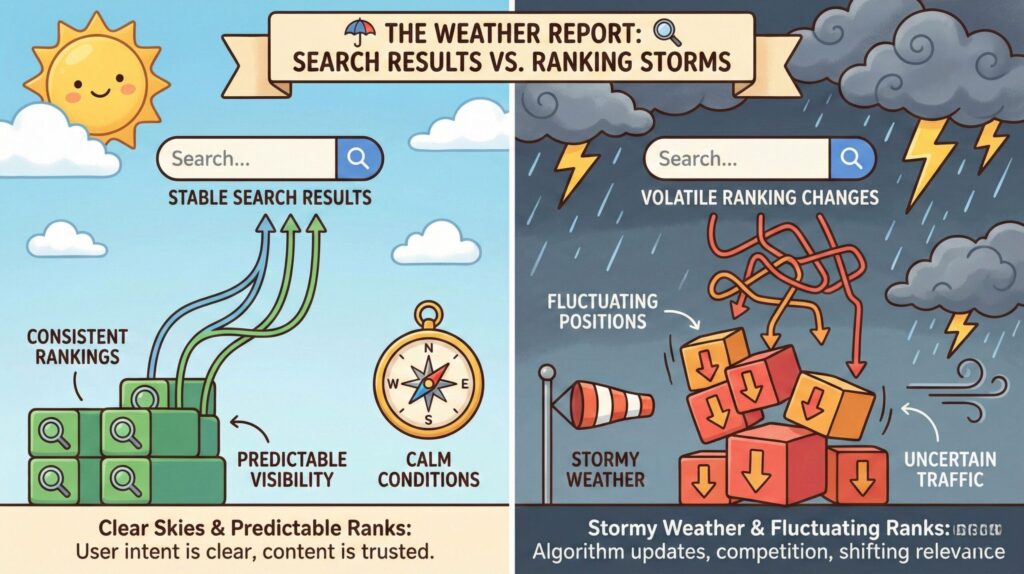
When Google changes something in its ranking system, it doesn’t send alerts. Rankings just start moving. SEMrush Sensor exists to answer one practical question: are many websites moving at the same time, or is it just us?
Instead of looking at a single site, the tool observes thousands of keywords across many industries and tracks how much their positions change every day. When movements are small, things are considered normal. When movements spike across the board, it usually means Google is testing or rolling out changes.
Think of it like a weather report for search results.
Not a prediction, not a diagnosis — but a clear signal of instability.
To understand the logic behind volatility tracking, SEMrush publicly explains how the Sensor works and how scores are calculated. You can read the official explanation here.
What the Sensor actually shows
| What you see | What it means in practice |
|---|---|
| Volatility score | Measures how much Google rankings are shifting across many websites at the same time |
| Daily trend | Shows whether ranking changes are normal, elevated, or unusually high |
| Industry breakdown | Highlights which niches are more affected than others on a given day |
| Desktop vs mobile | Compares ranking volatility between desktop and mobile search results |
What it does not do
This is important to set expectations early.
SEMrush Sensor does not:
tell us why Google made a change
explain which pages are “good” or “bad”
replace tools like Search Console or Analytics
It simply tells us when search results are unstable, so we don’t jump to conclusions too fast.
Once we understand this, the tool becomes much more useful — not as a panic trigger, but as a context filter. And that’s where it really starts helping with smarter decisions.
Next, we’ll look at how Google updates actually affect rankings in practice — and why volatility doesn’t always mean something is wrong.
3. How Google algorithm updates really affect rankings
When we hear “Google update,” it’s easy to imagine a single switch being flipped. In reality, that’s rarely how it works.
Most updates are gradual adjustments, not penalties. Google tweaks how it interprets signals like relevance, usefulness, freshness, or page experience — and rankings reshuffle as a result. Some pages move down, others move up, even if nothing “wrong” happened.
This is why rankings can feel unstable even when our content hasn’t changed.
What usually happens during an update
| What we notice | What it usually means |
|---|---|
| Sudden position changes | Google is re-evaluating how pages match search intent |
| Some pages drop, others rise | Relative reshuffling, not a site-wide issue |
| Traffic dips for a few days | Temporary testing or rollout phase |
| Volatility across many sites | A broad update, not a single-site problem |
Why this matters before taking action
The biggest mistake we see is reacting too fast.
When rankings move, our instinct is to change titles, rewrite pages, or “fix” things immediately. But during updates, doing nothing for a few days is often the smartest move. Google itself has repeatedly explained that fluctuations are normal during these periods.
For reference, Google regularly shares guidance on updates and ranking changes through its official Search Central channels here.
Understanding this behavior helps us stay calm and avoid unnecessary changes. And this is exactly where volatility tools become useful — not to predict updates, but to confirm whether what we’re seeing is part of a wider pattern.
4. How to tell Google updates apart from real SEO problems
This is the moment where most people get stuck.
Traffic drops, rankings move, and the big question becomes: do we wait, or do we act?
Making the wrong call here can create more damage than the update itself.
The good news is that patterns help. When we look at volatility data alongside our own site signals, the picture becomes much clearer.
The simple logic we use
Instead of guessing, we follow a short decision flow:
If many websites are moving, it’s likely a broader Google change
If only our site is affected, it’s time to look closer at our pages
This is where SEMrush Sensor becomes useful — not as a diagnosis tool, but as a context check.
Update vs real issue: how to read the signals
| What we see | How to interpret it | What to do next |
|---|---|---|
| High volatility across many niches | Likely a Google update or testing phase | Wait, observe, avoid major changes |
| Only your site drops | Page-level or technical issue | Review content, intent, and recent changes |
| Mobile volatility higher than desktop | Possible mobile ranking adjustment | Check mobile usability and speed |
| One page drops, others stay stable | Content relevance or intent mismatch | Update that page only, not the whole site |
A calm workflow that actually works
When volatility is high, we recommend a 48–72 hour pause before touching anything. During that time, we:
monitor trends instead of reacting emotionally
compare desktop vs mobile movements
check whether multiple competitors are affected
This approach saves time, avoids unnecessary rewrites, and keeps decisions grounded in data — not anxiety.
In the next section, we’ll walk through how to use these signals step by step, so you can apply this logic consistently — even if SEO isn’t your main job.
5. How to use SEMrush Sensor the right way (step-by-step)
Once we understand what SEMrush Sensor shows, the real value comes from how we use it in context. Used correctly, it helps us stay calm and make better decisions. Used poorly, it can create unnecessary panic.
Here’s a simple, repeatable workflow that works even if SEO isn’t our full-time job.
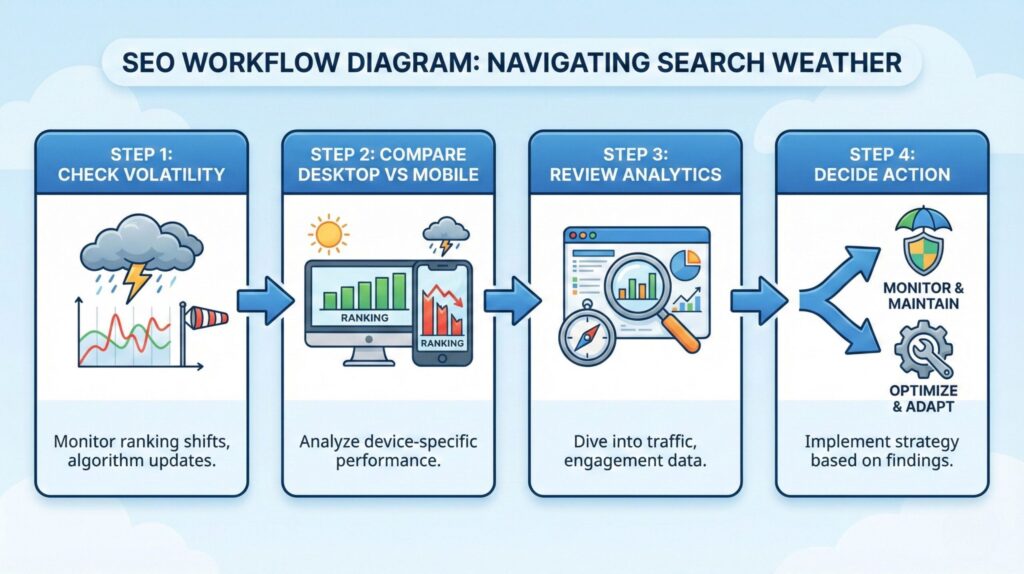
Step 1: Check the volatility score (before touching anything)
The first thing we look at is the daily volatility score.
Low to normal → rankings are behaving as expected
Elevated to high → Google is testing or rolling something out
This step helps us answer one question only: “Is today a noisy day in search?”
Nothing more, nothing less.
Step 2: Compare desktop and mobile signals
Next, we quickly compare desktop vs mobile.
If volatility is:
high on both → likely a broad update
higher on mobile only → possible mobile-specific adjustment
This avoids wasting time fixing the wrong things.
Step 3: Look at affected industries (not just your niche)
SEMrush Sensor lets us see which industries are moving the most.
Even if our niche isn’t listed, patterns still matter.
If many unrelated industries are volatile at the same time, it reinforces the idea that this isn’t a single-site issue.
Step 4: Combine Sensor data with your own signals
This is where people often go wrong. SEMrush Sensor should never be used alone.
We always pair it with:
Google Search Console (impressions, average position)
Analytics (traffic trends, not single-day drops)
To make this clearer, here’s how we combine signals in practice:
| Signal | What it tells us | Smart reaction |
|---|---|---|
| High Sensor volatility | Search results are unstable | Pause changes and observe trends |
| Stable Sensor + traffic drop | Likely site-specific issue | Review pages, intent, or technical changes |
| Sensor normal + impressions steady | No structural problem | Avoid unnecessary edits |
Step 5: Use it as a trend indicator, not a trigger
The most effective way to use SEMrush Sensor is to check it regularly, not obsessively.
A quick daily glance is enough to understand whether we’re operating in a stable or volatile environment.
6. Can you trust SEMrush Sensor? Limits, reliability & final verdict
At this point, the picture should be clearer.
SEMrush Sensor is not a crystal ball, and it doesn’t claim to be one. Its real strength is helping us contextualize what we’re seeing, so we don’t confuse normal Google turbulence with real SEO mistakes.
What SEMrush Sensor does well
It shows when rankings are unstable at scale
It reduces panic-driven decisions
It helps separate global shifts from local problems
Where it has limits
It doesn’t explain why Google changed something
It can’t tell us which page needs fixing
It shouldn’t be used alone or in isolation
This is why reliability comes from how we use it, not from the tool itself.
Ethical and practical considerations
There’s also an important ethical angle here.
Relying too heavily on third-party tools can push us toward over-optimization — changing content just to chase volatility, instead of improving it for real users. Google’s own guidance consistently emphasizes usefulness, clarity, and long-term value.
Used responsibly, tools like SEMrush Sensor support better decisions.
Used obsessively, they can distract us from what actually matters: creating content that answers real questions well.
The healthiest approach is balance:
data for awareness
patience for updates
human judgment for decisions
Final verdict
SEMrush Sensor is worth using if we treat it as a weather signal, not a warning alarm. It’s especially useful for:
small and medium websites
teams without full-time SEO monitoring
creators who want to avoid unnecessary reactions
If our goal is clarity — not control — it fits perfectly into a calm, sustainable SEO workflow.
If there’s one mindset skill that helps most when dealing with algorithm changes, it’s learning how to make decisions under uncertainty.
A book we often recommend for this is Thinking in Bets by Annie Duke. It’s not about SEO, but about recognizing patterns, avoiding overreaction, and understanding when outcomes don’t equal mistakes — a perspective that fits surprisingly well with how Google updates actually work.
Q&A – Frequently Asked Questions
Q: Is SEMrush Sensor accurate for Google updates?
A: It’s indicative, not definitive. High volatility often aligns with updates or testing phases, but it doesn’t explain the exact cause.
Q: What is a normal volatility score?
A: Lower scores usually indicate stable rankings. Sustained spikes above normal levels suggest unusual movement across many websites.
Q: Does SEMrush Sensor replace Google Search Console?
A: No. Google Search Console shows what’s happening on your site, while SEMrush Sensor shows what’s happening across search results.
Q: Is SEMrush Sensor useful for small websites?
A: Yes. It’s especially helpful for small sites because it reduces panic and helps avoid unnecessary changes during temporary fluctuations.
Q: How often should we check SEMrush Sensor?
A: Once a day is enough. Checking more frequently doesn’t improve decisions and often increases stress.
If this guide helped you make sense of ranking volatility and avoid overreacting to Google updates, these related articles go one step deeper into how algorithms behave and how to work with them calmly:
→ How Voice Assistants Actually Understand You (And Why They Sometimes Get It Wrong)
→ Why Everyone’s Talking About Open-Source AI Models (What It Means for Trust)
→ Will AI Replace Your Manager? Workplace Trends You Should Watch