
 Published on: September 1, 2025 (Last Update – Feb 2026)
This post contains affiliate links. If you buy through them, we may earn a small commission at no extra cost to you — thanks for supporting. Learn more.
Quick Navigation
- 1. Introduction: Why Krea AI Is Trending
- 2. Quick Overview: What Krea AI Does in 60 Seconds
- 3. Key Features That Make Krea AI Stand Out
- 4. The New LoRA Trainer – How It Works and Who It Helps
- 5. Krea-1 Model vs Flux, Ideogram & Midjourney
- 6. Free vs Paid Plans: What You Actually Get
- 7. Krea AI for Creators: Real Use Cases
- 8. How to Get Started with Krea AI Step by Step
- 9. Limitations and What to Watch Out For
- 10. Ethical Reflection: AI Creation at Scale
- 11. Alternatives Worth Checking
- 12. Final Verdict: Should You Try Krea AI?
- 13. FAQ – Krea AI
1. Introduction: Why Krea AI Is Trending
If you follow creative AI tools, you’ve probably noticed something: most platforms start to feel the same after a while. Krea AI is one of the few breaking that pattern.
It’s not as mainstream as tools like Midjourney or Runway, yet interest in Krea is rising quickly — especially among designers, creators, and marketers who want images, video, and customization in one place.
So why is Krea AI gaining so much attention? A few key reasons explain it:
1. All-in-one creative hub — Instead of juggling multiple apps, Krea brings different AI models together in one interface. That means faster testing, smoother workflows, and less friction when creating content.
2. Rapid feature evolution — New releases like the Krea-1 model and the built-in LoRA trainer give users more control over style and output without needing advanced technical skills.
3. Accessible entry point — The platform offers a free plan, which makes it easy to experiment before committing. For creators testing tools regularly, that’s a major advantage.
From our perspective, what makes Krea stand out isn’t just the feature list — it’s the timing. While many competitors specialize in only one area, Krea feels more like a creative hub where users can start, experiment, and stay.
Quick Decision: Is Krea AI Worth Trying?
| If this sounds like you... | Our take |
|---|---|
| You want one platform for AI images, video, and creative experimentation | Yes — Krea AI is worth testing. |
| You care about style control, visual consistency, and newer features like LoRA training | Strong fit. |
| You only want the simplest possible image generator with no learning curve | Maybe not ideal. A simpler tool may feel faster. |
| You want to test before paying | Good option, since Krea AI offers a free entry point. |
Bottom line: if you are a creator, designer, or marketer who wants more than a basic AI image tool, Krea AI is absolutely worth a try — especially if you want to test a more flexible creative workflow before committing.
2. Quick Overview: What Krea AI Does in 60 Seconds
Think of Krea AI as a fast creative workbench: you generate visuals, refine them directly on a canvas, and turn the best ones into short motion assets—without hopping between apps. In practice, this is how Krea AI saves time and keeps quality high.
What you can do at a glance
Generate images quickly: Write a prompt (optionally add a reference image) and Krea AI returns multiple variations you can compare side by side.
Edit on-canvas: Brush to add/remove elements, expand the frame, and iterate in place—Krea AI keeps versions so you can roll back if an idea doesn’t land.
Enhance and upscale: Clean edges, sharpen details, and export in higher resolution for thumbnails, ads, or product shots.
Style consistency: Teach Krea AI your brand look with a small image set, then reuse that style across new visuals.
From still to motion: Export frames or short loops you can sequence into simple video/GIF assets, or hand off to your preferred video tool.
Organize and share: Save prompts, name versions, and keep boards for campaigns so your future edits start faster.
Why this matters now
Switching tools slows creators down. Krea AI reduces friction by keeping prompt → edit → export in one flow. We’ve found this especially useful for social posts and blog heroes where speed and consistent style matter. If you already use Midjourney or Leonardo (see our comparison of Leonardo vs Midjourney), Krea AI complements them as the place where you refine and finalize assets. For the official feature list, check the Krea site.
How to use it (under a minute)
Open Krea AI and paste a clear prompt (subject, style, lighting, use-case).
Pick the best variation and edit on the canvas (add/remove objects, adjust framing).
Hit enhance/upscale for crisp output.
Export for web (PNG/JPG) or quick motion (GIF/MP4).
Save the prompt + version so the next iteration takes seconds, not hours.
3. Key Features That Make Krea AI Stand Out
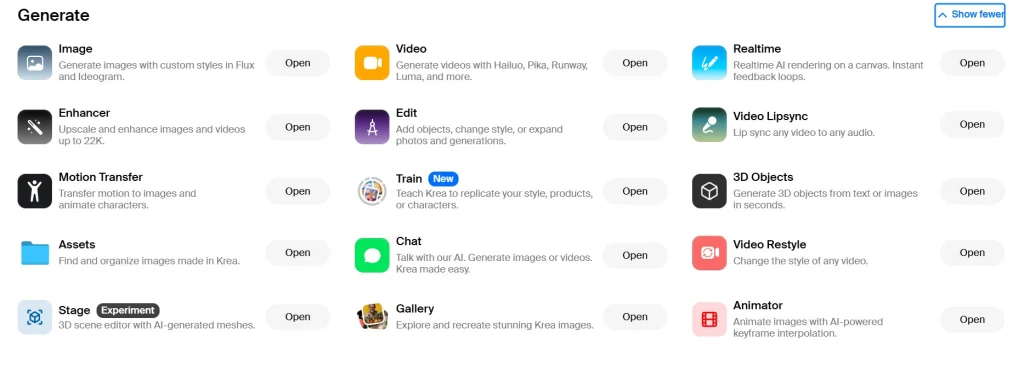
When people ask what makes Krea AI worth trying, the answer isn’t simply another text-to-image generator. What makes it stand out is its mix of practical features that streamline real creative workflows. Instead of juggling multiple tools, Krea combines key capabilities into one interface — which is why many creators are starting to rely on it as a central workspace rather than just an experiment tool.
Core features explained simply
Real-time canvas editing — Unlike many AI tools that require waiting after each prompt, Krea AI lets you paint directly on the canvas and see results instantly. For quick prototypes or social visuals, that speed makes a real difference.
Krea-1 model — Its in-house model is optimized for sharper details and cleaner text rendering, two common weaknesses in AI image generation. In practice, text on posters or banners often appears more readable here than in many competing tools.
LoRA training — Style consistency is one of the biggest challenges creators face. With Krea AI’s LoRA training, you can feed a small dataset — such as product shots or brand visuals — and generate a repeatable visual style. That means far less manual correction later.
Upscaling & enhancement — Support for resolutions up to 22K makes outputs suitable for print, marketing campaigns, and high-resolution publishing without quality loss.
Video integrations — While not a full video generator, Krea connects with external tools so you can turn still visuals into motion without rebuilding projects from scratch.
Boards & versioning — Creative iteration is built in. Boards store your work, prompts, and edits, so you can revisit versions or track progress over time — a feature especially useful for teams or ongoing projects.
Why these features actually matter
Many AI tools can generate impressive-looking images. But in real workflows, speed + consistency + iteration matter more than visuals alone. According to research from the MIT Technology Review, creative AI platforms that reduce workflow friction tend to see faster adoption because they integrate into existing processes instead of replacing them.
That’s where Krea stands out. By combining editing, training, and exporting inside one environment, it behaves more like a creative hub than a standalone generator. For example, a marketing team could train a style model, generate campaign visuals, upscale them for print, and produce motion assets — all without switching platforms.
If you’re interested in tools that offer more flexibility or work without constant connectivity, you might also find our guide to offline AI tools helpful, especially for privacy-focused or travel-friendly workflows.
For comparison, if you’ve used tools like Runway or Canva for quick graphics, Krea AI feels like a bridge between the two — powerful enough for advanced users, yet simple enough for everyday creators.
4. The New LoRA Trainer – How It Works and Who It Helps
One of the biggest updates that put Krea AI on the map is its LoRA trainer. For anyone unfamiliar, LoRA (Low-Rank Adaptation) is a lightweight way to “teach” an AI model a style or subject without retraining the entire system. What makes Krea’s approach different is how accessible and fast it is.
How Krea AI’s LoRA trainer works
Upload a small dataset – Around 10–20 reference images are enough. These could be product shots, portraits, or brand visuals.
Set parameters – The tool handles most defaults, so you don’t need deep ML knowledge. You just choose a style name and let the training run.
Train in minutes – Unlike traditional methods that require GPUs and hours of waiting, Krea AI processes the LoRA in under half an hour for most datasets.
Apply instantly – Once done, your new style appears inside the interface. From there, any prompt can adopt that look consistently.
Why this matters for creators
Consistency has always been a weak spot in AI content. A campaign might start strong, but outputs drift after a few iterations. With Krea AI’s LoRA trainer, creators can anchor a project to their exact brand identity or aesthetic. That’s a big deal for:
Marketers who need ads with the same color palette and visual tone across channels.
Designers who want to prototype fast while keeping a cohesive style.
Small businesses that don’t have time (or budget) to hire full creative teams.
Content creators who want a repeatable “signature style” for social media posts.
Our view is that this feature makes Krea AI stand out from most competitors. Midjourney doesn’t offer LoRA training at all, and while tools like Stable Diffusion allow it, the process is far more technical. By simplifying the setup, Krea lowers the barrier and opens style training to a wider audience.
Limitations worth noting
Like any AI training system, results depend heavily on the dataset. If you feed inconsistent or low-quality images, the output won’t be reliable. Krea AI is transparent about this, even suggesting minimum image resolution in its onboarding. So while the trainer is powerful, it rewards careful preparation.
5. Krea-1 Model vs Flux, Ideogram & Midjourney
When the Krea-1 model launched, it immediately sparked comparisons with the “big names” in the AI art space. Unlike many integrations that simply plug into existing engines, Krea AI built Krea-1 to focus on sharper details, cleaner text rendering, and flexible editing. Here’s how it stacks up against the competition.
| Feature | Krea-1 (Krea AI) | Flux | Ideogram | Midjourney |
|---|---|---|---|---|
| Text Rendering | High accuracy, banners and posters look polished | Strong for visuals but struggles with long text | Best at text-to-image, especially typography | Inconsistent, often needs manual fix |
| Detail & Realism | Balanced sharpness and style control | Photo-realistic, cinematic feel | Stylized, graphic-heavy outputs | Rich detail, painterly style |
| Ease of Use | Realtime edits, simple interface | Requires prompt precision | Simple but narrow focus | Discord-based, less intuitive for beginners |
| Best For | Brand visuals, posters, editable canvases | High-end visuals & cinematic renders | Designers needing typography + graphics | Artists exploring stylized illustrations |
| Try It | Get Krea AI | Get Flux | Get Ideogram | Get Midjourney |
Why this comparison matters
Creators don’t want to test every model blindly. What we’ve found is that Krea-1 fills a gap: it offers better text handling than Midjourney and Flux, while being more versatile than Ideogram. For everyday use—social posts, marketing campaigns, product visuals—it’s a reliable middle ground.
That said, each tool still has its niche. Flux excels at cinematic detail, Ideogram shines in text design, and Midjourney is unbeatable for pure artistry. But if you want one environment where you can iterate fast and get consistent results, Krea AI’s Krea-1 is worth considering first.
For context, we previously reviewed how Midjourney compares with Leonardo (Leonardo vs Midjourney), and the same logic applies here: the right model depends on your end goal, but Krea AI’s Krea-1 is tuned for creators who prioritize workflow efficiency as much as output quality.
6. Free vs Paid Plans: What You Actually Get
Picking the right Krea AI plan depends on your workload, the type of rights you need, and how quickly you expect results. Here’s what each level really offers.
Free Plan
Limited daily generations
Access to the main editor and basic features
Ideal to explore Krea AI and test prompts before upgrading
Paid Plans (Basic / Pro / Max)
Commercial licensing and private image/training storage
Priority and parallel jobs for faster results
Realtime editing and LoRA trainer availability
High-resolution exports (Enhancer up to 22K for stills, 8K for video)
Teams Plan
Multiple seats and shared billing
Best suited for agencies or brand teams running several projects in parallel
Why upgrades matter
Legal rights: Paid tiers include commercial usage and privacy options, essential for brand or client work.
Efficiency: Priority queues and parallel jobs cut waiting time when deadlines are tight.
Output quality: Higher tiers unlock ultra-resolution tools that make visuals ready for campaigns or print.
Consistency: LoRA training on Pro+ plans ensures styles remain uniform across different projects.
Who benefits from each plan
First-time users → Free plan, to learn how the canvas and workflow operate
Independent creators → Basic/Pro for private projects, faster processing, and LoRA features
Professional teams → Max or Teams to guarantee speed, consistent style, and multi-user access
Important notes
Plan features may update, so always confirm on the official Krea pricing page.
If high-resolution or print assets are part of your workflow, make sure the chosen plan includes Enhancer access.
Upgrading one tier is often more cost-effective than buying additional credits separately.
Tip: Many creators test ideas with the Free plan and finalize their best outputs on Pro or Max for higher quality. If you want to try it, here’s the link: Get Krea AI.
Krea AI Plans Table
Before deciding whether to stay on the free tier or upgrade, it helps to see the differences side by side. Krea AI structures its pricing around three main levels: Free, Pro, and Max. Each step adds more speed, higher resolution, and the rights you need for commercial or team projects. The table below shows exactly what you get with each plan so you can choose the one that matches your workflow.
| Feature | Free | Pro | Max |
|---|---|---|---|
| Generations | Daily limit, basic quality | Higher daily limit, faster queues | Priority queues, parallel jobs, high volume |
| Commercial Rights | Not included | Full commercial license | Full commercial license |
| Privacy | Public generations | Private image storage | Private + LoRA training data kept secure |
| Resolution | Up to 2K | Enhancer up to 8K | Enhancer up to 22K (print-ready) |
| Realtime & LoRA | Not included | Realtime editing + LoRA trainer | Realtime + higher LoRA quotas |
| Best For | Exploring Krea AI features | Freelancers, solo creators | Agencies, brand teams, heavy users |
| Try It | Start Free | Get Pro | Get Max |
7. Krea AI for Creators: Real Use Cases
A big reason Krea AI is gaining traction is because it solves real problems for different types of creators. Instead of being just another AI playground, it’s built to support practical workflows. Here’s how different groups are already using it:
1. Designers and Visual Artists
For designers, Krea AI removes the friction of switching between tools. A branding designer, for example, can:
Train a LoRA on a client’s product line to generate consistent ads.
Use Realtime editing to refine posters or campaign visuals without starting over.
Export up to 22K resolution for high-quality print materials.
This makes it especially appealing to small studios that want speed without sacrificing professional quality.
2. Marketers and Content Teams
Marketing teams often need lots of visuals fast—for ads, landing pages, or social posts. With Krea AI they can:
Repurpose a single visual into different sizes and formats using the canvas tools.
Create campaign-ready banners with clean text rendering, something Midjourney struggles with.
Keep a visual identity consistent across dozens of assets, thanks to LoRA training.
For teams already using tools like Canva Pro, Krea AI acts as the “engine” that generates unique visuals which are then polished and scheduled.
3. Bloggers and Solo Creators
Bloggers and freelancers often don’t have time to commission artwork for every post. Krea AI offers:
Quick hero images to match article topics.
Simple motion exports (GIF/MP4) for social teasers.
Saved prompts and boards so future posts reuse the same style.
For example, on our own AI Digital Space blog, a single Krea AI session can generate illustrations for several posts in one go.
4. Video and Motion Creators
While Krea AI isn’t a full video generator, its integrations with Luma and Runway make it a great pre-production tool:
Generate key visuals or short animated loops in minutes.
Hand them off to a video editor or sequence tool for refinement.
Reduce the cost and time of sourcing stock footage.
5. Small Businesses
Small businesses that don’t have in-house design teams are using Krea AI to:
Produce consistent product photos without reshooting.
Design quick social ads with brand colors and fonts.
Keep campaigns budget-friendly without relying on agencies.
Our take: This versatility is exactly why Krea AI is gaining traction so quickly. Unlike many AI tools that excel at just one task, Krea adapts to different creative needs — whether you’re designing blog banners, TikTok visuals, or high-resolution marketing assets. For creators and small teams, that “one-hub” workflow means fewer subscriptions, less friction, and a much faster path from idea to finished content.
If you’re exploring platforms that combine multiple capabilities into a single system, it’s worth looking at our guide to all-in-one AI tools to see how Krea compares within the broader ecosystem.
8. How to Get Started with Krea AI Step by Step
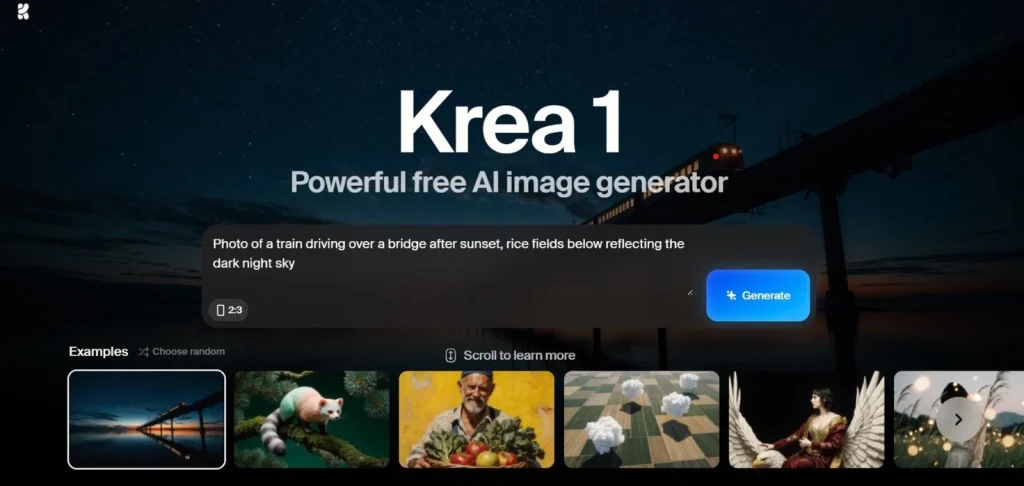
One reason Krea AI is spreading so quickly is that you don’t need a technical background to use it. Setting up and creating your first image or video takes only a few minutes. Here’s how to begin.
Step 1 – Create Your Free Account
Go to the official Krea AI site and sign up. You can start with the Free plan to explore the workflow before deciding whether to upgrade.
Step 2 – Explore the Dashboard
You’ll find the prompt bar at the top for text-to-image generation, the realtime canvas for brushing edits, and saved boards where all your generations and prompts are stored.
Step 3 – Generate Your First Image
Type a clear, specific prompt including subject, style, and lighting. Add an image reference if needed, then generate and review multiple variations. Unlike Midjourney, Krea AI lets you adjust directly on the canvas, so you don’t need to perfect the prompt on the first try.
Step 4 – Edit on the Canvas
Use brushes to add, remove, or expand parts of the image. Adjust framing or composition without starting from scratch. Version history makes it easy to roll back if you prefer a previous edit.
Step 5 – Enhance and Export
Click Enhancer for a sharper version (up to 22K resolution on higher tiers). Export as PNG, JPG, or short motion formats such as GIF or MP4. Save prompts with names so you can reuse them later.
Step 6 – Train a LoRA (Optional)
On Pro or Max plans, upload 10–20 reference images of your product, style, or brand. Train a LoRA in minutes, then apply it to new prompts for consistent outputs across campaigns.
Step 7 – Integrate with Video Tools
If you work with motion, connect Krea AI to Runway or Luma to turn stills into video sequences without redoing the process.
In short, from sign-up to your first export, Krea AI takes less than an hour to master. Once you’ve saved prompts and styles, it becomes a repeatable system for future projects. That’s why it’s a go-to tool for solo creators and teams who want consistent visuals without a steep learning curve. You can try these steps here: Get Krea AI.
9. Limitations and What to Watch Out For
Like any creative AI platform, Krea AI comes with trade-offs. Knowing them upfront helps you set the right expectations, avoid friction, and choose the plan that actually fits your workflow.
Learning curve for real-time editing
The realtime canvas is powerful, but it may feel unfamiliar if you’re used to prompt-only tools. Expect a short adjustment period while learning brushes, layers, and refinement controls. Once mastered, however, it often speeds up iteration dramatically.
Dataset quality for LoRA training
The LoRA trainer works fast — but results depend entirely on input quality. Low-resolution or inconsistent datasets produce uneven outputs. For best results, prepare 10–20 clear, stylistically consistent images before training.
Plan limits and credits
The free plan is great for testing, but it includes daily caps. Paid tiers unlock higher limits, private generations, priority queues, and commercial rights. Choosing the right plan early prevents interruptions during projects.
Integration still evolving
Krea connects with tools like Runway and Luma, but it doesn’t replace full video editors yet. Think of it as a pre-production accelerator, not a complete production suite.
Occasional inconsistencies
Like most generative AI systems, outputs can vary between runs. According to research highlighted by the Stanford HAI, variability is a known characteristic of generative models and part of why iteration is built into AI creative workflows. The upside: Krea lets you refine directly on canvas until results match your intent.
10. Ethical Reflection: AI Creation at Scale
As Krea AI and similar platforms evolve, it’s worth pausing to consider how these tools shape creators and the wider creative industry. Their speed and accessibility are powerful — but they also come with responsibilities.
Originality & ownership
LoRA training and fine-tuning can replicate styles very closely. This helps with brand consistency, but it can blur the line between inspiration and imitation. Creators should always use datasets they have rights to and treat AI as a collaborator, not a shortcut.
Impact on creative work
Tools like Krea lower barriers for freelancers and small businesses, enabling faster production and experimentation. At the same time, automation can shift expectations for professional designers. The healthiest approach is AI for speed, human judgment for decisions.
Bias & reliability
Like all AI systems, outputs reflect training data. Without thoughtful prompts or curated inputs, results may unintentionally reinforce bias or miss context. Reviewing and refining outputs remains essential.
Responsible usage
High-resolution generation and repeated training consume resources, so using AI intentionally is both more efficient and more sustainable. It’s also important to stay aware of how platforms guide user behavior — some apps subtly push choices through design patterns. If you’re curious how interfaces can influence decisions, our guide on dark UI tricks used by AI apps explains this in depth.
Our take
We see Krea AI as a creative accelerator, not a replacement for skill or judgment. Used thoughtfully, it expands possibilities. Used blindly, it risks reducing originality. Like any powerful tool, its real value depends on how intentionally you use it.
11. Alternatives Worth Checking
While Krea AI has earned its place as a versatile hub, it’s not the only tool creators are exploring in 2025. Depending on your priorities—whether that’s advanced video, cinematic style, or community-driven models—you may want to compare it with a few strong alternatives.
Runway
Runway is one of the leading names in AI video generation. Its Gen-3 Alpha model creates cinematic motion clips from text prompts, making it ideal for ads, trailers, or short creative projects. If you’re more focused on motion than static visuals, Runway is worth trying.
Haiper
Haiper recently launched its 2.0 model, offering free access to realistic and stylized video clips. It has a lightweight interface and appeals to solo creators who want quick results without heavy setup. While not as feature-rich as Krea, its accessibility makes it attractive for first-time AI video users.
Kling AI
Kling has become popular in creative circles thanks to its highly realistic, fluid animations. It’s especially strong for character and scene motion, and while it’s less known to the general public, professional creators are beginning to use it as a serious alternative to Runway.
Stable Diffusion
For those who want maximum flexibility and control, Stable Diffusion remains a go-to. It requires more setup and technical effort compared to Krea, but it supports endless customization and community-driven extensions. If you’re comfortable with experimentation, it’s a powerful open-source choice.
12. Final Verdict: Should You Try Krea AI?
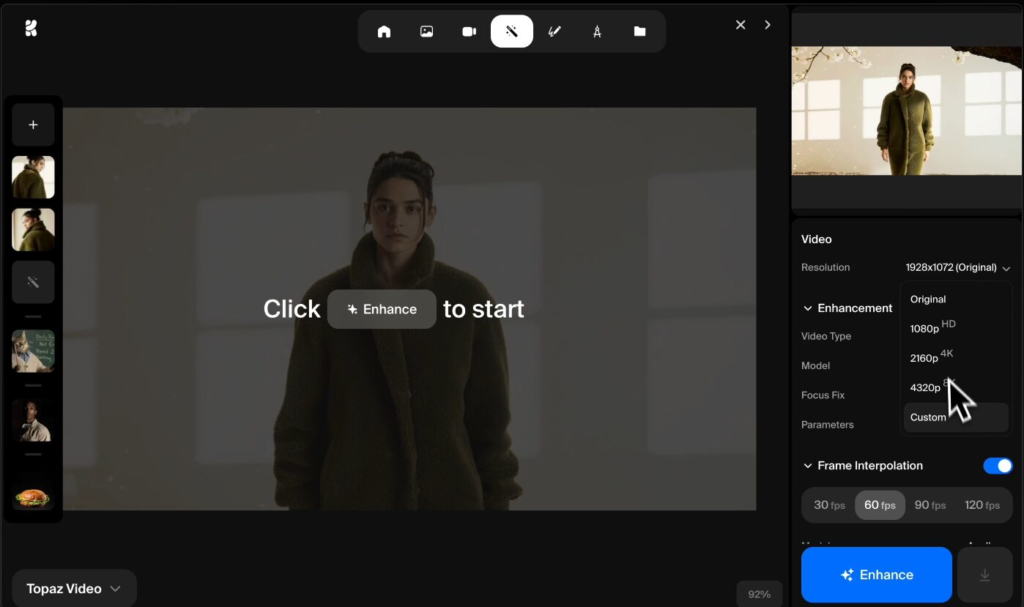
After testing features, comparing models, and looking at real use cases, the conclusion is clear: Krea AI is one of the most balanced creative platforms available.
It combines fast generation, realtime editing, LoRA training, and integrations with video tools—all in one environment. That’s what makes it different from single-purpose apps. Designers appreciate the editable canvas, marketers benefit from consistent styles, and bloggers value how quickly they can produce visuals without outsourcing.
Of course, Krea AI isn’t perfect. Like any AI tool, it requires careful prompts, curated datasets for training, and an understanding that some iterations may not work on the first try. But compared to its competitors, it strikes a strong balance between ease of use and professional-grade output.
Who should try it?
Solo creators who want a hub for both images and video prep.
Marketing teams that need scalable content while keeping brand identity intact.
Agencies that want to reduce tool-switching and speed up delivery.
If you’re looking for an all-in-one AI tool that saves time while staying versatile, Krea AI is worth testing today. The Free plan makes it risk-free, and the Pro/Max tiers add the features most professionals need for production work.
Train Your Own Style with Krea AI
Upload a few images, build a LoRA in minutes, and keep your visuals consistent across every campaign. Perfect for creators, marketers, and teams.
🚀 Start Training on Krea AI13. Quick Questions About Krea AI
Q: Is Krea AI free?
A: Krea AI offers a free plan for testing with limited daily generations. Paid plans unlock commercial rights, private storage, realtime tools, LoRA training, and higher-resolution exports. If you plan to use it regularly or professionally, upgrading is usually necessary.
Q: Does Krea AI replace Midjourney?
A: No. Krea AI doesn’t replace Midjourney — it complements it. Krea focuses on editable canvases, cleaner text rendering, and style training, while Midjourney remains stronger for highly stylized artwork and artistic prompts.
Q: What is the main advantage of Krea AI?
A: Its biggest advantage is combining generation, editing, enhancement, and LoRA training inside one platform. This reduces tool-switching and helps creators maintain visual consistency across projects.
Q: Can Krea AI be used for commercial projects?
A: Yes, but only with paid plans. The Free tier is meant for testing, while Pro and Max plans include licensing rights and private workflows suitable for professional use.
Q: Does Krea AI generate video?
A: Not directly. Krea AI focuses on image creation and editing, but integrates with video tools so users can turn visuals into motion projects without starting from scratch.
Q: Is Krea AI good for beginners?
A: Yes. While advanced features exist, the interface is beginner-friendly and visual. Most users can generate results within minutes, then gradually explore more advanced tools as they gain confidence.
If you’re exploring creative AI tools like Krea AI, chances are you’re looking for platforms that make content creation faster, smarter, and more flexible. The real advantage isn’t just finding one good tool — it’s understanding how different AI platforms fit together in your workflow and choosing the right one for your needs.
To keep learning and compare your options, these guides are worth reading next:
→ Runway vs Pika Labs – Best AI Video Generator for Creators?
→ Best Free AI Tools For Designers
→ Top AI Tools for Creativity
Each one breaks down real strengths, limitations, and ideal users so you can decide confidently instead of guessing.