
 Published on: December 6, 2025
Affiliate Disclaimer:
Some of the links in this post are affiliate links. This means we may earn a small commission if you click through and make a purchase, at no extra cost to you. We only recommend tools we truly believe offer value.
1. Why AI Quiz Generators Are Becoming Essential for Modern Classrooms
An ai quiz generator has become one of the most helpful creativity tools for teachers, tutors, and anyone creating educational content. The reason is simple: it turns hours of preparation into a few minutes while making quizzes more interactive, visual, and enjoyable for students.
Today’s classrooms and online learning environments move fast. Students expect quizzes that feel more like the digital experiences they already interact with — dynamic questions, visuals, instant feedback, and adaptive difficulty. Traditional quizzes rarely deliver this, and manual creation takes too long.
This is where modern tools such as ChatGPT, Canva Pro, Quizgecko, and Notion AI shine. They allow us to:
Create quizzes on any topic instantly
Adjust difficulty automatically for different levels
Add images, diagrams, and creative layouts
Build branching or scenario-based questions
Save hours each week on planning
According to recent education reports, teachers spend 7–10 hours per week preparing materials. With an ai quiz generator, that time finally shrinks — while student engagement goes up.
2. The Engagement Problem: Why Most Student Quizzes Don’t Work Anymore

Even when a topic is interesting, students often disengage because traditional quizzes don’t match how they learn today. Research from Harvard’s Graduate School of Education highlights that attention drops quickly when learning experiences feel repetitive or lack interaction. Most classic quizzes suffer from exactly that.
The main issues are clear:
• They rarely adapt to different student levels
Every class has mixed abilities. A fixed set of questions can be too hard for some and too easy for others, reducing motivation on both sides.
• They don’t feel interactive or game-like
Students today spend time in ecosystems full of feedback loops, visuals, and touch interactions. A block of plain text questions feels outdated.
• They lack personalization
According to Edutopia, personalized learning increases participation and retention. Traditional quizzes simply can’t shift in real time.
• They take too long to build, so creativity gets sacrificed
Most teachers admit that they often choose “what’s fast,” not “what’s engaging,” because time is limited. The result: dry, repetitive quizzes.
This is exactly where an ai quiz generator solves the engagement gap. AI tools make it easy to create quizzes with varied question types, adaptive challenges, visuals, and story-based formats — without increasing workload.
3. Quick Picks: The Best AI Quiz Generator Tools (With Pros and Cons)
Choosing the right ai quiz generator can be the difference between a generic quiz and one students genuinely enjoy. This quick comparison table highlights the best ai quiz maker options teachers and tutors use to create quizzes with AI. Each tool is selected for a specific purpose: creativity, automation, visuals, or classroom workflow — helping you pick the most effective interactive quiz generator for your needs.
| Tool | Best For | Strengths | Limitations |
|---|---|---|---|
| ChatGPT (Plus) | Custom quizzes & creativity | Highly flexible, supports any subject, perfect for creative/branching quizzes | Needs manual formatting for classroom platforms |
| Canva Pro | Visual worksheets & printable quizzes | Professional templates, AI question generator, easy export to PDF | Not ideal for adaptive or branching logic |
| Quizgecko | Instant quizzes from text, PDF, or URLs | Very fast auto-generation, multiple question types, educator-friendly | Design is basic vs Canva |
| Notion AI | Lesson planning & quiz organization | Great for structuring units, tracking progress, building test banks | Needs exporting when used outside Notion |
4. Step-by-Step Guide: How to Create an Interactive Quiz With AI

Creating an interactive quiz is much easier than most people expect. With the right ai quiz generator, you can go from a blank page to a polished quiz in minutes. Here’s the workflow most teachers and creators rely on.
1. Start by defining the learning goal
Clarify what students should understand after completing the quiz. Decide whether it’s for practice, revision, or assessment and whether you need different difficulty levels. A clear goal helps the ai quiz generator create more accurate, well-aligned questions when you create quizzes with AI.
2. Choose the tool that fits your format
Select the ai quiz generator based on the type of quiz you want to create. ChatGPT is best for creative or branching quizzes. Canva Pro works well for visual or printable worksheets. Quizgecko is ideal for fast automated quizzes from text or PDFs. Notion AI helps when you’re building a lesson plan or test bank.
3. Use a clear prompt to generate structured questions
A structured prompt produces better results.
Try this:
“Create a 10-question interactive quiz for middle-school students about ecosystems. Include multiple-choice, true/false, and one scenario-based question. Make the difficulty progressive and provide the correct answers.”
4. Add visuals, examples, or real-life scenarios
Interactive quizzes feel more engaging when they include visuals, diagrams, image-based questions, or short scenarios. Canva Pro and ChatGPT Vision make this easy. Research from Cognitive Research for Education shows visuals significantly improve attention and memory.
5. Test the quiz and adjust difficulty
Review your AI-generated questions to ensure progression, clarity, and accuracy. If needed, refine with:
“Regenerate questions 4, 6, and 7 at a slightly easier difficulty level.”
6. Export or publish your quiz for classroom use
Choose the best output for your class: PDF, Google Forms, PowerPoint, Notion, Kahoot, or Mentimeter. The flexibility of an ai quiz generator allows you to create once and publish anywhere.
5. Real Examples and Prompts: Quiz Types Students Actually Enjoy
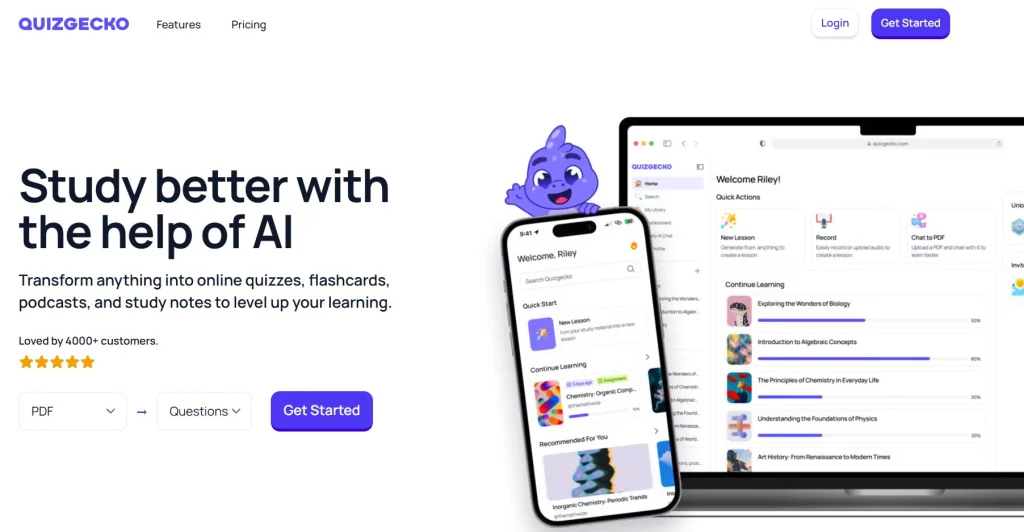
One of the advantages of using an ai quiz generator is the ability to create quiz formats that feel modern, dynamic, and more engaging than traditional worksheets. These are the quiz types teachers often build when they create quizzes with AI, along with ready prompts you can use immediately.
1. Visual Multiple-Choice Quizzes (Great for Science, Geography, Art)
Students respond better when questions include images or diagrams.
Prompt example:
“Create a visual multiple-choice quiz about the water cycle for 11-year-olds. Include one image-based question and explain the correct answers.”
2. Scenario-Based Problem Solving (Perfect for Real-World Thinking)
Students love being placed inside a story and asked what happens next.
Prompt example:
“Write a 5-question scenario-based quiz about online safety for middle-school students. Include one ‘choose what you would do’ challenge.”
3. Challenge Mode Quizzes (Increasing Difficulty)
A rising difficulty curve keeps students motivated and curious.
Prompt example:
“Generate an ascending-difficulty quiz on fractions for beginners. Start very easy and end with a multi-step problem.”
4. Gamified Trivia or Speed Round (Useful for Warm-Ups)
Fast-paced trivia energizes the classroom.
Prompt example:
“Create a 10-question rapid-fire trivia quiz about ecosystems. Questions should be short, fun, and structured for a 30-second challenge.”
5. Mixed-Format Quiz (MCQ + T/F + Short Answer)
Combining formats improves critical thinking and prevents boredom.
Prompt example:
“Build a mixed-format quiz about medieval history. Include multiple-choice, true/false, and two short-answer questions.”
6. Personalized Review Quizzes (AI-Adaptive Approach)
Using the student’s previous answers, AI tailors the next set of questions.
Prompt example:
“Generate follow-up questions based on these student errors: [paste errors]. Make them supportive, corrective, and level-adjusted.”
These styles are extremely effective because they feel dynamic, visual, and personal — all things students expect from digital learning today. With the right ai quiz generator, even a simple topic becomes engaging.
6. Ethical AI Reflection: Accuracy, Bias, and Responsible Classroom Use
Using an ai quiz generator can dramatically speed up lesson creation, but we still need to apply judgment and responsibility. These ai tools for teachers are powerful, yet not perfect, and students deserve content that remains accurate, fair, and safe.
Accuracy matters
AI occasionally generates incorrect facts or outdated information. Reviewing each question before sharing it with students is essential. Even small errors can mislead learners, especially in science or history contexts.
Watch for subtle bias
Studies from Stanford HAI show that AI training data can introduce cultural or contextual bias into questions. This is why quizzes involving ethics, culture, or social behavior should always be checked manually.
Protect student privacy
Never upload personal student data when using tools like ChatGPT, Quizgecko, or Notion AI. Quizzes should be built from general prompts, not identifiable information.
Promote transparency with students
Let your class know that you’re using AI as a creative assistant, not a replacement for teacher expertise. This encourages digital literacy and helps students understand how AI fits into modern learning.
If you’re exploring more ways to teach AI safely and clearly, you might enjoy our post “Behind the Algorithm: How AI Understands Visual Data in 2025” — it’s a simple introduction that helps students grasp how these systems actually work.
Recommended Read:
To explore how AI is transforming education, assessments, and the way students learn, “Artificial Intelligence in Education: Promises and Implications for Teaching and Learning” by Wayne Holmes, Maya Bialik and Charles Fadel is one of the most reliable and insightful books available today. It explains how AI generates quizzes, supports teachers, and what responsible AI use looks like in the classroom.
Read Artificial Intelligence in Education7. Final Takeaways and Recommended Tools to Start Today
Using an ai quiz generator makes it easy to build quizzes that feel modern, interactive, and enjoyable for students without adding extra workload. Whether you teach in a classroom, online, or create educational content, the right interactive quiz generator helps you design questions that adapt to different levels, use visuals effectively, and encourage real engagement.
Here’s a quick recap to help you choose the best tool for your needs:
If you want maximum creativity
Use ChatGPT Plus — ideal for branching scenarios, custom formats, and highly engaging prompts.
If you want beautiful worksheets or printed quizzes
Use Canva Pro, which gives you ready-made designs and AI question tools that save hours.
If you want fast automation from text or PDFs
Use Quizgecko, especially when you need a quiz generated in seconds.
If you want to organize lesson plans and quiz banks
Use Notion AI, great for teachers who want structure and long-term organization.
Each tool approaches quiz creation differently, but all of them help you produce content that students actually enjoy completing.
| Recommended Tool | What It’s Best For | Try It |
|---|---|---|
| ChatGPT Plus | Creative quiz design, branching scenarios, custom question structures | Try ChatGPT |
| Canva Pro | Visual quizzes, printable worksheets, engaging classroom materials | Try Canva Pro |
| Quizgecko | Instant quiz creation from text, PDFs, or URLs; auto-generated answers | Try Quizgecko |
| Notion AI | Lesson planning, course structure, quiz banks, organized workflows | Try Notion AI |
Creating quizzes that students actually enjoy doesn’t require complicated software or hours of preparation. With the right ai quiz generator, we can design interactive, visual, and adaptive assessments that fit perfectly into modern learning — while saving valuable time. Once you explore a few of these tools, you’ll quickly find a workflow that feels natural and boosts classroom engagement consistently. And if you’re looking to expand your toolkit even further, the world of AI-powered education tools is growing fast and full of opportunities.
8. FAQ About Using an AI Quiz Generator for Student Engagement
Q: What’s the fastest way to create a quiz with an AI quiz generator?
A: The fastest method is to paste your lesson notes or textbook excerpts into a tool like ChatGPT or Quizgecko and request a structured quiz format (multiple-choice, true/false, short answer). These tools generate questions instantly and allow you to adjust difficulty or style with a single prompt.
Q: Are AI-generated quizzes accurate enough for classroom use?
A: They can be, but always review them. AI sometimes produces outdated or slightly inaccurate information, especially in science or history. A quick edit ensures reliability and keeps your materials aligned with your curriculum.
Q: Can I use an AI quiz generator to differentiate levels for mixed-ability classes?
A: Yes. This is actually one of the strongest use cases. You can ask AI to regenerate the same quiz at beginner, intermediate, or advanced levels, helping every student work at a comfortable pace.
Q: Is it safe to upload student data into AI tools?
A: No. Avoid uploading any personal or identifiable student information. Always use general prompts. Most major platforms (OpenAI, Canva, Notion) explicitly advise against submitting sensitive data.
Q: Which AI tool is best for visual or printable quizzes?
A: Canva Pro is the easiest choice for visuals and layout, while ChatGPT or Quizgecko are better for generating the actual question content. Many teachers combine them for the best results.
Q: Can AI help create more engaging or game-like quizzes?
A: Absolutely. You can generate scenario-based questions, gamified challenges, visual prompts, branching paths, or speed rounds. These formats significantly increase engagement compared to traditional worksheets.