
A verification tool checking a photo for an AI watermark before it's shared online.

AI Watermarks: How to Verify Real vs. Fake Media in 2026

M

Mirko

AI Tech Writer

📅 Updated: August 2026·⏱️ 9 min read

I keep seeing the same panic in group chats: a shocking clip lands, and nobody knows if it's real. Since Google shipped its SynthID Detector and the EU's AI Act disclosure rules took effect this August, checking has gotten a lot easier. I ran a screenshot through Google's own detector to see exactly what it flags — here's what I found, and how you can check anything yourself in under a minute.

Some links are affiliate links · they support this site at no extra cost to you · Full disclosure

1. Why AI Watermarks Matter in 2026

If you've paused mid-scroll wondering whether a video was real, you're not alone. Deepfakes have gotten convincing enough that trained eyes miss them, which is exactly why AI watermarks matter now.

AI watermarks are signals hidden inside images, video, and audio that stay invisible to us but readable by detection tools. They don't censor anything, they just make origin checkable.

As of August 2, 2026, the EU AI Act requires AI watermarks or other machine-readable marks on generative outputs, and deepfakes must be visibly disclosed. That's not a proposal anymore, it's live law.

The Coalition for Content Provenance and Authenticity, the group behind the C2PA standard, tracks adoption across major platforms at contentcredentials.org, worth bookmarking for the technical detail.

Soft Tip: When something shocking crosses your feed, screenshot it before reacting. Most verification tools can still read watermark signals from a screenshot, a 10-second habit that beats sharing something false.

2. The Real Problem: Deepfakes, Misinformation and User Confusion
Why AI watermarks matter when verifying suspicious content online

Deepfakes are convincing enough now that most people can't tell a real video from a generated one on sight, which is exactly the gap AI watermarks exist to close before anyone reacts.

A clip goes viral on TikTok, or a voice note lands in a family group, and there's zero context. That gap is exactly what AI watermarks are built to close.

I've written before about the specific scam patterns AI-generated content enables. My deepfake awareness guide breaks down what to watch for beyond just checking a watermark.

If you want the fuller picture of how this problem developed, Nina Schick's Deepfakes: The Coming Infocalypse is still the sharpest read on how synthetic media got here.

Soft Tip: If content triggers a strong emotional reaction — fear, anger, urgency — treat that as a flag first. Emotionally charged material is the most common target for deepfake manipulation.

3. How AI Watermarks Work Behind the Algorithm

AI watermarks are tiny signals embedded inside images, video, or audio. They don't change how anything looks or sounds, they just give detection tools something to read.

Two AI watermark systems do most of the work today. Embedded watermarks like Google's SynthID live inside the pixels or waveform itself. Metadata watermarks, the C2PA standard, ride alongside the file as a signed record.

SynthID survives things that destroy metadata — cropping, compression, screenshots, even re-encoding through WhatsApp. Google explains the mechanics on its SynthID page, and by mid-2026 it had covered more than 10 billion pieces of content.

Content Credentials work differently — they're a signed manifest, like a nutrition label, showing who created a file, what tools touched it, and whether AI was involved at any step.

If you want the plain-English version of how AI systems process data in general, my guide on how voice assistants understand you is a useful companion piece.

Soft Tip: Always upload the original file when you can. Both watermark systems read more accurately before a chat app or social platform recompresses everything into mush.

4. How to Check Any File for an AI Watermark
Dashboard scanning a file for AI watermarks

Checking a file yourself takes under a minute once you know where to look. I ran this exact process on a suspicious image last week, and here's what happened.

I uploaded a screenshot to Google's SynthID Detector to see what it flagged. It identified the watermark and highlighted the exact region where it was embedded — not just a yes or no.
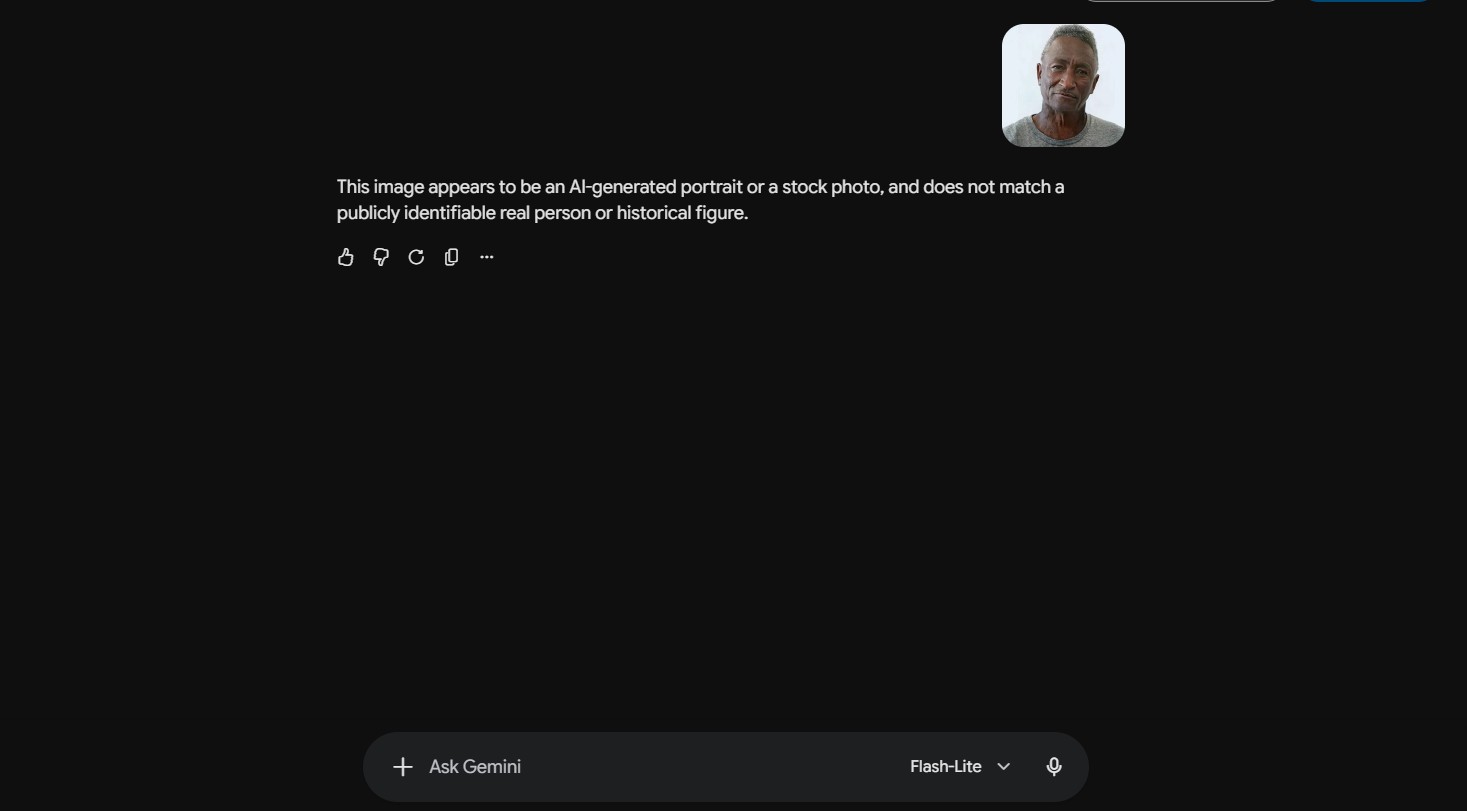
Google SynthID Detector flagging AI watermarks on a test image

That level of detail matters for an AI watermark check. A blanket "AI-generated" label doesn't tell you if the whole image is synthetic or just one edited corner — SynthID Detector's regional breakdown does.

  1. Get the original file — not a screenshot of a screenshot, not a re-saved copy. The more compression a file has been through, the weaker both signals get.
  2. Check Content Credentials first — upload the file at contentcredentials.org/verify. It reads the C2PA manifest and shows who signed it.
  3. Run a watermark check with Gemini — Google's Gemini app can check for a SynthID signal directly. Ask it "was this made by AI?" and upload the file.
  4. Try TrueMedia for video — the nonprofit tool at truemedia.org is built specifically for verifying suspicious video with a free multi-model check.
  5. Cross-check with a second tool — if two independent tools agree, trust the result. If they disagree, treat it as unresolved, not proof either way.

None of these tools are perfect. A missing AI watermark doesn't prove something's real, it just means no signal was found, which is a different thing entirely.

Soft Tip: Worth knowing — Google's full SynthID Detector portal is still early access for journalists and researchers, with a public waitlist. The Gemini app method above is open to everyone right now.

5. Common Mistakes, False Positives and What Detection Tools Can't See

The biggest misconception is treating AI watermark checks like a lie detector test. They're not. A present watermark is a strong signal, a missing one just means no signal was found.

Most false positives come from heavy editing. Aggressive filters, upscalers, and repeated compression can introduce patterns that mimic an AI watermark signal, even in a completely real photo.

On the other side, a real deepfake that's been screen-recorded or passed through three messaging apps can lose its embedded signal entirely. Watermarks weaken with every re-save.

Detection tools solve half the problem. The other half is what happens if a fake slips past you — voice-cloned calls and deepfake video are now common scam tools.

That's a separate layer worth having. I keep Bitdefender running as a backstop against the phishing links and malware that usually ride along with a deepfake scam.

For the visual side specifically — shadows, reflections, unnatural motion — my guide on how AI understands visual data breaks down what to look for by eye.

Soft Tip: Before trusting any single result, run the same file through two different tools. When both agree, you've dramatically cut your risk of misreading it — a habit real fact-checkers use daily.

6. Ethical Reflection: Balancing Safety, Transparency and Free Expression
Balancing transparency and privacy with AI watermarks

AI watermarks give us a real way to check whether something's genuine, but they open a harder conversation too, since detection and surveillance can look identical from the wrong angle.

AI watermarks only work at scale. If a handful of companies use them, bad actors route around the gap, which is what the EU AI Act's mandatory disclosure rules are trying to close.

The Act's Code of Practice separates "fully AI-generated" from "AI-assisted" content, with different labeling for each — a real distinction for creators using AI as one tool, not the whole process.

If you're the one adding a watermark rather than checking for one, I've covered the legal tools for that separately — worth a look if you create with AI regularly.

I'd treat AI watermarks the way I treat seatbelts — they should keep people safe without restricting movement. Clarity for users, accountability for platforms, fair tools for creators.

Soft Tip: If you share AI-generated work, use a tool that preserves Content Credentials rather than stripping them. It's a small step that lets other people verify your work later.

7. Final Insights and Recommended Tools to Stay Safe Online

Checking AI watermarks isn't about becoming a digital forensics expert, it's a 20-second habit that stops most misinformation before you share it.

Here's the actual toolkit I use, not a generic list — three free, no-signup options that cover images, video, and provenance data between them.

Tool Best For Access
Content Credentials Verify C2PA provenance — signer, tools, edit history Free, no signup →
Gemini app Quick SynthID check on Google-made content Free →
TrueMedia Suspicious video, nonprofit multi-model check Free →

And if you want a standing layer of protection against the scams that ride along with deepfakes — phishing links, malware, credential theft — that's where Bitdefender comes in.

Explore Bitdefender →

Soft Tip: Bookmark one verification tool on your phone. When something feels off, a 20-second check beats days of cleaning up after sharing something false.

Common Questions

Frequently Asked Questions — AI Watermarks & Detection

What exactly are AI watermarks?

+

AI watermarks are invisible signals embedded in AI-generated images, video, or audio — either in the file itself, SynthID-style, or in a signed manifest, C2PA-style — so tools can trace where content came from.

Why do AI watermarks matter in 2026 specifically?

+

Since August 2, 2026, the EU AI Act requires generative AI systems to mark outputs as machine-readable, and deepfakes must carry a visible disclosure — watermarks are the main technical way providers meet that.

Can AI watermarks be removed?

+

Metadata-only credentials can be stripped by a simple screenshot. Embedded AI watermarks like SynthID are harder to erase and often survive cropping or compression, though heavy re-editing can still degrade them.

Do all AI tools add watermarks automatically?

+

No. Google, OpenAI, ElevenLabs, and Kakao now apply an AI watermark by default, but plenty of smaller and open-source generators still don't watermark anything at all.

How can I check if something online is AI-generated?

+

Get the original file, check it at contentcredentials.org/verify, then ask Gemini directly or run it through TrueMedia for video — two agreeing results beat one.

What if one detector says "AI-generated" and another doesn't?

+

Mixed results happen often. Use the original file, test two tools, and check for visual tells too — shadows, motion, and voice timbre are still useful backup signals.

Does the EU AI Act require all AI content to be labeled?

+

Not all of it. Deepfakes and AI text on public-interest matters need clear, visible disclosure — other AI outputs just need a machine-readable mark, which most users won't see directly.

Is Google's SynthID Detector available to everyone?

+

Not yet, fully. The full detector portal is early access for journalists and researchers with a public waitlist, but the Gemini app already does a basic SynthID check for anyone today.