
 Published on: August 29, 2025
- 1. Introduction: Why AI Logo Makers Are Booming in 2025
- 2. Quick Picks: Best Free & Paid AI Logo Tools
- 3. How AI Creates Logos (Simple Explanation)
- 4. Best Free AI Logo Makers (No Cost, Fast Results)
- 5. Best Paid AI Logo Tools (Worth the Investment)
- 6. Free vs Paid AI Logo Makers: Key Differences
- 7. Step-by-Step: How to Create a Logo with AI in Minutes
- 8. Tips for Getting a Professional-Looking AI Logo
- 9. Ethical & Practical Considerations in AI Logo Design
- 10. Final Thoughts: Which AI Logo Tool Should You Use?
- 11. FAQ – Create a Logo with AI (2025)
Affiliate Disclaimer:
Some of the links in this post are affiliate links. This means we may earn a small commission if you click through and make a purchase, at no extra cost to you. We only recommend tools we truly believe offer value.
1. Why AI Logo Makers Are Booming in 2025
Creating a strong logo used to mean hiring a professional designer, paying hundreds of dollars, and waiting weeks for the final draft. Today, things look very different. Thanks to new AI tools, anyone can create a logo with AI in just a few clicks — and often for free.
So why is this so popular in 2025? The answer is simple: small businesses, freelancers, and even content creators on platforms like TikTok or YouTube want fast, affordable branding without compromising on style. AI logo makers deliver exactly that.
We’ve tested several tools ourselves, and while they don’t completely replace professional designers (especially for big brands), they can give you an impressive starting point. Many entrepreneurs even combine AI logos with human tweaks using design software like Canva Pro to get a polished final result.
Another reason why AI logo creation is trending: it’s highly shareable. People love showing off the before-and-after logo transformations generated by AI, and some of these videos go viral on Instagram Reels or TikTok. If you search “AI logo design challenge”, you’ll see millions of views — proof that this isn’t just about design, but also about fun and creativity.
Of course, there are a few things to keep in mind. While AI can generate stylish designs, it doesn’t always guarantee originality. That’s why we’ll also highlight ethical considerations later in this guide, helping you use these tools smartly and responsibly.
In short, AI logo makers are booming because they’re fast, cheap, and surprisingly good — perfect for startups, students, and anyone who wants to stand out online without overspending. In the next section, we’ll give you our quick picks for the best free and paid tools that actually work in 2025.
2. Quick Picks – Best Free & Paid AI Logo Tools
If you don’t have time to read the full guide and just want the best tools to create a logo with AI, here are our top recommendations for 2025. We’ve included both free options (great for quick results) and paid tools (worth it if you need higher quality and commercial rights).
| Tool | Best For | Free / Paid | Why We Pick It |
|---|---|---|---|
| Looka | Startups & entrepreneurs | Paid (from $20 one-time) | Easy AI wizard, gives you brand kit (fonts, colors, mockups). Ideal if you want more than just a logo. |
| Canva Pro | Creators & freelancers | Free + Paid upgrade | Super intuitive. You can create a logo with AI and then edit designs endlessly. Great for social media branding too. |
| Fotor | Fast personal projects | Free + Paid | Quick results, modern templates, and even AI photo editing. Perfect for non-designers. |
| Tailor Brands | Small businesses | Paid (subscription) | Professional logos plus domain + website bundle. A good all-in-one solution if you’re launching a new business. |
| Designhill AI Logo Maker | Budget-friendly users | Free preview / Paid download | Lets you test unlimited designs for free, then pay only if you like the final result. |
Our Take
If you want the most flexible option, Canva Pro is unbeatable because you can keep editing your AI-generated logo and use it across social media, presentations, and print. If you’re starting a business and need a full branding kit, Looka or Tailor Brands are strong choices. For quick, free testing, Fotor and Designhill are excellent starting points.
In the next section, we’ll explain in plain language how AI actually creates logos, so you understand what’s happening behind the scenes.
3. How AI Creates Logos (Simple Explanation)
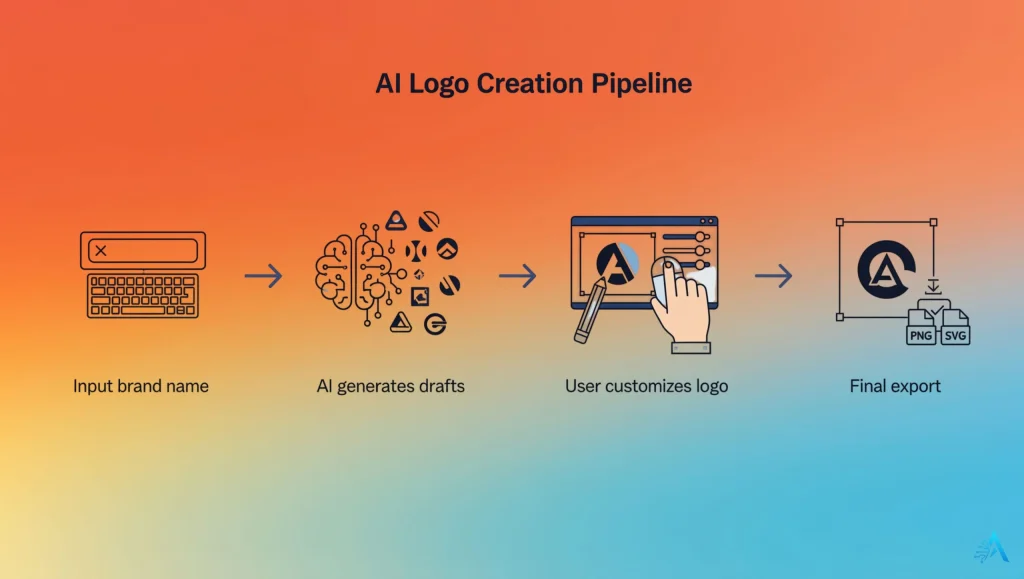
When you create a logo with AI, the process might feel like magic — type in your brand name, pick a few preferences, and within seconds you see dozens of designs. But what’s really happening behind the scenes is surprisingly simple.
AI logo makers use a mix of machine learning and design templates. Here’s how it works step by step:
You provide the input. This usually means your brand name, tagline, industry, and style preferences (like “modern,” “minimal,” or “playful”).
The AI analyzes your choices. Instead of starting from zero, the AI matches your input with millions of logo layouts, color palettes, and font combinations it has been trained on.
It generates logo drafts. Using this design database, the AI proposes multiple variations. Each one is slightly different, giving you options to refine.
You customize the result. This is where the real power lies. Most tools let you tweak colors, fonts, and icons until it feels right for your brand.
So while the AI doesn’t “invent art” like a human designer might, it’s excellent at mixing proven design rules with your preferences. This is why the results often look clean and professional, even if you don’t have any design skills.
Think of it like cooking with a recipe kit: the AI gives you the ingredients and base recipe, but you still decide the finishing touches.
This explains why many startups use AI logo makers as a first draft tool. You can quickly generate ideas, then refine them further in platforms like Canva Pro or pass them to a professional designer for polishing. Even well-known design communities such as 99designs suggest that AI is a useful starting point rather than a replacement.
In short, when you create a logo with AI, you’re using a smart assistant that knows design principles and can save you hours of work. But the final decision is still yours — and that’s what makes the process powerful.
4. Best Free AI Logo Makers (No Cost, Fast Results)
If you’re just starting out and don’t want to spend money yet, there are several solid tools that let you create a logo with AI for free. These platforms usually allow unlimited testing, but keep in mind that downloading high-resolution files may require a small fee.
Here are the best free AI logo makers in 2025:
Canva Free
If you’ve used Canva before, you know how easy it is. The free plan already includes an AI logo generator that lets you type your brand name, select some design vibes, and instantly see logo drafts. What makes Canva stand out is how much you can customize afterwards — colors, fonts, shapes, and icons are all editable.
👉 Want more power? Canva Pro gives you access to premium fonts, brand kits, and one-click resize for social media.

Fotor
Fotor is another excellent choice if you want something fast. Their AI logo maker is part of a larger design suite, which also includes AI photo editing and background removal. You can experiment for free, and only pay if you want to download high-res versions.

Designhill AI Logo Maker
Designhill is well-known for its design marketplace, but its AI logo generator is completely free to test. You can try unlimited variations, and only pay when you’re happy with the final design. This makes it one of the most budget-friendly options out there.

Hatchful by Shopify
Hatchful is Shopify’s free AI logo maker, aimed mainly at online store owners. It’s simple, fast, and comes with built-in e-commerce-ready templates, so your logo fits naturally into a shop layout. Perfect if you’re planning to launch a Shopify store.
Free AI Logo Makers Compared
| Tool | Best Feature | Limitations |
|---|---|---|
| Canva Free | Full editor + templates, very easy to use | High-res downloads require upgrade |
| Fotor | Includes AI photo editing tools | Limited free export quality |
| Designhill | Unlimited free logo previews | Pay to download vector files |
| Hatchful | Shopify-ready designs for e-commerce | Less flexibility in customization |
If you just want to create a logo with AI for free and see what’s possible, start with Canva Free — it’s the most flexible and beginner-friendly. If you’re opening a Shopify store, Hatchful is a no-brainer. Fotor and Designhill are great for experimenting until you find the right design.
In the next section, we’ll cover the paid AI logo tools that are worth investing in if you want full commercial rights and higher-end results.
5. Best Paid AI Logo Tools (Worth the Investment)
Free tools are great for testing ideas, but if you’re serious about building a brand, investing in a paid platform makes a big difference. When you create a logo with AI using premium tools, you usually get:
High-resolution vector files (so your logo looks sharp on a billboard or business card).
Commercial rights (important if you’re running a business).
Full brand kits (fonts, color codes, templates, social media assets).
Support and custom tweaks (some platforms even let you request human adjustments).
Here are the top paid AI logo makers we recommend in 2025:
Looka
Looka is one of the most popular AI logo makers for startups. Beyond logos, it delivers a complete brand kit with typography, color palettes, and even social media mockups. You pay once and get everything you need to launch your visual identity.
 Why it’s worth it: Great for entrepreneurs who want to look professional without hiring a full design agency.
Tailor Brands
Tailor Brands goes further than logo design: it bundles AI logos with a full business suite including domain, website builder, and social media tools. Perfect if you want to handle everything in one place.
Why it’s worth it: Best for small businesses that want to get online quickly with consistent branding.

Canva Pro
While Canva Free is great for beginners, Canva Pro unlocks the real power: premium fonts, brand kits, one-click resizing, and AI-generated assets. You can create a logo with AI and then use it across all your social channels, presentations, and print material.
Why it’s worth it: Best value for freelancers and creators who want logos plus everything else (posters, videos, infographics).

BrandCrowd
BrandCrowd offers AI-driven logo design combined with a massive template library. It’s especially good if you want quick results but still want to tweak layouts manually.
Why it’s worth it: Thousands of unique templates with AI recommendations, making it hard to run out of ideas.
Free AI Logo Makers Compared
| Tool | Best For | Pricing | Why We Like It |
|---|---|---|---|
| Looka | Startups & entrepreneurs | One-time fee (from $20) | Includes full brand kit with fonts, mockups, and social templates |
| Tailor Brands | Small businesses | Subscription (monthly/yearly) | Combines logo design with domain + website builder |
| Canva Pro | Freelancers & creators | Subscription ($12.99/month) | Best for all-in-one design + branding needs |
| BrandCrowd | Users who want lots of options | Pay-per-logo or subscription | Huge logo library with AI suggestions |
When you want to create a logo with AI that’s professional and scalable, paid tools are worth every cent. Canva Pro is the best all-rounder, Looka is ideal if you want a one-time purchase, and Tailor Brands is the smartest pick for businesses that want an entire online identity.
6. Free vs Paid AI Logo Makers – Key Differences
If you’re trying to decide whether to create a logo with AI using a free tool or pay for a premium one, the difference comes down to what you need. Free tools are fantastic for quick drafts, testing styles, or fun social content (you’ve probably seen those “AI logo challenge” videos going viral on TikTok). But if you’re launching a business, paid tools give you the professional files and rights you’ll need.
Here’s a clear comparison:
| Feature | Free AI Logo Makers | Paid AI Logo Makers |
|---|---|---|
| Cost | Free to test and preview designs | One-time fee or subscription (usually $10–$30+) |
| File Quality | Low to medium resolution, often JPG or PNG | High-resolution vector files (SVG, EPS, PDF) |
| Rights | Limited rights, sometimes only for personal use | Full commercial rights included |
| Customization | Basic edits, fewer templates | Advanced editing, brand kits, mockups |
| Best For | Testing ideas, personal projects, social media fun | Startups, small businesses, professional branding |
If your goal is to create a logo with AI just for fun or as a draft, free tools like Canva Free or Hatchful are more than enough. But if you need a logo you can actually put on business cards, websites, and merchandise, paying for a platform like Looka, Canva Pro, or Tailor Brands is absolutely worth it.
As a good strategy, many creators start free to test styles, then switch to a paid version once they’re ready to lock in their brand identity. That way, you get the best of both worlds without wasting money.
7. Step-by-Step – How to Create a Logo with AI in Minutes
One of the biggest advantages of AI is speed. You don’t need to be a designer — in fact, you can create a logo with AI in just a few minutes by following a simple process. Let’s break it down.
1. Choose the Right Tool
Pick the platform that fits your needs. If you want something flexible, start with Canva (free or Pro). If you want a full brand kit, tools like Looka or Tailor Brands are better.
 Pro tip: Try two different tools and compare results. Many people on TikTok do AI logo comparison challenges, and the differences can be surprising.
2. Enter Your Brand Name and Industry
Most tools will ask for your business name, tagline, and the industry you’re in. This helps the AI understand the style you need (for example, “modern tech startup” vs “cozy coffee shop”).
3. Select Style Preferences
Choose your vibe:
Minimalist, playful, or bold
Color palettes (blue for trust, green for eco-friendly, red for energy)
Font type (serif for classic, sans-serif for modern)
Why this matters: AI tools use these cues to generate logos that actually “feel” right for your audience.
4. Let the AI Generate Options
Click generate and watch the tool create dozens of logos in seconds. This is where AI shines — instead of waiting days for a first draft, you instantly see multiple variations.
5. Customize the Best Pick
This is the fun part. You can change colors, fonts, icons, or layouts until the logo feels unique to you. If you’re using Canva Pro, you can also export brand kits and apply your logo across presentations, social posts, and videos.
6. Download and Use Your Logo
Free tools often let you download low-resolution logos for testing, while paid tools give you high-resolution vector files that work everywhere — from websites to business cards and merchandise.
Example: Creating a Logo in Canva Pro
Here’s how easy it is with Canva:
Open the AI logo maker in Canva.
Type your brand name and tagline.
Pick your industry and preferred style.
Browse the generated logos and select your favorite.
Edit colors, fonts, or icons until you’re happy.
Export the logo (JPG, PNG, or vector).
In under 10 minutes, you’ll have a professional-looking logo ready to use.
Creating a logo with AI is less about replacing designers and more about saving time and sparking ideas. Even if you eventually hire a designer, starting with an AI draft can help you clarify your style preferences. And if you’re on a budget, these tools are more than enough to launch with confidence.
8. Tips for Getting a Professional-Looking AI Logo
Just because you can create a logo with AI in minutes doesn’t mean every result will look ready for prime time. The difference between an amateur and professional-looking logo often comes down to a few smart adjustments. Here’s what works best in 2025:
1. Keep It Simple
AI tools sometimes generate logos with too many colors or shapes. A clean, minimal design is easier to recognize and looks more professional across platforms. Remember: even Apple and Nike use simple icons.
2. Think About Color Psychology
Colors communicate emotions. Blue signals trust, green suggests eco-friendly, red feels energetic, and black is bold. When you create a logo with AI, pick a palette that reflects your brand values, not just what looks pretty.
👉 Helpful read: Color psychology in branding
3. Test Scalability
Logos should look good small and large — from a TikTok profile picture to a printed flyer. Always preview your AI-generated logo in different sizes before finalizing it.
4. Avoid Overused Icons
Many AI tools suggest common shapes like lightbulbs or globes. If your logo looks too generic, swap out the icon or combine it with custom text. This helps your brand stand out.
5. Use AI as a First Draft, Then Refine
The smartest strategy we’ve seen online (and even in viral TikToks) is:
Generate 3–5 logos with AI.
Pick the best one.
Refine it in a design platform like Canva Pro or hand it off to a designer for a final polish.
This way you save time and money, while still ending up with a logo that feels unique.
6. Always Secure the Rights
Some free AI tools only allow personal use. If you plan to run a business, make sure you’re downloading from a platform that provides full commercial rights (Looka, Tailor Brands, Canva Pro).
Our Take
AI is amazing for speed, but professionalism comes from attention to detail. If you follow these simple hacks, you can create a logo with AI that not only looks polished but also represents your brand identity in a meaningful way.
9. Ethical & Practical Considerations in AI Logo Design
While it’s fun and easy to create a logo with AI, there are some ethical and practical points worth keeping in mind if you want your brand to be strong and future-proof.
Originality vs. Templates
AI logo makers often reuse patterns, so your design may resemble others. Always customize to make your logo unique.
Copyright & Commercial Rights
Free tools sometimes limit usage, while paid platforms usually include full commercial rights. Always check the license before using your AI logo for business.
Avoiding Plagiarism Risks
Even if AI doesn’t copy logos directly, results can overlap with popular symbols. Run a reverse image search to be safe.
Transparency with Clients or Audiences
If you’re a freelancer, be upfront about using AI. Some clients are fine with it, others may expect fully original design work.
Ethical Branding Choices
Logos communicate meaning. Avoid icons that could unintentionally mislead or resemble sensitive trademarks in your industry.
10. Final Thoughts – Which AI Logo Tool Should You Use?
At the end of the day, the best choice depends on why you want to create a logo with AI. If you’re experimenting or need something quick for a school project, side hustle, or personal page, free tools like Canva Free, Fotor, or Hatchful are more than enough to get you started.
But if you’re building a business and want to make sure your brand looks professional everywhere — from websites to merchandise — it’s worth investing in a paid option. Looka is a great one-time purchase if you just want a complete logo kit. Tailor Brands makes sense if you’re also looking for a domain and website. And Canva Pro remains the most versatile choice for freelancers and creators, because it gives you both a logo and everything else you’ll need for content and marketing.
Our personal view? The smartest approach is to start free to test styles and directions, then upgrade to a paid tool once you’re ready to commit to your brand identity. This way, you enjoy the flexibility of AI without wasting money on drafts you may never use.
AI is changing how we think about design, and being able to create a logo with AI in minutes is an incredible opportunity. But as with any creative process, the final touch is still human — making sure your logo feels authentic, original, and aligned with your vision.
If you’d like to explore more inspiration and discover other AI tools for design, check out our full Creativity section.
11. FAQ – Create a Logo with AI (2025)
Q: Can I really create a logo with AI for free?
A: Yes, you can. Tools like Canva Free, Fotor, and Hatchful let you generate and test logos at no cost, but most platforms charge for high-resolution downloads or commercial rights.
Q: Which is the best tool to create a logo with AI?
A: It depends on your needs. Canva Pro is the most versatile for creators, Looka is great for a one-time brand kit, and Tailor Brands is best if you want a full business package with a website and domain.
Q: Are AI-generated logos unique?
A: Not always. AI uses patterns and templates, so results may look similar to others. Customizing your AI logo is the best way to ensure it feels original.
Q: Do I own the copyright if I create a logo with AI?
A: With free tools, rights may be limited. Paid platforms like Looka, Tailor Brands, or Canva Pro usually include full commercial rights, making them safer for business use.
Q: How long does it take to create a logo with AI?
A: Only a few minutes. You enter your brand details, pick a style, and the AI generates dozens of logo variations instantly. Refining and customizing may take a bit longer, but it’s still much faster than hiring a designer.
Q: Is it safe to use an AI logo for my business?
A: Yes, if you use a platform that provides commercial rights and you check for originality. Running a reverse image search is a smart step before finalizing your design.