
 Published on: November 18, 2025
Disclosure:
This post contains affiliate links. If you click through and make a purchase, we may earn a small commission at no additional cost to you. Thank you for supporting AIDigitalSpace — we only recommend tools and services we genuinely trust and believe bring real value to our readers.
1. Why Grammarly vs ChatGPT Matters for Everyday Writing
Choosing between Grammarly vs ChatGPT has become a daily decision for anyone who writes emails, reports, captions, blog posts, or even messages at work. Both tools promise clarity and speed, but they solve different problems — and understanding that difference is what helps us write faster without losing our natural tone. In our reviews across AI tools like Notion AI and Taskade on AIDigitalSpace.com, we’ve noticed one pattern: most people don’t actually need more tools — they need the right one for their workflow. That’s exactly what this guide helps you solve.
Today, writing mistakes hurt credibility and slow down productivity — which is exactly why the grammarly vs chatgpt comparison matters more than ever. Grammarly keeps sentences clean, consistent, and professional, while ChatGPT generates ideas, rewrites entire sections, and helps structure complex thoughts in seconds. Understanding when to use each tool (and when to avoid them) saves time, reduces stress, and improves the quality of everything we publish. This guide shows how to choose the best AI writing assistant for real, everyday tasks — the kind of writing we all do Monday to Friday.
If you struggle with tone changes in ChatGPT, draft in your own voice first, then use Grammarly to refine — you keep natural style and clarity without over-editing. This approach is one of the simplest ways to make the grammarly vs chatgpt workflow feel natural and effective.
Recommended Read: Everybody Writes by Ann Handley — a practical guide for anyone who wants to write clearer, faster, and with more personality in everyday work.
2. The Real Problem: We Need Fast, Error-Free Writing Without Losing Our Voice

Most of our daily writing happens fast — emails, reports, chats, briefs. The real challenge isn’t producing text; it’s producing clear, correct, confident writing without spending extra time editing. This is where the grammarly vs chatgpt decision becomes practical: one tool prioritizes precision and clarity, while the other helps shape, expand, and organize ideas. When we don’t use them correctly, we either over-edit or rewrite more than necessary, losing time and even our natural voice in the process.
Grammarly works best when we need real-time correction, tone control, and quick clarity fixes, especially inside tools we already use (email, documents, browsers). Its writing assistant explains decisions clearly, making it a reliable support for professionals.
ChatGPT is stronger when we need to structure, rewrite, or expand ideas — drafting sections, simplifying text, or turning notes into a polished explanation.
On AIDigitalSpace.com, tools like Notion AI show the same pattern: productivity improves when we choose the right assistant for the right moment, not when we expect one tool to do everything. The goal here is to help you understand which tool supports your workflow, so your writing stays fast, accurate, and authentically yours.
3. Grammarly vs ChatGPT Overview: What Each Tool Actually Does Better
To compare grammarly vs chatgpt effectively, it helps to see their strengths at a glance. They’re not competitors — they handle different stages of writing.
| What Grammarly Does Best | What ChatGPT Does Best |
|---|---|
| Real-time grammar, tone, and clarity checks | Rewriting, expanding, simplifying, summarizing |
| Works directly in emails, documents, browsers | Turns rough notes into structured paragraphs |
| Keeps your natural writing voice consistent | Helps build ideas, outlines, and explanations |
| Try Grammarly | Try ChatGPT |
Choosing between grammarly vs chatgpt becomes much easier when we map their roles to real workflows. Grammarly is ideal for fast writing — the moments when we need accuracy, tone control, and clarity without changing our natural voice. ChatGPT is stronger for shaping content, helping us reorganize ideas, generate variations, refine explanations, or turn raw notes into something structured and easy to understand.
For everyday work, most people benefit from using both tools together. Grammarly keeps writing polished as we type, while ChatGPT helps us shape paragraphs before we hit “send” or “publish.” This combination creates a smooth grammarly vs chatgpt workflow that brings speed, confidence, and consistent quality across emails, documents, and creative tasks.
Short video walkthrough to see key Grammarly and ChatGPT features in action before choosing your workflow.
4. How to Use Grammarly and ChatGPT Together for Stronger Writing
The fastest way to improve everyday writing is to use grammarly vs chatgpt as a combined workflow rather than choosing one tool over the other. Each one shines at a different moment: ChatGPT shapes ideas, while Grammarly polishes the final text so it looks clean, professional, and consistent.
1. Draft or reshape your ideas in ChatGPT
Start with rough notes, bullet points, or even a chaotic paragraph. Ask ChatGPT to organize your message, clarify a concept, or rewrite it in a more direct tone. This step gives you structure quickly — without overthinking or staring at a blank page.
2. Paste the draft into your document and let Grammarly refine it
Once the draft is ready, Grammarly checks tone, clarity, conciseness, and correctness in real time. This prevents the two issues almost everyone faces: over-editing the text until it loses personality and ending up with a tone that doesn’t sound like you. Grammarly keeps the final version sharp, natural, and reliable.
3. Use each tool only where it’s strongest
For clarity → Grammarly
For rewriting or expanding → ChatGPT
For tone consistency → Grammarly
For simplifying complex text → ChatGPT
This simple separation keeps the grammarly vs chatgpt workflow fast, predictable, and easy to maintain — no duplicate editing, no wasted time.
Bonus for longer documents
If you’re working on reports, proposals, or multi-section documents, tools like Notion AI integrate well with this workflow, especially for outlining and structuring ideas before moving into ChatGPT and Grammarly.
5. Key Differences, Common Mistakes, and When to Choose One Over the Other
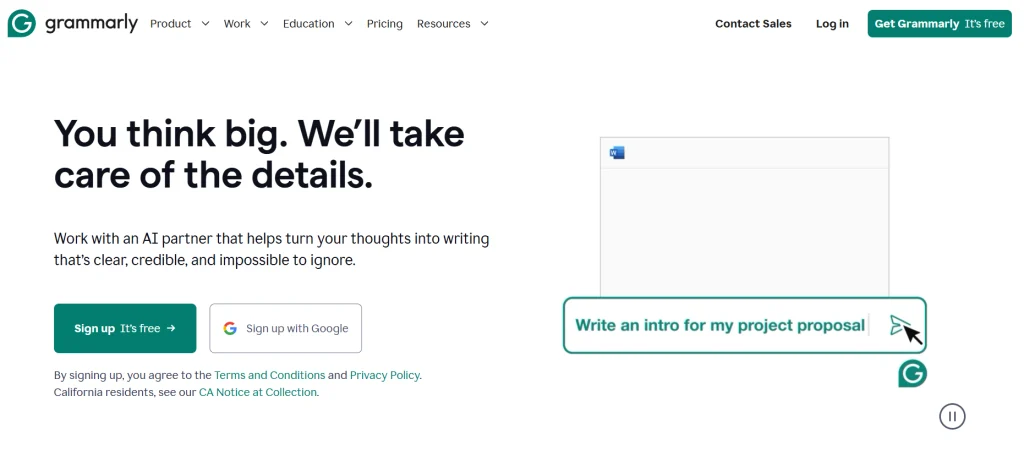
Understanding how grammarly vs chatgpt behave in real workflows helps us avoid the mistakes that slow writing down or make it feel unnatural. Grammarly focuses on accuracy, tone consistency, and producing clean final text, while ChatGPT is stronger earlier in the process when ideas still need shape, clarity, or better structure. Many users mix these roles, which leads to drafts that feel over-edited or overly AI-generated.
Common mistakes to avoid
• Using ChatGPT for tiny grammar fixes, even though Grammarly handles them faster and more reliably.
• Expecting Grammarly to rewrite long sections, even though it isn’t built for structural edits.
• Copying ChatGPT output without adding personal voice, then relying on Grammarly to fix the tone.
• Editing the same paragraph in both tools, which slows everything down instead of helping.
When to choose Grammarly
• When writing professional emails or reports that need a natural, consistent tone.
• When you want real-time clarity and correctness as you type.
• When you need quick, accurate fixes without changing your writing style.
When to choose ChatGPT
• When shaping a draft from notes or bullet points.
• When you need simpler explanations, variations, or clearer rewrites.
• When long content needs to be organized into a cleaner structure before final editing.
Used in the right order, the grammarly vs chatgpt workflow gives you speed, clarity, and a natural voice — without overthinking, rewriting twice, or doing unnecessary edits.
6. Ethical Reflection: Using AI Writing Tools While Protecting Your Voice and Privacy
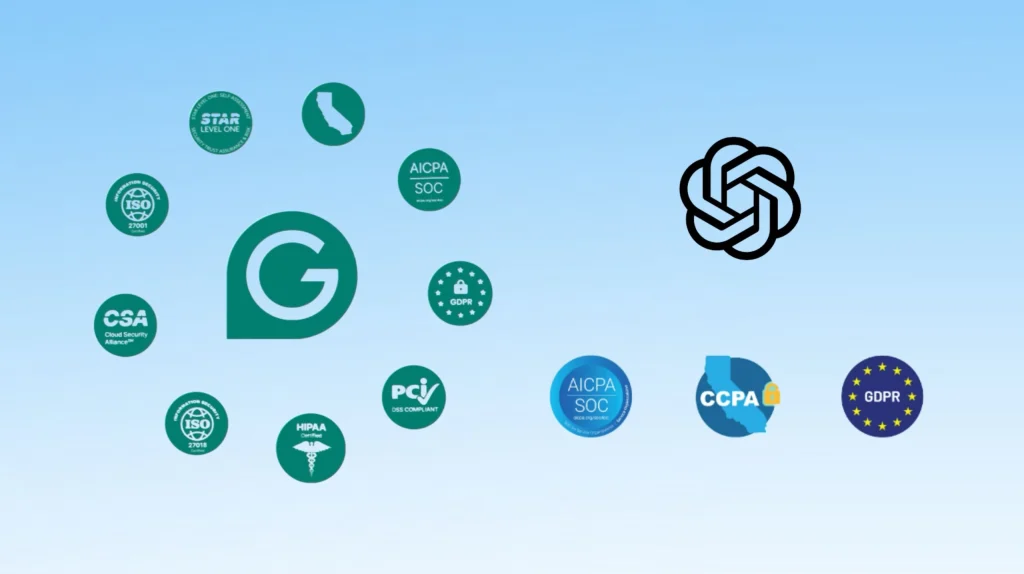
When we look at grammarly vs chatgpt from an ethical angle, the goal isn’t just to write faster — it’s to write responsibly. Both tools analyze text to improve it, but it’s important to stay aware of how they handle data, how suggestions are generated, and how easily AI can influence our writing style. Setting clear boundaries helps us stay efficient without giving up control over our voice, our privacy, or the intent behind what we write.
1. Protect personal or sensitive information
Avoid pasting confidential data, addresses, internal documents, or client details into any AI tool. Grammarly and ChatGPT have strong security policies, but the safest guideline is simple: if it’s sensitive, rewrite or anonymize before using AI.
2. Keep transparency in mind when collaborating
If you’re writing for a team or client, let them know when AI supports part of the workflow. This builds trust and avoids confusion about how content was produced or edited.
3. Maintain your authentic writing style
AI can unintentionally “flatten” your tone. Review each draft to ensure it still sounds like you — especially when ChatGPT reshapes larger sections. Grammarly can help preserve consistency, but your final read-through is essential.
4. Use AI suggestions as guidance, not absolute rules
Both tools offer great shortcuts, yet not every suggestion improves clarity or accuracy. Keep critical thinking active and choose the edits that genuinely support your message.
5. Verify facts and references manually
ChatGPT can make structural improvements, but real facts should always be checked independently. This ensures your writing remains credible, especially in professional or public content.
Soft Tip: Before pasting text into any AI tool, remove names, numbers, and internal references — you reduce risk without losing the value of the suggestion.
For a clear, trustworthy overview of how AI handles user data and why privacy boundaries matter, the Nielsen Norman Group’s research on AI and privacy offers an excellent, practical breakdown you can rely on.
7. Final Insights and Practical Recommendation
After comparing grammarly vs chatgpt, the most effective approach isn’t choosing one tool over the other — it’s using each exactly where it delivers the most value. Grammarly keeps your final text clean, consistent, and professional, making it ideal for emails, reports, proposals, and anything that represents you or your business. ChatGPT, instead, is most useful earlier in the process when ideas need structure, clarity, or a complete rewrite. It helps you organize thoughts, simplify complex paragraphs, and turn loose notes into a clear draft. When used together in this order, the grammarly vs chatgpt workflow becomes fast, dependable, and efficient — reducing errors, strengthening clarity, and saving time every single day.
If your priority is accuracy, tone, and professionalism, Grammarly gives you immediate value as you write. If your goal is speed, clarity, and idea development, ChatGPT helps you get there faster. Most readers benefit from both tools working together, especially when writing under deadlines or switching across multiple tasks during the day.
Below are two recommended starting points — choose the one that fits your daily writing needs, or combine them for maximum productivity using a balanced grammarly vs chatgpt workflow:
| Grammarly | ChatGPT |
|---|---|
| Best for: Professional tone, clarity, correctness | Best for: Drafting, rewriting, idea development |
| Real-time editing inside email & documents | Generates structured paragraphs and variations |
| Protects your natural writing voice | Excellent for simplifying complex text |
| Ideal for final reviews and polishing | Ideal early in the writing process |
| Fixes grammar, tone, and conciseness quickly | Reshapes content, expands ideas, and summarizes |
| Try Grammarly | Try ChatGPT |
Every minute you save in a meeting can be reinvested in real work. Start with a free plan — you’ll feel the difference in focus, clarity, and follow-through within a week.
8. FAQ About Grammarly vs ChatGPT for Daily Writing Tasks
Q: What’s the main difference between Grammarly and ChatGPT?
A: The biggest distinction in the grammarly vs chatgpt workflow is when each tool should be used. Grammarly checks clarity, tone, and correctness as you type, while ChatGPT helps you draft, rewrite, and organize ideas before the final edit. They deliver the best results when used together.
Q: Is it safe to paste my text into these tools?
A: Both tools offer clear privacy documentation, but in any grammarly vs chatgpt setup, the safest approach is always the same: avoid sharing sensitive details and anonymize internal content before pasting it into either platform.
Q: Do I still need Grammarly if I already use ChatGPT?
A: Yes. Even within a strong grammarly vs chatgpt workflow, each tool solves a different problem. ChatGPT improves structure and content, while Grammarly provides real-time corrections inside emails and documents — something ChatGPT doesn’t replace.
Q: Can ChatGPT replace a human editor?
A: Not fully. ChatGPT speeds up revisions, but important documents still benefit from a human final check. This remains true even in a combined grammarly vs chatgpt workflow.
Q: Which tool should I start with on a budget?
A: Grammarly is best if you need cleaner writing instantly. ChatGPT is better if your priority is drafting and idea development. For most people, the grammarly vs chatgpt combination eventually provides the strongest value.
If you’re looking to broaden your AI-writing toolkit beyond the grammarly vs chatgpt comparison, don’t miss our in-depth review of the latest Writesonic release — it could be the next step in refining your content workflow.