
 Published on: January 20, 2026
Affiliate Disclaimer:
Some of the links in this post are affiliate links. This means we may earn a small commission if you click through and make a purchase, at no extra cost to you. We only recommend tools we truly believe offer value.
1. Why People Are Searching for Todoist With AI Right Now
We’ve all had that moment: the task list looks organized, notifications are under control, and yet the day still feels scattered. Tasks pile up, priorities blur, and by evening it’s hard to tell what actually moved forward. Many of us already use Todoist for AI task management, so when new AI features appeared, the reaction was simple and shared: could this finally make planning feel lighter instead of heavier?
That question explains why searches around how to use Todoist with AI are growing steadily. It’s not curiosity for a new feature alone. It’s the growing sense that traditional task lists, even well-designed ones, aren’t enough anymore when work, personal projects, and constant inputs overlap all day. People are looking for a Todoist AI workflow that helps them decide faster, not just store more tasks.
What people are really looking for is reassurance and clarity. Do Todoist AI features actually help us decide what matters today? Can AI task management reduce the mental load instead of adding another layer to manage? Or is this just another form of automation we’ll try once and forget, like many productivity tools before?
In this article, we’ll focus on exactly that. We’ll look at why Todoist’s AI matters now, what problem it’s meant to solve, and how a simple, realistic system — without heavy Todoist automation or complex setups — can turn it into something genuinely useful in daily life, without changing how we already work or think.
2. Tasks Keep Growing, Focus Doesn’t

We don’t usually fail because we “forget” tasks. We fail because our list becomes a mix of everything: urgent work, small errands, long-term goals, random ideas, and guilt. Todoist can capture all of it… but once it’s inside, it often turns into a single long stream that our brain can’t prioritize fast enough.
That’s why many of us end up doing the opposite of productivity: we keep reorganizing instead of moving. And when the day is busy, even a perfect app can’t answer the question we actually need answered:
“What should we do next — and what can wait without consequences?”
Here’s a quick self-check. If we recognize ourselves in 2+ rows, we’re in the exact situation this post is built for:
| What we notice | What it usually means |
|---|---|
| We keep moving tasks to “tomorrow” | Too many tasks, not enough clear priorities |
| We spend time “organizing” but still feel behind | Our system is missing a simple decision rule |
| Important work gets buried under small tasks | The list isn’t separating “impact” from “noise” |
| We rewrite tasks because they feel too vague | Tasks aren’t actionable enough to start |
his is where AI can genuinely help — not by “doing our work,” but by reducing the mental friction: turning vague items into actionable steps, extracting the real next action, and helping us see patterns in our overload.
And to keep this grounded (and different from the usual generic “AI productivity” posts), we’ll lean on what Todoist itself explains about its AI suite, so we’re not guessing features or inventing workflows. Check out Todoist Help Center: Introduction to Todoist Assist.
In the next section, we’ll preview the “simple system” so we can immediately see what changes in real life — and then we’ll go step by step on how to use Todoist with AI without turning it into another complicated setup.
3. The “Simple System” Preview: What Changes When You Use Todoist With AI
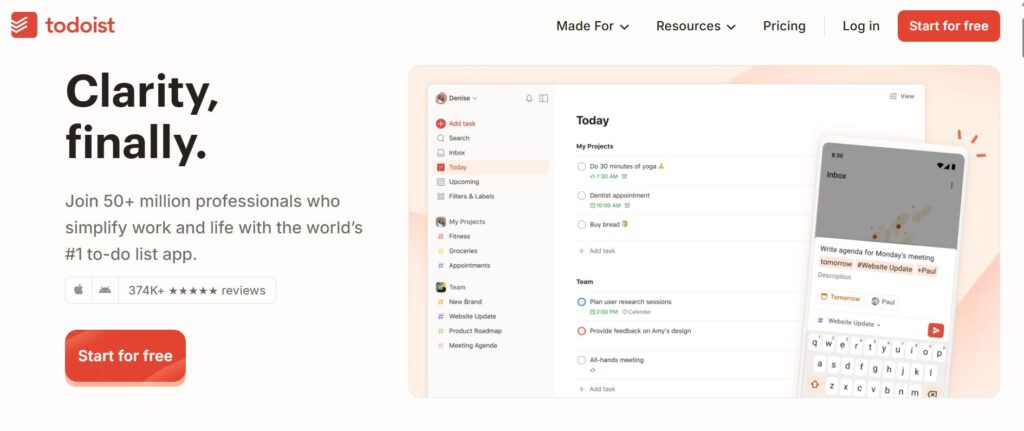
Before going into settings or individual features, it helps to pause for a moment and look at the practical outcome. When Todoist’s AI is used well as part of a clear Todoist AI workflow, the biggest change isn’t automation — it’s decision relief. This is where AI task management can quietly make a difference.
Instead of opening a task list and asking ourselves “where do I even start?”, the system begins to support a more useful question: “what makes sense to do now?” That shift is exactly what many people are hoping for when they search for how to use Todoist with AI in real daily work.
Here’s what most people notice after applying a simple Todoist-with-AI setup for a few days, especially when AI features are used intentionally rather than all at once:
| Before | After using AI intentionally |
|---|---|
| Long lists that feel equally urgent | Clearer separation between priority and background tasks |
| Vague tasks that require “thinking time” to start | Tasks rewritten into concrete next actions |
| Constant manual reordering and rescheduling | Less micromanagement, fewer daily decisions |
| Planning feels like extra work | Planning supports action instead of delaying it |
The important twist — and this is where many posts get it wrong — is that AI doesn’t replace judgment. It supports it. We still decide what matters, but we spend far less energy translating messy thoughts into workable tasks.
This is why the system works best when it stays simple. No complex automations, no constant tweaking, no “perfect setup” obsession. Just a small set of AI-assisted moments that reduce friction at the exact points where we usually get stuck.
If you wish can check out this official presentation video here below:
4. How to Use Todoist With AI: A Simple Daily System
This is where most guides become complicated — and where we’ll do the opposite.
The goal here isn’t to optimize everything. It’s to use AI only at the moments where we usually slow down, hesitate, or lose clarity. When applied this way, how to use Todoist with AI becomes intuitive, not technical.
Below is a simple daily system built around real behavior, not ideal workflows.
Step 1: Capture tasks without overthinking
We don’t need perfect tasks at the start. We just need to get things out of our head.
When adding a task, we can write it roughly:
“Prepare presentation”
“Client follow-up”
“Fix website issue”
At this stage, speed matters more than structure. The AI will help later.
Step 2: Let AI turn vague tasks into clear actions
This is the first place where AI earns its role.
Instead of rewriting tasks manually, we use AI assistance to:
clarify what the task actually means
suggest a concrete next action
make the task easier to start
This reduces friction at the exact moment where tasks usually get postponed.
Step 3: Use AI to support prioritization (not replace it)
Rather than trusting AI blindly, we use it as a second opinion inside our Todoist AI workflow, especially when priorities feel unclear.
Used this way, Todoist AI features help us:
spot tasks that are time-sensitive and shouldn’t slip
surface items that keep being postponed in our AI task management system
highlight what realistically fits into the day without overload
This isn’t about letting Todoist automation decide for us. It’s about understanding how to use Todoist with AI to reduce friction at the moment of choice.
We still choose — but we choose faster, with more context, and with far less mental noise.
Step 4: Do a short daily check-in (5 minutes)
This is the habit that makes the system stick.
Once a day, we review:
what’s actually doable today
what can wait without stress
what should be broken down further
AI support here keeps the review short and focused, instead of turning it into a long planning session.
What this system avoids (on purpose)
To keep this realistic, we intentionally avoid:
complex automations
constant rescheduling
overuse of labels, filters, or rules
If a system needs frequent maintenance, it won’t survive real life.
When this approach works best
This setup is especially useful if:
we manage many small tasks across work and personal life
we feel busy but unsure where time goes
we want clarity without micromanaging every hour
5. Ethical, Privacy, and Reliability Considerations
When we let AI interact with our tasks, we’re not just optimizing productivity — we’re also sharing how we think, plan, and prioritize our lives. That’s why this part matters more than it might seem at first, especially when we start relying on AI task management tools every day.
A task manager doesn’t contain only to-dos. It often includes work projects, personal goals, health reminders, financial notes, and half-formed ideas. Introducing AI into this space raises a fair question many readers already have in mind when exploring how to use Todoist with AI:
How much of this data is analyzed, stored, or reused — and who stays in control?
Todoist’s approach is relatively clear and conservative compared to many AI-first tools. According to their official documentation, Todoist AI features are designed to assist with task wording, organization, and suggestions as part of a controlled Todoist AI workflow, not to autonomously act or make decisions on the user’s behalf. Control remains manual, and AI suggestions are optional rather than automatic, which keeps Todoist automation intentionally limited.
This balance is important. Used this way, AI task management supports better decisions without quietly taking them for us — and that’s a key difference between helpful assistance and over-automation.
To keep this grounded and factual, it’s worth reviewing Todoist’s own explanation of how user data and AI features are handled: Todoist Privacy Policy
From a practical and ethical standpoint, this leads to three important takeaways:
• AI should support judgment, not override it
We decide what gets added, changed, or scheduled. AI proposes; we choose.
• Less automation can be more responsible
Using AI only for clarification and prioritization limits unnecessary data processing and keeps the system transparent.
• Awareness beats blind trust
Knowing what AI does — and what it doesn’t — helps us use it confidently without giving up control.
This is also why a simple system matters ethically, not just practically. The fewer moving parts we rely on, the easier it is to understand how our data flows and how decisions are made.
6. Final Verdict: Who Todoist With AI Is Really For
At this point, the picture should be clear. Todoist with AI isn’t about doing more. It’s about removing friction from decisions we already make every day. When we understand how to use Todoist with AI lightly and intentionally, it becomes a support layer for daily planning — not another system to maintain or constantly tweak.
To make this concrete and different from generic reviews, it helps to step back and look at a practical quality snapshot. Instead of focusing on features alone, this view rates the areas people actually care about when choosing tools for AI task management: clarity, control, ease of use, and how much automation is really helpful in a Todoist AI workflow.
Todoist With AI — Feature Quality Snapshot
| Feature area | Quality rating |
|---|---|
| Task clarity & rewriting | ★★★★★ |
| Daily prioritization support | ★★★★☆ |
| Ease of use & learning curve | ★★★★★ |
| Automation depth | ★★★☆☆ |
| Transparency & control | ★★★★☆ |
Todoist doesn’t aim to be the most automated or aggressive AI tool — and that’s intentional. Its strength is clarity, control, and low cognitive load, which is exactly what many people need to stay consistent long-term.
Who this setup is ideal for
This approach works especially well if we:
want help deciding, not delegating thinking
manage mixed work and personal tasks
prefer simple systems that don’t need constant tuning
It’s less suitable if we’re looking for:
fully automated scheduling
complex multi-layer workflows
AI making decisions on our behalf
FAQ — Common Questions About Todoist With AI
Q: Is Todoist AI worth paying for?
A: Yes, if our main goal is reducing mental load rather than adding more features. Todoist AI is most valuable when it helps clarify tasks and priorities every day, not when we expect full automation.
Q: Does Todoist AI replace manual planning?
A: No. It supports planning instead of replacing it. We still decide what matters, while AI helps turn vague ideas into clear, actionable tasks.
Q: Can Todoist AI work for teams or only for solo users?
A: It can be useful for teams in terms of task clarity, but it works best for individual focus and personal workload management rather than complex team coordination.
Q: How does Todoist AI compare to more automated AI planners?
A: Todoist takes a lighter, more transparent approach. Other tools may automate scheduling more aggressively, but often with less user control and higher complexity.
Q: Is it safe to use Todoist AI for personal tasks?
A: Based on available documentation, AI features are optional and assistive. Using them selectively keeps the system effective while maintaining control over personal data.
If this guide helped you understand how AI can reduce the friction of daily task management — without turning productivity into another system to maintain — these related guides pair naturally with what we explored here:
→ Why AI Answers Change Every Time (And How to Get Stable Results)
→ How Voice Assistants Actually Understand You
→ Best AI Tools for Productivity in 2025
Using AI effectively isn’t about doing more. It’s about making clearer decisions with less effort — and choosing tools that support how we already work.