
 Published on: March 5, 2026
This post contains affiliate links. If you buy through them, we may earn a small commission at no extra cost to you — thanks for supporting. Learn more.
Quick Picks + Pricing Table: Choose Your Plan in 30 Seconds
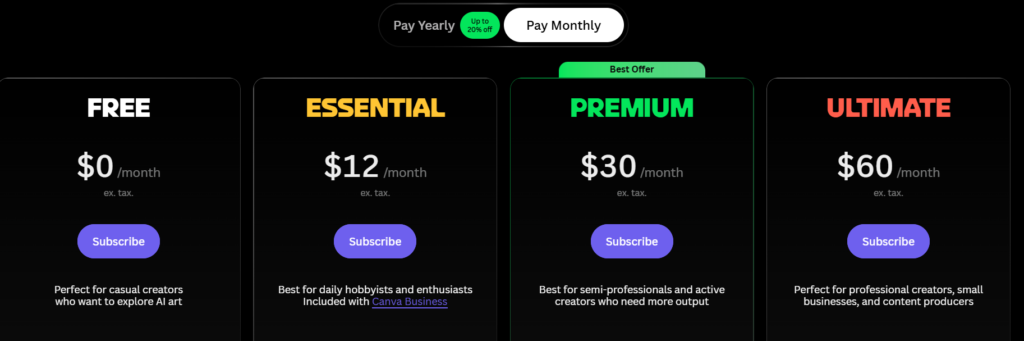
If you’re searching Leonardo AI pricing, you probably want one thing: the best plan for your use case without wasting tokens. Below is a fast, no-fluff breakdown of plans, tokens, and what you actually get each month — so you can pick the right tier in 30 seconds.
👉 Start here: choose your workflow below, then click the matching button.
| Quick Pick | Recommended Plan | Why This Is the Best Fit |
|---|---|---|
| Try it first (no risk) | Free plan | Perfect to test your workflow and learn how tokens behave before you pay. |
| Daily creator (best ROI) | Premium plan (Best Value) | The sweet spot if you generate frequently and want smoother output without hitting limits fast. |
| Client work / heavy output | Ultimate plan | Best if you iterate a lot, upscale often, and need consistent volume for real production. |
| Team workflow | Team plan | Shared usage + predictable seats — ideal if you collaborate and want controlled access. |
| Automations / bulk generation | API access | Separate from regular plans — best for developers, pipelines, and high-volume generation. |
Not sure yet? Jump to: Tokens Explained · Pricing Table · Hidden Costs
If you create weekly → Premium.
If you create daily/client work → Ultimate.
Tokens Explained: What You Actually Get Each Month
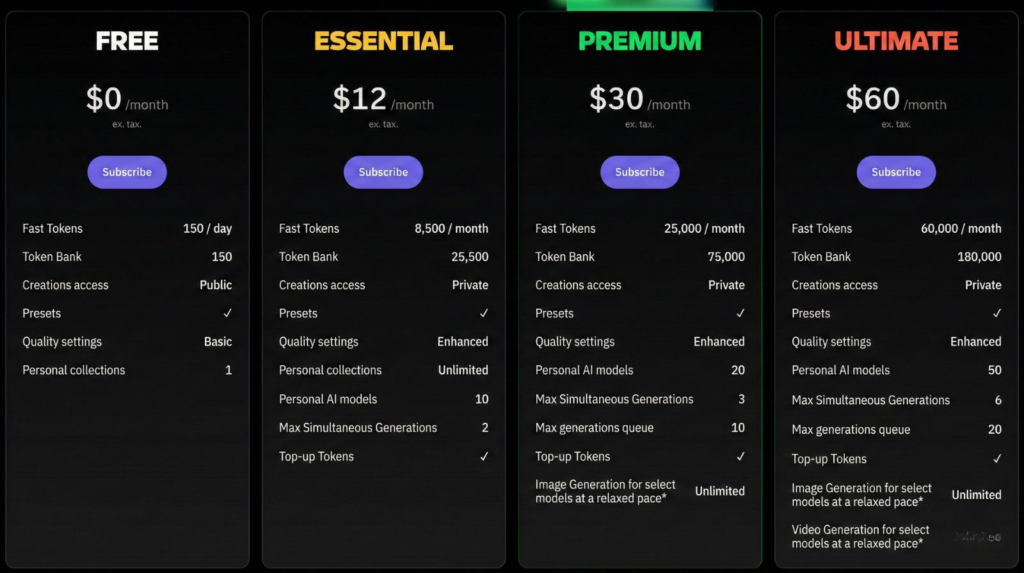
If Leonardo AI pricing feels confusing, it’s because everything comes down to tokens. In practice, tokens are your monthly “budget” for generating images, running heavier features, and scaling output across different Leonardo AI plans.
Here’s the simple version:
Leonardo AI free plan gives you a limited amount of tokens that refresh regularly. It’s great for testing the platform and learning the workflow — but not ideal for daily production if you need consistent volume.
Paid Leonardo AI plans give you a larger token allowance each billing cycle. This is what makes Leonardo AI pricing feel “smooth” for real workflows: more room to create, iterate, and ship without constantly watching your token balance.
Token cost changes depending on what you do. Basic generations cost less, while higher quality settings, more variations, upscales, and heavier models burn Leonardo fast tokens much faster — which is why the “best” plan depends on your usage, not just the monthly price.
The mistake most people make
They pick a plan based on the sticker price… then realize the real cost is how fast their workflow consumes tokens (especially when Leonardo fast tokens disappear during high-quality runs).
A quick rule that works
If you generate occasionally, the Free plan is enough.
If you generate every week, you’ll feel token limits quickly → Premium is usually the best value.
If you generate daily (or do client work), you need a higher buffer → Ultimate avoids constant slowdowns.
Tip to save tokens (and money):
Don’t upscale or generate tons of variants until your prompt is already close. First get the composition right, then spend tokens on refinement.
Next, we’ll make it even easier: a quick pricing table + break-even rules to choose the best plan in seconds.
1. Why Leonardo AI Pricing Is Spiking Right Now
People aren’t searching Leonardo AI pricing just out of curiosity — they’re searching because they’re ready to use Leonardo consistently and they want one clear answer: which plan won’t slow me down once tokens start running out?
Right now, interest around pricing, free limits, tokens, and API access is rising because more creators are moving from “testing” to publishing: daily posts, thumbnails, ad creatives, product images, and even client work. And when you create on a schedule, the free tier stops being “nice to have” and becomes a bottleneck.
Here’s what’s driving the spike:
Tokens create uncertainty. People want a straight answer: “How much can I actually generate per month?”
Iteration burns tokens fast. The moment you start doing variants, refinements, upscales, and consistent style tests, you feel the difference between plans.
“Is it free?” isn’t the real question anymore. The real question becomes: “What’s the cheapest plan that lets me work without friction?”
More pro use cases. Brand assets, eCommerce images, YouTube thumbnails, and ads need reliability, not occasional generations.
Comparison-driven buying behavior. Many users compare tools before committing — if you’re in that stage, this is a helpful reference to read next: Leonardo vs Midjourney (Best AI for Artists).
Bottom line: this page is built for decision intent. If you already know you’ll use Leonardo weekly (or daily), don’t overthink it: start free to confirm your workflow, then upgrade the moment tokens become the thing slowing you down — not your creativity.
Next, we’ll make tokens simple: what you actually get each month (and why costs change depending on what you generate).
2. How to Choose the Best Plan (Break-Even Rules + Token-Saving Tips)
If you want to pick the right plan fast, don’t start from the price — start from your workflow frequency. That’s the easiest way to understand Leonardo AI pricing: the “best” option is the one that lets you create without constantly watching tokens.
Your 30-second rule (choose one)
You generate occasionally (testing / hobby): stay on the Leonardo AI free plan until it feels limiting.
You generate every week (content, thumbnails, ads): go Premium — one of the Leonardo AI plans with the best ROI for consistent posting.
You generate daily (client work / heavy iteration): pick Ultimate — ideal if Leonardo fast tokens run out quickly with high-quality settings and lots of variations.
You work as a team: choose the Team plan for shared access and predictable usage.
You need automation / bulk generation: use API access (separate from normal plans) and check Leonardo AI API pricing if you need scalable output.
Break-even: when upgrading becomes the smart move
Upgrade when any of these happens more than once per week:
You stop mid-workflow because tokens run low
You avoid iterating (variants/refinements) to “save tokens”
You delay work or switch tools because the free tier is too tight
You’re producing assets on a schedule (daily posts / client deadlines)
If any of that is true, you’re already paying — just not with money: you’re paying with time, quality, and consistency.
Token-saving tips that keep your plan cheaper
These small habits reduce token burn a lot:
Nail composition first, upscale later. Don’t upscale until the image is already close.
Limit variants until your prompt is stable. Variants are great, but they multiply token usage quickly.
Iterate in 2 phases: (1) rough draft → (2) refinement. This avoids burning tokens on “random exploration.”
Reuse winning prompts. Save your best prompt structure and tweak only one variable at a time.
“If you’re still unsure, choose this”
If you want the safest bet for most creators: Premium (best value)
If you earn money from the output (clients, ads, product visuals): Ultimate
Helpful external resource (official, practical):
Leonardo’s token usage guide is the fastest way to understand what actions consume more tokens — read it once here and you’ll choose smarter.
Next, we’ll cover the stuff that can surprise people: rollovers, top-ups, teams, and API costs — so you don’t pick a plan and regret it later.
3. Hidden Costs & Gotchas: Rollover, Top-Ups, Teams & API
This is the section that prevents wasted money. Most people don’t upgrade because of the price — they upgrade because they get surprised by how tokens behave and how different “Team” and “API” really are. Read this once and you’ll avoid the most common pricing mistakes.
1) Rollover vs “reset”: what happens to unused tokens?
Before you pick a plan, check whether your tokens roll over or reset on billing. If you’re not creating every week, rollover can make a lower plan feel “bigger” over time. If tokens reset, you’ll want a plan that matches your monthly rhythm so you don’t lose value.
External resource (official, super useful):
Leonardo tokens FAQ (rollover/top-ups explained)
2) Top-ups: the “silent cost” that changes your real monthly spend
Top-ups can be great (you don’t need to switch plan), but they can also become a trap if you’re topping up repeatedly.
Strategic rule: if you top-up more than once a month, you’re usually better off upgrading a tier. It’s cheaper and removes friction.
3) Team plans are not “just one plan but shared”
In the Leonardo AI plans lineup, Team plans usually add seats and shared usage. That’s great for collaboration — but it also means the real cost (and how “good” the Leonardo AI pricing feels) depends on a few practical factors:
how many people generate
how often they iterate
whether the workflow is controlled (roles, rules, process)
If your “team” is really just you + one collaborator occasionally, a single-creator option from the Leonardo AI plans list is often simpler (and you’ll waste fewer Leonardo fast tokens). But if you collaborate daily, a Team plan is usually the cleaner, more predictable choice within Leonardo AI pricing.
4) API is separate (and it’s a different type of buyer)
API access is usually not “included like a feature” — it’s a different way of paying/consuming. That means:
it can scale better for bulk jobs and automations
but it can also become expensive if you run large batches without controlling prompts and output settings
Best practice: treat the API like an engine — you need guardrails (limits, retries, prompt templates) or costs can spike.
5) The 3 mistakes that cost people money
Buying a higher tier too early without knowing their workflow (start free, then upgrade when friction appears).
Staying on free too long and losing time/quality because they avoid iteration.
Choosing based on price instead of token behavior (then relying on top-ups repeatedly).
Bottom line: the “cheapest” plan is the one that lets you work without hesitation. If you’re creating weekly, Premium is usually the sweet spot. If you’re creating daily or for clients, Ultimate is the friction-free choice.
4. Final Verdict: Who Should Upgrade (and Who Should Stay Free)

If you want the shortest path to the right plan, use this rule: pick the option that removes friction from your workflow. The Leonardo AI free plan is perfect to test and learn. Paid Leonardo AI plans make sense once you publish consistently and don’t want tokens (or Leonardo fast tokens) to interrupt your output — that’s when Leonardo AI pricing starts to “click”.
Quick Verdict
Stay Free if you’re still testing, generating occasionally, or you don’t have a weekly publishing rhythm yet (best use of the Leonardo AI free plan).
Upgrade to Premium if you create every week (thumbnails, ads, social graphics) and want the best ROI among Leonardo AI plans.
Choose Ultimate if you create daily, iterate heavily, or monetize outputs — especially if Leonardo fast tokens run out quickly with higher-quality settings.
Team plan if multiple people generate consistently and you need predictable seats and shared usage within the Leonardo AI plans structure.
API if you run automations, bulk jobs, or production pipelines — and you should look at Leonardo AI API pricing for cost control at scale.
| If You Are… | Choose This | Why It Converts (Real Benefit) |
|---|---|---|
| Testing / occasional use | Free plan | You learn tokens + workflows without paying. Upgrade only when you hit friction. |
| Publishing weekly (best ROI) | Premium (Best Value) | Less token anxiety, faster iteration, and a smoother workflow for consistent output. |
| Daily output / client work | Ultimate | Best if you iterate a lot: fewer interruptions, more consistent production, less time wasted. |
| Collaborating with a team | Team plan | Predictable access + shared workflow. Ideal when multiple people generate often. |
| Automations / bulk generation | API access | Best for pipelines and scale. Use guardrails to control usage and cost. |
Want the deeper breakdown? Jump back to Tokens Explained or Hidden Costs.
If your AI images still look “too perfect” or obviously generated, the plan isn’t the real issue — it’s the workflow (prompting, realism settings, and refinement steps). Before you spend more, read this quick guide to fix it fast.
5. FAQ – Leonardo AI Pricing, Tokens & Plans
Q: Is Leonardo AI free (and what are the limits)?
A: Yes — the free plan is great for testing and learning the workflow. But if you create on a schedule (weekly/daily), you’ll feel the limits quickly because tokens become a bottleneck. A good rule: Free = try, Paid = produce consistently.
Q: What are “tokens” in Leonardo AI (in plain English)?
A: Tokens are your usage budget. Every generation and “heavier” feature uses tokens. If you do lots of iterations (variants, refinements, upscales), you burn tokens faster — that’s why pricing feels confusing until you map it to your workflow.
Q: Why do token costs change depending on what I generate?
A: Because not all actions cost the same. Basic generations cost less, while “heavier” actions (higher quality settings, more variations, upscales, advanced features) typically cost more.
Helpful external resource (official): Token usage guide
Q: What’s the best plan for most creators who publish weekly?
A: Premium. It’s usually the best balance of cost vs consistency because you stop managing tokens every session. If you publish weekly (thumbnails, ads, social posts), Premium is typically the “best value” tier.
Q: What’s the best plan for client work or daily production?
A: Ultimate. If you earn money from output, you need a plan that avoids slowdowns. Client work usually means more iteration, more revisions, and more pressure — Ultimate is built for that “no friction” workflow.
Q: When should I upgrade from Free to Premium/Ultimate? (break-even rule)
A: Upgrade when this happens more than once per week:
you stop mid-workflow because tokens run low
you avoid iterating “to save tokens”
you delay work or switch tools because limits are annoying
That’s the real break-even point: when tokens start costing you time.
Q: Do unused tokens roll over or reset?
A: It depends on the plan and token rules. Before choosing, check whether tokens roll over or reset — it changes the real value of the subscription.
Helpful external resource (official): Tokens FAQ (rollover/top-ups)
Q: Is Team plan worth it vs just one paid plan?
A: Team makes sense when multiple people generate consistently and you want predictable access. If it’s just you (or one occasional collaborator), a single creator plan is often simpler and cheaper.
Q: Is API included in normal plans?
A: Treat API as its own lane: it’s meant for automation and bulk generation, and pricing/usage is managed differently. If you’re not building workflows or pipelines, you probably don’t need API.
If you’re still testing, start with the Free plan and learn how tokens behave in your workflow. But if you’re generating weekly (or earning money with your outputs), don’t stay stuck in “token anxiety” — Premium is usually the best value, while Ultimate is the friction-free choice for daily creation and client work.
Before you go, here are 3 helpful next reads on AIDigitalSpace (so you can turn this into real output fast):