
 Published on: November 2, 2025
Disclosure:
This post may contain affiliate links. If you purchase through them, we may earn a small commission — at no extra cost to you. This helps support our research and keeps AI Digital Space running. Thank you!
1. What Is Ocoya AI and Why It’s Gaining Attention
If you manage multiple social media accounts, you already know how time-consuming it can be to plan, write, and post consistently. That’s where Ocoya AI steps in — a tool designed to automate content creation, captions, and scheduling in one clean dashboard. In 2025, it’s becoming one of the most discussed AI tools for social media automation, used by marketers, freelancers, and small businesses who want to save hours each week without sacrificing creativity.
What makes Ocoya AI stand out is how it blends automation with design. Instead of jumping between copy generators and schedulers, you can create visuals, generate captions with Travis AI, and publish instantly — all in one place. For anyone who’s ever felt overwhelmed switching between Canva Pro and ChatGPT, this all-in-one setup feels like a breath of fresh air. It’s part of a bigger shift we’re tracking across top AI productivity tools where integration is finally replacing tool overload (see our review on Taskade AI for a similar approach).
At AI Digital Space, we’ve seen this trend rise steadily in both Google Trends and real user feedback — people want AI that genuinely simplifies their workflow, not adds new steps. According to a recent VentureBeat report on AI marketing platforms, users now prioritize clarity and automation over complex analytics. That’s exactly where Ocoya AI finds its niche — turning social media chaos into calm, scheduled consistency.
2. Key AI Features That Make Social Media Faster
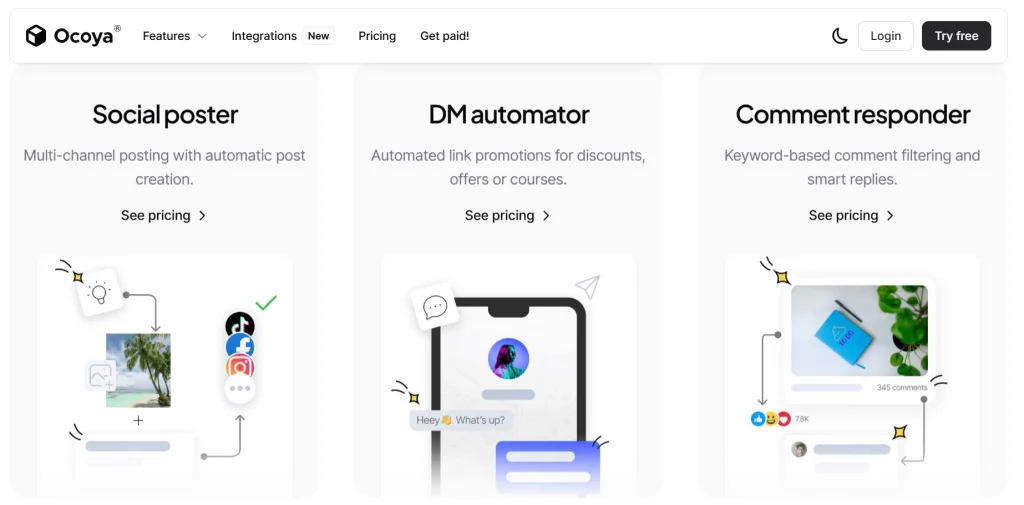
The real strength of Ocoya AI lies in how naturally it removes the friction from social media management. Instead of juggling five different tools, Ocoya centralizes everything — from post creation to analytics — and lets AI handle the repetitive work while you focus on creativity.
One of its most appreciated features is Travis AI, the built-in writing assistant that instantly generates captions, hashtags, and short post ideas tuned to each platform’s tone. It’s like having an always-ready copywriter that learns your voice. Then comes the visual composer, which connects directly with Canva templates, making branded graphics or quote cards take seconds, not minutes. Together, they turn the slow “blank screen” phase into a quick creative flow.
Another major time-saver is the multi-platform scheduler. From one dashboard, you can prepare Instagram reels, TikTok videos, or LinkedIn posts, preview them, and publish automatically. You can even duplicate top-performing content to test variations — a trick many marketers overlook. And since Ocoya offers a free trial, it’s worth experimenting with a few posts before deciding. Most users realize within the first week that upgrading to a paid plan pays itself back in saved hours. Plus, you can cancel anytime, so there’s truly nothing to lose and efficiency to gain.
| Feature | What It Does | Why It Matters |
|---|---|---|
| Travis AI Writer | Generates captions, hashtags, and ideas instantly | Saves hours of brainstorming and editing |
| Visual Composer | Builds posts and visuals directly with Canva templates | Keeps branding consistent across platforms |
| Multi-Platform Scheduler | Plans and posts automatically to all social networks | Eliminates manual uploads and reminders |
| Performance Analytics | Tracks engagement and best-performing content | Shows what really works, data-driven |
3. How to Use Ocoya AI for Content Creation and Scheduling
Using Ocoya AI is refreshingly simple — and that’s a big part of its appeal. The platform focuses on making content creation intuitive, even for users who aren’t social media pros. Here’s how the workflow looks in practice:
1. Choose your platform and post type
From the dashboard, select where you want to publish — Instagram, TikTok, LinkedIn, or Facebook. Each channel adapts automatically, so your content always fits the right format.
2. Create your post with AI help
Write a short idea or headline, then let Travis AI generate your caption and hashtags. You can tweak tone, length, or add emojis to match your brand personality. It feels similar to ChatGPT but tuned specifically for social content.
3. Design your visual quickly
You can upload media or open the integrated Canva Composer, where you’ll find customizable templates that stay consistent with your brand colors. It saves huge amounts of time for creators who’d otherwise design separately.
4. Schedule and automate
Once ready, preview the post and pick a time to publish. Ocoya supports both instant posting and auto-scheduling — even bulk uploading multiple posts at once. You can review everything in a single visual calendar.
5. Track results
After posting, the built-in analytics show engagement, clicks, and impressions per platform. That feedback loop helps you adjust tone or posting time for better reach next round.
It’s the kind of workflow that turns social media management into something smooth and predictable — perfect for freelancers, small teams, and creators balancing multiple channels.
4. Pricing, Plans, and Value for Creators in 2025
One of the reasons Ocoya AI is gaining popularity so quickly in 2025 is its flexible pricing. You can start completely free and only upgrade when you’re ready to scale — which makes it perfect for creators testing their workflow before committing.
| Plan | Main Features | Best For |
|---|---|---|
| Free Plan | Basic post scheduling, limited Travis AI credits | Beginners testing automation tools |
| Bronze / Silver | Unlimited scheduling, more AI captions & media library | Freelancers and small brands |
| Gold / Diamond | Full automation suite, team collaboration, advanced analytics | Agencies or power users managing multiple accounts |
Each plan scales based on AI credit usage, so you only pay for what you actually use. For most solo creators, the mid-tier plans already unlock everything needed to manage several accounts efficiently.
The free trial is a great entry point — no credit card required — and you can cancel anytime or request a refund within the trial period if it doesn’t fit your needs. This makes trying a paid plan essentially risk-free, while giving you access to the full automation experience.
It’s a smart way to understand your content rhythm, identify what automations save you the most time, and decide whether the upgrade truly supports your daily workflow — which, for most users, it does within the first few days.
5. Ocoya vs SocialBee vs AdCreative.ai – Feature Comparison

With dozens of AI marketing tools on the market, the question many creators ask is: how does Ocoya AI actually compare to similar platforms?
The short answer — it’s the most balanced all-in-one solution among the three. While SocialBee focuses mainly on scheduling and AdCreative.ai on ad design, Ocoya AI merges both worlds by automating captions, visuals, and posting in one integrated workspace.
Here’s a quick side-by-side snapshot to help clarify where each tool shines:
| Tool | Main Strength | AI Features | Best Use Case | Our Verdict |
|---|---|---|---|---|
| Ocoya AI | All-in-one content creation, automation, and scheduling platform | Travis AI captions, visual composer, hashtag generator | Creators & small businesses managing multiple channels | Try Free → |
| SocialBee | Smart scheduling and content recycling system | AI-generated captions, post categorization, queue automation | Freelancers or agencies ensuring consistent posting | View Site → |
| AdCreative.ai | AI-driven ad creatives optimized for performance | Headline, visual & layout generator trained on campaign data | Marketers running paid campaigns and A/B testing visuals | View Site → |
The biggest advantage of Ocoya AI is simplicity — fewer tabs, smoother collaboration, and an interface that feels made for everyday creators. If you’re focused on consistency, it delivers the fastest setup-to-result path among the three.
For those who want to understand more about psychology in digital marketing — how captions, colors, and timing influence engagement — the book “Made to Stick” by Chip Heath & Dan Heath is an excellent reference. It explores what makes messages memorable, a great mindset for improving your AI-assisted content.
6. Ethical AI Reflection: Can Automated Posts Stay Authentic?

The rise of tools like Ocoya AI shows how far automation has come — yet it also raises a key question: when AI writes and posts for us, does our online voice remain authentic?
Automation saves time, but audiences still value personality. An AI can generate captions, but it’s the human behind the strategy who ensures every post feels real, kind, and connected. That’s why at AI Digital Space, we always remind readers: AI should enhance your creativity, not replace it. Tools like Ocoya work best when used intentionally — letting the AI handle structure and timing, while you bring tone, story, and genuine emotion.
Ethically, the responsibility lies in transparency and alignment. If your followers realize posts are entirely machine-made with no human review, trust can fade quickly. The best practice is balance: let automation take over the repetitive tasks, but always review before publishing. Add your touch — a comment, a story, or an insight that shows there’s a human in the loop.
It’s also important to consider data privacy and platform policies. AI tools analyze engagement and performance, which is valuable, but users should always ensure that no sensitive or personal information is uploaded unintentionally.
In short: automation should free time to be more human online, not less. That’s the healthiest mindset for creators, brands, and communities alike — one where efficiency meets empathy.
7. Final Verdict for Marketers
After testing and reviewing dozens of automation platforms, Ocoya AI clearly stands out for its balance of simplicity, speed, and creative support. It’s not overloaded with features you’ll never use — instead, it focuses on what matters: writing, designing, and scheduling your content efficiently.
For creators, marketers, and small teams, the biggest win is how quickly it replaces 3–4 separate tools. Within a single dashboard, you can generate captions, design visuals, and plan posts across channels — all while keeping your tone consistent. It’s a straightforward way to stay visible online without burning out on repetitive work.
What we like most is how risk-free it is to try. Ocoya offers a free trial and a flexible refund policy if it’s not a fit — which makes testing the paid plan almost a no-brainer. We encourage you to treat it as an experiment: use it for a week, measure how much time you save, and decide from there. For most users, that small investment pays back in productivity within days.
At AI Digital Space, we see Ocoya AI as a tool that aligns with the future of creative efficiency — automation with purpose. It’s not just about faster posting; it’s about freeing your mind to focus on what you really want to say.
If you’re new to AI-powered social media tools, you might also enjoy our deep dive into AdCreative.ai and Taskade AI — both great complements to Ocoya for building a full, automated creative workflow.
8. FAQs About Ocoya AI
Q: What is Ocoya AI used for?
A: Ocoya AI is an all-in-one platform for creating, scheduling, and analyzing social media content. It uses AI to generate captions, hashtags, and visuals so users can manage multiple platforms efficiently from one dashboard.
Q: Is Ocoya AI free?
A: Yes, Ocoya offers a free plan with limited features and AI credits. It’s ideal for testing the platform before upgrading. Paid plans unlock unlimited scheduling, team collaboration, and advanced analytics.
Q: Can I cancel or get a refund?
A: Absolutely. You can cancel anytime during your subscription, and Ocoya has a flexible refund policy if the tool doesn’t fit your needs — making it risk-free to test even the paid plans.
Q: Does Ocoya AI integrate with Canva and other tools?
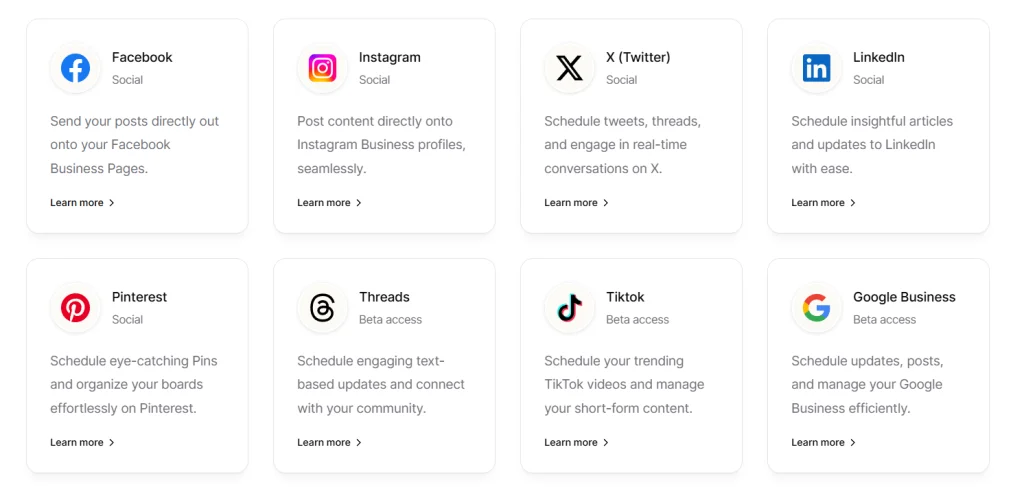
A: Yes, it connects directly with Canva for quick design editing, as well as with major platforms like Facebook, TikTok, Instagram, LinkedIn, and X (Twitter). This allows you to plan and post without switching tabs.
Q: What makes Ocoya AI different from other schedulers?
A: Unlike most schedulers, Ocoya includes a built-in AI writer (Travis AI) and creative design tools, so you don’t need to use separate apps for captions or visuals. It’s designed for creators who want simplicity without losing customization.
Q: Who should use Ocoya AI?
A: It’s perfect for freelancers, small businesses, content creators, and marketing teams who need to maintain consistent posting schedules without spending hours on manual work.
Q: Is Ocoya AI suitable for agencies?
A: Yes, the higher-tier plans include multiple workspaces and team roles, making it suitable for agencies handling different client accounts.
Q: How does Ocoya AI ensure data privacy?
A: Ocoya uses secure cloud infrastructure and doesn’t store sensitive data beyond what’s necessary to operate your connected accounts. Users remain in control of their data and can disconnect integrations at any time.
Q: Can Ocoya AI improve engagement rates?
A: Yes, indirectly. By posting more consistently, using data-driven captions, and testing what performs best, users typically see better engagement over time. The analytics dashboard helps refine strategy post by post.
Q: Does Ocoya AI work on mobile?
A: While most features work best on desktop, Ocoya’s responsive dashboard runs smoothly in mobile browsers, and a dedicated mobile app is expected to roll out soon.