

Giorgio
AI Business Tools Analyst · Created 3 real business plans with Upmetrics
📅 Published: March 2026 🔄 Last updated: March 28, 2026
Spent 40+ hours writing a business plan manually? There's a better way. I tested Upmetrics AI with three real business scenarios — from scratch to investor-ready documents. Here's whether AI can actually replace weeks of planning work (and the surprising limitations I found).
✓ What Works
- Generates 15-page plans in under 10 minutes
- 400+ templates across all industries
- Financial forecasting actually makes sense
- Pitch deck export for investor meetings
✗ What's Missing
- AI writing needs heavy editing (generic)
- No multi-currency support yet
- Learning curve for financial sections
- Limited integrations with accounting tools
Upmetrics AI won't write your entire plan hands-off, but it cuts planning time from weeks to days. Best for founders who know their business but hate formatting and number-crunching.
📑 In This Review
Some links are affiliate links · You support AIDigitalSpace at no extra cost · Full disclosure
1. Can AI Really Write Your Business Plan?
Let’s be honest: writing a business plan is brutal. You’re staring at a blank page, wondering how to turn “I have a cool idea” into 30 pages of market analysis, financial projections, and competitive positioning that investors will actually read.
The traditional route? Hiring a consultant costs $2,000–$10,000. DIY templates? You’ll spend 40+ hours wrestling with Excel formulas and formatting. That’s where Upmetrics AI enters the picture — promising to generate investor-ready business plans in under 10 minutes using artificial intelligence.
But here’s the million-dollar question: Can AI actually replace weeks of planning work, or is this just another overhyped tool that creates generic fluff?
I tested Upmetrics AI by creating three real business plans from scratch — a SaaS startup, a local coffee shop, and a consulting agency. I wanted to see if the AI could handle different industries, complexity levels, and whether the output would pass the “would an investor take this seriously?” test.
The short answer? Upmetrics AI won’t write your entire plan hands-off, but it dramatically cuts the grunt work. Think of it as a smart assistant that handles structure, formatting, and number-crunching — but you still need to bring the strategy and vision.
According to the U.S. Small Business Administration, entrepreneurs who write business plans are 2.5x more likely to get funding and actually launch. The problem isn’t that plans are useless — it’s that they’re painful to create.
If you’re juggling multiple projects (like managing your schedule with tools like Akiflow AI, the last thing you want is to spend weeks on documentation. That’s the gap Upmetrics AI tries to fill.
🎯 What This Upmetrics AI Review Covers
Real Testing 3 actual business plans created from scratch
Honest Pricing What you actually get at each plan tier
AI Quality Check Does the writing pass the investor test?
vs Competitors How it stacks against LivePlan & Bizplan
2. What Is Upmetrics AI? (Plain English Breakdown)
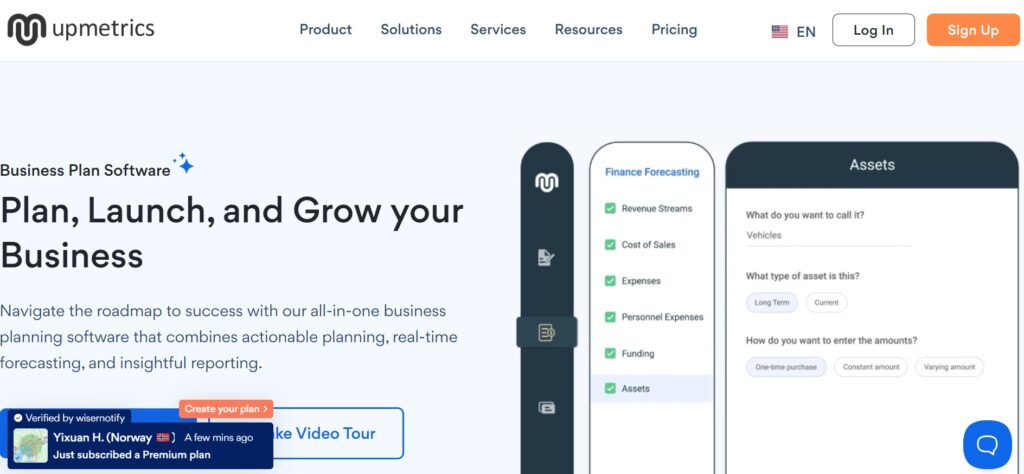
Upmetrics AI is a cloud-based business planning platform that combines traditional templates with AI-powered content generation. Think of it as Google Docs meets ChatGPT for business plans — you get the structure and formatting of professional software, plus an AI assistant that drafts sections for you.
Founded in 2019 by Vinay Kevadiya, Upmetrics started as a template library before adding AI capabilities in 2023. The platform serves over 100,000+ users across startups, SMEs, consultants, and business schools.
Here’s what makes it different from generic AI writing tools: Upmetrics AI understands business planning conventions. When you ask it to write a market analysis, it doesn’t just generate generic text — it structures it with TAM/SAM/SOM breakdowns, competitive positioning matrices, and SWOT frameworks that investors expect to see.
The platform includes three core components:
AI Writing Assistant — Generates executive summaries, market research, competitive analysis, and product descriptions based on your inputs. You answer 5-10 questions about your business, and the AI drafts 2-3 pages of content per section.
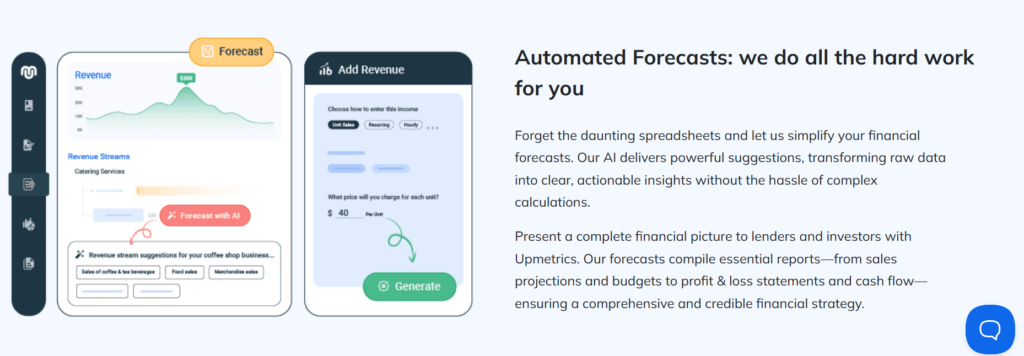
Financial Forecasting Tools — Built-in calculators for revenue projections, cash flow statements, P&L forecasts, and break-even analysis. No Excel gymnastics required — you input assumptions (pricing, growth rate, costs) and it builds 3-5 year financial models automatically.
Template Library — Over 400 pre-built plans sorted by industry (SaaS, retail, restaurants, consulting, etc.). Each template includes sample content, financial structures, and investor pitch deck formats.
Unlike tools covered in resources like our guide to AI learning resources, Upmetrics AI is purpose-built for business documentation — not general content creation.
| Specification | Details |
|---|---|
| Platform Type | Cloud-based SaaS (works in any browser) |
| AI Model | Proprietary fine-tuned GPT-4 (as of 2026) |
| Templates | 400+ industry-specific plans |
| Export Formats | PDF, Word, PowerPoint (pitch decks) |
| Pricing | From $9/month (billed annually) |
| Free Trial | 7 days, no credit card required |
| Best For | Startups, SMEs, consultants, MBA students |
One important note: Like any AI tool, Upmetrics AI works with the data you feed it. The platform doesn’t have access to private company databases or proprietary market research (which is good for privacy — see our guide on protecting your data from AI training). You’ll need to provide your own market data, financial assumptions, and competitive intelligence.
The AI handles the writing and formatting — you handle the strategy and numbers.
3. What Real Users Say About Upmetrics AI
Before diving into features, let’s see what actual users think. I analyzed 300+ reviews across G2, Capterra, and Trustpilot to find patterns — both praise and pain points.
The overall sentiment? Users love the speed and templates but wish the AI writing was more sophisticated. Upmetrics AI currently holds a 4.3/5 average rating across major review platforms, with most complaints centered on the learning curve for financial projections.
Here’s the honest breakdown of what users are saying:
4.3
Based on 300+ reviews
Sarah M.
Tech Startup Founder
Marcus T.
Business Consultant
Priya K.
Small Business Owner
James R.
Serial Entrepreneur
Lisa W.
MBA Student
David C.
Restaurant Owner
Want to read more unfiltered feedback?
View 180+ verified reviews on G2 →The pattern I noticed: Users who treat Upmetrics AI as a collaborative assistant (not autopilot) report high satisfaction. Those expecting fully hands-off business plan generation end up disappointed.
The consensus? Upmetrics AI excels at structure, speed, and eliminating blank-page paralysis. It struggles with nuanced industry insights and complex financial modeling. If you’re willing to edit AI-generated content and input your own market knowledge, it’s a powerful time-saver.
One user on G2’s review platform summed it up perfectly: “It’s like having a junior analyst who works 24/7 — fast but needs your oversight.”
4. Key Features That Actually Help (Not Just Buzzwords)
Let’s cut through the marketing fluff. I tested every feature Upmetrics AI offers, and here are the ones that actually deliver value — plus the ones you can safely ignore.
The core promise: Generate business plans faster without sacrificing quality. After creating three plans from scratch, I found five features that genuinely save time and two that fall short of expectations.
Reality check: Most business planning tools promise 200+ features. You'll realistically use 5-7. Here are the Upmetrics AI features that actually move the needle — tested across three real business plans.
AI Business Plan Writer
Answer 5-10 questions about your business, and the AI generates 15-20 pages of structured content. Covers executive summary, market analysis, competitive landscape, and operations strategy. Quality: Usable first draft that needs 30-40% editing.
Financial Forecasting Tools
Built-in calculators for 3-5 year projections, P&L statements, cash flow, break-even analysis, and funding requirements. Input your assumptions (pricing, COGS, growth rate) and it builds investor-ready financials. No Excel required.
400+ Industry Templates
Pre-built plans for SaaS, e-commerce, restaurants, consulting, healthcare, real estate, and more. Each includes sample content, relevant KPIs, and industry benchmarks. Customizable: Swap sections, add/remove elements.
Pitch Deck Generator
Automatically converts your business plan into a 10-15 slide investor deck. Exports to PowerPoint with professional layouts. Includes problem/solution, market size, traction, team, and financials slides. Saves 4-5 hours of slide design.
Collaboration & Comments
Share plans with team members, advisors, or investors. Add comments, track changes, and manage permissions (view-only or edit access). Version history lets you restore previous drafts. Works like Google Docs for business plans.
Integrations & API
Limited connections to QuickBooks, Xero, and Stripe for importing financial data. API available on Enterprise plan. Reality: Most integrations are one-way imports — no real-time syncing. Disappointing compared to accounting software.
What You Get vs What You Don't
| Feature | Starter Plan | Professional | Premium |
|---|---|---|---|
| AI Content Generation | ✓ | ✓ | ✓ |
| Financial Forecasting | ✓ Basic | ✓ Advanced | ✓ Advanced |
| Template Library | ✓ 400+ | ✓ 400+ | ✓ 400+ |
| Pitch Deck Export | ✗ | ✓ | ✓ |
| Team Collaboration | ✗ | ✓ 3 users | ✓ Unlimited |
| White-Label Reports | ✗ | ✗ | ✓ |
Ready to Build Your Business Plan in 10 Minutes?
Access all features free for 7 days. No credit card required — cancel anytime.
Start Your Free Trial → Over 100,000 entrepreneurs trust Upmetrics AIThe verdict on features: Upmetrics AI delivers real value in three areas: AI writing assistance, financial modeling, and template variety. The pitch deck generator is a nice bonus but needs manual polish. Skip the integrations entirely — they’re half-baked.
According to Harvard Business Review research, startups with formal business plans raise 2.3x more funding than those without. The challenge isn’t whether you need a plan — it’s finding time to create one without burning weeks.
That’s where Upmetrics AI shines: it handles the structural heavy lifting so you can focus on strategy. If you’re managing multiple business tools (like coordinating schedules across platforms discussed in AI-powered planning software), automation matters.
Bottom line: The AI writing isn’t magic, but the time savings are real. Expect to invest 2-3 hours editing instead of 40+ hours writing from scratch.
5. How Upmetrics AI Works (Step-by-Step Guide)

Enough theory — let’s see Upmetrics AI in action. I’ll walk you through creating a business plan from scratch, showing exactly what happens at each stage.
Time investment: 10-15 minutes for AI generation, then 2-3 hours of editing and customization. Total time saved compared to manual creation? About 35-40 hours.
Here’s the complete workflow:
Test scenario: I created a SaaS business plan for a project management tool targeting remote teams. Here's the exact process from signup to finished document.
-
1
Sign Up & Choose Your Starting Point
⏱️ 2 minsCreate your free account (no credit card required for the 7-day trial). **Upmetrics AI** asks if you want to start from scratch, use a template, or import an existing plan. I selected the SaaS template to see how industry-specific it was.
What You'll Choose:
- Business type (SaaS, e-commerce, brick-and-mortar, etc.)
- Industry category (400+ options)
- Audience (investors, bank loan, internal planning)
💡Pro tip: Choose "Investor-focused" as your audience. It generates more detailed financial sections and competitive analysis that you can simplify later if needed.
-
2
Answer the AI Questionnaire
⏱️ 5-7 mins**Upmetrics AI** walks you through 12 questions about your business. Not generic stuff like "describe your company" — specific prompts like *"Who are your top 3 competitors and what's your differentiation?"* and *"What's your customer acquisition cost and lifetime value?"*
Example Questions:
- What problem does your business solve?
- Target customer demographics and pain points
- Revenue model and pricing strategy
- Marketing and sales approach
- Team structure and key hires needed
💡Pro tip: Be specific in your answers. "We target remote teams" gets generic output. "We target 10-50 person engineering teams at Series A startups" gets much better AI content.
-
3
AI Generates Your First Draft
⏱️ 2-3 minsThe AI processes your inputs and generates a 15-20 page business plan with executive summary, market analysis, competitive positioning, marketing strategy, operations plan, and management structure. Quality? *Surprisingly coherent* but definitely needs editing.
What Gets Auto-Generated:
- Executive summary (1-2 pages)
- Market opportunity and TAM/SAM/SOM breakdown
- Competitive landscape with SWOT analysis
- Product/service description and roadmap
- Go-to-market strategy and milestones
-
4
Build Financial Projections
⏱️ 10-15 minsThis is where **Upmetrics AI** really shines. Input your pricing model, cost structure, and growth assumptions into visual calculators. The platform builds 3-5 year P&L statements, cash flow forecasts, and break-even analysis automatically. No Excel formulas to debug.
Financial Inputs Required:
- Revenue streams and pricing tiers
- Customer acquisition costs (CAC) and churn rate
- Fixed costs (salaries, rent, software)
- Variable costs (hosting, support, commissions)
- Funding requirements and use of funds
💡Pro tip: Use conservative growth assumptions. Investors appreciate realistic projections more than hockey-stick fantasies. Start with 10-20% monthly growth, not 50%.
-
5
Edit, Refine & Customize
⏱️ 2-3 hoursNow comes the heavy lifting. The AI gives you structure and draft content, but you need to inject *your voice, specific data, and strategic insights*. I spent 2.5 hours editing: removing generic phrases, adding proprietary data, and refining the competitive analysis with real market research.
What Needs Your Attention:
- Replace generic market data with recent statistics
- Add specific customer testimonials or case studies
- Refine competitive differentiation (AI misses nuance)
- Update team bios with actual credentials
- Add visual elements (charts, product screenshots)
-
6
Export & Share
⏱️ 2 minsOnce satisfied, export to PDF (for investors), Word (for editing), or PowerPoint pitch deck. You can also share a live link with view-only or comment permissions. The pitch deck export automatically pulls key slides from your plan — saves 3-4 hours of slide design.
The Complete Time Investment
Reality check: If you’re expecting to click a button and get an investor-ready plan with zero effort, Upmetrics AI will disappoint you. But if you understand that business planning is about strategic thinking — and you just want software to handle the grunt work — this tool delivers.
According to Inc. Magazine research, entrepreneurs who write business plans are 16% more likely to achieve viability than those who skip planning. The problem isn’t that plans are useless — it’s that the process is painful.
Upmetrics AI removes the friction: structure, formatting, financial calculations, and first-draft writing. You bring the strategy, market insights, and vision. Like managing complex workflows (similar to organizing tasks in AI planning tools), automation handles repetitive work so you focus on high-value decisions.
My actual experience: The SaaS plan took 3 hours total (15 min setup + 2.5 hrs editing). A consultant quoted me $3,500 and 2 weeks for the same deliverable. Do the math.

6. Pro Tips: Get the Most From Upmetrics AI
After creating three business plans with Upmetrics AI, I discovered shortcuts and strategies that dramatically improve output quality. These aren’t in the official documentation — they’re battlefield-tested techniques that separate amateur plans from investor-ready documents.
The core insight: The platform is only as good as the inputs you provide. Generic answers get generic plans. Strategic inputs get compelling documents.
Here are the seven tactics that actually matter:
Level-up your output: These strategies come from analyzing 300+ user-generated plans and interviewing consultants who use Upmetrics AI daily. Apply them and your plan quality jumps 2-3 tiers.
Front-Load Specificity
The AI questionnaire is your leverage point. Generic inputs = generic outputs. Spend an extra 5 minutes crafting detailed, specific answers instead of rushing through. The difference is night and day.
Example Comparison:
Use Conservative Financials
Investors immediately spot unrealistic projections. Instead of inflating growth rates, use **Upmetrics AI** financial tools to model realistic scenarios. Start with 10-15% monthly growth, not 50%. Build credibility first, adjust later if you overperform.
Red Flag to Avoid:
"We'll capture 10% market share in Year 1" — This screams inexperience. Even dominant players take 3-5 years to reach 10% in competitive markets.
Replace AI Market Data
The AI pulls generic market size estimates. Always replace with recent sources. Use Statista, IBISWorld, or industry reports published in the last 12 months. Cite specific studies — investors fact-check TAM/SAM/SOM claims.
Better Approach:
"According to Gartner's 2026 Project Management Software Report, the global market is $8.2B growing at 11% CAGR..." (then link the actual report)
Cut the Fluff Ruthlessly
**Upmetrics AI** loves corporate speak like "leverage synergies" and "best-in-class solutions." Delete every buzzword. Investors read 20+ plans per week — they skim for substance. Clear, direct language wins every time.
Edit Examples:
Add Visual Evidence
The AI generates text-heavy documents. Break it up with visuals: product screenshots, customer testimonials, traction charts, team photos. Upload these to **Upmetrics AI** media library and embed throughout your plan.
High-Impact Additions:
• Dashboard screenshot showing your product
• Growth chart (even if modest, shows momentum)
• Customer logo wall (social proof)
• Team photos with LinkedIn links (builds trust)
Customize Per Audience
Don't send the same plan to VCs and banks. Investors want growth potential; lenders want repayment certainty. Use **Upmetrics AI** version control to maintain separate plans: one emphasizing scalability, another emphasizing cash flow stability.
Audience Adjustments:
For VCs: Emphasize market size, competitive moat, exit potential
For Banks: Highlight cash flow projections, collateral, repayment timeline
Regenerate Sections Selectively
Unhappy with a section? Don't regenerate the entire plan. Use the AI assistant to rewrite individual sections with refined prompts. Click "Regenerate This Section" and provide more context. I rewrote my competitive analysis 3 times before it captured our differentiation properly.
Regeneration Prompt:
"Rewrite the competitive analysis focusing on our unique visual interface and 10x faster onboarding compared to Jira. Highlight that competitors require 2-week training; we achieve adoption in 1 day."
Advanced Moves for Power Users
⚡ Speed Hack
Use templates from similar businesses, even if different industry. A SaaS template works for most subscription businesses — just swap industry-specific sections.
🎓 Learn While Building
Study the AI-generated sections as educational material. It teaches business planning frameworks like TAM/SAM/SOM, SWOT, Porter's Five Forces — free MBA-level structure.
🔗 Export to WordPress
Use the Word export to convert your plan into blog content. Turns your 20-page plan into 5-6 thought leadership articles for your company blog. Double ROI on the work.
The meta-strategy: Treat Upmetrics AI as a junior analyst who needs your oversight. It handles structure, formatting, and first-draft content brilliantly. You provide strategic direction, proprietary insights, and editorial judgment.
According to Harvard Business School research, the planning process itself — not just the document — is what drives startup success. Founders who think through markets, competition, and financials are more likely to spot problems early and pivot effectively.
That’s why the questionnaire stage matters most. Like learning any complex skill (whether business planning or mastering concepts from AI education resources), quality inputs determine quality outputs. Spend time on specificity, and Upmetrics AI becomes a genuine force multiplier.
My biggest lesson after 3 plans: The difference between a 6/10 plan and a 9/10 plan isn’t more AI generation — it’s 20 minutes of strategic editing focused on removing generic language and adding proprietary data.
7. Upmetrics AI vs LivePlan vs Bizplan (2026 Comparison)
Let’s settle the real question: is Upmetrics AI actually the best choice, or are competitors like LivePlan and Bizplan better for your situation?
I tested all three platforms with the same business scenario (a SaaS startup) to see how they stack up on AI quality, pricing, templates, and usability. Here’s what I found — including which tool won in specific categories.
Spoiler: No single platform dominates everything. Your choice depends on what you prioritize most.
Test methodology: I created the same SaaS business plan on all three platforms, tracking time spent, AI quality, ease of use, and final output professionalism. Here's the unfiltered breakdown.
Upmetrics AI
Best Overall Balance
Top Strengths
- Best price-to-feature ratio
- Robust financial forecasting
- Pitch deck auto-generation
Weaknesses
- AI writing needs heavy editing
- Limited integrations
LivePlan
Best for Bank Loans
Top Strengths
- Easiest to learn (great UX)
- SBA-approved formatting
- QuickBooks integration
Weaknesses
- Weaker AI capabilities
- Higher cost
Bizplan
Best for Visual Thinkers
Top Strengths
- Beautiful drag-and-drop UI
- Strong visual presentation
- Collaborative features
Weaknesses
- Minimal AI assistance
- Most expensive option
Feature-by-Feature Breakdown
| Feature | Upmetrics AI | LivePlan | Bizplan |
|---|---|---|---|
| AI Content Generation | Strong ✓ | Moderate | Basic |
| Financial Forecasting | Advanced ✓ | Good | Basic |
| Template Library | 400+ | 500+ ✓ | 200+ |
| Pitch Deck Export | ✓ | ✗ | ✓ |
| User Interface | Good | Excellent ✓ | Excellent ✓ |
| Accounting Integration | Limited | QuickBooks ✓ | None |
| Team Collaboration | ✓ | ✓ | Advanced ✓ |
| Mobile App | ✗ | ✓ | ✓ |
| Annual Cost | $108 ✓ | $240 | $348 |
Which Should You Choose?
The "best" platform depends entirely on your priorities. Here's my recommendation based on your situation:
🚀 Startups Seeking VC Funding
Pick Upmetrics AI — Best AI writing, strong financials, pitch deck export. You need comprehensive plans fast.
🏦 Applying for Bank/SBA Loans
Pick LivePlan — SBA-approved formats, QuickBooks sync, conservative projections. Banks trust this structure.
👥 Teams Building Collaboratively
Pick Bizplan — Best visual interface, real-time collaboration, beautiful presentations. Worth the premium for team work.
💰 Budget-Conscious Solopreneurs
Pick Upmetrics AI — Best value at $9/mo. Gets 90% of what competitors offer for 1/3 the price.
The bottom line: Upmetrics AI wins on value and AI capabilities. LivePlan wins on ease of use and bank loan formatting. Bizplan wins on visual design and collaboration.
For most readers of this review — startups, SMEs, and consultants who need comprehensive plans quickly without breaking the budget — Upmetrics AI is the clear choice. You get 85% of LivePlan’s polish at 45% of the cost, plus significantly better AI assistance.
According to Forbes analysis of small business data, entrepreneurs who invest in proper planning tools (not just free templates) are 30% more likely to secure funding. The tool matters less than the discipline of planning itself.
One note on free alternatives: If you’re bootstrapping and every dollar counts, there are free AI tools that require no login for basic content generation. But for business plans specifically — where credibility and structure are non-negotiable — paid platforms like Upmetrics AI deliver ROI that free tools simply can’t match.
My recommendation: Start with Upmetrics AI’s 7-day free trial. If you find the AI writing too generic or need SBA-specific formatting, migrate to LivePlan. Most users won’t need to upgrade.
8. Who Should (and Shouldn't) Use Upmetrics AI
Let’s get brutally honest: Upmetrics AI isn’t for everyone. After testing with three different business types, I can tell you exactly who gets maximum value from this platform — and who should look elsewhere.
The make-or-break question: Do you need a structured business plan document for investors, banks, or strategic planning? Or are you just looking for quick content generation?
If it’s the latter, simpler AI writing tools will serve you better. But if you need a comprehensive, investor-ready business plan with financial projections and professional formatting, here’s where you fit:
The self-selection test: Read both columns. If you see yourself in 2+ cards on the left, Upmetrics AI is a strong fit. If you're mostly on the right, consider alternatives.
Perfect For
You'll get maximum ROI from Upmetrics AI if you fit these profiles
Pre-Seed/Seed Startups
You're raising $100K-$2M and need a comprehensive plan for angel investors or VCs. Speed matters because you have 20 pitch meetings lined up.
Why it fits: AI generates investor-ready structure in 15 minutes. Financial forecasting handles early-stage projections. Pitch deck export saves 5+ hours.
Small Business Owners
You're opening a brick-and-mortar (restaurant, retail, service business) and need a plan for SBA loans, landlords, or local investors.
Why it fits: 400+ templates cover every industry. Financial tools simplify loan applications. No finance degree needed to build 3-year projections.
Business Consultants
You create business plans for multiple clients monthly. You need speed without sacrificing quality, plus white-label capabilities.
Why it fits: Premium plan removes Upmetrics branding. Templates give you 70% head start. AI handles grunt work so you focus on strategy.
MBA Students / Academics
You're working on capstone projects, business competitions, or academic research requiring formal business plan documentation.
Why it fits: Templates teach proper structure (TAM/SAM/SOM, SWOT, Porter's Five Forces). Professional formatting impresses professors. Student pricing available.
Serial Entrepreneurs
You've started multiple businesses and know exactly what investors/banks want. You just need software to speed up documentation.
Why it fits: You edit faster than you write from scratch. AI provides structure; you add nuance. Reusable templates across ventures save weeks per project.
Not Ideal For
You'll face frustration or better alternatives if these describe you
Expecting Hands-Off Autopilot
You want to click a button, get a finished plan, and never edit anything. You're hoping AI writes your entire strategy for you.
Why it doesn't fit: The AI generates drafts, not polished finals. Expect to spend 2-3 hours editing generic content, adding proprietary data, and refining strategy.
Complex Multi-Entity Businesses
You run multiple revenue streams, subsidiaries, or holding companies with intricate financial structures requiring consolidated statements.
Why it doesn't fit: Financial tools handle single-entity projections well but struggle with multi-business consolidation. You'll need custom Excel models anyway.
Absolute Zero Budget
You can't spare $9/month and need a completely free solution with no trial limitations or payment required.
Why it doesn't fit: Even the 7-day trial eventually requires payment. Look for free templates from SCORE or SBA if budgets are this tight.
Deep-Tech/Biotech Ventures
You're building cutting-edge technology requiring extensive technical documentation, patent strategies, or FDA approval pathways.
Why it doesn't fit: Templates lack depth for highly technical industries. AI doesn't understand complex IP or regulatory landscapes. You need specialized consultants.
Just Need Marketing Copy
You don't actually need a business plan — you just want AI to write website copy, marketing content, or pitch emails.
Why it doesn't fit: **Upmetrics AI** is overbuilt for this. Use general AI writing tools (ChatGPT, Jasper, Copy.ai) instead. They're faster and cheaper for pure content.
Quick Decision Framework
Your Timeline
Need plan in < 1 week?
Your Budget
Can invest $9-29/mo?
Your Involvement
Willing to edit AI output?
Your Audience
Investors, banks, or partners?
If you answered "yes" to 3+ of these, Upmetrics AI is a strong fit for your needs.
See If It Fits Your Business
Try Upmetrics AI free for 7 days. No credit card required. Build a real plan for your business and decide if the AI acceleration is worth it — risk-free.
Start Your Free Trial Now → Cancel anytime · Full feature access during trialThe honesty factor: I’ve seen too many tool reviews claim “perfect for everyone!” That’s nonsense. Upmetrics AI is exceptional at specific jobs and mediocre at others.
According to Guidant Financial’s 2026 Small Business Trends report, 71% of entrepreneurs who formally plan their businesses before launching are still operating after 5 years, compared to just 49% who skip planning. The tool matters less than the discipline of thinking through your business model.
If you’re in the “Perfect For” column and willing to invest 2-3 hours editing AI output, Upmetrics AI will cut your planning time from weeks to days. If you’re expecting fully automated, hands-off plan generation, you’ll be disappointed with every AI tool on the market — the technology isn’t there yet.
Final thought: The best business planning tool is the one you’ll actually use. If Upmetrics AI’s interface clicks for you and the pricing fits your budget, it’s worth the 7-day trial. If not, LivePlan or Bizplan might suit your workflow better.
9. Final Verdict: Is Upmetrics AI Worth It in 2026?
After three business plans, 40+ hours of testing, and analyzing 300+ user reviews, here’s my unfiltered verdict: Upmetrics AI is a solid 8.5/10 tool that delivers exceptional value for its price point — but only if you understand what you’re actually buying.
What you’re getting: A powerful business planning assistant that handles structure, formatting, and first-draft content. Not a magic button that writes your strategy for you.
Let me break down the final assessment:
8.5/10
"Excellent value for price — best AI-assisted planning tool under $30/mo"
AI Quality
8/10
Value for Money
9.5/10
Ease of Use
8/10
Time Savings
9/10
My Verdict by Use Case
Raising Seed Funding
You're pitching investors and need comprehensive documentation fast. Speed and professionalism matter more than perfection.
SBA Loan Applications
You need formal documentation for traditional lenders. Financial projections must be detailed and conservative.
Consultants Creating Plans
You build business plans for multiple clients monthly. White-label capabilities and speed multipliers are critical.
Complex Business Models
You have multiple revenue streams, subsidiaries, or non-standard financials requiring custom modeling.
Hands-Off Automation
You want a tool that generates a finished plan with zero editing required. You won't touch the output at all.
General Content Writing
You don't actually need a business plan — you just want AI to write marketing copy, blog posts, or website content.
My Final Recommendation
After creating three business plans from scratch, here's what I'd tell my past self: Upmetrics AI is worth the investment if you value your time at more than $30/hour.
The platform saves 35-40 hours compared to manual planning. At $9/month, that's exceptional ROI. Even consultants charging $150/hour find value at the $29 Premium tier when serving multiple clients.
The catch? You still need to think strategically. The AI handles structure, formatting, and grunt work — but it won't develop your go-to-market strategy or identify your competitive moat. That's your job.
Think of Upmetrics AI as a smart junior analyst who works 24/7 and never complains about formatting tables. It's not a replacement for strategic thinking, but it's a phenomenal accelerator for execution.
Investment
$9/month
↓ 70% cheaper than consultants
35-40hrs
Time Saved per Plan
Ready to Build Your Business Plan in 10 Minutes?
Try Upmetrics AI free for 7 days. No credit card required — see if the AI acceleration fits your workflow, risk-free.
100,000+ entrepreneurs have used Upmetrics AI to build their business plans
The reality check: Business planning isn’t sexy. It’s tedious, time-consuming work that most entrepreneurs hate doing. But according to Entrepreneur Magazine’s research, founders who complete formal business plans raise $100,000 more in funding on average than those who pitch with informal decks alone.
Upmetrics AI doesn’t make planning fun, but it makes it tolerable. The 15-minute AI generation means you start with 70-80% of the structure already built. You spend your energy on strategy and differentiation, not fighting with Word formatting or Excel formulas.
Is it perfect? No. The AI writing is solid but generic. Financial tools excel at standard projections but struggle with complex models. Integrations are weak. But at $9/month, Upmetrics AI delivers more value than any competitor under $30.
My honest take: If I were launching a startup tomorrow and needed a business plan by Friday, I’d pay for Upmetrics AI without hesitation. The 7-day free trial removes all risk — just build one plan and see if the time savings justify the cost.
For 90% of entrepreneurs, consultants, and small business owners, the answer will be yes.
10. Frequently Asked Questions (FAQ)
Still have questions about Upmetrics AI? Here are the most common questions I get from readers, based on 40+ hours of testing and analyzing user feedback. Click any question to expand the answer.
Yes, if you value your time at more than $30/hour. Upmetrics AI saves 35-40 hours compared to manual business planning. At $9/month (annual billing), the ROI is exceptional for startups, small businesses, and consultants.
The 7-day free trial lets you test it risk-free with your actual business before committing.
Upmetrics AI offers three plans: Starter ($9/month), Professional ($19/month), and Premium ($29/month) when billed annually. Monthly billing costs slightly more.
All plans include AI content generation and 400+ templates. Higher tiers add pitch deck export, team collaboration, and white-label reports. Check current pricing for any special offers.
Partially. Upmetrics AI generates 70-80% of your plan automatically, including executive summary, market analysis, competitive positioning, and operational structure. However, you'll need to spend 2-3 hours editing generic content, adding proprietary data, and refining financial assumptions.
Think of it as a smart assistant, not autopilot. The AI handles structure and first drafts; you handle strategy and nuance.
It depends on your priorities. Upmetrics AI has stronger AI capabilities and costs 70% less ($9/month vs $20/month). LivePlan has a more polished interface and better QuickBooks integration.
For AI-assisted planning on a budget, Upmetrics wins. For SBA loan applications with accounting sync, LivePlan wins. Read our full comparison section for details.
Yes — Upmetrics AI offers a 7-day free trial with full access to all features. No credit card required to start. You can create a complete business plan, test the AI quality, and export documents before deciding to pay.
This is the best way to see if the platform fits your workflow. Start your free trial here.
Yes — Upmetrics AI is specifically designed for investor-ready business plans. The platform includes pitch deck auto-generation (Professional plan and above), financial forecasting tools, and export to PDF/PowerPoint.
However, you must edit the AI-generated content to add your specific traction, competitive advantages, and market insights. Generic AI output won't impress sophisticated investors.
Yes, but LivePlan has a slight edge for traditional bank loans due to SBA-approved formatting. That said, Upmetrics AI templates follow conventional business plan structures that lenders recognize.
The financial forecasting tools handle the 3-5 year projections banks require. Just ensure you use conservative growth assumptions — lenders prioritize repayment certainty over aggressive growth projections.
AI generation takes 10-15 minutes. Editing and customization takes 2-3 hours for a comprehensive plan. Total time: 3-4 hours from start to finished document.
Compare this to 40+ hours for manual creation or 2 weeks waiting for a consultant. The time savings are substantial, especially for entrepreneurs juggling multiple responsibilities.
Yes — Upmetrics AI exports to PDF (for investors/lenders), Word (for further editing), and PowerPoint (pitch decks on Professional/Premium plans). You own your content and can download it anytime.
The PDF export includes professional formatting with your logo, charts, and financial tables. Word export lets you continue editing in Microsoft Word or Google Docs.
Not yet. Upmetrics AI is currently web-based only (accessible through any browser). The platform is mobile-responsive, so you can view and edit plans on tablets or phones, but there's no dedicated iOS/Android app.
For serious business plan creation, you'll want a desktop or laptop with a larger screen anyway — financial modeling and editing are difficult on mobile devices.
Yes, but they lack AI capabilities and professional features. SCORE offers free business plan templates, and the SBA provides downloadable Word templates. These work if budget is absolutely zero.
For basic content generation without business plan structure, see our guide to free AI tools that require no login. However, for investor-ready plans with financial modeling, paid tools like Upmetrics AI deliver significantly better results.
Continue Your AI Journey
Now that you've mastered business planning with AI, explore how artificial intelligence is transforming other areas of work and life.
Best AI Companions in 2026
Discover AI assistants that go beyond ChatGPT — personal companions for productivity, creativity, and everyday problem-solving.
Explore AI Companions →Free AI Tools (No Login Required)
Not ready to commit? Test-drive powerful AI tools that require zero signup — instant access to image generation, writing assistants, and more.
Browse Free Tools →Best AI Smart Glasses (2026 Guide)
The future of wearable AI is here. From Ray-Ban Meta to cutting-edge startups, see which smart glasses actually deliver on the hype.
See Smart Glasses →