
 Published: August 16, 2025
- 1. What Is YouTube AI Age Verification?
- 2. Why YouTube Is Rolling Out This System Now
- 3. How the AI Age Check Works Behind the Scenes
- 4. What Happens If You’re Flagged as Under 18
- 5. How to Prove Your Age If the AI Gets It Wrong
- 6. Privacy Risks and Data Concerns You Should Know
- 7. Safety Features and Protections for Younger Users
- 8. Tips to Stay in Control of Your YouTube Experience
- 9. What This Means for Creators and Channel Owners
- 10. Our Take – Balancing Safety and Freedom on YouTube
- 11. FAQ – Quick Answers About YouTube AI Age Verification
1. What Is YouTube AI Age Verification?
YouTube AI age verification is a new system YouTube is rolling out in the US to estimate whether a viewer is over or under 18 — without asking for a birth date first. Instead, it uses artificial intelligence to analyse your watch history, activity patterns, and account signals to make an educated guess.
The idea, according to YouTube’s official blog, is to give younger users extra protection, while limiting certain features for accounts that appear to belong to minors. If you’ve been marked as under 18, you might see:
Limited video recommendations
No personalised ads
Screen-time reminders and wellbeing tools enabled by default
From my point of view, this is one of those updates where the intention is clear — protect teens from unsuitable content — but the implementation could spark debates. AI predictions aren’t perfect, and in some cases, adults may be flagged incorrectly. If you’re wrongly classified, YouTube says you’ll have the option to prove your age by providing an ID, credit card, or a selfie for verification.
For regular users, this means a change in how your account is handled. For parents, it could mean extra safety without manually setting up controls. If you’re interested in broader online privacy tips, we’ve covered related topics in our post on how AI in social networks affects your privacy.
In short: YouTube AI age verification is part of a bigger global move toward automated online age checks — and it’s only the beginning.
2. Why YouTube Is Rolling Out This System Now
The launch of YouTube AI age verification isn’t happening in a vacuum. Over the past two years, governments and regulators worldwide have been pushing for stricter online safety laws — especially to protect children and teenagers from harmful or inappropriate content.
In the UK, the Online Safety Act now requires platforms to prove they are keeping minors safe. Australia has already tested age verification for social media, and in the US, states like Utah, Arkansas, and Virginia have introduced laws demanding age checks before granting full access to certain online services.
From a strategic point of view, YouTube is clearly acting before being forced into stricter compliance. By implementing AI-driven checks now, it can show regulators that it’s proactive, not reactive. This can help avoid fines, legal battles, and even service restrictions.
Another reason? The sheer scale of the platform. YouTube has billions of users, and relying on manual checks or government IDs for everyone would be a nightmare. AI offers a faster, automated way to filter potentially underage accounts without slowing down the user experience.
Of course, this raises questions about accuracy and fairness. As we’ve discussed in our AI ethics section, predictive systems can make mistakes — sometimes in ways that frustrate legitimate users. That’s why YouTube’s decision includes an appeals process for those flagged incorrectly.
According to AP News, YouTube is starting this rollout with a limited test group in the US before expanding it to other regions. That means feedback from early users will likely shape the system’s final form.
In short, YouTube AI age verification is YouTube’s way of getting ahead of regulation, protecting its youngest viewers, and showing it can adapt to a changing internet — but the real test will be how accurate, fair, and transparent it turns out to be.
3. How the AI Age Check Works Behind the Scenes
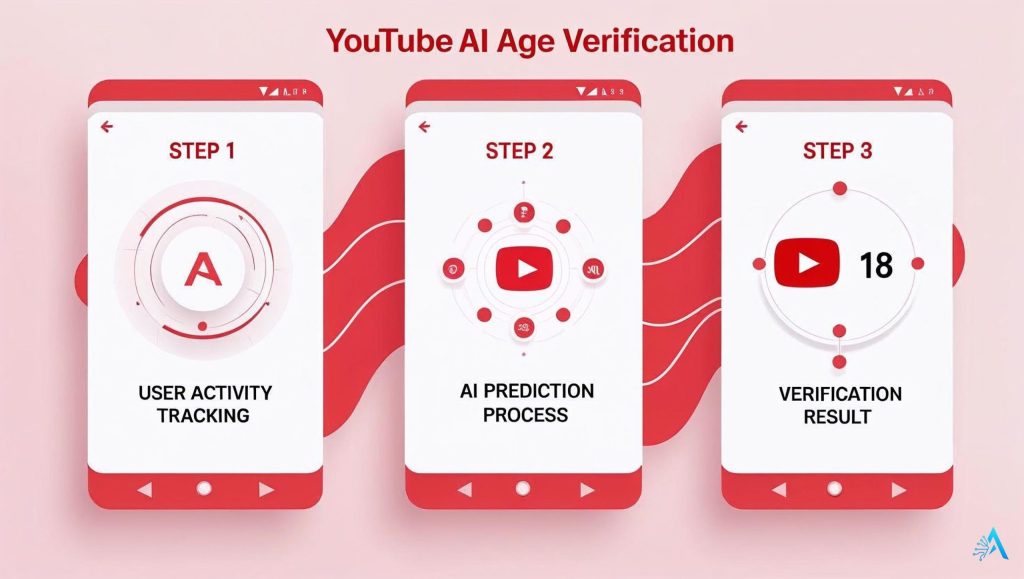
The YouTube AI age verification system works by analysing your activity on the platform — not just what you enter in your profile. It looks at patterns in your watch history, the types of videos you interact with, the time of day you’re active, and even the devices you use. All of this helps the algorithm estimate whether you’re likely under or over 18.
This process doesn’t rely on facial recognition (at least for the initial estimation). Instead, it uses behavioural analysis. For example:
Watching a lot of content aimed at children might raise a flag.
Engaging with certain genres or mature-rated videos could suggest you’re an adult.
Consistent usage patterns over years may support your claimed age.
If the system thinks you might be underage, it can automatically apply restrictions like disabling personalised ads, limiting certain video recommendations, and enabling wellbeing tools. This happens without sending you a notification first — you’ll usually find out when a feature you use becomes unavailable.
From my point of view, this is both smart and risky. Smart because it can catch fake ages entered during sign-up, risky because it’s not perfect — and behaviour isn’t always a true reflection of age. For example, an adult researching content for a child might trigger a false flag.
When a user is flagged, YouTube offers an appeals process. This is where traditional verification methods kick in: you can upload a government ID, confirm via credit card, or submit a selfie verification. The company says it deletes these verification files once the process is complete, any transfer of personal documents online comes with some degree of risk.
If you want a technical breakdown, YouTube’s announcement explains that the system uses “predictive signals” gathered from user behaviour and device context — a method designed to be faster and more scalable than traditional checks.
In short, YouTube AI age verification is less about knowing exactly who you are and more about predicting your likely age — and those predictions are only as good as the patterns the AI can read.
4. What Happens If You’re Flagged as Under 18
If the YouTube AI age verification system decides you’re under 18, your account will change instantly — no warning, no confirmation pop-up. Here’s what typically happens:
Restricted Recommendations – Your suggested videos will exclude certain categories, especially those considered inappropriate for minors.
No Personalised Ads – Ads will no longer be based on your watch history. You’ll see more generic advertising.
Wellbeing Features Enabled – Screen-time reminders, bedtime prompts, and default content filters turn on automatically.
Limited Live Chat & Comments – In some cases, live chat or comment access is removed to protect younger users.
From my point of view, these changes make sense if you’re genuinely a teen — they offer an extra layer of safety. But for adults wrongly flagged, it can be frustrating to lose features you use daily.
If that happens, don’t worry. In Section 5, we’ll walk through how to verify your age and get back to normal. For official guidance, you can also check the YouTube Help Center.
5. How to Prove Your Age If the AI Gets It Wrong
If YouTube AI age verification misclassifies you, you can appeal and confirm your real age. The process is straightforward, but you’ll need to provide proof.
Open the Age Verification Prompt – When you’re flagged, YouTube will show an alert or block certain actions until you verify your age. Click the prompt to start.
Choose a Verification Method – YouTube offers three options:
Government-issued ID – Passport, driver’s license, or national ID card.
Credit card check – A small transaction confirms you’re over 18 (usually refundable).
Selfie verification – A live photo matched against your ID photo.
Submit the Information Securely – Follow YouTube’s instructions. They claim uploaded documents are deleted after verification any online document transfer carries some risk.
Wait for Confirmation – Most verifications take minutes to hours. If approved, your account will return to normal, including ads, recommendations, and community features.
From my point of view, it’s worth using the most reliable method (usually a government ID) to avoid delays, but if privacy is your main concern, a credit card check might feel less intrusive.
For official steps and troubleshooting, visit YouTube’s Help Center page on age restrictions.
6. Privacy Risks and Data Concerns You Should Know
The YouTube AI age verification system works without asking for your birth date upfront, but it still analyses your activity, watch patterns, and device data to estimate your age. While YouTube says it doesn’t store these predictions permanently, the process raises important privacy questions.
Key concern: AI predictions rely on tracking and analysing behaviour — which means YouTube must process more data about you than before. This could include the genres you watch, the times you log in, and even how you interact with ads.
From my point of view, the risk isn’t necessarily that YouTube will misuse this data, but that any large dataset can be vulnerable to breaches, especially when it involves personal patterns and potential verification documents.
If you’re concerned about your digital footprint, a VPN (Virtual Private Network) can help reduce tracking by masking your IP address and encrypting your connection. Services like NordVPN hide your location and activity from third parties, giving you more control over what’s visible online.
Another point to note: if you go through manual verification (uploading ID or a selfie), YouTube says the files are deleted once the process is complete. Still, no online transfer is 100% risk-free.
Bottom line: Before you verify your age, consider how much information you’re comfortable sharing, and take steps to limit unnecessary data exposure.
7. Safety Features and Protections for Younger Users
One of the main goals of YouTube AI age verification is to make the platform safer for teenagers and children. When the system detects an under-18 account, several built-in protections automatically switch on.
Key protections include:
Limited content recommendations – Removes videos flagged as mature or unsuitable for minors.
Disabled personalised ads – Reduces targeted advertising that can influence younger viewers.
Wellbeing reminders – Encourages regular breaks and limits late-night usage.
Comment and live chat restrictions – Protects against harmful or unsafe interactions.
Default content filters – Prevents accidental exposure to explicit material.
From my perspective, these features are genuinely valuable for younger users — especially those without active parental supervision. They create a safer, more controlled environment without needing parents to manually set every restriction.
If you’re a parent and want even more control beyond YouTube’s built-in tools, parental control software like Qustodio can let you filter content, set daily limits, and monitor activity across all devices — not just YouTube.
Bottom line: These protections can’t replace active guidance from parents or guardians, but they are a strong safety net that works silently in the background.
8. Tips to Stay in Control of Your YouTube Experience
Whether you agree with YouTube AI age verification or not, there are ways to make sure you stay in control of your account, your privacy, and the type of content you see.
1. Use a VPN for Privacy
A VPN hides your IP address and encrypts your internet connection, making it harder for platforms to track your viewing patterns. This can reduce the data AI systems collect about your activity. Services like NordVPN or Surfshark are reliable, fast, and easy to use.
2. Check Your Privacy Settings Regularly
Visit your Google account privacy settings to see what data is being collected and adjust permissions accordingly. Small changes here can make a big difference in how much the AI knows about you.
3. Use Parental Controls for Family Accounts
If kids use the same device, consider setting up a controlled profile or using parental control software like Qustodio to manage access. This helps avoid false age flags triggered by mixed usage patterns.
4. Clear Watch History Periodically
Clearing or pausing your watch history can help reset the type of recommendations YouTube shows you — useful if the AI starts pushing content you don’t want.
5. Know How to Appeal Quickly
If you’re flagged incorrectly, follow the steps in Section 5 to prove your age. The faster you submit proof, the sooner you’ll regain full access.
From my point of view, these steps don’t just help with YouTube AI age verification — they’re good habits for managing your overall digital life.
9. What This Means for Creators and Channel Owners
For YouTube creators, the rollout of YouTube AI age verification could have a direct impact on audience reach, monetization, and content strategy.
If your videos are flagged as not suitable for minors, they may be shown to fewer viewers, especially in suggested feeds. That could mean lower watch time and fewer ad impressions. On the other hand, if your channel is already targeted to adults, this change might make your audience data more accurate.
Steps creators should consider:
Review your audience analytics – Check the “Audience” tab in YouTube Studio to see if your content is attracting a younger demographic.
Adjust content where needed – If a video series consistently triggers age restrictions, consider editing thumbnails, titles, or descriptions to better reflect suitability.
Stay compliant with policies – YouTube is likely to tighten its enforcement, so keeping up with their community guidelines is essential.
Use creator tools to adapt – Platforms like TubeBuddy or vidIQ can help identify SEO opportunities within safe content categories, so your reach isn’t affected by AI-driven age filters.
From my point of view, while these AI checks might seem like a hurdle, they could also help creators focus on building an audience that’s truly aligned with their content — instead of competing for views from demographics that might not be able to engage fully anyway.
Bottom line: If you’re proactive and willing to adapt, YouTube AI age verification doesn’t have to hurt your growth — it might even help refine it.
10. Our Take – Balancing Safety and Freedom on YouTube
The YouTube AI age verification system sits at the intersection of safety, technology, and personal freedom. On one side, it’s a proactive step to protect younger audiences from inappropriate content — something that’s increasingly demanded by regulators worldwide. On the other, it’s a system that makes decisions about you based on patterns, predictions, and data that may not always be accurate.
From my point of view, the success of this system will depend on accuracy and transparency. If the AI is consistent and appeals are handled quickly, most users will accept it as a reasonable safeguard. But if errors are frequent and verification feels invasive, it risks eroding trust in the platform.
There’s also a broader question: how far should AI go in deciding what we can see online? This isn’t just about YouTube — similar systems are being explored by social media networks, gaming platforms, and streaming services. The outcome of this rollout could influence how other platforms approach age verification in the future.
In the end, the challenge is to strike the right balance: giving parents and guardians confidence that younger users are protected, while ensuring that adults aren’t unnecessarily restricted. Done right, YouTube AI age verification could set a new standard for online safety. Done poorly, it could become another example of technology creating more friction than value.
11. FAQ – Quick Answers About YouTube AI Age Verification
Q: What is YouTube AI age verification?
A: YouTube AI age verification is a system that uses artificial intelligence to estimate if a user is over or under 18, based on activity patterns instead of only self-reported birth dates.
Q: Why is YouTube introducing this now?
A: The system responds to global regulations demanding stronger protections for minors online, including laws in the UK, Australia, and several US states.
Q: Does YouTube use facial recognition for this?
A: No, initial verification is based on behaviour and account signals. Facial data is only used if you choose selfie verification during an appeal.
Q: What happens if I’m wrongly flagged as under 18?
A: You can appeal by providing a government ID, credit card check, or selfie verification. Once approved, your account will return to normal.
Q: Will this affect my ads and recommendations?
A: Yes, flagged accounts lose personalised ads and have restricted video suggestions until verification confirms they’re over 18.
Q: Is my data stored permanently?
A: YouTube says verification files are deleted after the process, but activity patterns may still be logged as part of its AI systems.
Q: Can I avoid AI age checks?
A: Not entirely, but you can limit tracking with privacy tools like VPNs and by managing your Google account settings.
Q: How does this impact creators?
A: Creators may see reduced reach if their videos are restricted. Using tools like TubeBuddy can help adapt content for better visibility under the new rules.