
Freelance finance tracker: know what you earned, what you're owed and what to set aside
This freelance finance tracker puts everything in one Excel or Google Sheets workbook: invoices, expenses, a print-ready invoice, US quarterly tax estimates and a rate calculator, all feeding one dashboard.
One-time payment · instant download · no subscription, no bank login
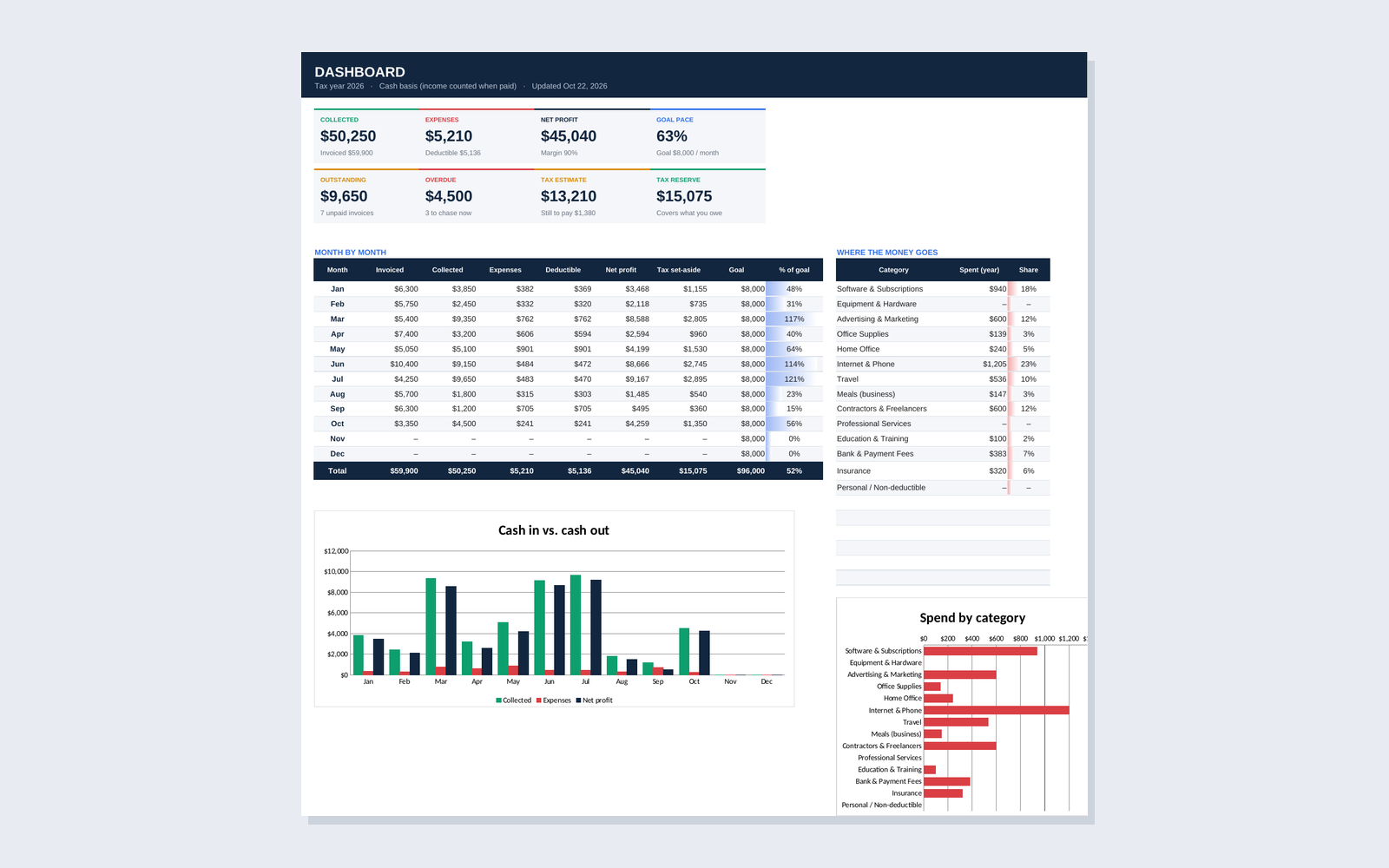
Collected
$50,250
Expenses
$5,210
Net profit
$45,040
Tax reserve
$15,075
Excel + Google Sheets
Windows, Mac, web and Sheets
9 connected tabs
Type once, see it everywhere
Filled example file
See every tab with real-looking data
$4.99 one-time
Instant download
Freelance money is messy. Your tracker shouldn't be.
- ✕Invoices paid late and nobody notices for weeks
- ✕Expenses split across three cards and PayPal
- ✕Quarterly tax payment is a guess, or a surprise
- ✕Rates set by gut feel, not by what you need to earn
- ✓Every invoice shows Paid, Open or Overdue on its own
- ✓Every expense lands in a deductible category
- ✓Each quarter shows what you owe and what you've paid
- ✓Your minimum hourly rate, worked back from your goal
I built this kit as one spreadsheet you own: no monthly fee, no bank access, and every number traces back to a row you typed.
See every tab
Real screenshots of the freelance finance tracker, taken from the filled example file in the download.
What's inside the freelance finance tracker
Six working tabs plus Clients and Settings, all linked. Type a number once and it shows up everywhere it matters.
Dashboard
Eight live numbers (collected, expenses, net profit, goal pace, outstanding, overdue, tax estimate, tax reserve), monthly cash flow and spend by category.
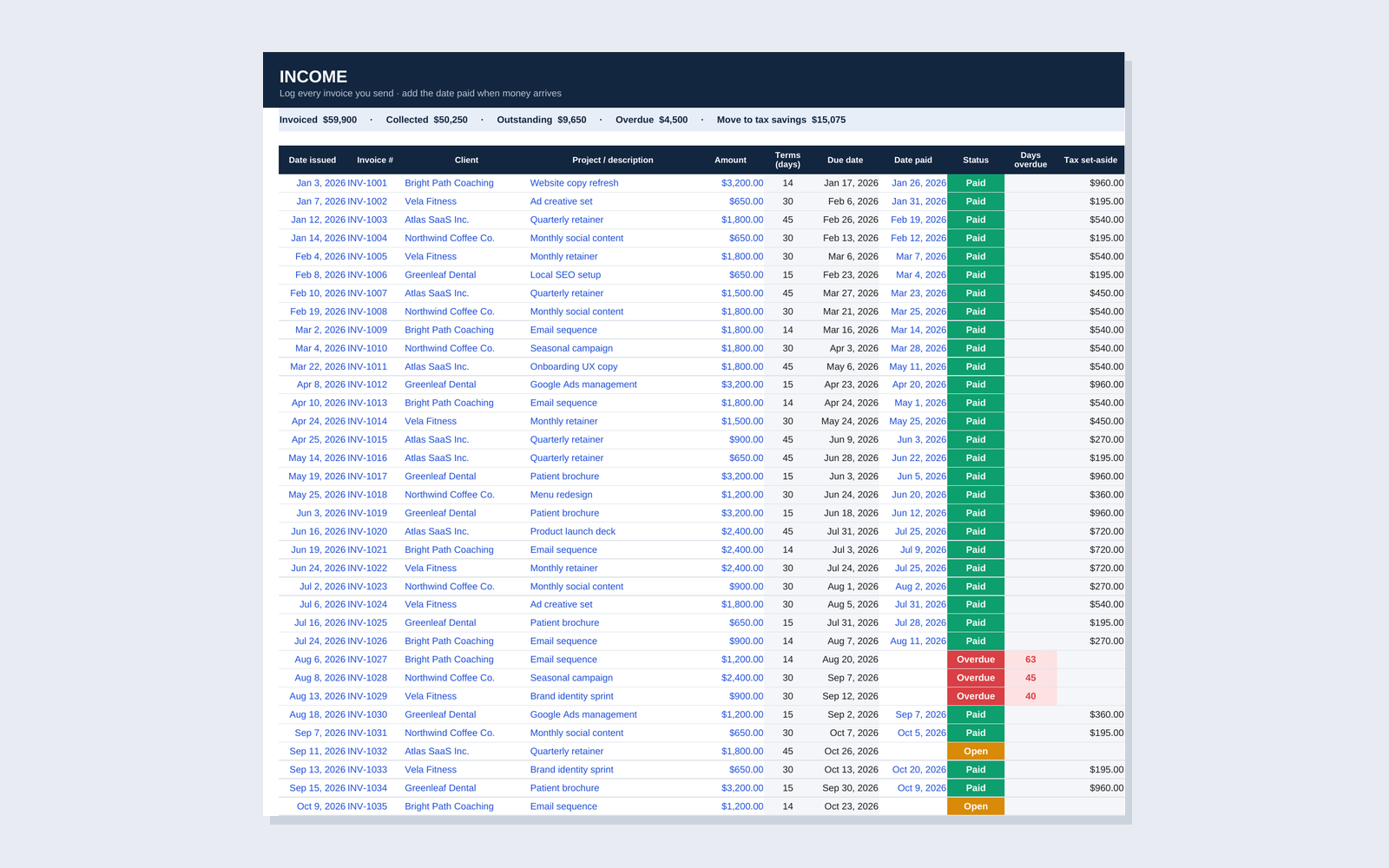
Income
Log each invoice once. Due dates come from the client's terms, status updates itself, and each payment shows what to move to tax savings.
Expenses
Pick a category and the deductible amount is calculated, with business meals at 50%. A flag shows which receipts are missing.
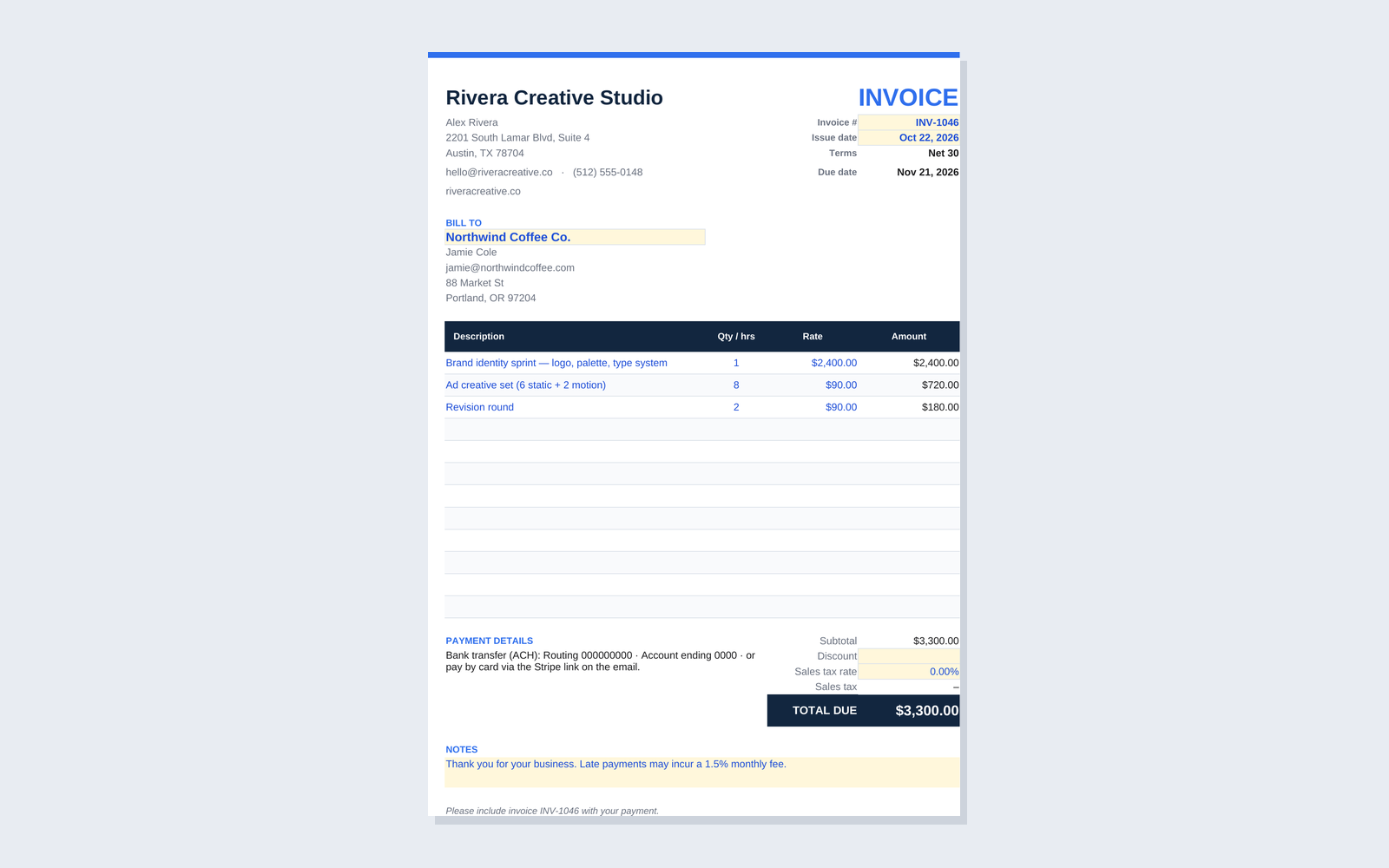
Invoice
A print-ready invoice. Choose a client and the address, terms and due date fill in. Add up to 12 lines and export to PDF.
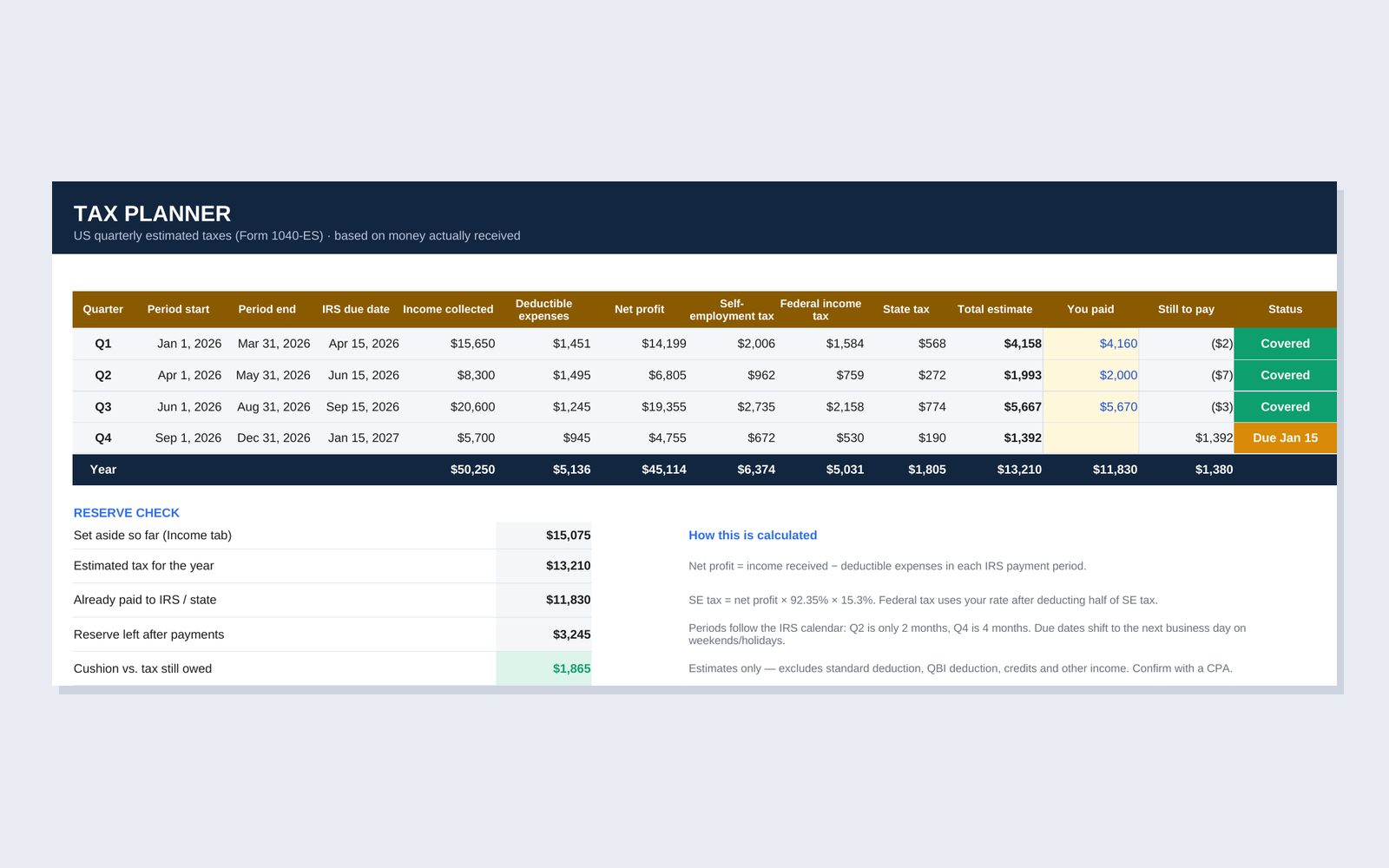
Tax Planner
US quarterly estimates on the IRS calendar: self-employment, federal and state tax, what you paid, what's left, and whether your reserve covers it.
Rate Calculator
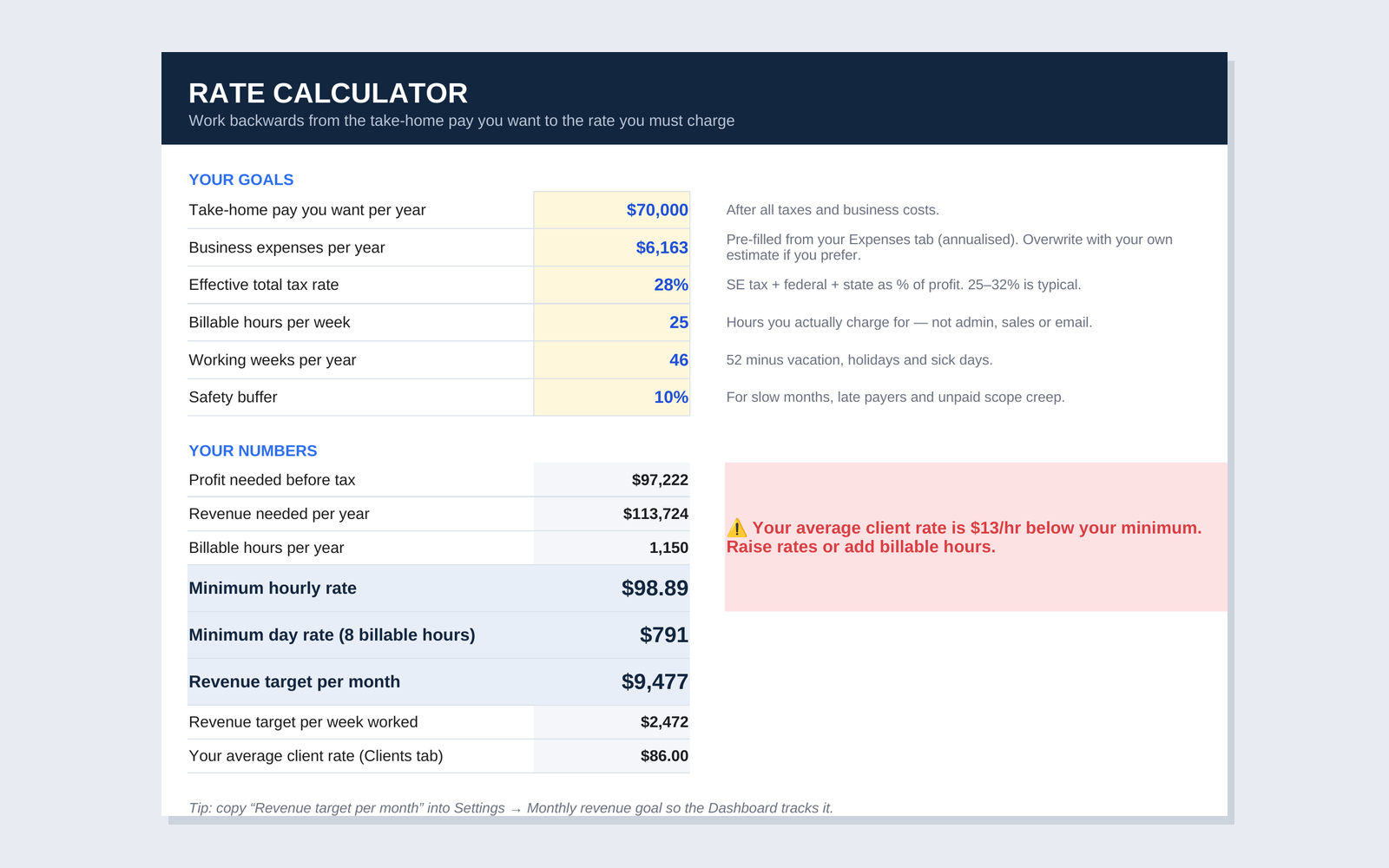
Start from the take-home pay you want and get your minimum hourly and day rate, with a warning if your clients pay below it.
In the download
- ✓Freelancer-Finance-Kit.xlsx: your workbook
- ✓Freelancer-Finance-Kit-DEMO.xlsx: a filled example file
- ✓Google Sheets copy link, private to you
- ✓1-page Quick Start PDF and README
Built into the workbook
- ✓Clients and Settings feed every dropdown
- ✓Yellow cells to type in, grey cells that calculate
- ✓Hover notes on every tax assumption
- ✓Room for 200 invoices and 500 expenses a year
How the freelance finance tracker works
1
Set up once
Business details, tax year, set-aside % and each client's payment terms. About five minutes.
2
Log as you go
One row per invoice and per expense. Add the date paid when the money lands.
3
Check and act
Chase what's overdue each week, and open the Tax Planner before each IRS due date.
Who it's for, and who it isn't
- ✓Freelance or run a one-person business in the US
- ✓Invoice clients yourself and get paid by transfer, card or PayPal
- ✓Want to know what to set aside for quarterly taxes
- ✓Prefer a spreadsheet you own to another subscription
- ✕Automatic bank or card syncing
- ✕Payroll, inventory or multi-currency books
- ✕A tax return or personal tax advice
- ✕Accrual accounting for a company with staff
Limitations, upfront
The freelance finance tracker gives you planning estimates, not tax filings. The Tax Planner uses the self-employment tax rate and the rates you enter, and leaves out the standard deduction, the QBI deduction and credits, so confirm real payments with a CPA or the IRS Form 1040-ES worksheet. The workbook doesn't connect to your bank: you type each row. It works in Excel and Google Sheets, not Apple Numbers.
One price, everything included
Pay once, download right away, keep it for good.
- ✓The 9-tab workbook for Excel (Windows, Mac, web)
- ✓Your own Google Sheets copy, one click
- ✓A filled example file to learn from
- ✓1-page Quick Start PDF
- ✓Use it for every new tax year: start a fresh copy
$4.99
One-time payment · instant download
Get the kitSecure checkout by Creem · sales tax handled for you
Files that work, or your money back
If a file doesn't open or something is missing, email me within 14 days and I'll fix it or refund you in full.
Frequently asked questions
Does it work in Google Sheets and Excel?
+
Yes. The download includes the .xlsx file for Excel on Windows, Mac or the web, and a link that makes your own private copy in Google Sheets with one click. Apple Numbers isn't supported.
Do I need to know spreadsheets?
+
No formulas to write. You type into the yellow and white cells, pick clients and categories from dropdowns, and everything else calculates. The filled example file shows every tab in use so you can see how each tab should look.
Is the tax planner accurate for my state?
+
It's an estimate. It applies the federal self-employment tax and the federal and state rates you enter, using the IRS quarterly periods. It doesn't know your deductions or credits, so treat it as a savings target and confirm the payment with a CPA.
Can I use it outside the US?
+
The invoices, income, expenses, dashboard and rate calculator work anywhere. The Tax Planner and the dollar formatting are built for US freelancers, so you'd skip that tab or set its rates to match your own system.
What happens after I pay?
+
Creem emails you a download link straight away. Open the Quick Start PDF first: it walks you through Settings, Clients and your first entries in about ten minutes.
Can I get a refund?
+
If a file doesn't open or something is missing, email me within 14 days and I'll fix it or refund you. The full terms are on the refund policy page.
Start this month with clean numbers
Five minutes of setup, then one row per invoice and expense.
Get the kit · $4.99A planning tool, not tax, legal or accounting advice. Prefer the basics first? See how I built an expense tracker with Copilot in Excel or which AI tools help with invoicing. Refund policy · Terms