
 Published on: August 9, 2025 • Last updated: March 2026
This post contains affiliate links. If you buy through them, we may earn a small commission at no extra cost to you — thanks for supporting. Learn more.
If you want the fastest path to publish: CapCut Pro wins for Reels/TikTok. If you edit by words and want cleaner audio + podcast workflows: Descript AI is usually the better pick.
- Choose Descript AI if you edit podcasts, interviews, YouTube talking-head videos, or need strong audio cleanup.
- Choose CapCut Pro if you publish short-form daily and want templates, auto-captions, and fast social editing.
Tip: if you’re deciding today, scroll to Pricing & Value for Money.
1. Introduction – Why Compare Descript AI and CapCut Pro
If you’re choosing between Descript AI vs CapCut Pro, don’t start with features. Start with your goal:
Do you edit mainly long-form (podcasts/interviews/YouTube) — or short-form (Reels/TikTok)?
Because the “best” tool changes depending on the workflow you repeat every week.
The 10-second answer
Pick Descript AI if you want podcast editing AI, text-based editing, cleaner audio, and faster long-form workflows.
Pick CapCut Pro if you want speed for short-form, templates, auto-captions, and a social-first editing pipeline.
Why this comparison matters (and saves you money)
Most creators lose time (and subscriptions) because they:
pay for features they don’t use
choose a tool that slows their editing style
spend hours fixing captions + audio + cuts
This Descript AI review vs CapCut Pro review is designed to get you to a decision fast — especially if you’re picking a plan today.
What you’ll get in this guide
A quick table to spot the winner in 60 seconds
A feature-by-feature breakdown (only what impacts output speed + quality)
Pricing & value (so you don’t overpay)
A simple “Best for” section to match the tool to your creator type
Start here: check the Quick Comparison Table first.
If you’re ready to subscribe, jump straight to Pricing & Value for Money.
2. Quick Comparison Table – Descript AI vs CapCut Pro
Want the fastest answer? Start with this Descript AI vs CapCut Pro quick comparison. In 60 seconds you’ll see which tool wins on AI features, value, and creator fit — so you don’t waste time (or money) on the wrong editor.
| Feature | Descript AI | CapCut Pro |
|---|---|---|
| Main Focus | Podcast editing, text-based video editing, AI audio cleanup | Short-form video editing, TikTok/Reels optimization, creative effects |
| AI Features | Overdub voice, filler word removal, auto transcription | Auto captions, background removal, smart cutout, speech enhancement |
| Ease of Use | Beginner-friendly, great for script-based editing | Drag-and-drop, mobile-first, instant effects |
| Platforms | Windows, Mac, Web | Windows, Mac, Web, iOS, Android |
| Pricing | Free tier, Creator plan from $12/month | Free tier, Pro plan from $7/month |
| Best For | Podcasters, YouTubers, course creators | TikTok creators, social media managers, marketers |
| Quick Action |
Try Descript AI
Best for podcasts + text-based editing
|
Try CapCut Pro
Best for Reels/TikTok speed
|
Why This Matters
If you’re weighing Descript AI vs CapCut Pro, the table above is the fastest way to spot the real differences before the deep dive. In simple terms:
Descript AI wins when your workflow is audio-first editing, accurate transcription, and long-form projects (podcasts, interviews, YouTube talking-head videos).
CapCut Pro wins when you need fast, social-first content — especially if you post regularly on TikTok, Instagram Reels, or YouTube Shorts.
If you travel, work on client files, or just care about privacy, you might also want tools that work offline — here’s our guide to offline AI tools you can use without an internet connection.
For deeper details, check our AI Tools for Creators guide for more creator-ready recommendations.
And for official tutorials and feature updates, use ByteDance’s CapCut resources — plus Descript’s official help center for the latest AI editing features.
3. Descript AI Overview
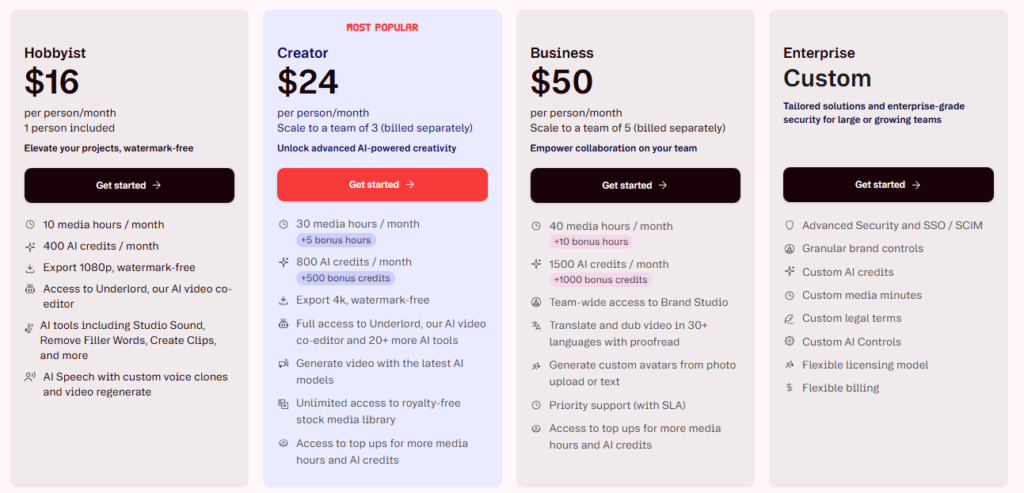
Descript AI is the editor built for creators who want to edit video and audio by editing text. It started as a podcast-first tool, but today it’s a complete workflow for podcasts, YouTube videos, online courses, and voice-led content — especially when speed and clarity matter.
Instead of fighting a complex timeline, you work like you’re editing a document: delete a sentence, remove filler words, clean the audio, and export. That’s the real difference in Descript AI vs CapCut Pro: Descript is optimized for audio-first, long-form editing, while CapCut is built for fast social edits.
If you want the full feature breakdown (Overdub limits, transcription accuracy, and real pros/cons), you can also read our in-depth Descript AI review here: https://aidigitalspace.com/descript-ai-review/
Key Features of Descript AI (What Matters Most)
Text-Based Editing — Cut audio/video by editing the transcript (huge time-saver for long recordings).
Transcription + Speaker Detection — Turn recordings into editable text in minutes.
AI Audio Cleanup — Reduce noise, improve clarity, and remove filler words quickly.
Overdub (AI Voice) — Fix small mistakes without re-recording (use carefully + ethically).
Multitrack Editing — Useful for podcasts with multiple speakers and layered audio.
Screen Recording — Ideal for tutorials, walkthroughs, and course lessons.
Why Creators Choose Descript AI
If your workflow is podcast editing AI or YouTube talking-head content, Descript can save hours every week. It’s a “workflow-first” tool: record → transcribe → edit → publish, all in one place.
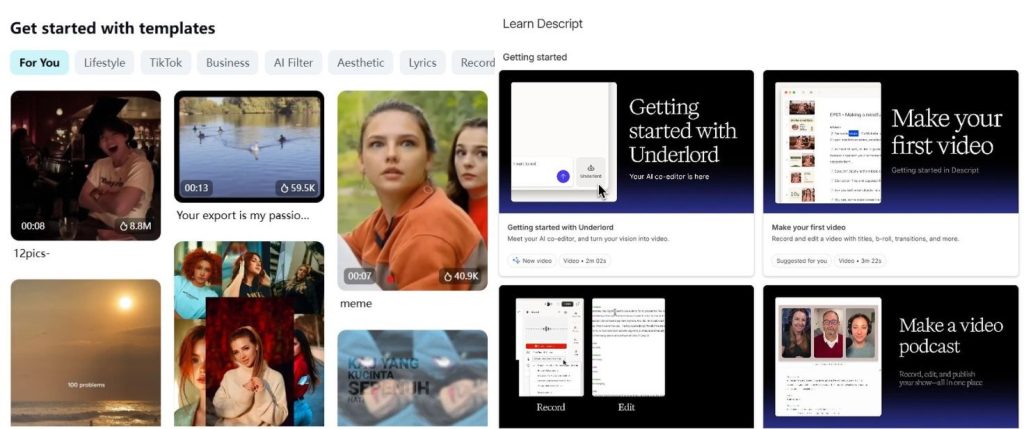
Pricing & Plans
Descript offers a free plan to test the workflow. Paid plans typically start around $12/month for the Creator tier (pricing can change), which unlocks more exports and advanced features.
Who Descript AI Is Best For
Podcasters who want quick edits without technical overwhelm
YouTubers & course creators who need accurate transcripts + clean audio
Marketers creating webinars, explainers, and training content
Anyone who prefers script-driven editing over timeline micro-trimming
Bottom line: if your content is voice-led and long-form, Descript AI is usually the smarter pick. Next, we’ll look at CapCut Pro, which is designed for speed on short-form and social-first editing.

4. CapCut Pro Overview
If Descript AI is built for podcasts and long-form editing, CapCut Pro is built for speed. It’s a social-first editor designed to help you publish Reels, TikToks, and YouTube Shorts faster — with templates, effects, and AI tools that reduce the “editing drag.”
Created by ByteDance (the company behind TikTok), CapCut became the go-to choice for creators who want polished short-form content without spending hours on a timeline. In the Descript AI vs CapCut Pro debate, CapCut wins when your priority is fast output and platform-ready formatting.
If you’re specifically comparing CapCut with AI video tools for creators, you can also check our detailed guide here: https://aidigitalspace.com/pika-labs-vs-capcut-ai/
Key Features of CapCut Pro (What Matters Most)
AI Auto-Captions — Quick captions that look native on short-form platforms.
Smart Cutout / Background Removal — Remove backgrounds and isolate subjects fast (no green screen).
Templates + Trend Effects — One-tap styles designed for TikTok/Instagram pacing.
Speech Enhancement — Cleaner voiceovers for ads, promos, and talking clips.
Cross-Platform Sync — Start on mobile, finish on desktop (useful for creators on the move).
Why Creators Choose CapCut Pro
CapCut Pro is one of the fastest paths from raw footage to a finished, share-ready edit. If you publish frequently, the combination of templates + effects + auto-captions can save time every week — and help your content look “native” to the platform.
Pricing & Plans
CapCut offers a free version for basic editing. CapCut Pro typically starts around $7/month (pricing can change) and adds premium effects, extra assets, and advanced tools.
Who CapCut Pro Is Best For
TikTok & Reels creators who want quick, trend-driven edits
Social media managers producing high volumes of short-form content
Marketers creating ads, promos, product showcases, and UGC-style videos
Bottom line: CapCut Pro is the better pick when your workflow is short-form and speed matters most. Next, we’ll compare Descript AI vs CapCut Pro feature-by-feature so you can choose the best AI editing tool for your exact creator style.
5. Feature-by-Feature Comparison – Descript AI vs CapCut Pro
When it comes to Descript AI vs CapCut Pro, the real decision comes down to how you create, what platforms you publish on, and how much control you need over your edits. Here’s a breakdown of the most important features.
5.1 User Interface & Ease of Use
Descript AI: Uses a text-first editing model, so you work from a transcript instead of a traditional timeline. Great for podcasters or video creators who think in scripts. May feel unusual if you’re used to manual cutting.
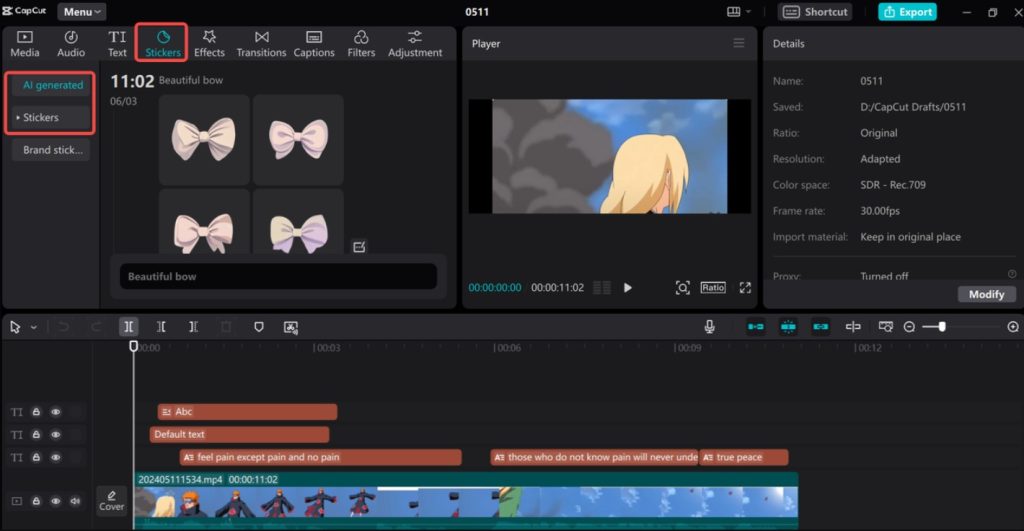
CapCut Pro: Timeline-based with drag-and-drop editing, instantly familiar to anyone who’s used a video editor before. Feels intuitive for quick, visual edits — especially on mobile.
 If you’ve never tried transcript-based editing, our Descript AI review explains why it can cut production time in half for long-form creators.
5.2 Editing Capabilities for Podcasts
Descript AI: Purpose-built for audio. Offers multitrack editing, AI filler word removal, and Overdub voice replacement. You can publish directly to podcast hosting platforms.
CapCut Pro: Can handle audio but lacks podcast-focused tools. Works best for short, social-friendly soundbites rather than full episodes.
5.3 Video & Reels Editing Features
Descript AI: Strong in adding captions, screen recordings, and B-roll to long videos. Basic transitions and effects, but nothing like the flashy templates in CapCut.
CapCut Pro: Packed with effects, transitions, trending templates, and speed controls ideal for TikTok/Instagram algorithms. Also has platform-specific export presets for better reach.
5.4 AI Tools & Automation
Descript AI: AI transcription, filler word removal, background noise cleanup, and voice cloning are standout features. Best for polishing rather than styling.
CapCut Pro: AI auto-captions, background removal, smart cutout, speech enhancement, and template automation for speed.
For more on AI-driven creative workflows, see our AI Tools for Video Editing guide.
5.5 Collaboration & Cloud Integration
Descript AI: Cloud-based collaboration lets multiple people work on the same project in real time, like Google Docs for video.
CapCut Pro: Has project sharing and cloud sync, but more limited for multi-person editing — geared toward solo creators.
Summary:
If your content is audio-heavy or long-form, Descript AI’s text-based workflow and AI audio tools give you maximum precision. If you’re producing short-form, trend-driven videos, CapCut Pro’s mobile-first effects and templates will get you publishing faster.
6. Pricing & Value for Money – Descript AI vs CapCut Pro
When deciding between Descript AI vs CapCut Pro, cost isn’t just about the monthly fee — it’s about what features you get and how much time the tool can save you. Here’s the 2026 breakdown.
| Plan | Descript AI | CapCut Pro |
|---|---|---|
| Free Tier | Yes — good to test transcription + basic exports (limits apply) | Yes — solid for basic edits, captions, and effects (limits apply) |
| Entry Plan | Creator — from $12/month (pricing can change) | Pro — from $7/month (pricing can change) |
| Notable Upgrades | More exports + longer workflows, Overdub, multitrack tools, screen recording | Premium templates, advanced effects/assets, extra tools + cloud features |
| Best Value For | Long-form creators who want podcast editing AI, clean audio, and precise edits | Social-first creators who post frequently and want speed + ready-to-publish edits |
| Quick Action | Check Descript Plans | Check CapCut Pro |
 Pro Tip: If you publish both long-form and short-form, a smart workflow is to edit the podcast in Descript AI (fast text-based cuts + audio cleanup), then export to CapCut Pro for the final social polish (captions, templates, effects). It’s not the cheapest setup — but it can save hours every week.
 Want to test without paying first? See our Best Free AI Tools with No Login Required guide for budget-friendly picks before you commit.
7. Strengths & Weaknesses – Descript AI vs CapCut Pro
Before committing to Descript AI or CapCut Pro, it helps to see exactly where each tool shines and where it might slow you down.
| Tool | Pros | Cons |
|---|---|---|
| Descript AI |
|
|
| CapCut Pro |
|
|
Tip for Maximum Impact: Many creators use Descript AI to clean audio and trim long-form content fast, then switch to CapCut Pro for short-form optimization (captions, templates, effects). This “two-tool” workflow isn’t just convenient — it’s one of the quickest ways to publish consistently.
 Related: See our AI Tools for Automating Social Media guide to plug CapCut Pro into a full content automation workflow.
8. Best For – Which Type of Creator Should Choose Each
The Descript AI vs CapCut Pro decision really comes down to your main content style, how you like to edit, and where you publish most often.
Descript AI is best for you if…
You produce podcasts, interviews, webinars, or educational videos regularly.
You prefer editing through a transcript instead of dragging clips on a timeline.
You need AI audio tools like background noise removal, voice cloning, or filler word cleanup.
You work in a team environment and want real-time collaboration.
You want all-in-one audio + video editing without switching platforms.
If that sounds like you, see our full Descript AI guide for workflow tips and hidden features most creators miss.
CapCut Pro is best for you if…
You create short-form content for TikTok, Instagram Reels, or YouTube Shorts.
You need to edit quickly on your phone with platform-ready export settings.
You rely on visual effects, trending templates, and creative transitions.
You want affordable AI-powered tools for captions, background removal, and speed control.
You value fast turnaround over deep editing precision.
For social-first creators, our AI Tools for Automating Social Media post shows how CapCut Pro can integrate into a full content pipeline.
Bottom line:
Pick Descript AI if your work is script-driven and audio-polished.
Pick CapCut Pro if you live on social media and want to move fast with trends.
Pick both if you want maximum flexibility — Descript for the foundation, CapCut Pro for the finish.
9. Ethical Considerations in AI Video & Audio Editing
As AI-powered tools like Descript AI and CapCut Pro become more advanced, they also raise important ethical questions — not just for professional creators, but for anyone publishing content online.
| Area | Risk / Consideration | Best Practice |
|---|---|---|
| Voice Cloning | Descript AI includes voice tools (e.g., Overdub) that can replicate speech — powerful for fixes, but risky if used without permission. | Get explicit consent before cloning any voice, use it only for edits you’re authorized to make, and disclose AI voice use when it’s material. |
| AI Cutouts & Effects | CapCut Pro smart cutouts, background removal, and effects can make altered visuals look “real,” which may mislead if not labeled. | Label AI-altered or composited footage clearly (caption/watermark), especially for ads, testimonials, and news-style content. |
| Transparency | AI-assisted editing can change meaning (tone, timing, or context) — especially with heavy cuts, audio cleanup, or AI voice fixes. | Be upfront when AI significantly affects the output. Keep originals for accountability, and avoid edits that change intent. |
| Data Privacy | Both tools may process files online (uploads, cloud features, AI processing). That can include sensitive client audio/video. | Avoid uploading sensitive content unless necessary, use watermarks for client drafts, and review policies: Descript Privacy • CapCut Privacy |
Ethics in AI editing aren’t just about avoiding misuse — they’re about protecting trust. Whether you choose Descript AI, CapCut Pro, or both, your audience will remember not just what you created, but how you created it.
10. Final Verdict – Our Recommendation for 2026
After comparing Descript AI vs CapCut Pro across features, pricing, workflow speed, and even ethics, the winner depends on where your content lives and how you edit.
Choose Descript AI if you want the cleanest long-form workflow
Pick Descript AI if your week is built around:
podcasts and interview edits
YouTube talking-head videos and explainers
courses, webinars, training content
Descript’s advantage is simple: text-based editing + podcast editing AI tools (transcription, audio cleanup, and structured long-form editing) that save serious time.
Choose CapCut Pro if you publish short-form and need speed
Pick CapCut Pro if you’re focused on:
TikTok, Instagram Reels, YouTube Shorts
templates, captions, effects, and “platform-ready” formatting
CapCut Pro is built for fast output — it’s the easiest way to turn raw clips into scroll-stopping short-form content.
Choose both if you want the fastest creator stack
If you publish long-form and short-form, the best workflow is often:
Edit + clean in Descript AI → polish + optimize in CapCut Pro.
It costs more, but it’s one of the quickest ways to publish consistently without sacrificing quality.
Our Take (what we’d do)
If you’re building a brand across multiple platforms, investing in the right tool for each job is worth it:
Descript AI handles structure and audio polish, while CapCut Pro handles speed, captions, and social formatting.
Start here:
Get Descript AI — best for podcasts, YouTube, and course content.
Get CapCut Pro — best for Reels/TikTok/Shorts and daily short-form output.
11. FAQ – Descript AI vs CapCut Pro
Q: Which is better for beginners, Descript AI or CapCut Pro?
A: It depends on what you create. If you’re editing podcasts, interviews, or educational videos, Descript AI is easier because you edit by text (transcript). If you’re editing Reels/TikTok with effects and templates, CapCut Pro feels more intuitive and faster.
Q: Can I use Descript AI and CapCut Pro together?
A: Yes — and it’s often the fastest workflow. Many creators do the structure + audio cleanup in Descript AI, then export to CapCut Pro for captions, templates, effects, and “platform-ready” formatting.
Q: Is Descript AI free?
A: Yes. Descript AI has a free plan with limits (transcription/export minutes). Paid plans unlock more usage and advanced tools (pricing changes over time). If you’re deciding today, jump to the Pricing & Value section above for the quick breakdown.
Q: Is CapCut Pro free?
A: CapCut has a free version with core editing features. CapCut Pro adds premium templates/effects and extra tools (pricing changes over time). If you mainly publish short-form weekly/daily, Pro is usually where the time-savings start.
Q: Which is better for podcast editing?
A: Descript AI wins for podcast editing AI workflows: transcription, text-based editing, filler word removal, and audio cleanup are built for long-form. CapCut can edit audio, but it’s not designed for podcast production.
Q: Which is better for TikTok and Instagram Reels?
A: CapCut Pro wins for Reels/TikTok. It’s optimized for vertical formats, trend templates, quick captions, and export settings that match social platforms.
Q: Do these tools work offline?
A: Mostly no. Both rely on the internet for most AI features. Some basic editing can work offline depending on the device/app, but expect limitations. If offline matters for travel or privacy, see our Offline AI Tools guide: https://aidigitalspace.com/offline-ai-tools/
Q: Which one is more affordable long-term?
A: If you only need one tool for short-form, CapCut Pro is usually the cheaper option. If you want advanced long-form audio tools and you edit weekly podcasts/interviews, Descript AI can be worth the higher price because it saves more time per project.
If this Descript AI vs CapCut Pro guide helped you pick the best AI editing tool for your workflow (podcasts, YouTube, Reels, and Shorts), these related reads will help you level up your creator stack:
→ All-in-One AI Tools — The Best Platforms to Do More in One Place
→ Best AI Video Editors — Kling vs Higgsfield vs CapCut (Full Comparison)
→ AI Storyboarding Tools — Plan Videos Faster With AI (Top Picks)