



Person adjusting privacy and security settings on a laptop to find the safe way to use AI tools

The Safe Way I Use AI Tools (Without Getting Tracked)

M

Mirko

AI Tech Writer

📅 Last updated: August 2026 · ⏱️ 11 min read

Most guides to the safe way to use AI tools tell you to grab a VPN and call it a day. I went into the actual settings panels of ChatGPT, Gemini, Claude, and Perplexity myself this month, confirmed exactly what each toggle does in August 2026, and built the checklist I now run before I trust any AI tool with anything real — this is how I use AI tools anonymously without giving up what makes them useful.

Some links are affiliate links · they support this site at no extra cost to you · Full disclosure

Why Privacy Actually Matters When Using AI

The safe way to use AI tools starts with understanding where your prompt actually goes once you hit send. Every message I type into ChatGPT, Gemini, or Claude gets logged, sometimes reviewed, and — unless the right toggle is off — sometimes used to train the next version of that model.

I'm not sharing this to scare you off AI; I use it daily. But a few simple AI privacy tips and a couple of settings changes are all it takes to avoid AI tracking without giving up the tool.

"If I wouldn't post it publicly, I don't paste it into an AI chat — that one rule covers 90% of the risk."

This guide walks through the safe way to use AI tools, start to finish — the exact steps I run for secure AI use on every platform I touch.

Quick picks for safe way to use AI tools – VPN, browser, privacy mode

Quick Picks — Safe Tools and Settings at a Glance

If you only fix four things today, fix these. I've ranked them by how much protection you get for how little effort it takes.

Setting / Tool What It Stops Effort
Training toggle off
ChatGPT, Gemini, Claude, Perplexity
Your chats being used to train future models 2 min each
VPN Your IP and rough location being logged alongside your prompts 5 min setup
Tracker-blocking browser Third-party trackers that follow you before an AI tool even loads One-time switch
Separate email + password manager One breach exposing every AI account tied to your main inbox 10 min setup

The Safe Way to Use AI Tools: My Core Checklist

This is the exact order I go through to find the safe way to use AI tools on any new platform — distilled from actually configuring ChatGPT, Gemini, Claude, and Perplexity myself. Eight steps, all built around one goal: letting me use AI tools anonymously whenever it matters.

  1. Switch to a tracker-blocking browser. Brave or Firefox with a couple of extensions stops most tracking before it starts — full picks in my browser comparison.
  2. Connect through a VPN. Non-negotiable on public Wi-Fi. I break down which ones are worth paying for in this VPN guide.
  3. Create a separate email just for AI tools. Don't tie ChatGPT, Gemini, or anything else to your main inbox — one dedicated address keeps a breach on one platform from cascading into every account you own.
  4. Turn off training on every platform you use. Exact toggle names for each one in Section 7 below — this alone is the biggest step toward secure AI use.
  5. Never paste anything you wouldn't post publicly. Client data, passwords, financial details, anyone's medical information — treat every prompt box like a public forum.
  6. Use incognito or temporary modes for anything sensitive. ChatGPT, Gemini, Claude, and Perplexity all have one now — I detail exactly what each does in Section 7.
  7. Review what you've connected. If you've linked an AI tool to Slack, Google Drive, or Notion, check what it can actually see — my running checklist is in this permissions guide.
  8. Keep everything updated. Browser, VPN, and AI app versions all patch privacy holes — the update you skip is usually the one that mattered.
Best browsers to block tracking for the safe way to use AI tools

Best Browsers and Extensions to Block Tracking

A browser that blocks trackers by default is the foundation of the safe way to use AI tools — it stops most data collection before an AI tool ever loads. Brave is the "install and forget" option; Firefox with Enhanced Tracking Protection set to Strict gives you more manual control.

Pair either one with Privacy Badger from the EFF — it's free, learns new trackers automatically, and is one of the simplest ways to avoid AI tracking before you've even opened a chat window.

"More extensions isn't more privacy past a point — three that work beats ten that make your browser easier to fingerprint."

This is one of the AI privacy tips that pays off immediately: a locked-down browser protects every AI tool you use, not just one. I go tool-by-tool, with screenshots, in Atlas vs Comet vs Opera Neon: Safest AI Browser Comparison and why some browser extensions can read your AI chats.

VPNs and Secure Connections

A VPN is one of the fastest ways to move toward the safe way to use AI tools — it masks your IP address and encrypts your connection, which stops a platform from tying your prompts to your rough location. This matters most on public Wi-Fi or when you're traveling.

"A VPN and a privacy browser solve different problems — the browser blocks trackers inside the page, the VPN hides you at the network level. You want both, not one instead of the other."

I compare the ones actually worth paying for — speed, logging policy, price — in AI-Powered VPNs Explained.

Account Hygiene: Separate Emails, Strong Passwords

Most people use one email everywhere. Part of the safe way to use AI tools is not doing that — a dedicated address keeps a breach on one platform from spreading into your main inbox, and makes it obvious which service leaked if something ever does.

  • Unique password per tool — if one site is compromised, the rest stay safe.
  • 2FA everywhere it's offered — it's the single cheapest security upgrade available.
  • A dedicated AI-only email — one of the simplest AI privacy tips there is, and it costs nothing to set up.

A password manager makes all of this sustainable instead of a chore — it's a small habit that adds up to genuinely secure AI use across every tool you touch.

Turn Off Data Sharing — Verified Settings for 4 Major Tools

I went into all four of these myself this month and confirmed the current toggle names — they've moved around enough in the last year that older guides (mine included) had a few wrong.

ChatGPT

I go to Settings → Data Controls → "Improve the model for everyone" and switch it off. That single toggle disables both training and chat history saving at once — it used to be two separate settings, it isn't anymore.
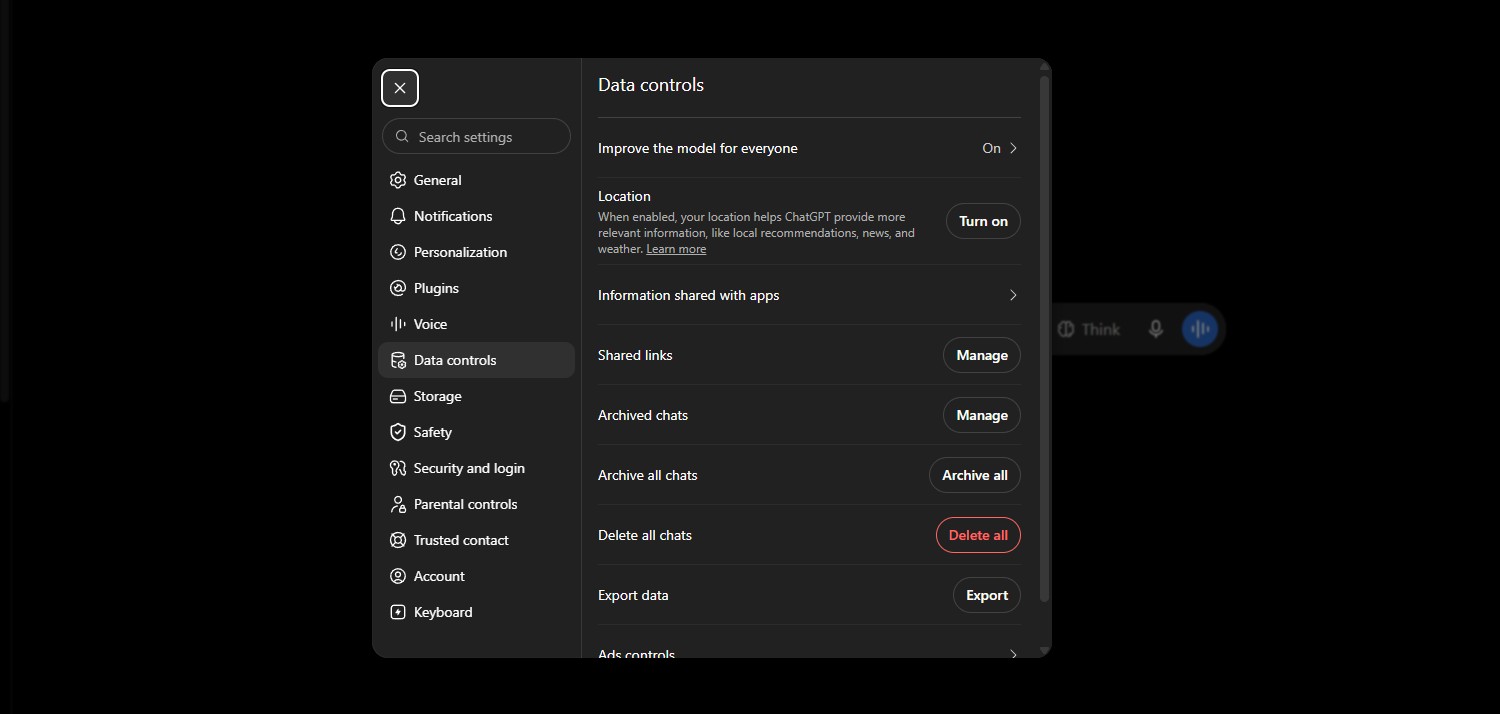
ChatGPT Data Controls menu showing the Improve the model for everyone toggle, part of the safe way to use AI tools

Google Gemini

The setting is now called "Keep Activity" (Gemini Settings → Activity, or directly at myactivity.google.com/product/gemini). Turning it off stops conversations from being saved or used to improve the model. I also switched off Personal Context separately — that's the newer memory feature that references your past chats, and it's on by default. Full setup walkthrough in Gemini Personal Intelligence: Setup & Privacy Checklist.

⚠️ What I couldn't fully verify: Google's own wording leaves it unclear whether turning off Keep Activity blocks every downstream use of your data, or just stops it from being saved to your account. I'm flagging the gap rather than guessing.

Claude (Anthropic)

The toggle here is "Help Improve Claude" (Settings → Privacy). I've got it off. One correction from my last version of this guide: Claude's Incognito chats aren't invisible the moment you close the window — Anthropic retains them for 30 days for safety review, they just never appear in your history and are never used for training, even with the toggle on.

Perplexity

Settings → "AI Data Retention", toggled off, plus Perplexity's Incognito mode for anything I don't want tied to my account at all — it's the one I reach for most since it doesn't cost me any features to use.

Offline AI tools for the safe way to use AI tools with maximum privacy

Offline and Local AI Tools for Maximum Privacy

For anything genuinely sensitive, the strongest version of the safe way to use AI tools is running a model on your own machine — nothing leaves your device, nothing gets logged, nothing needs an internet connection at all.

"If a local model can do the job, that's the closest thing to true secure AI use — there's no server to trust, because there's no server involved."

This is the one setup that lets you use AI tools anonymously by default, with nothing to toggle off. I've already built a full walkthrough of the tools worth setting up and how to pick one for your hardware: Best Offline AI Tools That Work Without Internet.

Extra Hacks and Pro Tips

A few more AI privacy tips I've picked up beyond the core checklist — smaller habits, but they compound.

  • Separate browser profile for AI tools — keeps cookies and logins from bleeding into your personal browsing, another easy way to use AI tools anonymously.
  • Clear cookies and cache weekly — resets trackers that accumulated since your last pass.
  • Check permissions before you connect anything — my running checklist is in AI App Permissions: What to Check on Your Phone.
  • Know what a scam looks like — fake "AI tool" installers and cloned login pages are common enough that I wrote a dedicated guide: Dangerous AI Tool Scams to Avoid.

My Take — Stay Safe Without Missing Out on AI

I went into ChatGPT, Gemini, Claude, and Perplexity myself so you don't have to guess which toggle covers the safe way to use AI tools. None of it took more than a few minutes per platform.

"Secure AI use isn't about avoiding these tools — it's about deciding what they get to keep."

Run this checklist once, and you'll avoid AI tracking without thinking about it every time you open a new chat.

Common Questions

FAQ — Safe Way to Use AI Tools

What is the safest way to use AI tools without getting tracked?

−

I run four things together: a tracker-blocking browser, a VPN, training switched off on every platform, and a rule against pasting anything I wouldn't post publicly — that's my whole approach to the safe way to use AI tools.

On their own, none of these fully solve tracking — stacked together, they cover the overwhelming majority of it.

Does turning off ChatGPT's training toggle delete my past conversations?

+

No — it only applies going forward. Chats that were already used for training before you flipped the toggle stay used; OpenAI doesn't retroactively pull data back out of a trained model.