
 Published on: November 11, 2025
Disclosure:
Some links in this post are affiliate links. If you click and purchase, we may earn a small commission at no extra cost to you. Thank you for supporting AIDigitalSpace.com and helping us keep this content free and useful.
1. Why Meeting Chaos Still Wastes Time
If you’ve ever left a meeting wondering “What did we just agree on?” — you’re not alone. Most of us spend hours every week in online calls, podcasts, or brainstorming sessions, and yet we lose precious time rewriting notes and trying to remember key decisions. That’s exactly where Castmagic AI steps in — a powerful AI productivity tool that listens, summarizes, and turns your conversations into structured action plans within minutes.
At AI Digital Space, we’ve tested many AI meeting transcription software options, and Castmagic AI quickly stood out for its accuracy and real-world usefulness. Unlike generic tools, it’s built for creators, teams, and professionals who don’t just need notes — they need results. Whether you’re recording a Zoom call, podcast episode, or client meeting, Castmagic AI gives you ready-to-use summaries, timestamps, and even task lists that make follow-ups effortless.
And there’s psychology behind it: when our brain sees clear, organized information right after a meeting, motivation and recall increase dramatically. Instead of scrolling through endless recordings, you see everything cleanly structured and ready to act on. It’s the perfect “mental reset” for overloaded workdays — and a practical reason why more people are switching to AI meeting notes tools in 2025.
If you’re ready to save time and see how it actually works, here’s the official link to try it out:
Book suggestion: For anyone who wants to master efficient communication and reduce cognitive overload, we recommend “Make Time: How to Focus on What Matters Every Day” by Jake Knapp and John Zeratsky“. It’s a light yet insightful read that complements tools like Castmagic perfectly, helping you build systems that actually save time — not add more noise.
2. What Is Castmagic AI and How It Works
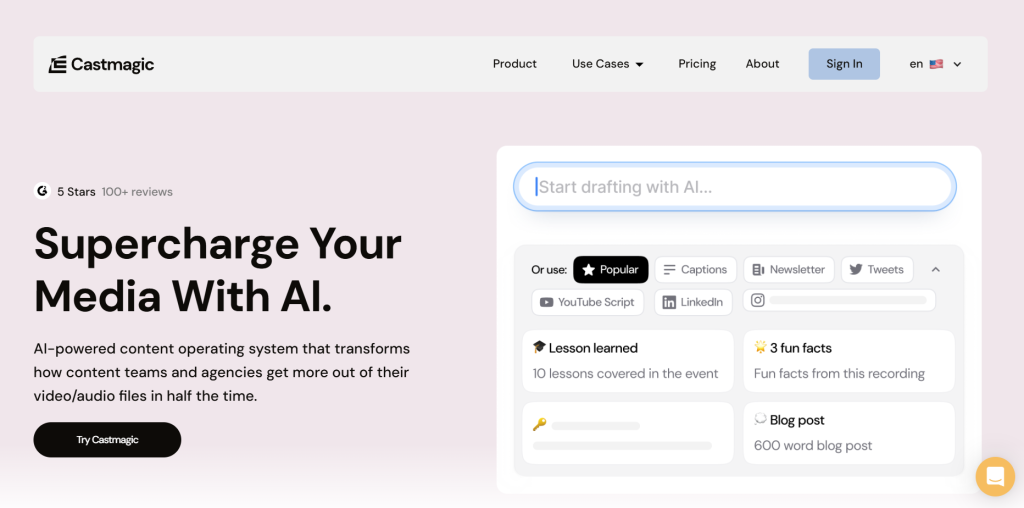
If you’ve ever wished you could leave a meeting and instantly have a clean summary with next steps, Castmagic AI does exactly that. It’s an AI productivity tool designed to transform audio or video recordings into organized transcripts, highlights, and action plans — automatically. The process is simple, intuitive, and built to save you time from the very first upload.
Here’s how it works in practice. Once you upload a file or connect Castmagic AI to your preferred platform — such as Zoom, Google Meet, or your podcast app — the tool uses AI meeting transcription software to generate a full, accurate transcript. From there, it identifies discussion topics, speaker segments, and tasks mentioned during the conversation. Within minutes, you receive a ready-made summary divided by key sections: what was said, what needs to be done, and who’s responsible for it. Everything is timestamped and searchable, so you can jump straight to the most important part of any meeting or episode.
| Step | What Happens | Time Saved |
|---|---|---|
| 1. Upload or connect recording | Castmagic AI imports your meeting or podcast audio/video file. | ~5–10 minutes |
| 2. AI transcription | The system generates accurate transcripts with speaker separation. | ~20–30 minutes of manual work saved |
| 3. Smart summary & action plan | AI automatically identifies decisions, tasks, and key discussion points. | ~1 hour saved per meeting |
This process reduces post-meeting follow-up work by up to 70%. Instead of switching between note-taking apps or manually creating to-do lists, everything is done the moment your call ends. And because Castmagic AI stores all transcripts in one dashboard, it’s easy to revisit past discussions and spot recurring topics — a valuable feature for content creators and team leads alike.
For anyone creating regular content (like podcasts or webinars), Castmagic’s podcast summarizer AI feature is a standout. It can turn long-form episodes into short, structured recaps or blog-ready summaries, saving both time and creative energy.
We find that combining Castmagic AI with an organization tool like Notion AI makes the workflow nearly frictionless — transcript in, action plan out.
3. Key Features That Boost Productivity

The real strength of Castmagic AI isn’t just its transcription accuracy — it’s how smartly it organizes your work. Every feature is designed to eliminate manual tasks and reduce the “mental load” that usually follows long meetings or interviews. Below are the standout tools that make it one of the most efficient AI productivity tools we’ve tested so far.
1. Instant AI Meeting Notes
Once your recording is uploaded, Castmagic automatically extracts clear, bullet-pointed summaries. These summaries are not only accurate but also context-aware — meaning the tool recognizes recurring topics or key terms you discuss often. For example, if you run a weekly team sync, Castmagic learns your themes over time and prioritizes what’s most relevant.
Soft insight: Most users report saving at least one full hour per week just by letting AI generate consistent summaries automatically.
2. Timestamped Transcripts
This feature is perfect for creators and professionals who need to revisit specific moments. Each transcript includes clickable timestamps, allowing you to jump straight to any part of the conversation. For podcast editors and coaches, this alone can cut editing time by half.
3. Task & Action Extraction
Castmagic AI doesn’t stop at transcription. It identifies verbs, decisions, and next steps — essentially mapping out your to-do list for you. This level of automation is a major time-saver for team leads who manage multiple projects simultaneously.
4. Multi-Format Export Options
You can export your meeting summaries directly to Notion, Google Docs, or Zapier workflows, turning raw dialogue into structured notes ready for sharing. According to a Zapier productivity study , automation can save an average of 6.2 hours per week — Castmagic fits right into that category.
5. AI Voice Tagging & Speaker Detection
This is where Castmagic stands out compared to other meeting transcription software. The AI automatically detects who’s speaking, tags each voice, and maintains that structure throughout the transcript. It’s a subtle but powerful feature for remote teams that need precision in shared notes.
| Feature | Benefit | Use Case |
|---|---|---|
| AI Meeting Notes | Summarizes discussions automatically with contextual awareness. | Weekly team syncs, client updates |
| Timestamped Transcripts | Jump to specific topics instantly for faster editing. | Podcast production, coaching calls |
| Action Item Detection | Automatically turns conversation points into task lists. | Project management, content planning |
| AI Voice Tagging | Detects speakers automatically for clarity in shared transcripts. | Remote collaboration, group interviews |
Pro tip: Start by uploading your next 30-minute call to Castmagic AI and review the output. You’ll immediately notice how it highlights tasks you might’ve missed — a small habit that compounds into major productivity over time.
We recommend pairing Castmagic AI with Creative Score when building content campaigns. Together, they streamline meetings and improve the quality of creative output — a perfect combo for modern teams.
For more insight into how automation improves focus, we also recommend reading Harvard Business Review’s article on productivity psychology — a great complement to this tool if you want to understand the science behind staying efficient.
4. Pricing, Plans, and Who Should Use It

Pricing transparency is one of the things that makes Castmagic AI stand out in the growing crowd of AI productivity tools. The platform offers flexible plans for different users — from solo creators to large remote teams — all with the same goal: helping you save time without extra complexity.
Here’s how the plans break down:
| Plan | What You Get | Best For | Price (per month, billed annually) |
|---|---|---|---|
| Hobby | Core transcription + AI meeting notes; basic exports | New creators, light podcasters | $21 |
| Starter | Faster processing, richer summaries, integrations (e.g., Docs/Notion/Zapier) | Growing creators, coaches, small teams | $79 |
| Business | Team workspace, higher limits, premium support | Agencies, marketing teams, high-volume users | $790 |
Note: prices and inclusions can change—always confirm on the official Castmagic pricing page.
Each plan includes AI meeting transcription software with timestamped outputs and summaries. The Creator Plan is the sweet spot for most people — it gives you unlimited uploads and access to advanced AI-driven insights, like keyword tagging and task detection. The Pro Team tier adds integrations for automation tools like Zapier and Slack, which is ideal if you want to scale your workflow.
Soft tip: If you’re a content creator or manager, start with the Creator Plan. You’ll see the most noticeable productivity gains in your first week, especially when pairing Castmagic AI with your existing task manager.
Who benefits the most?
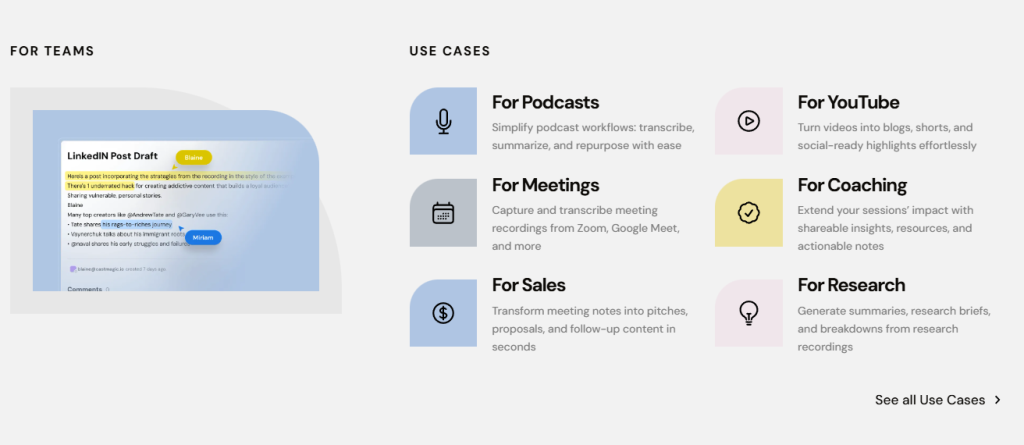
Podcasters and content creators: for transforming episodes into blog summaries or newsletter scripts.
Coaches and consultants: for sending quick recaps after client calls.
Remote teams and agencies: for creating accurate meeting logs without hiring assistants.
We’ve seen that pairing Castmagic AI with a task organizer like Taskade AI makes a huge difference in keeping projects aligned. It turns notes into structured workflows automatically.
For additional reading, the FutureTools directory lists Castmagic among the top-rated automation tools of 2025 — proof of its growing relevance in the productivity landscape.
5. Comparison Table – Castmagic vs. Top AI Meeting Tools
When it comes to AI meeting notes, the market is full of tools that promise to save time. But not all are built equally — especially when you compare features like task automation, integration options, or content reusability. Here’s a realistic look at how Castmagic AI stacks up against other leading meeting transcription software in 2025.
| Feature | Castmagic AI | Otter.ai | Fathom AI |
|---|---|---|---|
| Automatic Summaries | ✅ Yes – structured bullet summaries and highlights | ✅ Basic summarization | ✅ Auto-generated meeting notes |
| Task Extraction | ✅ Detects tasks, decisions, and responsibilities | ❌ Not automatic | ✅ Limited task detection |
| Integrations | ✅ Notion, Zapier, Google Docs | ✅ Slack, Zoom | ✅ Google Meet, Zoom |
| Content Repurposing | ✅ Podcast and content-ready summaries | ❌ Manual export only | ✅ Basic shareable reports |
| Team Collaboration | ✅ Shared workspace with role tagging | ✅ Shared folders | ❌ Individual users only |
| Ethical Transparency | ✅ Clear data-use policy and recording consent | ✅ Standard consent prompts | ✅ Basic consent reminder |
Soft tip: If you manage client calls or produce content, Castmagic’s “task + transcript” combo is its strongest advantage — it saves you from juggling multiple apps just to turn ideas into next steps.
Unlike Otter or Fathom, which mainly focus on note capture, Castmagic AI blends productivity and content creation. This is why podcasters, marketers, and agency teams find it particularly useful — it bridges the gap between conversation and execution.
At AI Digital Space, we appreciate this dual purpose. Tools like Otter.ai and Fathom are great for raw transcripts, but Castmagic’s podcast summarizer AI and task identification make it a true all-in-one choice for those who need to act on their recordings, not just store them.
Quick insight: People don’t abandon tools because of poor AI — they stop using them because they still feel “busy.” Castmagic solves that psychological friction by converting meetings into actionable steps, giving instant mental clarity after every call.
6. Ethical AI Reflection – Data, Consent, and Voice Privacy
One thing that sets Castmagic AI apart from many other AI meeting transcription software tools is its clear focus on transparency and ethical use. When we talk about AI in the workplace — especially tools that record and analyze human voices — data privacy and consent can’t be an afterthought. They must be built into the workflow itself.
Castmagic AI ensures that recordings are stored securely and only processed for the purpose of creating summaries or transcripts. According to their official privacy policy , users retain full ownership of their recordings and can delete them at any time — an important safeguard often overlooked by smaller competitors. This commitment to ethical data use aligns with new global privacy standards such as the EU’s GDPR and California’s CCPA, helping professionals maintain compliance while using AI tools at work.
Important note: Always inform meeting participants before recording — even if local laws don’t require explicit consent. It’s not just about legality, but about maintaining trust and professionalism.
At AI Digital Space, we strongly believe that AI productivity tools should make our lives easier without compromising our privacy or control. A great practice is to keep recordings within platforms that guarantee encryption and clear data policies. Castmagic’s focus on user control is reassuring, but the responsibility still lies with us — the users — to apply these tools respectfully.
For readers who want to dive deeper into the topic, we recommend the book “Privacy Is Power” by Carissa Véliz (available on Amazon, affiliate link ready). It’s a powerful, accessible read on why data ethics matter and how to navigate digital tools with awareness — an excellent companion to your AI workflow.
Soft reflection: True productivity isn’t just about speed; it’s about clarity, responsibility, and balance. The smartest AI tools are those that help us do more — while staying mindful of how we do it.
7. Verdict and Where to Try Castmagic AI
If Castmagic AI is your meeting assistant, the next step is building a complete ecosystem that keeps all your insights and notes in motion. Once your meetings are summarized and organized, connecting them to other tools on your productivity stack can multiply your efficiency.
That’s why we recommend reading our in-depth guide on Taskade AI – Your Second Brain for Team Productivity. It shows how to structure ideas, delegate tasks, and align team goals using AI — the perfect follow-up to Castmagic’s automatic note generation.
You can also explore Best AI Tools for Remote Teams in 2025 for a complete overview of how top-performing teams use AI daily to stay synchronized and reduce time spent on repetitive admin work.
Smart tip: Integrate, don’t isolate. AI works best when tools “talk” to each other — one collects, another organizes, and another executes.
Ready to Supercharge Your Workflow?
You’ve seen how Castmagic AI turns conversations into action — now discover how Taskade AI helps you organize and execute those actions with ease. Together, they form the ultimate productivity combo for 2025.
Read the Taskade AI Review →8. Frequently Asked Questions (FAQ)
Q: What is Castmagic AI used for?
A: Castmagic AI is an AI-powered meeting transcription and productivity tool that converts recordings from meetings, podcasts, or interviews into structured summaries, transcripts, and action items. It helps users save time by eliminating manual note-taking and follow-up work.
Q: Is Castmagic AI good for podcasters and creators?
A: Yes. Castmagic AI is particularly useful for podcasters, content creators, and coaches. Its podcast summarizer AI feature automatically extracts key highlights, timestamps, and quotes, allowing you to repurpose long conversations into blog posts, newsletters, or social captions effortlessly.
Q: How accurate is the AI meeting transcription software?
A: Accuracy depends on audio quality, but Castmagic AI performs exceptionally well with clear recordings. It uses advanced speech recognition to detect speakers, context, and tasks — outperforming many traditional transcription tools.
Q: Does Castmagic AI integrate with other productivity tools?
A: Yes. Castmagic AI integrates with Notion, Google Docs, and Zapier, enabling seamless workflow automation. You can instantly export meeting notes or task lists into your favorite apps without manual copy-paste.
Q: Is my data safe when using Castmagic AI?
A: Absolutely. According to the official Castmagic privacy policy, recordings remain private and can be deleted anytime. All files are processed securely, aligning with global data protection laws like GDPR and CCPA.
Q: How much does Castmagic AI cost?
A: Castmagic AI offers a Free plan for testing and two paid options — Creator and Pro Team. The Creator plan is ideal for freelancers and podcasters, while Pro Team supports advanced automation for companies or agencies.
Q: How does Castmagic AI compare to other AI meeting tools like Otter.ai or Fathom?
A: Castmagic AI stands out for its automation depth and content reusability. While Otter.ai and Fathom provide strong transcription capabilities, Castmagic adds unique features like task extraction, action plan generation, and podcast summarization, making it a more complete AI productivity tool.
Q: What’s the best way to get started with Castmagic AI?
A: You can start by uploading one of your recent meetings or podcasts directly through the platform. Within minutes, Castmagic AI generates a full summary and action plan. Try it now through our official link: Castmagic AI.