

Most people think their AI tool costs went up because they added AI tools. Mostly, they didn't add anything: the tools they already paid for put AI inside the plan and raised the price around it.
Notion's Business plan now lists at $20 per member per month on yearly billing, up from the $15 that price trackers recorded before it bundled its AI features. Nobody on that team installed anything new. Their AI tool costs changed anyway.
I researched the pricing pages behind a typical small-business stack and built a way to decide, tool by tool, which AI tool costs are worth absorbing. Below: the yearly arithmetic most people skip, a test for what stays, and seven cuts that keep the capability you use.
Some links are affiliate links · they support this site at no extra cost to you · Full disclosure
Why AI Tool Costs Jumped Without You Adding Anything
Across the pricing pages I checked, AI tool costs rose the same way. An optional AI extra moves inside a plan tier, or starts drawing from an allowance you already pay for. Either way, the plan price now carries the AI whether you use it or not.
How Notion Turned an Add-On Into a Plan Upgrade
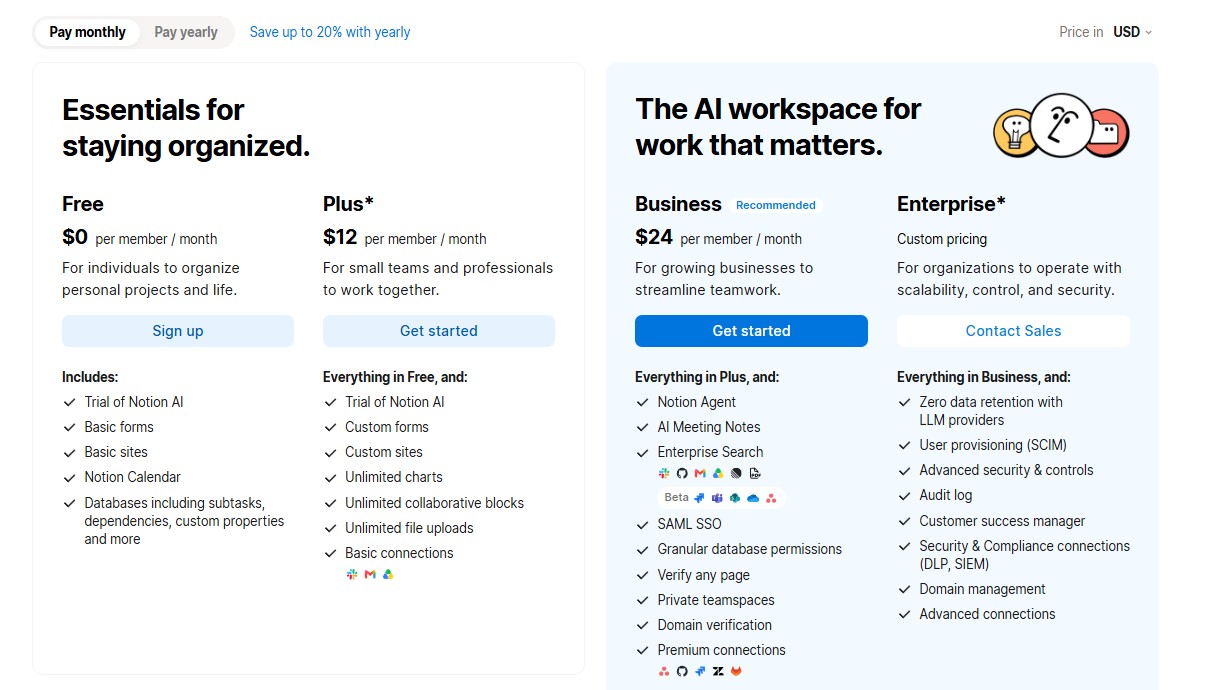
Notion used to sell AI as a separate add-on of about $10 per member per month. Trackers that followed the change report that Notion stopped offering that add-on to new Free and Plus accounts and folded the full AI set into Business, which went from $15 to $20 per member per month on yearly billing, a 33% increase.
Notion's pricing page confirms the current state: Plus at $10 and Business at $20, with Notion Agent, AI Meeting Notes and Enterprise Search only on Business. Billed monthly, trackers put them at $12 and $24.
Where the Meter Moved Inside Plans You Already Pay For
Zapier's pricing page now states that AI steps, code and its SDK all draw from the same task pool as ordinary automation steps. Heavier AI use pushes you toward the next tier, which is how AI tool costs climb with no change on the plan card.
Canva's AI subscription costs work the same way: its plans include a monthly AI allowance, and Pro users who want more can buy an AI Pass add-on. I couldn't find a vendor-published before-and-after price for Canva Pro, so I'm not quoting one.
💡 Your AI subscription costs no longer buy features you pick. They buy an AI layer the vendor picked, then meter how much of it you use.
What Your Stack Costs Per Year
Pricing pages quote one seat for one month. Your card pays for every seat, every month, so the number that decides your AI tool costs is monthly price × 12 × seats. Written that way, a $24 plan for three people is an $864 line item.
Here are example AI tool costs built from list prices I verified on each vendor's pricing page, billed monthly. Only you can fill in the last two columns.
| Tool | Monthly | Annual | Last real use | Keep or cut |
|---|---|---|---|---|
| Notion Business (3 seats) | $72 | $864 | Daily docs; AI Agent twice | Downgrade? |
| Zapier Professional (750 tasks) | $29.99 | $359.88 | Runs daily | Keep |
| Lindy Plus (1 seat) | $29.99 | $359.88 | 9 weeks ago | Cut |
| Total | $131.98 | $1,583.76 |
Notion's $24 monthly rate comes from trackers; its page defaults to the $20 yearly rate. Zapier's $29.99 is the monthly price of the plan it lists at $19.99 yearly.
"Last real use" means the last output you kept, not the last login. Nothing kept in two months puts a tool in the cut column.
💡 Nobody approves $1,584 of AI subscription costs on impulse. They get approved at $29.99 a month, which is why they survive.
The Test That Decides What Stays
A tool earns its seat when the time it gives back, minus the time you spend checking its output, is worth more than its annual price. Review time is what vendor pitches leave out, and it's where most AI tools ROI disappears.
To value the time, use the full cost of an hour, not the wage. The U.S. Bureau of Labor Statistics puts the employer cost of a full-time private-industry worker at $54.00 per hour worked in its latest release (BLS). Freelancers should use their effective billable rate.
A $30 Tool That Loses Money
I ran a small case through my free AI automation ROI calculator: meeting notes three times a week, 10 minutes each, valued at $25 an hour, half automated, with 4 minutes of review per automated run, on a $30 monthly note-taker.
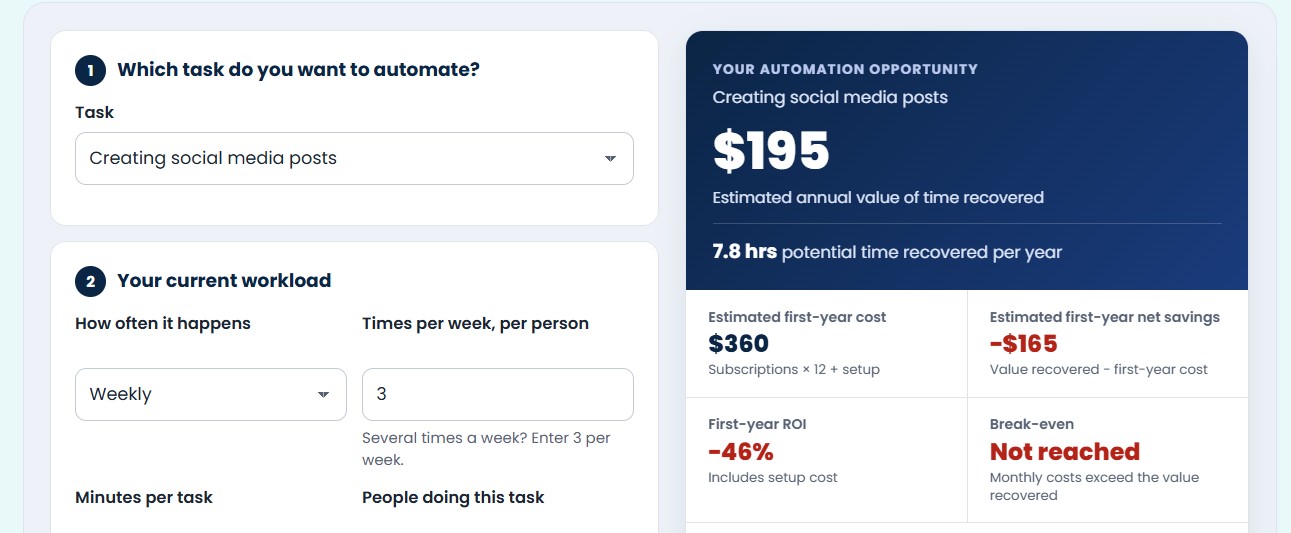
The task takes 26 hours a year by hand. After automation it still takes 18.2, because half the runs stay manual and the other half need review. That leaves 7.8 hours recovered, worth $195, against $360 in subscriptions: a first-year net of −$165.
The same feature inside a plan you already pay for could clear the bar, since its extra cost is zero. Ask the reverse of every bundled feature: would it justify its share of your AI tool costs on its own?
💡 Small, infrequent tasks rarely justify their AI tool costs. Volume is what pays for AI, not cleverness.
Check your AI tools ROI before you renew. Five inputs, review time included, nothing stored.
Check if a tool pays for itself →7 Cuts That Save Money Without Losing Capability
Each cut targets one way repricing inflates AI tool costs. The numbers come from the example stack above, so you see the saving before touching a setting.
1. Drop the Tier Nobody Uses the AI On
If your team opened Notion Agent twice last quarter, Business is paying for AI you don't use. Moving three members to Plus is the fastest way to cut software costs here: $360 a year on yearly billing. Notion's FAQ also says guests are free, so occasional collaborators don't need paid seats.
2. Switch Proven Tools to Annual Billing
On the example stack, annual billing cuts Notion from $864 to $720 and Zapier from $359.88 to $239.88: $264 off your AI tool costs for changing a toggle. Do it only for tools you've relied on for three months or more. Notion refunds annual plans within 30 days of signup; check each vendor's policy before you commit.
3. Consolidate Tools That Now Overlap
Bundling adds AI tool costs through overlap you didn't plan for. Notion Business includes AI Meeting Notes, so a separate note-taker may be a duplicate. My guide to all-in-one AI workspaces covers which suites can replace two or three single-purpose apps.
4. Cancel the Third Writing Assistant
Count every tool that drafts text: the chat assistant, the one in your docs app, the one in your email, the browser extension. Most stacks need one; every extra adds AI subscription costs for the same drafts. Run each through my 4-step hype filter and keep the one whose drafts you edit least.
5. Move High-Volume Flows Off Per-Task Pricing
Zapier bills each action step as a task. A three-step flow that runs 500 times a month uses 1,500 tasks, double the 750 in the entry Professional tier, and AI steps now draw from that same pool. For flows like that, Make's credit-based plans include 10,000 credits at the entry tier.
Credits and tasks aren't the same unit, since Make counts each module that runs, so price the specific flow before switching. My Zapier, Make and n8n breakdown covers which platform fits which kind of workflow.
6. Self-Host Only If You Can Maintain It
The n8n Community Edition is published on GitHub for self-hosting, and n8n's cloud plans bill per full workflow execution rather than per step. Self-hosting swaps a subscription for a server bill plus your time on updates and backups. If nobody can own that, the cheaper line item costs more.
7. Cancel Anything Unused for 60 Days
In the example, Lindy's last real use was nine weeks ago: cancelling cuts AI tool costs by $359.88. Unused allowances don't bank either. Lindy's credits refresh each cycle without rolling over, and Make says unused credits expire at the end of the term.
💡 Cuts 1, 2 and 7 alone take the example AI tool costs from $1,583.76 to $599.88 a year, without losing a workflow you rely on.
What the Data Says About AI Returns
If your AI tool costs rarely pay you back, you're in the majority. PwC's latest Global CEO Survey asked 4,454 chief executives in 95 countries what AI had done for them over the previous 12 months. 56% reported neither higher revenue nor lower costs (PwC).
About 30% saw more revenue and 26% saw lower costs, while 22% said AI had pushed costs up. Only one in eight, 12%, got both benefits at once.
PwC describes that 12% as companies that built the foundations first and then applied AI across the business, including 44% who put it into their own products and services. Some coverage summarizes this as redesigning workflows instead of handing out licences. PwC doesn't use those words, but its description points the same way.
These are large companies, and I can't tell you how the ratio looks for a five-person business. The mechanism transfers, though: AI tool costs you never built a process around behave like the 56%, not the 12%.
💡 A licence is a cost. A changed process is what turns AI tool costs into a return.
Tools Worth Keeping
I haven't run these four on my own stack yet, so this isn't a hands-on ranking. It's what I found on their pricing pages, framed around one question: at what usage are its AI tool costs worth paying?
Some links below are affiliate links. If you buy through them, I may earn a commission at no extra cost to you.
Keep it if your flows run often and branch. Entry paid tier includes 10,000 credits; free plan 1,000.
Paid from $9–$12/mo · see pricing note
Keep it if it handles inbox or meeting work every week. Credits reset monthly and don't roll over.
Plus $29.99/user/mo · no free plan
Keep it if your flows are short and your team won't learn a second tool. Free plan: 100 tasks.
Professional $19.99/mo yearly · $29.99 monthly
Keep it if long workflows would burn per-step billing. It charges per full execution.
Cloud Starter €20/mo yearly · self-host option
Pricing note: Make's page showed Core at $12 a month for 10,000 credits when I checked, and trackers disagree on which billing toggle that is. Some list $9 yearly and $12 monthly; one lists $12 yearly and $16 monthly. Flip the toggle yourself before you budget your AI tool costs.
A Book That Reframes What Your AI Spend Buys

The authors argue that AI bolted onto an existing task as a point solution rarely changes the economics, while AI that forces a redesign of the whole system does. That is the gap between the 56% and the 12% above, and it's the lens I'd use before accepting higher AI tool costs on any bundled tier.
Get the book →Frequently Asked Questions
How much should a small business spend on AI tools?
+I don't think a fixed budget for AI tool costs is safe. Every tool should cover its own annual price with the value of the hours it saves, after review time. Total the stack as monthly price × 12 × seats, then check each line. For ideas on which tools to test first, see my small-business AI tool picks.
Is annual billing worth it for AI tools?
+For tools you've used steadily for three months, yes: it's the easiest way to cut software costs. Zapier Professional drops from $29.99 to $19.99 a month on yearly billing, and Notion's yearly rates sit about 17% below monthly. Keep anything still on trial monthly, so leaving costs you one month, not eleven.
How do I know if an AI tool pays for itself?
+Value the hours it saves per year, subtract the hours spent checking its output, and compare that with 12 months of AI subscription costs plus setup. My AI tools ROI calculator does this in five inputs, with review time built in.
What should I cancel first?
+To cut software costs fast, start with anything whose last useful output is 60+ days old. Next, duplicates created by bundling, like a separate note-taker when your workspace plan already includes AI meeting notes. Then the extra writing assistants: most stacks need one.
Are free tiers of AI tools enough?
+For light use, often. Zapier's free plan includes 100 tasks a month and Make's includes 1,000 credits. Free plans still cost something in limits and data terms, which I cover in what free AI tools cost you.
Why did my plan price go up?
+Usually because AI moved into your plan or a shared allowance, which raises AI tool costs without any new tool. Notion's Business plan went from $15 to $20 per member when full AI was folded in, and Zapier now counts AI steps against your normal task pool.

Your stack didn't grow. It got repriced around AI you never asked for.
Rising AI tool costs aren't proof you overbought. They're a prompt to re-decide each line with the yearly number in front of you and review time counted. Keep what pays for itself; cut the rest.
Check your AI tools ROI →