
Mirko
AI Tech Writer
Most video creators spend 4–6 hours editing every single hour of footage. That's not a workflow problem — it's a tools problem. We reviewed the top AI video editing tools used by thousands of creators to find the exact stack that cuts editing time by 3x or more — without sacrificing quality or creative control.
Some links are affiliate links · You support us at no extra cost · Full disclosure
Why Video Editing Takes So Long — And How AI Changes That
Video editing is the single biggest time drain in any creator's workflow. For every 10 minutes of final content, most creators spend 3 to 4 hours in the timeline. That ratio does not scale.
The bottleneck is not skill or speed. It is the mechanical nature of traditional editing — scrubbing raw footage, hunting for the best take, removing every filler word, and repeating that process clip by clip.
According to Wyzowl's annual video marketing report, demand for video content has never been higher. Yet most creators still edit the same way they did a decade ago.
- Raw footage review and take selection — up to 45 minutes per session
- Silence removal and filler word cuts — 30 to 40 minutes for a 20-minute video
- Manual caption creation — 20 to 25 minutes per video
- Color correction and audio leveling — 15 to 20 minutes
- Platform-specific exports and resizing — 10 to 15 minutes per platform
AI video editing tools now address every item on that list. The sections below cover the tools that eliminate or dramatically compress each of these steps — without touching the creative decisions that only you can make.
How AI Video Editing Tools Actually Work
AI video editing tools operate on one core principle: automate the mechanical, and free up the creative. Understanding what they handle — and what they do not — sets you up to use them with the right expectations.
The Four Core Automation Categories
Modern AI video editing tools analyze audio and visual signals to perform tasks that previously demanded frame-by-frame manual attention. These are the four areas where they deliver the most consistent time savings.
- Speech transcription — converts your entire recording to editable text in under two minutes
- Silence and filler word detection — identifies and removes "um," "uh," and dead air in one click
- Auto-captions — generates synchronized, styled captions with 95%+ accuracy on clear audio
- Scene and cut detection — identifies natural cut points, pacing issues, and B-roll opportunities
- Background removal — separates subjects from backgrounds with no green screen required
- Voice correction — regenerates mispronounced words in your own voice without re-recording
What Stays in Your Hands
AI video editing tools handle the repetitive mechanical work. Every creative decision — pacing, narrative structure, music, tone, and story arc — remains yours. Think of them as your editing assistant, not your replacement.
Descript — Edit Video by Editing Text, Not the Timeline
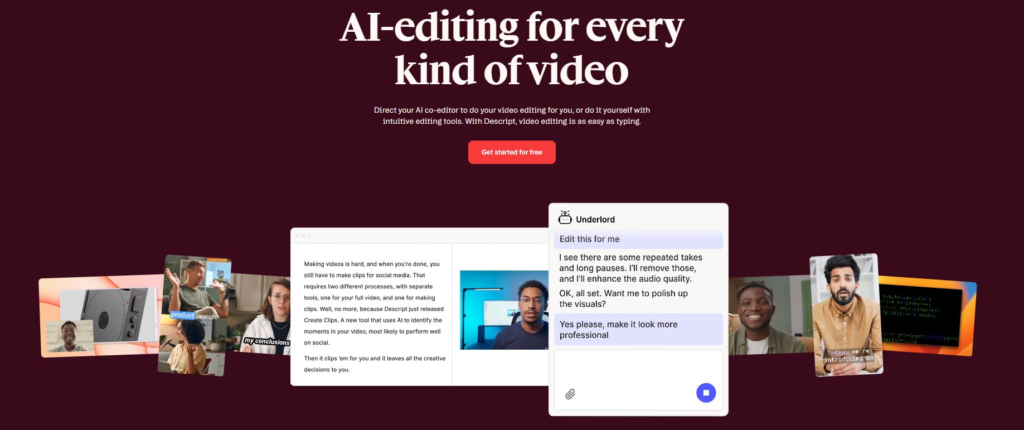
Descript is the most transformative AI video editing tool for creators who produce dialogue-heavy content. Instead of scrubbing a timeline, you edit a transcript — delete a sentence, and the corresponding video clip disappears instantly.
How the Text-Based Workflow Works
Descript transcribes your footage in under two minutes. Every spoken word maps to a precise moment on the timeline. Among AI video editing tools, nothing makes cutting and rearranging content faster — it works like editing a Google Doc.
This single capability eliminates the most time-consuming step in podcast, tutorial, interview, and educational video workflows.
- Remove filler words — one click removes every "um," "uh," "like," and silence from your entire recording
- Overdub (voice cloning) — correct mispronounced words by typing a fix — no re-recording needed
- AI eye contact correction — adjusts your gaze to face the camera even when you are reading notes
- Styled auto-captions — synchronized, animated captions export-ready for every platform
- Screen recorder included — one tool covers recording, editing, and publishing end-to-end
Best For
YouTube creators, online coaches, podcasters, and educators who need AI video editing tools where most edits are cut-based rather than effects-based. The more dialogue in your videos, the more Descript saves you.
Read our full breakdown in the Descript AI review, including a detailed free vs paid plan comparison.
Try Descript Free →
Runway AI — Smart Cuts, Scene Detection & Visual AI
Runway AI targets the visual production side of editing — the work that takes longest in cinematic, brand, and short-form commercial content. As an AI video editing tool, it brings professional-grade capabilities into a browser-based editor with no plugins required.
Where Runway Saves the Most Time
Where Descript focuses on words, Runway focuses on frames. This AI video editing tool analyzes motion, color, and scene structure to perform edits that would take hours to complete manually.
- Background removal — real-time rotoscoping with no green screen, even on complex footage
- Motion tracking — automatically pins text, graphics, or effects to a moving subject throughout a clip
- Scene detection — identifies natural cut points and pacing opportunities across long recordings
- AI video generation (Gen-2) — generates short B-roll clips from a text prompt or a still image
- AI color match — matches the color grade of any reference image across your entire timeline
Best For
Brand content creators, social media agencies, and filmmakers who need AI video editing tools focused on polished visual output. Runway is less about cutting dialogue and more about elevating the visual quality of every frame.
See platform-specific Runway techniques in our Runway ML workflows guide for creators.
Try Runway AI Free →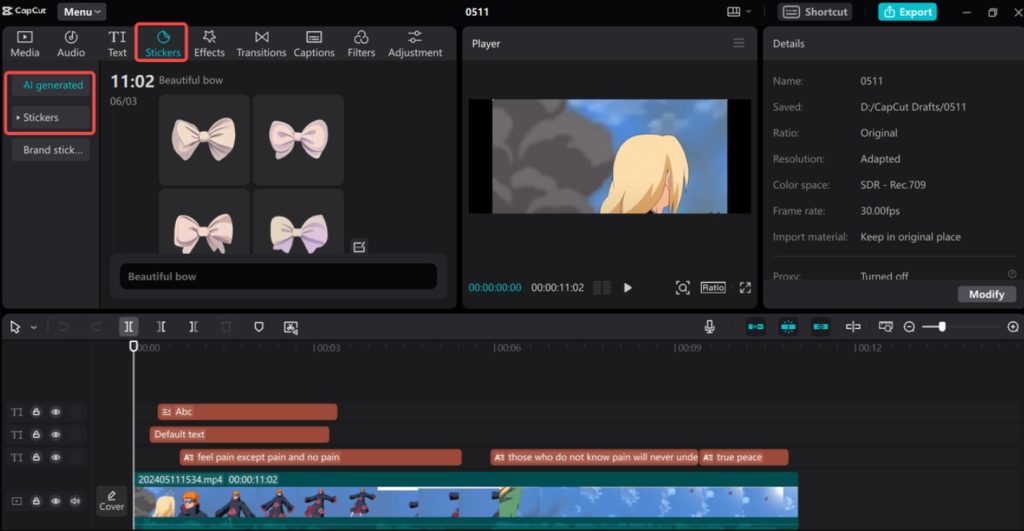
CapCut AI — The Fastest Editor for Social Content
CapCut is the most accessible AI video editing tool for creators producing high-volume short-form content. It was designed specifically for TikTok, Reels, and YouTube Shorts — and that focus shows in every feature it ships.
Why Social Creators Choose CapCut
Speed and zero learning curve. CapCut removes the technical barrier from AI video editing entirely. Import a clip, apply an AI template, add auto-captions, and export — in under 15 minutes for a polished short-form video.
- Viral auto-captions — word-by-word animated captions generated in seconds, fully style-customizable
- Smart cut — detects and removes all silences and dead air from footage in one click
- Script-to-video — generates a rough-cut video automatically from a written script
- AI background removal — instant subject isolation on mobile and desktop, no green screen needed
- 1,000+ trend templates — platform-optimized templates updated continuously to match current trends
Free vs Pro Plan
CapCut's free plan covers the majority of features most social creators need day-to-day. The Pro plan unlocks higher export resolution, expanded AI credits, and commercial licensing for professional client work.
See how CapCut performs in a full social media creator stack in our AI tools for Instagram and TikTok guide.
Try CapCut AI Free →
ElevenLabs & Pika Labs — Voice Correction and AI B-Roll
Two tools that solve specific production bottlenecks most creators overlook. ElevenLabs eliminates the need to re-record audio. Pika Labs eliminates the need to film B-roll. Together, they remove two of the most time-consuming steps outside the main edit.
ElevenLabs — Fix Audio Without Touching a Microphone
ElevenLabs clones your voice from a short audio sample. Mispronounced a name? Missed a key phrase? Type the correction, and ElevenLabs generates it in your voice — indistinguishable from the original recording.
- Correcting script errors discovered after the recording session ends
- Adding new narration lines to a nearly finished video without a full re-shoot
- Generating voiceovers for explainer or animated content at high volume
- Translating existing video content into multiple languages — in your own cloned voice
Pika Labs — Generate B-Roll From a Text Prompt
Filming quality B-roll is expensive and slow. Pika Labs generates short video clips from text descriptions or still images — giving you relevant cutaway footage in minutes, not hours.
It performs best on abstract concepts, product demonstrations, motion backgrounds, and any scenario where sourcing real footage would cost more time than it saves.
See a head-to-head output comparison in our Pika Labs vs CapCut AI breakdown.
The Complete 3x Faster AI Video Editing Workflow
Each tool above solves a specific problem. The real speed gain comes from combining them in the right order. This is the six-step workflow we analyzed across dozens of creator setups — it consistently delivers a 3x reduction in total editing time.
The Six-Step AI Editing Workflow
- Import into Descript — transcribe, remove all filler words, and complete every dialogue-based cut using the text editor
- Generate B-roll with Pika Labs — create any cutaway footage you need while Descript is still processing in the background
- Correct audio with ElevenLabs — fix any mispronounced words or missing lines without returning to the microphone
- Add visual effects in Runway AI — background removal, motion tracking, color grading, and AI-generated visual enhancements
- Repurpose in CapCut — add viral-style captions, apply platform-specific templates, and export for TikTok, Reels, and Shorts simultaneously
- Design thumbnails in Canva — create on-brand thumbnails and supporting social graphics using your brand kit without opening a second app
Where the 3x Gain Actually Comes From
A typical 20-minute YouTube video takes 4 to 5 hours to edit manually. Using this workflow, the same video takes 60 to 90 minutes — a 65 to 70% reduction in total production time.
For a hands-on walkthrough of the Descript portion of this workflow, see our step-by-step guide to editing YouTube videos in Descript.
Cost & Time Saved: Full AI Video Editing Tools Breakdown
Here is how every AI video editing tool in this guide compares on monthly cost, free plan quality, and the actual editing time you recover per video.
| Tool | Monthly Cost | Free Plan | Time Saved / Video | Best Choose When… |
|---|---|---|---|---|
| Descript | $12/mo | ✅ Yes | ~3h on a 20-min video | Most edits are dialogue-based cuts |
| Runway AI | $12/mo | ✅ Limited | ~1.5h on visual production | You need cinematic or branded visuals |
| CapCut AI | Free – $9/mo | ✅ Full features | ~45 min per short-form clip | You publish high-volume social content |
| ElevenLabs | $5/mo | ✅ Limited | 30–60 min per project | You need audio fixes without re-recording |
| Pika Labs | $8/mo | ✅ Limited | ~1h of B-roll sourcing eliminated | You produce explainer or abstract content |
| Canva Pro | $15/mo | ✅ Limited | ~40 min on thumbnails & graphics | You manage a consistent visual brand identity |
- Replaces a freelance video editor billing $50–$80/hour
- At 2 long-form videos per week, this stack saves 8+ hours — equivalent to $400–$640/month in editor costs
- ROI achievable from month one for anyone currently outsourcing any part of their editing
Start with Descript alone if you are new to AI video editing tools. It delivers the highest single-tool time saving at $12/month. Add tools progressively as your workflow and output volume grow.
Frequently Asked Questions — AI Video Editing Tools
What are the best AI video editing tools for beginners?
+The best AI video editing tools for beginners are Descript and CapCut AI. Descript requires no timeline experience — you edit by deleting text from a transcript, which is immediately intuitive for anyone.
CapCut AI offers one-click templates and auto-captions with a zero-learning-curve interface on mobile and desktop. Both tools have solid free plans, making them ideal starting points before investing in more advanced options like Runway AI.
Can AI video editing tools replace a professional editor?
+AI tools can replace the mechanical parts of editing — silence removal, captioning, color matching, and basic cuts. They cannot replace the creative judgment, narrative instinct, and client communication that a professional editor provides.
For creators producing talking-head, podcast, or social content, AI tools can handle 70–80% of the editing workflow independently. Complex narrative or commercial productions still benefit from a skilled human editor working alongside these tools.
Is Descript better than Adobe Premiere Pro for AI editing?
+Descript is significantly faster than Premiere Pro for dialogue-heavy content because its text-based editing eliminates timeline scrubbing entirely. Premiere Pro remains superior for complex multi-layer productions and advanced color work.
For YouTube videos, podcasts, interviews, and course content, Descript's AI tools produce a finished cut 60–70% faster. See our Descript YouTube editing tutorial for a direct workflow comparison.
What is the fastest AI video editing tool for social media?
+CapCut AI is the fastest AI video editing tool for social media. Its auto-caption generator, smart cut feature, and platform-specific templates let creators produce a polished short-form video in under 15 minutes.
The free plan covers the majority of features most social creators need daily. For TikTok, Instagram Reels, and YouTube Shorts, CapCut delivers the best output-per-minute-invested of any tool we reviewed in this category.
Do AI video editing tools work on both Mac and Windows?
+Yes — all tools in this guide support both Mac and Windows. Descript, Runway AI, and Canva Pro offer native apps for both operating systems. CapCut AI runs on Mac, Windows, iOS, and Android.
ElevenLabs and Pika Labs are fully browser-based and require no installation on any platform. The only hardware consideration is GPU performance for local processing features in Runway AI on older machines.
How much do AI video editing tools cost per month?
+Individual AI video editing tools range from free to $15/month. A complete production stack — Descript ($12), Runway AI ($12), CapCut (free–$9), ElevenLabs ($5), Pika Labs ($8), and Canva Pro ($15) — costs approximately $62/month in total.
This replaces a freelance editor billing $50–$80/hour. For anyone currently outsourcing any part of their video production, the ROI is achievable within the first month of use.
Can AI tools add captions to videos automatically?
+Yes — auto-captioning is one of the most reliable AI video editing features available today. Descript, CapCut AI, and Runway AI all generate captions with 95%+ accuracy on clear audio.
CapCut produces styled, animated word-by-word captions optimized for social in under 60 seconds. Descript generates synchronized captions exportable as SRT files or burned directly into the video. Both allow manual correction of any errors before final export.
What is the best AI tool for fixing audio errors without re-recording?
+ElevenLabs is the best AI tool for correcting audio errors without returning to the microphone. It clones your voice from a short sample and lets you type any correction — the generated audio is indistinguishable from the original recording.
Descript's Overdub feature offers similar functionality within an all-in-one editing environment. Both tools perform best when the original voice sample is recorded in a consistent, low-noise acoustic setting. See our comparison in the AI video editor breakdown.
Your First Edit Starts Now
You now have the exact AI video editing tools and workflow used by creators who produce more in a week than most produce in a month.
Do not try to implement everything at once. Start with Descript. Edit one video using the text-based workflow. Experience the time saving firsthand. Then add one tool per week until the full stack is running.
The 3x speed gain is not a promise — it is a byproduct of replacing manual habits with the right AI video editing tools, used in the right order. The workflow is there. All that remains is running it.
Start with one video. Build from there. Now go edit faster.
🎬 Go Deeper Into AI Video Production
You have the core AI video editing tools workflow. Take your video production further with these guides: