
A free AI image generator is never free in the same way twice. One gives you a daily allowance but makes every image public, another lets you sell your work but keeps the ownership, a third stamps a watermark on everything. I rebuilt this guide around those catches, so you can pick a tool by what you're allowed to do with the image, not just how many you can make.
⚡ Short answer: For the most free images per day, start with Leonardo AI (150 tokens daily) or ImagineArt (100 credits daily). For photo editing and quick results, use Google Gemini. For readable text on posters and logos, use Ideogram. If you need images you can safely use in client work, Adobe Firefly's own models are the cleanest commercial option.
Some links are affiliate links · they support this site at no extra cost to you · Full disclosure
What does "free" mean for an AI image generator?
Short answer: Free almost always means a capped allowance, not unlimited use. The real differences sit in the fine print: whether your images go into a public gallery, who owns them, whether you can use them for business, and whether a watermark is added.
I group the free plans into four models. Knowing which one you're on tells you how far you can push a free AI image generator before it stops you:
- Daily allowance: a fixed pool of tokens or credits that refills every day, like Leonardo AI and ImagineArt. Unused credits don't carry over.
- Weekly allowance: Ideogram refills a small pool once a week, so you can't spend it all on one project and get more tomorrow.
- Fast quota, then slow: Bing Image Creator gives a few fast generations, then keeps going at standard speed.
- Unlimited with strings: Craiyon has no cap but adds ads, a watermark and lower quality.
The catch most guides skip is privacy. On several free plans, every image you make appears in a public gallery where anyone can see it, and sometimes reuse it. If you're designing for a client or a product launch, that matters more than the daily number.
Core distinction: compare free plans on rights and privacy first, volume second. A big allowance is worthless if you can't use the result.
The free AI image generator catch matrix
I built this table from each free AI image generator's own pages, checked October 4. "Check" means the company doesn't state it clearly, or sources disagree.
| Tool | Free allowance | Images public? | Commercial use (free) | Watermark | Account |
|---|---|---|---|---|---|
| Leonardo AI | 150 tokens/day | Yes | Yes, but Leonardo owns the image | No | Free account |
| ImagineArt | 100 credits/day, basic models | Yes, by default | Check (credit ImagineArt) | Check | Free account |
| Bing Image Creator | ~15 fast/day, then slow | No | Check (personal use) | Content Credentials | Microsoft account |
| ChatGPT Free | A few per day (not published) | No | Yes | Content Credentials | Free account |
| Google Gemini | ~20/day + a couple Pro | No | Check | Visible mark + SynthID | Google account |
| Ideogram | 10 credits/week (~40 images) | Yes | Yes | Not stated | Free account |
| Adobe Firefly | Daily generations (count not published) | No | Yes, Firefly models | Content Credentials | Adobe account |
| Krea | 100 compute units/day | Check | Check | Check | Free account |
| Canva | Monthly AI allowance | No | Check Canva's AI terms | Check | Free account |
| Craiyon | Unlimited, slow, ads | Yes | Limited (paid plans) | Yes | None needed |
Prices and allowances are the US versions. In the EU and UK, the free plans are mostly the same, but some features roll out later and paid prices show in local currency, so check the pricing page in your region before you upgrade.
Which free AI image generator fits you?
Answer two questions and the picker names the free AI image generator that fits. It uses the same rules as the matrix above.
1. What will you make most?
2. Will the images be used for business or a client?
The 10 best free AI image generator picks
The order follows how far each free plan gets a typical creator: allowance first, then what you can legally do with the result. Every card shows the free limits as the company publishes them, checked October 4.
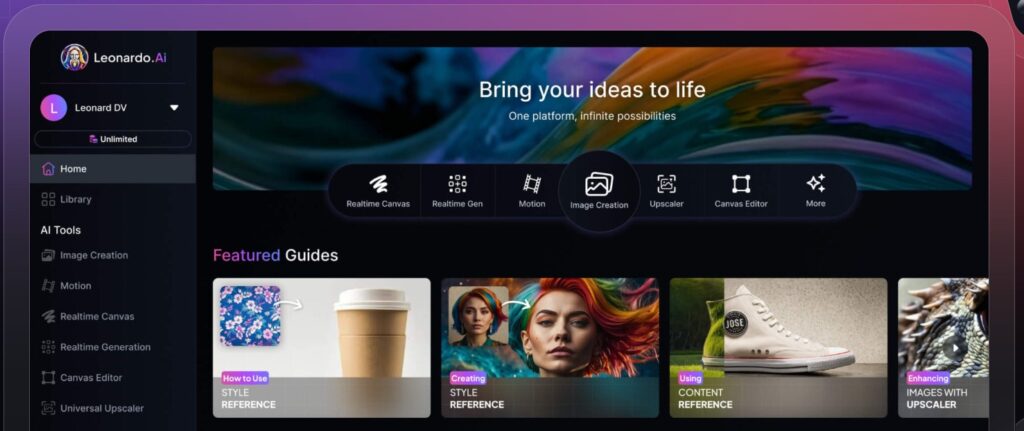
1. Leonardo AI 🏆 Most free images
The biggest daily allowance of any free AI image generator here
✅ What you get free
- 150 tokens per day, refreshed daily (no rollover)
- Several models, including Leonardo Phoenix
- Canvas editor and image-to-image tools
- Free images go into a public gallery
✓ Pros
- Largest fixed daily allowance in this list
- Wide choice of models and styles
- No watermark on free images
- Now owned by Canva
✗ Cons
- Free images are public
- Leonardo owns free-plan images
- Higher quality settings burn tokens faster
Best for: Hobbyists and creators who want the most free images a day for social posts, concept art and mockups, and don't need the images to stay private. Plan math in my Leonardo AI pricing guide.
No credit card · 150 free tokens daily · Paid plans from $12/month
2. ImagineArt 🎨 Daily credits
A second daily credit pool with a different set of models
✅ What you get free
- 100 credits every day, reset daily
- Free models such as ImagineArt 1.0 Lite and Flux Dev
- Premium models and video on paid plans
- Public gallery by default on Free
✓ Pros
- Generous daily refill
- Good model variety for a free plan
- Works on web, iOS and Android
✗ Cons
- Free images public by default
- Free-tier license unclear: check before client work
- Best models are paid-only
Best for: Anyone who already uses Leonardo and wants a second free pool of daily credits with different models.
Free plan · 100 credits daily · Check the license for business use
3. Bing Image Creator 🔒 Private
A free AI image generator that keeps your images out of public view
✅ What you get free
- A few fast generations a day (reported at 15), then standard speed
- Microsoft's MAI-Image and OpenAI models
- Images stay in your account
- Content Credentials mark images as AI-made
✓ Pros
- Keeps going after the fast quota
- Private by default
- Strong image quality for free
✗ Cons
- Needs a Microsoft account
- Personal-use terms; commercial use unclear
- Few editing controls
Best for: A private free AI image generator for everyday images, personal projects and brainstorming.
4. ChatGPT Free
Best at following long, detailed instructions
✅ What you get free
- A few images a day (OpenAI doesn't publish the number)
- Change images by asking in plain words
- Images are not shared publicly
✓ Pros
- Excellent prompt following and layouts
- Commercial use allowed by OpenAI's terms
- Already in an app you may use daily
✗ Cons
- Tiny daily limit
- Slower than most image tools
Best for: Complex scenes, infographic-style layouts and quick edits when you already use ChatGPT.
5. Google Gemini ✏️ Photo editing
The free AI image generator to use on your own photos
✅ What you get free
- Around 20 images a day, plus a couple with the Pro model
- Edits real photos from plain-language instructions
- Limits change with demand, per Google
- Runs Nano Banana 2.1, the newest model on Google's model card
✓ Pros
- Best free AI image generator for photo edits
- Merges and restyles images well
- Private to your Google account
✗ Cons
- Visible Gemini mark plus SynthID watermark
- Commercial terms not clearly stated
Best for: Changing backgrounds, restyling outfits and combining photos for personal posts. Fixing a photo rather than creating one? My guide to the best AI image editors compares Gemini with seven editors in a same-photo test. Walkthrough in my Nano Banana guide.
6. Ideogram 🔤 Text in images
Best for posters, thumbnails and logo drafts
✅ What you get free
- 10 slow credits a week, up to about 40 images
- Resets every Saturday
- Ideogram claims no ownership of your images
✓ Pros
- Spells words correctly far more often
- Commercial use allowed on all plans
- Clean, simple interface
✗ Cons
- Small weekly allowance
- Free images are public
Best for: Designers making posters, invitations, thumbnails or memes where the words must be readable.
7. Adobe Firefly 💼 Commercial-safe
The free AI image generator I'd start with for client work
✅ What you get free
- Free daily generations across image, video and audio (count not published)
- Firefly models trained on licensed and public-domain content
- Partner models from Google and OpenAI also available
- Content Credentials attached to images
✓ Pros
- Strongest commercial rights position
- Private by default
- Works with Photoshop and Adobe Express
✗ Cons
- Exact free limit not published
- Partner-model output isn't covered by Adobe's safety claim
Best for: Freelancers and businesses who need images they can use in client work. Stick to Firefly models.
8. Krea
Best for real-time sketching and fast iteration
✅ What you get free
- 100 compute units a day (not the same as images)
- Krea's own image model and real-time generation
- Basic upscaling included
✓ Pros
- Images update live as you sketch
- Upscaling on the free plan
✗ Cons
- Free-tier privacy and rights not clearly stated
- Unit cost varies by feature
Best for: Exploring ideas fast and upscaling images from other tools. More in my Krea AI review.
9. Canva
Best for turning an image into a finished social post
✅ What you get free
- Up to 200 standard or 20 premium AI uses a month
- Images land straight in your design
- Shared allowance across Canva's AI tools
✓ Pros
- No exporting or app switching
- Beginner-friendly
- Easy to add clean text on top
✗ Cons
- Small allowance once you iterate
- Only useful inside Canva
Best for: Social media managers who already design in Canva and want an image without leaving the editor.
10. Craiyon 🚫 No signup
The only free AI image generator here with no account at all
✅ What you get free
- Unlimited generations, supported by ads
- No sign-up, no email
- Nine images per prompt
✓ Pros
- Zero barrier to start
- Good for quick idea tests
✗ Cons
- Visible watermark
- Images are public
- Slow and lower quality
- Commercial rights only on paid plans
Best for: The quickest free AI image generator for testing an idea before spending credits elsewhere. More options in my no-login AI tools guide.
Still not sure which one to try?
Answer two questions and the picker names the free AI image generator that fits your project and how you'll use it.
Open the 30-second picker →Can you use images from a free AI image generator commercially?
Short answer: Sometimes, but "commercial use allowed" doesn't mean you own the image or that it's private. For client work, use Adobe Firefly's own models or a paid plan that gives you ownership and private generation.
There are three separate questions, and free plans answer them differently:
- May I use it for business? Yes on Leonardo, Ideogram, ChatGPT and Firefly. Unclear on Bing and ImagineArt. Limited on Craiyon's free plan.
- Do I own it? Not on Leonardo's free plan, where Leonardo keeps ownership. ChatGPT and Ideogram leave it with you.
- Can others see it? Yes on Leonardo, ImagineArt, Ideogram and Craiyon free plans, which publish to a gallery.
A practical rule: if a client or a product depends on the image, generate it privately and keep a record of which tool and plan you used. Stock sites, in particular, ask you to confirm you have full rights before you upload.
Core distinction: permission to use, ownership and privacy are three different things. A free AI image generator can give you one without the others.
When should you pay for an AI image generator?
Upgrade a free AI image generator when its limit costs you work, not before. These are the four signs I'd look for:
- You hit the daily cap several times a week and rotating tools no longer covers it.
- You need private images for clients, product launches or anything under embargo.
- You need ownership, for example to sell prints or license images.
- You need higher resolution for print, where free outputs often stop around 1024 pixels.
Entry plans are cheap on their own, from around $8 to $12 a month, but they stack up fast next to a chatbot and a video tool. Before you add one, run your current stack through my free AI subscription cost calculator to see the yearly total.
Ready to pay for quality rather than chase the biggest free AI image generator allowance? My best AI for image generation review ranks the paid tools by goal, and Midjourney vs DALL-E compares the two best-known names.
How do you get better results from a free AI image generator?
On a capped free AI image generator plan, every wasted generation hurts. A clearer prompt saves more credits than any setting. Name five things: subject, setting, lighting, style and camera angle.
Golden retriever sitting in autumn leaves, soft morning light, shallow depth of field, professional pet photography
- Draft cheap, finish on the best tool. Rough out ideas on Craiyon or Bing, then spend your Leonardo or ImagineArt credits on the final version.
- Edit instead of regenerating. In ChatGPT and Gemini, ask for one change ("make the sky darker") rather than starting over.
- Use negative prompts where offered. Leonardo lets you list what you don't want, such as "blurry, extra fingers, watermark".
- Add text afterward. Unless you're on Ideogram, generate without words and add lettering in a design tool.
My Midjourney prompts and hacks guide goes deeper on structure, my free AI image prompt generator builds a prompt for you, and most of it works in any image tool.
Can you copyright AI-generated images?
Short answer: In the US, not if the image is purely AI-generated. Copyright needs human authorship, so a raw output from any AI image generator usually isn't protected, even when the tool lets you use it commercially.
The U.S. Copyright Office has said that human contributions, such as arranging AI elements or substantially editing them, can be protected, while the machine-made parts can't. Rules differ in the EU, UK and elsewhere, and they're still changing.
In practice: a tool's license tells you what you may do with an image, while copyright decides whether anyone else may copy it. For a brand logo, use AI for the concept and have the final version drawn or heavily reworked by a person.
And whatever the license says, don't create realistic images of real people without consent, fake news photos or anything designed to deceive. Every major tool bans these, and many places now have laws against them.
Which free AI image generator should you use?
Pick a free AI image generator by the job, and don't be afraid to use two. Free allowances are per tool, so rotating them is the easiest way to stay at $0.
- Most images per day: Leonardo AI, with ImagineArt as the second daily pool.
- Editing your own photos: Google Gemini.
- Text on images: Ideogram.
- Client and commercial work: Adobe Firefly's own models.
- Private, everyday images: Bing Image Creator or ChatGPT.
- No account at all: Craiyon.
If I were starting today, I'd set up Leonardo as my main free AI image generator for volume and add ImagineArt as a second daily pool with a different set of models. Between them, that's 250 free credits a day before you touch Gemini or Bing.
Frequently Asked Questions — Free AI Image Generator
🎨 Keep building your free creative stack
Picked your free AI image generator? These guides cover what comes next.