
 Published on: March 9, 2026
 So, What Is OpenClaw Exactly?
 So, What Is OpenClaw Exactly?
OpenClaw is an open-source AI agent framework designed to let you build, run, and control autonomous AI agents locally — without depending on expensive subscriptions or sending your data to third-party servers. Think of it as the connective tissue your AI stack has been missing.
Unlike monolithic AI platforms, OpenClaw works as an orchestration layer: it coordinates different AI models, tools, and skills to complete complex, multi-step tasks on your behalf. One agent browses the web, another writes and executes code, another manages files — and OpenClaw makes them act as a single, unified system.
Who Is It Actually Built For?
 Who Is It Actually Built For?
OpenClaw sits in a powerful sweet spot: technical enough for developers who want full control, yet structured enough that confident non-coders can follow the setup and get real results.
If you’ve ever tried AutoGPT or LangChain and felt they were either too rigid or too complex — OpenClaw is the answer the community has been waiting for.
#openclaw-skills-agents-app What Are OpenClaw Skills?
 What Are OpenClaw Skills?
Skills are the individual capabilities you assign to OpenClaw. Think of them as modular superpowers — each one teaches OpenClaw how to do a specific job. You can install only the skills you need, keep things lean, and add more as your workflow grows.
The skills library is growing fast — and because OpenClaw is open-source, the community is adding new ones regularly. If you’re already exploring free AI tools that require no login, OpenClaw’s skill system is one of the most flexible you’ll find without spending a cent.
What Are OpenClaw Agents?
 What Are OpenClaw Agents?
If skills are the tools, agents are the workers who use them. Each OpenClaw agent is an autonomous AI entity you configure with a goal, a set of skills, and a preferred AI model. Once running, it executes multi-step tasks independently — pausing only when it genuinely needs your input.
You can run multiple agents in parallel, each with a different role: one handling research, one writing output, one managing your files. This is where OpenClaw stops feeling like a tool and starts feeling like an actual team working for you.
The OpenClaw App: Your Control Centre
 The OpenClaw App: Your Control Centre
The OpenClaw app is the interface that ties everything together. It gives you a clean dashboard to launch agents, monitor their progress in real time, review logs, and manage which skills are active. Available as both a desktop app and a web-based interface — accessible whether you’re on Mac, Windows, or a remote server.
The gateway system — which controls how agents communicate with external services and AI providers — is managed directly from here, giving you full visibility and control over what your agents can and cannot access.
What’s Actually Free
 What’s Actually Free
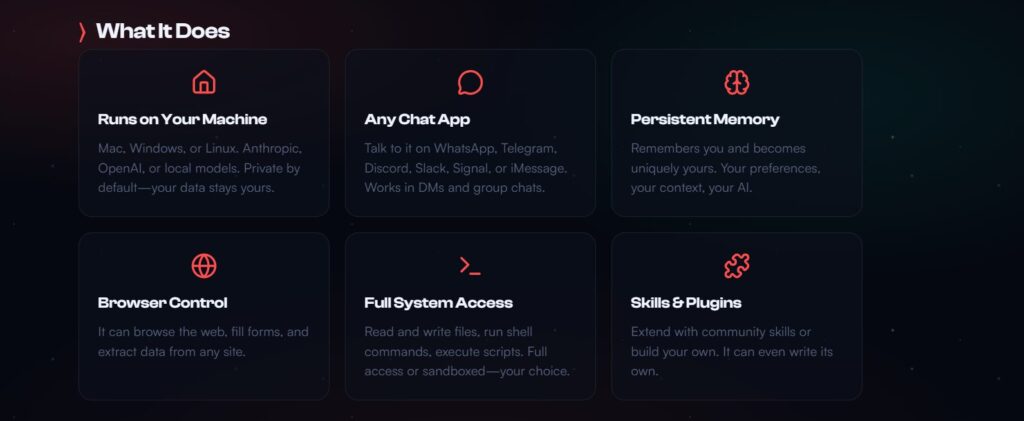
Everything at the core is free and open-source — the framework, the app, the skills library, the agent system. You download it, you run it, you own it. No subscription, no usage limits, no data sent to a paid platform unless you choose to connect one.
→ Pricing breakdown table here
Where Real Costs Can Appear
 Where Real Costs Can Appear
The moment you connect OpenClaw to an external AI model — like OpenAI’s GPT-4 or Anthropic’s Claude — you start paying that provider’s API rates. OpenClaw itself still costs nothing, but the intelligence powering your agents does.
The good news: if you run OpenClaw with a local model via Ollama, your total cost stays at zero. Your machine does all the work. This is why ollama openclaw is one of the most searched combinations right now — people are actively looking for the fully-free setup.
Do You Need a Server?
 Do You Need a Server?
Not necessarily. OpenClaw runs fine on a decent personal laptop for light use. But if you want agents running 24/7, handling heavier workloads, or accessible remotely — a small VPS becomes the practical choice. Entry-level plans from providers like Hostinger VPS or Vultr start around $5–6/month and handle OpenClaw comfortably.
→ Hosting comparison table here
The Honest Bottom Line
 The Honest Bottom Line
If you run OpenClaw locally with Ollama, your cost is $0. If you connect premium AI APIs and want 24/7 uptime on a server, expect $10–30/month realistically. For what you get — a fully autonomous multi-agent system — that’s an extraordinary value compared to any all-in-one AI platform subscription.
macOS — Full Install (Recommended)
 macOS — Full Install (Recommended)
This is the fastest path for most users. Open your Terminal and run:
macOS / Linux — CLI Only (No Onboarding)
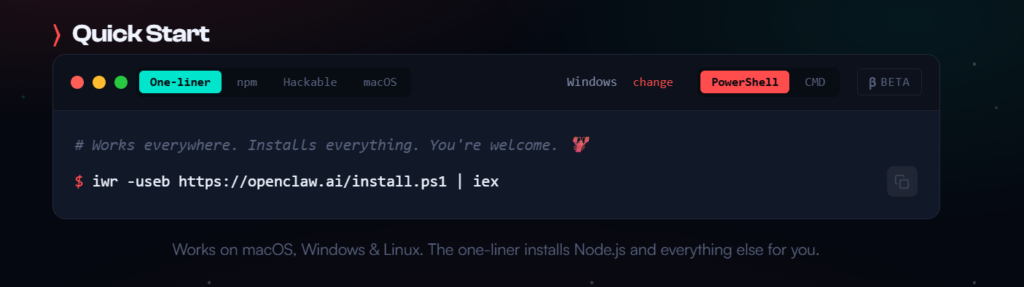
Windows — PowerShell Install
 Windows — PowerShell Install
Open PowerShell and run:
Docker — For Servers & Always-On Setups
 Docker — For Servers & Always-On Setups
Running OpenClaw on a VPS or home server? Docker is the cleanest approach for 24/7 deployments and gives you full control over the environment.
After Install: First Steps
 After Install: First Steps
Once the installer finishes, OpenClaw will guide you through connecting your first AI model (OpenAI, Claude, or a local Ollama model) and your first messaging channel. The whole onboarding takes under 10 minutes for most users.
If anything goes wrong, run:
A Note on Clawdbot
If you’ve seen Clawdbot trending alongside OpenClaw and wondered what the difference is — there is none. Clawdbot was simply OpenClaw’s original name, created by Austrian developer Peter Steinberger in late 2025. After a trademark issue with Anthropic it briefly became Moltbot, then landed on OpenClaw in January 2026. Same tool, same code, new name.
→ Full comparison table here
So Who Actually Wins?
 So Who Actually Wins?
The honest answer is: it depends entirely on your use case.
OpenClaw dominates when you want a persistent, autonomous agent running locally — one that actually does things across your apps and messaging channels without you babysitting it. It’s the closest thing available right now to a real digital employee.
OpenAI Agents and ChatGPT win when you need polish, reliability, and zero setup friction — ideal for non-technical users who want results without touching a terminal.
Ollama wins as the engine underneath — pair it with OpenClaw for a completely free, fully private local stack that sends nothing to the cloud.
AutoGPT and LangChain are powerful but developer-first frameworks — better for building products than personal productivity.
Our Recommended Stack for Most Users
If you want the best combination of power, privacy and zero ongoing cost:
OpenClaw + Ollama + a $6/month VPS = a 24/7 autonomous AI agent that costs almost nothing.

Is OpenClaw Safe to Use?
 Is OpenClaw Safe to Use?
The short answer is yes, with awareness. Here’s why:
Because OpenClaw is fully open-source, anyone can audit the code at any time. There are no hidden telemetry layers, no data silently sent to a central server, and no black-box behaviour. What you see in the repository is what runs on your machine.
That said, there are a few things worth keeping in mind before you dive in:
Gateway security matters. The gateway system controls how your agents communicate with external services. Configure it carefully — only enable the channels and permissions your agents actually need.
Telegram and messaging integrations carry inherent risk. Any tool that reads and sends messages on your behalf requires trust. Review what each skill has access to before activating it.
API keys are your responsibility. If you connect OpenAI or Anthropic APIs, store your keys securely. OpenClaw doesn’t manage them for you beyond the initial setup.
It’s still early software. OpenClaw moved fast from Clawdbot to its current form. Expect occasional rough edges, and always check the GitHub for the latest stable release before installing.
Final Verdict: Is OpenClaw Worth It in 2026?
 Final Verdict: Is OpenClaw Worth It in 2026?
For the right user — absolutely yes. If you’re comfortable with a terminal, curious about autonomous AI agents, and want a genuinely powerful local setup without paying subscription fees forever, OpenClaw is one of the most exciting tools available right now.
It’s not perfect. The documentation is still catching up with the pace of development, and the setup requires more confidence than clicking “Install” on an app store. But the core experience — agents that actually do things, locally, privately, for free — delivers on its promise.
Our rating: 4.4 / 5 — Outstanding for technical users. Growing fast for everyone else.
Keep Exploring: What to Read Next
 Keep Exploring: What to Read Next
If this guide helped you understand why local AI agents, privacy, and open-source tools are becoming the smarter choice in 2026, these three reads on AIDigitalSpace naturally expand on the same idea — each one from a different angle.
→ The Best Open-Source AI Models: What’s Actually Worth Using
→ All-in-One AI Tools: The Platforms Replacing Your Entire Stack
→ Stop AI From Reading Your Private Data: What You Can Actually Do
Each one tackles a question that OpenClaw users ask sooner or later: which models should I run locally, which tools are worth consolidating, and how do I make sure my data stays mine.