📅 Published January 10, 2026 · 🔄 Updated October 27, 2026 · ⏱ 12 min read · 💬 Free account, dashboard checked
The Tidio AI chatbot can answer your visitors at 3 a.m., but only if you set it up in the right order and know which of its three meters you are about to fill. I opened a free Tidio account, went through every Lyro screen you need, and priced each plan and the Lyro AI add-on so you know the real monthly cost before Tidio asks for a card.
Short answer
Sign up, install the widget with the WordPress plugin, Shopify app or a code snippet, feed Lyro your FAQ page, test it in the Playground, then set handoff rules. That takes about 30 minutes. The catch: the free plan gives Lyro only 50 AI conversations once, not every month. After that, the AI add-on starts at $39 a month.
💬 Quick verdict
Best for most small sites: Tidio
Live chat, a free plan and an AI agent that learns from your own FAQ in minutes.
Not sure what it will cost?
Enter your monthly chats and get the plan, the Lyro tier and the real total.
Need guided flows, not AI answers?
Landbot builds click-through bots for leads and bookings with no AI meter.
📋 What's inside
🔍 How I wrote this guide
I created a free Tidio account and went through the dashboard myself: the screenshots in this guide are from my account. I haven't run the bot live on a site yet, so the go-live advice comes from Tidio's help center and long-term user reviews. I haven't paid for Starter, Growth or the Lyro add-on: those prices come from a dated third-party price check from September 26 and Tidio's own help center, both linked below. Complaints come from G2 summaries and long-term reviews, not my own account.
Some links are affiliate links: if you buy through them I may earn a commission at no extra cost to you. It never decides what I recommend. Details
What the Tidio AI chatbot does (and what it won't)
🤖 Lyro AI agent
Answers questions from your own content. It doesn't invent policies and can't learn from past chats on its own.
🧩 Flows
Click-path bots for greetings, lead capture and cart reminders. No AI, separate meter.
🧑 Live chat and inbox
Web chat, email, Messenger, Instagram and WhatsApp in one inbox for your team.
Tidio says the Tidio AI chatbot works in 48 languages and detects the visitor's language on its own. In Configure you pick a default language and which languages Lyro supports; if it can't detect one, it falls back to the default. Reviewers say quality varies outside English, so test your main market's language in the Playground before you go live.
What it won't do well: refunds, angry customers, anything that needs judgment, or questions your content doesn't cover. Lyro can call your systems through Actions & MCPs, such as an order lookup, and follow step-by-step Procedures, but these are aimed at developers. For most small sites, the job is narrower: answer the same 15 questions, instantly, at any hour.
Before you start: the 3 meters that decide your Tidio bill
| Meter | What counts | What the free plan includes |
|---|---|---|
| Billable conversations | A chat, ticket or social message that gets a human reply | 50 a month |
| Lyro conversations | Any chat where Lyro replies at least once, solved or not | 50 total, once per account |
| Flows visitors | Each visitor who triggers a Flow | 100 |
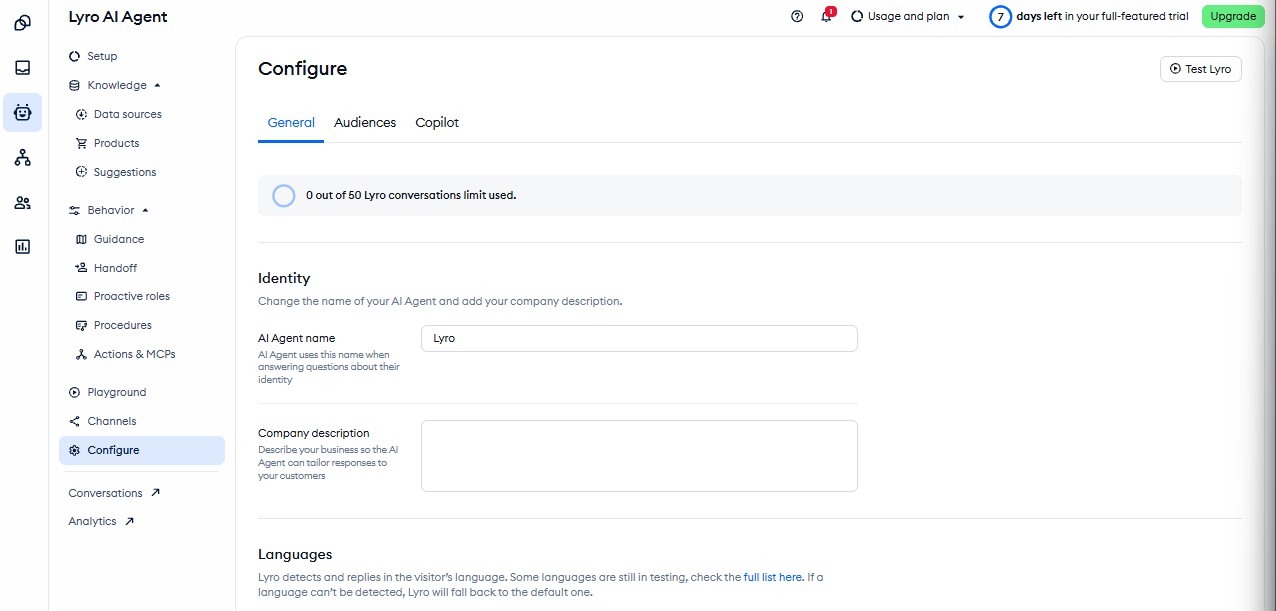
New accounts also start with a 7-day full-featured trial, so paid features vanish after a week and you drop to the free limits. Two more details change the math. A new conversation starts after 15 minutes of silence, so a visitor who comes back after lunch can count twice. And the Tidio AI chatbot is charged when it replies, not when it solves the problem, so a bot that answers badly still costs you a conversation.
How to set up the Tidio AI chatbot in 7 steps
1. Create your account and pick an install route
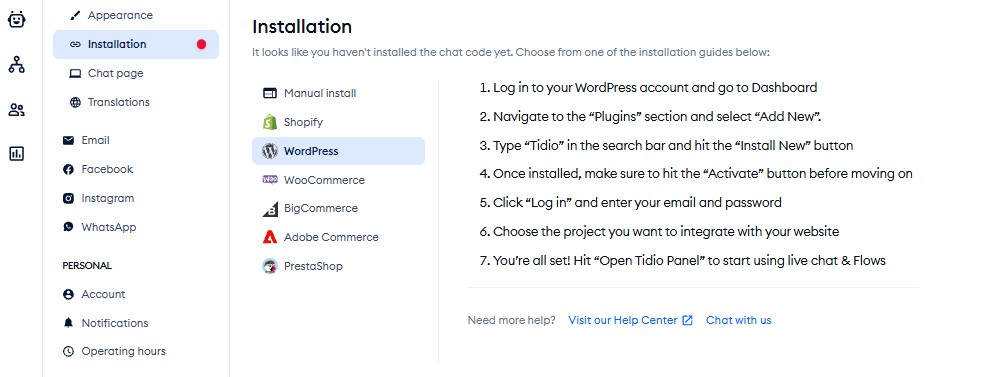
Sign up at Tidio with your work email and website address. Pick the route that matches your site: the WordPress plugin, the Shopify app, or a JavaScript snippet pasted before the closing body tag for anything else, including Wix and Squarespace.
2. Install the widget and check it loads
Install the plugin or app, then open your site in a private window and look for the chat bubble. On WordPress with a caching plugin, purge the cache first. If your site sits behind Cloudflare, Tidio's help center has a separate article on letting Lyro through the firewall, because a blocked crawler can't read your pages.
3. Add Lyro's data sources
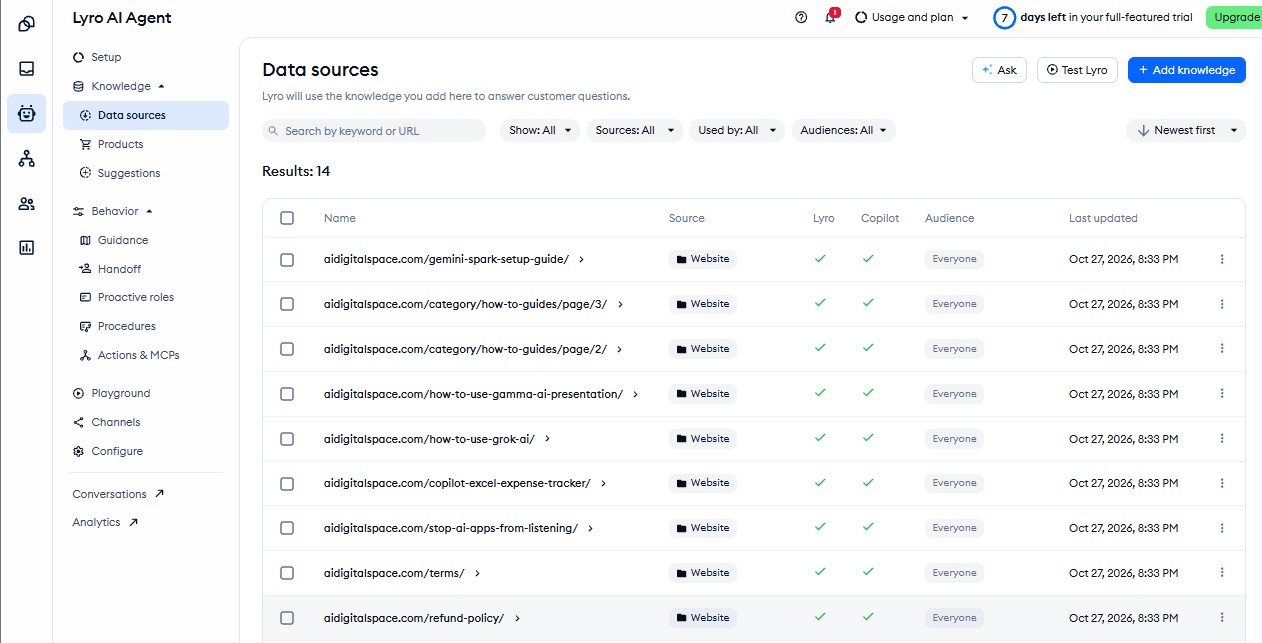
Open Lyro and add knowledge: your FAQ and help pages by URL, manual question-and-answer pairs, or a CSV import. Tidio's crawl reads a limited number of pages per site, so point it at the pages that answer questions, not your whole blog. File uploads such as PDFs are reserved for the Plus plan.
4. Write answers for your top 15 questions
Crawled pages are a start; direct Q&A pairs are what make Tidio AI chatbot answers sharp. Use the copy-paste list below, replace each answer with your real policy, and add one line telling Lyro when to send people to a human.
5. Test in the Playground
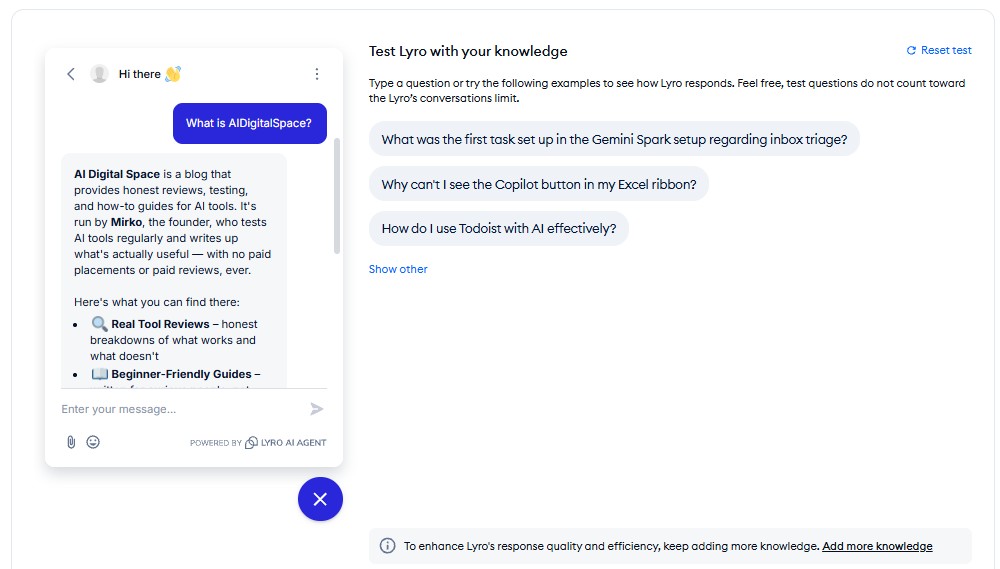
Before visitors see anything, ask the Tidio AI chatbot your 15 questions plus 5 awkward ones: a refund demand, a question you never wrote about, a message in another language. Fix the source content, not the reply, when it gets something wrong.
6. Set handoff rules, hours and offline capture
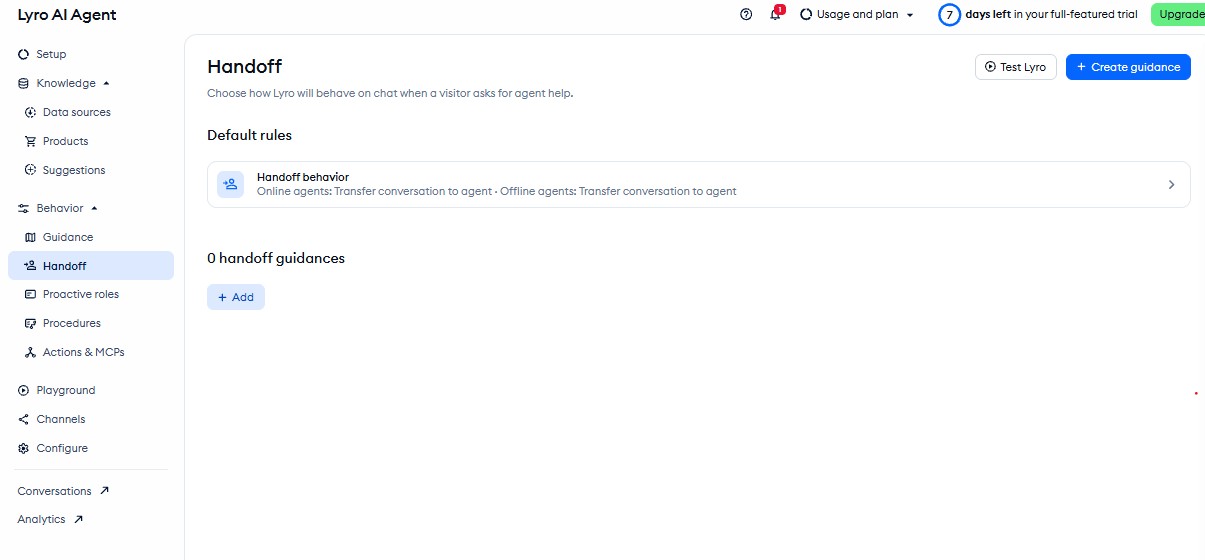
Under Behavior you'll find Guidance, Handoff, Proactive roles and Procedures. Use Guidance and Handoff to decide when the Tidio AI chatbot passes the chat to a person, what happens outside office hours, and whether it asks for an email so you can answer the next morning. Keep a visible "talk to a human" option at all times.
7. Go live, then review every chat for a week
Turn the Tidio AI chatbot on and read each conversation for the first 7 days. Lyro Analytics shows which questions it couldn't answer; each gap is a new Q&A pair. After a week you'll know your real volume, which is the number the calculator below needs.
Tidio free plan · live chat, 50 human-answered chats a month and a one-time Lyro trial.
Start Tidio free →Copy-paste: 15 questions to train the Tidio AI chatbot first
Add one rule line to the top of your Lyro guidance: "If you are not sure, say so and offer to connect a person." It stops the Tidio AI chatbot guessing on the questions your content doesn't cover.
Tidio pricing: what the Tidio AI chatbot really costs
✔ Prices as of September 26 · confirm at checkout
| Plan | Monthly | Annual (per month) | Human-answered chats | Seats |
|---|---|---|---|---|
| Free | $0 | $0 | 50 | 10 |
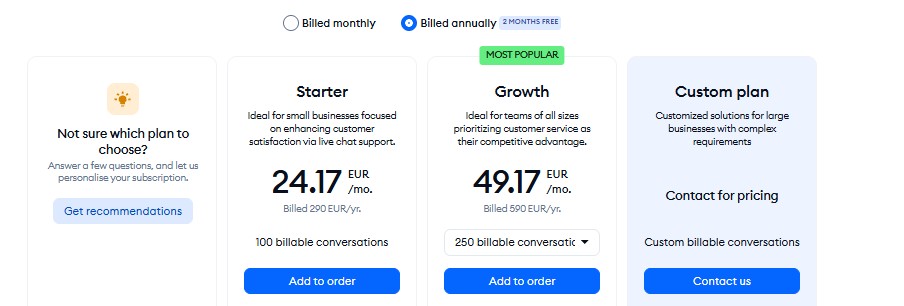
| Starter | $29 | $24.17 | 100 | 10 |
| Growth | $59 to $349 | from $49.17 | 250, 600, 1,000 or 2,000 | 10 |
| Plus | from $300 + usage | sales quote | custom | custom |
| Premium | sales quote | sales quote | custom | custom |
| Lyro conversations a month | Price a month | Per conversation |
|---|---|---|
| 50 | $39 | $0.78 |
| 100 | $75 | $0.75 |
| 200 | $140 | $0.70 |
| 500 | $350 | $0.70 |
| 1,000 | $700 | $0.70 |
Growth's middle tiers cost $129 for 600 chats and $179 for 1,000. Flows are free for the first 100 visitors and then start at $29 a month for 2,000. Tidio prices conversations, not seats, so a team of 10 pays the same as a team of one. Figures come from a dated price check because Tidio's pricing page loads its numbers with a script.
The jump that hurts Tidio AI chatbot users most is from Growth to Plus. Past 2,000 human-answered chats or 1,000 Lyro conversations there is no self-serve tier, only a sales call. Prices are in USD; in the EU and UK, expect VAT on top at checkout.
Tidio AI chatbot cost calculator
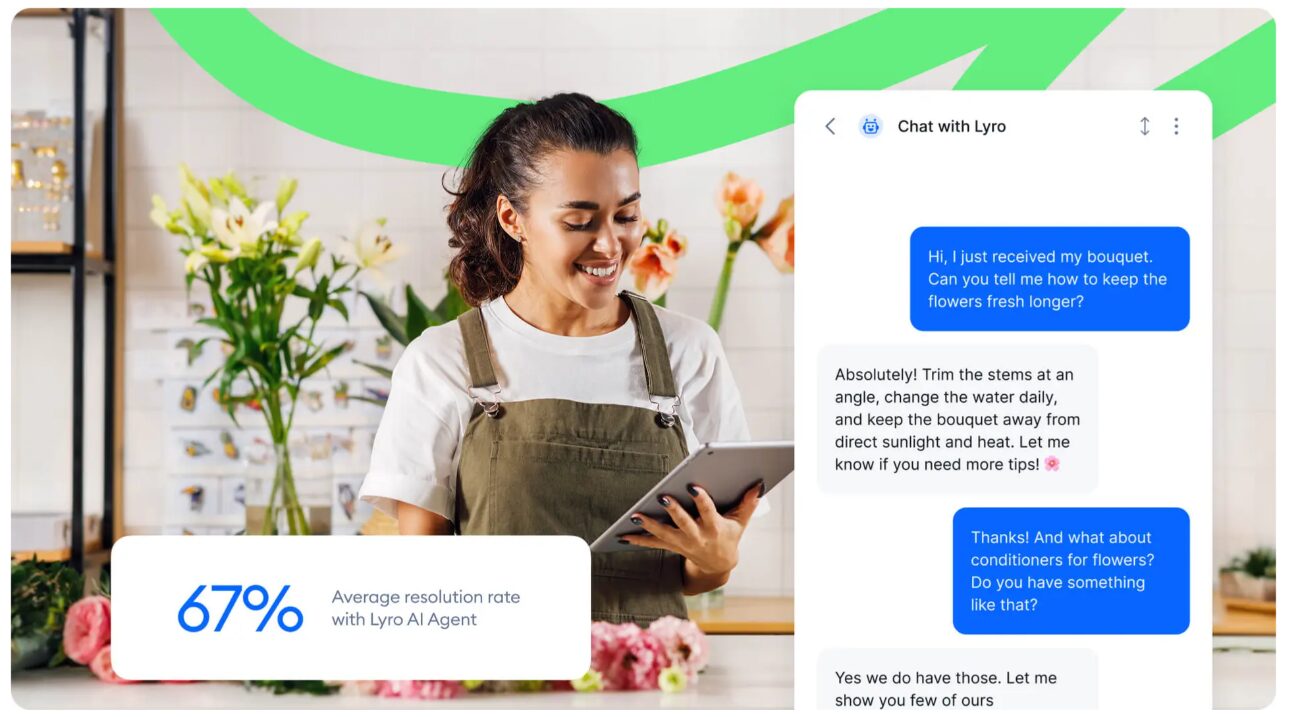
Run the Tidio AI chatbot numbers with real data. Tidio advertises an average Lyro resolution rate of 67%, but only Premium carries a guarantee, and that one is 50%. Starting at 50% keeps the estimate fair. For the bigger picture across all your automation tools, my AI automation ROI calculator works the same way.
Tidio alternatives: when another chatbot fits better
| Tidio | Landbot | Intercom Fin / Zendesk | |
|---|---|---|---|
| Best at | Chat + AI answers for small sites | Guided flows for leads and bookings | AI inside an existing help desk |
| AI pricing | Lyro add-on per conversation | Flow builder, AI optional | Per resolution, on top of seats |
| Free plan | Yes, 50 chats a month | Free tier for testing | No |
| Setup effort | About 30 minutes | An afternoon per flow | Days, with a help desk team |
🧭 Landbot
No-code bots that walk visitors through questions and book calls. Good when you want a script, not open answers.
📘 My Landbot guide
Five steps to a lead bot that converts, with the flows I'd build first.
🔁 After the first chat
Follow-ups, reviews and upsells: the AI tools that keep customers once the bot has answered.
Is the Tidio AI chatbot worth it? My verdict
✅ Choose Tidio if
you run a WooCommerce, Shopify or WordPress site, answer the same 15 questions on repeat, and want live chat and AI in one widget your whole team can use.
⛔ Skip it if
your chats are rare, mostly complex, or already live inside Zendesk or Intercom, or you'd hit the Plus price wall within a few months.
The Tidio AI chatbot setup is the easy part, and the free plan is enough to prove it on your own site. The money question is Lyro. It bills per conversation it touches, so the add-on only pays off when your FAQ content is good enough to solve most of what it answers. Write the 15 answers first, then switch the AI on.
Start on the free plan, add Lyro once you know your volume
Set up Tidio free →The free Lyro trial is 50 conversations once; check billing before busy weeks.
📚 Recommended read
Designing Bots by Amir Shevat
A practical book on writing bot conversations people don't hate: greetings, fallbacks, handoffs and tone. Read the chapter on failure messages before you write your Tidio AI chatbot guidance.
See the book →Tidio AI chatbot: FAQ
Primary source: Tidio's Lyro help center, for data sources, Guidance, Actions and the Cloudflare article.