
Mirko
AI Tech Writer
Higgsfield AI just became one of the most talked-about AI video tools of 2026 — and after weeks of hands-on testing, we see why. The combination of Higgsfield Cinema Studio and Higgsfield Motion Control puts cinematic-quality video production within reach of any creator, no film school required.
But is it worth paying for? Higgsfield pricing runs on a credit system, and the real question is whether the free plan carries you far enough before you need to upgrade.
Most importantly: in a direct Higgsfield vs Kling 3.0 face-off, which tool wins for quality, speed, and value in 2026?
We tested both tools on the same prompts, stress-tested the motion controls, and broke down every plan tier. Here's the honest verdict — no hype, no guesswork.
📋 What's Inside
Some links are affiliate links · You support us at no extra cost · Full disclosure
1. Quick Verdict: Is Higgsfield AI worth it in 2026? (Best for + Who Should Skip)
After three weeks of hands-on testing, the answer is straightforward: Higgsfield AI is one of the most capable AI video generators available right now — if you know what you're paying for. It's not trying to be everything. It's built for creators who want cinematic output and precise camera control, and in that lane, it genuinely delivers.
The standout features are Higgsfield Cinema Studio and Higgsfield Motion Control — two tools that, combined, produce results that would have required expensive software just 18 months ago. The question is whether Higgsfield pricing makes sense for your workflow.
- Content creators who want cinematic camera moves without a film budget
- Short-form video producers — renders in under 2 minutes
- Agencies testing Cinema Studio for branded content
- Anyone already comfortable with AI video tools like Runway or Pika
- Beginners who need a simpler interface — Kling 3.0 has a gentler learning curve
- High-volume producers — credit limits bite fast on paid plans
- Anyone needing built-in voiceover or audio — not available yet
- Tight budgets — the free plan is limited for serious use
2. What Is Higgsfield AI? Cinema Studio + Motion Control in 60 Seconds
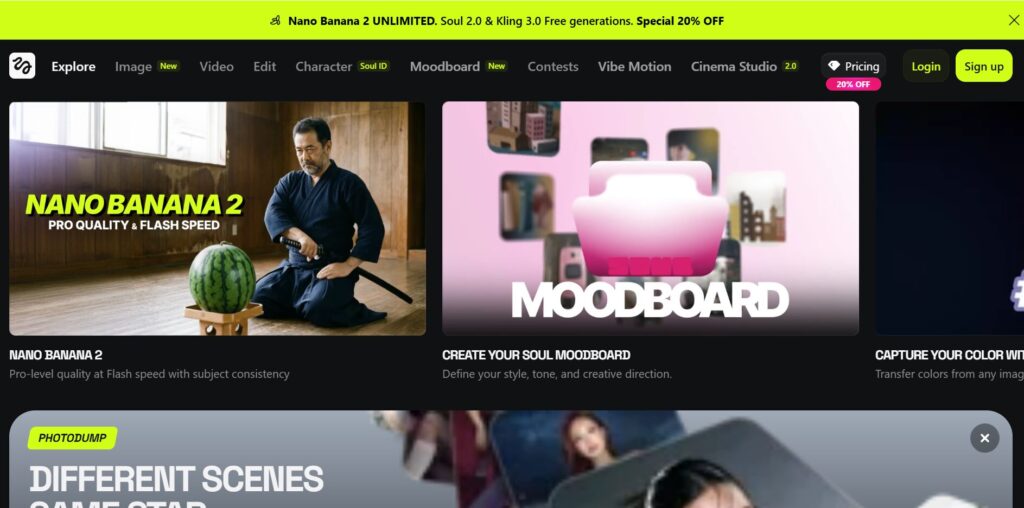
Higgsfield AI is a generative video platform built specifically for creators who care about how their footage moves — not just what it shows. Launched in 2024 and rapidly updated through 2025, it carved out a niche that most AI video tools ignore: professional-grade camera control paired with cinematic style presets.
It's not a general-purpose AI tool. Think of it as the intersection between a creative AI platform and a lightweight film production suite — designed from the ground up for short-form video, ads, and branded content.
Higgsfield Cinema Studio
- Cinematic style presets — film grain, color grading, aspect ratios
- One-click look: match the aesthetic of professional productions
- Works from text prompt or uploaded reference image
- Designed for branded content, ads, and short films
Higgsfield Motion Control
- 30+ camera movements: orbit, dolly, crane, whip pan and more
- Combine multiple moves in a single prompt
- Copy-paste templates — no technical knowledge needed
- The feature that separates Higgsfield from most competitors
Together, these two tools make Higgsfield AI genuinely different from platforms like Runway or Pika. You're not just generating a clip — you're directing it. Full pricing breakdown, credit limits, and free plan details in the next section.
New to AI video? Higgsfield Cinema Studio handles the visual style while Motion Control handles camera behaviour — think of them as two separate directors working at the same time on your clip.
3. Higgsfield Pricing: Is It Free? Plans, Limits, and Real Cost Per Video
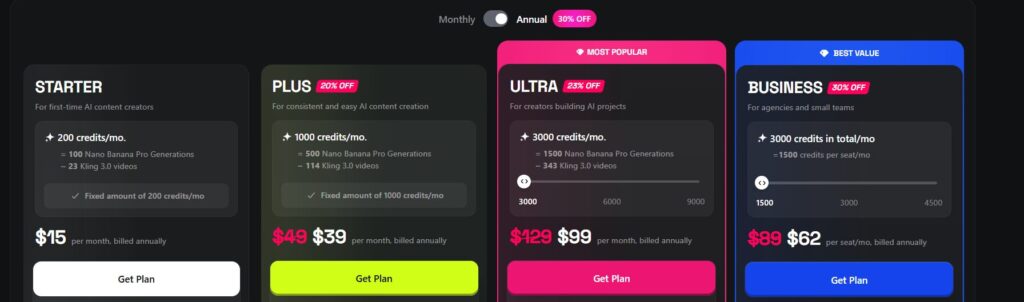
Yes — Higgsfield AI has a free plan. But let's be direct: it's a trial, not a workflow. You get 10 credits per day, outputs carry a watermark, and access is limited to selected models. If you're evaluating it for real use, start there — then decide if the paid tiers justify the cost.
Higgsfield pricing runs on a credit system, and that's where most creators get tripped up. The monthly fee looks simple; what's less obvious is how fast different models burn through credits. The official pricing page lists the tiers — here's what they actually mean in practice.
- Limited models only
- Watermark on exports
- No Veo 3 / Cinema Studio
- Good for testing
- Selected models only
- No Veo 3 access
- No Cinema Studio full suite
- Light personal use
- All models unlocked
- Full Cinema Studio access
- Motion Control included
- $39/mo billed annually
- All models + priority
- Scalable credit volume
- 365-day unlimited extras
- $99/mo billed annually
For most creators, the Plus plan at $49/month hits the sweet spot — full access to Higgsfield Cinema Studio, Higgsfield Motion Control, and all premium models at under $0.50 per clip. If you're on a tight budget and want to explore free AI tools with no login before committing, that's a smart first step. But for serious video output, the free plan won't get you far.
4. Motion Control Guide: Camera Moves + Copy/Paste Prompt Templates
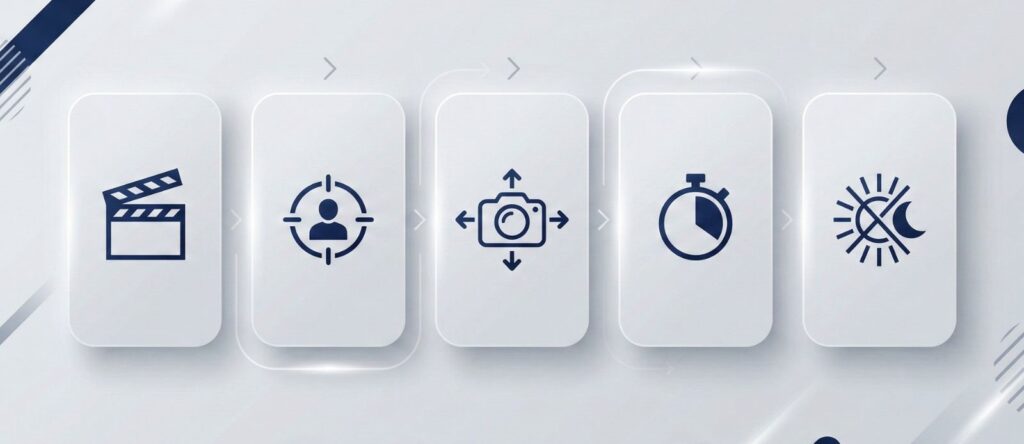
Higgsfield Motion Control is the feature that separates Higgsfield AI from most AI video tools. Instead of hoping the model guesses the right camera behaviour, you tell it exactly what to do — and it listens. The catch? Most creators under-prompt it, then wonder why the movement feels flat.
The key insight, straight from Higgsfield's own documentation: Motion Control runs on a layered prompt system. Camera movement, subject behaviour, and visual style are handled separately — not crammed into one sentence. Once you understand the formula, results improve immediately. If you've ever worked on AI prompt structure for image tools, the logic transfers directly.
Now that you have the motion toolkit, the next question is whether Higgsfield Motion Control actually beats the competition when put side by side. The next section runs a direct comparison against Kling 3.0 — same prompts, same use cases, honest results.
If you want your AI videos to feel more directed (not random), this book helps you plan scenes, pacing, and “what happens next” — which makes your prompts and Motion Control shots sharper.
5. Higgsfield vs Kling 3.0: Which AI Video Generator Wins (Quality, Speed, Value)
Both tools are excellent in 2026 — but they're built for different creators. Running Higgsfield vs Kling 3.0 through the same prompts and workflows makes the differences impossible to ignore. The wrong choice costs you either quality or time, depending on what your workflow actually demands.
Kling 3.0 launched February 2026 and immediately topped the ELO benchmark rankings among subscription-based video generators — the first AI video model with native 4K output and built-in multilingual audio. Higgsfield AI counters with Cinema Studio presets and Motion Control precision that Kling simply doesn't match. Here's the honest breakdown.
| Category | Higgsfield AI | Kling 3.0 | Winner |
|---|---|---|---|
| Camera Control | 20+ presets, Motion Control system | Basic prompt-based movement | Higgsfield |
| Cinema Presets | Full Cinema Studio suite | Style prompting only | Higgsfield |
| Output Quality | Praised for realism + style | #1 ELO benchmark (Apr 2026) | Context |
| Native 4K | 4K via upscaling | Native 4K — no upscaling | Kling |
| Native Audio | Not available yet | Multilingual, built-in | Kling |
| Generation Speed | ~2 min per clip | Faster, lower queue times | Kling |
| Free Tier | 10 credits/day | 66 credits/day | Kling |
| Entry Price | $15/mo (Starter) | $6.99/mo (Standard) | Kling |
| Volume at $49–50/mo | 1,000 credits (Plus) | ~3,000 credits (Pro) | Kling |
| Ease of Use | Moderate — requires prompt skill | Gentler learning curve | Kling |
- Cinematic camera control is non-negotiable
- You're producing fashion, luxury, or branded content
- Cinema Studio presets save you editing time
- You already know how to write structured prompts
Try Higgsfield Free →
- You need native 4K or built-in audio
- High-volume output matters more than shot control
- Budget is tight — better value at every tier
- You're a beginner who wants results fast
Try Kling 3.0 →
Not sure which fits your specific workflow? If you're building a full all-in-one AI creative stack, both tools can coexist — Higgsfield for hero shots, Kling for volume. The final section covers ethics, deepfakes, and which tool to use when those considerations matter too.
6. Ethics + FAQ + Final Verdict (Deepfakes, Copyright, Safety, Best Alternatives)
AI video tools like Higgsfield AI unlock genuine creative power — but they also raise questions that every creator should answer before publishing. Deepfakes, consent, copyright, and data privacy aren't edge cases in 2026. They're mainstream legal territory, and the platform's policies directly affect your liability.
Higgsfield prohibits unauthorized use of real people's faces and explicit biometric data. The platform's Trust & Safety policy explicitly bans content that is defamatory or designed to deceive. Under the US federal Take It Down Act (2025), platforms must remove non-consensual AI-generated content — and creator liability applies regardless of which tool generated it. Read our guide on deepfake awareness before uploading anyone else's likeness.
Good news: Higgsfield grants full commercial rights to your outputs — you can monetize ads, campaigns, and social content without paying royalties to the platform. Watch out for: by using the service, you grant Higgsfield a license to use your inputs and outputs for AI model training. If you're uploading client assets or unreleased products, review this with your legal team first.
Content moderation runs at the model level — each model filters prompts, reference images, and outputs independently. Automated filters screen all community content. Reports are reviewed with escalation to account termination where warranted. With 24 million+ creators and $130M raised, Higgsfield has the resources to enforce these policies — though no automated system is perfect.
No other AI video platform gives you this level of directed, cinema-quality output at this price. The caveat: it rewards creators who invest time learning it. If you want instant results without a learning curve, it's not the right first tool.
Prices and features verified May 2026 · Affiliate links used — full disclosure here · We were not paid to review any tool in this post
FAQ
Is Higgsfield AI free to use?
+Yes — Higgsfield AI has a free plan, but it is closer to a trial than a working tier. You get 10 credits per day, exports carry a watermark, and access is limited to selected models. Cinema Studio and premium models like Veo 3 are locked behind paid plans.
It is enough to test the interface and generate a few clips before committing. For consistent production use, paid plans start at $15/month (Starter) and $49/month (Plus) — the latter being where Cinema Studio and Higgsfield Motion Control fully unlock. Try the free plan here — no credit card needed.
How does Higgsfield Motion Control work?
+Higgsfield Motion Control uses a layered prompt system to direct camera behaviour independently from subject movement and visual style. You choose from 20+ camera move presets — push-in, orbit, dolly, FPV sweep, handheld and more — and describe them directly in your prompt.
The critical rule: one camera move per clip. Combining two moves in one prompt typically causes instability. Keep prompts short and direct — commands outperform long descriptions. Example: "Slow push-in toward her face, steady camera. Film grain. 5 seconds, smooth." Full prompt templates are in the Motion Control guide above.
What is Higgsfield Cinema Studio?
+Higgsfield Cinema Studio is the platform's flagship creation environment for cinematic-quality video. It combines style presets (film grain, color grading, anamorphic ratios), Motion Control, and an AI co-director called Mr. Higgs — which breaks a written scene description into a structured shot list with suggested camera moves, framing, and pacing.
You can accept, edit, or override Mr. Higgs' suggestions entirely. Cinema Studio is available on Plus ($49/month) and above, and is the primary reason serious creators choose Higgsfield AI over simpler text-to-video tools. It is particularly strong for fashion, branded content, and short-film workflows.
Higgsfield vs Kling 3.0 — which AI video generator is better in 2026?
+It depends on your workflow. Higgsfield AI wins on cinematic camera control — no other tool at this price gives you the same level of directed shot-making. Kling 3.0 wins on almost everything else: native 4K, built-in audio, faster generation, a more generous free tier (66 credits/day vs 10), and lower entry price ($6.99/mo vs $15/mo).
The honest answer: choose Higgsfield AI for cinematic, directed content. Choose Kling 3.0 for volume, speed, and versatility. Many serious creators use both — Higgsfield for hero shots, Kling for high-volume output. See the full head-to-head comparison above for the 10-category breakdown.
How much does Higgsfield AI cost per month?
+Higgsfield pricing in 2026 runs across four tiers: Free ($0, 10 credits/day, watermark) · Starter ($15/mo, 200 credits, selected models) · Plus ($49/mo or $39 annual, 1,000 credits, all models) · Ultra ($129/mo or $99 annual, 3,000–9,000 credits).
The Plus plan is the best value for most creators — full Cinema Studio and Motion Control access at roughly $0.49 per clip. One important catch: credits don't roll over between billing cycles, so choose a tier that matches your actual monthly output. Start free and upgrade only if it fits.
Does Higgsfield AI add a watermark to videos?
+Yes — the free plan adds a visible Higgsfield AI watermark to all exported videos. Watermarks are removed on all paid plans, starting from the Starter tier at $15/month.
All paid plans also include full commercial rights — you can publish Higgsfield-generated videos in paid ads, client campaigns, and monetised social media without paying additional royalties to the platform. If you need watermark-free output for professional use, any paid tier covers you. See the pricing section above for the full plan breakdown.
Can I use Higgsfield AI videos commercially?
+Yes — all Higgsfield AI paid plans include full commercial rights. You can use generated videos in paid advertising, client work, branded content, and monetised social media without owing royalties to Higgsfield. The free plan does not include commercial use rights.
One important caveat: Higgsfield's terms grant the platform a licence to use your inputs and outputs for AI model training. If you're uploading sensitive client assets or unreleased products, review this clause carefully before uploading. For questions specific to your situation, consult your legal team — especially for agency or enterprise use cases.
Is Higgsfield AI good for beginners?
+Higgsfield AI has a moderate learning curve — it is not the easiest starting point if you have never used AI video tools before. The platform rewards creators who invest time understanding its layered prompt system. Results improve significantly once you grasp how Motion Control and Cinema Studio work together.
If you're completely new to AI video, starting with Kling 3.0 first is a smarter path — simpler interface, larger free tier, and gentler learning curve. Once you're comfortable with AI video prompting, Higgsfield's Mr. Higgs co-director makes Cinema Studio more accessible: give it a scene description and it generates a full shot list for you. Compare the top AI video tools here if you're still deciding.
Does Higgsfield AI support native audio in videos?
+Native audio generation is not yet a full built-in feature — this is one of Higgsfield AI's key limitations compared to Kling 3.0, which includes multilingual audio natively. Higgsfield does offer Higgsfield Speak on Plus plans and above, which adds voiceover and talking-head workflows for select models.
For fully synchronised cinematic audio, most creators currently generate video on Higgsfield and add audio separately in tools like CapCut or Premiere Pro. Full native audio support has been signalled as an upcoming development, but no official release date has been announced as of May 2026. If audio is a hard requirement for your workflow today, Kling 3.0 is currently the stronger option.
🎬 Build Your Full AI Creative Toolkit
Now that you know where Higgsfield AI fits, here are three guides that complete the picture — covering the broader AI video landscape, free generation tools, and the best creative AI platform alternatives: