
 Published on: June 6, 2025
Disclosure:
This post contains affiliate links. If you click through and make a purchase, we may earn a small commission at no additional cost to you. Thank you for supporting AIDigitalSpace — we only recommend tools and services we genuinely trust and believe bring real value to our readers.
1. Fireflies.ai – Tired of Missing Key Details During Meetings or Losing Track of Action Items?
If you’ve ever left a meeting unsure about what was decided, who owns which task, or where the notes went, you’re not alone. As remote and hybrid work expand, meetings are increasing — but clarity often isn’t.
fireflies.ai is an AI meeting assistant built to fix that. It provides accurate AI meeting transcription, structured summaries, and reliable meeting notes automation, allowing teams to stay focused on the conversation instead of manual note-taking.
Today’s professionals spend over 30% of their workweek in meetings, yet much of that time is lost afterward — reviewing recordings, searching for notes, or following up on unclear decisions. Tools like fireflies.ai aim to turn meetings into actionable outcomes, not forgotten conversations.
Rather than acting as a passive recorder, fireflies.ai functions as a true meeting productivity tool. It captures discussions in real time, highlights key moments, and organizes insights automatically — making it especially useful for sales teams, managers, educators, and remote workers.
As demand for smarter AI meeting transcription and automation grows, fireflies.ai has become a widely adopted solution across industries. The real question is not whether teams need tools like this — but which AI meeting assistant actually delivers consistent value.
In this review, we’ll look at how fireflies.ai works, where it stands out, how it compares to alternatives like Otter and Fathom, and whether it’s the right fit for your workflow in 2025.
2. What is Fireflies.ai?
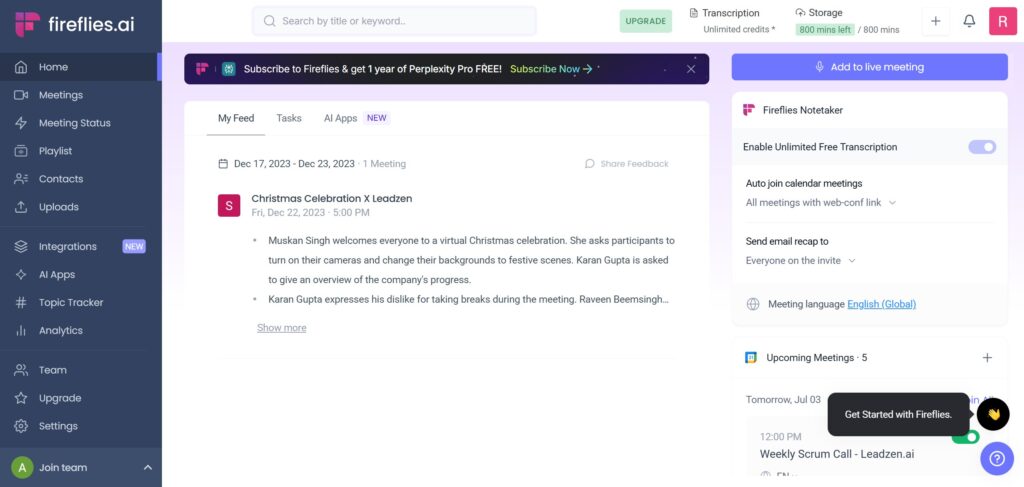
Fireflies.ai is an AI meeting assistant that automatically records, transcribes, and summarizes meetings across popular platforms like Zoom, Google Meet, and Microsoft Teams. Its core goal is simple: turn conversations into searchable, actionable meeting notes without interrupting the flow of the meeting.
Instead of manually taking notes, users can stay fully engaged while fireflies.ai handles AI meeting transcription in the background. After each meeting, the platform organizes everything into clear summaries, identifies speakers, highlights key topics, and surfaces action items — making meeting notes automation reliable and easy to review later.
What sets fireflies.ai apart from basic transcription tools is that it’s designed as a meeting productivity tool, not just a recorder. Meetings become a knowledge resource you can search, revisit, and share — whether you’re a solo professional, part of a remote team, or managing frequent client calls.
In practice, fireflies.ai is used across sales, HR, education, customer success, and leadership teams — anywhere meetings generate decisions that shouldn’t get lost.
Key Features
Below is a quick overview of the core features that make fireflies.ai one of the most widely used AI meeting assistants today:
| Feature | What It Does |
|---|---|
| Automatic Meeting Recording | Automatically joins scheduled meetings and records audio without manual setup |
| Real-Time Transcription | Transcribes conversations live with high accuracy across supported platforms |
| AI-Powered Summarization | Creates concise, structured summaries highlighting key points and decisions |
| Smart Search & Filters | Search transcripts by keyword, topic, speaker, or specific action items |
| Collaboration Tools | Share transcripts, leave comments, and tag teammates for follow-ups |
| CRM & Calendar Integrations | Connects with tools like HubSpot, Salesforce, and Google Calendar |
| Custom Workflows (Pro+) | Automates post-meeting actions, notifications, and data syncing |
3. Real Use Cases That Matter
Fireflies.ai delivers the most value when meetings generate decisions, follow-ups, and shared knowledge. These are the real-world scenarios where teams consistently rely on it as an AI meeting assistant — not just a recorder.
• Sales Teams
Automatically log calls to your CRM, capture accurate AI meeting transcription, and review customer objections, questions, and next steps after every meeting. This reduces manual admin work and improves handoffs between sales and account teams.
• Education & Coaching
Share transcripts and summaries with students or clients, highlight key learning points, and revisit discussions asynchronously. Meeting notes automation makes it easier to track progress without repeating sessions.
• Startups & Product Teams
Use Fireflies.ai to document product discussions, sprint reviews, and roadmap decisions. Instead of rewriting notes, teams can search past conversations and build internal documentation faster.
• Remote & Distributed Teams
Stay aligned across time zones without attending every call. With searchable summaries and highlights, Fireflies.ai turns meetings into a shared knowledge base — a key advantage for modern meeting productivity tools.
Across all these use cases, the common benefit is simple: less time spent on note-taking and follow-ups, more time acting on what was decided.
4. Is it Safe to Use?
Yes — fireflies.ai is built with enterprise-grade security in mind. The platform is GDPR-compliant and SOC 2 Type II certified, which means meeting data is encrypted, handled under strict access controls, and managed according to recognized security standards.
More importantly for everyday use, Fireflies.ai gives users clear control over what gets recorded, stored, and shared. You can manage permissions, limit access to transcripts, and decide how long data is retained — an essential feature for teams handling sensitive conversations.
For additional context, SOC 2 Type II compliance is widely considered a baseline requirement for secure SaaS tools that process business communications, as outlined by independent security and compliance frameworks like those referenced by the American Institute of CPAs (AICPA).
As with any AI meeting assistant, best practice still applies: inform participants when meetings are recorded and review internal policies before enabling automatic transcription. Used responsibly, Fireflies.ai fits well within modern privacy and security expectations for meeting productivity tools.
5. Fireflies.ai Pricing
Fireflies.ai offers a simple tier system (Free → Pro → Business → Enterprise). The right choice depends on how often you meet, whether you need unlimited AI summaries, and if your team relies on integrations (CRM, calendars, workflows). Since plans can change, it’s always smart to double-check the latest details on the official Fireflies.ai pricing page.
| Plan | Typical Price Range | Best For | Key Benefits |
|---|---|---|---|
| Free | $0 | Trying the platform or light personal use | Basic AI meeting transcription, limited AI summaries, limited storage |
| Pro | From ~$10/seat/mo (annual billing) |
Frequent meetings, freelancers, small teams | Unlimited transcription, stronger meeting notes automation, more integrations & exports |
| Business | From ~$19/seat/mo (annual billing) |
Growing teams that need admin controls and analytics | Advanced collaboration, team analytics, stronger admin controls, expanded integrations |
| Enterprise | Custom / Contract | Larger orgs with security, SSO, compliance needs | SSO/SCIM, admin governance, custom policies, enterprise support options |
6. Fireflies.ai vs Otter.ai vs Fathom: Which AI Meeting Assistant Fits Your Workflow?

All three tools aim to reduce meeting chaos, but they solve slightly different problems. If your priority is meeting notes automation for teams and workflows, Fireflies.ai is usually the most “workspace-like.” If you mainly want simple AI meeting transcription and easy sharing, Otter.ai is often the straightforward pick. And if you live in sales calls and want fast post-call notes, Fathom is commonly used as a lightweight option.
The comparison below focuses on what readers typically care about most: who it’s best for, how strong the summaries are, whether it supports meeting productivity tools features like searching and action items, and how well it connects to daily workflows.
| Tool | Best For | AI Meeting Transcription | Summaries & Notes | Search + Action Items | Team Collaboration | Integrations (Calendar/CRM) | Free Plan |
|---|---|---|---|---|---|---|---|
| Fireflies.ai | Teams, managers, and frequent meeting workflows | Strong multi-meeting capture with structured transcripts | Advanced summaries + meeting notes automation | Robust search, highlights, and action item support | Sharing, comments, and workspace-style collaboration | Calendar + broader integrations; CRM support on higher tiers | ✅ |
| Otter.ai | Individuals, students, educators, simple note capture | Reliable transcription focused on clarity and speed | Good summaries; strong for clean exports & sharing | Searchable notes; action items vary by plan/workflow | Solid for sharing, less “workflow automation” oriented | Calendar support; CRM workflows are typically more limited | ✅ |
| Fathom | Sales calls, customer success, fast call recap | Strong call capture with fast post-meeting outputs | Time-stamped notes and quick summaries | Great highlights; action item depth depends on workflow | Simple collaboration, built around sharing clips/notes | Often used with sales workflows; integrations depend on setup/tier | ✅ |
Quick pick: If you want deeper meeting notes automation for teams, Fireflies.ai is usually the most complete option. If you prefer a simpler note-taking experience, Otter.ai can be a good fit. For sales-heavy call recaps, Fathom is often the fastest.
7. Integrations
One of the reasons fireflies.ai works well as a long-term AI meeting assistant is how easily it fits into existing workflows. Instead of acting as a standalone transcription tool, it connects directly with the apps teams already use every day.
Fireflies.ai integrates with 50+ tools, including:
• Zoom, Google Meet, Microsoft Teams
Automatically joins meetings and handles AI meeting transcription without manual setup.
• Slack, Notion, Asana
Share transcripts, summaries, and action items where teams already collaborate.
• Salesforce, HubSpot, Pipedrive
Sync meeting notes and insights directly into CRM records, reducing manual follow-ups.
• Zapier
Create custom automations to trigger tasks, notifications, or data updates after meetings.
These integrations turn Fireflies.ai into a meeting productivity tool, not just a note-taker. Conversations don’t stop at transcription — they flow directly into tasks, documentation, and follow-ups across your digital workspace.
8. Why Fireflies.ai Stands Out as One of the Top AI Tools in 2025
What makes fireflies.ai genuinely valuable isn’t just accurate transcription — it’s how effectively it turns meetings into clear, usable outcomes. In real workflows, that difference matters.
Fireflies.ai delivers high-accuracy AI meeting transcription, even in group discussions, while its structured summaries remove the need for manual note-taking. Instead of rewatching recordings or chasing follow-ups, teams can immediately see what was discussed, decided, and assigned.
Beyond summaries, Fireflies.ai functions as a true meeting productivity tool. Its AI-powered search makes past conversations easy to retrieve, while workflow automation helps teams follow through without extra admin work. The result is less mental overhead and more consistent execution.
Considering that many professionals still spend around 30% of their workweek in meetings, tools that reduce friction and improve clarity don’t just save time — they improve alignment across teams.
Final take: if your goal is to get more value from every meeting without adding more tools or manual work to your day, fireflies.ai is a practical and reliable AI meeting assistant for 2025. It fits equally well for solo professionals, growing teams, and larger organizations that care about documentation, accountability, and follow-through.
If this guide helped you understand how AI meeting assistants like Fireflies.ai fit into real productivity workflows, you may also find these related posts useful — especially if your goal is to save time, reduce manual work, and stay organized across tools and teams:
→ Best AI Meeting Tools 2025 – Loom vs MeetGeek vs Otter Compared
→ Taskade AI – Your Second Brain for Team Productivity
→ How Voice Assistants Work in 2025 – Simple Guide to Understand Alexa, Siri & More