
Mirko
AI Tech Writer
Juggling Slack, email, Zoom, project boards, and your calendar while trying to focus? You're not alone — remote workers lose 2.5 hours daily to context switching. After testing 30+ productivity apps, I found one that actually consolidates everything without adding complexity. Here's my honest breakdown of Akiflow AI — the good, the expensive, and whether it's worth disrupting your workflow.
Akiflow AI
The unified command center that turns chaos into clarity for remote teams
📋 What's Inside
Some links are affiliate links · You support the blog at no extra cost · Details
1. Why Remote Workers Are Switching to Akiflow AI
Remote workers face an invisible productivity drain: notification overload. The average remote professional checks 7 different apps before 10 AM—Slack, Gmail, Asana, Trello, Google Calendar, Zoom, and their CRM.
Sound familiar?
This constant context-switching doesn't just feel exhausting. Research from the University of California shows it takes an average of 23 minutes to refocus after each interruption. That's nearly 4 hours of lost productivity daily for workers juggling multiple tools.
Enter: The Unified Command Center
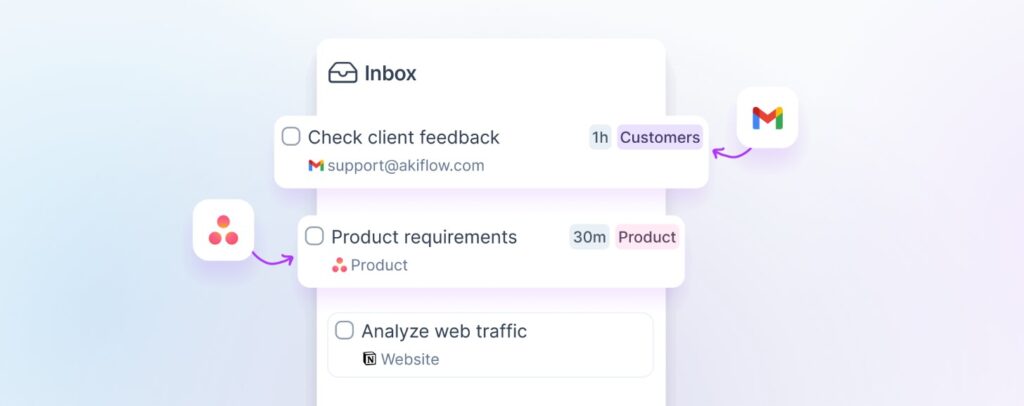
Akiflow AI tackles this by consolidating your entire workflow into one intelligent interface. Instead of alt-tabbing through a dozen windows, you get:
- A universal inbox that pulls tasks from every platform
- AI-powered scheduling that finds optimal time blocks automatically
- One-click time blocking directly from your task list
- A command bar that lets you create, schedule, and move tasks in seconds
Think of it as your AI companion for work—but specifically designed for professionals drowning in tool fatigue.
Why It Matters Now
The remote work landscape has matured. We're past the "just use Zoom" phase. Productivity tools are now expected to be AI-native, integration-rich, and actually save time rather than add another login to remember.
Akiflow AI represents this new wave: fewer apps, smarter automation, and a single source of truth for your workday.
But is it worth disrupting your current system? Let's dig in.
2. How Akiflow AI Works – Setup in Under 10 Minutes
Getting Started Is Surprisingly Simple
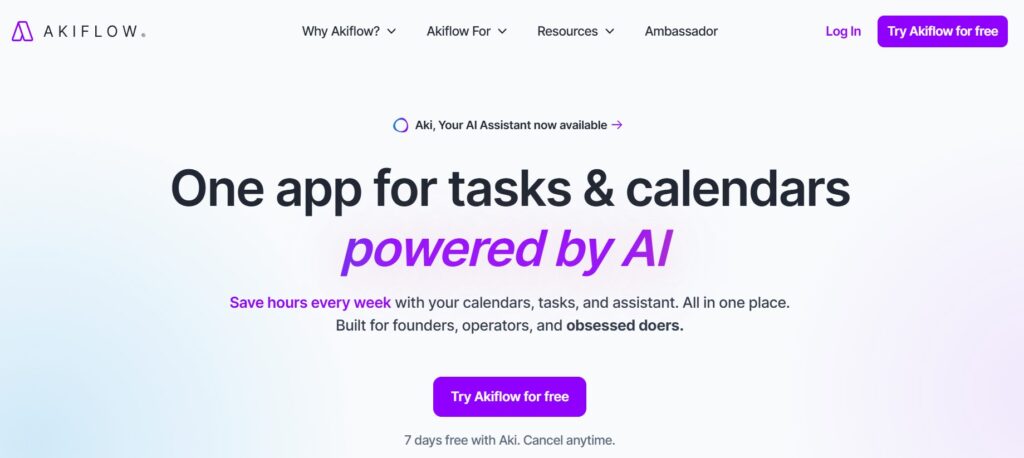
Unlike most productivity tools that require hours of configuration, Akiflow AI gets you operational in under 10 minutes. No complicated tutorials, no CSV imports—just connect your existing tools and let the AI do the heavy lifting.
Download & Install
Available for Mac, Windows, iOS, and Android. Pick your platform and install.
Connect Your Tools
Link Google Calendar, Slack, Asana, Notion, or any of 50+ integrations with one click.
Set Your Preferences
Tell Akiflow AI your working hours, focus time blocks, and meeting preferences.
Let AI Organize
Watch as your scattered tasks consolidate into one intelligent timeline.
What You Get Immediately
Once connected, Akiflow AI becomes your central nervous system for work:
- Universal Inbox: All tasks from every app in one place
- Smart Scheduling: AI suggests optimal time slots based on your energy patterns
- Command Bar: Type
Cmd+Kto create, move, or reschedule anything instantly - Calendar Sync: Two-way integration keeps everything updated automatically
No learning curve. No manual data entry. Just immediate productivity gains.
Want to see how it compares to traditional project management tools? The difference is night and day.
3. Honest Pros and Cons – What You'll Love (and What Might Frustrate You)
After 90 days of daily use, here's my brutally honest assessment of Akiflow AI. No sugarcoating—just the truth about what you're getting into.
- 💚 True consolidation – All tasks/meetings in one view
- 💚 Keyboard-first design – Command bar is lightning fast
- 💚 Smart time blocking – AI actually understands context
- 💚 50+ integrations – Works with everything you use
- 💚 No subscription fatigue – Replaces 3-4 other tools
- ❌ Steep price – $19-34/month isn't cheap
- ❌ No free tier – Only 7-day trial available
- ❌ Learning curve – Keyboard shortcuts take practice
- ❌ Mobile app lags – Desktop experience is superior
- ❌ Limited team features – Built for individuals, not teams
The Bottom Line on Performance
Akiflow AI excels at what it promises: consolidating chaos into clarity. If you're already using tools like Notion, Todoist, or Google Calendar, the integration is seamless.
However, the pricing is a legitimate barrier. At $19-34/month, Akiflow AI positions itself as a premium productivity tool—and it delivers premium results, but only if you actually commit to using it daily.
My take? Akiflow AI is worth it for solopreneurs, consultants, and remote managers who bill by the hour. If saving 90 minutes daily pays for itself, you're already profitable.
4. Pricing Breakdown – Is It Worth the Investment?
Akiflow AI doesn't hide behind "contact sales" buttons. Here's the exact pricing you'll pay—no surprises.
Monthly
Billed monthly
- All integrations
- Unlimited tasks
- AI scheduling
- Command bar access
- Cancel anytime
Yearly
$228 billed annually (save 44%)
- Everything in Monthly
- 2 months free
- Priority support
- Early feature access
- Best value
Free Trial
No credit card required
- Full feature access
- Test all integrations
- No commitments
- Easy cancellation
- Risk-free trial
Is Akiflow AI Worth the Investment?
Let's do the math. If Akiflow AI saves you just 30 minutes daily, that's 10 hours monthly. For freelancers billing $50/hour, the tool pays for itself 26 times over.
Compare this to subscription stacking—most remote workers pay $15-20 monthly each for Notion, Todoist, Calendly, and a task manager. Akiflow AI consolidates all four.
My recommendation? Start with the 7-day free trial. If you're not saving significant time by day 3, it's not for you. But if you find yourself naturally reaching for it over your old tools, the yearly plan at $19/month is the smart move.
Want more AI tools that justify their cost? Check out our best AI companions guide for alternatives at different price points.
5. Is Akiflow AI Right for You? (And Who Should Skip It)

Not every productivity tool fits every workflow. Here's who Akiflow AI serves best—and who should look elsewhere.
Perfect For
- Freelancers & consultants juggling multiple clients
- Remote managers coordinating across time zones
- Solopreneurs wearing all the hats
- Knowledge workers who live in their calendar
- Power users who love keyboard shortcuts
Skip If You're
- Budget-conscious – $19/mo is too steep
- Team-first – Need robust collaboration features
- Mobile-only – Desktop experience is key
- Tool-minimalist – Happy with Google Calendar alone
- Just starting out – Try free tools first
The Honest Assessment
Akiflow AI shines for individual contributors who already understand their productivity bottlenecks. If you're constantly thinking "I wish I could just..." when switching between tools, this solves that.
However, if you're still figuring out your productivity system, Akiflow AI might be premature. Start with foundational habits first—maybe dive into our best AI books to understand how productivity tools fit into larger workflows.
The sweet spot? You're billing $50+ per hour, managing 3+ active projects, and losing time to admin work. That's when Akiflow AI transforms from "nice to have" to "how did I live without this?"
Bottom line: Akiflow AI is a professional tool for professionals. If that's you, it's worth every penny.
6. Ethical Perspective – When AI Planning Helps vs. Hinders
Let's address the elephant in the room: Can an AI planner make you too dependent?
Akiflow AI automates scheduling and task prioritization—but it doesn't think for you. The difference matters. Tools like Akiflow AI handle the mechanical burden (finding time slots, syncing calendars, reducing context-switching), which frees your brain for strategic decisions.
The risk? Over-optimization. When every minute is blocked, spontaneity dies. Creative breakthroughs rarely happen in perfectly scheduled 25-minute Pomodoros.
⚖️ My Rule: Use Akiflow AI to eliminate decision fatigue on routine tasks, but leave 20% of your week unscheduled. Let some chaos in. That's where insights live.
Akiflow AI works best as a copilot, not an autopilot. Review its suggestions, override when your gut says otherwise, and remember: efficiency isn't the same as effectiveness.
This aligns with broader principles we explore in our ethical AI tools guide—the best AI assistants augment human judgment rather than replace it.
The healthiest relationship with Akiflow AI? Use it to reclaim time—then spend that time thinking, not just doing more tasks.
7. Final Verdict – My Recommendation After 90 Days
After three months of daily use, here's my verdict: Akiflow AI delivers on its promise—but only if you're the right user.
Best Feature
Universal inbox consolidation
Biggest Drawback
Premium pricing
Ideal User
Solopreneurs & consultants
ROI Timeline
2-3 weeks
Ready to reclaim 2+ hours daily? Start your free 7-day trial—no credit card required.
Try Akiflow AI Free →Cancel anytime · Full features unlocked · Setup takes 10 minutes
The Decision Framework
Buy Akiflow AI now if: You're billing $50+/hour, juggling 3+ projects, and context-switching is killing your focus. The tool will pay for itself in saved time within two weeks.
Wait if: You're still figuring out your productivity system or operating on a tight budget. Free tools like Google Calendar + Todoist might suffice until your workflow complexity justifies the investment.
According to McKinsey research, knowledge workers spend 28% of their workweek managing email and internal communications. Akiflow AI directly attacks that inefficiency.
My final take? Akiflow AI is the rare productivity tool that actually delivers on its promise. It's expensive, but if you value your time at professional rates, it's a no-brainer investment.
8. FAQ – Real Questions from Remote Workers
What is Akiflow AI and how does it work?
+Akiflow AI is a unified productivity platform that consolidates all your tasks, calendars, and meetings into one intelligent interface. It works by connecting to 50+ tools (Slack, Gmail, Asana, Notion, Google Calendar) and pulling everything into a universal inbox.
The AI scheduling assistant analyzes your calendar, suggests optimal time blocks, and automatically schedules tasks based on priority and deadlines. The command bar (Cmd+K) lets you create, move, or reschedule anything in seconds without switching apps.
How much does Akiflow AI cost?
+Akiflow AI costs $34/month billed monthly or $19/month billed annually ($228/year, saving 44%). There's a 7-day free trial with no credit card required.
The yearly plan is the best value and includes priority support plus early access to new features. All plans include unlimited tasks, 50+ integrations, AI scheduling, and the command bar. No free tier exists beyond the trial period.
Does Akiflow AI offer a free trial?
+Yes, Akiflow AI offers a 7-day free trial with full feature access and no credit card required. The trial includes all integrations, unlimited tasks, AI scheduling, time blocking, and the command bar.
You can cancel anytime during the trial without charges. Setup takes under 10 minutes, so you can test the full workflow immediately. Start your free trial here.
What apps and tools does Akiflow AI integrate with?
+Akiflow AI integrates with 50+ productivity tools including Google Calendar, Outlook Calendar, Slack, Gmail, Asana, Todoist, Notion, Trello, ClickUp, Linear, Jira, GitHub, and more.
Calendar integrations are two-way sync, meaning changes in Akiflow AI update your calendar and vice versa. Task integrations pull items into Akiflow's universal inbox while keeping the source system updated. Most integrations connect with one click via OAuth.
Is Akiflow AI better than Notion or Todoist?
+Akiflow AI serves a different purpose than Notion or Todoist. Notion is for knowledge management and documentation. Todoist is a pure task manager. Akiflow AI is a scheduling and time-blocking tool that consolidates tasks from multiple sources into one timeline.
Many users keep Notion for notes and Todoist for task capture, then use Akiflow AI to actually schedule and execute tasks. Think of it as the command center that coordinates all your other tools rather than replacing them.
Who should use Akiflow AI?
+Akiflow AI is ideal for freelancers, consultants, solopreneurs, and remote managers who juggle 3+ active projects across multiple tools. It's perfect for knowledge workers who bill by the hour and need to maximize productivity.
The tool works best for individuals rather than teams since collaboration features are limited. If you're constantly context-switching between apps, losing tasks in notification floods, or struggling to protect focus time, Akiflow AI solves those exact problems.
Does Akiflow AI work well on mobile?
+Akiflow AI has iOS and Android apps, but the desktop experience is superior. The mobile apps handle task capture, quick scheduling, and calendar viewing well, but the command bar and advanced time-blocking features work best on desktop with a keyboard.
Most users rely on desktop for planning sessions and use mobile for on-the-go task additions and meeting prep. If you're mobile-only, Akiflow AI might not be the best fit.
How does the AI scheduling actually work in Akiflow?
+Akiflow AI's scheduling assistant analyzes your calendar patterns, work hours, meeting density, and task deadlines to suggest optimal time blocks. It learns your productivity patterns over time—when you typically do focused work, take breaks, or schedule meetings.
When you drag a task to your calendar, the AI suggests the best available slots. It can also auto-schedule an entire day's tasks based on priority, estimated duration, and energy levels. You maintain full control and can override any AI suggestion. Learn more about ethical AI implementation.
Is Akiflow AI worth $19-34 per month?
+For professionals billing $50+/hour, yes. If Akiflow AI saves just 30 minutes daily through reduced context-switching and better time management, that's 10 hours monthly—worth $500+ for a $50/hour rate.
The tool pays for itself if you value your time at professional rates. For hobbyists or tight budgets, free alternatives like Google Calendar plus Todoist might suffice. The 7-day trial lets you measure actual time savings before committing. Most users see ROI within 2-3 weeks.
Can I use Akiflow AI with my team?
+Akiflow AI is designed for individual productivity, not team collaboration. There's no shared workspaces, task assignment, or team views. However, it syncs with team tools like Asana, Slack, and shared Google Calendars, so you can manage your portion of team projects within Akiflow AI.
For team-focused project management, tools like Asana, ClickUp, or Monday.com are better choices. Use Akiflow AI as your personal command center that connects to your team's shared tools.
Is my data secure with Akiflow AI?
+Akiflow AI uses bank-level encryption (AES-256) and stores data on secure servers. All integrations use OAuth, so Akiflow never sees your passwords. Calendar and task data syncs via official APIs.
However, like all cloud tools, sensitive project details are processed on their servers. For highly confidential work, review their privacy policy or contact them about enterprise data residency options. Most remote workers find the security sufficient for typical business use.
What are the best alternatives to Akiflow AI?
+Top alternatives include Motion (AI scheduling with team features, $34/month), Sunsama (daily planning focus, $20/month), Reclaim.ai (free tier available, calendar-first), and Todoist + Google Calendar (budget option, requires manual coordination).
Motion is the closest competitor with similar AI features but better team collaboration. Sunsama emphasizes mindful planning over speed. For more AI productivity tools, check our best AI companions guide for different workflows.
🚀 Keep Optimizing Your Productivity Stack
Ready to build the ultimate remote work system? Akiflow AI is just one piece of the puzzle. Explore these guides to complete your productivity arsenal: