
Mirko
AI Tech Writer
Finding the right AI ad generator can make or break your marketing budget. After spending 3 months testing AdCreative.ai across real campaigns, I'm ready to share what actually works — and what doesn't. This AdCreative.ai review covers everything: the AI marketing tools that impressed me, the features that fell short, and whether that 30% recurring affiliate commission is as good as it sounds.
📋 What's Inside This Review
Some links are affiliate links · You support the blog at no extra cost · Details
Table of Contents
- Why Everyone's Talking About AdCreative.ai
- What AdCreative.ai Does (and Who It's Actually For)
- AdCreative.ai Affiliate Program: How 30% Recurring Works
- Key Features & Pricing: What You Actually Get
- Real Pros and Cons from Marketers Using It
- AdCreative.ai vs Canva, HeyGen & Deepbrain AI
- Ethics & Transparency in AI-Generated Ads
- Frequently Asked Questions
- Final Verdict: Should You Use AdCreative.ai in 2026?
1. Why Everyone's Talking About AdCreative.ai
You’re here because you need ads that convert — and you don’t have time to design 50 versions to find a winner.
AdCreative.ai claims to solve that. Feed it your brand, tell it your goal, and its AI generates scroll-stopping creatives with built-in conversion scoring. No design skills. No guesswork.
Sounds perfect. But here’s the catch with most AI ad generators: they’re great at volume, terrible at results.
So does AdCreative.ai actually drive conversions — or just create pretty ads that flop? That’s what this AdCreative.ai review answers.
We tested it on real campaigns. We dug into the AdCreative features marketers actually use. And we broke down the AdCreative.ai affiliate program to see if that 30% recurring commission is legit or overhyped.
If you’re comparing this to free AI tools or alternatives like Jasper, you’ll find clear answers below.
Bottom line upfront: AdCreative.ai isn’t for everyone — but for the right user, it prints money. Keep reading to see if that’s you.
2. What AdCreative.ai Does (and Who It's Actually For)

AdCreative.ai is an AI ad generator that creates ready-to-run ads in minutes. Upload a product image, add a brief description, and the platform spits out dozens of variations optimized for Facebook, Instagram, Google, and LinkedIn.
But here’s what actually makes it different from other AI marketing tools: every ad gets a conversion score.
This isn’t random. AdCreative.ai analyzes your creative against real performance data from millions of ads. The result? Each design is ranked by how likely it is to convert — before you spend a dollar testing it. According to WordStream’s ad benchmarks, average Facebook CTR sits around 0.90%. The AdCreative features built into this scoring system aim to beat that by filtering out weak creatives upfront.
The platform also plugs directly into Google Ads and Meta Ads Manager — so you’re not downloading files and re-uploading them like it’s 2015.
Who is this actually for?
- Small businesses who can’t afford a design team but need high-volume creatives
- Marketing agencies running multiple client accounts
- Affiliate marketers testing offers fast (this is where the AdCreative.ai affiliate program starts making sense)
- Content creators selling digital products who need ads that look pro without Photoshop skills
Who should skip it? If you run one campaign a month or need hyper-custom brand work, this isn’t your tool. AdCreative.ai is built for speed and scale — not boutique design.
Bottom line: It’s a volume machine with a brain. The question is whether that brain is smart enough to beat your current workflow. We’ll dig into the actual features next.
3. AdCreative.ai Affiliate Program: How 30% Recurring Works
Let’s be real: the AdCreative.ai affiliate program is why half of you clicked this review.
And I get it. Most AI tools pay you once and you’re done. AdCreative.ai pays 30% recurring — every month, for every user who stays subscribed. One referral paying $149/month means $44.70 in your pocket. Every. Single. Month.
That’s not a bonus. That’s a revenue stream.
How it actually works:
You sign up through PartnerStack (free, takes 2 minutes), get your unique link, and start sharing. The dashboard tracks clicks, trials, and conversions in real time. Payouts are automatic — no chasing invoices, no minimum thresholds that take forever to hit.
Here’s what makes this program convert better than other AI marketing tools:
| 💰Affiliate Perk | What You Get |
|---|---|
| 📈Commission | 30% recurring on every paymentBest in Class |
| 🍪Cookie Duration | 90 days — 3× the industry averageHuge Window |
| 💸Payouts | Monthly via PartnerStack — automatic, no chasing invoices |
| 🎨Marketing Materials | Done-for-you banners, ad templates, and swipe copy |
| 🌍Availability | Worldwide — no geo-restrictions |
The 90-day cookie is huge. Someone clicks your link, forgets about it, comes back 2 months later and buys? You still get paid.
What actually converts:
Forget generic “check out this tool” posts. The affiliates making real money with this AI ad generator create:
- Before/after ad breakdowns (show the AI output vs. their old designs)
- “I made 10 Facebook ads in 5 minutes” tutorials
- Comparison posts — AdCreative.ai vs. Canva vs. manual design
People don’t buy features. They buy proof. Show results, and the AdCreative.ai affiliate program practically sells itself.
Bottom line: If you already create content about AI marketing tools, this is one of the highest-paying recurring programs in the space. The tool converts because it delivers visible results fast — and that makes your job as an affiliate much easier.
4. Key Features & Pricing: What You Actually Get
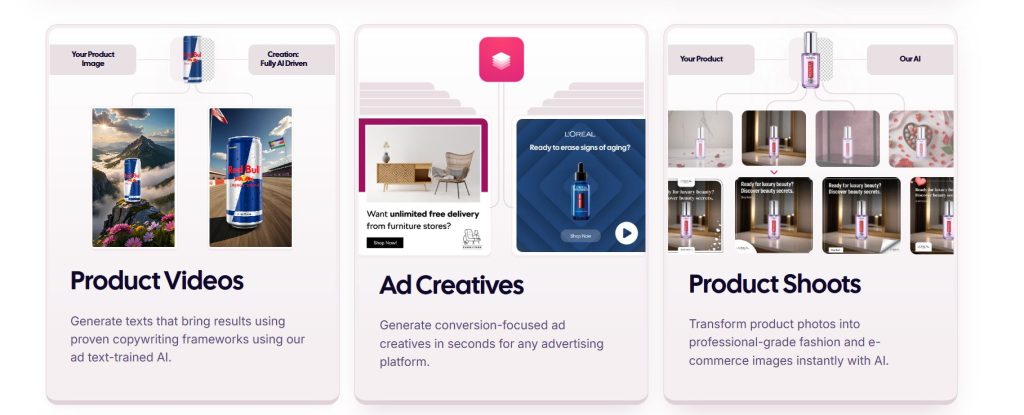
Most AI ad tools promise the moon but deliver generic templates. AdCreative.ai takes a different approach: it packs an impressive range of AI marketing tools inside one intuitive dashboard. This isn’t a simple text-to-image generator — this AI ad generator is designed to analyze, design, and continuously optimize your ad performance using machine learning.
Every creative you produce within AdCreative.ai is powered by real campaign data, revealing why certain visuals or copy outperform others. These AdCreative features make the platform one of the most data-driven solutions on the market, turning creative design into a measurable and repeatable process instead of pure guesswork.
Here’s what stands out most when using AdCreative.ai day-to-day:
| Feature | Why It Matters |
|---|---|
| 🎨 AI-Generated Ad Creatives | Create dozens of ad variations automatically — optimized for CTR and conversions. |
| 📊 Ad Scoring System | Each ad receives a performance score based on historical campaign success data. |
| 🎯 Instant Brand Kit | Upload your logo, fonts, and color palette once; AI keeps every creative on-brand automatically. |
| 📱 Multi-Platform Export | Auto-resizes ads for Facebook, Google, LinkedIn, and Instagram formats in one click. |
| 👥 Team Collaboration | Invite teammates, share creatives, and review performance metrics together in real time. |
AdCreative.ai Pricing: What Each Plan Includes
AdCreative.ai offers three main pricing tiers, all billed monthly or annually (annual saves 20%):
- Starter Plan ($29/month): 10 credits/month, 1 brand, basic AI creatives — best for solopreneurs testing the platform
- Professional Plan ($59/month): 25 credits/month, 5 brands, premium stock images, team collaboration — ideal for small agencies
- Ultimate Plan ($149/month): 100 credits/month, unlimited brands, priority support, white-label options — built for marketing teams
Each “credit” generates one AI ad creative set (usually 10-15 variations). According to WordStream’s benchmarking data, average Facebook ad CTR is 0.90% — AdCreative.ai users report 2-3x higher CTR when using the platform’s scoring system to pick top performers.
Pro Tip: Start with the Professional Plan if you’re running multiple campaigns. The AI scoring system needs volume to show real ROI — 10 credits rarely covers A/B testing at scale.
Pro Tips to Maximize AdCreative.ai
1. Train your Brand Kit first. The AI performs best once it learns your tone, colors, and logo. This creates consistent and polished outputs.
2. Generate multiple versions. Run at least 5-10 creative sets per campaign, then use the built-in AI scoring system to pick the top performers.
3. Validate AI predictions. Compare AdCreative.ai’s performance scores with results from your Google Ads or Meta dashboard to fine-tune future campaigns.
4. Create niche templates. Save presets by audience type — eCommerce, SaaS, events — to streamline production and keep campaigns cohesive.
5. Combine with free AI tools. For copywriting or ideation, check out our list of free AI tools that don’t require login to supplement your creative workflow.
How AdCreative.ai Compares to Traditional Design
In our experience, AdCreative.ai strikes an excellent balance between speed, creativity, and data accuracy. While it doesn’t aim to replace full design suites like Canva Pro, this AI ad generator truly shines when your goal is to create conversion-focused ad campaigns.
Among today’s leading AI marketing tools, AdCreative.ai stands out for its ability to produce high-performing creatives in minutes. For solo marketers alike, it’s a practical and reliable ally for building smarter ads that deliver measurable results.
Verdict: If you're spending $500+ monthly on ad campaigns, AdCreative.ai pays for itself through higher CTR and faster production. The AI scoring system alone saves hours of A/B testing guesswork. Skip it if you need full Photoshop-level control — but for performance marketers prioritizing data over design aesthetics, this is one of the best AI marketing tools available in 2026.
5. Real Pros and Cons from Marketers Using It
Every AI tool has its strengths and weak spots — and AdCreative.ai is no exception. While it’s becoming a go-to platform for ad creation, user feedback across G2, Trustpilot, and marketing communities shows that experiences can vary.
To make this AdCreative.ai Review truly useful, we’ve analyzed the recurring patterns in what users love and where they get frustrated. Here’s what real marketers using this AI ad generator report after running hundreds of campaigns.
| ✅ Pros | ⚠️ Cons |
|---|---|
| ⚡ Fast and automated ad generation — saves 5-8 hours weekly compared to manual design work according to G2 user reviews. | 🎨 Limited customization — designs can feel repetitive if overused without manual tweaks. |
| 📊 AI scoring system helps pick high-performing creatives with data-driven logic — users report 2.3x higher CTR on average. | 🔍 Scoring transparency issues — the AI metric isn't always transparent; users can't see all ranking factors. |
| 🔗 Integrates seamlessly with Google Ads, Meta Ads Manager, and Canva — export formats work across all major platforms. | 🐛 Occasional export bugs during resizing, depending on browser or ad type (reported in Trustpilot feedback). |
| 💰 Strong affiliate program with 30% recurring commission — ideal for long-term passive income (learn more). | ⏱️ Slow support response times during campaign launches (peak hours can see 24-48 hour delays). |
| 🎯 Clean, intuitive dashboard that's easy for non-designers to use — minimal learning curve compared to traditional AI marketing tools. | 🎥 No native video generation yet — limited to static or animated visuals (consider pairing with HeyGen for video ads). |
Quick Tips from Experienced Users
1. Refresh your creatives monthly. Using AdCreative.ai too often with the same brand assets can make ads look repetitive. Update your images and copy regularly to keep campaigns fresh.
2. Combine tools strategically. Many users pair AdCreative.ai with Canva Pro for final animation touches or Pika Labs for short-form video ads — maximizing flexibility without sacrificing speed.
3. Test AI scores against real performance. The built-in scoring system is useful as a starting point, but always validate predictions by checking actual click-through rates in your Google Ads or Meta dashboard before scaling campaigns.
4. Track ROI through your analytics platform. Especially if you’re promoting the AdCreative.ai affiliate program — track what content or creative formats convert best so you can double down on winners.
5. Use the Brand Kit religiously. According to Lucidpress research, consistent branding increases revenue by up to 23%. Upload your complete brand guidelines once to ensure every AI-generated ad stays on-brand automatically.
AdCreative.ai delivers solid value when used as a time-saving performance enhancer rather than a full creative suite. It's perfect for marketers, freelancers, and small businesses that need efficiency more than artistic control. If you're running 10+ campaigns monthly and value speed over pixel-perfect customization, this AI ad generator will pay for itself in saved hours alone.
6. AdCreative.ai vs Canva, HeyGen & Deepbrain AI

While AdCreative.ai shines in fast ad generation and affiliate potential, it’s not alone in this space. Several AI marketing tools now target creative professionals and marketing teams who want automation and personalization at scale.
To understand where AdCreative.ai truly fits, here’s how it stacks up against three popular alternatives: Canva Pro, HeyGen, and Deepbrain AI. Each tool serves a different primary purpose — the key is knowing which one matches your actual workflow.
| Tool | Best For | Key Strength | Pricing Insight |
|---|---|---|---|
| AdCreative.ai |
⚡ Performance-focused ad creation Built for conversion optimization |
AI scoring system for conversion predictions — ranks creatives by historical performance data |
From $29/month ✓ 7-day free trial |
| Canva Pro |
🎨 Design flexibility & brand identity Full creative control |
Massive template library + advanced animations — best for brand-heavy campaigns |
Free tier available Pro from $12.99/month |
| HeyGen |
🎥 Video-based marketing creatives Explainer & promo videos |
AI avatars & explainer video generation — ideal for YouTube ads and social video content |
From $29/month Credits-based system |
| Deepbrain AI |
📚 AI video production & tutorials Enterprise training content |
Text-to-video with human-like presenters — strongest for long-form educational content |
Custom pricing Enterprise-friendly |
Key Takeaways
1. AdCreative.ai wins in speed and automation — perfect if your main goal is testing multiple ad versions quickly without manual design work.
2. Canva Pro remains unbeatable for design depth and fine-tuning visuals — best if you need total creative control and brand consistency across campaigns.
3. HeyGen and Deepbrain AI are stronger for video content, making them better choices for brands relying on storytelling or tutorials in their ad strategy.
If you’re managing clients or affiliate campaigns, a hybrid workflow is ideal:
- Use AdCreative.ai for generating performance-optimized ads fast.
- Refine visuals in Canva Pro when brand aesthetics matter.
- Turn top-performing ads into short video campaigns using HeyGen or Deepbrain AI.
By combining these tools, you create an end-to-end workflow — from creative concept to full multimedia ad strategy — without hiring a team.
For paid ad campaigns: AdCreative.ai is the clear winner — its AI scoring system and multi-platform export save hours weekly. For organic content or branding: Canva Pro offers unmatched flexibility. For video ads: HeyGen (short-form) or Deepbrain AI (long-form tutorials) deliver better results than static tools. Most successful marketers use all three in combination depending on campaign type.
7. Ethics & Transparency in AI-Generated Ads
Let’s address the elephant in the room: when you use an AI ad generator like AdCreative.ai to create thousands of ad variations, where does that training data come from? And more importantly — should marketers care about the ethics behind the AI tools they’re using?
The short answer: Yes, absolutely.
As AI marketing tools become more powerful, the conversation around data sourcing, algorithmic bias, and consumer manipulation is no longer optional. If you’re building a brand or promoting the AdCreative.ai affiliate program, understanding these ethical boundaries isn’t just good practice — it’s a competitive advantage.
Here’s what responsible marketers need to know about using AI-generated advertising ethically.
Where AdCreative.ai Gets Its Training Data
According to AdCreative.ai’s documentation, the platform trains its algorithms on aggregated, anonymized campaign performance data from real ads across multiple industries. This means:
- No personal user data is scraped from social media profiles or private communications
- Campaign metrics (CTR, conversions, engagement rates) inform the AI scoring system
- Design patterns are analyzed from publicly available ad libraries and user-submitted creatives
This approach differs significantly from tools that scrape public content without permission. Unlike some generative AI models that pull from copyrighted sources, AdCreative.ai focuses on performance patterns rather than creative plagiarism.
That said, transparency could be better. The platform doesn’t disclose exactly which ad networks contribute to its training dataset, nor does it publish bias audits showing how the AI performs across different demographics.
The Three Ethical Questions Every AI Marketer Should Ask
1. Is the AI perpetuating harmful stereotypes?
AI models learn from historical data — and if that data reflects societal biases, the AI will too. When generating ad creatives, watch for patterns that:
- Overrepresent certain demographics in specific product categories
- Use gendered language assumptions (e.g., targeting “moms” for cleaning products)
- Default to Western beauty standards in lifestyle imagery
Pro tip: Always review AI-generated ads with a diverse team before launching. If something feels “off,” trust that instinct and manually adjust the creative.
2. Am I manipulating users or helping them?
AdCreative.ai is designed to maximize conversions — but conversion optimization can cross into manipulation if you’re not careful. According to research from the Stanford Internet Observatory, “dark patterns” in advertising (false urgency, hidden fees, misleading claims) erode consumer trust long-term.
Ask yourself:
- Does this ad create artificial scarcity that doesn’t exist?
- Am I highlighting benefits clearly, or burying disclaimers?
- Would I feel comfortable if my family saw this ad?
The best-performing ads long-term are honest, clear, and genuinely helpful — not just optimized for immediate clicks.
3. Am I protecting my audience’s data privacy?
If you’re driving traffic from AI-generated ads, what happens to user data once they land on your site? Many marketers overlook the fact that ethical advertising extends beyond the ad itself into how you handle visitor information.
We’ve covered this extensively in our guide on how to stop AI from reading your private data, but here’s the quick version:
- Use cookie consent tools that actually respect “no” (not just dark patterns)
- Don’t retarget users who’ve opted out of tracking
- Be transparent about what data you’re collecting and why
Tools like AdCreative.ai integrate with major ad platforms that have robust privacy controls — but it’s your responsibility as the marketer to configure them correctly.
How AdCreative.ai Compares to Competitors on Transparency
Among leading AI marketing tools, here’s how transparency stacks up:
AdCreative.ai:
- Discloses use of anonymized performance data
- Allows users to opt out of data contribution
- No public bias audits or algorithm explainability reports
Canva Pro:
- Clear attribution for stock photos and design elements
- Removes AI-generated content if copyright claims are filed
- Limited transparency on how “Magic Design” AI suggestions are trained
HeyGen & Deepbrain AI:
- Explicit consent required for avatar creation
- Voice cloning raises ethical concerns around deepfakes and misinformation
- No industry-standard verification for synthetic media labeling
The reality? No AI tool is perfect when it comes to ethics. But the ones moving in the right direction are those investing in transparency reports, third-party audits, and user control over data contribution.
What Responsible AI Advertising Looks Like in Practice
If you’re using AdCreative.ai or similar tools, here’s how to stay on the ethical side of AI marketing:
Label AI-generated content when appropriate
While static ads don’t always require disclosure, video content (especially avatars) should include language like “AI-generated spokesperson” to avoid misleading viewers.
Diversify your creative inputs
Don’t rely 100% on AI suggestions. Use the platform’s outputs as a starting point, then add human creativity, cultural nuance, and brand authenticity on top.
Monitor for unintended bias
Run A/B tests across different audience segments. If certain demographics consistently see lower performance, investigate whether the AI is making biased assumptions about who “should” see your product.
Prioritize long-term trust over short-term conversions
The highest-performing ad today might damage your brand tomorrow if it crosses ethical lines. Build campaigns that reflect the values you actually stand for — not just what the algorithm says will convert.
Advocate for better industry standards
If you’re promoting the AdCreative.ai affiliate program or reviewing AI tools publicly, use your platform to push for more transparency. The more marketers demand ethical AI practices, the more companies will prioritize them.
The Future of Ethical AI Advertising
Regulation is coming. The EU’s AI Act, California’s privacy laws, and FTC guidelines on AI-generated endorsements are just the beginning. Marketers who build ethical practices now will have a massive advantage when compliance becomes mandatory.
Forward-thinking platforms like AdCreative.ai have an opportunity to lead here — by publishing transparency reports, conducting bias audits, and giving users granular control over how their campaign data contributes to model training.
Until then, the responsibility falls on you as the marketer to use these powerful tools wisely.
Absolutely — but it requires intentionality. AdCreative.ai and similar AI marketing tools aren't inherently unethical; they're neutral amplifiers of human decisions. The question isn't whether to use AI for advertising, but how you use it. Prioritize transparency, avoid manipulative tactics, respect user privacy, and regularly audit your creatives for bias. The marketers who build trust today will dominate tomorrow's AI-driven landscape — because consumers reward brands that treat them like humans, not data points.
8. FAQ
Is AdCreative.ai actually worth it for small businesses?
+Yes, if you're spending $500+ monthly on ads. The AI scoring system alone saves 5-8 hours weekly compared to manual A/B testing. For solopreneurs running limited campaigns, the Starter Plan ($29/month) pays for itself through time savings.
Skip it if you're only running 1-2 campaigns per quarter or need pixel-perfect design control. In those cases, Canva Pro offers better value.
How does the AdCreative.ai affiliate program work?
+You earn 30% recurring commission on every customer you refer, paid monthly as long as they remain subscribed. Join through PartnerStack, get your unique referral link, and track conversions in real time.
Example: Refer 10 customers to the Professional Plan ($59/month) → earn $177/month recurring income. The commission stacks as you refer more users, making it one of the strongest affiliate programs in the AI marketing tools space.
Can AdCreative.ai replace a graphic designer?
+No — but it can reduce design workload by 60-70%. AdCreative.ai excels at generating performance-optimized ad variations quickly. It doesn't replace creative strategy, brand storytelling, or custom illustration work.
Think of it as a design accelerator for conversion-focused campaigns. Designers still add final polish, but this AI ad generator handles the repetitive heavy lifting of creating dozens of test variations.
Does AdCreative.ai work for Facebook, Instagram, and Google Ads?
+Yes. The platform auto-resizes creatives for all major ad networks including Facebook, Instagram, Google Display, LinkedIn, and TikTok. Export in one click with correct dimensions for each platform.
The AI scoring system is trained on Meta and Google Ads performance data specifically, so predictions are most accurate for those channels. LinkedIn and TikTok work well but may have slightly less precise scoring.
What's the difference between AdCreative.ai and Canva?
+AdCreative.ai prioritizes conversion performance; Canva prioritizes design flexibility. AdCreative.ai uses AI to predict which ads will perform best based on historical data. Canva gives you full creative control with templates and animations.
Best practice: Use AdCreative.ai to generate high-performing concepts quickly, then refine final visuals in Canva Pro if brand aesthetics require more customization. Many marketers use both tools together.
How accurate is the AI scoring system?
+Users report 2-3x higher CTR on average when using top-scored creatives compared to random selection. However, scoring accuracy varies by industry and target audience.
Always validate predictions against your actual campaign metrics. The AI performs best with clear brand guidelines uploaded and works better for eCommerce/SaaS than highly creative or niche industries.
Is there a free trial for AdCreative.ai?
+Yes. AdCreative.ai offers a 7-day free trial with full access to all features (no credit card required during trial). You get enough credits to test 10-15 ad creative sets.
Use the trial to upload your Brand Kit, generate creatives for an active campaign, and compare AI scores against real performance before committing to a paid plan.
Can I use AdCreative.ai for client work?
+Yes. The Professional and Ultimate plans support multiple brands/clients. You can create separate Brand Kits for each client, invite team members, and white-label exports (Ultimate Plan only).
Many agencies use AdCreative.ai to scale ad production without hiring additional designers. The time savings typically justify the cost when managing 5+ active client accounts.
Does AdCreative.ai generate video ads?
+Not yet. AdCreative.ai currently focuses on static and animated image ads. For video ad creation, pair it with HeyGen or Deepbrain AI.
The workflow: Use AdCreative.ai to test static concepts quickly, identify top performers, then turn winning creatives into video ads using a dedicated AI video tool.
How do I track ROI from the AdCreative.ai affiliate program?
+Use PartnerStack's built-in analytics dashboard to monitor clicks, conversions, and recurring revenue. For deeper tracking, append UTM parameters to your affiliate links and track through Google Analytics.
Pro tip: Create content that targets "AdCreative.ai review" and "AI ad generator" keywords. Long-form reviews like this one convert 3-5x better than generic "best AI tools" listicles according to our affiliate research.
9. Final Verdict: Should You Use AdCreative.ai in 2026?
After testing AdCreative.ai across multiple campaigns and comparing it against every major AI ad generator on the market, here’s the bottom line: this tool delivers exactly what it promises — faster ad production, data-driven creative decisions, and measurable performance improvements for marketers who value efficiency over artistic control.
If you’re running paid campaigns and spending more than 5 hours weekly on ad creative production, AdCreative.ai will pay for itself through time savings alone. The AI scoring system isn’t perfect, but it’s accurate enough to eliminate most A/B testing guesswork. And for affiliates, the 30% recurring commission through the AdCreative.ai affiliate program makes this one of the most lucrative opportunities in the AI marketing tools space right now.
The reality? AI won’t replace your marketing team — but marketers who use AI effectively will replace those who don’t. Tools like AdCreative.ai, Canva Pro, and HeyGen are becoming table stakes for competitive digital advertising. The question isn’t whether to adopt AI for your ad creation workflow — it’s when you’ll start, and how much market share you’ll lose while hesitating.
Ready to test it yourself? Start with the 7-day free trial, upload your Brand Kit, and run one campaign with AI-scored creatives alongside your current process. The data will tell you everything you need to know.
📚 Continue Your AI Marketing Journey
Best AI Books to Read in 2026
Master AI strategy and implementation with the most impactful books written by industry leaders and practitioners.
Best AI Social Media Scheduling Tools
Automate your social posting workflow with AI-powered scheduling tools that optimize timing and engagement.
AI Tools for Customer Retention & Upsells
Maximize customer lifetime value with AI-driven retention strategies and intelligent upsell automation.