

Mirko
AI Tech Writer
Most solopreneurs hand $3,000–$5,000 a month to a virtual assistant for tasks that could run on autopilot. Email triage, calendar blocking, lead research, CRM updates — none of it requires human judgment anymore. We analyzed how a focused AI assistant stack — three tools, no coding, under $200/month — replaces the mechanical half of a VA's workload. The ROI math is not subtle.
Some links are affiliate links · You support us at no extra cost · Full disclosure
What a $5K/Month VA Actually Does All Day
Most VA invoices are really lists of tasks that stopped needing a human the moment AI agents matured. Email triage, calendar blocks, CRM updates — they look like coordination work. But they're mechanical sequences dressed up as skilled labor. Most solopreneurs paying $3,000–$5,000 a month for a virtual assistant are funding a workflow problem an AI assistant stack now solves at a fraction of that cost.
To understand the real bill, break down where those weekly hours actually go. According to Upwork's virtual assistant marketplace, US-based VAs charge $25–$50/hour. Run the breakdown below and the numbers tell you exactly what you're automating — and what you're not.
| Task Category | Hrs / Week | Monthly Cost* | AI Automatable? |
|---|---|---|---|
| Email triage & replies | 10 hrs | ~$1,000 | ✓ Yes — Lindy AI |
| Calendar & scheduling | 5 hrs | ~$500 | ✓ Yes — Lindy AI |
| Lead research & enrichment | 8 hrs | ~$800 | ✓ Yes — Clay |
| Data entry & CRM updates | 7 hrs | ~$700 | ✓ Yes — Bardeen |
| Admin & browser tasks | 5 hrs | ~$500 | ✓ Yes — Bardeen |
| Creative & judgment tasks | 5 hrs | ~$500 | ✗ Not yet |
| Total automatable | 35 hrs | ~$3,500 | 87% of VA hours |
*Estimated at $25/hr blended rate. US-based VA rates vary $25–$50/hr based on experience and platform.
Thirty-five hours a week of purely mechanical, rule-based execution. That is precisely what an AI assistant stack is built to absorb. The remaining five hours — judgment calls, client voice decisions, relationship-sensitive moments — still benefit from a human. But five hours a week of genuine judgment work does not justify a $5,000 monthly retainer. It justifies a $250 project fee.
🧠 Run This Test Before Your Next VA Renewal
List every task your VA handles. Flag each one that follows a consistent, repeatable pattern — same input, same expected output, every time. If 70% or more of the list fits that description, those tasks are candidates for your AI assistant stack. For a complete framework on what to automate first, see our guide to the best AI tools for solopreneurs.
The 3-Agent AI Assistant Stack
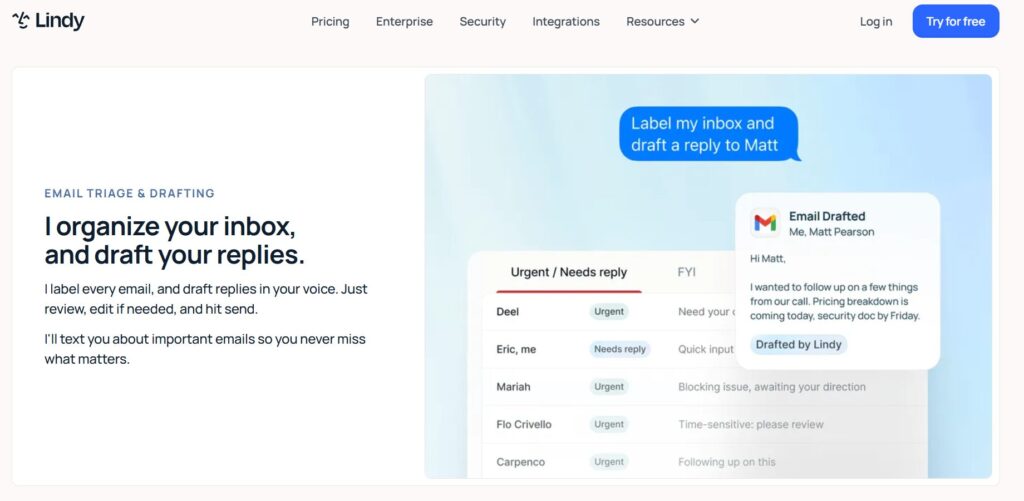
Here's the stack. Three tools, each owning a specific category of work that previously required hiring, onboarding, and monthly invoices. Together, they form an AI assistant stack that covers 87% of a VA's mechanical workload — automatically, consistently, without sick days.
Lindy AI
Lindy sits between your Gmail or Outlook inbox and the world. You train it with sample emails and configure response rules — VIP escalations, follow-up schedules, booking logic. Once live, it drafts replies in your exact voice, routes action items, and books meetings without your involvement. For most solopreneurs, this alone replaces 10 weekly hours of VA email management. Check our full Lindy AI review for setup details.
Free → Plus $49.99/moBardeen AI
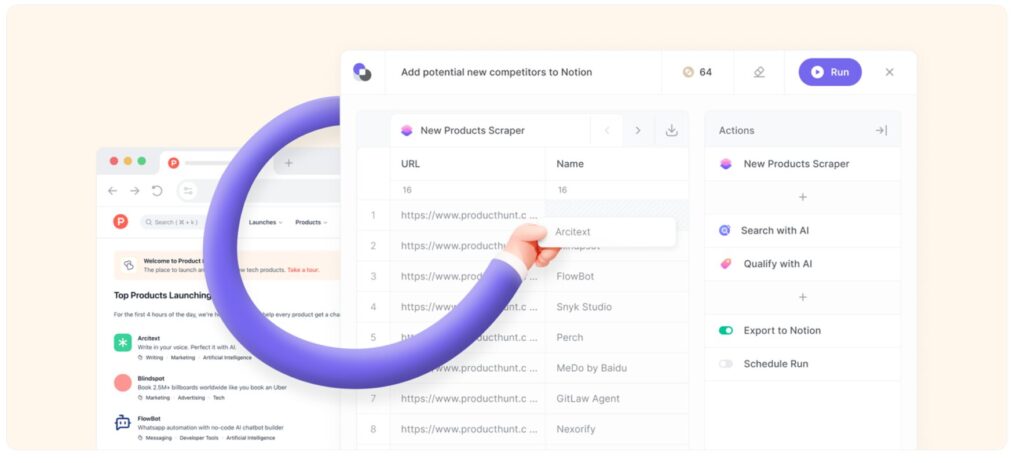
Bardeen runs as a Chrome extension and operates as your browser automation layer. You describe the workflow in plain English — "pull this LinkedIn profile, enrich it, push to HubSpot" — and Bardeen builds the playbook automatically. Lead imports, CRM field updates, spreadsheet population, form submissions. All trigger-based. The free plan handles most individual workflows without payment.
Free → Pro $10/moClay
Clay is the lead research engine of this AI assistant stack. Feed it a domain list, a LinkedIn filter, or a search query, and it builds fully enriched prospect records — verified emails, phone numbers, technographics, LinkedIn activity signals — by querying 100+ data providers simultaneously. The free tier (100 credits/month) is genuinely enough to test your first outbound campaign before committing to a paid plan.
Free → Starter $134/mo💰 Starting Stack Cost — What You Actually Pay
When your lead volume outgrows Clay's free tier, the Starter plan at $134/month brings the full stack to roughly $194/month — still $3,800+ per month below a US-based VA. You can start with Lindy AI's free plan and build the inbox agent before touching the other two tools.
Step-by-Step Workflow Setup
Knowing which tools belong in your AI assistant stack is the easy part. Getting them running in under a weekend — that's where most solopreneurs stall. This is the exact setup sequence we recommend: start with inbox, layer in scheduling, then add data automation once the first two agents are stable.
📧 Inbox Automation Saves 8–10 hrs/week
Lindy AI's inbox agent reads every email, categorizes it, drafts context-aware replies in your writing style, and routes anything requiring your attention to a priority folder. Setup takes about 2–3 hours for the initial training phase.
📅 Meeting Scheduling Agent Saves 4–5 hrs/week
The second layer of your AI assistant stack is scheduling automation. Lindy's scheduling agent connects to Google Calendar or Outlook, reads your availability, and handles inbound booking requests end-to-end — without calendar links or back-and-forth emails.
🔍 Lead Research + Outreach Sequences Saves 7–9 hrs/week
Clay handles the research layer of this AI assistant stack. Once leads are enriched, connect an outreach tool (Reply.io or your email platform) to trigger personalized sequences automatically. For a deeper look at the connection setup, our AI agent workflow guide covers the full flow.
🗂️ CRM Sync + Task Management Saves 5–7 hrs/week
Bardeen covers the data entry layer — the part of VA work that's pure mechanical repetition. Once you build a playbook, CRM updates run without anyone touching them.
⚡ Bardeen Setup for CRM Automation
Install the Bardeen Chrome extension, connect your CRM (HubSpot, Pipedrive, or Notion work out of the box), and describe the workflow in plain English: "When I view a LinkedIn profile, create a new contact in HubSpot with their name, title, and company." Bardeen builds the playbook automatically. Run it once to verify, then set it as a trigger that fires on future LinkedIn visits — no more manual data entry, ever.
The ROI Math: Break Even in 30 Days
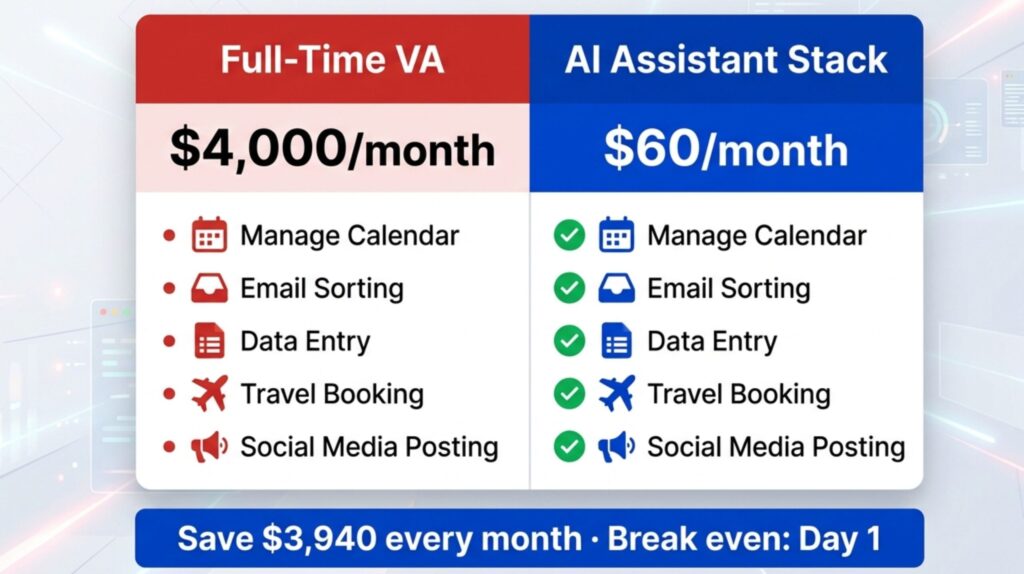
The numbers are straightforward. A full-time US-based VA at $25/hour across 40 weekly hours costs $4,000/month. The AI assistant stack we've outlined costs $59.99/month to start. That's not a rounding error — it's a $3,940 monthly difference. Here's the full comparison, including what happens when you scale Clay to its paid plan.
| Cost Item | Monthly | Annual |
|---|---|---|
| Full-time VA (40 hrs @ $25/hr) | $4,000 | $48,000 |
| Part-time VA (20 hrs @ $25/hr) | $2,000 | $24,000 |
| Lindy AI Plus (inbox + scheduling) | $49.99 | $599 |
| Bardeen Pro (data entry + browser) | $10.00 | $120 |
| Clay (free tier) | $0 | $0 |
| Clay Starter (when scaling) | $134 | $1,608 |
| Starting AI stack total | $59.99 | $719 |
| Monthly savings vs full-time VA | $3,940 | $47,281 |
📊 What Changes After 30 Days
In the first month, expect 2–3 hours of setup and agent training. After that, your AI assistant stack runs without maintenance beyond occasional rule adjustments. Most solopreneurs report that by week four, they've stopped thinking about the automation entirely — it just runs. For workflows that go beyond this three-tool stack, see 5 AI workflows for small business for the next level of automation.
Tool Comparison: Which Agent Does What Best
Not every tool in an AI assistant stack does everything equally well. Lindy, Bardeen, MindStudio, and Reply.io each dominate a specific slice of the automation landscape. This table maps which tool wins each use case — different winner per row, because no single platform rules the full AI assistant stack.
| Use Case | Lindy AI | Bardeen | MindStudio | Reply.io | Winner |
|---|---|---|---|---|---|
| Email automation | ✓✓✓ | — | ✓ | ✓ | Lindy AI |
| Browser / data entry | — | ✓✓✓ | — | — | Bardeen |
| Custom no-code agents | ✓ | — | ✓✓✓ | — | MindStudio |
| Sales outreach sequences | ✓ | — | — | ✓✓✓ | Reply.io |
| Best free plan | ✓ (400 credits) | ✓✓✓ (unlimited non-premium) | ✓ | ✓ (trial) | Bardeen |
| Multi-channel outreach | — | — | — | ✓✓✓ | Reply.io |
| Native integrations | ✓✓✓ (3,000+) | ✓✓ (1,000+ playbooks) | ✓ (growing) | ✓✓ | Lindy AI |
| Setup speed | ✓✓ Fast | ✓✓ Fast | ✓✓✓ Templates | ✓ Medium | MindStudio |
✓✓✓ = best in class for this use case · ✓ = capable · — = not designed for this
Choosing the right components for your AI assistant stack comes down to your biggest time drain. For a full head-to-head breakdown of the two most popular stack tools, our Lindy AI vs Bardeen AI comparison covers the setup differences in detail. And if outbound sequences are your priority, the Reply.io review is worth reading before committing.
Setup Mistakes That Kill Solopreneur Stacks
An AI assistant stack fails in predictable ways. Most solopreneurs who abandon the setup make one of five mistakes — none of which are permanent, but all of which are avoidable if you know what to watch for before you start.
🛠️ Before You Configure Anything
Map your current VA tasks against these five failure patterns first. If you want to go further and build a custom research agent beyond this stack, our guide on building an AI research agent without coding covers the no-code setup process in detail.
Frequently Asked Questions — AI Assistant Stack
What is an AI assistant stack and how does it replace a virtual assistant?
+An AI assistant stack is a set of two or more AI automation tools configured to handle the same task categories a virtual assistant manages manually. In practice: Lindy AI handles inbox and scheduling, Bardeen covers data entry and browser automation, and Clay runs lead research.
Together they absorb roughly 87% of a typical VA's weekly workload — email replies, calendar management, CRM updates, and prospect research — for under $200/month versus $3,000–$5,000 for a human VA.
How much does it cost to build an AI assistant stack in 2026?
+Starting cost is approximately $60/month — Lindy AI Plus ($49.99) plus Bardeen Pro ($10), with Clay's free tier covering basic lead research.
When outbound volume grows beyond 100 monthly enrichments, Clay's Starter plan at $134/month brings the full stack to ~$194/month — still over $3,800 less per month than a full-time US-based VA.
Can Lindy AI actually handle email the same way a virtual assistant does?
+Lindy handles the mechanical parts of email — categorizing, drafting replies in your voice, routing action items, following up on unanswered threads — as reliably as a VA for rule-based scenarios. The critical setup step is the voice training phase: upload 15–20 real emails you've written, and Lindy calibrates its tone to match yours precisely.
Start in draft-review mode for two weeks before enabling auto-send. Most solopreneurs report saving 8–10 inbox hours per week within the first month of operation.
Is Clay worth the price for solo operators doing lead research?
+Clay's free tier (100 credits/month) is enough to test your ideal customer profile and run a first campaign of 50–80 enriched contacts. For solo operators, this validates whether Clay fits their AI assistant stack before any payment.
If outbound volume grows beyond that, the Starter plan at $134/month provides 2,000 credits and access to 100+ enrichment providers simultaneously — consistently eliminating 7–9 hours of weekly manual research.
How long does it take to set up an AI assistant stack?
+A basic stack covering inbox automation (Lindy) and data entry workflows (Bardeen) can be fully configured in one focused weekend — approximately 4–6 hours total. Lindy takes the longest because of voice training; Bardeen playbooks average 30–60 minutes each.
Clay's first enrichment table typically takes under 90 minutes to set up and run. The stack doesn't require ongoing technical maintenance — just a 15-minute weekly review of each agent's activity log.
What tasks can an AI assistant stack not replace?
+The AI assistant stack handles rule-based, mechanical workflows very well. It struggles with tasks requiring genuine human judgment: high-stakes client situations, relationship-sensitive communication, brand strategy decisions, and negotiation conversations.
These account for roughly 10–15% of a typical VA's workload and still benefit from human judgment. Set VIP escalation rules in Lindy to ensure those contacts always reach you directly — never the automation layer.
How does Bardeen compare to Zapier for VA-style automation?
+Zapier connects cloud applications via APIs — ideal for triggering actions between SaaS tools when an event occurs in another. Bardeen operates inside your browser and automates websites without public APIs: LinkedIn scraping, form fills, web data extraction, and interactions with apps that don't have Zapier integrations.
For VA replacement specifically, Bardeen handles tasks Zapier cannot. Most solopreneurs find Bardeen's free plan replaces 5–7 hours of weekly data entry without any paid subscription.
What happens when an AI agent in the stack makes a mistake?
+AI agents make mistakes in predictable patterns: Lindy might misclassify an email priority, Bardeen might fail to extract a field cleanly, Clay might return an incorrect email from a lower-quality data provider. The safeguard is running each agent in review mode for the first two weeks before enabling autonomous action.
Set a recurring 15-minute weekly audit of each agent's activity log. Most errors are edge cases fixed permanently by a single rule update — and agents improve consistently when you correct them rather than ignore the mistakes.
🚀 Keep Building Your AI Automation Stack
You've got the foundation of your AI assistant stack. Now go deeper — explore the tools, setups, and workflows that take it further: