
Mirko
Tech Writer
Hiring a developer for $5,000 to scrape data from websites, or spending 10 minutes setting up Browse AI yourself? I chose the latter. After testing it for 30 days on real projects — extracting competitor pricing, monitoring product availability, and pulling LinkedIn data — here's my honest take on whether this no-code web scraper lives up to the hype in 2026.
📋 What's Inside
Some links are affiliate links · You support the blog at no extra cost · Details
1. What is Browse AI?
Browse AI is a no-code web scraping tool that lets you extract data from any website without writing a single line of code. Instead of hiring developers or learning Python, you point, click, and let Browse AI’s robots handle the heavy lifting.
Here’s how it works in practice. You visit a website, select the data you want (product prices, contact info, job listings, competitor research), and Browse AI records your actions. It then creates a “robot” that repeats the exact same process automatically — hourly, daily, or whenever you need fresh data.
The real power? Browse AI runs in the cloud 24/7. Your robots keep working even when your laptop is off, delivering scraped data directly to Google Sheets, Airtable, or via API. No manual copying. No spreadsheet hell.
What makes Browse AI different from traditional scrapers is the visual approach. Tools like Apify require technical knowledge and custom scripts. Browse AI gives you pre-built templates for 500+ popular websites (Amazon, LinkedIn, Google Maps, Yelp) — meaning you can start extracting data in under 5 minutes, not 5 hours.
Common use cases include: monitoring competitor pricing, scraping real estate listings, extracting lead data from directories, tracking product availability, pulling job postings, and gathering market research. If you’ve ever thought “I wish I could automate collecting this data,” Browse AI is built for that exact moment.
Who benefits most? Freelancers who need client research, small marketing teams tracking competitors, e-commerce sellers monitoring prices, recruiters sourcing candidates, and anyone who’s ever wasted hours copy-pasting data into spreadsheets. You don’t need to be technical — if you can use a web browser, you can use Browse AI.
This review is based on hands-on testing in April 2026, covering real-world projects, pricing updates, feature comparisons, and whether Browse AI still holds up against newer competitors in the no-code automation space.
 Quick Example:
Imagine you’re tracking 50 competitor products on Amazon. Manually checking prices daily = 2 hours. With Browse AI, you set up one robot in 10 minutes, and it updates a Google Sheet automatically every morning. That’s 730 hours saved per year.
For teams just starting with automation, tools like Browse AI pair well with free AI tools that don’t require login barriers — keeping your workflow simple and accessible.
If you’re comparing Browse AI to code-heavy alternatives, Apify’s web scraping platform offers more flexibility for developers but has a steeper learning curve for non-technical users.
2. Key Features and How Browse AI Works
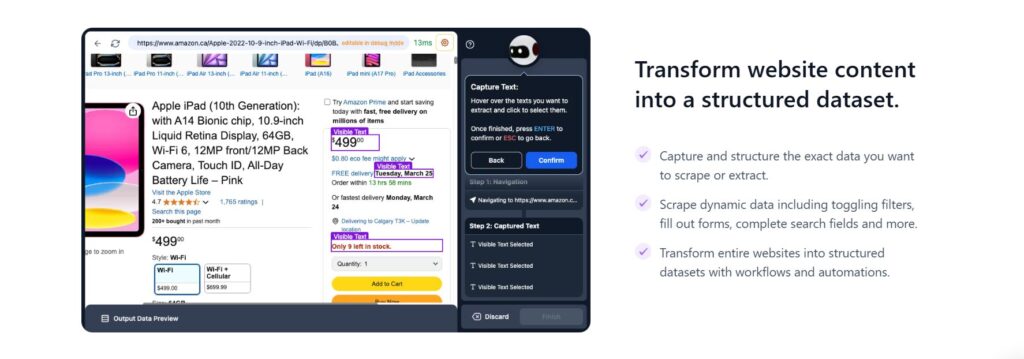
Browse AI works through three simple steps: record, customize, and automate. No coding required at any stage.
Step 1: Record Your Actions
You install the Browse AI Chrome extension, navigate to any website, and click “Record.” As you interact with the page — clicking product titles, selecting filters, scrolling through listings — Browse AI captures every action. Think of it as teaching a robot by showing it what to do, not writing instructions.
Step 2: Select the Data You Want
Browse AI analyzes the page structure and highlights extractable data. You click on elements you need (prices, names, images, descriptions), and the tool automatically detects similar patterns across the entire page. If you select one product price, it finds all product prices. One job title? It grabs every job title on the list.
Step 3: Run and Schedule
Hit “Save,” and your robot is ready. You can run it once for immediate data or schedule it to run automatically (every hour, daily, weekly). Browse AI handles pagination, dynamic content loading, and exports everything to Google Sheets, CSV, JSON, or via API.
What makes this powerful? You’re not writing code or dealing with CSS selectors. Browse AI’s visual interface does the technical work behind the scenes. The Chrome extension handles JavaScript-heavy sites, infinite scroll pages, and dynamic content that traditional scrapers struggle with.
Real-world example: Need to track 100 Airbnb listings in your city? Record yourself clicking on one listing. Browse AI recognizes the pattern and extracts all 100 automatically. Schedule it to run daily, and you’ll have fresh pricing data in your Google Sheet every morning — zero manual work after the 5-minute setup.
| Feature | What It Does |
|---|---|
| 🤖 Pre-built Templates | 500+ ready-made robots for Amazon, LinkedIn, Google Maps, Yelp, Zillow — start scraping in 2 minutes without custom setup |
| 🔄 Auto-Scheduling | Run robots hourly, daily, or weekly. Data updates automatically while you sleep — no manual intervention needed |
| 📊 Google Sheets Integration | Scraped data flows directly into spreadsheets. No manual exports, no CSV uploads, no copy-pasting |
| 🌐 Cloud-Based Execution | Robots run on Browse AI's servers 24/7. Close your browser, shut down your computer — scraping continues uninterrupted |
| 🔔 Change Monitoring | Get instant alerts when data changes — price drops, new listings, stock status. Perfect for competitive intelligence |
| 🛡️ Anti-Bot Detection | Built-in proxy rotation and CAPTCHA handling. Scrapes sites that block standard automation tools (improved April 2026) |
| 📦 Bulk Actions | Extract data from hundreds of pages in one run. Process entire product catalogs or directory listings at scale |
| 🔗 API Access | Connect scraped data to Zapier, Make.com, or custom apps. Build automated workflows beyond spreadsheets |
| 📸 Screenshot Capture | Archive visual proof of scraped pages. Track design changes, monitor ads, document competitor strategies |
| ⚡ Pagination Handling | Automatically navigates "Next Page" buttons. Scrape multi-page search results without manual clicking |
Want to see it in action? Browse AI offers a free plan with 50 credits per month — no credit card required.
Start Free Trial →3. Who Is Browse AI For and When It’s Useful
Browse AI works best for specific people and use cases. Here’s who gets the most value from it — and who should look elsewhere.
Freelancers & Consultants
Need competitor research or client data without hiring developers. Set up robots in 10 minutes, deliver results same-day.
E-commerce Teams
Track competitor pricing across hundreds of products. Monitor hourly, flag changes instantly, feed data to Google Sheets for repricing.
Marketing Agencies
Extract leads from directories, scrape contact info, pull social media data. Pre-built templates for LinkedIn, Google Maps, Yelp.
Recruiters & HR Teams
Source candidates from job boards automatically. Extract postings, contact details, profiles. Catch new listings the moment they appear.
Content Creators
Gather data for articles and reports. Pull pricing, ratings, locations automatically. Cut research time from hours to minutes.
Real Estate Professionals
Monitor property listings and rental prices. Track Zillow, scrape Airbnb availability, analyze market inventory automatically.
When Browse AI makes the most sense:
You’re scraping standard websites with predictable structures — Amazon product pages, directory listings, search results where pre-built templates exist.
You need scheduled automation, not one-time extractions. Daily price monitoring, weekly lead generation, hourly inventory checks justify the subscription cost.
You want data in Google Sheets or Zapier. If your workflow ends with “dump this into a spreadsheet,” Browse AI handles the entire pipeline.
You’re non-technical or don’t want to maintain code. If “learning Python” sounds miserable, the visual interface is worth the premium.
Skip Browse AI If...
- You need to scrape heavily protected sites. Enterprise platforms with Cloudflare, PerimeterX, or aggressive CAPTCHAs will block Browse AI regularly.
- This is a one-time project. Paying $49/month for a single extraction doesn't make sense. Use the free plan or hire a freelancer instead.
- You need complex data transformation. Browse AI extracts raw data as-is. Regex parsing, API lookups, or cleaning happens separately in Google Sheets or Zapier.
- You're a developer comfortable with Scrapy/Puppeteer. The visual interface adds overhead, and credit-based pricing costs more than running scrapers on your own infrastructure.
Bottom line: Browse AI shines for repetitive, scheduled scraping on standard websites where ease of use matters more than technical flexibility. If you're replacing manual data collection with automation, it pays for itself immediately. If you need advanced features or one-off projects, other tools fit better.
📖 Web Scraping with Python
by Ryan Mitchell
This hands-on guide teaches you how to build custom scrapers from scratch using Python, BeautifulSoup, and Scrapy. Perfect for when you outgrow no-code tools or need complete control over complex scraping logic.
Browse AI handles 80% of scraping tasks effortlessly. This book prepares you for the other 20% — sites with unusual structures, advanced authentication flows, or custom data pipelines that visual recorders can't handle.
4. Browse AI Pricing and Plans
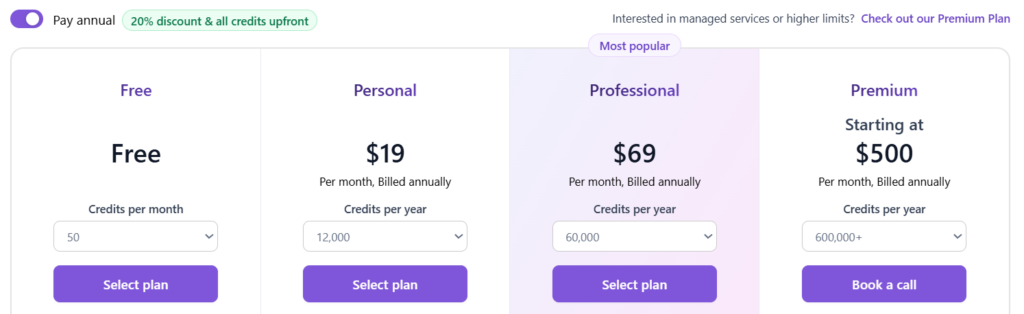
Browse AI uses a credit-based pricing system across four plans. One credit equals one page scraped — whether that’s a single product listing or a search results page with 50 items.
How credits work in practice:
Scraping one Amazon product page costs 1 credit. Running a robot daily for 30 days costs 30 credits. Monitoring a price hourly for a month costs 720 credits (24 hours × 30 days). The key difference: scraping an entire search results page with 100 listings still costs just 1 credit, not 100.
Which plan should you choose?
If you’re testing Browse AI or running occasional scrapes (under 50 pages/month), the Free plan works. For regular competitor monitoring or lead generation (up to 2,000 pages/month), Starter makes sense. Professional suits agencies and teams scraping at scale. Enterprise is for companies needing custom infrastructure and legal compliance support.
Pricing notes updated April 2026:
Credits roll over for one month. Unused credits from February carry into March, then expire. Annual billing saves 20%. Starter drops to $39/month when paid yearly ($468 vs $588). You can buy add-on credits mid-month without upgrading — 1,000 credits cost $25 on any plan.
How does this compare to competitors?
Octoparse charges $75/month for similar features but caps you at 10,000 pages with slower execution. Apify offers more flexibility but requires coding and charges per compute unit, making costs unpredictable. Browse AI’s flat-rate structure is easier to budget, especially for non-technical users.
Money-saving tip: Build and test robots on the Free plan first. Many users waste paid credits debugging broken scrapers when they could’ve tested for free. Once your robot works perfectly, upgrade to automate it.
| Plan | Credits/Month | Key Features | Best For |
|---|---|---|---|
| Free $0/mo | 50 credits |
|
Best for: Testing the platform, small one-time projects, personal use
|
| Starter Most Popular $49/mo | 2,000 credits |
|
Best for: Small businesses, agencies, e-commerce sellers tracking competitors
|
| Professional $149/mo | 10,000 credits |
|
Best for: Marketing teams, SaaS companies, high-volume data extraction
|
| Enterprise Custom | Unlimited |
|
Best for: Large enterprises, financial firms, custom compliance needs
|
Start with the Free plan. Test Browse AI with 50 credits per month — no credit card required. Upgrade only when you need more capacity.
Try Browse AI Free →5. Pros and Cons of Browse AI
Browse AI isn’t perfect for everyone. After 30 days of testing on real projects, here’s the honest breakdown.
Pros
- ✓ Zero coding Visual recorder works instantly
- ✓ 500+ templates Amazon, LinkedIn ready to use
- ✓ 24/7 cloud execution Runs even when laptop is off
- ✓ Handles JavaScript sites Works on dynamic content
- ✓ Predictable pricing 1 page = 1 credit, no surprises
- ✓ Auto Google Sheets sync Data flows without exports
Cons
- ✗ Credits burn fast Hourly monitoring = 720 credits/month per URL
- ✗ Anti-bot not foolproof Cloudflare sites still block sometimes
- ✗ Limited data cleaning No built-in formatting tools
- ✗ Custom robots need tweaking Complex sites require trial and error
- ✗ No proxies on lower tiers Free/Starter share IPs, hit rate limits
- ✗ Slower support on Free plan 24-48hr email response time
Ready to test it yourself? Start with Browse AI's free plan — 50 credits, no credit card needed.
Try Browse AI Free →6. Alternatives and Competitors to Browse AI
Browse AI isn’t the only no-code web scraper available in 2026. Depending on your technical skills, budget, and scraping complexity, these alternatives might fit better.
When to consider alternatives:
If Browse AI’s credit system doesn’t match your usage pattern, you need more advanced data transformation, or you’re scraping sites that require custom JavaScript execution, other tools offer different trade-offs between ease of use and technical power.
| Tool | Ease of Use | Automation | Price Range | Best For |
|---|---|---|---|---|
| Browse AI | Very Easy | High | Free – $149/mo | Beginners and small teams needing quick setup |
| Apify | Moderate | Very High | $49 – $499/mo | Developers building custom scrapers and APIs |
| ParseHub | Easy | Medium | Free – $189/mo | Visual scraping with desktop app control |
| Octoparse | Moderate | High | $75 – $249/mo | Desktop scraping with scheduled cloud runs |
| Import.io | Moderate | High | $299+ /mo | Enterprise teams building data pipelines |
Browse AI vs Apify
Apify offers more technical power but requires JavaScript knowledge. You write custom scrapers using their SDK, which means unlimited flexibility for complex sites. Browse AI’s visual recorder is faster for standard use cases but hits limits on heavily customized scraping logic.
Price difference: Apify’s compute-based billing fluctuates — you might pay $49 one month and $150 the next depending on usage. Browse AI’s flat credit system is predictable.
Choose Apify if: You’re a developer, need to scrape sites with complex authentication flows, or want to sell scrapers as APIs to clients.
Browse AI vs ParseHub
ParseHub uses a desktop app instead of cloud-based execution. You download the software, build scrapers visually similar to Browse AI, then export data or schedule cloud runs. The interface feels more dated but handles some edge cases Browse AI struggles with.
Price difference: ParseHub’s free plan offers 200 pages per run (vs Browse AI’s 50 credits total). Paid plans start at $149/month for 10,000 pages.
Choose ParseHub if: You want more control over scraper execution timing, need to process large single runs locally, or prefer desktop software over browser extensions.
Browse AI vs Octoparse
Octoparse sits between Browse AI and Apify in complexity. It offers point-and-click scraping like Browse AI but includes built-in data cleaning, regex tools, and IP rotation on lower tiers. The learning curve is steeper but you get more features without coding.
Price difference: Octoparse starts at $75/month for 10,000 pages with cloud execution. Browse AI’s $49 Starter plan offers 2,000 credits but simpler setup.
Choose Octoparse if: You need built-in data transformation, want proxy rotation without jumping to expensive tiers, or scrape sites that require more anti-detection features.
Browse AI vs Import.io
Import.io targets enterprise teams with legal compliance needs, dedicated support, and custom integrations. It’s overkill for freelancers or small businesses. The platform handles massive-scale scraping but costs 2-3x more than Browse AI’s Professional plan.
Choose Import.io if: You’re scraping for a Fortune 500 company, need SLA guarantees, require legal review of scraping practices, or building proprietary databases from scraped data.
🎯 Quick Decision Guide
- Choose Browse AI if you're non-technical and need results in under 10 minutes
- Choose Apify if you're a developer building custom scraping infrastructure
- Choose ParseHub if you prefer desktop apps and need larger single-run exports
- Choose Octoparse if you need built-in data cleaning without coding
- Choose Import.io if you're an enterprise with compliance requirements
7. Final Verdict — Is Browse AI Worth It?
After 30 days of testing Browse AI on competitor research, lead generation, and price monitoring projects, here’s the honest verdict.
Browse AI delivers on its core promise: making web scraping accessible without code. The visual recorder works as advertised, pre-built templates save hours of setup time, and cloud execution means your scrapers run 24/7 without babysitting.
It’s not perfect. Credits burn fast on hourly monitoring, some heavily protected sites still block scrapers, and you’ll need external tools for data cleaning. But for 80% of common scraping tasks — tracking competitor prices, extracting directory listings, monitoring product availability — Browse AI handles it better than alternatives in its price range.
Who should use Browse AI in 2026?
Freelancers who need client research without hiring developers. Small e-commerce teams tracking competitor pricing across dozens of sites. Marketing agencies extracting lead data from directories. Recruiters sourcing candidates from job boards. Anyone who’s ever thought “I wish I could automate collecting this data” but doesn’t want to learn Python.
Who should skip it?
Developers comfortable with Scrapy or Puppeteer — you’ll find Browse AI limiting. Teams needing hourly monitoring at massive scale — the credit costs don’t make sense. Companies scraping sites with enterprise-grade bot protection — you’ll need more powerful (and expensive) solutions.
The pricing sweet spot: Browse AI’s Starter plan ($49/month, 2,000 credits) offers the best value. It’s enough for daily competitor monitoring, weekly lead generation, or monthly market research without breaking the budget.
Final score: 4.2/5
Browse AI earns points for ease of use, reliable cloud execution, and predictable pricing. It loses points for credit consumption on high-frequency monitoring, occasional anti-bot failures, and limited data transformation features.
Bottom line: If you need to extract data from websites without coding skills, Browse AI is one of the best options available in April 2026. Start with the free plan, test it on your actual use case, then upgrade if it saves you time.
Final Verdict
4.2/5
Excellent for beginners · Good for small teams · Limited for advanced users
👍 Best Use Cases
- Competitor price monitoring
- Lead generation from directories
- Product availability tracking
- Job board data extraction
- Real estate listing scraping
⚡ Key Strengths
- Zero coding required
- 10-minute setup time
- 500+ pre-built templates
- 24/7 cloud execution
- Predictable credit pricing
Ready to test Browse AI yourself? Start with the free plan — 50 credits, no credit card, no risk.
Try Browse AI Free →💡 Our Recommendation
Start with the Free plan to test Browse AI on your actual use case. Build 2-3 robots, run them for a week, and measure time saved. If it eliminates even 2 hours of manual work monthly, the $49 Starter plan pays for itself. If the free plan handles your needs, you just saved money on unnecessary software.8. Frequently Asked Questions
Is Browse AI actually free to use?
+Yes, Browse AI offers a free plan with 50 credits per month. One credit equals one page scraped, so you can extract data from 50 pages monthly without paying.
The free plan includes access to pre-built templates, Google Sheets integration, and scheduled robots. You're limited to 5 active robots, but there's no credit card required to start. For higher volume needs, paid plans start at $49/month.
Does Browse AI require coding knowledge?
+No coding required. Browse AI uses a visual Chrome extension where you simply click on the data you want to extract. The tool records your actions and creates a scraping robot automatically.
If you can browse a website and click elements with your mouse, you can use Browse AI. Pre-built templates for sites like Amazon, LinkedIn, and Google Maps require zero setup — just select and run.
Can Browse AI scrape any website?
+Most websites, but not all. Browse AI works on standard sites, JavaScript-heavy pages, and even some sites with basic bot protection. It handles dynamic content, infinite scroll, and pagination automatically.
Sites with enterprise-grade protection (Cloudflare, PerimeterX, aggressive CAPTCHAs) may block scrapers. Browse AI improved anti-bot detection in April 2026, but heavily protected sites still pose challenges. Always check a site's terms of service before scraping.
How many credits does Browse AI use per scrape?
+One page = one credit. Scraping a single product listing costs 1 credit. Scraping a search results page with 100 items also costs just 1 credit (not 100).
Running a robot daily for 30 days uses 30 credits. Hourly monitoring for a month burns 720 credits per URL (24 hours × 30 days). Credits roll over for one month if unused, then expire.
Does Browse AI work with Google Sheets?
+Yes, and it's one of Browse AI's best features. Scraped data flows directly into Google Sheets automatically — no manual exports or CSV uploads required.
You can also export to Airtable, connect via API, or use Zapier/Make.com integrations. Data updates in real-time as your robots run, making Browse AI ideal for building live dashboards and automated reporting.
Can I use Browse AI for commercial purposes?
+Yes, Browse AI allows commercial use on all plans, including the free tier. You can scrape competitor data, extract leads, monitor prices, or gather market research for business purposes.
However, always comply with website terms of service and data protection laws (GDPR, CCPA). Browse AI is the tool — legal compliance is your responsibility. Avoid scraping personal data without consent or violating explicit anti-scraping policies.
What's the difference between Browse AI and Octoparse?
+Browse AI is easier to use; Octoparse offers more features. Browse AI's visual recorder and pre-built templates get you scraping in minutes. Octoparse has a steeper learning curve but includes built-in data cleaning, regex tools, and IP rotation on lower tiers.
Pricing differs too: Browse AI starts at $49/month (2,000 credits), while Octoparse begins at $75/month (10,000 pages). Choose Browse AI for simplicity, Octoparse for advanced data transformation without coding.
Does Browse AI handle websites that require login?
+Yes, Browse AI can scrape login-protected sites. During the recording phase, you log in manually, navigate to the data you want, and Browse AI captures the authenticated session.
The robot reuses your login credentials for future runs. This works for most standard login forms, but sites with two-factor authentication or complex OAuth flows may require workarounds or manual re-authentication.
How often can Browse AI scrape a website automatically?
+It depends on your plan. Free plan users can schedule robots daily. Starter plan ($49/month) unlocks hourly scheduling. Professional and Enterprise plans offer even more frequent intervals.
Keep in mind: hourly scraping consumes 720 credits monthly per URL. For most use cases, daily or weekly scheduling provides fresh data without burning through credits too quickly.
Is Browse AI better than hiring a developer to build a custom scraper?
+For standard scraping tasks, yes — it's faster and cheaper. A developer might charge $2,000–$5,000 to build a custom scraper, plus ongoing maintenance costs. Browse AI costs $49–$149/month and requires no technical maintenance.
Custom scrapers make sense for: highly complex sites with unusual structures, scrapers needing advanced logic or machine learning, projects requiring 100% control over code, or situations where Browse AI's credit costs exceed developer fees long-term.
Browse AI proves that powerful web scraping doesn’t require a computer science degree. Whether you’re tracking competitor prices, extracting lead data, or monitoring market trends, this no-code tool delivers results in minutes instead of hours. The free plan gives you enough runway to test real use cases, and the $49 Starter tier offers genuine value for small teams and freelancers who’d otherwise spend thousands hiring developers.
Is it perfect? No. Credits burn fast on hourly monitoring, some protected sites still slip through the cracks, and you’ll need external tools for data cleaning. But for 80% of common scraping tasks, Browse AI hits the sweet spot between ease of use and functionality.
The bottom line: If you’ve ever wasted an afternoon copying data from websites into spreadsheets, Browse AI pays for itself immediately. Start with the free plan, build a robot for your most tedious scraping task, and see if those 10 minutes of setup eliminate hours of manual work. That’s the real test.
📚 Continue Reading
Best AI Companions 2026
Discover the top AI chatbots and virtual companions for conversation, productivity, and emotional support — from Replika to Character.AI.
Read the guide →HARPA AI Review
Is this Chrome extension the productivity upgrade you need? Full breakdown of HARPA AI's automation features, pricing, and real-world performance.
Read the review →Best AI Books to Read
From technical deep dives to ethical implications — the essential reading list for understanding artificial intelligence in 2026.
Read recommendations →