
 Published on: March 2, 2026
This post contains affiliate links. If you buy through them, we may earn a small commission at no extra cost to you — thanks for supporting. Learn more.
1. Quick Verdict: Is Higgsfield AI worth it in 2026? (Best for + Who Should Skip)
If you’re here because “Motion Control” and “Cinema Studio” keep popping up everywhere, you’re not imagining it — Higgsfield AI is trending because it tries to solve one big creator pain: AI videos that look cool… but don’t feel directed.
The promise is simple: more “cinema-like” control, fewer random camera decisions, and a workflow that feels closer to real filmmaking.
My quick take: Higgsfield AI is a strong pick if you care about camera movement consistency and “directable” shots. But if your priority is fast output, volume, and predictable pricing, you might get better value from alternatives — especially if you’re publishing daily short-form.
Best for:
Creators + marketers who want cinematic camera moves (dolly, orbit, push-in) without the usual “AI wobble”.
Product/brand content where visual polish matters more than speed.
Teams that want a “studio-like” flow (concept → shot → variations).
Skip (or consider alternatives) if:
You mainly need quantity over control (10–30 clips/day).
You’re extremely budget-sensitive and your top question is “is it free?” — Higgsfield AI may not be the best long-term value for heavy usage.
You prefer a simpler “type prompt → get result” experience without learning camera language.
Not sure if you want a “cinema-first” tool or a faster generator? Before you commit, compare real creator workflows in our Runway ML vs Pika Labs guide.
Next up: we’ll break down what Higgsfield AI actually is and what Cinema Studio + Motion Control mean in real-world creator terms — so you know if Higgsfield AI fits your workflow before you spend time (or money).
| Quick Pick | Tool | Why it wins | Action |
|---|---|---|---|
| Best for cinematic motion control | Higgsfield AI | Best if you want more “directable” camera moves and a cinema-first workflow. | Try Higgsfield |
| Best alternative for creators | Kling | Great choice when you want strong results fast and a simpler workflow. | Try Kling |
| Best pro workflow (editing + iterations) | Runway | Best if you need a polished production pipeline and lots of creative control. | Try Runway |
2. What Is Higgsfield AI? Cinema Studio + Motion Control in 60 Seconds
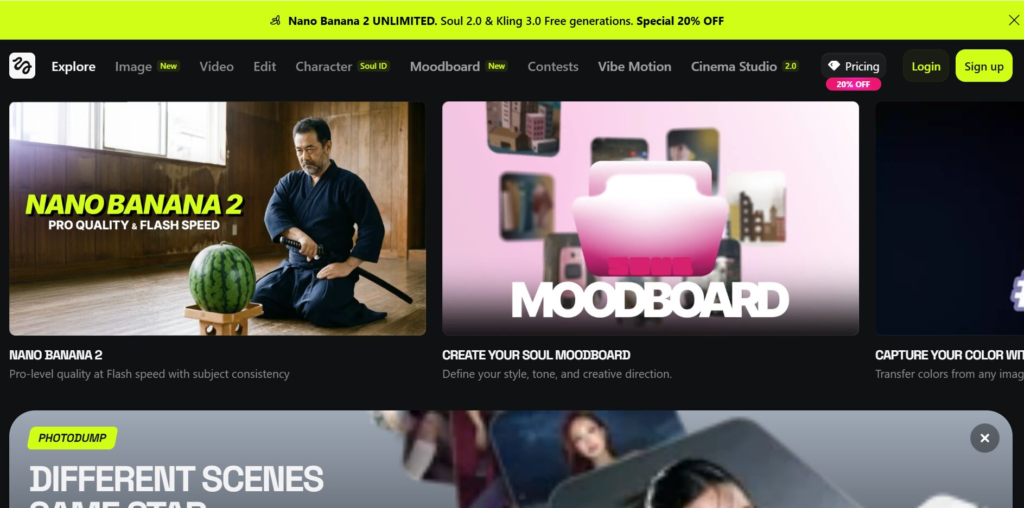
Higgsfield AI is an AI video generator focused on one thing: helping creators get more “directable” shots — meaning the result feels less random and more like you planned the camera.
Here’s the plain-English version:
Cinema Studio = a more structured creation flow (think: idea → shot setup → variations), so you can iterate like a mini production studio instead of gambling on one generation.
Motion Control = more control over how the camera moves (push-in, orbit, pan, dolly), which is exactly where many AI videos usually look fake or “wobbly”.
What Higgsfield AI is best at
Making AI video look more cinematic (especially when camera movement matters).
Helping you create repeatable shots for ads, product clips, and brand visuals.
Giving creators a workflow that feels closer to directing than prompt roulette.
What Higgsfield AI is NOT
It’s not the fastest choice if your goal is mass output (lots of daily clips).
It’s not a “one-click perfect video” tool — you get better results if you can describe scenes and camera moves clearly.
The fast decision
If you want cinema-style motion and you’re okay spending 2 extra minutes to guide the shot, Higgsfield AI makes sense.
If you want speed and volume first, jump to the Higgsfield vs Kling 3.0 section later — that’s usually where the best value decision happens.
Want the official feature breakdown? Higgsfield explains Cinema Studio and its “structured filmmaking” workflow here.
Next up: we’ll go straight to the most searched part: Higgsfield pricing and the real answer to “Is Higgsfield AI free?”
3. Higgsfield Pricing: Is It Free? Plans, Limits, and Real Cost Per Video
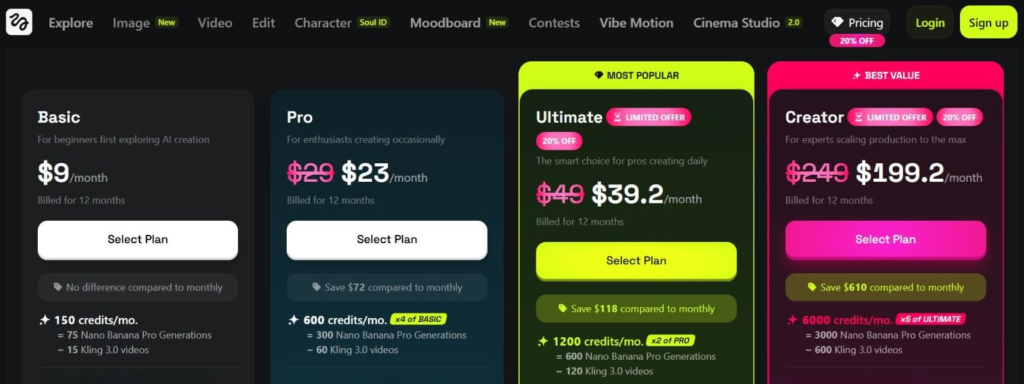
If you’re searching Higgsfield pricing or “is Higgsfield AI free?” you’re not alone — pricing is usually the real deciding factor for creators.
Here’s the best way to think about Higgsfield AI cost without getting lost in plan names:
Is Higgsfield AI free?
Yes, there’s usually a free entry point (or trial-style access), but the “free” part is best seen as a way to test the workflow — not a plan you can rely on for serious output.
Free access is great for:
Testing Motion Control and seeing if the tool fits your style
Creating a few samples for a client pitch
Understanding what “Cinema Studio” actually changes
Free access is NOT great for:
Daily posting schedules
Batch content for ads
High-volume experiments (you’ll hit limits fast)
What limits matter most (the ones that impact your workflow)
When comparing Higgsfield pricing vs alternatives, ignore the marketing words and look at these practical limits:
Generation credits / monthly cap (this is your real budget)
Export quality (watermark? resolution limits?)
Queue priority / speed (huge if you work daily)
Commercial use licensing (important for client work + ads)
Real cost per video (quick mental model)
A practical way to judge value is:
your monthly plan cost ÷ how many usable clips you can publish.
Because creators don’t need “generations”… we need publishable outputs.
So ask yourself:
Will I get 5 usable clips/week from Higgsfield AI?
Or do I need 20–40 usable clips/week, where a faster tool wins?
If you’re in the high-output camp, alternatives may give better ROI even if the quality feels slightly less “cinema”.
Quick Picks: choose the best option based on your budget + publishing workload.
| Your goal | Best pick | Why it fits | Action |
|---|---|---|---|
| Cinema-level control (fewer, better clips) | Higgsfield AI | Best when Motion Control matters and you want more “directable” shots. | Try Higgsfield |
| Daily short-form volume (more publishable clips) | Kling | Strong value when speed and output consistency matter more than cinema polish. | Try Kling |
| Pro workflow (iterations + editing control) | Runway | Best if you want a production-style pipeline with tighter creative control. | Try Runway |
Next up: we’ll do the most useful section of the whole post — Motion Control. I’ll give you a simple “camera move” playbook plus copy/paste prompt templates that work well with Higgsfield AI.
4. Motion Control Guide: Camera Moves + Copy/Paste Prompt Templates
Motion Control is the reason many creators are trying Higgsfield AI right now. Most AI video tools can generate a “cool” clip… but the camera movement often feels accidental.
With Higgsfield AI, you’ll get better results if you treat Motion Control like a simple recipe:
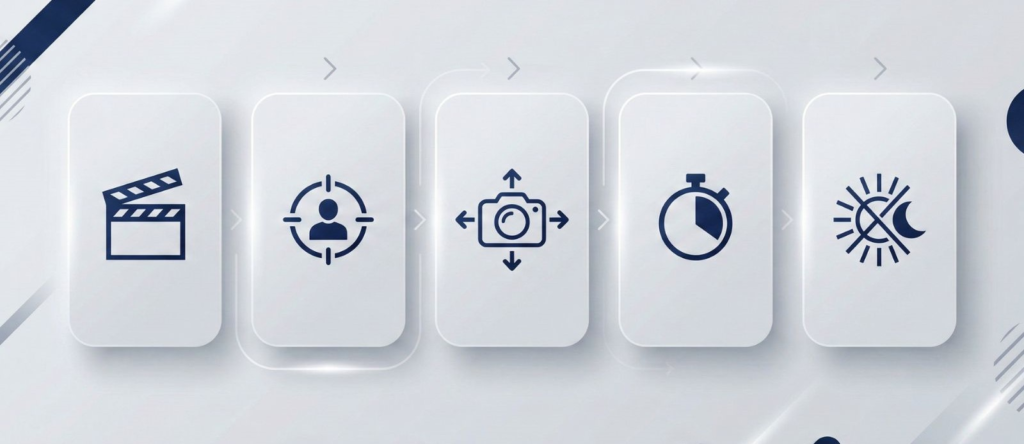
Scene (what we see) + Subject (who/what) + Camera move (how it moves) + Timing (seconds) + Mood (lighting/style)
The 6 camera moves that look “cinematic” fast
Use these moves when you want Higgsfield AI to feel directed (not random):
Push-in (dolly in): great for product reveals and faces
Pull-out (dolly out): great for scene reveals
Orbit: great for showcasing objects or characters
Pan: great for landscapes, rooms, setups
Tilt: great for “hero” shots (top-to-bottom reveals)
Crane / boom: great for premium cinematic energy
Pro tip: If the video looks shaky, you’re usually asking for too many moves at once. Keep one move per clip.
Copy/Paste prompt templates (ready to use)
Below are safe templates you can reuse. Just replace the parts in [brackets].
Template 1 — Product cinematic reveal (best for ads)
Prompt:
[Product] on [surface/location], soft cinematic lighting, clean background, camera push-in slowly, shallow depth of field, high detail, 5 seconds, no jitter, stable motion.
Template 2 — Character cinematic intro (best for creators)
Prompt:
[Person/character] in [environment], moody cinematic lighting, camera orbit 180 degrees slowly, natural motion, sharp subject, 5–6 seconds, smooth stable camera.
Template 3 — Space/room reveal (best for real estate / setups)
Prompt:
[Room/environment] with [key objects], realistic lighting, camera pan left to right slowly, wide framing, smooth motion, 6 seconds, no warping.
Common mistakes (and how to fix them fast)
If your Higgsfield AI clips look “AI-ish,” it’s usually one of these:
Too many instructions → keep it short + structured
More than one camera move → pick one move per clip
No timing → always add “5–6 seconds”
No stability words → add “smooth, stable, no jitter”
If you want a broader workflow for short AI video creation (planning, iterations, and exporting for social), read our guide here.
If Motion Control is your priority, start with Higgsfield AI.
If you want faster output and more volume, compare it with Kling in the next section.
Next up: Higgsfield vs Kling 3.0 — quality, speed, and which one actually gives better value for creators.
If you want your AI videos to feel more directed (not random), this book helps you plan scenes, pacing, and “what happens next” — which makes your prompts and Motion Control shots sharper.
5. Higgsfield vs Kling 3.0: Which AI Video Generator Wins (Quality, Speed, Value)
When people search “Higgsfield vs Kling 3.0”, they’re usually trying to answer one question:
Which one gives me more publishable clips for my time (and money)?
Here’s the clean way to decide — without overthinking it.
The fast decision (90% of readers)
Choose Higgsfield AI if you want cinema-style camera control and you’re willing to be more specific with prompts.
Choose Kling 3.0 if you want speed + volume and a simpler “prompt → output” workflow.
In practice: Higgsfield AI is the “director” tool. Kling is the “content machine”.
| Category | Higgsfield AI | Kling 3.0 |
|---|---|---|
| Best for | Cinematic control + Motion Control shots | Fast output + higher volume content |
| Quality “feel” | More “directed” camera movement | Strong results, less camera-direction focus |
| Speed | Better for fewer, polished clips | Better for daily short-form volume |
| Value | Best if Motion Control saves editing time | Best if you need more publishable clips/month |
| Action | Try Higgsfield | Try Kling |
Who should pick Higgsfield AI
Choose Higgsfield AI if:
You care about Motion Control and camera movement consistency.
You’re building ads, product videos, or brand content where polish matters.
You’d rather make fewer clips that look more premium.
Who should pick Kling 3.0
Choose Kling 3.0 if:
You need more clips per week (high-volume workflow).
You want a tool that’s easier to run daily without “camera language”.
Your goal is speed: iterate fast, post fast, move on.
Honest recommendation
If you’re a creator who posts every day, Kling tends to be the practical choice.
If you’re making ads or “premium feeling” content, Higgsfield AI can pay off because Motion Control saves you time in editing and re-generation.
Next up: we’ll cover the trust layer — ethics, copyright, reliability, and best alternatives — plus the FAQ that can help you rank for high-intent searches.
6. Ethics + FAQ + Final Verdict (Deepfakes, Copyright, Safety, Best Alternatives)
Even when Higgsfield AI produces stunning results, we should be honest about the tradeoffs. AI video isn’t just a creative tool — it can also become a trust problem if we use it carelessly.
Ethics + safety: what to watch (quick but real)
Deepfake risk: If a clip looks realistic, people may believe it’s real. If you’re using Higgsfield AI for characters, faces, or “news-like” scenes, be extra careful. Label AI-generated content when there’s any chance of confusion. If you are curious to know more on this topic, check our post on Deepfake.
Copyright + style cloning: Avoid prompts that try to replicate a specific creator’s “signature style,” a brand campaign, or recognizable copyrighted characters. In ads and client work, play it safe.
Privacy + data: Don’t upload private client assets or personal footage unless you’re fully comfortable with the platform’s terms. With any AI tool, assume that what you upload may be stored and used to improve systems unless explicitly stated otherwise.
Reliability: AI video can still glitch (hands, faces, motion artifacts). Always do a final human check before publishing.
Simple rule we follow at AI Digital Space:
If it could mislead, we label it. If it uses someone’s identity, we avoid it. If it’s for a client, we keep it conservative.
Final verdict (who should use what)
Here’s the clean decision based on real creator workflows:
 Choose Higgsfield AI if…
You want cinema-style motion control and more “directable” shots
You’re producing premium brand content (ads, product visuals, polished reels)
You prefer fewer clips that look better over high volume
Choose Kling 3.0 if…
You want speed + volume and a simpler daily workflow
You’re publishing constantly and need more usable clips per week
You care more about output than camera “directing” details
Consider Runway if…
You want a more production-style pipeline and editing/iteration control
Your workflow looks like: generate → refine → export → reuse for multiple formats
FAQ
Q) Is Higgsfield AI free?
A: Usually there’s a free entry point or trial-style access, but it’s best for testing. If you publish often, you’ll want a plan that matches your output needs.
Q) What is Higgsfield Cinema Studio?
A: It’s the part of Higgsfield AI that makes the workflow feel more structured — more like building shots and variations, not just generating one random clip.
Q) How does Higgsfield motion control work?
A: You guide the camera move (push-in, orbit, pan, etc.) inside your prompt and keep it simple: one move per clip + stable/smooth wording + clear timing (5–6 seconds).
Q) Higgsfield vs Kling 3.0: which is better?
A: If you want cinematic control, pick Higgsfield AI. If you want speed and volume, pick Kling 3.0.
Q) What’s the best AI video generator for creators in 2026?
A: It depends on your workflow: Higgsfield AI for cinematic motion, Kling for output speed, and Runway for a more production-style pipeline.
If this review helped you understand what Higgsfield AI is really good at — cinema-style Motion Control, structured creation, and more “directable” results — you’ll probably get even more value by zooming out and comparing the broader AI video landscape.
To stay on the safe + credible side (especially with realistic AI video), it’s also worth looking at Content Credentials / provenance standards like C2PA, which explain how authenticity signals can travel with media (check out here).
Here are 3 closely related guides we’ve already covered on AIDigitalSpace (perfect if you’re building a serious creator workflow):
→ Pika Labs vs CapCut AI: Which One Makes Better AI Videos Faster?
→ Faceless Videos: The AI Workflow to Create Content Without Showing Your Face
→ Sora vs Veo vs Runway: Best AI Video Tool (Quality, Speed, Use Cases)