
Mirko
Founder & AI Tech WriterVista Social reviews still quote a $39 Standard plan and a $79 Professional plan. Both are gone: the cheapest plan is now Professional at $99 a month, or $950 a year. I went through the 14-day free trial and rechecked every plan, add-on and discount to answer one question: is it still worth paying for?
⚡ Short answer: Yes, if you manage several brands or clients and want scheduling, one inbox, review replies and reports in one tool. Professional costs $99 a month, about $79 billed yearly, for 15 profiles. If you only post to three or four accounts, SocialBee or Later does the publishing part for a third of the price.
🆕 What changed in this update (October 22, 2026)
- New prices: the $39 Standard plan is gone and Professional now starts at $99.
- Added every add-on: listening, X integration and employee advocacy.
- New sections on discounts, year-one cost and the free trial.
- Added this year's biggest releases: Ask Vista AI agents, Trends, API 2.0 and MCP.
- Added alternatives with current prices.
Some links are affiliate links · they support this site at no extra cost to you · Full disclosure
What is Vista Social?
Short answer: Vista Social is a social media management platform for brands, agencies and small teams. It schedules posts to 13 networks, puts comments, messages and reviews in one inbox, builds reports, and adds an AI assistant called Ask Vista. Plans start at $99 a month, with a 14-day free trial and no free plan.
It works from one dashboard: connect Instagram, Facebook, TikTok, LinkedIn, YouTube, X, Threads, Pinterest, Reddit, Bluesky, Google Business and more, then plan, publish and reply from the same place. The 13 networks are the same on every plan; what changes between plans is the number of profiles, users and advanced tools.
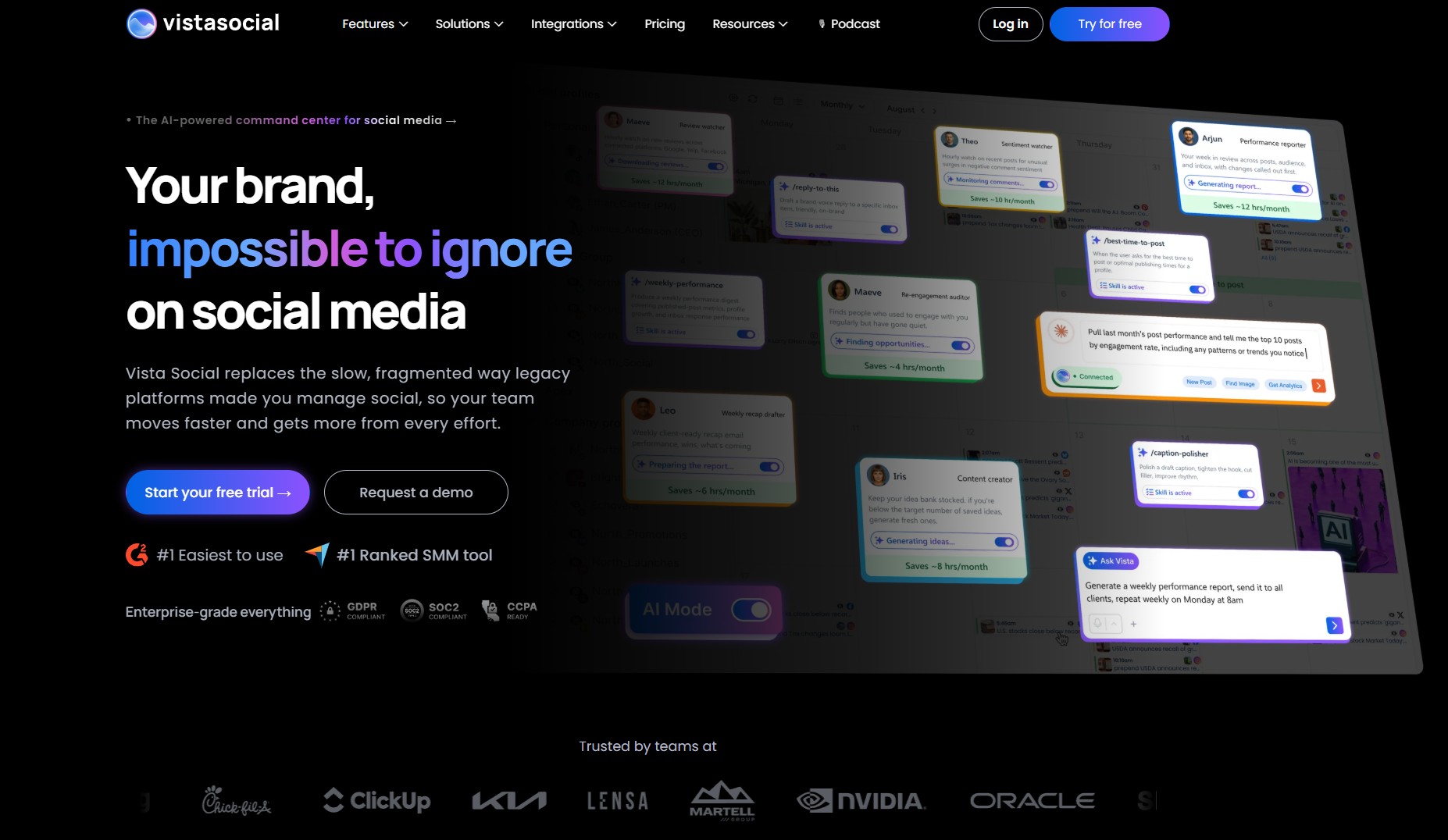 The home screen, with shortcuts to publishing, the inbox and Ask Vista.
This year the company shipped what it counts as 106 major features. The ones that change buying decisions are the Ask Vista AI agents, a Trends tool, API 2.0 with MCP access for AI assistants, Vista Work project management and desktop apps for Windows and Mac.
Is Vista Social worth it? My 7.5/10 verdict
Short answer: Vista Social is worth it for agencies and teams running several brands, because the inbox, review replies and client reports save hours a week. It's poor value for a solo creator posting to a few accounts: the entry price rose to $99 a month, and cheaper schedulers cover basic publishing.
| Category | Score | Why |
|---|---|---|
| Unified inbox | 9/10 | Comments, DMs, mentions and reviews in one feed with automations |
| Publishing | 8/10 | 13 networks, unlimited scheduled posts, bulk tools on higher plans |
| AI (Ask Vista) | 8/10 | 25 ready-made agents, web research, brand training |
| Reports | 7/10 | Clear and shareable; white-label only from Scale |
| Value | 6/10 | Entry price now $99; listening and X cost extra |
| Ease of use | 7/10 | Many features, so a learning curve |
✅ Choose it if
you manage 5+ brands or clients, answer lots of comments and reviews, or need reports a client can read.
⛔ Skip it if
you post to a few personal accounts, want a free plan, or only need a content calendar.
Vista Social pricing: every plan compared
Short answer: It has three self-serve plans: Professional at $99 a month, Advanced at $199 and Scale at $449, plus custom Enterprise pricing. Paying yearly saves about 20%: $950, $1,910 and $4,310 a year. Every plan includes a 14-day free trial with no credit card.
| Plan | Monthly | Yearly | Profiles | Users | AI credits / mo | What it adds |
|---|---|---|---|---|---|---|
| Professional | $99 | $950 (≈$79/mo) | 15 | 2 | 1,000 | Planning, publishing, inbox, reports; Facebook and Google reviews |
| Advanced | $199 | $1,910 (≈$159/mo) | 30 | 3 | 2,000 | Advanced workflows and reports, Zapier and Make, 6 more review sites |
| Scale | $449 | $4,310 (≈$359/mo) | 70 | 4 | 3,500 | White-label reports, client connections, 100,000 DM contacts |
| Enterprise | Custom | Custom | Unlimited | 8+ | Unlimited | Sentiment detection, SSO, account manager |
Scheduled posts are unlimited on every plan. The table above comes from the vendor's own pricing page, checked October 22. One inconsistency: the same page's FAQ says Professional includes 3 users and Advanced 6, while the plan table says 2 and 3. Ask support before you buy a plan for a specific team size.
Vista Social add-ons
| Add-on | Price | What you get |
|---|---|---|
| Listening (social, web, news) | $75/mo | Brand and keyword monitoring beyond your own profiles |
| X (Twitter) integration | $29/mo | Publishing, boosting, automations and analytics for X |
| Employee Advocacy | $199/mo | 25 employees sharing approved posts; free to try with 3 |
| Extra profiles and users | On request | Scale and Enterprise only |
Prices are in USD and exclude local VAT, which EU and UK buyers pay on top. The X add-on exists because X charges tools for API access, so expect it on most competitors too.
Is there a Vista Social discount code?
Short answer: Vista Social doesn't publish a public discount code. The real savings are yearly billing, which cuts about 20% and brings Professional to roughly $79 a month, and nonprofit pricing for US organizations on Professional and Advanced. Coupon sites list codes, but none appear on the vendor's own pages, so treat them as unverified.
💳 Yearly billing
About 20% off: $950 instead of $1,188 for Professional.
🤝 Nonprofit pricing
Available for US nonprofits on Professional and Advanced.
🧪 14-day free trial
No card needed, so you can test before you pay anything.
🔁 Switch plans
You can change plans at any time, so start small.
My advice: run the free trial on monthly billing, and switch to yearly only once you know you'll use it every week. A yearly plan is paid upfront for the full term, so a wrong guess costs more than the 20% you save.
What does Vista Social really cost per year?
Short answer: A small team on Professional pays $950 a year on yearly billing. Add web and news listening and it's $1,850; add X as well and it's $2,198. An agency on Advanced with listening pays $2,810. For comparison, SocialBee's Accelerate plan costs $490 a year and Later's Growth plan $450.
The pattern: The tool costs two to four times a basic scheduler, and the gap is the inbox, review management, automations and reports. If you'd use those daily, it's fair. If you'd mostly schedule posts, it isn't. To see how it fits with the other tools you pay for, run my free AI subscription cost calculator.
Vista Social features that matter
Short answer: Seven features justify the price: the unified inbox, publishing to 13 networks, Ask Vista AI agents, review management, listening and Trends, reports, and API and MCP access. The inbox is the standout: users on Capterra praise it most, and it's included on every plan.
📥 1. Unified inbox
Comments, DMs and mentions from every network in one feed, with automations that hide, delete, tag or route messages, plus Zendesk tickets from DMs.
🗓️ 2. Publishing to 13 networks
Calendar, bulk scheduling, stagger publishing and a new Clip Maker beta that cuts long videos into short ones.
🤖 3. Ask Vista AI
25 ready-made agents, brand training, web research and AI images and video, also in Slack and on mobile.
⭐ 4. Review management
Reply to Facebook and Google reviews from Professional; Yelp, TripAdvisor, Trustpilot, OpenTable and the app stores from Advanced.
👂 5. Listening and Trends
Free on your own profiles; $75 a month for social, web and news. Trends turns a rising topic into a draft post.
📊 6. Reports
Shareable, customizable reports; scheduled delivery and white-label versions on higher plans.
🔌 7. API 2.0 and MCP
A public REST API and MCP access, so Claude or ChatGPT can draft and schedule posts in your account.
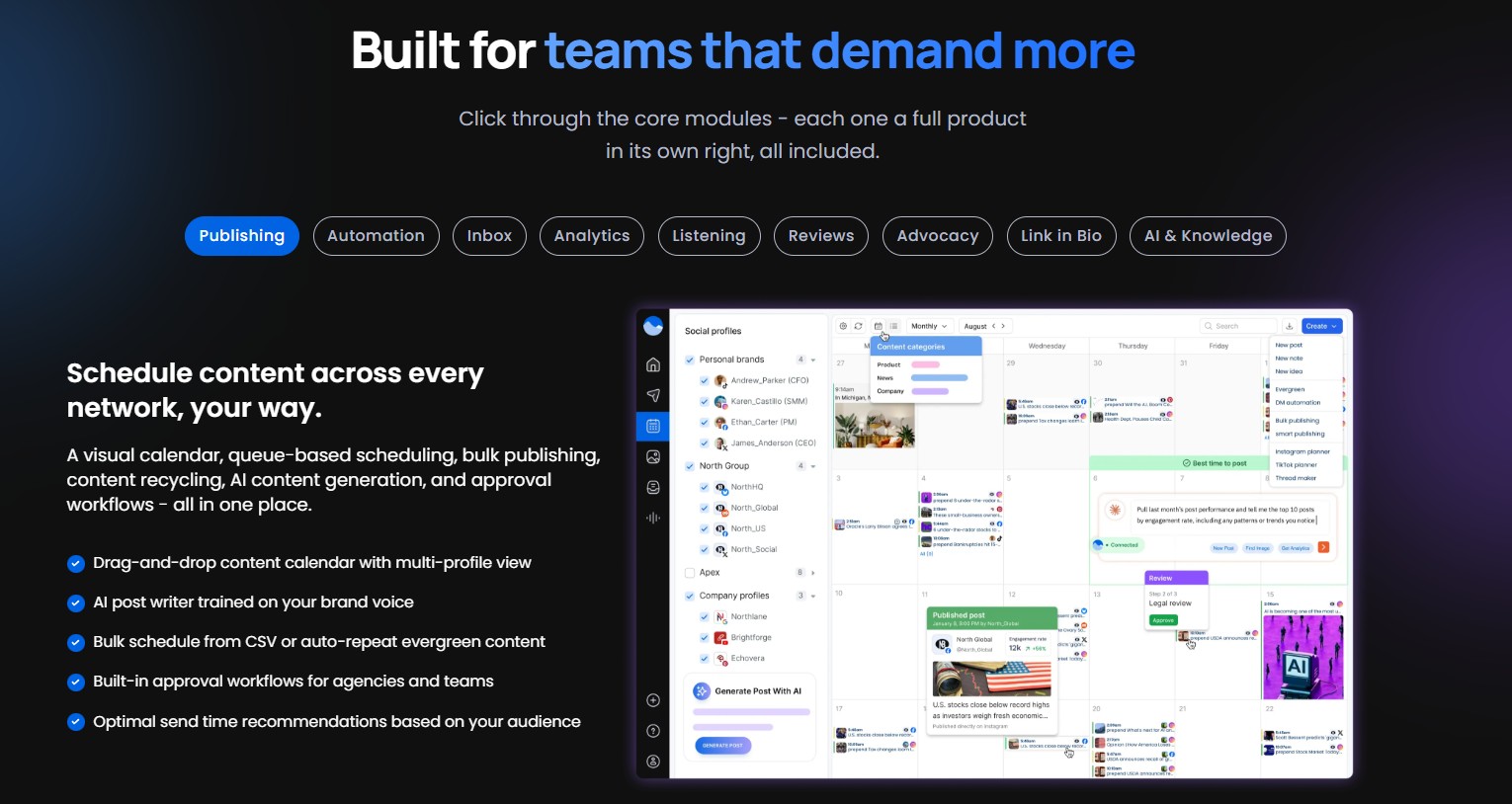 The built-in AI assistant drafting a caption inside the post composer.
For a local business, review management is the sleeper feature. Answering Google reviews from the same inbox as Instagram comments is the kind of task that otherwise slips. If you want listening beyond your own pages, compare it with the dedicated tools in my AI brand monitoring tools guide.
The MCP access is new and worth knowing about if you already work with AI assistants: it lets a chatbot read your queue and schedule posts for you. I cover how that works for Instagram in how to connect Claude to Instagram.
How to use the Vista Social free trial
Short answer: The Vista Social free trial lasts 14 days, covers Professional, Advanced and Scale, and needs no credit card. Pick the plan you'd really buy, connect your real accounts on day one, and test the inbox and reports, because those are what you pay for. Decide before day 14.
- 1
Pick the plan you'd buy
Start the trial on Professional unless you need 30+ profiles or review sites beyond Google and Facebook.
- 2
Connect your real accounts
Link the 3 to 5 profiles you post to most, including Google Business if you get reviews.
- 3
Live in the inbox for a week
Answer every comment and DM from its inbox instead of the native apps. This is the main test.
- 4
Schedule a full week of posts
Use the calendar and Ask Vista to draft captions, then check how each network previews them.
- 5
Build one report
Make the report you'd send a client or your boss, and check it has the numbers you need.
- 6
Decide by day 12
Without a card on file nothing is charged, but deciding early leaves time to switch plans.
Key idea: the trial answers one question: would you live in this inbox every day? If yes, the price makes sense. If you only used the calendar, a cheaper scheduler will do.
What do Vista Social users say?
Short answer: The tool rates 4.9 out of 5 from 966 reviews on Capterra, with 4.8 for customer service. Users praise the unified inbox, bulk scheduling and fast support. The common complaints are a learning curve, a weaker mobile app, occasional account disconnections and costs that rise as you add team members.
- One inbox for every network
- Bulk and multi-network scheduling
- Fast, patient support
- Fair price versus enterprise tools
- Many features to learn
- Mobile app behind the desktop
- Accounts that need reconnecting
- Costs rise with more users
Source: user reviews on Capterra. Independent reviewers make similar points; Blogging Wizard calls the inbox one of the best it has tested but notes there's no live chat support.
Vista Social alternatives worth comparing
Short answer: SocialBee is the closest match for small teams, from $29 a month, with a 30-day money-back guarantee. Later is the cheapest way to get a shared inbox, from $50 a month on Growth. Buffer is the simplest, at $6 a channel. None of them matches its review management.
1. SocialBee 🐝 Best for solo creators🔎 Researched
Category-based scheduling with an AI copilot
SocialBee organizes posts into content categories that recycle on a schedule, which suits creators who post evergreen content. Bootstrap costs $29 a month for 5 profiles, Accelerate $49 for 10 profiles, and Pro $99 for 25 profiles with 3 users per workspace. Yearly billing saves about 16%.
- A third of the entry price
- Evergreen post recycling
- Agency plans from $149/mo yearly
- One user until Pro
- No review management
- Lighter inbox
2. Later 📸 Best for Instagram-first brands🔎 Researched
Visual planner with a shared inbox on Growth
Later started as an Instagram planner and is still strongest there, with a visual grid and link in bio. Starter costs $25 a month for one social set of 8 profiles; Growth costs $50 for two sets, two users and a shared inbox. Yearly billing takes 25% off.
- Cheapest shared inbox here
- Strong visual Instagram planning
- Simple to learn
- No review management
- Fewer users per plan
- Lighter reports
Buffer is the third option if you want something simple: $6 a month per channel on Essentials, or a free plan for 3 channels. For a wider look at schedulers, see my best AI social media scheduling tools.
Who should buy Vista Social?
Short answer: Buy it if you run several brands, answer a lot of comments and reviews, or report to clients: Professional at about $79 a month yearly is the plan to start on. Choose SocialBee if you mainly schedule posts, and Later if your brand lives on Instagram.
Back to the price change: the product didn't get worse, it moved up-market. The $99 entry plan buys a full inbox, reviews and reports, not just a scheduler. Judge it on whether you'd use those, and the free trial will tell you in a week.
My pick for teams: the Professional plan
Start your 14-day free trial →No credit card. Switch to yearly later to save about 20%.
I write every guide on this site myself and recheck prices when vendors change them, as this one did this year. For this review I used the free trial and checked every plan on the vendor's pages; anything beyond the trial is marked as research.