

Mirko
Founder & AI Tech Writer
The best AI task managers don't just store your to-do list; they decide when each task fits into your week and move it when your day changes. Since the last version of this guide, one of my picks shut down, two raised prices and one ended its partner program. So I rebuilt it around one question: which tool still earns its subscription after a full year?
⚡ Short answer: Motion is the most complete autopilot: it plans your whole day from your calendar, from $19 a seat a month. Reclaim AI is the best value, with a free plan that already auto-schedules tasks and habits. Akiflow suits people whose tasks are scattered across apps, and Todoist is the cheapest way to start with AI capture.
🆕 What changed in this update (October 9, 2026)
- Removed Clockwise: the product shut down on March 27.
- New prices for Motion, Akiflow and Sunsama, all higher than before.
- Added screenshots from my own Todoist and Akiflow accounts, a "Skip it if" line on every pick and 3 budget stacks.
- Added Taskade, a yearly cost chart, a shutdown-risk checklist and a 30-second finder.
- Corrected Notion: AI on the Plus plan is a limited trial, not the full feature.
Some links are affiliate links · they support this site at no extra cost to you · Full disclosure
What do AI task managers do that a to-do app can't?
Short answer: A to-do app stores tasks and reminds you when they're late. AI task managers read your calendar, estimate how long each task takes and place it in a free slot, then move it when a meeting runs over. Some also capture tasks from email and chat, or hand the work itself to an AI agent.
The useful split is not "AI or no AI". It's how much of the planning you hand over. Some AI task managers take the whole schedule off your hands, some help you plan faster, and some only make capturing tasks quicker. Paying for autopilot when you only need a faster list is the most common way people overspend on AI task managers.
Three kinds of AI task managers
- Auto-schedulers → the AI decides when you work on what. Motion, Reclaim AI.
- Planners and time-blockers → you decide, the app pulls everything into one place and makes blocking time fast. Akiflow, Sunsama.
- Smart lists and workspaces → AI helps you capture, sort or even do tasks, but doesn't build your calendar. Todoist, Taskade, Notion.
Key idea: pick among AI task managers by where your day breaks. If meetings wreck your plan, you need an auto-scheduler. If you lose tasks between apps, you need an inbox. If you just forget things, a smart list is enough.
Psychologists have measured the cost of jumping between tasks for decades; the American Psychological Association's summary explains why each switch eats time. That's the problem the best AI task managers attack: fewer decisions about what's next, so more of your day goes to the task itself.
AI task managers compared: all 7 side by side
Two columns decide most choices between AI task managers: whether the tool auto-schedules and whether there's a free plan. Prices are US list prices from each vendor's pricing page on the update date above; some apps show local prices at checkout outside the US.
| Tool | Auto-schedules? | Free plan | Lowest paid price | Best for |
|---|---|---|---|---|
| Motion | Yes, full day | No (trial) | $19/seat/mo (Pro AI) | Busy calendars |
| Reclaim AI | Yes, tasks + habits | Yes, Lite | $10/mo yearly · $12 monthly | Best value |
| Akiflow | Time-blocking | No (7-day trial) | $19/mo yearly · $34 monthly | Tasks in many apps |
| Sunsama | Guided planning | No (14-day trial) | $17/mo yearly · $22 monthly | Daily ritual |
| Todoist | No | Yes, Beginner | Pro from $4/mo yearly | Simple capture |
| Taskade | No, AI agents | Yes, limited | Pro $10/mo listed | AI doing tasks |
| Notion | No | Yes (AI trial) | $20/seat for Notion Agent | Docs-first teams |
Only two of these AI task managers place tasks on your calendar without you lifting a finger: Motion and Reclaim. Everything else either helps you plan faster or works next to your calendar. That one distinction explains most of the price gap.
Find your AI task manager in 30 seconds
Three questions narrow seven AI task managers to one pick. The finder runs in your browser; nothing is saved or sent.
Prefer a wider match across every AI category? Try my AI Tool Finder quiz.
The 7 best AI task managers right now
I ranked these AI task managers by how much planning each one takes off your plate, then by value. Each card opens with what you get free, because a trial week tells you more than any review.
1. Motion 🏆 Best full autopilot
An AI planner that builds and rebuilds your workday from your calendar
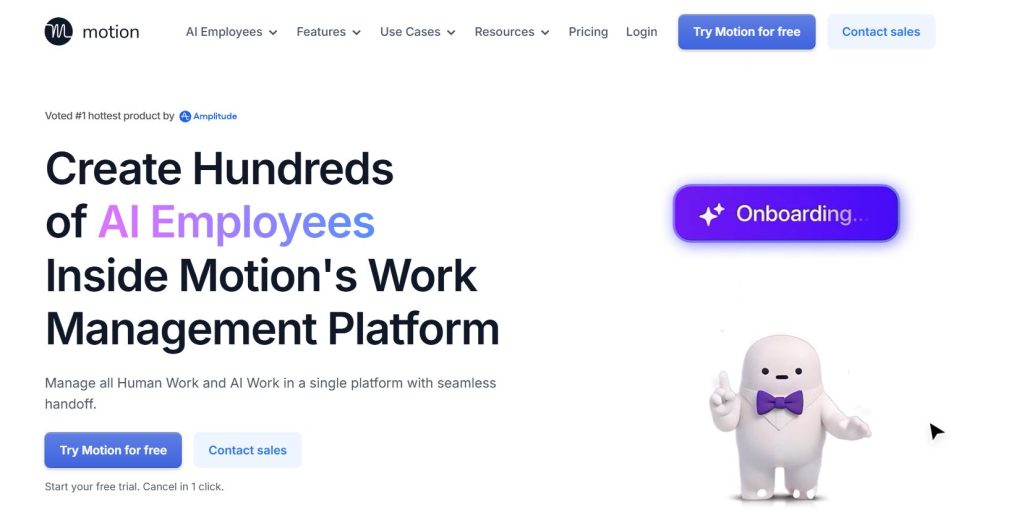
I've used Motion myself, and it's the most hands-off of all the AI task managers here. You add tasks with a deadline, priority and rough duration; Motion fits them around your meetings and reshuffles the rest when something moves. It has grown into a full work app, with AI projects, docs, notes and meeting tools on the same plan.
The price went up with it. Motion's pricing page lists Pro AI at $19 a seat a month and Business AI at $29, with up to 33% off for yearly billing. Pro includes 7,500 AI credits per seat each month; heavy AI use can mean buying more. There's a free trial, but no free plan.
- Plans your day with no input
- Replans when meetings move
- One app for tasks, projects and docs
- Most expensive pick here
- AI credits can run out
- More app than a solo planner needs
2. Reclaim AI 💡 Best value
Auto-schedules tasks, habits and focus time inside Google or Outlook Calendar
Unlike most AI task managers, Reclaim works inside the calendar you already use instead of asking you to move into a new app. It finds time for tasks, recurring habits and focus blocks, defends them, and slides them when your meetings change. Paid plans pull tasks in from Todoist, Asana, ClickUp, Jira and Linear.
The free Lite plan is real: one user, one calendar sync, one scheduling link and a one-week planning range, on Google or Outlook. Starter is $10 a month billed yearly ($12 monthly) and stretches the range to eight weeks, per Reclaim's pricing page. When Clockwise closed, it pointed its own users here.
- Real auto-scheduling for $0
- Lives in your existing calendar
- Outlook support even on free
- One-week range on free
- Task apps need a paid plan
- Less of a full planner than Motion
3. Akiflow 📥 Best for scattered tasks
One inbox for tasks from email, chat and project tools, then fast time-blocking
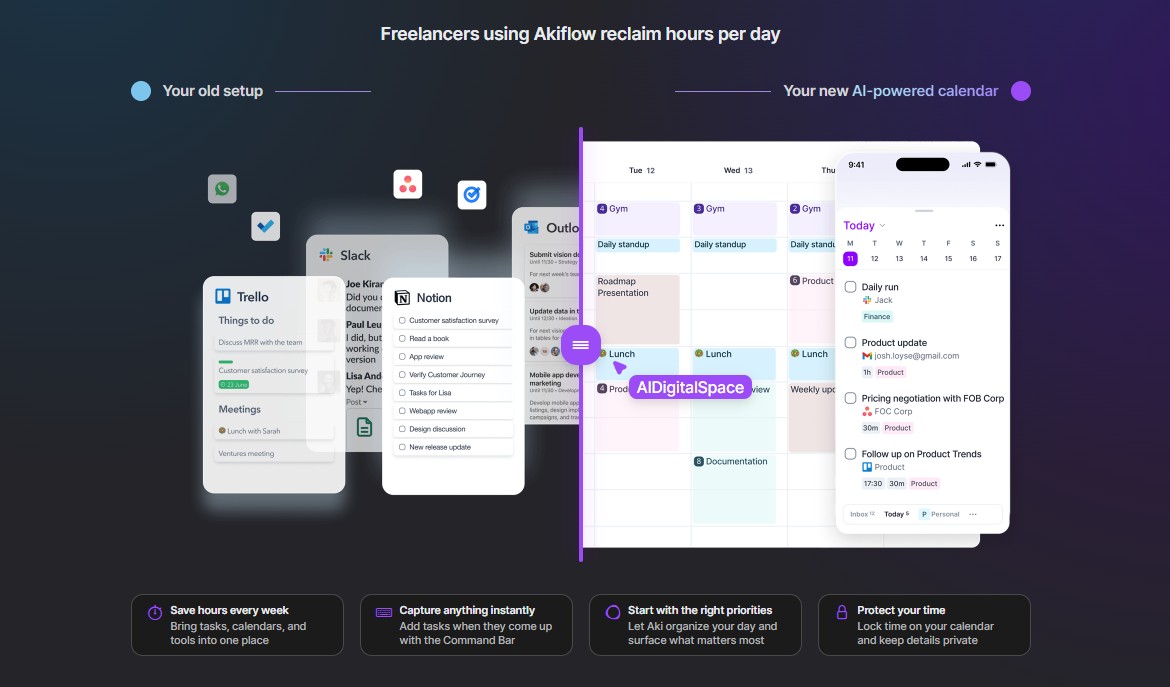
I've used Akiflow too, and my setup in it has changed over time; its strength is the inbox. Tasks from your email, Slack and project tools land in one list, and you drag them onto your calendar or block time with a shortcut. Unlike the auto-scheduling AI task managers, it doesn't plan the day for you; it makes you faster at planning it yourself, with a daily planning routine built in.
Pricing changed a lot. Akiflow's pricing page now shows one Pro plan at $19 a month billed yearly ($228) or $34 month to month. It includes the Aki AI assistant; the AI meeting assistant is a $19 add-on. The 7-day trial needs a card.
- Best inbox for scattered tasks
- Keyboard-first and quick
- Google and Outlook sync
- $408 a year on monthly billing
- No auto-scheduling engine
- Meeting assistant costs extra
4. Sunsama 🌅 Best daily ritual
A guided morning and evening planning routine across all your tools
Sunsama is for people who want to stay in charge but plan with intent. Each morning it walks you through pulling in tasks, estimating time and picking what fits, then helps you wrap up in the evening. It's the calmest of these AI task managers, and the least automatic.
The plan cards on Sunsama's pricing page show $17 a month billed yearly or $22 monthly, with AI, MCP and Zapier included. The trial runs 14 days and needs no card, the friendliest trial in this list.
- Builds a planning habit
- No card for the trial
- Integrations included
- No auto-scheduling
- Paid only after the trial
- Planning takes a few minutes daily
5. Todoist ✏️ Best simple start
A fast, clean task list with AI capture and voice input
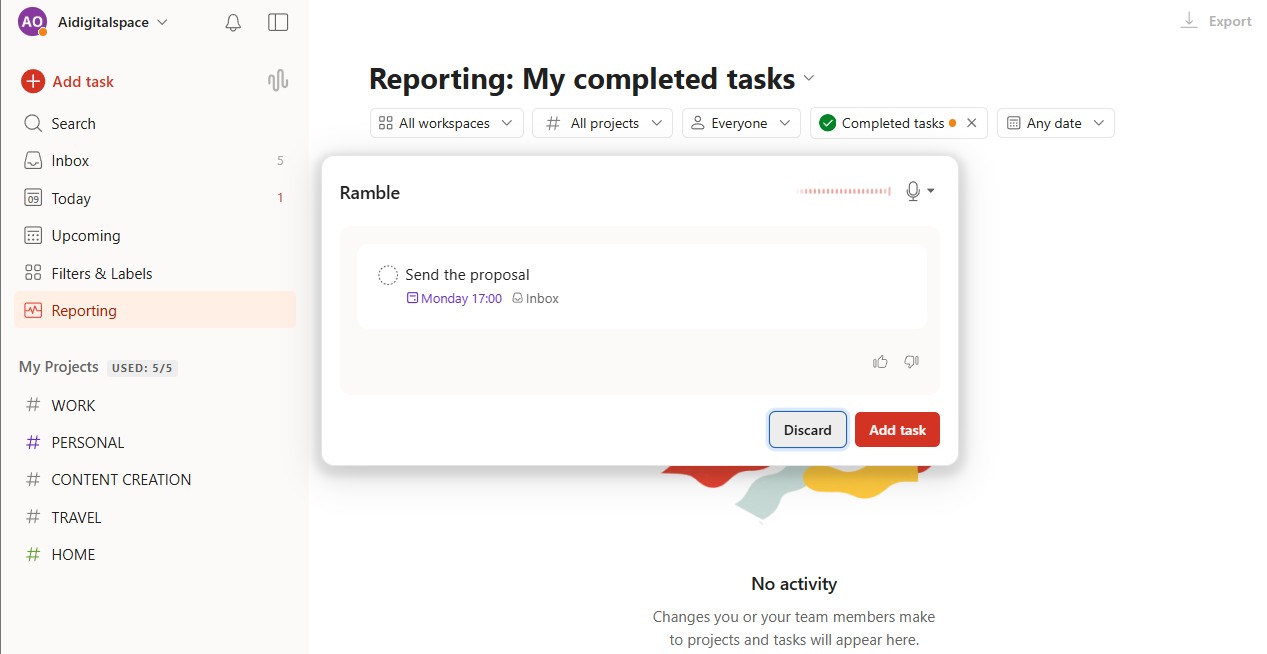
I've used Todoist, and it's the one I'd hand to anyone who just needs to stop forgetting things. Type "pay rent every 1st" and Smart Quick Add sets the date. Ramble turns a spoken brain dump into tasks, and Task Assist on Pro breaks a big task into steps.
What it won't do, unlike the scheduling AI task managers above, is plan your calendar: there's a calendar layout, but no auto-scheduling. Pro costs from $4 a month billed yearly; the free Beginner plan gives you five projects and limited Ramble sessions. Pair it with Reclaim if you want both a list and auto-scheduling.
- Fastest capture of the 7
- Cheapest paid plan
- Works on every platform
- No auto-scheduling
- AI features are light
- Free plan caps projects at 5
6. Taskade 🤖 Best for AI that does tasks
Projects plus AI agents and automations that run work in the background
Taskade comes at AI task managers from the other side. Instead of scheduling your tasks, its AI agents and automations do some of them: research, summaries, recurring updates, all inside your projects. It's the pick if your list is full of jobs an assistant could finish.
Per Taskade's pricing page, free gets one agent and three automations; Pro is listed at $10 a month with unlimited agents, 50,000 AI credits and 1,000 automation runs. Taskade says yearly billing costs half of monthly.
- Agents finish real tasks
- Free plan to test agents
- Good for small teams
- No calendar auto-scheduling
- Credits to keep an eye on
- More to set up than a list
7. Notion 📄 Best for docs-first teams
Tasks inside the same workspace as your notes, wikis and projects
Notion isn't one of the dedicated AI task managers, but if your team already writes everything there, a task database beats adding another app. On the Business plan, Notion Agent handles multi-step work across your pages, like turning meeting notes into tasks with owners.
Read the plan table carefully. Notion's pricing page gives Free and Plus ($10 a seat) only a limited trial of Notion AI; the Agent comes with Business at $20 a seat. Older guides that sell Plus as "Notion AI" are out of date.
- Tasks live with your docs
- Flexible databases and views
- Agent handles multi-step work
- Full AI needs Business
- No auto-scheduling
- Setup takes time
Motion vs Akiflow vs Reclaim: which one wins what?
Short answer: Of the three AI task managers people compare most, Motion wins on full automation, Akiflow wins on collecting tasks from many apps, and Reclaim wins on value and on working inside your existing calendar. If you want the AI to plan for you, it's Motion or Reclaim; if you want to plan faster yourself, it's Akiflow.
Score: Reclaim and Motion take two rows each, Akiflow one, and Outlook is a tie. That's why I start most readers on Reclaim's free plan and send heavy calendars to Motion.
Motion vs Akiflow: the one-line version
Choose Motion when your problem is a calendar that changes every hour and you want the AI to own the plan. Choose Akiflow when your problem is tasks hiding in Gmail, Slack and Asana, and you're happy to plan once you can see everything. Both AI task managers cost about the same per year on yearly billing.
What do AI task managers cost in a year?
Short answer: AI task managers cost from $0 to about $240 a year for one person at the lowest published rate. Reclaim and Todoist have free plans and the cheapest upgrades ($120 and $48 a year). Sunsama, Akiflow and Motion land between $204 and $228 on yearly billing, and Akiflow jumps to $408 if you pay month to month.
I took each vendor's lowest published price on the update date and multiplied it by 12. Where a page shows a price without saying whether it's yearly or monthly, I used the listed figure and say so below the chart.
The takeaway: with AI task managers, the gap between free and paid is smaller than the gap between yearly and monthly billing. Akiflow costs $180 more a year if you pay monthly. If you're not sure one of these AI task managers will stick, use the trial, then commit yearly only once it has survived a busy month.
Already paying for ChatGPT, Notion or a meeting bot? My free AI subscription cost calculator totals every plan in 60 seconds and flags overlaps, like paying for both Motion and a separate calendar tool.
What's the best AI task manager stack for your budget?
Short answer: You rarely need the most expensive app. Three setups cover most people: Reclaim's free plan with Google Tasks for $0, Todoist Pro plus Reclaim Starter for about $168 a year, or Motion on its own for about $228 a year if you want one app to run the whole day.
Top AI task managers work best in pairs: a list where tasks land fast, and a scheduler that finds them a slot. Here are the three combinations I'd build, priced at the lowest published yearly rate.
- Reclaim Lite schedules tasks and habits
- Google Tasks as the list (it syncs on Reclaim's free plan)
- Todoist Pro for capture and Ramble ($48)
- Reclaim Starter pulls Todoist tasks into your calendar ($120)
- Motion Pro AI replaces both the list and the scheduler
- Projects, docs and meetings in the same app
3 mistakes that make AI task managers fail
- Paying monthly before the tool proves itself. Akiflow is $34 a month on monthly billing against $19 on yearly; take the trial, then commit.
- Buying autopilot for a light calendar. With a few meetings a week, a list plus Reclaim's free plan does the same job as Motion.
- Importing every old task on day one. Start with this week's work. A scheduler fed 300 stale tasks produces a plan nobody follows.
What happens when your AI task manager shuts down?
Short answer: When AI task managers shut down, you get a deadline, an export and a refund for unused time, if you're lucky. Clockwise gave its users notice, stopped working on March 27, deleted data shortly after and refunded prepaid time. The tasks you lose are the ones you never exported, so pick tools that keep your plan readable outside the app.
The details come from Clockwise's own notice: support ran until the shutdown date, Salesforce did not receive customer data, and prepaid time past March 27 was refunded pro rata. It also pointed customers to Reclaim and offered migration help. That's a clean exit. Not every startup manages one.
5 questions to ask before you pay yearly
- Where do my tasks live? Events written into Google or Outlook Calendar survive if the app dies; tasks only inside the app don't.
- Can I export? Look for a CSV or calendar export in settings before you import 300 tasks.
- Is there a free plan? A free tier usually means a larger user base and a way to keep basics running if you stop paying.
- Is this the company's main product? A side feature is easier to cut than the thing a company sells.
- What does monthly cost? If yearly saves 30–44%, try monthly first, then switch once the tool sticks.
How to leave a task app without losing work
- 1Export everything first. Download tasks, projects and notes as CSV or JSON while the app still works.
- 2Note recurring tasks and habits. Repeating rules rarely export cleanly. List them by hand so nothing silently stops.
- 3Pick the replacement before the deadline. Use the finder above, and start its trial while the old app still runs.
- 4Import and spot-check. Bring the export in, then check due dates, owners and repeats on ten random tasks.
- 5Disconnect the old app. Remove its calendar access in your Google or Microsoft account settings once you've switched.
Lesson: the cheapest insurance when you choose AI task managers is one that writes your plan into a calendar you own. Reclaim, Motion, Akiflow and Sunsama all sync with Google and Outlook; a list that lives only in one app is the riskiest kind.
Which AI task manager should you pick?
Short answer: Among AI task managers, start with Reclaim AI's free plan if you want AI scheduling today without a bill. Move to Motion if your calendar changes hourly and you want the AI to own the day. Pick Akiflow for tasks scattered across apps, Sunsama for a guided routine, Todoist for a simple list, Taskade for AI that does the work, and Notion if your team lives in docs.
Whichever of these AI task managers you pick, give it two working weeks before judging. AI task managers only pay off once they hold your real tasks, not a test list. If one doesn't click, my guide to fixing AI productivity tools that aren't working covers the usual setup mistakes, and the best AI calendar apps covers the calendar side.

Frequently Asked Questions — AI Task Managers
I write every guide on this site myself and update it when products change, as these AI task managers did. I've used Todoist, Motion and Akiflow, and the screenshots here come from my own accounts; the other picks are research-based, checked on the vendors' own pages on the date above.