

Mirko
AI Tech Writer
In May 2026, six national cyber agencies issued their first joint warning about AI agents being hijacked in the wild. Most people have never heard the word for it.
Agentjacking is what happens when an AI browser treats a hidden instruction on a page as if you typed it yourself, and acts on it.
We researched how it works, where it's already happened, and which habits actually reduce your exposure.
Some links are affiliate links · You support us at no extra cost · Full disclosure
What Is Agentjacking?
Agentjacking is when an AI agent — a browser, a coding assistant, or any tool that acts on your behalf — follows a hidden instruction planted in content it reads.
It mistakes that planted instruction for a command from you.
No malware. No stolen password. Just a convincing lie the agent believes.
Agentjacking, In Plain Terms
Your AI agent can't always tell what you asked from what an attacker planted for it to read.
The term surfaced publicly in June 2026, after researchers at Tenet Security disclosed this exact attack against AI coding agents.
A fake error report, formatted to look like routine debugging advice, quietly hijacked the agent instead.
NIST had already been calling this broader pattern "agent hijacking." Security researchers just gave it a catchier name. And the same underlying weakness doesn't stop at coding tools.
It sits inside every AI browser that reads a page and decides what to click, fill in, or summarize next. That's the part that should worry everyday users, not just developers.
Think of it less like a virus and more like a con.
The agent isn't broken — it's doing exactly what it's built to do: follow instructions. The problem is deciding whose instructions those really are.
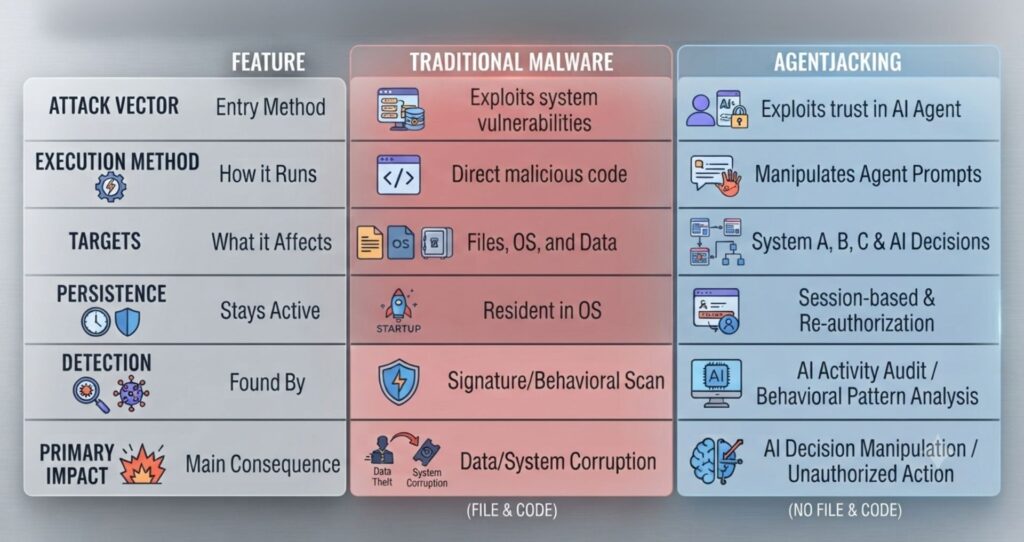
How Does Agentjacking Actually Work?
Every agentjacking case follows a similar shape. An attacker doesn't break into anything. They just write something in a place they know your agent will eventually read.
🔍 The Attack Pattern, Step By Step
- Plant. The attacker hides an instruction inside a webpage, comment, or report — somewhere the agent treats as routine data.
- Wait. Nothing happens until you ask your agent to read, summarize, or act on that exact content.
- Blend. The instruction is formatted to look like normal system text, not an attack.
- Execute. The agent can't separate "data" from "command," so it just complies, using your own permissions.
This is a variant of indirect prompt injection, and it's why the technique is so hard to catch.
The agent isn't tricked by code. It's tricked by meaning — and meaning doesn't trip a virus scanner.
In May 2026, CISA, the NSA, and their counterparts in Australia, Canada, New Zealand, and the UK jointly called prompt injection the most persistent, hardest-to-fix threat facing agentic AI systems.
Read the full advisory on CISA.gov.
One documented case hit over 2,300 organizations with an 85% success rate in controlled testing, from small dev teams up to a $250 billion enterprise. The attack worked because nothing looked wrong.

Why AI Browsers Are the New Target
A new wave of browsers can read a page and act on it for you — click buttons, fill forms, summarize content without being asked twice. That convenience is exactly what makes them exposed.
Browsers like Comet, ChatGPT Atlas, and Opera Neon all share this design, each with its own approach to limiting the risk.
A browser agent doesn't just read text for you anymore. It reads text as instructions, sometimes while logged into your email, your bank, or your work tools in the background.
📌 A Real-World Case
In 2025, Brave's security team hid an instruction inside a Reddit spoiler tag on an ordinary page. Perplexity's Comet browser read it, treated it as a command, and extracted a user's email and one-time code.
No exploit. No malware. Just text the agent trusted that it shouldn't have.
This isn't a one-browser problem. Every agentic browser shares the same design tension: usefulness requires reading the open web, and the open web is exactly where an attacker can plant a trap.
How Exposed Is Each Browser Type?
| Browsing style | Agentjacking exposure | Lower risk? |
|---|---|---|
| Manual browsing, no agent | Low | ✅ Winner |
| AI browser, human confirms each action | Moderate | Depends on settings |
| AI browser, full autonomous mode | High | ❌ Riskiest |
For a deeper side-by-side of how the major AI browsers actually handle this, our AI browser privacy comparison breaks down each one's default protections.
Why Traditional Security Tools Miss It
Firewalls, antivirus software, and browser extensions look for known bad code. Agentjacking doesn't use any. It uses language your agent is designed to obey.
OWASP, the security nonprofit that catalogs application risks, now lists prompt injection as the top risk for AI applications specifically because existing tools weren't built to catch it.
🚫 What Legacy Tools Check
- Known malware signatures
- Suspicious file downloads
- Blacklisted domains
- Unusual network traffic
✅ What This Actually Exploits
- Plain-looking text the agent reads
- Your agent's own valid permissions
- Trust between the agent and its data source
- The gap between "data" and "instruction"
An agentjacking attempt looks, to a firewall, exactly like an authenticated user doing normal work. That's the uncomfortable part. There's nothing external to flag.
It also means the fix isn't a single download. It's a mix of scoped permissions and smarter defaults.
Habits that limit what any single hijacked action can reach matter more here — exactly what the next section covers.
How to Protect Yourself From Agentjacking
You can't patch this away completely. OpenAI has said the underlying issue may never be fully fixed. But you can shrink what a hijacked agent can actually do.
Require confirmation for anything that spends, sends, or deletes
Turn off full autonomous mode for purchases, emails, and file changes. One click of friction stops most agentjacking attempts cold.
Keep your AI browser logged out of sensitive accounts
If it can't reach your banking or email session, there is nothing there to steal. Use a separate, less-privileged profile for agentic tasks.
Review what permissions your AI tools already have
Most people have never audited this. Our AI app permissions guide walks through exactly where to look.
Use unique, vaulted passwords instead of reused ones
If an agentjacking attempt does succeed, a password manager limits the blast radius to one account instead of every account you own.
✅ Fast Self-Check
- Does your AI browser act without asking first? Turn that off.
- Is it logged into email or banking right now? Log it out when not in use.
- Are your passwords unique per site? If not, a manager fixes this in one sitting.
None of this makes an attack impossible. It makes it expensive and slow for an attacker — which, most of the time, is enough to make them move on to an easier target.
Frequently Asked Questions — Agentjacking
What does agentjacking mean in simple terms?
+Agentjacking means an AI agent follows a hidden instruction it finds in content, instead of following your actual request. The attacker never touches your device directly.
They just plant text somewhere the agent will read, formatted to look trustworthy, and let the agent do the rest on its own.
Is this the same as prompt injection?
+Agentjacking is the outcome; prompt injection is the technique behind it. Indirect prompt injection hides the instruction inside data the agent reads later.
This specifically describes the moment that injected instruction succeeds in hijacking the agent's actions, not just its reply.
Can it steal my passwords or money?
+Yes, if the hijacked agent has access to a logged-in session. Documented cases have already extracted email addresses and one-time codes this way.
The real risk scales with whatever accounts and permissions the agent can reach the moment it gets hijacked.
Which AI browsers are most exposed to this risk?
+Any browser that reads a page and acts on it carries some agentjacking exposure, including Comet, ChatGPT Atlas, and Opera Neon.
Exposure grows with autonomy. A browser that confirms actions with you is safer than one running fully unattended.
How do I know if I've been targeted?
+There's rarely an obvious sign, which is part of what makes it dangerous to spot in the moment.
Watch for an agent taking action you never requested, or login sessions you don't recognize in your account history.
Does antivirus software stop this kind of attack?
+Not reliably. Antivirus tools scan for known malicious code, and this technique uses plain, convincing language instead.
There's no file to flag and no signature to match, which is why researchers treat it as its own category of risk.
Our guide to stopping AI from reading your private data covers the settings side of this.
Is this only a risk for developers and coding agents?
+No. The term started in coding-agent research, but the same mechanism applies anywhere an agent reads untrusted content and acts on it.
Anyone using an agentic browser to shop, book travel, or manage email carries some of this exposure too.
What's the single best defense against it?
+Require human confirmation before your agent completes anything sensitive, like a purchase or an email send.
Pairing that with a script-blocking tool like AdGuard and unique, vaulted passwords covers most of what a successful attempt would need to cause harm.
🛡️ Keep Your AI Setup Protected
You now know what agentjacking is. Here's how to keep tightening the rest of your AI privacy setup: