

Mirko
AI Tech Writer
Most teachers spend 7–10 hours a week preparing lesson materials — and quizzes eat up a big chunk of that time. That's not a passion problem. It's a tools problem.
We researched the top ai quiz generator options teachers actually rely on, so you can build interactive quizzes in minutes instead of hours.
Some links are affiliate links · you support us at no extra cost · Full disclosure
1. Why AI Quiz Generators Are Becoming Essential for Modern Classrooms
An ai quiz generator has become one of the most helpful creativity tools for teachers, tutors, and anyone creating educational content.
The reason is simple: it turns hours of preparation into a few minutes while making quizzes more interactive, visual, and enjoyable for students.
Today's classrooms and online learning environments move fast. Students expect quizzes that feel more like the digital experiences they already interact with.
That means dynamic questions, visuals, instant feedback, and adaptive difficulty — not static text. Traditional quizzes rarely deliver this, and manual creation takes too long.
This is where a modern ai quiz generator like ChatGPT genuinely helps. It lets us:
- Create quizzes on any topic instantly
- Adjust difficulty automatically for different levels
- Add images, diagrams, and creative layouts
- Build branching or scenario-based questions
- Save hours each week on planning
Together, these features turn a static worksheet into something closer to a personalized learning experience — without adding extra prep time.
If you want to expand beyond quizzes, our roundup of free AI learning tools worth trying covers the wider toolkit.
By the numbers: RAND Corporation research found that 25% of teachers already use AI tools for instructional planning — and that share keeps climbing every year.
That gap is exactly where a good ai quiz generator earns its keep — turning search-and-build time into a five-minute prompt.
2. The Engagement Problem: Why Most Student Quizzes Don’t Work Anymore

Even when a topic is interesting, students often disengage because traditional quizzes don’t match how they learn today. Research from Harvard’s Graduate School of Education highlights that attention drops quickly when learning experiences feel repetitive or lack interaction. Most classic quizzes suffer from exactly that.
The main issues are clear:
• They rarely adapt to different student levels
Every class has mixed abilities. A fixed set of questions can be too hard for some and too easy for others, reducing motivation on both sides.
• They don’t feel interactive or game-like
Students today spend time in ecosystems full of feedback loops, visuals, and touch interactions. A block of plain text questions feels outdated.
• They lack personalization
According to Edutopia, personalized learning increases participation and retention. Traditional quizzes simply can’t shift in real time.
• They take too long to build, so creativity gets sacrificed
Most teachers admit that they often choose “what’s fast,” not “what’s engaging,” because time is limited. The result: dry, repetitive quizzes.
This is exactly where an ai quiz generator solves the engagement gap. AI tools make it easy to create quizzes with varied question types, adaptive challenges, visuals, and story-based formats — without increasing workload.
3. Quick Picks: The Best AI Quiz Generator Tools (With Pros and Cons)
Choosing the right ai quiz generator can be the difference between a generic quiz and one students genuinely enjoy. This quick comparison table highlights the best ai quiz maker options teachers and tutors use to create quizzes with AI. Each tool is selected for a specific purpose: creativity, automation, visuals, or classroom workflow — helping you pick the most effective interactive quiz generator for your needs.
| Tool | Best For | Strengths | Limitations |
|---|---|---|---|
| ChatGPT (Plus) | Custom quizzes & creativity | Highly flexible, supports any subject, perfect for creative/branching quizzes | Needs manual formatting for classroom platforms |
| Canva Pro | Visual worksheets & printable quizzes | Professional templates, AI question generator, easy export to PDF | Not ideal for adaptive or branching logic |
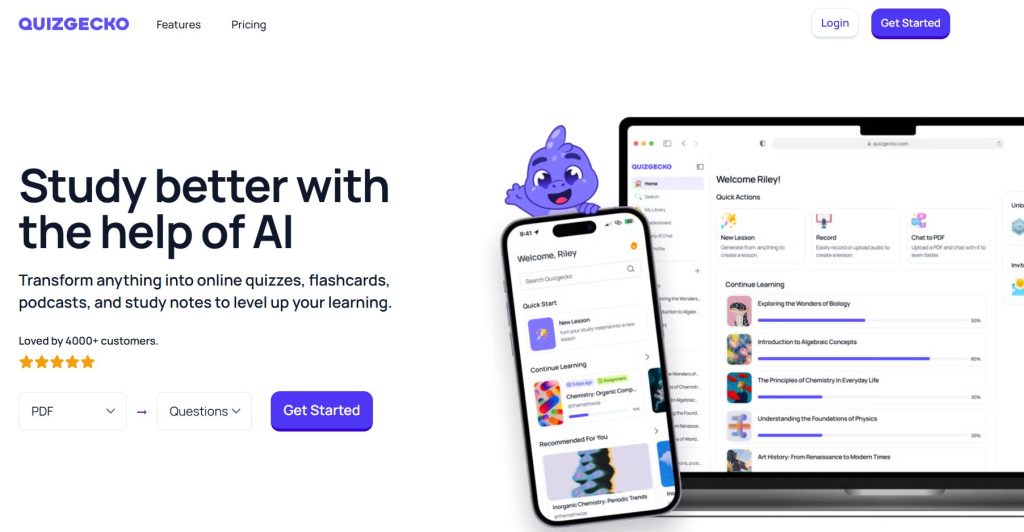
| Quizgecko | Instant quizzes from text, PDF, or URLs | Very fast auto-generation, multiple question types, educator-friendly | Design is basic vs Canva |
| Notion AI | Lesson planning & quiz organization | Great for structuring units, tracking progress, building test banks | Needs exporting when used outside Notion |
🧭 Quick Guidance — Match Your Priority to a Tool
Not sure where to start? Pick what matters most to you:
All four tools work well together, especially when you want an ai quiz generator that balances creativity and ease of use.
4. Step-by-Step Guide: How to Create an Interactive Quiz With AI

Creating an interactive quiz is much easier than most people expect. With the right ai quiz generator, you can go from a blank page to a polished quiz in minutes. Here’s the workflow most teachers and creators rely on.
1. Start by defining the learning goal
Clarify what students should understand after completing the quiz. Decide whether it’s for practice, revision, or assessment and whether you need different difficulty levels. A clear goal helps the ai quiz generator create more accurate, well-aligned questions when you create quizzes with AI.
2. Choose the tool that fits your format
Select the ai quiz generator based on the type of quiz you want to create. ChatGPT is best for creative or branching quizzes. Canva Pro works well for visual or printable worksheets. Quizgecko is ideal for fast automated quizzes from text or PDFs. Notion AI helps when you’re building a lesson plan or test bank.
3. Use a clear prompt to generate structured questions
A structured prompt produces better results.
Try this:
“Create a 10-question interactive quiz for middle-school students about ecosystems. Include multiple-choice, true/false, and one scenario-based question. Make the difficulty progressive and provide the correct answers.”
4. Add visuals, examples, or real-life scenarios
Interactive quizzes feel more engaging when they include visuals, diagrams, image-based questions, or short scenarios. Canva Pro and ChatGPT Vision make this easy. Research from Cognitive Research for Education shows visuals significantly improve attention and memory.
5. Test the quiz and adjust difficulty
Review your AI-generated questions to ensure progression, clarity, and accuracy. If needed, refine with:
“Regenerate questions 4, 6, and 7 at a slightly easier difficulty level.”
6. Export or publish your quiz for classroom use
Choose the best output for your class: PDF, Google Forms, PowerPoint, Notion, Kahoot, or Mentimeter. The flexibility of an ai quiz generator allows you to create once and publish anywhere.
5. Real Examples and Prompts: Quiz Types Students Actually Enjoy
One advantage of using an ai quiz generator is building quiz formats that feel modern, dynamic, and more engaging than traditional worksheets.
These are the quiz types teachers reach for most when they create quizzes with AI, with ready-to-use prompts for each one.
Visual Multiple-Choice Quizzes
Students respond better when questions include images or diagrams.
"Create a visual multiple-choice quiz about the water cycle for 11-year-olds. Include one image-based question and explain the correct answers."
Scenario-Based Problem Solving
Students love being placed inside a story and asked what happens next.
"Write a 5-question scenario-based quiz about online safety for middle-school students. Include one 'choose what you would do' challenge."
Challenge Mode Quizzes
A rising difficulty curve keeps students motivated and curious.
"Generate an ascending-difficulty quiz on fractions for beginners. Start very easy and end with a multi-step problem."
Gamified Trivia or Speed Round
Fast-paced trivia energizes the classroom in the first five minutes.
"Create a 10-question rapid-fire trivia quiz about ecosystems. Questions should be short, fun, and structured for a 30-second challenge."
Mixed-Format Quiz
Combining formats improves critical thinking and prevents boredom.
"Build a mixed-format quiz about medieval history. Include multiple-choice, true/false, and two short-answer questions."
Personalized Review Quizzes
AI tailors the next set of questions using the student's previous answers.
"Generate follow-up questions based on these student errors: [paste errors]. Make them supportive, corrective, and level-adjusted."
Formats like these work because they lean on retrieval practice, not passive review. Research on retrieval practice shows it outperforms simple re-reading for long-term retention, across age groups and subjects.
If personalization is your main goal, our guide to AI IEP goal generators covers a similar adaptive approach for individual student needs.
Paste any of these prompts directly into ChatGPT and adjust the grade level, subject, or question count to fit your class.
6. Ethical AI Reflection: Accuracy, Bias, and Responsible Classroom Use
Using an ai quiz generator can dramatically speed up lesson creation, but we still need to apply judgment and responsibility. These ai tools for teachers are powerful, yet not perfect, and students deserve content that remains accurate, fair, and safe.
Accuracy matters
AI occasionally generates incorrect facts or outdated information. Reviewing each question before sharing it with students is essential. Even small errors can mislead learners, especially in science or history contexts.
Watch for subtle bias
Studies from Stanford HAI show that AI training data can introduce cultural or contextual bias into questions. This is why quizzes involving ethics, culture, or social behavior should always be checked manually.
Protect student privacy
Never upload personal student data when using tools like ChatGPT, Quizgecko, or Notion AI. Quizzes should be built from general prompts, not identifiable information.
Promote transparency with students
Let your class know that you’re using AI as a creative assistant, not a replacement for teacher expertise. This encourages digital literacy and helps students understand how AI fits into modern learning.
If you’re exploring more ways to teach AI safely and clearly, you might enjoy our post “Behind the Algorithm: How AI Understands Visual Data in 2025” — it’s a simple introduction that helps students grasp how these systems actually work.
Recommended Read:
To explore how AI is transforming education, assessments, and the way students learn, “Artificial Intelligence in Education: Promises and Implications for Teaching and Learning” by Wayne Holmes, Maya Bialik and Charles Fadel is one of the most reliable and insightful books available today. It explains how AI generates quizzes, supports teachers, and what responsible AI use looks like in the classroom.
Read Artificial Intelligence in Education7. Final Takeaways and Recommended Tools to Start Today
Using an ai quiz generator makes it easy to build quizzes that feel modern, interactive, and enjoyable — without adding extra workload.
Whether you teach in a classroom or online, the right interactive quiz generator adapts to different levels and keeps students genuinely engaged.
Before you subscribe: ChatGPT offers a free plan for verified U.S. K-12 educators through June 2027, and Canva for Education is free for verified K-12 teachers and students — worth checking before paying for either.
Ready to start? ChatGPT remains the most flexible entry point — free to try, no extra setup required.
Try ChatGPT Free →Explore a couple of these tools and you'll find a workflow that fits your classroom naturally. If you want to keep going, our roundup of AI tools for students covers what to try next.
8. FAQ About Using an AI Quiz Generator for Student Engagement
What's the fastest way to create a quiz with an AI quiz generator?
+The fastest method is pasting your lesson notes or textbook excerpts into a tool like ChatGPT and requesting a structured format — multiple-choice, true/false, or short answer.
These tools generate questions in seconds, and you can adjust difficulty or style with a single follow-up prompt.
For a classroom-ready quiz in under five minutes, this is usually the quickest path available.
Are AI-generated quizzes accurate enough for classroom use?
+They can be, but always review the output first. AI occasionally produces outdated or slightly inaccurate information, especially in science or history topics.
A quick manual edit ensures reliability and keeps materials aligned with your curriculum standards — treat the first draft as a starting point.
Can I use an AI quiz generator to differentiate levels for mixed-ability classes?
+Yes — this is one of the strongest use cases for an ai quiz generator. You can ask it to regenerate the same quiz at multiple levels in seconds.
That lets every student work at a comfortable pace without you building three separate quizzes by hand.
Is it safe to upload student data into AI tools?
+No. Avoid uploading any personal or identifiable student information into any AI quiz generator — always use general prompts instead.
Most major platforms, including OpenAI, Canva, and Notion, explicitly advise against submitting sensitive data of this kind.
Which AI tool is best for visual or printable quizzes?
+Canva Pro is the easiest choice for visuals and layout, since it's built around design rather than text generation.
ChatGPT is better for the actual question content. Many teachers draft in one tool, then design the final version in the other.
Can AI help create more engaging or game-like quizzes?
+Absolutely. An ai quiz generator can produce scenario-based questions, gamified challenges, visual prompts, branching paths, or speed rounds on request.
These formats increase engagement because they mirror the kind of interactive content students already encounter outside the classroom.
How much does an AI quiz generator cost per month?
+ChatGPT Plus runs $20/month, and Canva Pro is $15/month (about $10/month billed annually).
Both offer free routes for educators: ChatGPT is free for verified U.S. K-12 teachers through June 2027, and Canva for Education is free for verified K-12 staff and students.
What's the best free AI quiz generator for beginners?
+ChatGPT's free tier is the easiest starting point — no cost, no setup, and simple prompts get you a working quiz right away.
Verified K-12 teachers should apply for Canva for Education first, since it unlocks most Pro design features at no cost.
Can students use an AI quiz generator to build their own study quizzes?
+Yes, and it's an effective self-study strategy — students can paste their own notes in and get instant practice questions.
This works especially well for students who need extra repetition. Our guide to AI tools for students with learning disabilities covers more options built around that kind of flexibility.
Do AI quiz generator tools support non-English or multilingual quizzes?
+Most general-purpose tools like ChatGPT handle dozens of languages, so you can request a quiz directly in Spanish, French, or elsewhere.
Quality varies by language and subject complexity, so review non-English output carefully before handing it to students.
🎓 Keep Building Your Teaching Toolkit
You've got a working ai quiz generator workflow now. These go a step further — turning notes into study guides, differentiating for every learner, and rounding out the rest of your AI toolkit.