
📅 Published September 2025 · 🔄 Updated October 23, 2026 · ⏱ 14 min read · 🎙 Used: Murf, ElevenLabs, Descript, CapCut
The best AI voice generator for YouTube is the one that fits the video you make, not the one with the longest voice list. I've used Murf, ElevenLabs, Descript and CapCut for narration, then checked every plan, free tier and YouTube rule that decides what you can publish and monetize. Below are six picks, one per job, plus a calculator that prices your channel's monthly minutes.
Short answer
Murf AI is my pick for tutorials and explainers: its editor makes pacing and pronunciation fixes fast, and Creator costs $19 a month billed yearly with commercial rights. Pick ElevenLabs for the most lifelike storytelling voices from $6 a month, Fish Audio for cheap cloning, Descript to fix your own recorded voice and HeyGen to dub videos into other languages. Every free AI voice generator plan here is for testing only.
🎙 Quick verdict
🏆 Editor's Choice: Murf AI
The AI voice generator for tutorials, explainers and courses. Line-by-line control over pace, pauses and pronunciation. Creator $19/mo yearly.
🎭 Most realistic: ElevenLabs
Storytelling and faceless narration, with instant cloning of your own voice from the $6 Starter plan.
🧮 Not sure which plan?
Enter your monthly minutes and retakes; get the cheapest plan that covers them.
📋 What's inside
- My 6 picks at a glance
- The 6 picks, ranked by job
- Can you monetize an AI voice on YouTube?
- Cost calculator: which plan fits your channel
- Is there a free option worth using?
- My 6-step Murf voiceover workflow
- 5 script fixes for a natural voice
- Play.ht shut down: where to move
- Voice cloning: legal and safe
- My verdict
- FAQ
🔍 How I picked these tools
I've used Murf and ElevenLabs as an AI voice generator for narration, Descript to repair my own recorded voice, and the text to speech built into CapCut Desktop. I haven't paid for Fish Audio or HeyGen, so those picks rest on their pricing pages and dated third-party checks. Prices were checked on October 23; YouTube rules come from its Help Center. Older claims in the first version of this post, such as a $39 Murf "Pro" plan with cloning and Play.ht as a pick, were wrong and are gone.
Some links are affiliate links: if you buy through them I may earn a commission at no extra cost to you. It never decides what I recommend. Details
Best AI voice generator for YouTube: my 6 picks at a glance
✔ Prices checked October 23 · confirm at checkout
| Tool | Best for | Free plan | Paid plan to publish | Clone your own voice |
|---|---|---|---|---|
| Murf AI | Tutorials, explainers, courses | 10 min total, no downloads | Creator $19/mo yearly ($29 monthly) | Enterprise only |
| ElevenLabs | Storytelling, faceless narration | About 10 min/mo, no commercial use | Starter $6 (~30 min) · Creator $22 (~100 min) | From Starter |
| Fish Audio | Budget volume, multilingual | About 7 min/mo, 500 characters per clip | Plus about $15/mo (~200 min) | Yes, paid slots |
| Descript | Fixing your own narration | 60 media min, watermark | Hobbyist $16/mo yearly · Creator $24 | AI Speech in your voice |
| HeyGen | Dubbing into other languages | 3 videos/mo | Creator $29/mo (600 credits) | On Creator |
| CapCut | Free narration for Shorts | Built-in voices | Pro for premium voices | Check license first |
👉 Jump to your job
Every AI voice generator here is priced in US dollars. In the EU and UK, VAT is added at checkout, and some vendors show local prices instead.
The 6 best AI voice generators for YouTube, ranked by job
Murf AI
Voiceover studio · 200+ voices · commercial rights on paid plans
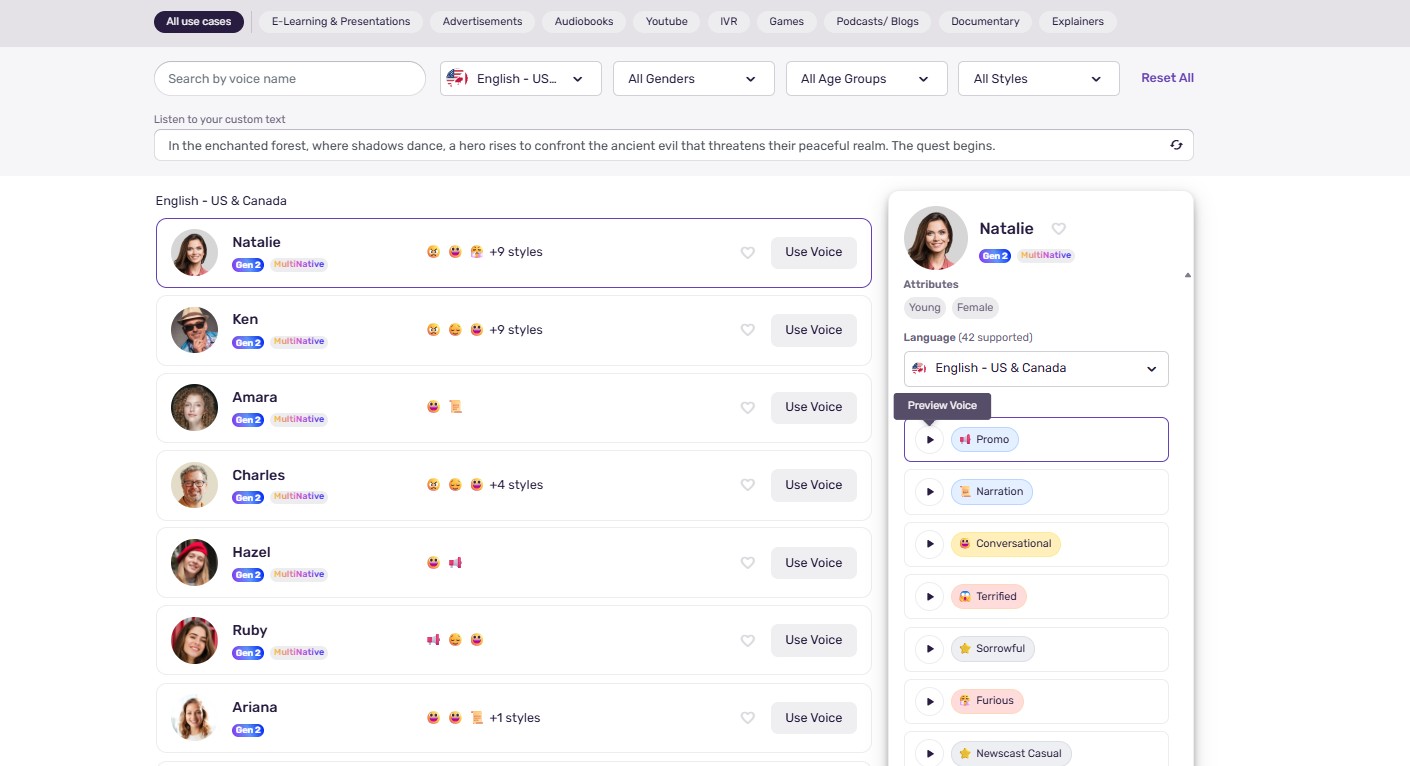
Murf is an AI voice generator built like a voiceover studio: you paste a script, split it into blocks and fix each line's pace, pauses, pitch and pronunciation without regenerating the whole track. That control is why it wins for tutorials, software walkthroughs and course videos, where one mispronounced product name ruins a take.
 📸 My screenshot
Know the limits before you pay. Creator includes about 24 hours of generation a year, roughly 2 hours a month, and regenerating a line to fix one word counts against it. Business adds the Emphasis, Variability and Say It My Way controls plus about 8 hours a month. Cloning your own voice is Enterprise only, at custom pricing.
ElevenLabs
Text to speech · voice cloning · dubbing
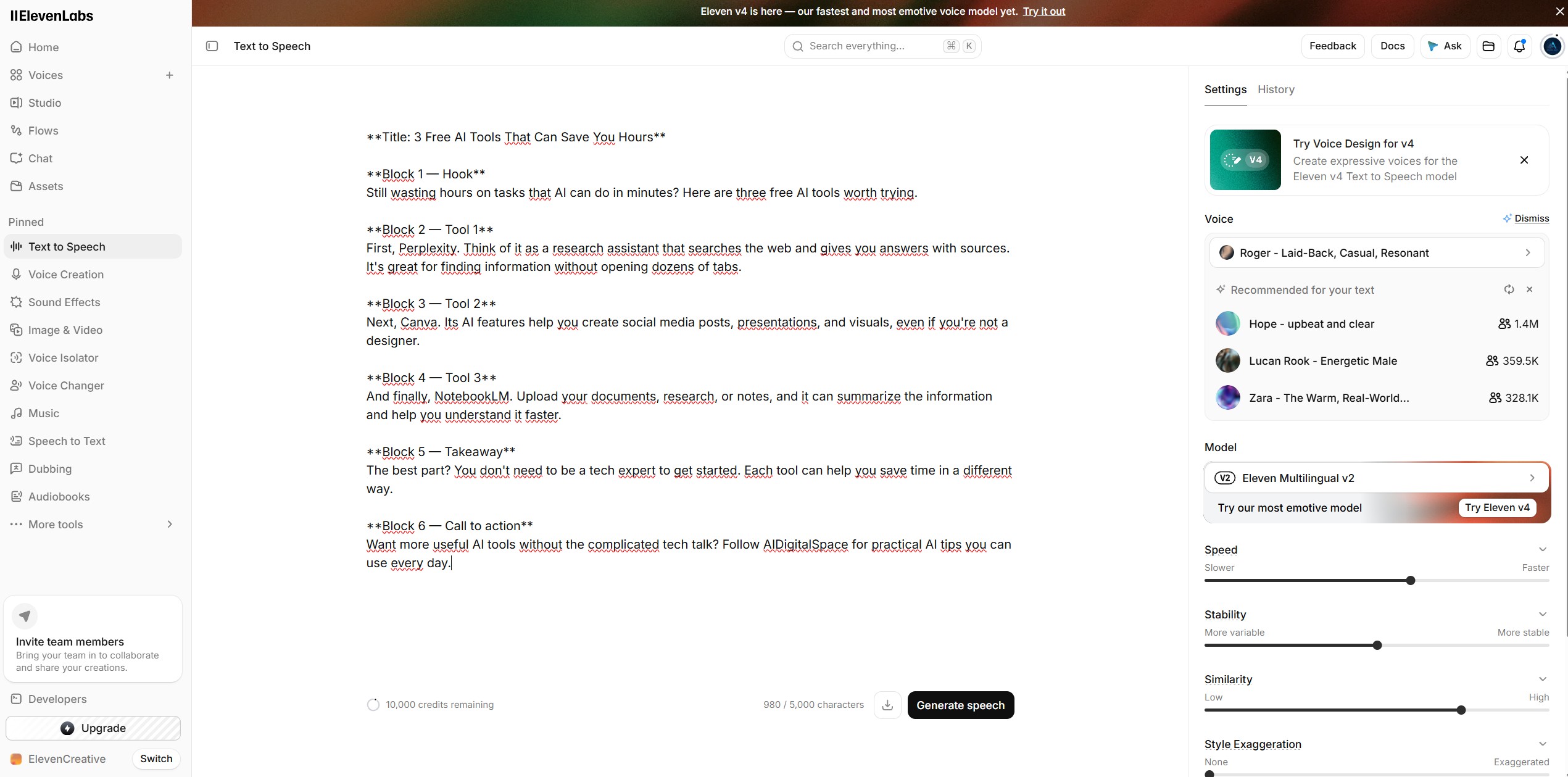
ElevenLabs is the AI voice generator I'd choose when emotion carries the video: storytelling, history and true-crime narration, or a faceless channel where the voice is the personality. It bills in credits; at standard quality that works out to about 30 minutes a month on Starter and about 100 to 120 on Creator.
 📸 My screenshot
Starter adds a commercial license and instant cloning from a short sample; Creator adds professional cloning trained on longer recordings. The free plan has no commercial rights, so keep it for tests. For the head-to-head details, read my Murf AI vs ElevenLabs comparison.
Fish Audio
Text to speech · cloning from seconds of audio
Fish Audio is the cheapest AI voice generator for an expressive or cloned voice at volume. Plus gives about 200 minutes a month with commercial use, private voice slots and a professional clone slot. The free plan gives about 7 minutes a month but caps each generation at 500 characters, so long scripts need splitting.
Third-party checks disagree on the exact Plus and Pro prices and on whether the free tier allows commercial use, so read the pricing page and terms on the day you sign up. My ElevenLabs vs Fish Audio test covers how the voices compare.
Descript
Text-based audio and video editor · AI Speech
Descript isn't a classic AI voice generator; it solves a different problem: you recorded the narration yourself and need to fix it. You edit the transcript like a document, and its AI Speech feature, formerly called Overdub, regenerates a flubbed word or a missing sentence in your own cloned voice, so you don't re-record a 12-minute take for one line.
AI voice work spends AI credits, which are separate from media hours: Hobbyist includes 400 a month and Creator 800. Free exports carry a watermark. My Descript YouTube editing tutorial shows the workflow end to end.
HeyGen
AI video · translation with your own voice
HeyGen is an AI video platform, but its translation tool is the fastest way to turn one English video into other languages in a voice that sounds like yours. On the Creator plan's 600 monthly credits, audio-only dubbing costs 2 credits a minute and lip-synced translation 5, so roughly 300 or 120 minutes a month.
Credits reset each cycle and premium avatar videos burn them much faster, so price it on dubbing alone. Pair it with a separate AI voice generator for your main-language narration.
CapCut
Video editor · built-in text to speech
If you already edit in CapCut, its built-in AI voice generator is the quickest route for Shorts: type the line, pick a voice and the audio lands on the timeline. CapCut's tool pages say the audio can be used commercially, but its materials license limits some assets to CapCut and TikTok, so check the license for the voice you pick before a monetized long-form upload.
Can you monetize videos made with an AI voice generator?
YouTube's channel monetization policies say reviewers focus on your main theme, most viewed videos, newest videos and biggest share of watch time. The examples of what won't monetize include channels that upload narrated stories with only superficial differences and slideshows that all use the same narration. Using an AI voice generator isn't the problem; the sameness is.
✅ Usually safe
An original script for each video, your own analysis, screen recordings or footage, varied structure and one consistent AI voice generator voice across the channel.
⛔ High risk
Reddit-story or top-10 templates at scale, the same voice over looping stock clips, scraped scripts, and several near-identical uploads a day.
Disclosure is a separate rule. YouTube asks you to switch on the altered or synthetic content setting when realistic content could be mistaken for real, and its examples include cloning someone else's voice for a voiceover. Its help page lists cloning your own voice for voiceovers or dubs among the uses that don't need a label, and it says disclosing won't limit a video's reach or earnings.
Faceless doesn't mean inauthentic. My faceless video workflow shows how to add the human layer that keeps an AI-narrated channel monetizable.
AI voice generator cost calculator: which plan fits your channel?
Here's what the AI voice generator calculator shows for a typical channel. At 40 finished minutes a month with normal retakes, you need about 60 generated minutes. On yearly billing, Fish Audio Plus covers that for about $11 a month, ElevenLabs Creator for about $18 and Murf Creator for $19. Murf costs a little more, but its block editor means fewer full regenerations, which is where the minutes go.
Add your AI voice generator to the rest of your stack in my AI subscription cost calculator to see the full monthly bill.
Is there a free AI voice generator for YouTube worth using?
| Tool | Free allowance | Download | Commercial use |
|---|---|---|---|
| Murf AI | 10 min total | No | No |
| ElevenLabs | About 10 min a month | Yes | No |
| Fish Audio | About 7 min a month, 500 characters per clip | Yes | Sources conflict: check terms |
| Descript | 60 media min a month, 100 one-time AI credits | 720p with watermark | For testing |
| CapCut | Built-in voices in the editor | Yes | Check the materials license |
The cheapest legal route for a new channel is one paid month on the AI voice generator that sounds best on your own script. ElevenLabs Starter at $6 is the lowest entry price with a commercial license.
How I make a YouTube voiceover with Murf in 6 steps
- 1Write for the ear
Short sentences, contractions, and numbers written the way you'd say them. A script that reads well silently often sounds stiff out loud. - 2Paste the script in blocks
One block per scene or slide, so you can fix a single line later without regenerating the whole track. - 3Audition three voices on your hardest paragraph
Pick by pace and clarity on your own words, not by the polished demo line. - 4Fix pronunciation and pauses first
Set brand names, acronyms and pauses before you generate the full track, because every regeneration spends your monthly hours. - 5Generate and listen once with your visuals
Play it at normal speed over the edit; awkward rhythm shows up against the footage, not in isolation. - 6Export and cut to the voice
Download the audio, drop it into your editor and cut the visuals to the narration rather than the other way round.
The same six steps work in any AI voice generator, including ElevenLabs and Fish Audio; only the controls differ. Murf's advantage is step 4, because you fix a word inside one block instead of regenerating a whole paragraph.
How to make an AI voice generator sound natural: 5 script fixes
🗣 Write the way you talk
Use contractions and plain words. "You're" sounds human; "you are" in every line sounds like a manual.
⏸ Put pauses in the text
Commas, full stops and line breaks shape rhythm. Add your AI voice generator's pause control after key points and before a new section.
🔤 Spell it the way it's said
Write SQL as "sequel" or "S-Q-L", and spell brand names phonetically if the voice stumbles.
✂️ One idea per sentence
Long sentences flatten intonation. Split anything over about 20 words.
⚡ Match the energy to the format
Shorts can run faster and brighter; tutorials need a calmer pace so viewers can follow along.
Play.ht shut down: where to move your voiceovers
If you used Play.ht's cloned voice, record a fresh clean sample before you switch, since the old clone can't be moved. Murf published a transition guide for former Play.ht users; check its current offer before you sign up.
Voice cloning on YouTube: what's legal and safe
🧬 Clone your own voice
ElevenLabs, Fish Audio and Descript all clone your voice on paid plans. My voice cloning tools guide compares them.
📞 Know the scam side
Cloned voices are used in fake emergency calls. Read how AI voice cloning scams work.
🛡 Set a safe word
Make a family code phrase in two minutes with my free family safe word generator.
My verdict: the best AI voice generator for most YouTubers
For tutorials, explainers and courses, Murf AI is the best AI voice generator to start with: the block editor turns a one-word fix into a ten-second job, and Creator at $19 a month yearly covers about 2 hours of generation with commercial rights. If your channel lives on storytelling or you want your own cloned voice cheaply, ElevenLabs Starter is the better first month.
Whichever AI voice generator you pick, test it on your own script, finalize the text before you generate, and keep each video original. That last part protects your monetization more than any voice setting.
My pick: Murf AI Creator, billed yearly
Try Murf AI free →The free plan lets you audition voices; downloads and commercial use start on Creator.
📚 Recommended read
The YouTube Formula by Derral Eves
A good AI voice generator keeps viewers listening; Eves explains what makes them click and stay in the first place. Read it before you script your next ten videos.
See the book →