

The ClickUp Creative Score Confusion, Explained
Type ClickUp Creative Score into Google and the results assume you're asking about one thing. You're actually asking about two — here's the split in one glance before the full explanation:
A ClickUp feature called "Creative Score" that automatically rates how creative your work is.
Two unrelated products: ClickUp Brain (ClickUp's real AI) and a separate tool called Creative Score.
I checked ClickUp's pricing and feature pages directly, both current as of August 2026. ClickUp's AI product is called ClickUp Brain — there's no scoring feature by the other name anywhere in its docs, blog, or pricing table.
Meanwhile, a real company exists at creativescore.ai. It analyzes marketing creative — ads, landing pages, pitch decks — and returns a score out of 100. It has nothing to do with project management or ClickUp.
Two products, one shared buzzword — that's the entire mix-up.
My guess is the confusion started because the phrase describes exactly what a lot of people wish a task manager did: put a number on how good an idea is. It's a good name for a product — it's just not ClickUp's product.
It matters beyond curiosity, too. If you're budgeting for one tool and accidentally price out the other, you'll either overpay for a project-management add-on that will never score an ad, or underpay expecting a scoring platform bundled into software that doesn't have one.
What ClickUp Brain Actually Does
ClickUp Brain is ClickUp's AI layer, sold as an add-on on top of any paid workspace plan. The base tier, called Brain AI, includes an unlimited Brain Assistant, an unlimited @Brain Agent inside tasks and docs, and AI chat access to Claude, ChatGPT, and Gemini without switching tools.
A second tier, Everything AI, adds unlimited AI Notetaker, AI Fields, automated dashboards, and heavier use of ClickUp's Super Agents — the part of Brain built to complete multi-step work on its own, like triaging a batch of tasks and reassigning them by capacity.
What a Super Agent Does
A Super Agent handles a multi-step instruction without a human clicking through each step. Tell it to review this week's overdue tasks, reassign them by who has open capacity, and post a summary to the project channel — it does all three, not just one.
What AI Super Credits Gate
Both tiers include a monthly pool of AI Super Credits — 1,500 with Brain AI, 5,000 with Everything AI — priced at roughly $0.001 each ($10 per 10,000) once you run out. These fuel the heavier features: Super Agents, automations, and image generation. Everyday chat and writing don't draw them down.
Does Brain Replace a Standalone ChatGPT or Claude Subscription?
Not entirely. Brain gives you chat access to those models inside ClickUp's interface, which is genuinely convenient for staying in one tab, but a standalone subscription still gives deeper settings, longer context handling in some cases, and access outside the ClickUp workspace. Teams already paying for both often keep the standalone tool for heavy individual work and let Brain handle anything tied to a task or doc.
Enterprise Search and Multi-Model Access
Two features worth knowing about specifically: Enterprise Search lets Brain pull answers from across your whole workspace — tasks, docs, and comments — instead of just the page you're on, and the multi-model routing means you pick Claude, ChatGPT, or Gemini per task rather than being locked into whichever model ClickUp defaults to. Everything AI extends that search to private spaces as well as shared ones.
ClickUp Brain Pricing: The Real Cost
ClickUp's workspace plans and its AI pricing are billed separately, and that split isn't obvious on the pricing page. Unlimited runs $7/user/month billed yearly, and Business runs $12/user/month — neither includes Brain.
ClickUp's own pricing page doesn't list the Brain AI add-on inside its main plan-comparison table at all. It sits in a separate "AI Pricing" section further down the page — easy to price out a plan and miss the AI line item entirely.
Add Brain AI at $9/user/month to a Business seat and the real cost is $21/user/month, not $12. Add Everything AI instead and it's $40/user/month. Every seat in the workspace gets billed for Brain once it's turned on — not just the people using it.
Where to Compare ClickUp Brain Against Other Workspace AI
If ClickUp Brain specifically — versus other project-management AI — is what you're evaluating, I've compared it head-to-head with Notion's agents in I Tested Notion Agents vs ClickUp AI, and against Taskade in a three-way AI workspace comparison.
What Creative Score Actually Is
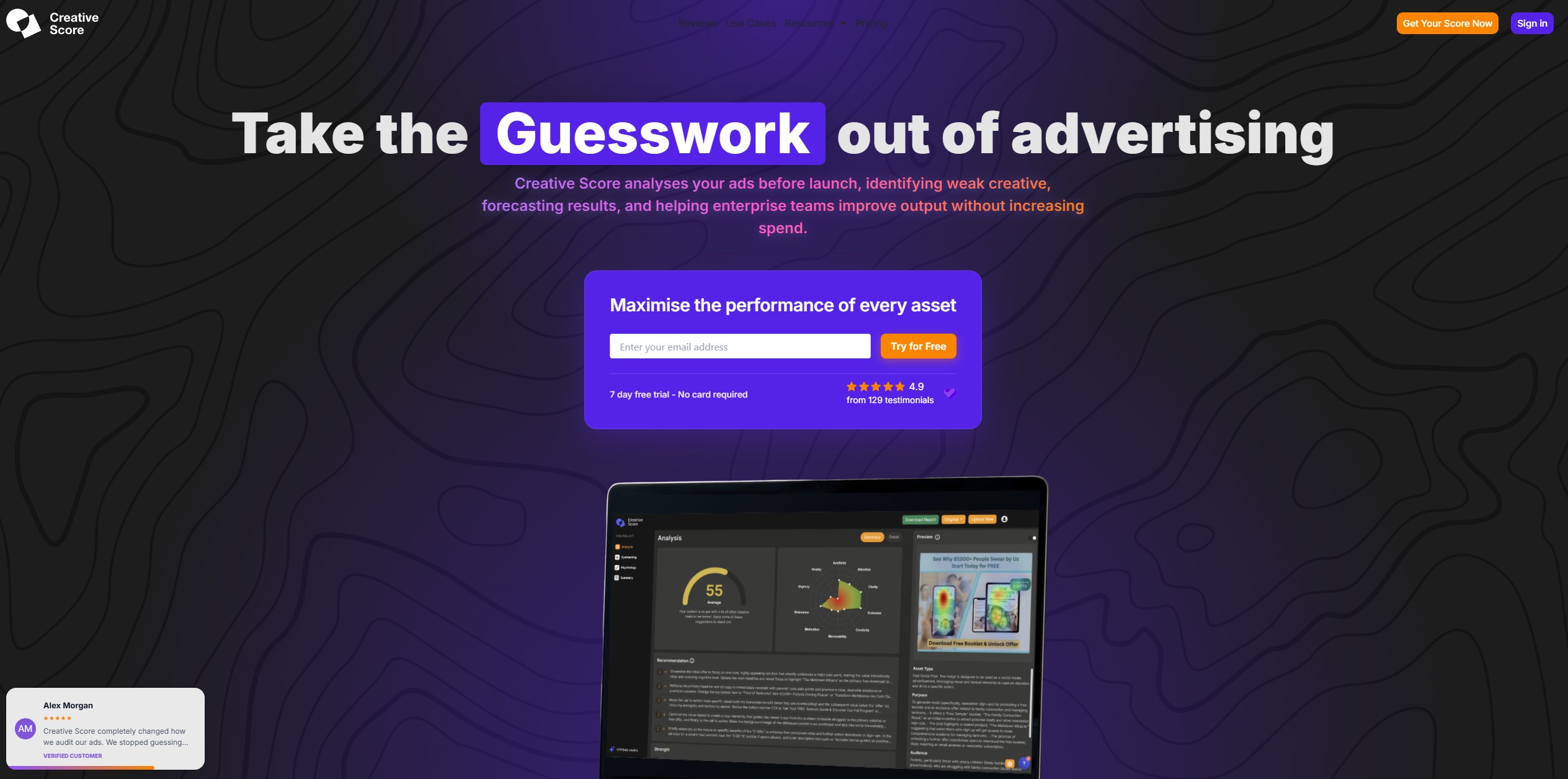
Creative Score is built for marketers, not project managers. Upload an ad, landing page, email, or pitch deck, and it returns a score out of 100 in about 90 seconds, checked against roughly 200 marketing-performance indicators — things like headline clarity, visual hierarchy, and CTA placement.
I'd point you to Creative Score if you're the one signing off on ad creative before it goes live, not if you're managing a team's task board. That's the core difference from ClickUp Brain, and it's worth sitting with before you compare the two on price.
If a screen full of tasks is your problem, Creative Score won't help. If a screen full of underperforming ads is, ClickUp Brain won't either.
How Creative Score Works
The pitch is straightforward: replace subjective sign-off with an objective one. Creative Score's own before/after framing shows a slow, guesswork-driven approval process on one side — nobody quite sure an asset is ready — and an instant, benchmarked score confirming it on the other.
In practice that means a media buyer uploads a static Facebook ad before it goes live, gets a numeric score plus a breakdown by category — say, low marks on CTA contrast but strong marks on headline clarity — and fixes the flagged element before spending a cent on distribution.
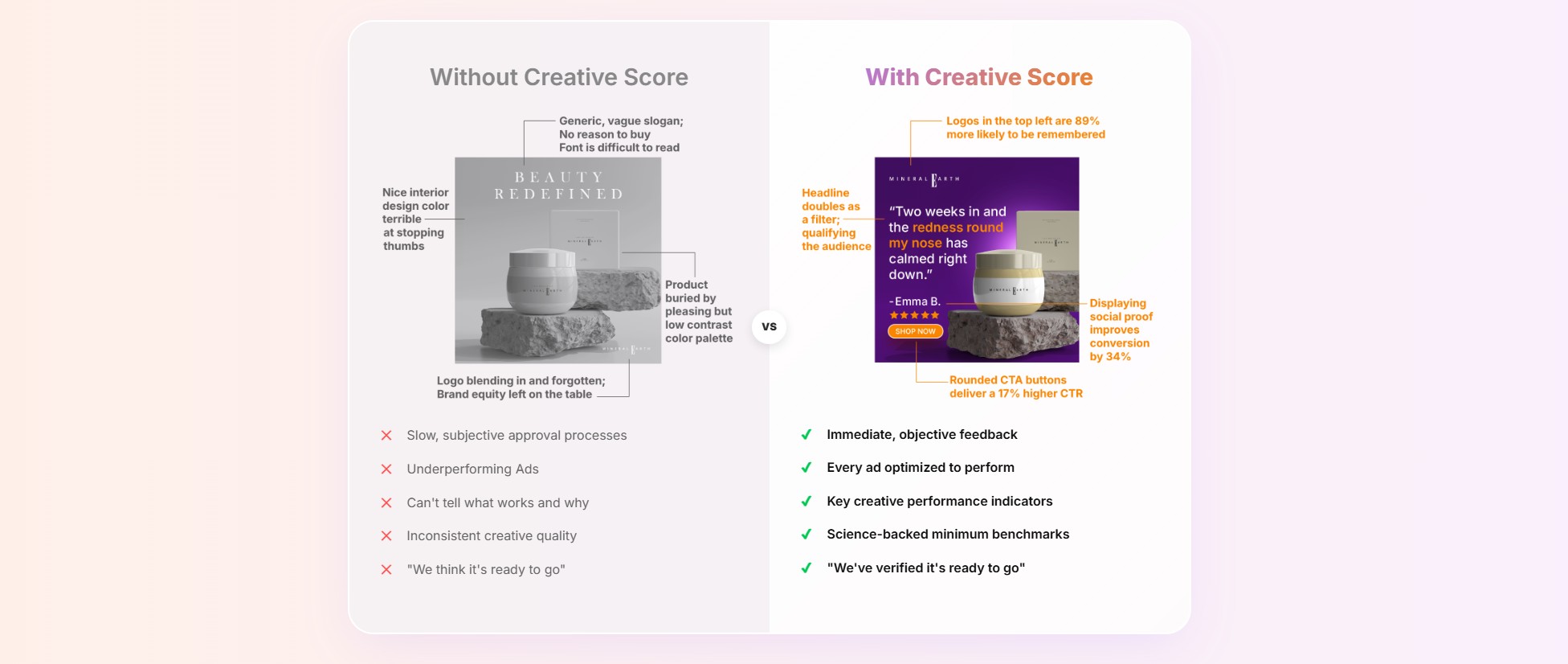
The platform also runs use-case-specific checks: Meta and Instagram ad creative gets scored differently than a TikTok hook or an Amazon listing photo, since what stops a thumb mid-scroll isn't what makes a product photo convert.
Team Sign-Off, Not Just a Solo Check
Beyond the single-asset score, the platform is built for approval workflows — a media buyer can require every ad to clear a minimum threshold before it's allowed to launch, replacing an informal "looks good to me" thread with a documented, repeatable standard the whole team works against.
Which Ad Formats It Covers
The tool scores Facebook and Instagram ad creative, TikTok and Reels short-form hooks, YouTube thumbnails and video openers, and Amazon or e-commerce listing photos, each against benchmarks specific to that format — a static feed ad and a 3-second video hook aren't judged by the same criteria.
The headline stats — a 42% average increase in ROAS, up to 15x claimed profitability gains — come from the vendor's own site, not an independently audited study I could locate. Worth knowing before you treat those figures as a benchmark for your own results.
ClickUp Brain vs Creative Score: Which One You Need
These aren't competitors, so "better" is the wrong question. ClickUp Brain works inside a task-and-docs workspace — it summarizes, drafts, and automates around whatever your team is already tracking. Creative Score works on a single uploaded asset, outside any workspace, and tells you whether that asset is ready to publish.
A marketing team could reasonably run both — ClickUp Brain to manage the campaign, Creative Score to sign off on the ad before it ships. Neither replaces the other.
Choose ClickUp Brain if the problem is coordinating the work. Choose Creative Score if the problem is knowing whether the work is any good before it ships.
Project managers, ops teams, and cross-functional teams already living inside ClickUp for tasks and docs — it saves time in the tool you're already using.
Performance marketers, media buyers, and small agencies shipping paid creative on a recurring schedule — solo creators testing one ad a month may not clear the $79 entry price.