

 Published on: January 15, 2026
Affiliate Disclaimer:
Some of the links in this post are affiliate links. This means we may earn a small commission if you click through and make a purchase, at no extra cost to you. We only recommend tools we truly believe offer value.
1. Why People Are Searching for This Topic Now
Faceless videos AI are suddenly everywhere in our feeds. Videos with no faces, no influencers talking to the camera — yet some of them quietly perform incredibly well, while others feel cheap, forgettable, or just off. If you’ve ever tried faceless content creation yourself, you’ve probably felt the same frustration: “This looks fine… so why isn’t it working?”
The truth is, faceless content is no longer a trend — it’s a response. A response to camera fatigue, privacy concerns, time pressure, and the growing need to publish consistently without turning ourselves into the product. Many creators and businesses are experimenting with AI faceless videos because they promise speed and scale — but the results often don’t match expectations.
That gap is exactly why people are searching for answers right now.
What we’re really looking for isn’t another tool, but clarity:
why some faceless videos AI workflows feel trustworthy and drive AI video conversion, while others get ignored — and what actually makes the difference going into 2026. This guide exists to break that pattern calmly and practically, without technical overload or hype.
By the end, we’ll understand what’s changed, what still works, and how to approach a faceless video workflow in a way that feels intentional — not random.

If you want to understand why some videos win attention and conversions (and others don’t), The YouTube Formula is one of the most practical books to read. It breaks down the core mechanics behind high-performing videos — a perfect match for our faceless AI workflow approach.
2. The Real Problem People Are Trying to Solve
Most people don’t start searching for faceless videos because they want shortcuts — they start because something isn’t working.
We try publishing more. We try new formats. We even try automation. Yet the results feel inconsistent: views without clicks, engagement without trust, or videos that look “fine” but don’t lead anywhere. This is where the frustration usually sets in. The issue isn’t effort — it’s alignment.
The real problem behind faceless videos AI isn’t visibility. It’s credibility. When a video removes the human face, everything else has to work harder: the structure, the pacing, the voice, and the visual flow. If even one of these elements feels artificial or disconnected, viewers subconsciously disengage.
Platforms have also raised the bar. Algorithms increasingly reward watch time, retention, and meaningful interaction, not just output volume. YouTube itself has been clear about this shift toward viewer satisfaction and long-term value, rather than raw posting frequency (official Youtube article here).
So what people are really asking when they search this topic is simple:
How do we create faceless videos that feel intentional, trustworthy, and worth watching — without turning content creation into a full-time job?
Until that question is answered, no tool — AI-powered or not — can truly convert.
3. The Solution That Actually Works (Real Use Cases)
At this point, it helps to be precise about what we mean by a solution.
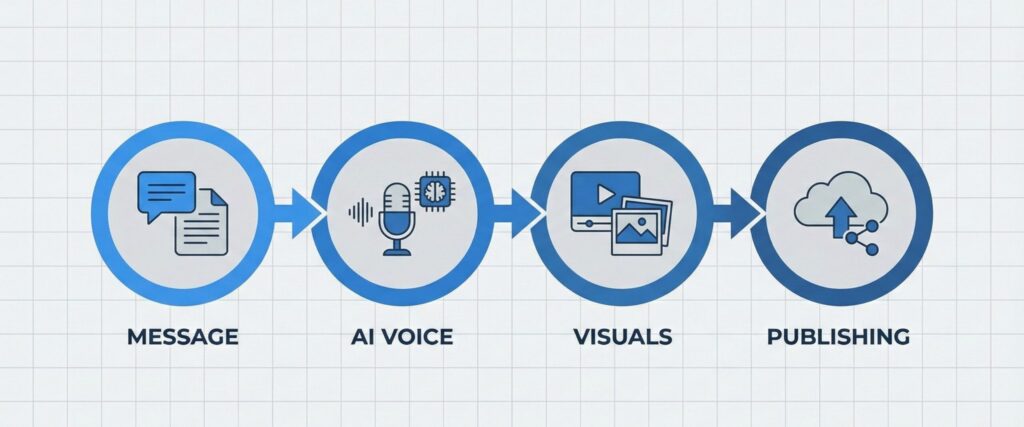
Faceless videos AI that actually convert are not the result of stacking random tools together. They follow a clear faceless video workflow, where each element has a defined role and supports the next. When that structure is missing, even powerful AI tools produce weak or inconsistent results.
This is the faceless video conversion workflow we’re referring to throughout this guide.
The idea behind effective AI faceless videos is simple: when you remove the human face, everything else must work harder — the message, the voice, the visuals, and the direction given to the viewer. When these parts are aligned, faceless content creation stops feeling generic and starts feeling intentional.
That’s also why AI video conversion isn’t about automation alone. It’s about coherence.
We consistently see this workflow succeed in real-world scenarios such as:
Educational faceless videos AI that explain complex topics clearly without a talking head
Product videos that guide attention and understanding before asking for action
Short-form AI faceless videos designed to inform first, then convert
In all these cases, success doesn’t come from using more automation. It comes from structure — knowing what comes first, what supports it, and what leads the viewer forward. When the faceless video workflow is clear, results become repeatable instead of random.
| Workflow Step | What It Fixes | Why It Converts |
|---|---|---|
| Clear message | Random scripts, weak hooks, unclear topic | Viewers instantly understand the value and keep watching |
| Natural voice | Robotic audio that lowers trust | A human-sounding delivery increases credibility without showing a face |
| Visual flow | Static visuals, confusing pacing | Better retention improves reach and keeps attention until the CTA |
| Clear outcome | Views without clicks or next action | Guides the viewer to the next step (subscribe, click, buy, or save) |
What this table highlights is that faceless videos AI only work when each step depends on the previous one. A strong message needs a voice that doesn’t break trust. A good voice needs visuals that reinforce meaning. And none of it leads to AI video conversion if the viewer isn’t guided toward a clear outcome.
This is where faceless videos AI become genuinely useful — not as a shortcut, but as a way to reduce friction inside a structured faceless video workflow. Used without that structure, AI tools often feel impressive but ineffective, especially in faceless content creation.
In the next section, we’ll walk through this faceless video workflow step by step and show how to apply it correctly, including which tools support each phase of AI faceless videos and where most people go wrong.
4. How to Apply the Faceless Video Workflow (Step by Step)
At this stage, clarity matters more than speed.
Faceless videos work best when they follow a repeatable order, not when everything is decided at once. The goal isn’t to create a perfect video — it’s to follow the same logic every time, so results become predictable.
Here’s the exact workflow we recommend using. You can bookmark this and come back to it whenever you create a new video.
| Step | What to Do | Why This Comes First |
|---|---|---|
| 1. Define the takeaway | Decide one clear thing the viewer should understand or do | Faceless videos fail when the message is vague or overloaded |
| 2. Write a short script | 6–10 simple sentences, spoken language | Keeps the video natural and avoids robotic pacing |
| 3. Generate the voice | Turn the script into calm, human narration | Voice replaces the face — trust depends on it |
| 4. Build the visuals | Match visuals to what’s being said, not the opposite | Prevents distraction and improves retention |
| 5. Publish with intent | Choose one realistic next action for the viewer | Conversion comes from clarity, not pressure |
Once this order becomes familiar, tools stop feeling overwhelming. Instead of asking “Which AI tool should I use?”, the question becomes “Which tool helps me at this step?” — a much easier and safer decision.
Tools That Support This Workflow (When and How to Use Them)
Below are tools we recommend only because they fit specific steps in the workflow above. You don’t need all of them — start where your process feels weakest.
| Workflow Step | Tool | Best Used When | Action |
|---|---|---|---|
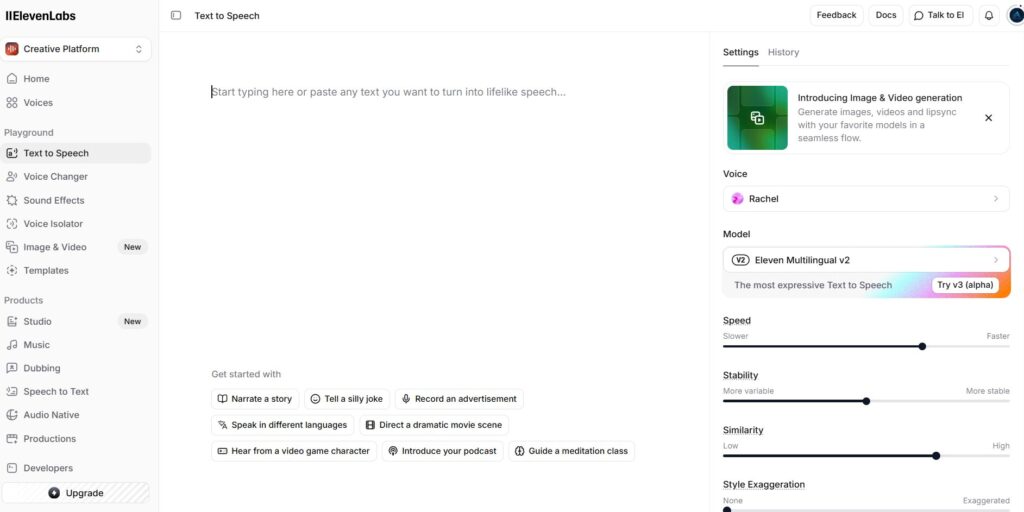
| Voice generation | ElevenLabs | You want natural narration without recording yourself | Try ElevenLabs |
| Visual scenes | Runway | You need smooth visuals that follow the narration | Explore Runway |
| Short video clips | Pika | You create fast, short-form videos for social platforms | Try Pika |
| Publishing & scheduling | Vista Social | You publish consistently and want less manual work | View Plans |
If you’re trying this for the first time, start with one tool and one video. Free plans are often enough to understand whether the workflow fits your style — and where quality improves most.
5. Ethical, Privacy, and Trust Considerations (Why This Matters More Than Ever)

By now, one thing should be clear: when we remove a human face, trust doesn’t disappear — it shifts.
In faceless videos AI, viewers still look for signals that tell them whether a video feels honest, respectful, and worth their attention. In faceless formats, those signals come from how the content is made, not who appears on screen. That’s why ethics and reliability aren’t side topics anymore — they directly influence AI video conversion.
One common concern is transparency. People don’t automatically reject AI faceless videos, but they react strongly when something feels misleading or manipulative. Over-polished voices, exaggerated claims, or visuals that don’t match the message can quietly erode credibility, even when the video looks “professional.”
Consistency matters just as much. Faceless videos AI workflows work best when tone, voice, and messaging remain predictable over time. Sudden changes confuse returning viewers and weaken long-term trust. In this sense, reliability is both an ethical choice and a strategic one for sustainable faceless content creation.
Privacy also plays a role. Many creators choose faceless formats to avoid exposing personal identity or data. That’s valid — but it comes with responsibility. Using tools that clearly define voice rights, commercial usage, and data handling helps keep your faceless video workflow safe and sustainable.
From our perspective, ethical use isn’t about adding disclaimers everywhere. It’s about making decisions that respect the viewer’s time and intelligence:
-
Don’t imitate real people without consent
-
Don’t promise outcomes the video can’t support
-
Don’t hide automation in ways that feel deceptive
When these boundaries are respected, faceless videos AI feel calm and intentional — not artificial. And in practice, that’s exactly what helps them convert better over time.
If you’re unsure where to begin, start small.
Apply this faceless video workflow to one short video, focus on clarity first, and test one tool at a time. Many creators discover that even a simple free trial is enough to see where friction disappears — and where quality improves.
That’s usually the moment faceless videos stop feeling experimental and start feeling intentional.
6. Final Verdict: Is This the Right Way to Create Faceless Videos Today?
After breaking everything down, the takeaway is simple.
Faceless videos don’t convert because they use AI — they convert because they follow a clear structure. When message, voice, visuals, and direction are aligned, the absence of a face stops being a limitation and becomes a strength. It allows content to feel focused, repeatable, and easier to scale without losing credibility.
What we’ve outlined here isn’t a shortcut or a trend-based tactic. It’s a workflow you can apply gradually, adapt to different formats, and improve over time. You don’t need to change everything at once. Even adjusting one touchpoint — clarity of message, voice consistency, or visual flow — can noticeably improve results.
Most importantly, this approach keeps control in your hands. Tools assist the process, but they don’t replace judgment. That balance is what makes faceless videos sustainable, not just efficient.
If you’ve been experimenting without clear results, this framework gives you a way to step back, simplify, and move forward with intention.
FAQ
Q: Do faceless videos still work in 2026?
A: Yes — but only when they’re designed thoughtfully. Volume alone no longer works. Structure, clarity, and trust matter more than ever.
Q: Is AI required to create faceless videos?
A: No. AI simply reduces friction. The workflow works with or without AI, but AI tools make it easier to stay consistent and efficient.
Q: Can faceless videos really convert viewers into customers?
A: They can, as long as the video guides the viewer clearly toward one realistic next step. Confusion is the biggest conversion killer.
Q: Are faceless videos allowed on major platforms?
A: Yes. Platforms don’t penalize faceless content. They reward retention, relevance, and viewer satisfaction — regardless of who appears on screen.
Q: What’s the most common mistake people make?
A: Relying on tools before defining the message. When the structure is unclear, even the best tools won’t fix the outcome.
If this guide helped clarify how faceless videos and AI workflows actually convert, you may want to explore a few related topics where creators and teams often struggle with trust, realism, and consistency. We’ve already covered these in depth on AIDigitalSpace:
→ Midjourney Prompt Hacks – Get Better Images with Smarter Prompts
→ How to Create AI Images That Don’t Look Fake (Simple Fixes)
→ AI Visual Storytelling Guide: Turn Ideas Into Clear Visual Narratives
Each of these dives deeper into practical decisions, common mistakes, and real-world use cases — helping us move from experimenting with AI content to using it intentionally, confidently, and with better results.