
Mirko
AI Tech Writer
Choosing between video editors shouldn't be painful. Most creators stuck using desktop software waste 3-5 hours per week on editing tasks that AI should handle in minutes. We tested Descript and CapCut Pro head-to-head across 15+ editing workflows to find the real winner for your content style. One excels at podcasts. One dominates short-form video. Only one works for both. Here's exactly which tool fits your workflow — and why.
📋 What's Inside
Some links are affiliate links · You support us at no extra cost · Full disclosure
1. Why Compare Descript AI and CapCut Pro
If you're weighing Descript AI vs CapCut Pro, you're probably stuck choosing between two very different editing philosophies. Both call themselves "AI video editors," but they solve completely different problems — and choosing the wrong best AI editing tool costs you hours weekly.
Here's what actually matters:
- Descript AI wins when your workflow is audio-first editing — podcasts, interviews, YouTube talking-head videos, or anything where you need accurate transcription and text-based editing. This podcast editing AI approach revolutionizes long-form content.
- CapCut Pro wins when you need fast, social-first content — especially if you post regularly on TikTok, Instagram Reels, or YouTube Shorts. Speed and templates define this editor's strength.
According to Wyzowl's latest video marketing report, 91% of businesses now use video content — but editing speed remains the biggest bottleneck. The right best AI editing tool removes that bottleneck. The wrong one becomes it.
This Descript AI review and CapCut Pro review breaks down exactly which tool fits your content type, where each editor's AI actually saves time, and what you're really paying for beyond the subscription price.
2. Quick Comparison Table – Descript AI vs CapCut Pro
Want the fastest answer? Start with this Descript AI vs CapCut Pro quick comparison. In 60 seconds you’ll see which tool wins on AI features, value, and creator fit — so you don’t waste time (or money) on the wrong editor.
| Feature |
🎙️ Descript AI
For Long-Form Content
|
🎬 CapCut Pro
For Short-Form Video
|
|---|---|---|
| 🎯Main Focus |
✓ Podcast editing ✓ Text-based video editing ✓ AI audio cleanup |
✓ Short-form video editing ✓ TikTok/Reels optimization ✓ Creative effects library |
| 🤖AI Features |
✓ Overdub voice cloning 🏆 Unique ✓ Auto filler word removal ✓ Studio-quality transcription |
✓ Auto captions (90+ languages) ✓ AI background removal ✓ Smart cutout + speech enhance |
| ⚡Speed & Workflow |
Edit by deleting text (no timeline) Best for: Script-heavy content |
Drag-and-drop with instant effects 🏆 Fastest Best for: Quick turnaround posts |
| 💻Platforms | Windows, Mac, Web | Windows, Mac, Web, iOS, Android 🏆 More Devices |
| 💰Pricing |
Free: 1 video/month (watermark) Creator: $12/month Best value for podcasters |
Free: Unlimited (watermark) Pro: $7.99/month 🏆 Cheaper Best budget option |
| 👤Best For |
✓ Podcasters ✓ YouTube long-form creators ✓ Course creators + webinars |
✓ TikTok creators ✓ Instagram Reels producers ✓ Social media managers |
| 📚Learning Curve |
Easy — if you can edit a Word doc, you can edit video Setup time: ~10 minutes |
Very Easy — mobile-first interface 🏆 Easiest Setup time: ~2 minutes |
| 🚀Start Free Trial |
Try Descript Free →
✓ No credit card · ✓ 1 video free
|
Try CapCut Free →
✓ No credit card · ✓ Unlimited free tier
|
3. Descript AI Overview
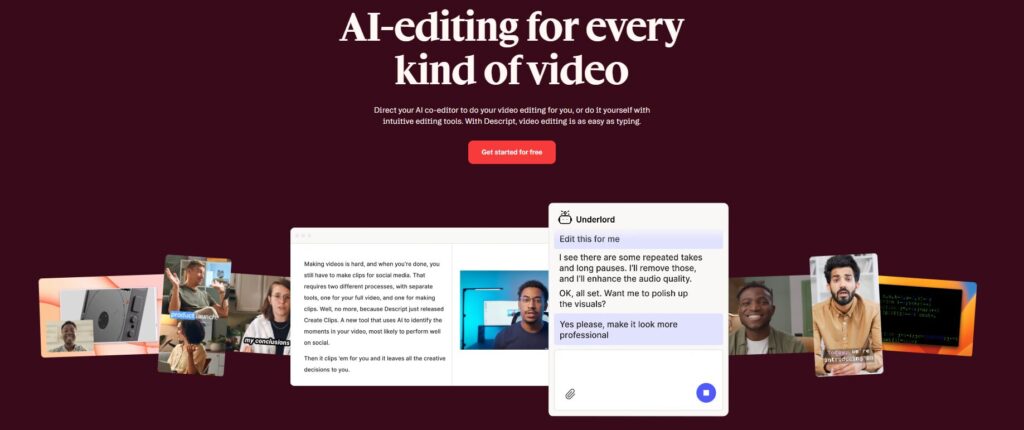
Descript AI is an AI video editor built around one radical idea: edit video by editing text. Instead of cutting timelines, you delete words from a transcript — and the video cuts itself.
Here's what makes Descript AI different:
- Text-based editing: Upload a video, get an instant transcript, edit it like a Google Doc. Cut awkward pauses by deleting "um" and "uh" with one click.
- Overdub (AI voice cloning): Record your voice once, then type corrections. The AI generates your voice saying words you never recorded. Perfect for fixing mistakes without re-recording.
- Studio Sound: One-click audio cleanup that removes background noise, echo, and room tone. Makes home recordings sound professional.
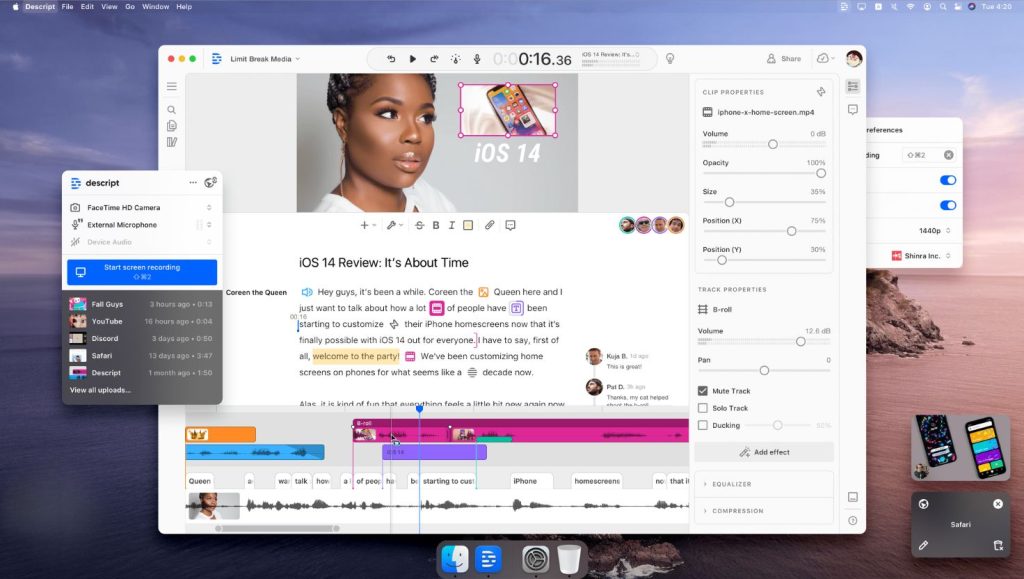
- Multi-track editing: Layer multiple video/audio tracks, add b-roll, insert images — all while maintaining the text-based workflow.
Who should use Descript AI?
This podcast editing AI tool shines for content creators who work from scripts — podcasters, YouTube talking-head videos, course creators, interview shows, and webinars. If you spend more time fixing what you said than how it looks, Descript AI saves hours.
The workflow is simple: record, transcribe, delete bad takes, export. No wrestling with complex timelines or learning keyboard shortcuts.
The catch? If your content is highly visual (dance videos, montages, effects-heavy edits), Descript AI's text-first approach feels limiting. It's built for audio-first workflows where the best AI editing tool prioritizes what's spoken.
Pricing: Free plan includes 1 video per month with watermark. Creator plan starts at $12/month for unlimited transcription hours and Overdub features.
For a deeper breakdown of features, limits, and real-world workflow examples, check our complete Descript AI review.
Bottom line: Descript AI is the fastest way to edit podcasts and talking-head videos. If you edit what people say more than what they show, this is your tool.
4. CapCut Pro Overview

CapCut Pro is ByteDance's AI video editor built for speed. If Descript AI edits through text, CapCut Pro edits through templates and instant effects — optimized for creators pumping out daily TikToks and Instagram Reels.
Here's what makes CapCut Pro dominate short-form:
- Auto captions in 90+ languages: Upload video, get animated captions instantly. One tap changes fonts, colors, and animation styles. No manual typing.
- AI background removal: Remove backgrounds without green screen. Works on people, objects, even moving subjects — in seconds.
- Trending templates library: Thousands of viral templates updated weekly. Drop your clips into trending formats instantly.
- Mobile-first workflow: Edit on phone, export in vertical format, post immediately. Desktop version syncs everything via cloud.
Who should use CapCut Pro?
This best AI editing tool for social media shines for high-volume social content creators — TikTok creators, Instagram Reels producers, YouTube Shorts channels, and social media managers handling multiple accounts. If you post 3+ videos per week and need speed over customization, CapCut Pro delivers.
The workflow is drag-and-drop simple: import clips, apply template or effects, add auto captions, export. According to Sprout Social's video statistics, short-form video generates 2.5x more engagement than long-form — and CapCut Pro's speed helps creators capitalize on trends while they're hot.
The catch? CapCut Pro trades creative control for speed. You're working within templates and presets. For podcast editing or nuanced color grading, it feels limiting compared to Descript AI.
Pricing: Free tier is generous (unlimited videos with watermark). Pro plan costs $7.99/month and removes watermarks, unlocks premium effects, and adds cloud storage.
For a complete feature breakdown and real-world testing results, read our full CapCut Pro review in the comparison above.
Bottom line: CapCut Pro is the fastest path from footage to published Reel. If you need to post daily and ride trends quickly, this is your tool.
5. Feature-by-Feature Comparison – Descript AI vs CapCut Pro
Here's how Descript AI vs CapCut Pro stack up across the features that actually matter for choosing the best AI editing tool:
6. Pricing & Value for Money – Descript AI vs CapCut Pro
When deciding between Descript AI vs CapCut Pro, cost isn’t just about the monthly fee — it’s about what features you get and how much time the tool can save you. Here’s the 2026 breakdown.
| Plan | Descript AI | CapCut Pro |
|---|---|---|
| Free Tier | Yes — good to test transcription + basic exports (limits apply) | Yes — solid for basic edits, captions, and effects (limits apply) |
| Entry Plan | Creator — from $12/month (pricing can change) | Pro — from $7/month (pricing can change) |
| Notable Upgrades | More exports + longer workflows, Overdub, multitrack tools, screen recording | Premium templates, advanced effects/assets, extra tools + cloud features |
| Best Value For | Long-form creators who want podcast editing AI, clean audio, and precise edits | Social-first creators who post frequently and want speed + ready-to-publish edits |
| Quick Action | Check Descript Plans | Check CapCut Pro |
Pro Tip: If you publish both long-form and short-form, a smart workflow is to edit the podcast in Descript AI (fast text-based cuts + audio cleanup), then export to CapCut Pro for the final social polish (captions, templates, effects). It’s not the cheapest setup — but it can save hours every week.
Want to test without paying first? See our Best Free AI Tools with No Login Required guide for budget-friendly picks before you commit.
7. Strengths & Weaknesses – Descript AI vs CapCut Pro
Choosing the best AI editing tool means understanding trade-offs. Here's an honest breakdown of where Descript AI vs CapCut Pro excel and struggle:
- Text-based editing — edit video by deleting words from transcript (massive time-saver)
- Podcast editing AI excellence — transcription, multi-speaker cleanup, audio polish
- Overdub voice cloning — fix mistakes without re-recording entire segments
- Collaboration tools — real-time editing, comments, version history for teams
- All-in-one workflow — record, edit, export in single platform
- Learning curve if you're used to traditional timeline editors
- Minimal trendy effects/templates compared to social-first tools
- Best features locked behind paid tiers ($12/month minimum)
- Desktop-only (no mobile app for on-the-go editing)
- Social media optimized — Reels, TikTok, Shorts templates and formatting
- Lightning-fast editing — mobile-first workflow for daily content creators
- Massive template library — thousands of trending effects updated weekly
- AI features — auto-captions, background removal, smart cutout
- Cross-platform — edit on phone, tablet, or desktop seamlessly
- Weak for podcast workflows (limited long-form audio tools)
- Basic collaboration features (not built for team editing)
- Template-dependent workflow (less creative control than pro editors)
- Busy interface can feel overwhelming for minimalist editors
Tip for Maximum Impact: Many creators use Descript AI to clean audio and trim long-form content fast, then switch to CapCut Pro for short-form optimization (captions, templates, effects). This “two-tool” workflow isn’t just convenient — it’s one of the quickest ways to publish consistently.
Related: See our AI Tools for Automating Social Media guide to plug CapCut Pro into a full content automation workflow.
8. Best For – Which Type of Creator Should Choose Each
The right choice for the best AI editing tool comes down to what you create and how often you post. Here's exactly which tool fits your content workflow in this Descript AI vs CapCut Pro decision:
Choose Descript AI if you're:
- A podcaster — this podcast editing AI cuts production time in half with text-based editing. Overdub fixes mistakes without re-recording entire episodes.
- A YouTube talking-head creator — remove filler words, clean up audio, edit by deleting transcript text. Descript AI is perfect for educational content, vlogs, and commentary channels.
- A course creator or coach — record webinars and tutorials, then edit them like documents. Export to multiple formats for different platforms.
- Working with a team — real-time collaboration features let editors, writers, and producers work simultaneously on the same project.
Choose CapCut Pro if you're:
- A TikTok or Instagram Reels creator — posting 3+ times per week demands speed. Templates and auto captions let you batch-create content in hours, not days.
- A social media manager — handling multiple client accounts means you need fast turnaround. CapCut Pro's mobile editing lets you create and post from anywhere.
- A YouTube Shorts channel — repurposing long-form content into vertical clips? CapCut Pro makes reformatting and adding trending effects effortless.
- Building a personal brand — according to HubSpot's marketing research, short-form video delivers the highest ROI of any content format. CapCut Pro helps you capitalize on this with minimal editing friction.
The hybrid approach: Some creators use both — Descript AI for long-form YouTube videos and podcasts, CapCut Pro for repurposing those videos into Reels and TikToks. If you're producing 10+ hours of content monthly across formats, this stack makes sense.
Bottom line: Audio-first workflow? Descript AI. Visual-first workflow? CapCut Pro. Both workflows? Start with whichever format generates more revenue.
9. Ethical Considerations in AI Video & Audio Editing
When comparing Descript AI vs CapCut Pro as your best AI editing tool, consider ethical implications. Both platforms offer powerful AI features that require responsible use:
Descript AI Privacy Policy • CapCut Pro Privacy Policy
10. Final Verdict – Our Recommendation
There's no universal winner — only the right tool for your workflow. Both Descript and CapCut Pro are exceptional editors that solve different problems brilliantly.
🎙️ Pick Descript
If editing feels like rewriting — podcasts, talking-head videos, interviews, courses. Text-based workflow saves hours on script-heavy content.
Try Descript Free →🎬 Pick CapCut Pro
If speed beats perfection — daily TikToks, Instagram Reels, trending content. Templates and instant effects keep you posting consistently.
Try CapCut Free →11. FAQ – Descript AI vs CapCut Pro
Which is better for beginners: Descript AI or CapCut Pro?
+CapCut Pro is easier for complete beginners with its drag-and-drop interface and mobile-first design. You can start editing within minutes.
Descript AI requires understanding the text-based editing concept, but once learned, it's just as intuitive. If you can edit a Google Doc, you can use Descript AI. Choose based on your content type, not just ease of use.
Can I use both Descript AI and CapCut Pro together?
+Yes, many creators use both as the best AI editing tool combination. A common workflow: edit long-form content (podcasts, YouTube videos) in Descript AI, then export clips and repurpose them into TikToks and Reels using CapCut Pro's templates.
This hybrid approach costs around $20/month combined and covers both content formats without compromise.
Is Descript AI better than CapCut Pro for podcasts?
+Descript AI is significantly better for podcasts. This podcast editing AI tool offers text-based editing, filler word removal, Studio Sound audio cleanup, and Overdub voice cloning built specifically for audio-first content.
CapCut Pro lacks these podcast-specific features and forces you into a timeline-based workflow that's inefficient for long audio editing.
Which is better for TikTok and Instagram Reels: Descript AI or CapCut Pro?
+CapCut Pro dominates short-form social video. It offers thousands of trending templates, animated captions, one-tap effects, and direct publishing to TikTok and Instagram.
Descript AI can create Reels, but it lacks the template library and social-first features that make CapCut Pro the industry standard for viral content creators.
Is Descript AI worth the extra cost over CapCut Pro?
+Descript AI costs $12/month versus CapCut Pro's $7.99/month—worth it if you create podcasts, interviews, or talking-head videos. The Overdub voice cloning feature alone saves hours of re-recording.
However, if you only create short-form social content, CapCut Pro's lower price and template library offer better value.
Can CapCut Pro handle professional video editing?
+CapCut Pro handles professional short-form content excellently but has limitations for complex projects. It exports in 4K, supports multi-track editing, and offers advanced color grading.
However, for feature-length projects, documentaries, or content requiring precise color work, tools like Premiere Pro or DaVinci Resolve remain superior.
Which has better AI features: Descript AI or CapCut Pro?
+Descript AI has more unique AI features like Overdub voice cloning and Studio Sound audio enhancement. CapCut Pro has more AI features overall—auto captions, background removal, AI voice effects, smart cutout—but they're less revolutionary.
Choose based on priority: audio AI (Descript AI) or visual AI effects (CapCut Pro).
Do I need a powerful computer for Descript AI or CapCut Pro?
+CapCut Pro runs smoothly on mid-range computers and even phones, making it accessible for mobile creators. Descript AI requires more processing power for transcription and AI features—at least 8GB RAM and a modern processor recommended.
Both offer cloud processing for heavy tasks, reducing local hardware requirements.
🚀 Level Up Your AI Video Editing Workflow
You've chosen your editor. Now enhance your content creation with these essential guides to AI voice tools, data privacy, and deepening your AI knowledge: