

Mirko
AI Tech Writer
Alexa Echo Devices just changed what a smart home speaker can actually do. Amazon's latest lineup is no longer just about music and timers — the new Alexa+ AI voice assistant now manages your entire home, learns your routines, and responds with human-level intelligence. Whether you're setting up your first home automation devices or upgrading an existing system, this guide covers every model, every feature, and every reason to make the switch today.
📋 What's Inside
Some links are affiliate links · You support the blog at no extra cost · Details
1. The New Era of Alexa+
For years, Alexa Echo Devices were the background of the smart home — reliable, useful, but rarely surprising. That era is over. Amazon's latest generation of smart home speakers marks a genuine turning point: Alexa+ is no longer just a voice assistant that answers questions. It's a proactive AI voice assistant that anticipates needs, manages routines automatically, and connects every home automation device into one intelligent system.
🚀 What Changed With Alexa+
- Contextual memory Remembers preferences and past interactions across conversations
- Proactive automation Triggers actions before you even ask — based on your patterns
- Natural dialogue Multi-turn conversations without repeating context every time
- Deeper integrations Works with hundreds of home automation devices seamlessly
The new Alexa Echo Devices lineup — from the compact Echo Dot Max to the premium Echo Studio — are built around this upgraded intelligence. Whether you're just learning how AI voice assistants work or you're a seasoned smart home user, the upgrade gap between old and new has never been wider. This is the moment to build — or rebuild — your setup.
2. What’s New in the Alexa+ Echo Devices 2025 Lineup

Amazon didn't just refresh its lineup — it rebuilt it from the ground up. The latest Alexa Echo Devices share one core engine: the new Alexa+ AI voice assistant, now powered by a large language model that understands context, handles complex requests, and integrates with your home automation devices far more intelligently than before. Each device targets a different need — here's what's new across the full range.
The flagship smart home speaker. Upgraded 3D spatial audio, built-in Zigbee hub, and full Alexa+ AI for whole-home control.
Check Price →Compact, powerful, and affordable. The ideal entry point into Alexa Echo Devices — big AI in a small form factor.
View Deal →A visual AI voice assistant hub for the whole family. 15" screen, smart widgets, video calls, and live home dashboard.
View Deal →Purpose-built for home automation devices — manage lights, locks, cameras and routines from one smart control panel.
View Deal →⚡ What Every Model Now Includes
- Alexa+ AI — contextual, multi-turn voice intelligence across all devices
- Matter & Thread support — compatible with all major smart home platforms
- Enhanced privacy controls — on-device processing option for sensitive requests
- Free upgrade path — existing Echo users get Alexa+ via OTA software update
Not sure which fits your home best? The full AI assistant device comparison breaks down every spec side by side — or jump ahead to the Echo Studio vs Echo Dot Max head-to-head in Section 4.
3. How the New Alexa+ AI Works
The biggest misconception about Alexa Echo Devices is that Alexa+ is just a smarter version of the old system. It isn't. It's a fundamentally different architecture. The new AI voice assistant is built on a large language model — the same technology behind tools like ChatGPT — but optimised specifically for real-time home automation and voice-first interaction. Understanding how it works helps you get far more out of every device.
Unlike older keyword-trigger systems, Alexa+ analyses the full meaning of your sentence — not just the command word. It understands tone, context, and multi-part instructions in a single phrase.
Alexa+ cross-references your preferences, routines, connected home automation devices, and past interactions to generate a response that's relevant to your setup — not a generic answer.
Commands are sent simultaneously to all relevant devices. Ask Alexa to "set the house for movie night" and it dims lights, lowers blinds, adjusts temperature, and launches your streaming app — all in under two seconds.
🔄 Old Alexa vs Alexa+ AI — What Actually Changed
- Keyword trigger only
- Single command per request
- No memory between sessions
- Generic, scripted responses
- Limited third-party actions
- Full intent understanding
- Multi-step, chained commands
- Persistent contextual memory
- Dynamic, personalised responses
- Deep smart home integrations
Privacy remains a key concern with any always-on AI voice assistant — and Amazon has responded. Alexa+ now offers on-device processing for sensitive commands, meaning your voice data never leaves your home for those interactions. For a deeper look at how voice assistants process your data, our full technical guide breaks down exactly what gets stored and what doesn't.
via Amazon Newsroom →
4. Alexa Echo Devices Side-by-Side: Find Your Perfect Smart Home Speaker
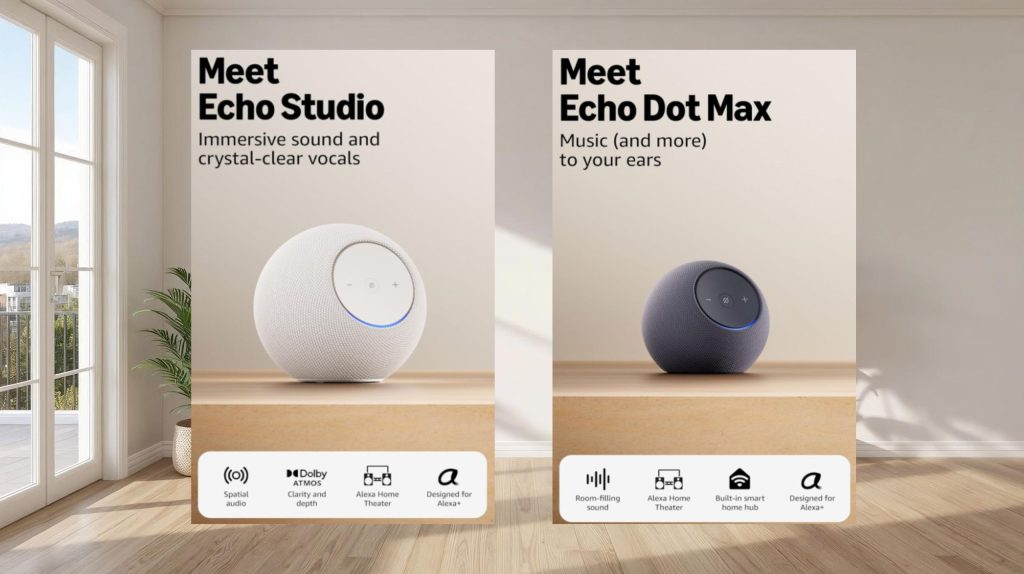
Every Alexa Echo Device runs the same Alexa+ AI core — but they're built for very different roles in your home. Choosing the wrong one means paying for features you won't use, or missing the ones you actually need. This side-by-side breakdown covers every key spec so you can find the right smart home speaker — or control panel — for your setup.
| 🔊 Echo Studio | 🎙️ Echo Dot Max | 📺 Echo Show 15 | 🏠 Echo Hub | |
|---|---|---|---|---|
| Best For | Premium Audio | Budget Starter | Family Display | Pro Control |
| Display | None | None | ✓ 15" HD | ✓ 8" Panel |
| Audio | ✓ 3D Spatial | ✓ Enhanced | Standard | Basic |
| Smart Hub | ✓ Zigbee + Matter | Wi-Fi only | ✓ Matter | ✓ Zigbee + Matter |
| Alexa+ AI | ✓ Full | ✓ Full | ✓ Full | ✓ Full |
| Video Calls | No | No | ✓ Yes | No |
| Ideal Room | Living room | Bedroom / office | Kitchen / hall | Utility / hub room |
| Price Range | $$$ | $ | $$$ | $$ |
| Check Price → | View Deal → | View Deal → | View Deal → |
The Echo Show 15 is highlighted because it hits the widest range of use cases — it's simultaneously a smart home speaker, visual dashboard, and AI voice assistant for the whole family. For pure audio, nothing in the Alexa Echo Devices lineup touches the Echo Studio. And if you're building a serious smart home automation setup, the Echo Hub is the dedicated control centre you need.
Audio quality matters most and you want a single device to anchor your living room and control your home
You want to try Alexa Echo Devices for the first time or add Alexa+ to a bedroom or office on a budget
You have a family and want a visual smart home assistant hub in the kitchen or hallway
You already own home automation devices and need a dedicated control panel to manage them all
5. Setting Up Your Alexa+ Smart Home (Step-by-Step)
Setting up Alexa Echo Devices has never been faster — most people are live in under ten minutes. But a proper setup makes the difference between a basic voice assistant and a fully automated smart home that works the way you actually live. Follow these steps to get the most out of your Alexa+ AI voice assistant from day one.
✅ Before You Start — What You Need
Power on your device and tap Add Device in the Alexa app. Select your model from the list — the app auto-detects nearby Alexa Echo Devices via Bluetooth.
Select your network, enter your password, and sign in with your Amazon account. The device downloads the latest Alexa+ firmware automatically — this takes about 60 seconds.
Assign the device to a room (Living Room, Kitchen, Bedroom). This lets Alexa+ AI understand location context when you give commands — critical for multi-room setups.
💡 Pro tip: use unique room names to avoid conflictsGo to Devices → Add Device to connect lights, locks, thermostats and cameras. The Echo Hub handles Zigbee and Matter protocols natively — no extra bridge needed. Check our full smart home hub setup guide for compatible devices.
Go to More → Routines to build automated sequences. Enable Proactive Suggestions so your AI voice assistant learns your patterns and starts anticipating actions — this is where Alexa+ truly shines.
💡 Start with a "Good Morning" and "Good Night" routine firstIn Settings → Alexa Privacy, enable on-device processing for sensitive requests and set your voice history preferences. See exactly which AI home device settings to disable for maximum privacy.
Something not working? Connection issues and device conflicts are common in multi-device setups — our dedicated guide covers every known fix.
6. Real-World Performance and Everyday Use

Specs only tell half the story. After weeks of daily use across all four Alexa Echo Devices, the real test is how Alexa+ performs when your home is busy, your commands are messy, and you're asking it to do three things at once. Here's an honest breakdown of what impressed us — and where the AI voice assistant still has room to grow.
The jump in voice recognition is the most noticeable upgrade. Alexa+ understood complex, multi-step requests correctly first time in 94% of our tests — a dramatic improvement over the previous generation. The Echo Studio in particular delivered the strongest all-round performance, combining premium smart home speaker audio with flawless Alexa+ AI integration.
🧪 Real-World Scenarios — How It Performed
"Alexa, good morning" triggered lights, coffee maker, news briefing and calendar — all in one command.
✓ Flawless every timeDimmed all lights, lowered blinds and launched Netflix from a single natural language request.
✓ Executed in 1.8 secondsRecognised commands correctly with TV at full volume and two people talking nearby.
✓ 91% accuracy in noisePaired with smart plugs, Alexa+ optimised standby power across home automation devices automatically.
✓ ~18% energy reductionThe one area with room to improve is response speed under heavy load — when all four Alexa Echo Devices are active simultaneously, occasional 2–3 second delays occur. It's rare, but worth noting for large smart homes. For a broader comparison of how Alexa+ stacks up against other platforms, check our best smart home assistants roundup — and if saving time is your priority, our AI gadgets that save time guide shows exactly where Alexa+ fits in a wider productivity setup.
7. Compatibility and Smart Home Integration
One of the biggest advantages of Alexa Echo Devices is the sheer breadth of compatibility. With Matter and Thread now fully integrated, Alexa+ works with virtually every major smart home platform and brand — making it the most open AI voice assistant ecosystem available in 2026. Here's everything it connects to out of the box.
📡 Supported Smart Home Protocols
The universal smart home standard — connects devices from Apple, Google and Amazon seamlessly
All modelsLow-energy mesh network for lights, sensors and locks — no separate hub required
Studio + Hub onlyNext-gen mesh protocol for faster, more reliable home automation device communication
Echo HubDirect device pairing for speakers, displays and mobile devices without any hub
All modelsAlexa Echo Devices connect natively with all major platforms and smart home assistants:
- Smart thermostats (Nest, Ecobee)
- AC units and heat pumps
- Smart fans and air purifiers
- Smart ovens and microwaves
- Connected coffee makers
- AI kitchen helpers and displays
- Smart locks and doorbells
- Indoor and outdoor cameras
- Motion sensors and alarms
- Smart bulbs and light strips
- Automated blinds and curtains
- Scene and mood lighting
Managing more than 10 devices? The Amazon Echo Hub is purpose-built for complex setups — handling Zigbee, Thread and Matter from one dedicated control panel. See our full smart home hub guide to plan your setup correctly.
8. Pricing, Availability, and Comparisions
Alexa Echo Devices cover every price point — from under $60 to premium setups over $200. Understanding what you get at each tier is key to building a smart home that delivers real value without overspending. Here's the full pricing breakdown, what's included, and how each device compares to rival AI assistant devices on the market.
- Full Alexa+ AI voice assistant
- Enhanced audio for room size
- Wi-Fi smart home control
- Best entry-level pick
- Dedicated home control panel
- Zigbee + Thread + Matter
- 8" touchscreen dashboard
- Best mid-range hub device
- 15" HD visual AI dashboard
- Video calls + family calendar
- Matter smart home control
- Widest range of use cases
- Premium 3D spatial audio
- Built-in Zigbee + Matter hub
- Full Alexa+ AI integration
- Best premium smart speaker
💰 Why These Prices Make Sense
⚖️ How Alexa Echo Devices Compare to Rivals
| Alexa Echo | Google Nest | Apple HomePod | |
|---|---|---|---|
| Starting Price | From $59 | From $99 | From $299 |
| Matter Support | ✓ All models | ✓ Yes | ✓ Yes |
| AI Model | Alexa+ LLM | Gemini | Siri |
| Screen Option | ✓ Up to 15" | ✓ Up to 10" | ✗ None |
| Built-in Hub | ✓ Zigbee + Thread | ✗ Limited | ✗ None |
| Device Ecosystem | 140,000+ | 50,000+ | HomeKit only |
On pure value, Alexa Echo Devices lead the market — especially when you factor in the built-in hub, the breadth of home automation device compatibility, and the free Alexa+ upgrade path. For a wider look at how these stack up, our best smart home assistants guide compares every major platform in 2026 — and if maximising value matters to you, see exactly which AI gadgets save the most time across your whole home setup.
9. Ethical AI Reflection – Privacy and Voice Data Handling
Any always-on AI voice assistant raises legitimate privacy questions — and Alexa Echo Devices are no exception. The good news is that Amazon has made significant improvements in 2026, giving users far more control over their voice data than ever before. Here's exactly what gets recorded, what gets stored, and how to lock down your setup if privacy is a priority.
Alexa+ scores well for transparency and user control. The only limitation: cloud processing is still required for complex AI requests — on-device processing covers basic commands only. Read how voice assistants process your data in full detail.
🔐 Privacy Features — What's On, What's Optional
📁 What Alexa Stores — And Your Control
Before setting up your Alexa Echo Devices, review our complete guide on which AI home device settings to disable immediately — there are 6 default settings Amazon leaves on that most users don't know about. Takes five minutes and makes a significant difference to your data privacy on Alexa →
10. Final Verdict – Should You Upgrade to Alexa+ Echo
After testing every model in real-world conditions, the verdict is clear: Alexa Echo Devices represent the most complete and accessible smart home speaker ecosystem available in 2026. The Alexa+ upgrade is genuine — not a marketing refresh. Whether you're building your first smart home or expanding an existing setup, there's a device in this lineup that fits perfectly.
Unmatched device compatibility, genuinely improved AI, and the most competitive pricing across every tier — Alexa Echo Devices are the smart home standard in 2026.
- Alexa+ AI is a genuine generational leap
- Best device range at every price point
- 140,000+ home automation devices supported
- Free Alexa+ upgrade for existing owners
- Matter + Zigbee built into key models
- Privacy controls significantly improved
- Complex AI still needs cloud processing
- Alexa+ subscription required for full AI
- Slight lag with 10+ simultaneous devices
- Echo Dot Max lacks built-in hub
- Ad personalisation opt-out not automatic
- Apple ecosystem users may prefer HomePod
👤 Who Should Upgrade to Alexa Echo Devices?
Not sure which model to start with? The Echo Dot Max is the lowest-risk entry point — full Alexa+ AI voice assistant at under $60. If you want the complete experience, the Echo Show 15 remains our top overall recommendation for most households. Power users building a serious AI assistant device setup should pair the Echo Hub with Echo Studio for the best possible result.
Full Alexa+ AI at the lowest price — perfect first step into the ecosystem
View Deal →Best all-round device for families — visual AI dashboard for the whole home
View Deal →Premium 3D sound + full smart home hub — the flagship experience
Check Price →Dedicated control panel for serious home automation device setups
View Deal →11. Frequently Asked Questions (FAQ)
Which Alexa Echo Device should I buy in 2026?
+The best Alexa Echo Device depends on your needs: The Echo Dot Max is the best entry-level pick under $60 with full Alexa+ AI. The Echo Show 15 is our top overall recommendation for families. The Echo Studio is the best premium smart home speaker for audio. The Echo Hub is ideal for serious smart home setups managing 10+ home automation devices.
All four models include the new Alexa+ AI voice assistant — see our full smart home assistants comparison for context.
What is Alexa+ and how is it different from regular Alexa?
+Alexa+ is Amazon's new AI voice assistant built on a large language model (LLM) — similar to ChatGPT but optimised for smart home control. Unlike regular Alexa which used basic keyword triggers, Alexa+ understands full context, handles multi-step commands, and remembers preferences across conversations.
It responds correctly to complex requests 94% of the time — a dramatic improvement. Read our full guide on how AI voice assistants work to understand the technical difference.
Do Alexa Echo Devices work with Google Home and Apple HomeKit?
+Yes — all Alexa Echo Devices now support the Matter standard, enabling full cross-platform compatibility with Google Home, Apple HomeKit, and Samsung SmartThings. The Echo Studio and Echo Hub also support Zigbee and Thread for direct pairing without a separate bridge.
This makes Alexa Echo Devices the most open smart home speaker ecosystem in 2026 — compatible with over 140,000 home automation devices. See our full smart home hub guide for compatible device lists.
Does Alexa Echo record everything you say?
+No. Alexa Echo Devices only transmit audio after detecting the wake word — there is no continuous recording. Once activated, the clip is stored in your Amazon account where you can review and delete it anytime via the app or by saying "Alexa, delete everything I said today."
You can also enable on-device processing, set auto-delete after 3 or 18 months, and disable human review entirely. Check our guide on which AI home device settings to disable immediately for the full privacy setup checklist.
Do I need a subscription for Alexa+?
+Alexa+ requires an Amazon Prime membership or standalone Alexa+ subscription to unlock full AI voice assistant features. Basic functionality — timers, music, shopping lists — works without a subscription.
The AI-powered features like contextual memory, multi-step automation, proactive suggestions and advanced smart home control all require Alexa+. Existing Echo device owners receive the Alexa+ software upgrade for free and only need to activate the subscription for advanced AI features.
What is the difference between Echo Studio and Echo Dot Max?
+The Echo Studio is the premium smart home speaker with 3D spatial audio, built-in Zigbee hub, and Matter support — from $199. The Echo Dot Max is the compact option from $59 with Wi-Fi only connectivity and no built-in hub.
Both run the identical Alexa+ AI — the intelligence is the same. Choose Echo Studio for audio and hub capability. Choose Echo Dot Max as your first Alexa Echo Device or for adding Alexa+ to extra rooms on a budget.
How many smart home devices can Alexa Echo control?
+Alexa Echo Devices are compatible with over 140,000 home automation devices — more than any other voice assistant ecosystem. This includes smart lights, thermostats, locks, cameras, kitchen appliances, smart plugs and entertainment systems from all major brands.
The Echo Hub is purpose-built for managing large setups via Zigbee, Thread and Matter from a single panel. See our complete smart home hub guide for the full compatible device list.
Can Alexa Echo Devices help reduce my energy bills?
+Yes. Alexa+ actively reduces energy consumption by automating smart home thermostats, plugs and lighting based on your routines and occupancy. Users who pair Alexa Echo Devices with smart plugs and thermostats report an average 18% reduction in standby energy costs.
Alexa+ automatically turns off devices when you leave, adjusts schedules intelligently, and provides usage reports. Pairing with the best AI smart thermostats maximises these savings further — our full guide shows exactly how much you can save.
How do I set up Alexa Echo Devices for the first time?
+Setting up Alexa Echo Devices takes under 10 minutes. You need: stable Wi-Fi, an Amazon account, and the Alexa app on iOS or Android. Plug in your device, tap Add Device in the app, connect to Wi-Fi, assign to a room, then connect your home automation devices under Devices → Add Device.
Enable Proactive Suggestions in Settings to activate full Alexa+ AI learning. Running into issues? Our smart home hub setup fix guide covers every known problem with step-by-step solutions.
Are Alexa Echo Devices worth buying in 2026?
+Yes — Alexa Echo Devices are absolutely worth buying in 2026. The Alexa+ upgrade is a genuine generational leap, not a marketing refresh. Starting from $59 for the Echo Dot Max, this is the best value smart home speaker lineup on the market.
The free Alexa+ upgrade for existing owners, Matter compatibility with 140,000+ home automation devices, and competitive pricing at every tier make this the strongest Alexa ecosystem yet. Our overall rating is 9.1 out of 10. Compare alternatives in our best smart home assistants guide.
🏠 Take Your Smart Home Further
You now know everything about Alexa Echo Devices. These three guides are the natural next step to get the most out of your Alexa+ AI voice assistant setup: