

Bardeen AI is no longer the all-purpose browser automation tool most reviews still describe. It became a lead-sourcing tool: an agentic web scraper, AI qualification and contact enrichment, billed per row. I went through its current pricing page line by line, and the real question is no longer "what can it automate?" but "what does each lead cost?"
⚡ Short answer: Bardeen AI is worth it if you build lead lists from websites and want them scraped, qualified and enriched in one place. Plan on Premium at $50 a month: Basic has no enrichment, and the free 100 credits are a test budget, not a working plan. For general scraping or browser automation, the alternatives below are cheaper.
🆕 What changed in this update (October 10, 2026)
- Rewritten for Bardeen's move to lead sourcing; removed the retired playbook and autobook sections.
- Corrected every price and the credit rules (per row, not per workflow).
- Added a credit calculator and a cost-per-lead breakdown.
- Replaced the Zapier comparison with four checked alternatives.
Some links are affiliate links · they support this site at no extra cost to you · Full disclosure
What is Bardeen AI now?
Short answer: Bardeen AI is now a lead-sourcing tool for sales, recruiting and other go-to-market work. You point its scraper at a site, it pulls rows of people or companies, AI qualifies them against your criteria, and enrichment adds verified emails and phone numbers. Results export to CSV, Google Sheets, Airtable or Notion.
If you used Bardeen a year or two ago, you remember a different product: a Chrome extension with "playbooks" for almost any browser task, from saving tabs to updating a CRM. That general builder, its Magic Box prompt and the playbook/autobook split no longer appear on Bardeen's site. The homepage now leads with one promise: find and reach leads.
The new product has four parts, and the pricing is built around them:
- Scraper: build your own, or use premium scrapers for common sites.
- Web search: research or generate leads with AI search instead of manual Googling.
- Enrichment: validated emails and phone numbers for each lead.
- AI tools: describe your ideal lead and let AI tag who fits.
Key idea: Bardeen AI stopped competing with Zapier and started competing with lead-data tools. Judge it on cost per lead, not on how many apps it connects.
5 findings from my Bardeen AI research
Short answer: The five things most Bardeen AI reviews miss: it is a lead tool now, credits are charged per row, the free 100 credits are a test budget, Basic has no enrichment, and LinkedIn scraping stays your risk. Each one changes which plan, or which tool, you should pick.
Bardeen AI pricing: what each plan includes
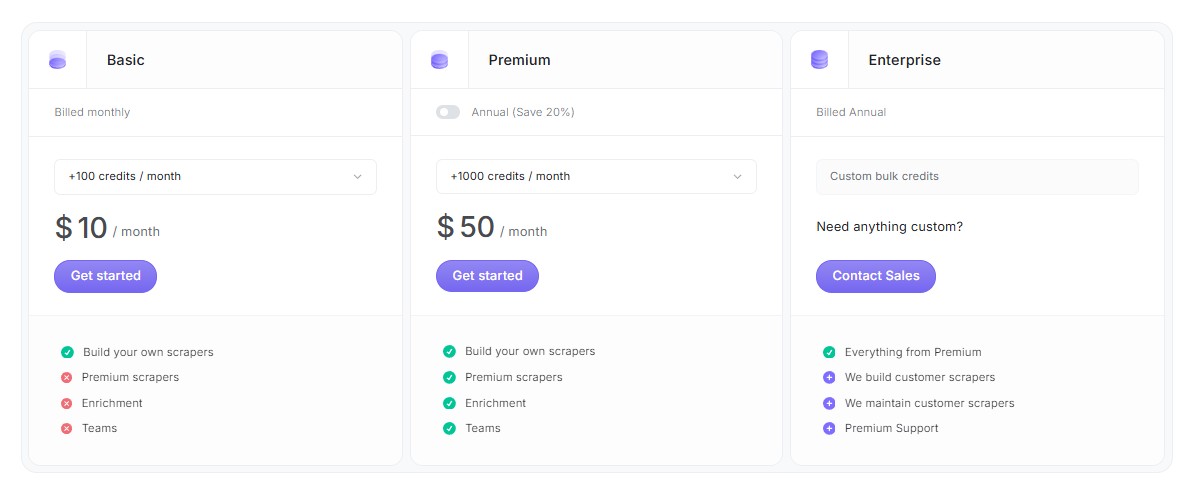
Short answer: Bardeen AI pricing has three paid plans on top of 100 free monthly credits. Basic is $10 a month for 100 extra credits, Premium is $50 a month or $480 a year for 1,000 extra credits, and Enterprise is custom. Credits stack on the free 100, and unused credits expire each billing period.
| Plan | Price | Credits | Own scrapers | Premium scrapers | Enrichment | Teams |
|---|---|---|---|---|---|---|
| Free | $0 | 100 / month | Not stated | Not stated | Not stated | Not stated |
| Basic | $10 / month | +100 / month | ✅ | ❌ | ❌ | ❌ |
| Premium | $50 / month or $480 / year | +1,000 / month (larger tiers available) | ✅ | ✅ | ✅ | ✅ |
| Enterprise | Custom, billed annually | Custom bulk credits | ✅ | ✅ | ✅ | ✅ + scrapers built and maintained for you |
Plan features are from the plan cards on Bardeen's pricing page, which I checked on October 10, 2026. The Free row reflects the page's note that every account always keeps 100 credits; Bardeen doesn't publish a feature list for it, and I couldn't verify whether enrichment works on free credits alone. Premium's credit slider goes up to +10,000 a month, but higher-tier prices only show inside the selector.
The credit rules matter more than the plan names:
| Action | Credit cost |
|---|---|
| Scraper | 1 credit per row |
| Web search | 1 credit per row |
| AI tools (qualify, tag) | 1 credit per row |
| Enrichment (emails, phones) | 3 credits per row |
| Utilities, importing data, CSV download | Free |
| Export to Google Sheets (in Bardeen's example) | 1 credit per row |
Prices are in USD. Buyers in the EU or UK may see VAT added at checkout, so compare the final total, not the card price.
Key idea: Basic at $10 looks like the starter plan, but without enrichment it only builds lists. Most lead work starts on Premium.
What does Bardeen AI cost per lead?
Short answer: On Bardeen AI's own example, scraping 10 profiles, pulling details, validating emails, qualifying them with AI and exporting the 4 that fit costs 64 credits, or 6.4 credits per lead. At that rate, Premium's 1,100 monthly credits cover about 170 leads, around $0.29 each.
| Step (10 profiles) | Rows | Credits |
|---|---|---|
| Scrape search results | 10 | 10 |
| Scrape profile details | 10 | 10 |
| Validate email address (enrichment) | 10 | 30 |
| Qualify with AI | 10 | 10 |
| Export qualified leads to Google Sheets | 4 | 4 |
| Total | 64 |
Here is what that example works out to per plan. These are my calculations from Bardeen's published numbers, not figures Bardeen states:
| Plan | Monthly credits | Leads at 6.4 credits each | Cost per lead |
|---|---|---|---|
| Free | 100 | ~15 (if enrichment is available on free credits) | $0 |
| Basic (no enrichment) | 200 | ~100 scrape-only rows at 2 credits each | ~$0.10 per row, no emails |
| Premium (monthly) | 1,100 | ~171 | ~$0.29 |
| Premium (annual, $40/mo) | 1,100 | ~171 | ~$0.23 |
🧮 Bardeen AI credit calculator
Enter how many leads you want each month and which steps you need. It uses the per-row prices above and suggests the smallest plan that fits.
If you'd rather measure the time saved than the credits spent, my free AI automation ROI calculator turns hours saved per week into a monthly dollar figure you can compare with the plan price.
Is Bardeen AI safe for LinkedIn scraping?
Short answer: Bardeen AI itself lists SOC 2 Type II, GDPR and CASA Tier 2 and 3 certifications, so the tool handles your data to recognized standards. The bigger risk is the target site: LinkedIn's User Agreement prohibits scraping, so your account can be restricted no matter which tool runs the job.
LinkedIn's User Agreement bans software that scrapes or copies profiles and other data from its service. Courts have treated scraping public pages differently from logging in and breaching terms, so this is a gray area rather than a clear yes or no. I'm not a lawyer; if lead data is core to your business, ask one.
- Start small: run a few dozen rows first and check that the output is accurate before scheduling anything.
- Scrape less: pull only the fields you will use; it also saves credits.
- Store responsibly: leads are personal data under GDPR and similar laws, so keep a reason for holding them and delete what you don't need.
- Prefer other sources: company sites, directories and job boards carry less account risk than LinkedIn.
Chrome extensions that read pages can see a lot. Before installing any of them, run through my guide on how to stop AI from reading your private data.
Who should use Bardeen AI?
Short answer: Choose Bardeen AI if you build lead lists from websites every week and want scraping, AI qualification and enrichment in one tool at Premium's $50 a month. Skip it if you need general browser automation, app-to-app workflows or occasional one-off scrapes; a cheaper tool covers those jobs.
| You are… | Bardeen AI fit | Why |
|---|---|---|
| Solo founder or SDR building outbound lists | ✅ Strong | Scrape, qualify and enrich in one pass; about $0.29 a lead on Premium |
| Recruiter sourcing candidates | ✅ Good | Bardeen markets a recruiting setup; enrichment adds contact details |
| Real estate or local-services prospector | ✅ Good | Listings and directories are the use case Bardeen leads with |
| Marketer tracking competitor prices | ⚠️ Overkill | Browse AI's monitors fit better and start free |
| Anyone wanting general browser automation | ❌ Poor fit | The general playbook builder is no longer offered |
| Team connecting apps (Gmail → Slack, forms → CRM) | ❌ Poor fit | That is Make's or Zapier's job |
If what you need is an agent that works your inbox and calendar rather than a lead list, compare it in Lindy AI vs Bardeen AI, or see the five agents in my AI workflow bots roundup.
Best Bardeen AI alternatives
Short answer: The best Bardeen AI alternative depends on the job. Browse AI is the closest swap for no-code scraping and site monitoring, with a free plan. Octoparse gives the most free export volume. HARPA AI runs AI commands and page monitors inside Chrome. Make connects apps when you need workflows rather than lead data.
| Tool | Best for | Free plan | Paid from |
|---|---|---|---|
| Bardeen AI | Lead lists with enrichment | 100 credits / month | $10 / month |
| Browse AI | Scraping and monitoring sites | 50 credits / month (1 credit = 10 rows) | $19 / month, billed annually |
| Octoparse | High-volume exports | 10 tasks, 50,000 rows / month | $69 / month, billed annually |
| HARPA AI | AI commands and monitors in Chrome | Demo: 10 messages / day, 100 command runs | $12 / month, billed annually |
| Make | Connecting apps into workflows | 1,000 credits / month | $12 / month for 10,000 credits |
1. Browse AI 🕷️ Closest swap
No-code robots that scrape and watch any website
Browse AI is what Bardeen used to be good at for most readers: train a "robot" by clicking what you want, then run it on a schedule. One credit extracts 10 rows, so the free 50 credits go further for plain list-building than Bardeen's per-row model.
Personal is $19 a month billed annually, or $48 month to month, for 2,000 credits a month; Professional is $69 annually or $87 monthly. Monitoring checks as often as every 5 minutes on paid plans.
- Change monitoring built in
- Cheaper per row for plain lists
- Sheets, Airtable, Make and Zapier integrations
- No contact enrichment
- Premium sites cost 2–10 credits per run
- Monthly billing costs much more
2. Octoparse 🐙 Most free volume
Desktop and cloud scraper with templates for big sites
Octoparse suits volume. Its free plan allows 10 tasks and up to 50,000 exported rows a month, running locally on one device. That makes it the cheapest way to test large one-off scrapes.
Standard ($69 a month billed annually) adds cloud runs, IP rotation, CAPTCHA solving and scheduling; Professional is $249 a month. There is a 5-day money-back guarantee on paid plans.
- Largest free export allowance
- Hundreds of preset templates
- Anti-blocking tools on paid plans
- Desktop software to install
- More setup than a Chrome extension
- No AI lead qualification
3. HARPA AI 🧠 In-browser AI
AI assistant and automation inside Chrome
If you liked Bardeen for working inside the page you're on, HARPA AI is the nearest fit today. It summarizes and extracts from the current page, runs reusable commands, and monitors prices and pages, using GPT, Claude or Gemini.
The free demo allows 10 web-session messages a day and 100 command runs in total. The $12 plan (billed annually) adds unlimited power messages; scheduled commands and advanced automation start at $19 a month. A $240 lifetime plan is also offered.
- Works on any page you open
- Page and price monitors on every plan
- Several AI models in one extension
- Not a bulk scraper
- Token-based limits take some learning
- No refunds, per its billing FAQ
4. Make 🔗 For workflows
Visual builder that connects 3,500+ apps
Make covers the other half of what people used Bardeen for: moving data between apps. A form fills, a row lands in Sheets, a message goes to Slack. Each module action costs one credit.
The free plan gives 1,000 credits a month with two active scenarios. Core starts at $12 a month for 10,000 credits, Pro at $21 and Teams at $38. It pairs well with Browse AI, which sends scraped rows straight into Make.
- Visual, flexible logic
- Large app library
- Generous free tier for testing
- Learning curve for routers and filters
- No scraping on its own
- Credits expire each term
More browser-side picks are in my guide to AI Chrome extensions.
Is Bardeen AI worth it?
Short answer: Bardeen AI is worth it for one job: turning websites into qualified, enriched lead lists. At about $0.29 a lead on Premium, it beats doing that research by hand. For anything else that old reviews promise, such as tab tasks, app workflows or price watching, a cheaper tool does it better.
Still sure Bardeen AI is the right fit? Start on the free 100 credits, run one real list through the full pipeline, and check the credit counter before upgrading: bardeen.ai. Then put the leads to work with my guide to AI sales funnel automation.
Frequently Asked Questions — Bardeen AI
I write every guide on this site myself. For this review I worked from Bardeen's own pricing page and credit example, and say where a number is my calculation rather than theirs. Where I haven't paid for a tool, I say so.