
Mirko
AI Tech Writer
Most ad campaigns fail on volume — not strategy.
Producing 50 creative variations used to mean a designer, a copywriter, and three days of back-and-forth.
I found a system using Claude + Higgsfield that collapses that entire process into one conversation — and delivers 50 platform-ready creatives in under 20 minutes.
Some links are affiliate links · they support this site at no extra cost to you · Full disclosure
Why Ad Production Hits a Wall
Ever finished writing a batch of ad copy — only to spend the next three days waiting on visuals from a designer you'd already briefed twice?
Most content teams run a fragmented workflow. Copy in one tool. Images in another. Video in a third. Every handoff resets creative context and kills momentum.
The problem is not effort — it is architecture.
Creative volume and variation are among the strongest predictors of digital ad performance, as documented by the IAB. But producing more variations traditionally means more tools and more hours.
Why Claude + Higgsfield Changes the Math
- Traditional stack: 3–5 separate tools, 2–4 hours per campaign batch
- Claude + Higgsfield AI content studio: one conversation, ~20 minutes, 50 outputs
- No prompt juggling across tabs — Claude directs Higgsfield from inside the same chat window
- Creative context stays intact from brief to final batch — no rebuilding from scratch
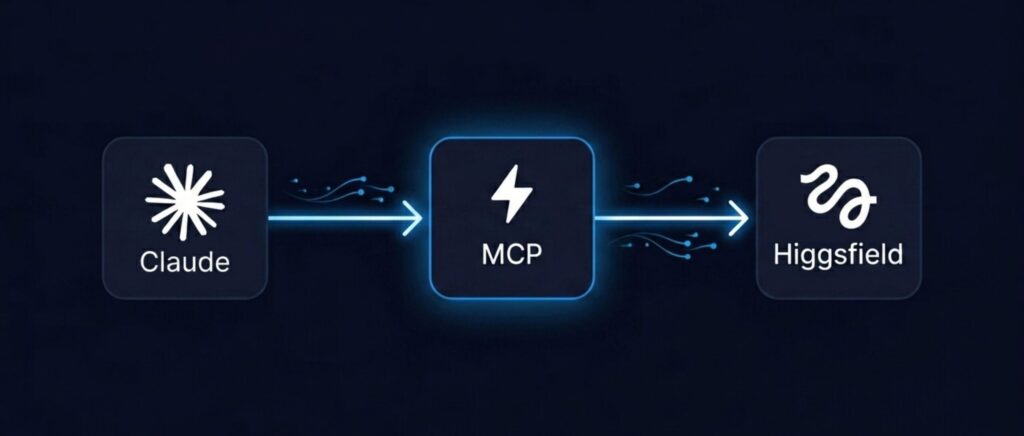
Claude + Higgsfield connects through MCP — a protocol that lets Claude call Higgsfield's generation tools directly. No copy-pasting prompts. No tab switching.
The result: a single conversation that writes the brief, designs 10 creative angles, and queues 50 ad outputs through Higgsfield automatically.
This is not a prompt-and-hope setup. It is a proper AI content studio — one with a strategy layer and a production engine working in sync.
For the full AI creative stack many content teams use today, our guide to AI for creators covers the most useful combinations.
How Claude + Higgsfield Work Together
Most AI tools still require you to be the connector between them. You prompt one, copy the output, paste it into another, rebuild context, and repeat.
Claude + Higgsfield removes that role. When connected via MCP, Claude can call Higgsfield's generation API directly from inside the conversation — no switching, no re-prompting.
Claude + Higgsfield divides the work cleanly. Claude acts as the strategic layer: it writes the brief, decides creative angles, selects the right Higgsfield model, and queues every generation task.
| Tool | Role in the Claude + Higgsfield Workflow | Key Output |
|---|---|---|
| Claude AI | Creative director — writes briefs, builds angles, sequences tasks | Strategy + ad copy |
| Higgsfield | Production engine — generates images, video ads, UGC clips | Visual creatives |
| MCP | Integration bridge — connects both tools inside Claude's chat | Seamless automation |
Higgsfield aggregates over 30 AI models — Kling, Seedance 2.0, Veo, Flux, and more — under one platform. Claude selects the best model for each ad format based on your brief.
The Anthropic MCP documentation explains exactly how this protocol works — it is the open standard now supported by Claude and hundreds of external tool integrations. Read the full MCP overview at Anthropic's developer docs.
You can start with Claude here — MCP support for connecting external tools like Higgsfield is included on Pro, Team, and Enterprise plans.
For a full breakdown of what Higgsfield can do outside of a Claude connection, our Higgsfield AI Review covers every feature and the full credit system.
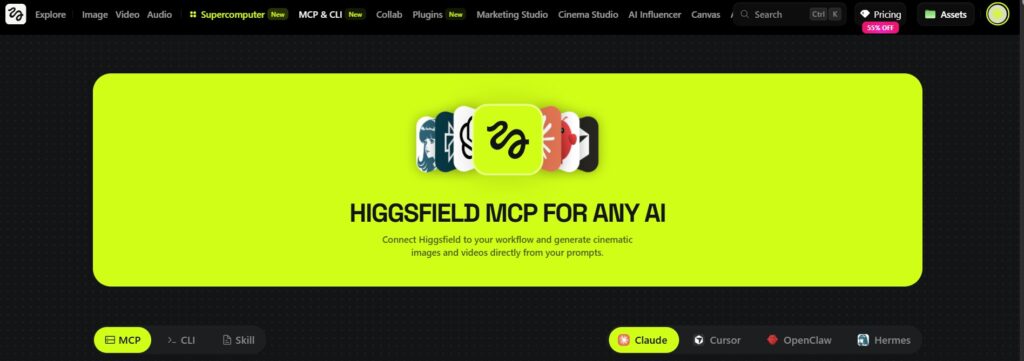
Set Up Your Claude + Higgsfield AI Content Studio
A content manager we spoke with set up the Claude + Higgsfield workflow on a Friday afternoon — and had 50 ad variants ready to review before her next standup that same day.
The Claude + Higgsfield setup takes under five minutes. No code to write, no API keys to manage — just two account logins and one settings step inside Claude.
3 Steps to Connect Claude + Higgsfield
Once connected, Higgsfield appears as a native tool inside Claude. Ask Claude to generate visuals and it calls Higgsfield directly — no copy-pasting, no switching tabs.
The MCP — Model Context Protocol — is the open standard that makes this connection possible. modelcontextprotocol.io maintains the full specification for any tool supporting this integration.
You can try Higgsfield here — the Plus plan at $39/month includes 1,000 credits, which covers a full 50-ad batch mixing image and short-video formats.
For deeper Claude patterns beyond ad generation, our guide to Claude AI productivity covers the most effective daily use cases.
Generate 50 Ads in 20 Minutes
Higgsfield processes generation requests in parallel — queuing 50 creatives takes roughly the same wall-clock time as queuing five, because every job runs concurrently.
The Claude + Higgsfield system works in two layers. Claude builds the creative slate — 10 distinct angles with copy variations. Then it queues five Higgsfield variations per angle. That is your 50 ads.
Paste this prompt into Claude, customize the four variables, and let the Claude + Higgsfield batch run:
Product: [Name + one-sentence description]
Target audience: [demographics, core pain point]
Platform: [Instagram Reels / TikTok / Meta Feed / YouTube Shorts]
Tone: [Direct / Playful / Aspirational / Trust-building]
Build 10 ad angles covering: curiosity hook, pain interrupt, social proof, benefit lead, and question opener.
For each angle, use Higgsfield to generate 5 variations — mix product shots, lifestyle scenes, and UGC-style clips.
Queue all 50 jobs and confirm when the full batch is complete.
Claude reads the brief, builds the creative slate, and issues all Higgsfield commands in sequence. Most 50-creative batches complete within 10–15 minutes.
| Minutes | Step | What's Happening |
|---|---|---|
| 0–2 | Write product brief | Paste and customize the prompt above |
| 2–7 | Claude builds creative slate | 10 angles + copy variations generated inside the chat |
| 7–10 | Claude queues Higgsfield | 50 generation commands issued to Higgsfield in sequence |
| 10–20 | Higgsfield generates | Parallel processing — step away, check back in 10 min |
| 20 | Review + export | Check your Higgsfield dashboard, download ready assets |
The best Claude + Higgsfield batches mix formats. A combination of product shots, lifestyle scenes, and UGC-style clips gives you variety for A/B testing across every platform.
Ad creative variation directly improves campaign performance. The IAB insights library is the most comprehensive free resource on creative testing best practices for digital advertising.
For the prompting techniques that sharpen Claude's creative output, our guide to writing better prompts for AI tools covers the core methods that apply directly to this workflow.
Frequently Asked Questions — Claude + Higgsfield AI Content Studio
Does Claude + Higgsfield work without knowing how to code?
+Yes — the Claude + Higgsfield setup requires zero coding. You add Higgsfield as an integration in Claude's Settings panel using a one-click OAuth flow.
Once connected, everything happens inside Claude's standard chat interface. No API keys, no command line, no developer needed.
What does Claude actually do when connected to Higgsfield?
+Claude acts as the creative director. It reads your product brief, generates 10 creative angles and ad copy variations, then issues generation commands directly to Higgsfield via MCP.
Claude selects the appropriate Higgsfield model for each format — image, short video, or UGC-style — and queues all 50 jobs automatically.
How much does the Claude + Higgsfield AI content studio cost?
+You need Claude Pro at $20/month and a Higgsfield subscription. For production batches, the Plus plan at $39/month provides 1,000 credits — enough for a full 50-ad session.
Combined cost: approximately $59/month for a complete Claude + Higgsfield AI content studio. You can check current Higgsfield plans here.
Can I use this to generate ads for Instagram and TikTok?
+Yes — Higgsfield includes platform-specific presets for Instagram feed, Reels, TikTok, and YouTube Shorts. Specify the platform in your Claude brief and Claude picks the right preset automatically.
You can generate native-format creatives for multiple platforms in the same 50-ad batch, which makes this setup especially efficient for multi-platform campaigns.
What types of ad formats can Claude + Higgsfield create?
+Through Higgsfield's 30+ model library, Claude can generate product shots, lifestyle scenes, UGC-style video clips, unboxing sequences, brand story videos, and hero banner images.
Video outputs go up to 15 seconds and are generated in cinematic quality. Claude selects the right mode automatically based on the format you specify in your brief.
Is the Higgsfield free plan enough to test this workflow?
+The Higgsfield free plan gives you enough credits to verify the MCP connection and run two or three test generations. It is not sufficient for a full 50-ad production batch.
For a complete session, the Plus plan at $39/month provides 1,000 credits — enough for a full image and short-video ad mix with room to iterate on outputs.
How long does it actually take to generate 50 ads with this system?
+The full Claude + Higgsfield workflow runs in approximately 20 minutes from brief to batch complete. Claude takes 5–8 minutes to build the creative slate and queue all generation tasks.
Higgsfield then processes jobs in parallel — not sequentially. Timing varies by model: Kling 3.0 and image models are fastest; Veo 3 and Sora 2 take longer per clip.
Can I reuse the same creative brief for different product campaigns?
+Yes — and this is one of the most practical parts of the Claude + Higgsfield system. Save the prompt template and update four variables per campaign: product name, audience, tone, and platform.
Each update produces a completely fresh creative batch. Most teams keep a saved master brief and adapt it per campaign, reducing setup time to under two minutes for each new product.
🎬 Keep Building Your Content Studio
You've got the Claude + Higgsfield workflow running. Now go deeper on the tools and creative techniques that sharpen every batch: