
📅 Published October 23, 2026 · ⏱ 12 min read · 🧮 Free checker inside
A Gmail storage full warning usually has less to do with email than you think. Your free 15 GB is one pool shared by Gmail, Google Drive and Google Photos, so a phone that backs up every video can block your inbox. I went through Google's own storage rules and hundreds of user complaints to answer one question: what frees the most space in the least time?
Short answer
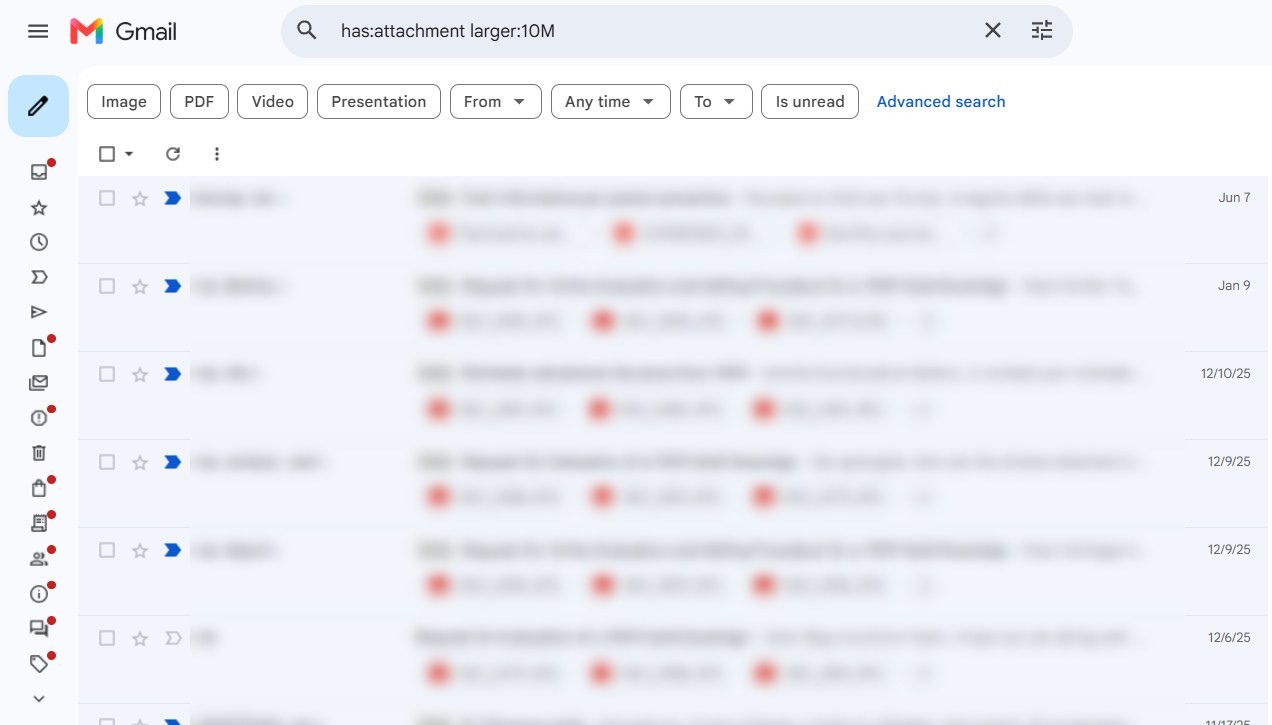
Open google.com/settings/storage and see which service is biggest. If it's Gmail, search has:attachment larger:10M, delete the results, then empty Trash and Spam, because deleted mail still counts until it's gone from there. If Photos or Drive is bigger, clean those first. Expect the counter to take up to a day or two to update.
📦 Quick verdict
Free fix, 15 minutes
Find your biggest service, delete large attachments, empty Trash. Enough for most people under 15 GB.
Buried under years of newsletters?
Clean Email groups old mail by sender and size and deletes it in bulk. Free for your first 1,000 emails.
Not sure where the space went?
Type the numbers from your storage page. Get your space hog, a cleanup target and the cheapest fix.
📋 What's inside
- Why is my Gmail storage full when my inbox looks empty?
- What happens when Gmail storage is full?
- Free Gmail Storage Doctor: find your space hog
- 9 fixes for Gmail storage full, biggest wins first
- Copy-paste Gmail search cheat sheet
- Deleted everything and it's still full? 5 reasons
- When a cleaner app is worth it: Clean Email
- Buy Google One storage or clean up?
- Stop it filling up again
- FAQ
🔍 How I researched this
I read Google's storage help pages and Gmail's own announcement of Manage subscriptions on October 23, then grouped the complaints people post on forums, help threads and review sites into the problems below. Clean Email facts come from its help center plus a dated third-party price check from September 29.
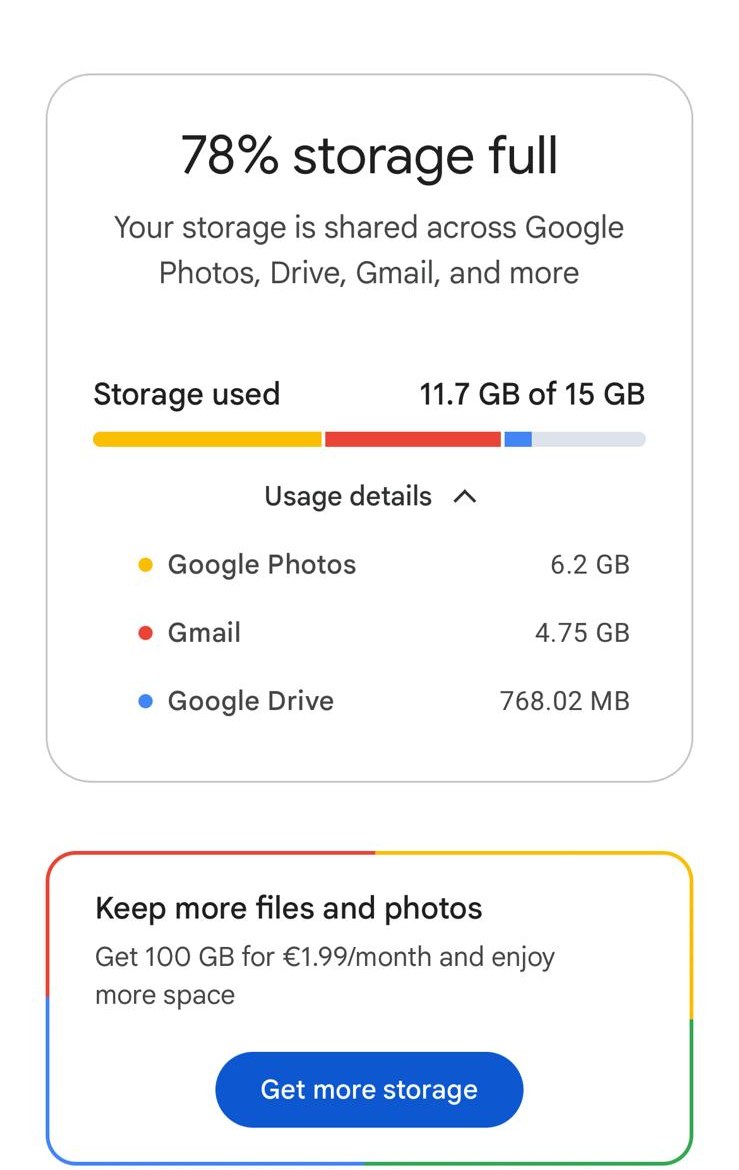
I also checked my own account: Google's storage page shows 11.7 GB of 15 GB used, with Photos bigger than Gmail, and the screenshots in this post come from it, with personal details blurred. I built the checker and the search cheat sheet myself; the storage math runs in your browser and stores nothing.
Some links are affiliate links: if you buy through them I may earn a commission at no extra cost to you. It never decides what I recommend. Details
Why is my Gmail storage full when my inbox looks empty?
Google says it plainly on its storage help page: each account includes up to 15 GB shared across Gmail, Google Drive and Google Photos. That is why one person deletes 5,000 emails and frees almost nothing, while another empties a single Drive folder and the warning disappears.
The usual culprits behind full Gmail storage, roughly in the order they surprise people: full-quality photo and video backups, big files sitting in Drive or its trash, years of attachments in Gmail, and messages you archived instead of deleting. Archiving only removes the inbox label; the message stays in All Mail and keeps its size.
If you prefer to watch first, this 4-minute walkthrough covers the same three places: Gmail, Drive and Photos, plus where to see your Gmail storage split.

🎥 Video credit: “Google Account Cleanup and freeing more space (Gmail, Drive & Photos)” by Carol Brightbill Technology on YouTube · Watch on YouTube
What happens when Gmail storage is full?
| What you think | What happens |
|---|---|
| "I'll just miss some newsletters." | Every new email bounces, including bank codes and job replies, until you're back under the limit. |
| "Deleting puts me under the limit right away." | Deleted mail sits in Trash, and still counts, until you empty it or 30 days pass. |
| "Google will warn me before deleting anything." | Google says it notifies you before removing content, but the 2-year over-quota rule still applies. |
| "Archiving saves Gmail storage." | Archived mail keeps its full size in All Mail. |
The bounce is the part that hurts. Senders get a "mailbox full" error, and most automated systems won't retry for long, so a password reset or delivery notice sent while you were full may never arrive. If your Gmail storage is over the limit right now, do fixes 1 to 3 below first: they take minutes and free the most.
Free Gmail Storage Doctor: find your space hog in 30 seconds
The default numbers are from my own account: 78% full, with Photos, not Gmail, as the biggest user. Change them to yours. If the checker says Photos is the hog, cleaning Gmail storage in the next section will help a little but won't solve it.
9 fixes for Gmail storage full, biggest wins first
1. See where your Gmail storage goes
Go to google.com/settings/storage on a computer. It splits your usage into Gmail, Drive and Photos. If you are over the limit, Google's storage manager also shows a cleanup target and a "clean up by service" list with your largest items.
2. Delete large attachments
A handful of old emails with videos or PDF scans can take more Gmail storage than thousands of newsletters. Search for the big ones and start at the top of the list.
3. Empty Trash and Spam
Deleted mail goes to Trash and keeps counting against your Gmail storage until it's permanently removed, which happens on its own after 30 days. If you need the space today, empty both folders yourself.
4. Bulk-delete old Promotions and Social mail
Each promo email is small, but ten years of them eat real Gmail storage. Gmail's category tabs let you clear them in one search without touching personal mail.
5. Unsubscribe from everything in one place
Gmail now has a Manage subscriptions view that lists your mailing lists, sorted by how often each sends, with an unsubscribe button next to each. It stops new clutter; it doesn't delete the old messages.
6. Clean archived mail
Archive hides mail from the inbox but keeps it in All Mail at full size. If you archive everything instead of deleting, this is where your Gmail storage went.
7. Clear Google Drive and its trash
Drive has its own trash, and files there still count. Shared files only count against the owner's storage, so the files you created are the ones to check.
8. Trim Google Photos
Video backups in Original quality fill 15 GB fastest. Google notes that photos backed up in Storage saver before June 1, 2021 don't count, so deleting those frees nothing.
9. Check WhatsApp and other backups
On Android, Google says WhatsApp backups also use your Google storage. A chat backup that includes videos can quietly take several gigabytes.
Copy-paste Gmail search cheat sheet
Paste any of these into the Gmail search bar, check the results, then select all matching conversations and delete. Each one targets a different kind of dead weight in your Gmail storage.
has:attachment larger:10MEmails over 10 MB. The fastest single win.has:attachment larger:5M older_than:2yMid-size attachments you haven't needed in two years.category:promotions older_than:1yOld promo mail from the Promotions tab.category:social older_than:6mOld social network notifications.from:(noreply OR no-reply) older_than:6mAutomated mail: receipts, alerts, shipping updates.-in:inbox older_than:3yOld archived mail hiding in All Mail.Deleted everything and Gmail storage is still full? 5 reasons
| Reason | How to check | Fix |
|---|---|---|
| Trash and Spam not emptied | Open both folders | Empty them now instead of waiting 30 days |
| You archived, not deleted | Search -in:inbox | Delete old archived mail |
| Space is in Drive or Photos | google.com/settings/storage | Clean the biggest service first |
| The counter hasn't caught up | Check again tomorrow | Wait up to a day or two |
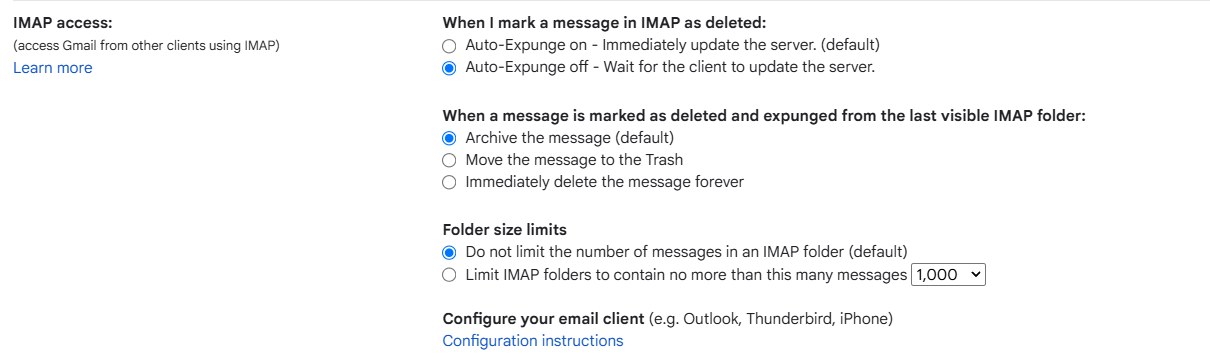
| Your mail app archives on delete | Gmail settings, Forwarding and POP/IMAP | Set expunged messages to move to Trash |
The IMAP one quietly fills Gmail storage for people who read Gmail in Outlook or Apple Mail. Gmail's default, when a message is deleted in another app, is to archive it rather than trash it. Change it in Gmail on a computer: Settings, See all settings, Forwarding and POP/IMAP, then set what happens when a message is marked as deleted to Move the message to the Trash.
When a cleaner app is worth it: Clean Email
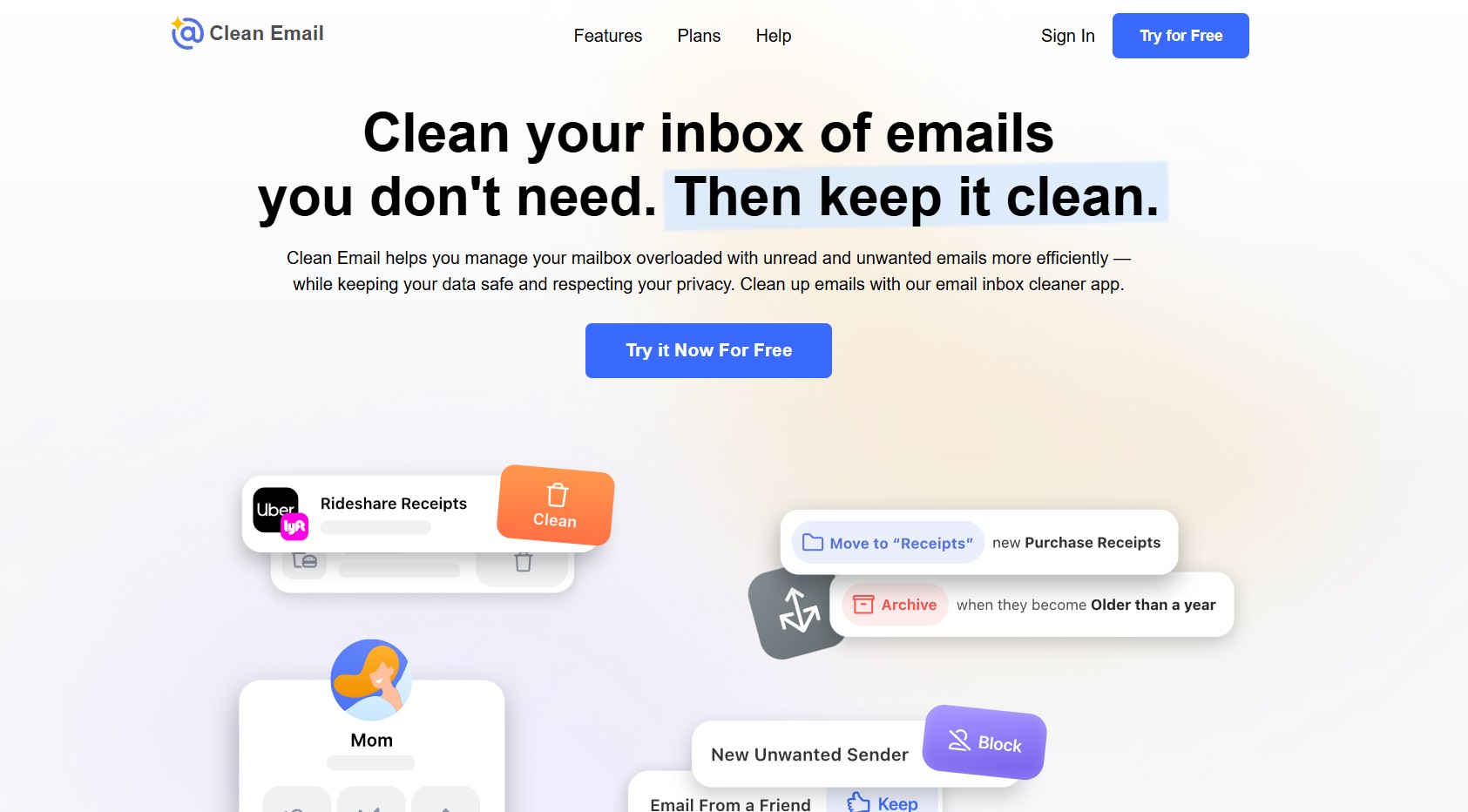
Gmail's own search can free Gmail storage the same way, one query at a time. Clean Email's value is speed on a neglected mailbox: Smart Folders group mail like shopping, travel and social notifications, the Unsubscriber lists every mailing list in one place, and Auto Clean rules keep deleting new clutter after the first purge.
| Plan | Billed monthly | Billed yearly |
|---|---|---|
| 1 account | $9.99/mo | $29.99/yr |
| 5 accounts | $19.99/mo | $49.99/yr |
| 10 accounts | $29.99/mo | $99.99/yr |
| Free account | 1,000 emails, plus 100 a week with cleanup reminders | — |
Every paid plan has every feature; you pay by number of accounts. The 14-day premium trial needs no credit card and includes 25 unsubscribe actions. Prices are from a dated third-party check on September 29, because Clean Email loads its plans page with a script I couldn't read; confirm at checkout, and expect VAT in the EU and UK.
👀 What it reads
An index of headers: sender, subject, date, size and attachment details. Clean Email says it doesn't sell your data.
🔐 How it connects
Gmail signs in through Google, so you don't hand over your password.
🛡 Audits
It says it has passed Google's annual security assessment for apps with Gmail access every year since 2019.
Before you pay: 4 catches users report
- Check the account count. Its help center says the in-app upgrade button goes to the 5-account plan by default.
- Plans renew automatically. Cancel at least 2 business days before renewal; refunds are limited and not prorated.
- Broad rules can trash mail you want. Start Auto Clean with one sender, not a whole category.
- Big mailboxes take hours. Gmail throttles bulk deletes, so a 100,000-email purge can run overnight.
My take: for a one-time purge, one month at $9.99 is enough if you cancel on time. If you want Auto Clean and the Unsubscriber to keep running, the yearly plan costs about the same as three months.
Clean Email · bulk-delete old mail by sender or size, free for your first 1,000 emails.
Start the free cleanup →Should you buy Google One storage or clean up?
✅ Clean up if
you're under about 20 GB in total, most of it is email or junk, and you'll spend 15 minutes a month keeping it tidy.
💳 Pay for storage if
your photo library is growing, you share storage with family (Google One can be shared with up to 5 others), or your time is worth more than $20 a year.
A paid plan isn't a cure if junk keeps arriving: it only moves the limit. And if you subscribe to several services, check what they cost together with my AI subscription cost calculator. In the EU, 100 GB lists at €1.99 a month (the price my own storage page shows) or €19.99 a year.
How to stop Gmail storage filling up again
- Use Manage subscriptions every month and unsubscribe from anything unread.
- Create a filter for alert emails you never reread: search from:([email protected]), click the filter icon, choose Delete it.
- Run has:attachment larger:10M on the first of each month.
- Set Google Photos to Storage saver and turn off video in WhatsApp backups.
- Delete, don't archive, anything you'll never search for again.
If inbox noise is the bigger problem than storage, my SaneBox review covers the filter that sorts new mail for you, and my roundup of AI tools for inbox overload compares the rest. For the privacy side of letting any app into your mailbox, see my AI privacy settings guide.
Your Gmail storage full warning is rarely about email alone.
Find the biggest of the three services, clear its heaviest files, empty the trash, and only then decide whether to pay.
Run the Storage Doctor ↑