

📅 Published October 20, 2026 · 🔄 Updated October 21, 2026 · 💵 Prices checked October 20, 2026 · ⏱ 14 min read
Vibe coding tools turn a plain-English description into a working app, and most of them get you a demo in under an hour. What happens after the demo is where non-coders get stuck: the AI breaks a feature it built yesterday, credits run out mid-fix, or the database ships with the door open.
I built five free tools on this blog by describing them to Claude, so I know the loop from the inside. This guide ranks seven vibe coding tools by the seven problems that sink most first apps, not by feature lists. Then a free picker matches you to one, and a ship-ready checklist catches what the AI forgot.
Short answer
Building a full web app with logins? Start on Lovable. Want a fast prototype to show people? Bolt.new. Want build, database and hosting in one place? Replit. Adding a calculator or quiz to a site you already run? Claude, which is how I built mine. Whatever you pick, run the checklist below before real users sign up.
🎯 Key takeaways
- Pick by job, not by demo: Lovable for a first app, Bolt.new for prototypes, Replit for build-plus-hosting, Claude for tools inside an existing site.
- Budget $20–$50 a month while building. Debugging, not the first draft, is what eats credits.
- The AI writes the happy path. Database security, secret keys and login limits are on you; the 12-point checklist covers them.
- Deploy on day one and save a checkpoint before every big change. Both cost nothing and prevent the worst days.
⚡ Quick verdict
Best first app
Lovable · Pro $25/mo
The most polished apps from a prompt, with a database built in.
Best for site tools
Claude · Pro $20/mo
How I built five calculators and quizzes for this blog.
Best all-in-one
Replit · Core from $20/mo
Build, database, hosting and deploy without leaving the tab.
📋 What's inside
🔍 How I researched these vibe coding tools
I checked every plan on the vendor's own pricing page or docs, then read the security research and user complaints published about each tool. The seven problems come from those reports, not from guesswork.
Hands-on: Claude is the only tool on this list I have built with. I described each of my site tools to it, pasted the code into WordPress and fixed what broke. I haven't paid for Lovable, Bolt, Replit, Base44, Emergent or Hostinger Horizons, so those cards are research, not testing.
Some links are affiliate links (Emergent, Claude): if you buy through them I may earn a commission at no extra cost to you. Lovable, Bolt, Replit, Base44 and Hostinger links aren't affiliate links. Details
The 7 problems that break vibe coding tools projects
🔁 1. The fix-it loop
You paste an error, the AI fixes it, something else breaks, and the same fix comes back three prompts later.
Fix: Revert to the last working version instead of pushing forward, and name what the AI must not touch: "don't change the header or the login logic." If it still loops, open a fresh chat and paste only the error and the file it lives in.
💸 2. Credits that vanish
Every retry costs money. Lovable users complain they can't see what a prompt will cost before sending it, and Replit bills every Agent interaction, Plan mode included.
Fix: Plan the change in a free chat first, then send one clear build prompt. On Bolt, typing /clear resets the conversation so later requests read less context.
🗄️ 3. The database is open to everyone
Vibe coding tools often call the database straight from the browser. Without row level security, anyone with the public key can read every table.
Fix: Turn on row level security for every table and test with a second account: can user B see user A's data? If yes, don't launch.
🔑 4. API keys in the front end
Many vibe coding tools paste your OpenAI or Stripe secret key into code that any visitor can read in their browser.
Fix: Secret keys live in the tool's secrets or environment settings, never in a page file. Ask the AI: "list every key in this project and where it is stored."
🌐 5. It works in preview, not live
The app runs inside one of the vibe coding tools, then fails on deploy or on your custom domain.
Fix: Deploy early, on day one, with a dummy page. Fixing a deploy with three files is easier than with thirty.
⏪ 6. No way back
One bad prompt rewrites ten files, and there is no clean version to return to.
Fix: Use the builder's version history and connect GitHub as soon as the tool allows it. Save a checkpoint before every big change.
🔒 7. Lock-in
Some vibe coding tools host your app but won't let you export the code, or the export only runs on their servers.
Fix: Before you build anything important, check that you can export to GitHub and run it elsewhere.
The database problem is the one with real numbers behind it. In September, UpGuard published research on 16,326 Supabase databases exposing readable tables on the public web, which it calls the largest study of its kind. Supabase now turns row level security on by default for tables made in its editor, but tables created through the API, which is how vibe coding tools work, still need it switched on.
Smaller audits point the same way. Escape.tech scanned 5,600 apps built with vibe coding tools and found over 2,000 vulnerabilities and 400+ exposed secrets. A separate test of fifteen apps across five tools found none with login rate limiting. None of this means the tools are unsafe to use. It means the AI writes the happy path, and you check the rest.
Vibe coding tools compared: price, meter and what you own
| Vibe coding tool | Free plan | Paid from | What you pay for | Database | Code export |
|---|---|---|---|---|---|
| Lovable | 5 credits/day, 30/mo cap | Pro $25/mo | Credits per message | Built in (Supabase) | GitHub sync |
| Bolt.new | 1M tokens/mo | Pro $25/mo | Tokens | Built in | Download or GitHub |
| Replit Agent | Daily Agent allowance | Core $20/mo yearly | Effort-based credits | Built in | Yes |
| Base44 | Free tier | Starter $16/mo yearly | Message + integration credits | Built in | Limited |
| Emergent | 10 credits/mo | Standard $17/mo yearly | Credits | Built in | GitHub on Standard |
| Hostinger Horizons | 7-day trial | From $6.99/mo yearly | AI credits | Built in | Code editor on higher plans |
| Claude | Chat only, no Claude Code | Pro $20/mo, $17 yearly | Shared usage limits | Bring your own | You own every file |
Prices are US list prices before tax, checked October 20. EU and UK buyers pay in local currency and usually a little more. Vibe coding tools change plans often: Lovable reworked its credits more than once this year, so check the pricing page on the day you subscribe.
The 7 best vibe coding tools for non-coders, ranked by job
Each card shows what these vibe coding tools give you free, how each handles the seven problems, and who it fits. The ranking ignores commissions: only two of these links pay me, and neither is my top pick.
1. Lovable Best first app
Describe an app, get a polished one with logins and a database
🧪 Research: I haven't paid for Lovable.
What you get free
Five build credits a day, capped at 30 a month, with a Lovable badge on published apps. Enough to build a small prototype over a week.
✅ Pros
- Cleanest design out of the box of the vibe coding tools here
- Supabase database and auth wired in for you
- Built-in security scan flags missing protections
⚠️ Cons
- You can't see a prompt's credit cost before sending it
- An audit found about 1 in 10 of its showcase apps with an open database
- A separate platform bug in April exposed some projects' code and chats
Best for: non-coders building a first web app with accounts, like a client portal or booking tool
2. Bolt.new Best for prototypes
The fastest way from idea to a clickable demo
🧪 Research: I haven't paid for Bolt.
What you get free
1M tokens a month with a 300K daily cap and Bolt branding. Bolt's own math puts that at about three days of full use.
✅ Pros
- Fastest first draft of all the vibe coding tools I compared
- Clicking on-screen actions costs nothing; only prompts use tokens
- Unused paid tokens roll over for a month
⚠️ Cons
- Token use climbs as the project grows, because Bolt rereads more code
- Retrying the same fix drains an allowance fast
- Weaker on complex backend logic than Replit
Best for: demos, landing pages with logic, and testing an idea before you invest
3. Replit Agent Best all-in-one
Build, database, hosting and deploy in one browser tab
🧪 Research: I haven't paid for Replit.
What you get free
A daily Agent allowance, basic Agent access and one published app. No card needed to start.
✅ Pros
- Deploys, databases and a 7-day restore window on Core
- Asks for confirmation before a paid action starts
- You can set a monthly spending limit
⚠️ Cons
- Effort-based billing makes a month hard to predict
- Every Agent message is billable, planning included
- Long chats cost more per message as context grows
Best for: people who want one place to build and host, and are willing to watch the meter
4. Base44 Best for internal tools
Simple apps with hosting included, now owned by Wix
🧪 Research: I haven't paid for Base44.
What you get free
A free tier to build and test a basic app with Base44 branding. Hosting is included on every plan.
✅ Pros
- Hosting included, so no separate bill
- Good at forms, trackers and dashboards
- Wix ownership means it isn't going anywhere soon
⚠️ Cons
- Two credit types to track: messages and integrations
- Credits don't roll over on Free or Starter
- Less freedom to move the app off Base44
Best for: small teams replacing a spreadsheet with a simple app
5. Emergent Best for web + mobile
Agents that build the front end and back end, including mobile apps
🧪 Research: I haven't paid for Emergent.
What you get free
10 credits a month to describe an app and watch its agents build it. Enough to judge the approach, not to finish a product.
✅ Pros
- Builds web and mobile apps from the same chat
- Code export and GitHub sync on Standard
- Stripe, login and hosting wired in
⚠️ Cons
- Credits burn fast during debugging
- The jump to Pro is steep
- Overkill for a single-page tool
Best for: founders validating an app idea who want to own the code
6. Hostinger Horizons Cheapest with hosting
A vibe coding tool bundled with hosting, email and a domain
🧪 Research: I haven't paid for Hostinger Horizons.
What you get free
A 7-day trial. After that you need a Horizons plan plus an active Hostinger hosting plan to publish.
✅ Pros
- Lowest entry price of these vibe coding tools
- Hosting, a professional mailbox and an auto-fix button included
- No daily message cap
⚠️ Cons
- Credits per response vary with complexity
- Renewal prices run higher than the intro rate
- Fewer guides and community answers than Lovable or Replit
Best for: small businesses that want an app and a website under one bill
7. Claude + Claude Code Best for site tools
Chat for small tools you paste into a site; Claude Code for whole projects
✅ Hands-on: I built five tools for this blog in Claude chats. I haven't used Claude Code.
What you get free
The free chat writes a single-file tool you can test in the preview. Claude Code, the agent that edits whole folders, starts on Pro.
✅ Pros
- You own every file and can host it anywhere
- Great for calculators, quizzes and widgets inside WordPress
- Pro covers chat and Claude Code under one subscription
⚠️ Cons
- No built-in hosting or database
- You do the pasting, testing and deploying
- Usage limits are shared between chat and Claude Code
Best for: anyone adding interactive tools to a site they already run
💡 Already write code? The developer view is in my GitHub Copilot vs Claude Code vs Cursor comparison. Need pages, not an app? Start with my AI website builders ranked by 2-year cost.
What I built with vibe coding tools, and what broke
Every free tool on this blog started as a description in a Claude chat: the AI automation ROI calculator, the AI subscription cost calculator, the AI gift finder, the family safe word generator and the AI image prompt generator. None needs a server or a database; each runs in the visitor's browser, which makes Claude the simplest of the vibe coding tools for this job.
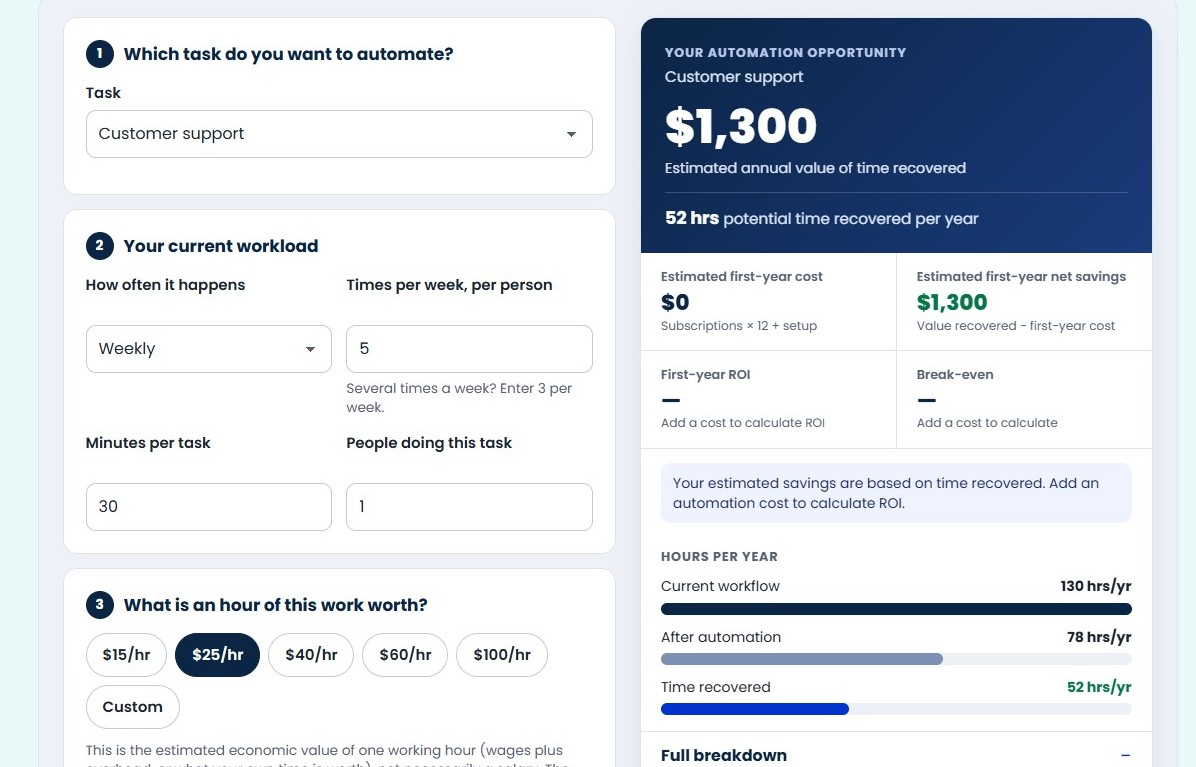
My loop is the same every time. I describe what the tool should do and who it is for, ask Claude for one self-contained file, test it in the chat preview, then paste it into WordPress through a WPCode snippet and an Elementor widget. Then the real work starts, because the preview and my live site are not the same place.
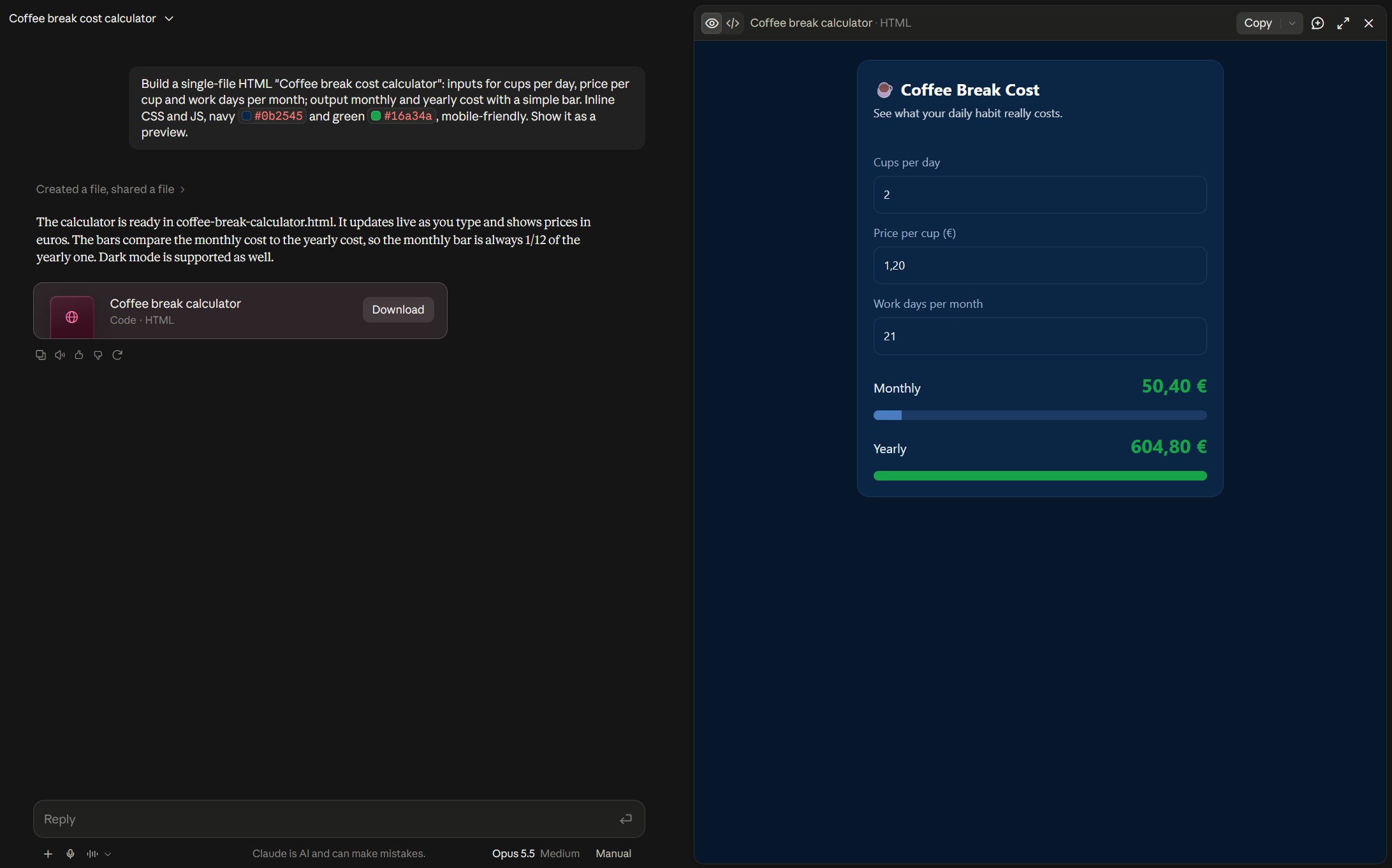
The prompt matters more than the tool. Mine always names the audience, the inputs and outputs, the brand colors, and the one constraint that saves me later: everything in a single file. Here is the template I start from.
🛠️ My security plugin blocked the code.
Wordfence flagged the snippet because it contained script tags. The fix was allowlisting that one action, not turning the firewall off.
🛠️ The page builder stripped my styles.
Elementor removes literal style tags pasted into an HTML widget. I now ask Claude to inject styles from a script, which survives the paste.
🛠️ The theme header covered the tool.
On phones the sticky header hid the top of each calculator. Extra top padding on tool pages fixed it, and now I check every page at phone width before publishing.
🛠️ Prices went stale.
A calculator full of prices is only as good as its last update. I keep every price in one data block with a "last checked" date, so updating means editing one place.
None of these were bugs in the code the vibe coding tools wrote. They were the gap between "works in preview" and "works on my site," which is problem five on the list above. If you take one lesson from my builds: publish something small on day one, so the deploy problems show up while the project is still tiny.
Free vibe coding tool picker: your match in 4 clicks
Answer four questions and the picker names the vibe coding tool that fits, a runner-up, the plan to start on, and the risks to check before launch. It runs in your browser and stores nothing.
1. What are you building?
2. Monthly budget?
3. Will it store personal data or take payments?
4. Do you want to own and export the code?
US list prices checked October 20. Plans change often; confirm on the vendor page.
Ship-ready checklist for vibe coding tools
Not sure how to check item one or two? Paste this into your builder's chat: "List every database table, say whether row level security is on, and show me the policy for each." Then log in as a second user and try to open the first user's records. That one test catches the most common leak.
6 copy-paste prompts that keep vibe coding tools on track
💡 Want sharper prompts for every AI tool, not only vibe coding tools? My guide to writing better prompts for AI tools covers the workflow hacks.
What do vibe coding tools really cost per month?
A realistic first month on most vibe coding tools looks like this: the $25 plan, one top-up during the bug-fixing week, and a domain. Add the costs your app creates on its own, like an OpenAI or Stripe bill. If you already pay for ChatGPT, Claude or Gemini, total everything in my AI subscription cost calculator before adding another plan.
Building something for a business? Run the time it saves through the AI automation ROI calculator first. A $25 app that saves two hours a week pays for itself; one that saves ten minutes probably doesn't.
When should you not use vibe coding tools?
Vibe coding tools shine for prototypes, internal tools and small public tools like mine. Vibe coding tools struggle when a project grows past what you can test yourself. The moment you can't explain what a feature does or why it broke, bring in a developer for a review. For a site that only needs pages and a contact form, a regular AI website builder is cheaper and has nothing to secure.
My verdict: pick the vibe coding tool that fails safely
Every one of these vibe coding tools makes a great first demo, so the demo isn't the decision. The decision is what happens on day ten: can you undo, can you see what a fix will cost, is the database locked, and can you leave with your code.
Start on Lovable for a first app with accounts, Bolt.new for a fast prototype, and Replit if you want hosting in the same tab. Choose Base44 for team tools, Emergent for mobile, Hostinger Horizons for one cheap bill, and Claude for tools inside a site you already run. Whichever vibe coding tools you try, run the checklist before launch.
Still deciding? · Four clicks to your match.
Open the picker ↑